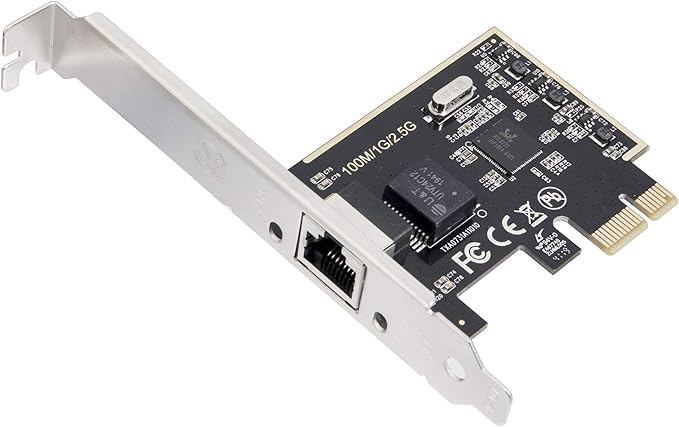
Provides 2.5 Gigabit Ethernet Connectivity to Mac Pro Towers and Windows PCs. Simple way to add or expand 2.5 Gigabit Ethernet connectivity to any compatible computer. It is suitable for multiple market segments and emerging applications, such as desktop, mobile, workstation, server, communications platforms, and embedded applications.
Provides 2.5 Gigabit Ethernet Connectivity to Mac Pro Towers and Windows PCs. Simple way to add or expand 2.5 Gigabit Ethernet connectivity to any compatible computer. It is suitable for multiple market segments and emerging applications, such as desktop, mobile, workstation, server, communications platforms, and embedded applications.
Provides 2.5 Gigabit Ethernet Connectivity to Mac Pro Towers and Windows PCs. Simple way to add or expand 2.5 Gigabit Ethernet connectivity to any compatible computer. It is suitable for multiple market segments and emerging applications, such as desktop, mobile, workstation, server, communications platforms, and embedded applications.
Provides 2.5 Gigabit Ethernet Connectivity to Mac Pro Towers and Windows PCs. Simple way to add or expand 2.5 Gigabit Ethernet connectivity to any compatible computer. It is suitable for multiple market segments and emerging applications, such as desktop, mobile, workstation, server, communications platforms, and embedded applications.
Last updated at 06/10/2026 08:55:03
2.5 Gigabit Ethernet PCI Express PCI-E Network Controller Card 10/100/1000/25000 Mbps RJ45 LAN Adapter Converter for Desktop PC
Affiliate Disclosure: We may receive a small commission for purchases made through this link at no extra cost to you. This helps support our site. Thank you!
2.5 Gigabit Ethernet PCI Express PCI-E Network Interface Card 10/100/1000/25000 Mbps RJ45 LAN SI-PEX24059
Delivery between 16–19 June $29
originally posted on homeessentialsdirect.com
260Mb+ on Fiber downloading with this card. So I'd say it performs as described.
originally posted on homeessentialsdirect.com
Great ethernet 2.5 Gigabit speeds - but as with any hardware, make sure you install the drivers.
originally posted on homeessentialsdirect.com
I got it quickly and immediately installed it. I'm a little scared of doing stuff on my computer but this was very easy to install.
| Speed | 10/100/1000/2000Mbps |
| Connectors | 1 x RJ45 |
| Interface | PCI-Express |
| Parts | 3 Year |
2.5 Gigabit Ethernet PCI Express PCI-E Network Controller Card 10/100/1000/25000 Mbps RJ45 LAN Adapter Converter for Desktop PC
Affiliate Disclosure: We may receive a small commission for purchases made through this link at no extra cost to you. This helps support our site. Thank you!
2.5 Gigabit Ethernet PCI Express PCI-E Network Interface Card 10/100/1000/25000 Mbps RJ45 LAN SI-PEX24059
Delivery between 16–19 June $29
260Mb+ on Fiber downloading with this card. So I'd say it performs as described.
Great ethernet 2.5 Gigabit speeds - but as with any hardware, make sure you install the drivers.
I got it quickly and immediately installed it. I'm a little scared of doing stuff on my computer but this was very easy to install.
I have one of these in a Win 10 build and a linux based Unraid server and they work flawlessly. Cheap way to get over 250MBps throughput.
I was skeptical, since this is the cheapest multi-gig card I could find, but I haven't had any issues at all. It's super easy to set up - just pop it in, install the drivers, and you're set. It's perfect if you have a multi-gig setup but are bottle-necked by HDDs, or only have PCI Express x1 slots available - I have no issues getting 2.5 gigs up/down between my PC and NAS, with a 10 gig QNAP switch in between. I'd love to get another for my HTPC, but I may have to fork over a few extra bucks for another brand. Hopefully it's just a supply issue due to COVID and they'll be back in stock soon... UPDATE: First NIC is still going strong after a few months of heavy use. I noticed that these were indeed re-stocked, so I grabbed another for my HTPC - I'm looking forward to ... MoreI was skeptical, since this is the cheapest multi-gig card I could find, but I haven't had any issues at all. It's super easy to set up - just pop it in, install the drivers, and you're set. It's perfect if you have a multi-gig setup but are bottle-necked by HDDs, or only have PCI Express x1 slots available - I have no issues getting 2.5 gigs up/down between my PC and NAS, with a 10 gig QNAP switch in between. I'd love to get another for my HTPC, but I may have to fork over a few extra bucks for another brand. Hopefully it's just a supply issue due to COVID and they'll be back in stock soon... UPDATE: First NIC is still going strong after a few months of heavy use. I noticed that these were indeed re-stocked, so I grabbed another for my HTPC - I'm looking forward to replacing the 2.5 gig USB adapter that I'm currently using for that system, as it's a less than perfect solution.
Installed it in my PC and performed a couple of quick iperf3 tests and performance looks good. It also came with a heatsink installed which isn't shown in the picture. I actually bought a heat sink separately as these cards tend to get pretty hot, but didn't need it. Will update the review if something goes wrong. P.S I did not use the low-profile bracket so can't comment on that.
Looking for more internet speed. My cable provider says my internet was updated to 1.2 GB, but my existing hardware on my Z390 motherboard was only 1 GB compatible . Installed the board. Tried selecting 2.5 GB on the card but still only connecting at 1 GB. Therefore, I assume my upgraded cable provided modem (directly connected to the card with 3 ft patch cable) is only 1 GB compatible. However, the web pages seem to snap up much faster. At the price of the card, I recommend it as an upgrade whether you run 2.5 GB or not.
Unraid recognized the RealTek RTL8125 NIC without any driver updates. I have this NIC directly connected from my Unraid Server to my desktop with a USB 2.5GB using a separate subnet. Getting 2.5x the speeds as before.
[UPDATE 7-6-2020] This card does indeed work as advertised in Linux. I was able to easily get 290MB/s throughput between two Linux computers via the Zyxel XGS1210-12 managed switch that has two 2.5gb ports. One computer has this PCIe card and the other is a laptop with a USB3.0 to 2.5gb ethernet adapter (Cable Creation) based on the Realtek chips. [/UPDATE] I am waiting on a Zyxel XGS1210-12 switch to arrive which has 2.5 gigabit ports to test the max speed of this card, but until then I can confirm this card works at least up to a gigabit throughput in Linux. BUT, the trick is you have to install a driver and, while easy if you know the steps, it is not something that was easy for me to *find* a up to date tutorial on as someone who's never compiled a driver ... More[UPDATE 7-6-2020] This card does indeed work as advertised in Linux. I was able to easily get 290MB/s throughput between two Linux computers via the Zyxel XGS1210-12 managed switch that has two 2.5gb ports. One computer has this PCIe card and the other is a laptop with a USB3.0 to 2.5gb ethernet adapter (Cable Creation) based on the Realtek chips. [/UPDATE] I am waiting on a Zyxel XGS1210-12 switch to arrive which has 2.5 gigabit ports to test the max speed of this card, but until then I can confirm this card works at least up to a gigabit throughput in Linux. BUT, the trick is you have to install a driver and, while easy if you know the steps, it is not something that was easy for me to *find* a up to date tutorial on as someone who's never compiled a driver before. There are a lot of outdated driver tutorials. I found one that works and am sharing it here. Saying that, please note these steps are ONLY for Linux Mint 19.3 which is based on Ubuntu 18.04 LTS which is based on Debian. So these steps may not be required in future releases. Both Ubuntu and Linux Mint are now at version 20 with kernel 5.4. I have not had a chance yet to test this card with those. But I will. I'm evaluating Linux Mint 20 in a virtual machine and will upgrade at a later date. Linux Mint says they will have an updater from 19.3 soon. If you are NOT using a Debian based Linux these specific steps will NOT work, but should be adaptable to other distros such as RedHat, Fedora, CentOS, Manjaro, OpenSuse, etc. with a little tweaking. It is my experience that a recompile of the entire kernel from source is not necessary. Only compile the driver and then add it. The Realtek script download does this. But there are some things you have to install first. (see steps below) If you are using FreeBSD you're going to have a difficult time because there are no drivers provided by Realtek for that operating system (at least from what I can see.) BUT, you may want to look into using the Windows driver in FreeBSD by using ndisgen or ndiswrapper. I know NOTHING about using those, but have read this is a workaround when no drivers are provided for a Unix-like OS such as FreeBSD. At least now you have a starting point for Google search. Steps to compile and install the driver for this card and others based on the Realtek r8125 chip: 1. Download the r8125 driver for PCIe cards (not USB) from Realtek's website and unzip it. Make note of where you unzip it. Most browsers save to the Downloads folder of your home path. 2. From a command line prompt (aka terminal) do the following: 2a. cd {path to unzipped driver download} 2b. sudo apt install linux-headers-$(uname -r) build-essential 2c. sudo ./autorun.sh The autorun.sh file is included with the Realtek driver, in case you're curious. It's not part of Linux. After the autorun.sh file finishes the driver will be installed. Be patient. After it's done installing then the card may take a few seconds or a minute to get an IP address. In my experience a reboot of the computer was not required. It just started working on its own. The DOWN side to this is that the driver is only installed for the current kernel, so when an update to a newer kernel happens you'll have to do these steps again. (Unless the driver is in the new kernel.) There is a way to automatically compile and install the driver whenever the kernel is updated and that is called DKMS. I'm not familiar enough with it to provide notes on its use. But if you want to investigate on your own I encourage it. Gotta try to learn, right? I also have found a way to test speed of Ethernet ports using two computers. It is preferred, but not required, to connect both computers to a switch for the test, but it is possible to direct connect between two computers, assign IP address to each card, and test that way. SPEED TEST Speed test (both computers running Linux. Probably any version of Linux or even FreeBSD as nc and dd are usually already present) We will presume the first computer's IP address is 192.168.1.100. Step 1: If using a firewall open a port to test with. I use 12345 in these steps. Use what you prefer. Open a port on both computers (presuming firewall is on both) because you may want to test in both directions. This test only tests one way at a time. Sometimes I get different speeds (on other adapters, specifically USB Ethernet) so it is good to test both ways. Step 2: On first computer that will be the "server" type this at the command line nc -vvnlp 12345 >/dev/null After pressing enter the computer will sit patiently waiting for something on that port. Step 3: On the second computer that will be the "client" type this at the command line dd if=/dev/zero bs=1M count=1K | nc -vvn 192.168.1.100 12345 The test will begin but you will not see a status until the test is done and it will report the speed. Be patient. This tests throughput of a 1 gigabyte data stream. If you want more change the count to a higher number like 2K or 3K or less like 250...
worked well right out of the box
| Speed | 10/100/1000/2000Mbps |
| Connectors | 1 x RJ45 |
| Interface | PCI-Express |
| Parts | 3 Year |

