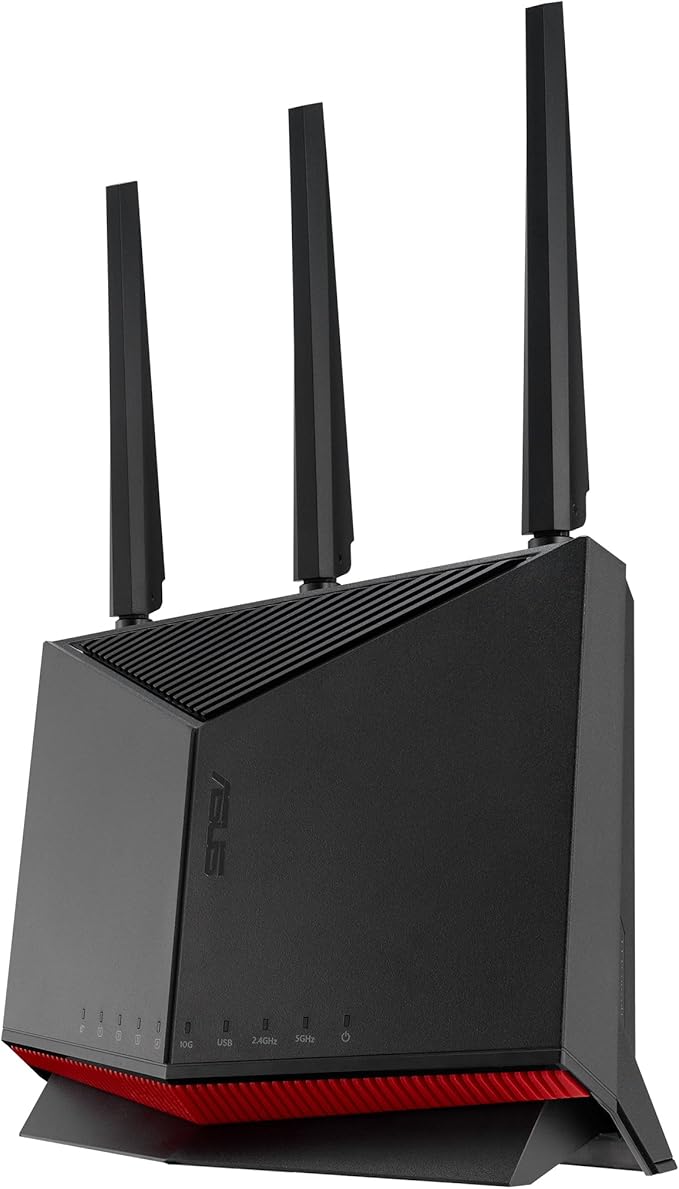
ROG Rapture GT-BE98
ROG Rapture GT-BE98
ROG Rapture GT-BE98
ROG Rapture GT-BE98
Last updated at 07/03/2026 06:15:24
ASUS ROG Rapture GT-BE98 Quad-band WiFi 7 AiMesh Extendable Gaming Router, 25Gbps, 320MHz, 4K-QAM, Dual 10G Ports, Quad 2.5G Ports, Subscription-free
Free delivery
Affiliate Disclosure: We may receive a small commission for purchases made through this link at no extra cost to you. This helps support our site. Thank you!
ASUS ROG Rapture GT-BE98 PRO First Quad-Band WiFi 7 Gaming Router supports 320MHz, Dual 10G Port, Triple-level Game Acceleration, Mobile Game Mode,
Free delivery
Affiliate Disclosure: We may receive a small commission for purchases made through this link at no extra cost to you. This helps support our site. Thank you!
Asus ROG Rapture GT BE98 Quad-band Wi-Fi 7 Gaming Router -Extendable
Delivery between 6–10 July $20
ASUS WiFi ROG Rapture GT-BE98 Wireless Router Latest Standard WiFi7 11529576457641376Mbps Quad-band Gaming Dual 10G and Quad 2.5G Ports 10G Optical
Delivery between 7–11 July $15.52
ASUS 90IG08F0-MZ7A1V GT-BE98 Quad-band WiFi 7 (802.11be) Gaming Router
Delivery $12.99
ASUS GT-BE98 ROG Rapture Quad-band WiFi 7 (802.11be) BE25000 Gaming Router
Delivery $12.99
ASUS ROG Rapture GT-BE98 (BE25000) Quad-Band WiFi 7 Extendable Gaming Router 10GbE x2 / 2.5GbE x4 / 1GbE x1 / USB 3.2 x1
Free delivery between 8–13 July
ASUS ROG Rapture GT-BE98 WiFi 7 Extendable Gaming Router
Delivery $17
Asus ROG Rapture Quad band WiFi 7 AURA RGB 802 11be Gaming Router GT BE98 - Routers
Delivery $31.65
ASUS ROG Rapture GT-BE98 Quad-Band WiFi 7 Gaming Router | Best Online Computer Store
Delivery between 9–16 July $15.15
originally posted on lazada.com.my
This is a strange router. It's huge. In the photo you can see it compared to my previous Asus AX86U. In the footprint of one of these GTBE98 you can fit 5 AX86Us. No idea why it has to be this big, it doesn't fit in my network shelf. I've seen the gt-ax11000 before and from the design I assumed they were the same size but they're not.Anyway, for some reason the ROG GUI is very slow compared to the normal ASUSWRT GUI you get in the AX86U. I wish I could turn it off, but I can't.I bought this because I needed the 2.5g ports and I wanted an AIO solution rather than breaking out into switches. If you're looking for the same I'd suggest waiting for the RT version of this that Asus will release eventually if you're not in a hurry. The unnecessary nonsense that comes with ... MoreThis is a strange router. It's huge. In the photo you can see it compared to my previous Asus AX86U. In the footprint of one of these GTBE98 you can fit 5 AX86Us. No idea why it has to be this big, it doesn't fit in my network shelf. I've seen the gt-ax11000 before and from the design I assumed they were the same size but they're not.Anyway, for some reason the ROG GUI is very slow compared to the normal ASUSWRT GUI you get in the AX86U. I wish I could turn it off, but I can't.I bought this because I needed the 2.5g ports and I wanted an AIO solution rather than breaking out into switches. If you're looking for the same I'd suggest waiting for the RT version of this that Asus will release eventually if you're not in a hurry. The unnecessary nonsense that comes with the ROG (GT) versions make no sense and are annoying like the massive brightly lit logo (thankfully can be turned off) and the annoying slow ROG \"gamer\" ui (can't be turned off). I suspect the size of router is partly due to fitting that obnoxiously sized LED lol.HOWEVER, performance wise so far can't complain, wifi is solid and so is wired 2.5g. I don't have a 10g device so I can't check that bit from reviews the switching and routing capacity is good
originally posted on bhphotovideo.com
The ASUS GT-BE98 Pro was to replace 2 wireless routers I had in wireless access mode. One old router was integrated in the Motorola Cable Modem (a Surfboard with DOCSIS 3.0, located in the basement on one side of the house) and the other was a TP-Link wireless router (located on the first floor, opposite side of the house). The TP-Link wireless router was connected via a 50-foot Ethernet cable (through the basement of my house) from the Cable Modem. Both were about 10-15 years old. When my Cable Modem decided not to work anymore, I decided to get a Motorola Cable Modem (with the newer DOCSIS 3.1 Specification) that DID NOT have wireless router capabilities integrated in it. That would enable me to look at my wireless router options which were plenty, from regular ... MoreThe ASUS GT-BE98 Pro was to replace 2 wireless routers I had in wireless access mode. One old router was integrated in the Motorola Cable Modem (a Surfboard with DOCSIS 3.0, located in the basement on one side of the house) and the other was a TP-Link wireless router (located on the first floor, opposite side of the house). The TP-Link wireless router was connected via a 50-foot Ethernet cable (through the basement of my house) from the Cable Modem. Both were about 10-15 years old. When my Cable Modem decided not to work anymore, I decided to get a Motorola Cable Modem (with the newer DOCSIS 3.1 Specification) that DID NOT have wireless router capabilities integrated in it. That would enable me to look at my wireless router options which were plenty, from regular access points to full mesh systems.After reading many reviews and in the end, I wound up purchasing two (2) ASUS GT-BE98 Pro routers from B&H. I wanted one to be the master (located near the new cable modem in basement) and the other to be the AiMesh Node (on first floor). For the trunk, I would use the 50-foot Ethernet cable for the fastest 10GB throughput between the two.Both ASUS GT-BE98 Pro routers were updated to the latest firmware, which is 3.0.0.6.102_32882 as of 4/2/2024.I was not disappointed at all with them. Over the past month they have given VERY solid connectivity. On my Galaxy 9+ phone, I have the whole property (about a 1/4 acre + a 2,700 square foot house) and then some covered with the WIFI signal. Before these 2 ASUS routers, there were obvious dead spots in the WIFI signal (but it wasn't that big of a deal to me at the time).I have a laptop that has WIFI 6 capability, and its reaction time on the Internet is like I am connected via Ethernet, very fast and no lag. Although I have 1 PC that has WIFI 7 capability, I have it connected via the 2.5GB Ethernet port in the master ASUS GT-BE98 Pro, so I cannot comment on its WIFI 7 performance.I have a few older devices that use the 2.4GHz band and I originally had some issues connecting some of them to the ASUS GT-BE98 Pro network. Well, digging into the web interface of the ASUS GT-BE98 Pro (there is a phone APP as well, but the web interface has A LOT more configuration parameters), there is a Band selection in Wireless - Professional tab that allows for the 2.4GHz band parameter of Wireless Mode to be in Legacy mode. Really cool. This solved ALL BUT ONE 2.4GHz device not being able to see the ASUS GT-BE98 Pro AiMesh network. The Legacy mode was the best and most stable configuration for the 2.4GHz home devices. I don't attribute the issues due to the ASUS GT-BE98 Pro, but rather an obsolete and cheap WIFI SLI card in an older PC as the issue. So, I just replaced it with a USB-style 2.4GHz WIFI that did work, and ALL were happily connected.On a day-to-day basis, there are typically seven (7) 2.4GHz and ten (10) 5GHz devices communicating on the home network. This does not include any PCs or laptops. The WIFI network could handle much more for sure.In conclusion, the ASUS GT-BE98 Pro routers are larger than most and look like an upside-down spider. However, it is a solid performer (in the 2.4GHz, 5GHz, and 6GHz bands), great APP and web interface with a ton of nerdy network configurations (if you should want them), cool lighting features (can be turned off if you find it annoying), 2.5GB/10GB Ethernet connections, and an ASUS 2-year warranty (best to register it, just in case). Would buy them again in a heartbeat. Great job ASUS.
originally posted on very.co.uk
What can I say apart from what a BEAST of a machine, It’s huge, but fulfils its promises. My house is not too big only a terraced and I didn't want to install 2-3 different APs to get what I want. This completely changed that, I can safely say that I'm finally taking advantage of my 2.3Gb fiber connection. I've tested on different machines simultaneously and I got of around 2.3Gbps (over the 6 Ghz, wifi 7, 320 MHz channel width -> 2.3Gbps), 2 different iPhones 15 pro max with wifi 6e -> each had around 1.8Gbps, each on separate 5 Ghz bands with channel width 160 Mhz). So in terms of hardware, this thing rocks! It's amazing. I can game on Ps5 whilst my son and daughter play & download games on PC. The software is honestly not the best but once I installed Merlin ... MoreWhat can I say apart from what a BEAST of a machine, It’s huge, but fulfils its promises. My house is not too big only a terraced and I didn't want to install 2-3 different APs to get what I want. This completely changed that, I can safely say that I'm finally taking advantage of my 2.3Gb fiber connection. I've tested on different machines simultaneously and I got of around 2.3Gbps (over the 6 Ghz, wifi 7, 320 MHz channel width -> 2.3Gbps), 2 different iPhones 15 pro max with wifi 6e -> each had around 1.8Gbps, each on separate 5 Ghz bands with channel width 160 Mhz). So in terms of hardware, this thing rocks! It's amazing. I can game on Ps5 whilst my son and daughter play & download games on PC. The software is honestly not the best but once I installed Merlin firmware then it’s fantastic. It has a lot of functionality including VLAN,VPN etc. I have had this beast for roughly 3-4 months now and it’s never went down or anything.I have loads connected devices1 Ps5, 2 Xbox, 4 smart TVs, 2 meta quest headsets, 1 NAS, 1 game server, 2 Nintendo switches, 2 echo dots, 2 Gaming PCs, Hive, 4 iPhones & a few other devices.DO NOT listen to the negative reviews as they either don’t know how to setup properly or are doing summit wrong.
| WLAN data transfer rate (first band) | 1376 Mbit/s |
| WLAN data transfer rate (second band) | 5764 Mbit/s |
| WLAN data transfer rate (third band) | 5764 Mbit/s |
| Number of guest networks (2.4 GHz) | 5 |
| Number of guest networks (5 GHz) | 5 |
ASUS ROG Rapture GT-BE98 Quad-band WiFi 7 AiMesh Extendable Gaming Router, 25Gbps, 320MHz, 4K-QAM, Dual 10G Ports, Quad 2.5G Ports, Subscription-free
Free delivery
Affiliate Disclosure: We may receive a small commission for purchases made through this link at no extra cost to you. This helps support our site. Thank you!
ASUS ROG Rapture GT-BE98 PRO First Quad-Band WiFi 7 Gaming Router supports 320MHz, Dual 10G Port, Triple-level Game Acceleration, Mobile Game Mode,
Free delivery
Affiliate Disclosure: We may receive a small commission for purchases made through this link at no extra cost to you. This helps support our site. Thank you!
Asus ROG Rapture GT BE98 Quad-band Wi-Fi 7 Gaming Router -Extendable
Delivery between 6–10 July $20
ASUS WiFi ROG Rapture GT-BE98 Wireless Router Latest Standard WiFi7 11529576457641376Mbps Quad-band Gaming Dual 10G and Quad 2.5G Ports 10G Optical
Delivery between 7–11 July $15.52
ASUS 90IG08F0-MZ7A1V GT-BE98 Quad-band WiFi 7 (802.11be) Gaming Router
Delivery $12.99
This is a strange router. It's huge. In the photo you can see it compared to my previous Asus AX86U. In the footprint of one of these GTBE98 you can fit 5 AX86Us. No idea why it has to be this big, it doesn't fit in my network shelf. I've seen the gt-ax11000 before and from the design I assumed they were the same size but they're not.Anyway, for some reason the ROG GUI is very slow compared to the normal ASUSWRT GUI you get in the AX86U. I wish I could turn it off, but I can't.I bought this because I needed the 2.5g ports and I wanted an AIO solution rather than breaking out into switches. If you're looking for the same I'd suggest waiting for the RT version of this that Asus will release eventually if you're not in a hurry. The unnecessary nonsense that comes with ... MoreThis is a strange router. It's huge. In the photo you can see it compared to my previous Asus AX86U. In the footprint of one of these GTBE98 you can fit 5 AX86Us. No idea why it has to be this big, it doesn't fit in my network shelf. I've seen the gt-ax11000 before and from the design I assumed they were the same size but they're not.Anyway, for some reason the ROG GUI is very slow compared to the normal ASUSWRT GUI you get in the AX86U. I wish I could turn it off, but I can't.I bought this because I needed the 2.5g ports and I wanted an AIO solution rather than breaking out into switches. If you're looking for the same I'd suggest waiting for the RT version of this that Asus will release eventually if you're not in a hurry. The unnecessary nonsense that comes with the ROG (GT) versions make no sense and are annoying like the massive brightly lit logo (thankfully can be turned off) and the annoying slow ROG \"gamer\" ui (can't be turned off). I suspect the size of router is partly due to fitting that obnoxiously sized LED lol.HOWEVER, performance wise so far can't complain, wifi is solid and so is wired 2.5g. I don't have a 10g device so I can't check that bit from reviews the switching and routing capacity is good
The ASUS GT-BE98 Pro was to replace 2 wireless routers I had in wireless access mode. One old router was integrated in the Motorola Cable Modem (a Surfboard with DOCSIS 3.0, located in the basement on one side of the house) and the other was a TP-Link wireless router (located on the first floor, opposite side of the house). The TP-Link wireless router was connected via a 50-foot Ethernet cable (through the basement of my house) from the Cable Modem. Both were about 10-15 years old. When my Cable Modem decided not to work anymore, I decided to get a Motorola Cable Modem (with the newer DOCSIS 3.1 Specification) that DID NOT have wireless router capabilities integrated in it. That would enable me to look at my wireless router options which were plenty, from regular ... MoreThe ASUS GT-BE98 Pro was to replace 2 wireless routers I had in wireless access mode. One old router was integrated in the Motorola Cable Modem (a Surfboard with DOCSIS 3.0, located in the basement on one side of the house) and the other was a TP-Link wireless router (located on the first floor, opposite side of the house). The TP-Link wireless router was connected via a 50-foot Ethernet cable (through the basement of my house) from the Cable Modem. Both were about 10-15 years old. When my Cable Modem decided not to work anymore, I decided to get a Motorola Cable Modem (with the newer DOCSIS 3.1 Specification) that DID NOT have wireless router capabilities integrated in it. That would enable me to look at my wireless router options which were plenty, from regular access points to full mesh systems.After reading many reviews and in the end, I wound up purchasing two (2) ASUS GT-BE98 Pro routers from B&H. I wanted one to be the master (located near the new cable modem in basement) and the other to be the AiMesh Node (on first floor). For the trunk, I would use the 50-foot Ethernet cable for the fastest 10GB throughput between the two.Both ASUS GT-BE98 Pro routers were updated to the latest firmware, which is 3.0.0.6.102_32882 as of 4/2/2024.I was not disappointed at all with them. Over the past month they have given VERY solid connectivity. On my Galaxy 9+ phone, I have the whole property (about a 1/4 acre + a 2,700 square foot house) and then some covered with the WIFI signal. Before these 2 ASUS routers, there were obvious dead spots in the WIFI signal (but it wasn't that big of a deal to me at the time).I have a laptop that has WIFI 6 capability, and its reaction time on the Internet is like I am connected via Ethernet, very fast and no lag. Although I have 1 PC that has WIFI 7 capability, I have it connected via the 2.5GB Ethernet port in the master ASUS GT-BE98 Pro, so I cannot comment on its WIFI 7 performance.I have a few older devices that use the 2.4GHz band and I originally had some issues connecting some of them to the ASUS GT-BE98 Pro network. Well, digging into the web interface of the ASUS GT-BE98 Pro (there is a phone APP as well, but the web interface has A LOT more configuration parameters), there is a Band selection in Wireless - Professional tab that allows for the 2.4GHz band parameter of Wireless Mode to be in Legacy mode. Really cool. This solved ALL BUT ONE 2.4GHz device not being able to see the ASUS GT-BE98 Pro AiMesh network. The Legacy mode was the best and most stable configuration for the 2.4GHz home devices. I don't attribute the issues due to the ASUS GT-BE98 Pro, but rather an obsolete and cheap WIFI SLI card in an older PC as the issue. So, I just replaced it with a USB-style 2.4GHz WIFI that did work, and ALL were happily connected.On a day-to-day basis, there are typically seven (7) 2.4GHz and ten (10) 5GHz devices communicating on the home network. This does not include any PCs or laptops. The WIFI network could handle much more for sure.In conclusion, the ASUS GT-BE98 Pro routers are larger than most and look like an upside-down spider. However, it is a solid performer (in the 2.4GHz, 5GHz, and 6GHz bands), great APP and web interface with a ton of nerdy network configurations (if you should want them), cool lighting features (can be turned off if you find it annoying), 2.5GB/10GB Ethernet connections, and an ASUS 2-year warranty (best to register it, just in case). Would buy them again in a heartbeat. Great job ASUS.
What can I say apart from what a BEAST of a machine, It’s huge, but fulfils its promises. My house is not too big only a terraced and I didn't want to install 2-3 different APs to get what I want. This completely changed that, I can safely say that I'm finally taking advantage of my 2.3Gb fiber connection. I've tested on different machines simultaneously and I got of around 2.3Gbps (over the 6 Ghz, wifi 7, 320 MHz channel width -> 2.3Gbps), 2 different iPhones 15 pro max with wifi 6e -> each had around 1.8Gbps, each on separate 5 Ghz bands with channel width 160 Mhz). So in terms of hardware, this thing rocks! It's amazing. I can game on Ps5 whilst my son and daughter play & download games on PC. The software is honestly not the best but once I installed Merlin ... MoreWhat can I say apart from what a BEAST of a machine, It’s huge, but fulfils its promises. My house is not too big only a terraced and I didn't want to install 2-3 different APs to get what I want. This completely changed that, I can safely say that I'm finally taking advantage of my 2.3Gb fiber connection. I've tested on different machines simultaneously and I got of around 2.3Gbps (over the 6 Ghz, wifi 7, 320 MHz channel width -> 2.3Gbps), 2 different iPhones 15 pro max with wifi 6e -> each had around 1.8Gbps, each on separate 5 Ghz bands with channel width 160 Mhz). So in terms of hardware, this thing rocks! It's amazing. I can game on Ps5 whilst my son and daughter play & download games on PC. The software is honestly not the best but once I installed Merlin firmware then it’s fantastic. It has a lot of functionality including VLAN,VPN etc. I have had this beast for roughly 3-4 months now and it’s never went down or anything.I have loads connected devices1 Ps5, 2 Xbox, 4 smart TVs, 2 meta quest headsets, 1 NAS, 1 game server, 2 Nintendo switches, 2 echo dots, 2 Gaming PCs, Hive, 4 iPhones & a few other devices.DO NOT listen to the negative reviews as they either don’t know how to setup properly or are doing summit wrong.
It's a wonderful machine, huge, but fulfills its promises. Originally, I wanted to buy a Unifi Dream Machine + AP but unfortunately they have 2.5 Gb ports only for the Access Points. My apartment is not too big and I didn't want to install 4 different APs to get what I want. This completely changed that, I can safely say that I'm finally taking advantage of my 10Gb fiber connection. I've tested on 4 different machines simultaneously and I got an aggregate speed of around 6 Gbps (over the 6 Ghz, wifi 7, 320 MHz channel width -> 2.9 Gbps), 2 different iPhones 15 pro max with wifi 6e -> each had around 1.4 Gbps, each on separate 5 Ghz bands with channel width 160 Mhz). So in terms of hardware, this thing rocks! It's amazing. On the other hand, the software is honestly ... MoreIt's a wonderful machine, huge, but fulfills its promises. Originally, I wanted to buy a Unifi Dream Machine + AP but unfortunately they have 2.5 Gb ports only for the Access Points. My apartment is not too big and I didn't want to install 4 different APs to get what I want. This completely changed that, I can safely say that I'm finally taking advantage of my 10Gb fiber connection. I've tested on 4 different machines simultaneously and I got an aggregate speed of around 6 Gbps (over the 6 Ghz, wifi 7, 320 MHz channel width -> 2.9 Gbps), 2 different iPhones 15 pro max with wifi 6e -> each had around 1.4 Gbps, each on separate 5 Ghz bands with channel width 160 Mhz). So in terms of hardware, this thing rocks! It's amazing. On the other hand, the software is honestly not the best. Don't get me wrong, it has a lot of functionality including VPN server, VPN client, VLANs, gaming mode, etc. But what mattered the most to me was band steering and smart connect. They were awful, unless they fix it at some point, you're better off separating each band to its own SSID and then split your devices over them. Also, the auto channel selection sucks, do your own scan and decide accordingly, it's a trial and error method. Depending on your experience this could take a while to fine tune this to your liking, but trust me the results are absolutely worth it. If you have a 10Gbps internet, this is your goto solution.
It was time to replace my aging Netgear R9000. I was waiting for wifi7 certification before upgrading to another router that I’ll use for 5+ years. The Asus BE98 Pro was a clear choice in terms of features and flexibility. The initial setup was easy to follow. If you are migrating from another router like I did. I recommend taking a snapshot/pic of your old router’s config. For example I have static IP addresses for devices that were configured as manually assigned IPs in my DHCP. I also had port forwarding configured. And I also named all my wifi devices and identified via MAC address in my old router. Having a pic of these setting prior to the setup of the Asus router was helpful and necessary. It made the Asus setup easy and troublefree. The Asus VPN fusion ... MoreIt was time to replace my aging Netgear R9000. I was waiting for wifi7 certification before upgrading to another router that I’ll use for 5+ years. The Asus BE98 Pro was a clear choice in terms of features and flexibility. The initial setup was easy to follow. If you are migrating from another router like I did. I recommend taking a snapshot/pic of your old router’s config. For example I have static IP addresses for devices that were configured as manually assigned IPs in my DHCP. I also had port forwarding configured. And I also named all my wifi devices and identified via MAC address in my old router. Having a pic of these setting prior to the setup of the Asus router was helpful and necessary. It made the Asus setup easy and troublefree. The Asus VPN fusion feature was what I was excited to use. Configuring a 3rd party VPN provider was simple to setup. It does require abit more technical know how to get it setup and configured. I suggest calling Asus support. Overall I’m glad with the wifi throughput I’ve gained and the WAN internet speed bump I gained coming from a 1G WAN/netgear roter to the 2.5G / Asus. I have a 1G plan with my provider and Im getting internet speed bursts up to 1.4G. If you can afford this router now I’d pull the trigger.
I’ve used Asus routers for years and I have to say, they’re among the best. Their interface is great, simple and is based on open source software. This router is huge but it is powerful enough to send WiFi throughout my home. WiFi 7 is coming, and this router will prepare you for it.Something great about this router is it has Guest Networking Pro. What this means is that you can create specialize SSIDs for your guests, IoT devices, or a network for working from home. Each network you create is separate from your intranet, so it can’t access your devices on the primary network (network segregation).If you’re wondering what the difference is with this router versus their other WiFi 7 router, it’s because this one includes Quad Bands instead of Tri Band. This is ... MoreI’ve used Asus routers for years and I have to say, they’re among the best. Their interface is great, simple and is based on open source software. This router is huge but it is powerful enough to send WiFi throughout my home. WiFi 7 is coming, and this router will prepare you for it.Something great about this router is it has Guest Networking Pro. What this means is that you can create specialize SSIDs for your guests, IoT devices, or a network for working from home. Each network you create is separate from your intranet, so it can’t access your devices on the primary network (network segregation).If you’re wondering what the difference is with this router versus their other WiFi 7 router, it’s because this one includes Quad Bands instead of Tri Band. This is beneficial if you plan on implementing mesh networking. One of the best things about Asus is that any of their routers can be used as a mesh node.Overall this is an awesome router for performance, security, network segregation and I can’t recommend it enough. Can’t recommend it enough.
I have this as the main router and the BE-96U as a mesh unit. First issue is that it takes multiple tries to get them to sync up even with the routers sitting next to each other. Finally, after hooking it up with an ethernet cable, did it MESH. However, this brings up the second issue. The 5ghz band will not connect on the BE-96U while in AiMesh mode. The main unit works fine and any other ASUS router I use works fine. Also, the BE-96U works flawlessly when used as a main router so it must be a firmware issue with using two WIFI7 devices. I have not tried disabling WIFI7 to see if that corrects the issue. Finally, if you take it off Auto channel select, you struggle to keep the 160Mhz spread. It will default at 40Mhz and sometimes go to 80Mhz. Also, it will not let ... MoreI have this as the main router and the BE-96U as a mesh unit. First issue is that it takes multiple tries to get them to sync up even with the routers sitting next to each other. Finally, after hooking it up with an ethernet cable, did it MESH. However, this brings up the second issue. The 5ghz band will not connect on the BE-96U while in AiMesh mode. The main unit works fine and any other ASUS router I use works fine. Also, the BE-96U works flawlessly when used as a main router so it must be a firmware issue with using two WIFI7 devices. I have not tried disabling WIFI7 to see if that corrects the issue. Finally, if you take it off Auto channel select, you struggle to keep the 160Mhz spread. It will default at 40Mhz and sometimes go to 80Mhz. Also, it will not let deselect Auto DFS channel select. No matter what you do, it will always recheck itself. But, because I dont have many neighbors I get around these issues by leaving it on auto channel mode and I run a second ASUS router on 5Ghz mode only and I have no issues. I hope they fix these issues with firmware as I am interested in the new ZENWIFI7 mesh units.
I've owned several Asus Gaming Routers in the past, the GT AXE-16000 and GT AX-11000 in an AiMesh configuration. With the GT-BE98 Pro, I decided to get two of them to use AiMesh for better coverage one downstairs, one upstairs. The signal strength is indeed stronger and I like the dual 6GHz which you can use one as a backhaul. The antennas are like double the girth of the GT AXE-16000 and triple that of the GT AX-11000, so that explains the great range on the signal coverage. Probably won't be able to test out the MLO in a real world use case but it's nice to have it as an option for future proofing.The router works seemlessly, it has lots of features like a VPN server, port management and built in security. I love the dual 10GBe ports, it's great to be able to ... MoreI've owned several Asus Gaming Routers in the past, the GT AXE-16000 and GT AX-11000 in an AiMesh configuration. With the GT-BE98 Pro, I decided to get two of them to use AiMesh for better coverage one downstairs, one upstairs. The signal strength is indeed stronger and I like the dual 6GHz which you can use one as a backhaul. The antennas are like double the girth of the GT AXE-16000 and triple that of the GT AX-11000, so that explains the great range on the signal coverage. Probably won't be able to test out the MLO in a real world use case but it's nice to have it as an option for future proofing.The router works seemlessly, it has lots of features like a VPN server, port management and built in security. I love the dual 10GBe ports, it's great to be able to hook up my TRUENAS server and my main PC to be able to edit photos directly off the NAS at fast speeds (after enabling jumbo frames in the router menus). If you're a tech-fluent power user, you'll appreciate all the features. Less fluent users will appreciate the easy wizard setup menus to get you started.
I would only consider buying an Asus router and I have had a few in the past, the RT-AC68U, the RT-AC86U, the RT-AX82U and the RT-AX86U. Now I have the GT-BE98. Asus routers are highly configurable and operate an outstanding mesh system, called AiMesh, which makes whole home WiFi a breeze.No review would be complete without talking about the price. This router has just about everything and you pay for that. No one is forced to buy a top of the range router, so anyone buying the BE98 it is a volunteer to the price-tag, so I am not going criticise the price, as there is a whole range of Asus routers to fit most incomes.After using the GT-BE98 for a couple of weeks, I would call it a mixed bag. Physically, it is big, very big and no amount of styling is going to ... MoreI would only consider buying an Asus router and I have had a few in the past, the RT-AC68U, the RT-AC86U, the RT-AX82U and the RT-AX86U. Now I have the GT-BE98. Asus routers are highly configurable and operate an outstanding mesh system, called AiMesh, which makes whole home WiFi a breeze.No review would be complete without talking about the price. This router has just about everything and you pay for that. No one is forced to buy a top of the range router, so anyone buying the BE98 it is a volunteer to the price-tag, so I am not going criticise the price, as there is a whole range of Asus routers to fit most incomes.After using the GT-BE98 for a couple of weeks, I would call it a mixed bag. Physically, it is big, very big and no amount of styling is going to detract from it looking imposing. Yes, it does look like an upside-down cybernetic giant spider! With the size comes the power consumption. Not really a criticism, because if you are going to spend a large amount of money on router like this, you are probably not going to be put off by the fact that it uses over 20 watts of electricity just to be idle and goes above that when under a load.Features are just vast, you get WiFi 7, which hopefully adds a bit of future-proofing, you get a 10Gb LAN port, a 10Gb WAN port, 4 x 2.5Gb LAN ports and just one 1Gb LAN port. The LAN ports are fast, very fast, to a point that I noticed a difference when web browsing on my PC coming from the RT-AX86U to the RT-BE98. The array of features in the firmware is nothing short of staggering, as is the case with every Asus router I have owned.WiFi does not seem to have much more reach over my AX router, but it is faster and access to files on my NAS appears much quicker. It should be noted that I have not tried WiFi 7 clients yet, so that will (hopefully) impress even more. When at a distance from the router and the WiFi signal is weak, it does carry more data and speedtests do show solid performance, so the signal does not travel much further, but is useful for further, which does equate to greater range.I have the router setup on a wired 2.5Gb LAN connection for an AiMesh system with my RT-AX86U as a node. My previous AiMesh system was with the RT-AX86U as the router and the RT-AX82U as the node and that was perfect and stable for several years, but was starting to fall over, with buffering and other glitches appearing, where there were no hints of problem previously. It was ready for a re-set and if I was doing that, it would be with a new router.As you might expect with a recently released router, there are some issues that hopefully Asus will iron out. Before adding any settings, there was the obligatory firmware update and I manually added the settings that had worked so well in my previous AiMesh setup.The first issue I encountered was on the first day. The router disconnected already connected wireless clients, denying them internet access. My Alexa had a red circle and said it was having trouble connecting to the internet. My phone’s WiFi connection stopped and I needed to provide the password again, which was apparently not correct, albeit, it was correct previously. I re-booted the router, that problem solved the issue, the phone re-connected without alteration of the password. Using the Asus router app, I felt it prudent to schedule a daily re-boot, to iron out any similar issues for the next few months.The next issue was with an AiMesh node, the 5GHz band did not appear from the node. Re-boots and a bit of Googling the issue got me past this one (essentially, had to stop using 160MHz bandwidth on the 5GHz channels). I am going to guess that my two AX routers played together so well because they had the same WiFi, perhaps mixing a WiFi 7 router, with an AX node might be a potential cause? Time will tell.The Guest Pro network was the next issue. Despite being setup to appear on all the AiMesh nodes, it would only appear on the main router.As times goes no, I will update this review with any issues or improvements, as they arise.In summary, excellent fast performance, but stability does need some work.
Upgraded from the GT-AX11000 - mostly for better performance in PCVR. I am very much satisfied with the performance of it.With the two 6Ghz bands, I have two different SSIDs created for the two VR headsets we have at my place (Quest Pro and Quest 3). We have 2 gaming PCs connected to the multi gig ethernet ports, and can run them both at the same time with no issues. Both headsets are able to achieve what I'm assuming must be their maximum wifi speeds (about 1300Mbs on the Pro, 1900Mbs on the Quest 3), as I haven't seen any higher numbers yet.The 5Ghz and 2.4Ghz bands provide connectivity for all the other devices, and I have seen >1000Mbs speed tests on the 5Ghz network, so that's great for my laptops, phones and tablets, and the 2.4Ghz has great range and ... MoreUpgraded from the GT-AX11000 - mostly for better performance in PCVR. I am very much satisfied with the performance of it.With the two 6Ghz bands, I have two different SSIDs created for the two VR headsets we have at my place (Quest Pro and Quest 3). We have 2 gaming PCs connected to the multi gig ethernet ports, and can run them both at the same time with no issues. Both headsets are able to achieve what I'm assuming must be their maximum wifi speeds (about 1300Mbs on the Pro, 1900Mbs on the Quest 3), as I haven't seen any higher numbers yet.The 5Ghz and 2.4Ghz bands provide connectivity for all the other devices, and I have seen >1000Mbs speed tests on the 5Ghz network, so that's great for my laptops, phones and tablets, and the 2.4Ghz has great range and works great for IoT devices and such.The amount of options available in the config is just great, and is a big part of why I chose this router (along with the awesome multigig LAN port connectivity options). I compared this router to the Netgear wifi 7 router (Rs700, I believe?) and found all the additional QoS and gaming prioritization features very helpful in keeping buffer bloat and overall ping times a bit lower. The WireGuard VPN works great, the Guest network Pro features are very hand, the ability to mesh with other ROG routers helps keep my GT-AX11000 relevant, and guarantees that I'll be sticking with Asus routers for the foreseeable future. Plus, being able to install AsusWRT Merlin on the device gives you even more options.Downsides? Well, the thing is pretty massive, and TBH I find the looks are a bit ridiculous and juvenile. "Do the looks of a router really matter?" you ask? Well, with Wifi 6 having less range, you're going to want to keep it out in the open in the area you want the fastest speeds. The LEDs are kinda neat, but I'm not a fan of the controller they used and the patterns and effects all look obnoxious, so setting for a static color is pretty much the best option (thankfully you can disable them altogether). Also, that little pointless plastic window that lets you view stupid stickers in an empty cavity is just dumb, it would be better to have this be more heatsink (especially because the device runs hot for a router) or at least give the option to remove the clear plastic so that there's less insulation on top of the plastic layer underneath. Not to mention that, over time, dusty and lint will probably work its way under there, just making things look gross (instead of dorky). I definitely preferred the look of the Netgear, but ended up prioritizing the performance and features, so Asus won easily there.
| WLAN data transfer rate (first band) | 1376 Mbit/s |
| WLAN data transfer rate (second band) | 5764 Mbit/s |
| WLAN data transfer rate (third band) | 5764 Mbit/s |
| Number of guest networks (2.4 GHz) | 5 |
| Number of guest networks (5 GHz) | 5 |

