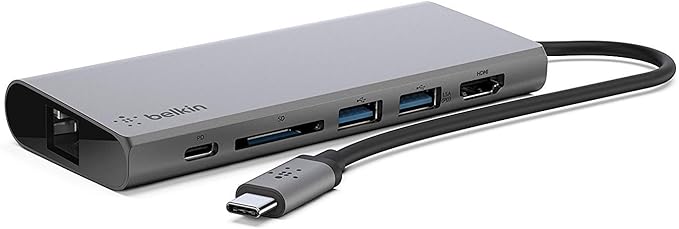
Connect and charge all your essential devices with the versatile Belkin USB-C Multimedia Hub. This sleek grey hub lets you plug in and power a range of peripherals through its USB-C port, two USB 3.0 ports, and one HDMI port. Simply connect the hub to your laptop's USB-C port to access multiple ports in one compact device. Send video and audio to an external display in vivid 4K resolution via the HDMI port. Rapidly transfer photos, videos, and other files with the fast USB 3.0 ports. This hub is perfect for productivity and entertainment when working remotely or in the office. Its durable and lightweight aluminum-alloy casing and compact design make it ideal for portable use when traveling. With the Belkin USB-C Multimedia Hub, you can connect all your everyday accessories through one hub and eliminate desktop clutter. It's the streamlined solution for managing multiple devices and displays. The manufacturer's part number for this product is F4U092BTSGY. For easy connectivity on the go, grab the Belkin USB-C Multimedia Hub today.
Connect and charge all your essential devices with the versatile Belkin USB-C Multimedia Hub. This sleek grey hub lets you plug in and power a range of peripherals through its USB-C port, two USB 3.0 ports, and one HDMI port. Simply connect the hub to your laptop's USB-C port to access multiple ports in one compact device. Send video and audio to an external display in vivid 4K resolution via the HDMI port. Rapidly transfer photos, videos, and other files with the fast USB 3.0 ports. This hub is perfect for productivity and entertainment when working remotely or in the office. Its durable and lightweight aluminum-alloy casing and compact design make it ideal for portable use when traveling. With the Belkin USB-C Multimedia Hub, you can connect all your everyday accessories through one hub and eliminate desktop clutter. It's the streamlined solution for managing multiple devices and displays. The manufacturer's part number for this product is F4U092BTSGY. For easy connectivity on the go, grab the Belkin USB-C Multimedia Hub today.
There are no live offers for Belkin USB-C Multimedia Hub right now. The all-time low we recorded was $28.00 on 26 Apr 2026. Set a price alert to hear when it's back in stock.
Prices last updated 5 Sept 2026.
Belkin USB-C Multimedia Hub
Connect and charge all your essential devices with the versatile Belkin USB-C Multimedia Hub. This sleek grey hub lets you plug in and power a range of peripherals through its USB-C port, two USB 3.0 ports, and one HDMI port. Simply connect the hub to your laptop's USB-C port to access multiple ports in one compact device. Send video and audio to an external display in vivid 4K resolution via the HDMI port. Rapidly transfer photos, videos, and other files with the fast USB 3.0 ports. This hub is perfect for productivity and entertainment when working remotely or in the office. Its durable and lightweight aluminum-alloy casing and compact design make it ideal for portable use when traveling. With the Belkin USB-C Multimedia Hub, you can connect all your everyday accessories through one hub and eliminate desktop clutter. It's the streamlined solution for managing multiple devices and displays. The manufacturer's part number for this product is F4U092BTSGY. For easy connectivity on the go, grab the Belkin USB-C Multimedia Hub today.
Connect and charge all your essential devices with the versatile Belkin USB-C Multimedia Hub. This sleek grey hub lets you plug in and power a range of peripherals through its USB-C port, two USB 3.0 ports, and one HDMI port. Simply connect the hub to your laptop's USB-C port to access multiple ports in one compact device. Send video and audio to an external display in vivid 4K resolution via the HDMI port. Rapidly transfer photos, videos, and other files with the fast USB 3.0 ports. This hub is perfect for productivity and entertainment when working remotely or in the office. Its durable and lightweight aluminum-alloy casing and compact design make it ideal for portable use when traveling. With the Belkin USB-C Multimedia Hub, you can connect all your everyday accessories through one hub and eliminate desktop clutter. It's the streamlined solution for managing multiple devices and displays. The manufacturer's part number for this product is F4U092BTSGY. For easy connectivity on the go, grab the Belkin USB-C Multimedia Hub today.
Last updated at 09/05/2026 19:15:08
Belkin F4U092BTSGY 4P USB-C Hub
Affiliate Disclosure: We may receive a small commission for purchases made through this link at no extra cost to you. This helps support our site. Thank you!
Belkin Usb-c Multimedia Hub Spacegray F4u092btsgy
Affiliate Disclosure: We may receive a small commission for purchases made through this link at no extra cost to you. This helps support our site. Thank you!
Belkin USB-C Multimedia Hub - (F4U092btSGY) Compact 60W 5Gbps 1x 4K
Delivery $20
BELKIN 4 PORT USB-C HUB / DOCK USB-C(1) SD(1) USB-3.1(2) HD MI(1) 60W PASSTHROUGH 2Y WTY
Delivery $16.50
Belkin 4K HDMI Ethernet & SD USB-C Multimedia Hub - Space Grey Card Port USB-A - USB-C & Pass Through Charging up to 60-Watts
Delivery between 10–15 Sept $9
Belkin USB-C Multimedia Hub - Grey
Delivery $9.95
Belkin USB-C Multimedia Hub (Grey)
Free delivery between Tue – Wed
Belkin USB-C Multimedia Hub (Grey)
Delivery between Wed – Sat $10
BELKIN F4U092BTSGY – USB-C / 60W PD / Ethernet – Port Replicator
Free delivery
USB-C Multimedia Hub
30-day returns
originally posted on belkin.com
I had similar product but it stopped working one fine day. I had this product 2 weeks ago and immediately started using this. I have a MacBook so its really helpful to have that type c connection. It has USB ports, a SD card reader and an extra type c port. I am a photographer so having that SD card slot really helps me to export the photos from my SD card to Mac. Also I have MacBook Air which only has 2 types c ports, so having that extra type c port really comes handy. it also has an ethernet port which I have not used but I could see the use of it when I need to upload large video files online, then I can connect my MacBook to my modem directly via ethernet cable to get 1gbps speed. it also has HDMI port which is good if I want to connect to an extra monitor. ... MoreI had similar product but it stopped working one fine day. I had this product 2 weeks ago and immediately started using this. I have a MacBook so its really helpful to have that type c connection. It has USB ports, a SD card reader and an extra type c port. I am a photographer so having that SD card slot really helps me to export the photos from my SD card to Mac. Also I have MacBook Air which only has 2 types c ports, so having that extra type c port really comes handy. it also has an ethernet port which I have not used but I could see the use of it when I need to upload large video files online, then I can connect my MacBook to my modem directly via ethernet cable to get 1gbps speed. it also has HDMI port which is good if I want to connect to an extra monitor. Which I do for my videos and photos editing. I cannot see how I can stay without this multiport adapter.
originally posted on bestbuy.com
I find that laptops today have cut way back on how many ports they offer. I love my laptop, but it only has 1 USB-A and 2 USB-C, and an HDMI port. I was able to go Bluetooth with my mouse and printer, but that was not an option with everything. Since I hook up a variety of peripherals to my laptop (thumb drive, external hard drive, monitor, LCD projector, etc), I was in search of a hub with a variety of ports that was safe to use and lightweight and portable for when I travel. Product Features: • Aluminum body • Built-in 3-inch USB-C cable for connecting to your laptop • Supports USB PD 3.0 pass-through up to 60 W • One USB-C data/charging port • Two USB-A 3.1 Gen 1 5 Gbps ports • Full-size HDMI output supporting up to 4K at 30 Hz • UHS-1 SD card reader • Gigabit ... MoreI find that laptops today have cut way back on how many ports they offer. I love my laptop, but it only has 1 USB-A and 2 USB-C, and an HDMI port. I was able to go Bluetooth with my mouse and printer, but that was not an option with everything. Since I hook up a variety of peripherals to my laptop (thumb drive, external hard drive, monitor, LCD projector, etc), I was in search of a hub with a variety of ports that was safe to use and lightweight and portable for when I travel. Product Features: • Aluminum body • Built-in 3-inch USB-C cable for connecting to your laptop • Supports USB PD 3.0 pass-through up to 60 W • One USB-C data/charging port • Two USB-A 3.1 Gen 1 5 Gbps ports • Full-size HDMI output supporting up to 4K at 30 Hz • UHS-1 SD card reader • Gigabit ethernet • Works with Mac® OS X® 10.8 or later, Windows® 10 or later, Chrome OS™ Tested Compatibility: • MacBook® with USB-C 3.1 Port • MacBook Pro® 13” with Thunderbolt™ 3 • MacBook Pro 15” with Thunderbolt 3 • MacBook Pro 15” with Touch Bar™ and Thunderbolt 3 • HP Spectre x360 with USB-C 3.1 • Dell® XPS 13 with Thunderbolt 3/USB-C 3.1 • HP Pavilion x360 with USB-C 3.1 • ASUS® ZenBook Flip S with USB-C 3.1 • Lenovo® Yoga 910 with USB-C 3.1 • Microsoft® Surface® Book 2 with USB-C 3.1 • Dell Chromebook™ 3180 with USB-C 3.1 • ASUS Chromebook Flip C302 with USB-C • Google Pixelbook™ with USB-C 3.1 Package Inclusions: • Belkin F4U092 • Quick Start Guide • Regulatory Documentation For FAQs on product information, if you want to know the tested compatibility for your devices, specific hardware information, and functionality, visit https://www.belkin.com/us/support-article?articleNum=315197 What I like about the Belkin USB-C multiport hub is that it: • Offers up to 56 bps of bandwidth and is speedy • Connects to a variety of devices by a single cable (USB-C, 2 USB-A, HDMI, Ethernet, SD card) • Is attractive with a brushed metallic exterior, not cheap plastic • Supports 4K 30Hz monitors (that’s some picture!) • Is compact and lightweight, easy to carry in my purse or briefcase for use in the airport or on the plane itself. (0.8” w x 2.75” h; 6.83” length with cable; 4.16 oz) • Serves as a multiple device charging station (wireless headphones, cell phone, iPod) since so many hotels don’t offer adequate plugs or ports • Is protected by a Belkin Connected Equipment Warranty. If your device is damaged by an electrical charge while properly connected to the hub, Belkin will repair or replace it up to a value of $2,500. That is a motivator! Sometimes when I travel or even at work, wireless Internet is not available or is undependable. In that case, I want a secure, faster Internet connection via an Ethernet port, but my laptop doesn’t have one. However, this hub does, and it is a 1Gb Ethernet port. The hub offers pass-through charging up to 60-Watts so there’s no need to choose between port expansion and power. However, my laptop sent me a message to only use an approved, brand power cable. That made me nervous that there might be issues. It is great that the warranty is provided, but I don't ever want to have to use it to replace my laptop. The only thing this hub doesn’t have that I wish it did is a VGA port for when I do PowerPoint presentations on older LCD projectors that don’t have an HDMI port. The other aspect that I don’t like is the cable is a bit rigid. My USB-C port is on the right side of my laptop and for the hub and cable to sit right, the hub has to be laid upside down. Finally, I have only had the hub for about a week and there is already a scratch on the top. For these three reasons, I am rating this a 4, since a 4.5 isn’t on option.
originally posted on bestbuy.com
Belkin’s been a known name in the mobile accessory space for many years, making a wide swath of charging, connectivity, and travel computing gear covering pretty much any mobile need. They’ve made countless USB docks and accessories over the years that use the ubiquitous USB-A port (the rectangular one we’ve been seeing since the late 90s), but as the market continues to shift to the newer, more capable USB-C, Belkin seemingly recognizes that we’ve got many years to come of wrangling these two port types. With some devices shipping with only a single USB-C port, this becomes much more of a challenge than it should be. Thankfully, Belkin’s USB-C Travel Multimedia Dock + Charge handles all of these concerns with aplomb in a simple, well-built, port-abundant shell. ... MoreBelkin’s been a known name in the mobile accessory space for many years, making a wide swath of charging, connectivity, and travel computing gear covering pretty much any mobile need. They’ve made countless USB docks and accessories over the years that use the ubiquitous USB-A port (the rectangular one we’ve been seeing since the late 90s), but as the market continues to shift to the newer, more capable USB-C, Belkin seemingly recognizes that we’ve got many years to come of wrangling these two port types. With some devices shipping with only a single USB-C port, this becomes much more of a challenge than it should be. Thankfully, Belkin’s USB-C Travel Multimedia Dock + Charge handles all of these concerns with aplomb in a simple, well-built, port-abundant shell. Disclaimer: I tested this device using a Windows laptop only, as it’s the only device I have with USB-C capabilities. Though Belkin indicates this is tablet-compatible (and thus should be phone-compatible by extension), I was unable to test. - Setup & Initial Impressions Kudos to Belkin for keeping the packaging simple and recyclable. As it’s a pretty standard USB dock setup was as simple as plugging the hub into a device with a USB-C port, and after some automatic configuration the dock was ready to use. Build quality is excellent. Encased in an all-aluminum shell, the dock feels heftier than others I’ve used in the past, and I have no doubt this thing will stand up to some careless use over time. I would’ve liked to see a braided cable at this price, but the connection ends feel plenty robust like they should take a few hundred awkward bends at the bottom of a laptop bag without issue. - USB Power Delivery The hallmark feature of this hub compared to other options is the inclusion of USB-C pass-through charging, up to 60 watts. This means most devices will be able to charge at full speed when a USB-C power adapter is connected to the power port on the dock, and some will be limited if they use more (USB-C specification allows for up to 100 watts). That said, being able to charge at a reasonable speed at all while using an array of ports is a welcome upgrade. One nice feature of the power pass-through is that also increases the output power of each of the USB-A ports on the hub. These ports are restricted to 1.8 amps (9 watts) total between them when no power adapter is connected, which is fine for most needs. However, if you use an external “pocket” hard drive or external DVD/Blu-Ray drive, these could fall short of providing the power needed to use them. Plugging in a power adapter to the USB-C port bumps total output to 3 amps (15 watts), allowing such devices to function. - Ethernet & HDMI Gigabit ethernet is welcome on this hub, as less expensive hubs often only feature a 10/100 port (10x slower) to cut costs. I attained full speeds when testing and the connection was stable across several large file transfers. I found that the HDMI port is HDMI 1.4 compliant, allowing output at 1080p resolution at 60Hz or up to 4K resolution at 30Hz. This was somewhat surprising as the dock is rated for a 5Gbps transfer rate, but HDMI 1.4 for 4K at 30Hz is a 10Gbps signal. Regardless, I had no difficulty connecting my laptop to an external display for the first time ever, and the connection was flawless. - SD & USB Slots Once again, no complaints here. Both USB ports function as they should, supporting USB3.0 data transfers up to the proper 5Gbps speed. I maxed out all my devices when testing and didn’t encounter any issues. The SD card slot, similarly, worked just fine. - Bottom Line There isn’t terribly much to say about the Belkin USB-C Travel Multimedia Dock + Charge; it’s a perfectly competent dock that will ease the transition from USB-everything to a wireless future. It does everything it promises without a hitch, feels built to last, and delivers pretty much everything may need to use on a modern, port-starved device. The MSRP is high, but justifiably so, since this just works and works well, which is far higher praise than I can give for my last two USB-C docks that were among its “budget” competition. Recommended!
| General | |
| Product Type | Docking station |
| Video | |
| Max Resolution Details | 30 Hz |
| Networking |

Belkin F4U092BTSGY 4P USB-C Hub
Affiliate Disclosure: We may receive a small commission for purchases made through this link at no extra cost to you. This helps support our site. Thank you!
Belkin Usb-c Multimedia Hub Spacegray F4u092btsgy
Affiliate Disclosure: We may receive a small commission for purchases made through this link at no extra cost to you. This helps support our site. Thank you!
Belkin USB-C Multimedia Hub - (F4U092btSGY) Compact 60W 5Gbps 1x 4K
Delivery $20
BELKIN 4 PORT USB-C HUB / DOCK USB-C(1) SD(1) USB-3.1(2) HD MI(1) 60W PASSTHROUGH 2Y WTY
Delivery $16.50
Belkin 4K HDMI Ethernet & SD USB-C Multimedia Hub - Space Grey Card Port USB-A - USB-C & Pass Through Charging up to 60-Watts
Delivery between 10–15 Sept $9
I had similar product but it stopped working one fine day. I had this product 2 weeks ago and immediately started using this. I have a MacBook so its really helpful to have that type c connection. It has USB ports, a SD card reader and an extra type c port. I am a photographer so having that SD card slot really helps me to export the photos from my SD card to Mac. Also I have MacBook Air which only has 2 types c ports, so having that extra type c port really comes handy. it also has an ethernet port which I have not used but I could see the use of it when I need to upload large video files online, then I can connect my MacBook to my modem directly via ethernet cable to get 1gbps speed. it also has HDMI port which is good if I want to connect to an extra monitor. ... MoreI had similar product but it stopped working one fine day. I had this product 2 weeks ago and immediately started using this. I have a MacBook so its really helpful to have that type c connection. It has USB ports, a SD card reader and an extra type c port. I am a photographer so having that SD card slot really helps me to export the photos from my SD card to Mac. Also I have MacBook Air which only has 2 types c ports, so having that extra type c port really comes handy. it also has an ethernet port which I have not used but I could see the use of it when I need to upload large video files online, then I can connect my MacBook to my modem directly via ethernet cable to get 1gbps speed. it also has HDMI port which is good if I want to connect to an extra monitor. Which I do for my videos and photos editing. I cannot see how I can stay without this multiport adapter.
I find that laptops today have cut way back on how many ports they offer. I love my laptop, but it only has 1 USB-A and 2 USB-C, and an HDMI port. I was able to go Bluetooth with my mouse and printer, but that was not an option with everything. Since I hook up a variety of peripherals to my laptop (thumb drive, external hard drive, monitor, LCD projector, etc), I was in search of a hub with a variety of ports that was safe to use and lightweight and portable for when I travel. Product Features: • Aluminum body • Built-in 3-inch USB-C cable for connecting to your laptop • Supports USB PD 3.0 pass-through up to 60 W • One USB-C data/charging port • Two USB-A 3.1 Gen 1 5 Gbps ports • Full-size HDMI output supporting up to 4K at 30 Hz • UHS-1 SD card reader • Gigabit ... MoreI find that laptops today have cut way back on how many ports they offer. I love my laptop, but it only has 1 USB-A and 2 USB-C, and an HDMI port. I was able to go Bluetooth with my mouse and printer, but that was not an option with everything. Since I hook up a variety of peripherals to my laptop (thumb drive, external hard drive, monitor, LCD projector, etc), I was in search of a hub with a variety of ports that was safe to use and lightweight and portable for when I travel. Product Features: • Aluminum body • Built-in 3-inch USB-C cable for connecting to your laptop • Supports USB PD 3.0 pass-through up to 60 W • One USB-C data/charging port • Two USB-A 3.1 Gen 1 5 Gbps ports • Full-size HDMI output supporting up to 4K at 30 Hz • UHS-1 SD card reader • Gigabit ethernet • Works with Mac® OS X® 10.8 or later, Windows® 10 or later, Chrome OS™ Tested Compatibility: • MacBook® with USB-C 3.1 Port • MacBook Pro® 13” with Thunderbolt™ 3 • MacBook Pro 15” with Thunderbolt 3 • MacBook Pro 15” with Touch Bar™ and Thunderbolt 3 • HP Spectre x360 with USB-C 3.1 • Dell® XPS 13 with Thunderbolt 3/USB-C 3.1 • HP Pavilion x360 with USB-C 3.1 • ASUS® ZenBook Flip S with USB-C 3.1 • Lenovo® Yoga 910 with USB-C 3.1 • Microsoft® Surface® Book 2 with USB-C 3.1 • Dell Chromebook™ 3180 with USB-C 3.1 • ASUS Chromebook Flip C302 with USB-C • Google Pixelbook™ with USB-C 3.1 Package Inclusions: • Belkin F4U092 • Quick Start Guide • Regulatory Documentation For FAQs on product information, if you want to know the tested compatibility for your devices, specific hardware information, and functionality, visit https://www.belkin.com/us/support-article?articleNum=315197 What I like about the Belkin USB-C multiport hub is that it: • Offers up to 56 bps of bandwidth and is speedy • Connects to a variety of devices by a single cable (USB-C, 2 USB-A, HDMI, Ethernet, SD card) • Is attractive with a brushed metallic exterior, not cheap plastic • Supports 4K 30Hz monitors (that’s some picture!) • Is compact and lightweight, easy to carry in my purse or briefcase for use in the airport or on the plane itself. (0.8” w x 2.75” h; 6.83” length with cable; 4.16 oz) • Serves as a multiple device charging station (wireless headphones, cell phone, iPod) since so many hotels don’t offer adequate plugs or ports • Is protected by a Belkin Connected Equipment Warranty. If your device is damaged by an electrical charge while properly connected to the hub, Belkin will repair or replace it up to a value of $2,500. That is a motivator! Sometimes when I travel or even at work, wireless Internet is not available or is undependable. In that case, I want a secure, faster Internet connection via an Ethernet port, but my laptop doesn’t have one. However, this hub does, and it is a 1Gb Ethernet port. The hub offers pass-through charging up to 60-Watts so there’s no need to choose between port expansion and power. However, my laptop sent me a message to only use an approved, brand power cable. That made me nervous that there might be issues. It is great that the warranty is provided, but I don't ever want to have to use it to replace my laptop. The only thing this hub doesn’t have that I wish it did is a VGA port for when I do PowerPoint presentations on older LCD projectors that don’t have an HDMI port. The other aspect that I don’t like is the cable is a bit rigid. My USB-C port is on the right side of my laptop and for the hub and cable to sit right, the hub has to be laid upside down. Finally, I have only had the hub for about a week and there is already a scratch on the top. For these three reasons, I am rating this a 4, since a 4.5 isn’t on option.
Belkin’s been a known name in the mobile accessory space for many years, making a wide swath of charging, connectivity, and travel computing gear covering pretty much any mobile need. They’ve made countless USB docks and accessories over the years that use the ubiquitous USB-A port (the rectangular one we’ve been seeing since the late 90s), but as the market continues to shift to the newer, more capable USB-C, Belkin seemingly recognizes that we’ve got many years to come of wrangling these two port types. With some devices shipping with only a single USB-C port, this becomes much more of a challenge than it should be. Thankfully, Belkin’s USB-C Travel Multimedia Dock + Charge handles all of these concerns with aplomb in a simple, well-built, port-abundant shell. ... MoreBelkin’s been a known name in the mobile accessory space for many years, making a wide swath of charging, connectivity, and travel computing gear covering pretty much any mobile need. They’ve made countless USB docks and accessories over the years that use the ubiquitous USB-A port (the rectangular one we’ve been seeing since the late 90s), but as the market continues to shift to the newer, more capable USB-C, Belkin seemingly recognizes that we’ve got many years to come of wrangling these two port types. With some devices shipping with only a single USB-C port, this becomes much more of a challenge than it should be. Thankfully, Belkin’s USB-C Travel Multimedia Dock + Charge handles all of these concerns with aplomb in a simple, well-built, port-abundant shell. Disclaimer: I tested this device using a Windows laptop only, as it’s the only device I have with USB-C capabilities. Though Belkin indicates this is tablet-compatible (and thus should be phone-compatible by extension), I was unable to test. - Setup & Initial Impressions Kudos to Belkin for keeping the packaging simple and recyclable. As it’s a pretty standard USB dock setup was as simple as plugging the hub into a device with a USB-C port, and after some automatic configuration the dock was ready to use. Build quality is excellent. Encased in an all-aluminum shell, the dock feels heftier than others I’ve used in the past, and I have no doubt this thing will stand up to some careless use over time. I would’ve liked to see a braided cable at this price, but the connection ends feel plenty robust like they should take a few hundred awkward bends at the bottom of a laptop bag without issue. - USB Power Delivery The hallmark feature of this hub compared to other options is the inclusion of USB-C pass-through charging, up to 60 watts. This means most devices will be able to charge at full speed when a USB-C power adapter is connected to the power port on the dock, and some will be limited if they use more (USB-C specification allows for up to 100 watts). That said, being able to charge at a reasonable speed at all while using an array of ports is a welcome upgrade. One nice feature of the power pass-through is that also increases the output power of each of the USB-A ports on the hub. These ports are restricted to 1.8 amps (9 watts) total between them when no power adapter is connected, which is fine for most needs. However, if you use an external “pocket” hard drive or external DVD/Blu-Ray drive, these could fall short of providing the power needed to use them. Plugging in a power adapter to the USB-C port bumps total output to 3 amps (15 watts), allowing such devices to function. - Ethernet & HDMI Gigabit ethernet is welcome on this hub, as less expensive hubs often only feature a 10/100 port (10x slower) to cut costs. I attained full speeds when testing and the connection was stable across several large file transfers. I found that the HDMI port is HDMI 1.4 compliant, allowing output at 1080p resolution at 60Hz or up to 4K resolution at 30Hz. This was somewhat surprising as the dock is rated for a 5Gbps transfer rate, but HDMI 1.4 for 4K at 30Hz is a 10Gbps signal. Regardless, I had no difficulty connecting my laptop to an external display for the first time ever, and the connection was flawless. - SD & USB Slots Once again, no complaints here. Both USB ports function as they should, supporting USB3.0 data transfers up to the proper 5Gbps speed. I maxed out all my devices when testing and didn’t encounter any issues. The SD card slot, similarly, worked just fine. - Bottom Line There isn’t terribly much to say about the Belkin USB-C Travel Multimedia Dock + Charge; it’s a perfectly competent dock that will ease the transition from USB-everything to a wireless future. It does everything it promises without a hitch, feels built to last, and delivers pretty much everything may need to use on a modern, port-starved device. The MSRP is high, but justifiably so, since this just works and works well, which is far higher praise than I can give for my last two USB-C docks that were among its “budget” competition. Recommended!
Belkin calls this device a “multimedia hub.” I’ve always called something like this a docking station. It’s very handy if you use a laptop computer regularly but want to have desktop computer amenities when you park yourself at your desk at home or at the office (or both or wherever). This unit connects to a USB-C port, so you’ll need one of those on whatever (desktop or laptop) you connect it to. What you get in return for taking up a USB-C port on your computer is another USB-C port labeled “upstream/downstream”, which means that you can use it to connect to another device OR to provide extra power to the unit with USB-C-capable power cord, two USB-3 ports, an HDMI port, an SD card reader, and a gigabit ethernet port. You could connect to this a computer monitor, ... MoreBelkin calls this device a “multimedia hub.” I’ve always called something like this a docking station. It’s very handy if you use a laptop computer regularly but want to have desktop computer amenities when you park yourself at your desk at home or at the office (or both or wherever). This unit connects to a USB-C port, so you’ll need one of those on whatever (desktop or laptop) you connect it to. What you get in return for taking up a USB-C port on your computer is another USB-C port labeled “upstream/downstream”, which means that you can use it to connect to another device OR to provide extra power to the unit with USB-C-capable power cord, two USB-3 ports, an HDMI port, an SD card reader, and a gigabit ethernet port. You could connect to this a computer monitor, keyboard, and mouse, and then have access to all three by just a single USB-C connection to your computer. You can also have wired ethernet capability if you’re like me and use a laptop computer that lacks such a port and thus can only connect to the internet wirelessly. Wireless is nice, but it’s not available everywhere, and sometimes you just want the faster speeds (and greater security) that a wired connection can provide. Ten or fifteen years ago, something like this was very useful to someone, like me, who worked about equally between home and office, and so I would carry a laptop with all my files and programs on it back and forth. At each location I had a docking station/hub like this unit with ethernet, printer, mouse, keyboard, and monitor all connected, and a single, quick connection of my laptop to the hub had me having a desktop-like experience (full-size keyboard, larger monitor, faster internet, mouse instead of touch-pad) in no time flat. But things have changed, and I have to be honest and say that I went away from the laptop/hub idea to making great use of the “cloud.” Now I just have a desktop computer at each location, and each is connected to my cloud storage, where I keep all of my important files. I no longer need to tote a laptop back and forth between home and work. So I think the utility of something like this is less than it was, say, a decade or so ago. I think the best feature of this device is the ability to have a wired internet connection on a computer that doesn’t have an ethernet jack. But there are other, cheaper ways of achieving this, so this Belkin hub would appeal most, I think, to someone who both needs a wired internet connection for their laptop and who also wants some of the other features the hub offers, such as the extra USB ports or the card reader. Bottom line: if you need something like this, the Belkin USB C Multimedia Dock/Hub will work just fine. It is small (5 inches by 2 inches by 5/8 inch), lightweight (4.4 oz.) but solid feeling, and very portable (could pretty much fit in your shirt pocket). It will fulfill your needs just fine.
Unboxing: When you open the box the first thing that caught my attention was…the very confusing method of getting the hub out of the box. The cable was intertwined in the cardboard, which was taped into together in many places for seemingly no reason (maybe to prevent theft?). The information card was the same. This could be much better designed, even just a foam insert and the hub tucked in. Quality: Once I was able to get the hub out, the actual first thing you notice is how solid it is. The hub has a premium feel to it and seems well put together. The cable is permanently attached to the unit and feels very sturdy as well. One suggestion I’d have here obviously is that the design could have been streamlined a bit so the cable could be tucked around or so that the ... MoreUnboxing: When you open the box the first thing that caught my attention was…the very confusing method of getting the hub out of the box. The cable was intertwined in the cardboard, which was taped into together in many places for seemingly no reason (maybe to prevent theft?). The information card was the same. This could be much better designed, even just a foam insert and the hub tucked in. Quality: Once I was able to get the hub out, the actual first thing you notice is how solid it is. The hub has a premium feel to it and seems well put together. The cable is permanently attached to the unit and feels very sturdy as well. One suggestion I’d have here obviously is that the design could have been streamlined a bit so the cable could be tucked around or so that the cable could be removed. Because the unit is so small, you could easily throw it in a backpack or your pocket, or even a purse, but that cable is going to see its wear during travel. Performance: The Hub was immediately recognized by my laptop. It accepted connections quickly and didn’t slow down one bit when connecting multiple Input devices (keyboard, mouse, Xbox One Controller Adapter). HDMI performed perfectly, 4K video came straight through, with no issues. The Gigabit Ethernet connection performed great. It saw a 7MS Ping with a 952mbps download and a 35mbps upload with no issues. I played a few games using the hub onto an external monitor. It did not handle 4K through gaming that well, though I would not have expected this, it did handle 1080p perfectly (FPS and Racing games worked perfect in this resolution). I honestly was not expecting it to do so well, as there are higher priced and bulkier docks on the market that don’t handle this at all. Extra Info: I also used this hub plugged directly into the USB-C connection of my Android Phone. It automatically recognized it and displayed the Android Desktop on my monitor. It also took the connection for the keyboard and mouse and my file explorer app on my phone immediately recognized the external drive plugged into it. I know few would think to use it this way, but it worked as I intended it to. I was able to open my office apps, view photos and run all my android apps perfectly this way on my monitor. It has even given me some ideas for automation or car tech. Overall: This device worked as intended. I’d be more impressed if the cable could tuck away somehow. The hub got warm and did heat up more, but it never got “hot”. I think its great the SD Slot is on here, but I don’t think its necessary. Most laptops come with this and its not intrusive so people can usually just plug their SD card into their laptop. I would have liked to see another USB port here instead and/or a headphone jack. Though that’s personal preference. They could have used a MicroSD and an extra USB port here instead also. The performance overall exceeded my expectations when connecting a secondary monitor and used for gaming (which it is not intended for or advertised for and probably shouldn’t be used over the direct HDMI port on your laptop). This was a pleasant surprise. It performs all the intended functions well and easily.
The HDMI output, USB hub, and the SD reader, all worked flawlessly. I could not test the power pass-through for charging as my laptop does not support USB-C charging. The strange problem I had was with the Ethernet port. I could run days at a time with no issues as long as I wasn't having video calls (Teams, Zoom, WebEx, etc.) Any time I'd start a call, a couple of minutes in everyone would start telling me my video froze and they couldn't hear me, yet I could still see their video and hear them. That would last about 10-15 seconds then all network functionality would stop. At first I thought it was my network switch, and network would be restored after I rebooted it. After upgrading to a newer switch, the issue persisted. I discovered when it happened, that if I ... MoreThe HDMI output, USB hub, and the SD reader, all worked flawlessly. I could not test the power pass-through for charging as my laptop does not support USB-C charging. The strange problem I had was with the Ethernet port. I could run days at a time with no issues as long as I wasn't having video calls (Teams, Zoom, WebEx, etc.) Any time I'd start a call, a couple of minutes in everyone would start telling me my video froze and they couldn't hear me, yet I could still see their video and hear them. That would last about 10-15 seconds then all network functionality would stop. At first I thought it was my network switch, and network would be restored after I rebooted it. After upgrading to a newer switch, the issue persisted. I discovered when it happened, that if I unplugged and reconnected the Ethernet cable between the Belkin hub and the switch, connectivity would be restored. The same thing would repeat during a video call, but if I ended the video call it would remain connected until the next call. The strange part is I had no issues transferring large files at far greater bandwidth than a video call required. I ended up switching to a Wavlink brand hub/dock and I no longer have any issues with networking.
I bought this in Nov 21 from Noel Leeming. I went to Noel Leeming because Apple is new to me and I wanted to be sure I got the correct accessory. Unfortunately I had a lot going on in Nov 21 after I opened the hub and tried to unsuccesfully use on my Apple Mac I put it aside thinking its me ill suss it later. I just recently tired to connect again with no success so called Belkin Helpline and was advised the hub is not compatible with my Apple Mac. I contacted Noel Leeming online and got the standard reply bring it back within a certain time with packaging. I now have an expensive hub to look at.
-= Features=- This Belkin USB C travel dock allows you use just one plug into your laptop's USB-C port to power a variety of peripherals. External Monitor: There is a HDMI on the dock that allows you to connect an external monitor; no need to plug in your monitor directly to the laptop! Two USB 3.0 Ports: This allows you to connect a keyboard and mouse or other USB device to your laptop. I found it very convenient having everything already connected to the dock so I can quickly connect (and disconnect) all your peripherals with one single USB-C cable. SD Card Reader: You can insert an SD card into a dedicate slot on the dock if you need to load pictures off of a camera, for example. Ethernet Port: Most laptops today don't come with a wired Ethernet port, but there ... More-= Features=- This Belkin USB C travel dock allows you use just one plug into your laptop's USB-C port to power a variety of peripherals. External Monitor: There is a HDMI on the dock that allows you to connect an external monitor; no need to plug in your monitor directly to the laptop! Two USB 3.0 Ports: This allows you to connect a keyboard and mouse or other USB device to your laptop. I found it very convenient having everything already connected to the dock so I can quickly connect (and disconnect) all your peripherals with one single USB-C cable. SD Card Reader: You can insert an SD card into a dedicate slot on the dock if you need to load pictures off of a camera, for example. Ethernet Port: Most laptops today don't come with a wired Ethernet port, but there is one on the dock if you need the stability of a wired internet connection. USB-C Power Input: You can plug your normal laptop's USB-C charger into the dock and it will pass that power on your laptop so it charges while you use it. I tested this dock with a Samsung Galaxy Book 12 tablet and noticed that its included Samsung Adaptive Fast Charger did not work properly (it's not USB-C Power Delivery certified), but a Dell USB-C Laptop Charger worked in its place and it did allow the tablet to charge through the dock. -= Design =- The dock is very compact in a solid, aluminum enclosure that is ideal for travel. However, I use it mainly on my desk so I can quickly "dock" my tablet or laptop on my desk and use a full keyboard, mouse and monitor. The dock has a short but thick USB-C cable that connects to the laptop. While this cable should hold up for years, it's somewhat rigid and can make the dock difficult to position how you want to at first, but it should loosen over time. Overall, I'm pleased with this dock and it makes it convenient to dock my home laptop or work laptop whenever I need to work at a desk. I can now just use one cord to connect my monitor, keyboard and mouse while charging the laptop all at the same time.
The good stuff... + Solid and durable build quality + USB 3.0 High performance + Charging pass-thru + Ethernet lights The quality solid build is noticeably right away. I do not see anywhere stating what the outer casing is made of, but they have me fooled if it isn’t aluminum especially since it has a bit of weight to it. The black sides are hard plastic and the cable is a thick and seems durable. The space gray coloring is almost spot on. I only notice a slight shade difference because I am evaluating it closely for this review. The USB 3.0 speeds impressed me, especially compared to a similar off-brand USB-C adapter that I had available for comparison. Speeds will vary based on the drive, but my 128GB Corsair GTX USB drive 131MB/s write and 418MB/s read (see notes ... MoreThe good stuff... + Solid and durable build quality + USB 3.0 High performance + Charging pass-thru + Ethernet lights The quality solid build is noticeably right away. I do not see anywhere stating what the outer casing is made of, but they have me fooled if it isn’t aluminum especially since it has a bit of weight to it. The black sides are hard plastic and the cable is a thick and seems durable. The space gray coloring is almost spot on. I only notice a slight shade difference because I am evaluating it closely for this review. The USB 3.0 speeds impressed me, especially compared to a similar off-brand USB-C adapter that I had available for comparison. Speeds will vary based on the drive, but my 128GB Corsair GTX USB drive 131MB/s write and 418MB/s read (see notes below for qualifier). The same drive in the off-brand adapter performed at 50MB/s write and 420MB/s read. The charging pass-thru in the USB-C port is a nice feature. My MacBook Pro is a little sparse on ports with a whopping 4. Honestly, I doubt I’ll fill them, but it is nice to know that I can charge my Mac using the adapter. It’s also a requirement if you exceed 1.8 amps on the USB 3.o ports. More on that below. The Ethernet lights were a nice surprise. I didn’t realize those were there until I plugged the cable in. It did help in diagnosing a bad port on my switch too. Issues during my experience... - SD card performance could be better My SD card performance test on the Belkin didn’t fare so well compared to the off-brand adaptor. Using a MicroSD 64GB U1-10 in an adapter, the Belkin performed at 15MB/s write and 21MB/s read which is within specifications of the SD, but the off-brand performed noticeably better at 26MB/s write and 91MB/s read. I’m not overly concerned about the difference in performance in an SD. Other thoughts: I am happy with my purchase and I would recommend this product. They have an important note in the instructions that states the combined output of the two USB ports cannot exceed 1.8 amps; however, if you connect a USB-C power supply (60W max) to directly to the adapter, you can have a combined maximum of 3.0 amps. I tested drive performance using Blackmagic Disk Read Test and my personal random marker of “ProRes 422 HQ at 1080” seemed like an appropriate speed for consistent measurement. If you found this review helpful, please let me know.
Great Product . USB-C connector this is one of the most useful and compact adaptor with multiple ports i ever had . My use case is very specific , however it has wider range of port to fulfill your requirement. I use it for ipad and streaming video services , which is connected to smart TV via HDMI port . The reason this so good is because it supports the high bandwidth data transfer , not only from adaptor to the internally connected devices but also from the internet connected via Ethernet port(supports full 1 Gig connection) . It also supports high resolution (up to 4k ) video over hdmi connection . There are 2 additional usb-A and one SD card port , which you can use it for your home/mini office . Great product with awesome value for money.
| General | |
| Product Type | Docking station |
| Video | |
| Max Resolution Details | 30 Hz |
| Networking |


