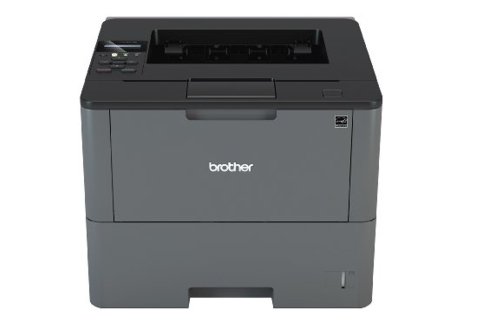
HL-L6200DW Mono Laser Printer
HL-L6200DW Mono Laser Printer
HL-L6200DW Mono Laser Printer
HL-L6200DW Mono Laser Printer
Last updated at 06/10/2026 12:33:49
Brother HLL6200DW Wireless Monochrome Laser Printer
Affiliate Disclosure: We may receive a small commission for purchases made through this link at no extra cost to you. This helps support our site. Thank you!
Brother HL-L6200DW Mono Wireless Laser Printer High Speed Monochrome 2-sided | TECHNOLOGY Products
Free delivery between 11–18 June
Brother HL-L6200DW Mono Wireless Laser Printer with TN-3470 Toner Bundle | TECHNOLOGY Products
Free delivery between 11–18 June
Brother Laser Printer HL L6200DW - Laser Printers
Delivery $42.65
Brother HLL6200DW Laser
Free delivery
Brother HL-L6200DW Mono Laser Printer HL-L6200DW
Free delivery between Thu – Mon
Brother HL-L6200DW Mono Laser Wireless Printer + Duplex
30-day returns
Brother HLL6200DW Laser BP6200DW
Free delivery
Brother Hl-L6200Dw High Speed Mono Laser Printer
Delivery between 16–18 June $9.95
HL-L6200DW Mono Laser Printer
14-day returns
originally posted on officedepot.com
After many years of productive use, I had to replace my Brother HL-5370DW laser printer. I was leaning toward the Brother brand, and the customer service rep assisting me at the store suggested the HL-L6200DW as a suitable replacement. I have not used it very long, but it appears to meet my expectations. It has a higher capacity paper tray than my previous model, and it is noisier when operating, but it is also faster, produces higher quality output, and does not automatically flip the paper if there is not a second page to copy. I do not currently have the wireless setup (using USB cable - which is NOT included, by the way), but it looks like wireless would be easy enough to setup if I wanted to in the future.
originally posted on staples.com
Purchased to replace an older Brother HL-5250DN that lasted us well over a decade. This printer was very easy to set up in a completely wireless mode on our Windows-based network (I do have a CD drive to load the setup software, but I suspect using online access from your main computer would be just as easy). It prints very crisp documents and so far none of the paper wrinkling issues reported by some even in duplex (2-sided) printing mode. We had no problem setting up printing from our Android phones or tablets either. In wireless mode, the first page is slow to come through, but as soon as it does, subsequent pages immediately follow. No issue with waking it up from sleep mode either.
originally posted on brother-usa.com
Absolutely love the power and quality of print from this multi-platform (Windows, MacOS and Linux) friendly Laser Printer. I bought the extra tray (500-plus sheet version) to ensure months of "set it and forget it" service reliability of a trusted name in the printer industry. I am so impressed with the deep sleep mode of the printer that sips energy but that jumps back to life when a print job is sent. The device's web page management console is easy to use and configure. Emulation modes provide further compatibility for this workhorse. Multiple wireless printing protocol makes this printer versatile. Last, but certainly not least, this Brother seems to accept toner from a choice of vendors, not only Brother Inc. themselves. All the above make this printer a winner ... MoreAbsolutely love the power and quality of print from this multi-platform (Windows, MacOS and Linux) friendly Laser Printer. I bought the extra tray (500-plus sheet version) to ensure months of "set it and forget it" service reliability of a trusted name in the printer industry. I am so impressed with the deep sleep mode of the printer that sips energy but that jumps back to life when a print job is sent. The device's web page management console is easy to use and configure. Emulation modes provide further compatibility for this workhorse. Multiple wireless printing protocol makes this printer versatile. Last, but certainly not least, this Brother seems to accept toner from a choice of vendors, not only Brother Inc. themselves. All the above make this printer a winner for me. HP's choice to employ chip-based software to now force customers (including long-standing ones, like myself) into paying though the nose for not only their printers, but obligatory HP-branded toner cartridges, gave me the final push needed to find another printer manufacturer to put my hard-earned dollars into. In doing so, I re-found Brother. This is the second brother Laser I own. Looking to probably replace my entire set of HP with Brother as time goes on. Thank-you Brother for respecting your customers' right to choose with this model.
| Dimensions & Weight | |
| Width | 37.3 cm |
| Depth | 38.8 cm |
| Height | 28.7 cm |
| Weight | 11.9 kg |
Brother HLL6200DW Wireless Monochrome Laser Printer
Affiliate Disclosure: We may receive a small commission for purchases made through this link at no extra cost to you. This helps support our site. Thank you!
Brother HL-L6200DW Mono Wireless Laser Printer High Speed Monochrome 2-sided | TECHNOLOGY Products
Free delivery between 11–18 June
Brother HL-L6200DW Mono Wireless Laser Printer with TN-3470 Toner Bundle | TECHNOLOGY Products
Free delivery between 11–18 June
Brother Laser Printer HL L6200DW - Laser Printers
Delivery $42.65
Brother HLL6200DW Laser
Free delivery
After many years of productive use, I had to replace my Brother HL-5370DW laser printer. I was leaning toward the Brother brand, and the customer service rep assisting me at the store suggested the HL-L6200DW as a suitable replacement. I have not used it very long, but it appears to meet my expectations. It has a higher capacity paper tray than my previous model, and it is noisier when operating, but it is also faster, produces higher quality output, and does not automatically flip the paper if there is not a second page to copy. I do not currently have the wireless setup (using USB cable - which is NOT included, by the way), but it looks like wireless would be easy enough to setup if I wanted to in the future.
Purchased to replace an older Brother HL-5250DN that lasted us well over a decade. This printer was very easy to set up in a completely wireless mode on our Windows-based network (I do have a CD drive to load the setup software, but I suspect using online access from your main computer would be just as easy). It prints very crisp documents and so far none of the paper wrinkling issues reported by some even in duplex (2-sided) printing mode. We had no problem setting up printing from our Android phones or tablets either. In wireless mode, the first page is slow to come through, but as soon as it does, subsequent pages immediately follow. No issue with waking it up from sleep mode either.
Absolutely love the power and quality of print from this multi-platform (Windows, MacOS and Linux) friendly Laser Printer. I bought the extra tray (500-plus sheet version) to ensure months of "set it and forget it" service reliability of a trusted name in the printer industry. I am so impressed with the deep sleep mode of the printer that sips energy but that jumps back to life when a print job is sent. The device's web page management console is easy to use and configure. Emulation modes provide further compatibility for this workhorse. Multiple wireless printing protocol makes this printer versatile. Last, but certainly not least, this Brother seems to accept toner from a choice of vendors, not only Brother Inc. themselves. All the above make this printer a winner ... MoreAbsolutely love the power and quality of print from this multi-platform (Windows, MacOS and Linux) friendly Laser Printer. I bought the extra tray (500-plus sheet version) to ensure months of "set it and forget it" service reliability of a trusted name in the printer industry. I am so impressed with the deep sleep mode of the printer that sips energy but that jumps back to life when a print job is sent. The device's web page management console is easy to use and configure. Emulation modes provide further compatibility for this workhorse. Multiple wireless printing protocol makes this printer versatile. Last, but certainly not least, this Brother seems to accept toner from a choice of vendors, not only Brother Inc. themselves. All the above make this printer a winner for me. HP's choice to employ chip-based software to now force customers (including long-standing ones, like myself) into paying though the nose for not only their printers, but obligatory HP-branded toner cartridges, gave me the final push needed to find another printer manufacturer to put my hard-earned dollars into. In doing so, I re-found Brother. This is the second brother Laser I own. Looking to probably replace my entire set of HP with Brother as time goes on. Thank-you Brother for respecting your customers' right to choose with this model.
I have only had this printer since around last April and a couple months ago I started to have problems with the prints coming out folded, crinkled, and/or with excess toner covering the pages. Initially I thought it was because I was printing too many pages at once, causing the rollers to get too hot and not properly hold onto the pages correctly, then I started to print the things I needed at a slower pace, about 6-12 pages with about 5 minutes in between, rather than 50-100 at a time, with little to no time between prints. Since I started to do it at the slower rate it feels like I've been getting more and more crinkled papers and it is costing me time and money having to reprint so many pages. It could be one page out of every 30 or half of the pages I print at ... MoreI have only had this printer since around last April and a couple months ago I started to have problems with the prints coming out folded, crinkled, and/or with excess toner covering the pages. Initially I thought it was because I was printing too many pages at once, causing the rollers to get too hot and not properly hold onto the pages correctly, then I started to print the things I needed at a slower pace, about 6-12 pages with about 5 minutes in between, rather than 50-100 at a time, with little to no time between prints. Since I started to do it at the slower rate it feels like I've been getting more and more crinkled papers and it is costing me time and money having to reprint so many pages. It could be one page out of every 30 or half of the pages I print at a time. I will say those first few months of me owning this printer were nice, but since I started having this issue, it has been nothing but a sour experience.
We print thousands of receipts per month along with smaller label sheets. It prints fast and great quality. Eco settings don't really work on printer...Main issue was getting to print 4x6. Driver wouldn't load properly, kept defaulting to Microsoft drivers... Finally got it working and a few paper sizes were missing (specifically 4x6). So I had to roll back the driver to a earlier version. But now you have to go thru 2 sets of settings to get it to print on different paper sizes. and then do it again to revert to the original. Hopefully a new driver will come out to fix this.But I really purchased it for its speed and reliability!
I needed something more than a typical home printer for printing about a case of paper's worth every week or two. Though this would fit the bill at first, but shortly after the warranty expired, the printer started breaking down and making odd noises. The way the printer stops working when there's still plenty of toner is annoying, but there are work-around online. But the print quality deteriorated, then the duplexing failed. All happening within 4 months of ownership. I'll ever buy another Brother product again. The quality just isn't there.
I have had this about 2 weeks and I am impressed. Good, clear prints, even when converting from color to black and white - not too much greying of CAD lines. The machine is fast - both to first page printed and print rate - way faster than our main copier. I would buy again without hesitation. I really like the paper tray holding 500 sheets - one of the main reason I bought it. I will print about 30 000 pages a year on this printer so paper changing on my previous 250 sheet paper tray printer was a pain.My only complaint is that it is noisy when it prints. If it was not on my desk, this would not be an issue, but it is much noisier than the smaller bother all in one's I previously had - but a *lot* faster.I am connected via USB, so cannot speak to the WIFI or ... MoreI have had this about 2 weeks and I am impressed. Good, clear prints, even when converting from color to black and white - not too much greying of CAD lines. The machine is fast - both to first page printed and print rate - way faster than our main copier. I would buy again without hesitation. I really like the paper tray holding 500 sheets - one of the main reason I bought it. I will print about 30 000 pages a year on this printer so paper changing on my previous 250 sheet paper tray printer was a pain.My only complaint is that it is noisy when it prints. If it was not on my desk, this would not be an issue, but it is much noisier than the smaller bother all in one's I previously had - but a *lot* faster.I am connected via USB, so cannot speak to the WIFI or LAN connection, but Brother I have other Brother printers at home and in the office that all work well when we conencted via these methods.
When it works, it works great. I've run into a few instances where the printer decides to not work and/or be connected to the network. From the main computer it prints almost instantly, from the alternate computer it takes up to 10 mins to print. Recently on the alternate printer it has decided to print an endless amount of paper with only the top line and I have to shut off the printer. I've become very good at repairing the issues when they do arise on this. I am happy with the printer but am not in love with it like I was my dinosaur pre connected to the internet printer.
I bought this printer about 5 months ago and I'm more than satisfied.I actually forgot how I set it up to work for my computer but I guess that just goes to show how easy the process was/is.It is hooked up wireless and I haven't had a single incident of problems or issues.It had one annoying feature about it.It would go into sleep mode if set idle for more than a few minutes and it isn't easy to wake it up for use.I googled the issue and learned how to keep it from going to sleep.Ever since I resolved that minor issue, I absolutely love this printer.It responds fast as lightning when I get ready to print now.It responds fast and prints fast.Zero complaints and I'd buy this printer again without hesitation.Highly recommend!
Bought this Brother computer to use with Mac OS, primarily using Word and Adobe Creative Suite. Set up and connecting was fine. Worked like a dream with Word. Tried to print InDesign document—print was sketchy at best, like in draft mode. Tried exporting to pdf -- same result. Called Brother. One hour on the phone while tech support walked me through cleaning the brand new printer (If that was the problem, Word docs would be sketchy, too). Finally — the problem is Adobe. One hour on phone with Adobe ending with — yep, the problem is Brother; you need a PPD (printer driver). Back to Brother for an hour of on-line support (very tedious and slow): end result, "We don't have PPDs for OS 11, 12 or 13." ???? I don't believe the machine can't be made to work with Adobe, ... MoreBought this Brother computer to use with Mac OS, primarily using Word and Adobe Creative Suite. Set up and connecting was fine. Worked like a dream with Word. Tried to print InDesign document—print was sketchy at best, like in draft mode. Tried exporting to pdf -- same result. Called Brother. One hour on the phone while tech support walked me through cleaning the brand new printer (If that was the problem, Word docs would be sketchy, too). Finally — the problem is Adobe. One hour on phone with Adobe ending with — yep, the problem is Brother; you need a PPD (printer driver). Back to Brother for an hour of on-line support (very tedious and slow): end result, "We don't have PPDs for OS 11, 12 or 13." ???? I don't believe the machine can't be made to work with Adobe, but they exhausted my patience; I returned the printer to Office Depot.
| Dimensions & Weight | |
| Width | 37.3 cm |
| Depth | 38.8 cm |
| Height | 28.7 cm |
| Weight | 11.9 kg |

