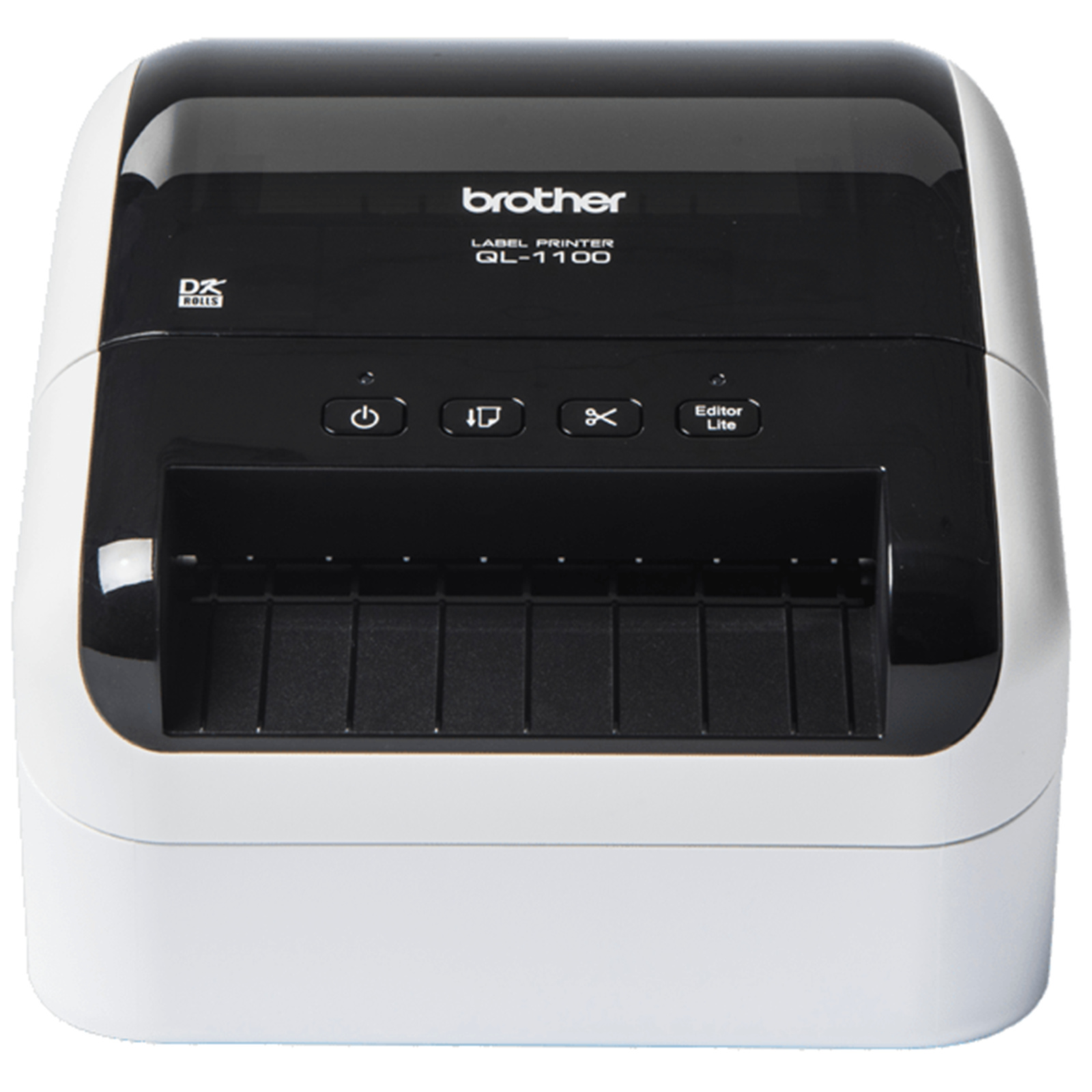
Brother QL-1100 Professional Wide Format Label Printer (QL-1100) Introducing the Brother QL-1100; a professional label printer that offers unrivalled versatility not only in the office but also warehouse postal facilities management and other industries. For developers and systems integrators looking to incorporate label printing as part of their solutions software development kits for Windows and Android offer an easy way to add support for the Brother QL-1100. With print speeds of up to 69 labels/min and the ability to print on labels up to 102mm wide this easy to use wide format label printer ensures youll have anything you need labelled in no time.
Brother QL-1100 Professional Wide Format Label Printer (QL-1100) Introducing the Brother QL-1100; a professional label printer that offers unrivalled versatility not only in the office but also warehouse postal facilities management and other industries. For developers and systems integrators looking to incorporate label printing as part of their solutions software development kits for Windows and Android offer an easy way to add support for the Brother QL-1100. With print speeds of up to 69 labels/min and the ability to print on labels up to 102mm wide this easy to use wide format label printer ensures youll have anything you need labelled in no time.
Brother QL-1100 Professional Wide Format Label Printer (QL-1100) Introducing the Brother QL-1100; a professional label printer that offers unrivalled versatility not only in the office but also warehouse postal facilities management and other industries. For developers and systems integrators looking to incorporate label printing as part of their solutions software development kits for Windows and Android offer an easy way to add support for the Brother QL-1100. With print speeds of up to 69 labels/min and the ability to print on labels up to 102mm wide this easy to use wide format label printer ensures youll have anything you need labelled in no time.
Brother QL-1100 Professional Wide Format Label Printer (QL-1100) Introducing the Brother QL-1100; a professional label printer that offers unrivalled versatility not only in the office but also warehouse postal facilities management and other industries. For developers and systems integrators looking to incorporate label printing as part of their solutions software development kits for Windows and Android offer an easy way to add support for the Brother QL-1100. With print speeds of up to 69 labels/min and the ability to print on labels up to 102mm wide this easy to use wide format label printer ensures youll have anything you need labelled in no time.
Last updated at 08/25/2026 10:22:41
Brother QL-1100 Label Maker, Shipping & Barcode Label Printer, Up to 102mm Wide Labels
Free delivery
Affiliate Disclosure: We may receive a small commission for purchases made through this link at no extra cost to you. This helps support our site. Thank you!
Brother QL1100 Genuine High-Speed Label Printer
Free delivery between 27 Aug – 2 Sept
Brother QL-1100 Wide Format Direct Thermal Label Printer
Delivery $10
Brother QL-1100 Professional Wide Format Label Printer
14-day returns
Brother Ql1100 Label Machine
14-day returns
Brother QL-1100 Wide Format Direct Thermal Label Printer
Delivery $10
Brother QL1100 Label Machine QL-1100
14-day returns
Brother QL-1100 Label Machine
14-day returns
BROTHER QL1100 Label Machine
14-day returns
Brother QL-1100 Professional Wide Format Label Printer
Delivery between 28 Aug – 7 Sept $12
originally posted on brother.co.uk
I'll start with the unboxing, the printer was well packaged. The printer is a good size to fit on my desk or on a shelf in my storage room. It's not heavy so if you need to move it from one room to another it's no problem. I found it easy to set up. All the set up instructions are on line and easy to follow and was all set up in minutes. The quality of both the printer and the labels it prints out are excellent. I found it easy to select the label size and print it off. It is a must have if you send out parcels on a regular basis. The time you save using the label printer is quite surprising. I have to say I can whole heartedly recommend this printer from the quality of the actual machine, the ease of use and the quality of the printing it is all superb.
originally posted on brother-usa.com
This is my first experience in a long time with a Brother thermal printer and I am very happy with it! First off this printer is super easy to setup and use and it prints super fast even at high quality. In my case I have a Windows PC but the setup will be similar for other OS. First off download the drivers and software from the Brother support site and install on your PC. Plug in the printer to PC cable and power on the printer. In my case Windows had an issue with the driver working right away and I had to uninstall the driver and reinstall it. I did not experience the issue on my other Windows systems. That said you can at this point either install the rest of the software, namely P-Touch Editor or you can long press the Edit Lite button and access the storage ... MoreThis is my first experience in a long time with a Brother thermal printer and I am very happy with it! First off this printer is super easy to setup and use and it prints super fast even at high quality. In my case I have a Windows PC but the setup will be similar for other OS. First off download the drivers and software from the Brother support site and install on your PC. Plug in the printer to PC cable and power on the printer. In my case Windows had an issue with the driver working right away and I had to uninstall the driver and reinstall it. I did not experience the issue on my other Windows systems. That said you can at this point either install the rest of the software, namely P-Touch Editor or you can long press the Edit Lite button and access the storage in the printer for P-Touch Lite. The software was super easy to use and I was easily designing my own custom labels including graphics. The print quality was better than I expected a label printer to be able to do and print speed was outstanding! I will definitely be using this printer for A LOT of things including mailing but mainly for labels around the house and shop!
originally posted on brother-usa.com
All my first impressions of this printer were great. I followed all the instructions as I unpacked and connected the printer up with my MacOS 11 laptop. I used the P-Touch editor that comes when downloading everything you would seemingly need to operate the printer. I printed my first few labels with the editor and they all came out pretty great except one that I had to crop down. I then was a little curious about the driver for the printer. I was thinking, "there's no way this prints without a driver, right?". Unfortunately, correct. It was so disappointing to realize this printer does not have a driver to connect with my Mac so I could easily print off labels more than one at a time. I originally really liked the printer, and if you're only printing a label here ... MoreAll my first impressions of this printer were great. I followed all the instructions as I unpacked and connected the printer up with my MacOS 11 laptop. I used the P-Touch editor that comes when downloading everything you would seemingly need to operate the printer. I printed my first few labels with the editor and they all came out pretty great except one that I had to crop down. I then was a little curious about the driver for the printer. I was thinking, "there's no way this prints without a driver, right?". Unfortunately, correct. It was so disappointing to realize this printer does not have a driver to connect with my Mac so I could easily print off labels more than one at a time. I originally really liked the printer, and if you're only printing a label here and there where you don't have multiple orders you want to ship at once, this is great. But, if you want a seamless process with a printer driver instead of a separate app, this isn't the label printer I would recommend.
| Maximum resolution Maximum printing resolution | 300 x 300 DPI |
| Minimum print length | 2.54 cm |
| Maximum label width | 10.4 cm |
| Maximum label length | 3 m |
| Flash memory | 7.8 MB |
Brother QL-1100 Label Maker, Shipping & Barcode Label Printer, Up to 102mm Wide Labels
Free delivery
Affiliate Disclosure: We may receive a small commission for purchases made through this link at no extra cost to you. This helps support our site. Thank you!
Brother QL1100 Genuine High-Speed Label Printer
Free delivery between 27 Aug – 2 Sept
Brother QL-1100 Wide Format Direct Thermal Label Printer
Delivery $10
Brother QL-1100 Professional Wide Format Label Printer
14-day returns
Brother Ql1100 Label Machine
14-day returns
I'll start with the unboxing, the printer was well packaged. The printer is a good size to fit on my desk or on a shelf in my storage room. It's not heavy so if you need to move it from one room to another it's no problem. I found it easy to set up. All the set up instructions are on line and easy to follow and was all set up in minutes. The quality of both the printer and the labels it prints out are excellent. I found it easy to select the label size and print it off. It is a must have if you send out parcels on a regular basis. The time you save using the label printer is quite surprising. I have to say I can whole heartedly recommend this printer from the quality of the actual machine, the ease of use and the quality of the printing it is all superb.
This is my first experience in a long time with a Brother thermal printer and I am very happy with it! First off this printer is super easy to setup and use and it prints super fast even at high quality. In my case I have a Windows PC but the setup will be similar for other OS. First off download the drivers and software from the Brother support site and install on your PC. Plug in the printer to PC cable and power on the printer. In my case Windows had an issue with the driver working right away and I had to uninstall the driver and reinstall it. I did not experience the issue on my other Windows systems. That said you can at this point either install the rest of the software, namely P-Touch Editor or you can long press the Edit Lite button and access the storage ... MoreThis is my first experience in a long time with a Brother thermal printer and I am very happy with it! First off this printer is super easy to setup and use and it prints super fast even at high quality. In my case I have a Windows PC but the setup will be similar for other OS. First off download the drivers and software from the Brother support site and install on your PC. Plug in the printer to PC cable and power on the printer. In my case Windows had an issue with the driver working right away and I had to uninstall the driver and reinstall it. I did not experience the issue on my other Windows systems. That said you can at this point either install the rest of the software, namely P-Touch Editor or you can long press the Edit Lite button and access the storage in the printer for P-Touch Lite. The software was super easy to use and I was easily designing my own custom labels including graphics. The print quality was better than I expected a label printer to be able to do and print speed was outstanding! I will definitely be using this printer for A LOT of things including mailing but mainly for labels around the house and shop!
All my first impressions of this printer were great. I followed all the instructions as I unpacked and connected the printer up with my MacOS 11 laptop. I used the P-Touch editor that comes when downloading everything you would seemingly need to operate the printer. I printed my first few labels with the editor and they all came out pretty great except one that I had to crop down. I then was a little curious about the driver for the printer. I was thinking, "there's no way this prints without a driver, right?". Unfortunately, correct. It was so disappointing to realize this printer does not have a driver to connect with my Mac so I could easily print off labels more than one at a time. I originally really liked the printer, and if you're only printing a label here ... MoreAll my first impressions of this printer were great. I followed all the instructions as I unpacked and connected the printer up with my MacOS 11 laptop. I used the P-Touch editor that comes when downloading everything you would seemingly need to operate the printer. I printed my first few labels with the editor and they all came out pretty great except one that I had to crop down. I then was a little curious about the driver for the printer. I was thinking, "there's no way this prints without a driver, right?". Unfortunately, correct. It was so disappointing to realize this printer does not have a driver to connect with my Mac so I could easily print off labels more than one at a time. I originally really liked the printer, and if you're only printing a label here and there where you don't have multiple orders you want to ship at once, this is great. But, if you want a seamless process with a printer driver instead of a separate app, this isn't the label printer I would recommend.
I bought this label printer to use for shipping products from home. I'm not a frequent shipper but I wanted the simplicity of peel and stick labels when I did decide to send a package out. There is a more expensive model with Wi-Fi functionality, but frankly I found that unnecessary for the price increase. I have this printer connected via USB to a Linux server running CUPS, so I can print to it from any computer in the house; cheaper and just as effective. I mainly use Macs and found there isn't a standard way to cut shipping labels down to the proper size for this printer. Ironically Brother's own support page suggests taking a screenshot of the label and printing that. It doesn't seem to be an exact science; I haven't had issues with it, and the labels produced ... MoreI bought this label printer to use for shipping products from home. I'm not a frequent shipper but I wanted the simplicity of peel and stick labels when I did decide to send a package out. There is a more expensive model with Wi-Fi functionality, but frankly I found that unnecessary for the price increase. I have this printer connected via USB to a Linux server running CUPS, so I can print to it from any computer in the house; cheaper and just as effective. I mainly use Macs and found there isn't a standard way to cut shipping labels down to the proper size for this printer. Ironically Brother's own support page suggests taking a screenshot of the label and printing that. It doesn't seem to be an exact science; I haven't had issues with it, and the labels produced this way look fine. Just a bit funny to me. I did buy a couple other label rolls along with this product, but found out there are actually a couple of sample rolls provided in the package with the printer.
First of all let’s talk about how stylish this label printer looks! It’s black & white and looks so modern and sleek on my desk. It’s a great compact size too that barley takes up any work space. I could carry it to any room I wanted easily whenever I want. The label printer was very simple to set up through WI-Fi, I simply downloaded the driver onto my laptop, connected the label printer with my router and it was ready to print. I wanted to print shipping labels via my courier company website. Which had the option of print via label machine (stated the size of labels). I selected print and within a few seconds my shipping labels were printed and cut to size ready to stick into my parcels! Amazing! This cool little gadget is saving me so much time as before I was ... MoreFirst of all let’s talk about how stylish this label printer looks! It’s black & white and looks so modern and sleek on my desk. It’s a great compact size too that barley takes up any work space. I could carry it to any room I wanted easily whenever I want. The label printer was very simple to set up through WI-Fi, I simply downloaded the driver onto my laptop, connected the label printer with my router and it was ready to print. I wanted to print shipping labels via my courier company website. Which had the option of print via label machine (stated the size of labels). I selected print and within a few seconds my shipping labels were printed and cut to size ready to stick into my parcels! Amazing! This cool little gadget is saving me so much time as before I was printing on paper, cutting to size and cello-taping on the labels. Now I just pull the backing off the sticky label and stuck to parcel..job done! The labels are great quality and stuck down onto the parcel super strongly. I cannot fault this label printer. I really recommend it to anyone needing to print shipping labels regularly.
This label printer is very impressive regarding speed. It prints up to 69 labels per minute! I like the drop in, no fuss label loading rolls. The P-touch Editor Lite (Windows) worked well. You must connect to your pc with a USB cable. You can use this with an Android with a USB On-the-Go cable. That cable is sold separately. It is a nice, small label printer that doesn’t take up much space W: 6.70” x H:5.95” x D:8.75”. It is also very lightweight at 3.79 lbs. I feel it is a great label printer as long as you don’t mind that it is not wireless. Pros: Fast printing, great printing quality, compact, ease of roll installation. Cons: A USB cable is needed.
This thermal printer has been a life safer for our little business. SInce it’s thermal, it only prints in black.It prints fast! You do have to install the drivers onto your computer to use. I visited the Brother website and downloaded them. It wasn’t too complicated. The p-touch editor kinda looks like it’s from the 1990’s. The included graphics and fonts are pretty basic, but fine for simple labeling. On the plus side, you can upload your own images including corporate logos. I created some documents on Canva with basic graphics and downloaded the file, then used it as a picture on the p-touch editor. I was also able to use my screenshot software to save images, then upload it to the p-touch editor to print. Screenshot images aren’t as crisp but it did get the job ... MoreThis thermal printer has been a life safer for our little business. SInce it’s thermal, it only prints in black.It prints fast! You do have to install the drivers onto your computer to use. I visited the Brother website and downloaded them. It wasn’t too complicated. The p-touch editor kinda looks like it’s from the 1990’s. The included graphics and fonts are pretty basic, but fine for simple labeling. On the plus side, you can upload your own images including corporate logos. I created some documents on Canva with basic graphics and downloaded the file, then used it as a picture on the p-touch editor. I was also able to use my screenshot software to save images, then upload it to the p-touch editor to print. Screenshot images aren’t as crisp but it did get the job done. It is nice that it automatically cuts each label to the predetermined length. Brother offers label sizes for every printing need. We have found so many unexpected uses that we have since purchased several other label sizes and I use this for work several times a week.
This is hands down the best printer on the market set up can be a little bit of a pain but once up and running it is amazing the fact it has multiple methods of connectivity makes you online business flourish. One of the best points is that the printer is compatible the amazon FBA labels so it makes preparing products to send to amazon a breeze. Its helped me grow my business. I couldn't recommend it enough. The only downside as I said was the initial connectivity but once you are connected by using the app there should be no other issues. One thing that impressed me was the speed in which it prints the labels if you are stuck for time dealing with lots of orders this is a massive help. Its also easy to print straight from ebay or amazon by using their label buying ... MoreThis is hands down the best printer on the market set up can be a little bit of a pain but once up and running it is amazing the fact it has multiple methods of connectivity makes you online business flourish. One of the best points is that the printer is compatible the amazon FBA labels so it makes preparing products to send to amazon a breeze. Its helped me grow my business. I couldn't recommend it enough. The only downside as I said was the initial connectivity but once you are connected by using the app there should be no other issues. One thing that impressed me was the speed in which it prints the labels if you are stuck for time dealing with lots of orders this is a massive help. Its also easy to print straight from ebay or amazon by using their label buying service.
Full disclosure this is my first label printer and have to say it’s been life changing over the last 3 weeks. I’m forever posting or couriering something to a colleague or friend of shipping out sold products and have always used an inkjet printer with label sheets. What I didn’t realise was how time consuming this was swapping the paper out, making sure I have the right dimensions for the labels etc let alone the amount of waste when things go wrong or when I’m not using a full page of labels and the rest of the sheet going in the bin. Setup was a breeze, I plugged it in, inserted the label roll and with the WPS button on the printer and then pressing the same on the router they were both connected. I downloaded the iprint and label app on my mobile and I was away. ... MoreFull disclosure this is my first label printer and have to say it’s been life changing over the last 3 weeks. I’m forever posting or couriering something to a colleague or friend of shipping out sold products and have always used an inkjet printer with label sheets. What I didn’t realise was how time consuming this was swapping the paper out, making sure I have the right dimensions for the labels etc let alone the amount of waste when things go wrong or when I’m not using a full page of labels and the rest of the sheet going in the bin. Setup was a breeze, I plugged it in, inserted the label roll and with the WPS button on the printer and then pressing the same on the router they were both connected. I downloaded the iprint and label app on my mobile and I was away. The whole process took around 3 minutes. Using the machine daily I’m constantly learning new features, the software suite for the PC is great as you can really customise your labels with ease and saving label templates and my favourite feature by far the machine auto detects the label size so no more guessing and wastage. the continuous label rolls are great for address labels and the larger labels are the perfect size for printing courier labels. Bonus the printers are thermal so there’s no messing about with inks, literally just replace the labels when they run out. Final verdict #Winner, I’ve been converted and don’t think I’d ever go back.
We ship a lot of packages and therefore have to print lots of labels. Being tired of printing labels of the regular printer and taping them to the boxes, we decided to get this Brother QL-1100 label printer and are so glad we did. Out of the box, the unit is very nice, well built and setting it up was very straightforward. The printer accepts many different sizes of labels which is excellent. Best of all, it is very fast and printing labels using this device is so much better compared to my regular printer. With all that being said, we are very pleased with our new Brother label printer which gets a solid 5 stars rating from us.
| Maximum resolution Maximum printing resolution | 300 x 300 DPI |
| Minimum print length | 2.54 cm |
| Maximum label width | 10.4 cm |
| Maximum label length | 3 m |
| Flash memory | 7.8 MB |

