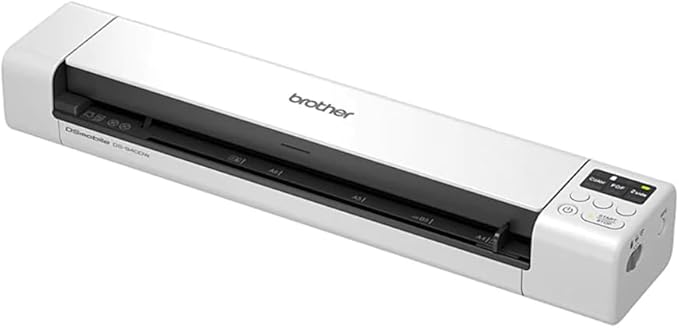
Brother DSmobile DS-940DW Wireless, 2-sided Portable Document Scanner Wireless scan and go with the DSmobile DS-940DW. Versatile and truly portable with built-in rechargeable battery. Staying on top of your paperwork when you are out of the office is simple. The DSmobile DS-940DW is engineered to be truly flexible. Featuring a built-in battery, Wi-Fi and intuitive LCD panel, setup is effortless. Digitising your files whether in the office where space is limited or out on the road is simple. Scan your documents straight to the cloud using Brother's mobile app and easily share your documents with colleagues wherever you are. Your information is kept safe, effortless to find and more convenient to edit. With a unique "U-path" roller system, you are not required to have extra space behind the scanner for the document to feed-through. As the document goes in, it glides over the top of the scanner and is returned to you.
Brother DSmobile DS-940DW Wireless, 2-sided Portable Document Scanner Wireless scan and go with the DSmobile DS-940DW. Versatile and truly portable with built-in rechargeable battery. Staying on top of your paperwork when you are out of the office is simple. The DSmobile DS-940DW is engineered to be truly flexible. Featuring a built-in battery, Wi-Fi and intuitive LCD panel, setup is effortless. Digitising your files whether in the office where space is limited or out on the road is simple. Scan your documents straight to the cloud using Brother's mobile app and easily share your documents with colleagues wherever you are. Your information is kept safe, effortless to find and more convenient to edit. With a unique "U-path" roller system, you are not required to have extra space behind the scanner for the document to feed-through. As the document goes in, it glides over the top of the scanner and is returned to you.
Brother DSmobile DS-940DW Wireless, 2-sided Portable Document Scanner Wireless scan and go with the DSmobile DS-940DW. Versatile and truly portable with built-in rechargeable battery. Staying on top of your paperwork when you are out of the office is simple. The DSmobile DS-940DW is engineered to be truly flexible. Featuring a built-in battery, Wi-Fi and intuitive LCD panel, setup is effortless. Digitising your files whether in the office where space is limited or out on the road is simple. Scan your documents straight to the cloud using Brother's mobile app and easily share your documents with colleagues wherever you are. Your information is kept safe, effortless to find and more convenient to edit. With a unique "U-path" roller system, you are not required to have extra space behind the scanner for the document to feed-through. As the document goes in, it glides over the top of the scanner and is returned to you.
Brother DSmobile DS-940DW Wireless, 2-sided Portable Document Scanner Wireless scan and go with the DSmobile DS-940DW. Versatile and truly portable with built-in rechargeable battery. Staying on top of your paperwork when you are out of the office is simple. The DSmobile DS-940DW is engineered to be truly flexible. Featuring a built-in battery, Wi-Fi and intuitive LCD panel, setup is effortless. Digitising your files whether in the office where space is limited or out on the road is simple. Scan your documents straight to the cloud using Brother's mobile app and easily share your documents with colleagues wherever you are. Your information is kept safe, effortless to find and more convenient to edit. With a unique "U-path" roller system, you are not required to have extra space behind the scanner for the document to feed-through. As the document goes in, it glides over the top of the scanner and is returned to you.
Last updated at 06/23/2026 01:06:49
Brother DS-940DW Wireless A4 Duplex Scanner 15PPM - White
Affiliate Disclosure: We may receive a small commission for purchases made through this link at no extra cost to you. This helps support our site. Thank you!
Brother Ds-940dw Mobile Scanner Double Sided Scan, 7.5ppm, Usb
Delivery $9.95
Affiliate Disclosure: We may receive a small commission for purchases made through this link at no extra cost to you. This helps support our site. Thank you!
Brother Ds-940dw Wireless, Duplex, Portable, Colour, Sheetfeed Scanner
Free delivery
Affiliate Disclosure: We may receive a small commission for purchases made through this link at no extra cost to you. This helps support our site. Thank you!
Ds-940dw Brother Ds940dw Scanner
Free delivery
Affiliate Disclosure: We may receive a small commission for purchases made through this link at no extra cost to you. This helps support our site. Thank you!
Brother DS-940DW A4 Portable Duplex Document Scanner WiFi
Delivery $11.99
Brother DS-940DW Portable Wireless A4 Sheetfed Color Document Scanner+Duplex [MDS-940DW]
Delivery $70
Brother DS-940DW Wireless, Portable 2-Sided (Duplex) A4 Document Scanner
Delivery $13.90
Brother DS-940DW Document Scanner A4 Portable WiFi White
Delivery $17.95
Brother DS940DW Scanner
Delivery $5
Brother DS940DW Scanner
Delivery $60
originally posted on bestbuy.com
There are a LOT of times when an app-based scanner just doesn't cut it. Whether it's lighting or shaky hands from too many coffee meetings, it helps to have a dedicated, wireless scanner that you can have with you. Let's get really clear: the scans from this device are high-quality, color-accurate, and FAST (faster than similar Brother scanner models by a few seconds of processing time). The DS-940DW is about 5 pounds, so not light enough to carry with you in a computer bag daily, but easily able to be brought with you in your car. In terms of form factor, the buttons are pretty clear on the top to switch options (color/b+w, 1 or 2 sided, pdf or jpeg output), along with a power button and a start/stop scan button. Since you can do most of these things via the ... MoreThere are a LOT of times when an app-based scanner just doesn't cut it. Whether it's lighting or shaky hands from too many coffee meetings, it helps to have a dedicated, wireless scanner that you can have with you. Let's get really clear: the scans from this device are high-quality, color-accurate, and FAST (faster than similar Brother scanner models by a few seconds of processing time). The DS-940DW is about 5 pounds, so not light enough to carry with you in a computer bag daily, but easily able to be brought with you in your car. In terms of form factor, the buttons are pretty clear on the top to switch options (color/b+w, 1 or 2 sided, pdf or jpeg output), along with a power button and a start/stop scan button. Since you can do most of these things via the Brother iScan+Print app, you may never use these physical buttons, but the scan-to-SD feature means you're *ultraportable* with no computer required at all - and that's a great thing for places where it's just too risky to take your computer, but you need a scanner. On the side, there's a "scan to" switch that lets you select either SD card, USB connection to computer, or WiFi connection. The slightly-odd thing about setup here: the scanner generates its own WiFi network that you can connect to... it's on by default whenever the "scan to" switch is set to WiFi. The TL;DR version of what I'm about to say: you're gonna need a geek to help you get this set up the way you'll probably want to use it (wirelessly). In order to connect the scanner to your own WiFi network, the included documentation is woefully sub-par (there are a number of hoops to jump through: connecting via USB, installing and updating the Brother software, then turning on the scanner's WiFi connection, then finding the browser admin tool password in the Brother online documentation - because this info isn't on the QuickStart or PDF manuals, then finally connecting the scanner to your wifi... and then shutting off the internal broadcast network). The USB cable included is USB-A, so if your computer is USB-C only, you'll need an adapter for the initial setup, but it does make finding a charger pretty easy. A slight irritation: the scanner is front-load rather than top-load... which is fine if you only have a page or two to scan, but if you have a stack, it's not optimal and requires extra effort to avoid a mess at the top. Because of how the "cover" sticks out, you can't just set it on its back to make it a top-load... this is an odd user experience for something designed to be ultraportable. Overall, the DS-940DW gets 4 out of 5 stars. It's a must-have if you're on the go and need something better than your phone's camera app to scan documents.
originally posted on brother-usa.com
Conceptually this is a great product. It offers USB, SD card, and wireless scanning. However, the Brother DS-940W is infuriating to use. - The bundled application, though it looks pretty, is cumbersome to set up and use. Moreover, it is unusably buggy. With every click and every scan I am prompted multiple times to acknowledge "cannot connect to localhost". - The included cable is comically small such that it can only effectively be used in wireless mode. - In wireless mode, the scan button does not work, forcing you to click on the buggy application to initiate a scan defeating half the point of it being wireless. - The battery is effectively useless. Despite reading the documentation multiple times, I cannot tell if the battery LED is telling me it is charging, ... MoreConceptually this is a great product. It offers USB, SD card, and wireless scanning. However, the Brother DS-940W is infuriating to use. - The bundled application, though it looks pretty, is cumbersome to set up and use. Moreover, it is unusably buggy. With every click and every scan I am prompted multiple times to acknowledge "cannot connect to localhost". - The included cable is comically small such that it can only effectively be used in wireless mode. - In wireless mode, the scan button does not work, forcing you to click on the buggy application to initiate a scan defeating half the point of it being wireless. - The battery is effectively useless. Despite reading the documentation multiple times, I cannot tell if the battery LED is telling me it is charging, needs charging, or is just broken. - If the finicky and fragile sheet feed fails to grasp the first millimeter of paper, it errors out and requires needless cajoling to resume operation. It gets two stars instead of one because it looks nice. If you do not actually have to uses it, it is a nice scanner. It seems like a product that needed another year of testing and development but was sadly released to test on customers instead.
originally posted on brother-usa.com
This scanner was perfect for what I needed. I work for the City and they do not allow you to install software and hardware in their network. You have to have approval from IT which is never allowed. This scanner is fast and quiet. I scanned 14 timesheets in 40 seconds. It can scan in .pdf and .jpeg formats. It scans in black and white or color. You do not need a computer because this scanner can save to a micro SD card, or to a computer via USB or Wifi. The software it came with is not the greatest and the PDF software is like a trial limited version. The instructions are terrible. If you are turning it on, short press the power button for a second. If you are turning it off, long press the power button and hold for at least 6 seconds before you let go. Otherwise it ... MoreThis scanner was perfect for what I needed. I work for the City and they do not allow you to install software and hardware in their network. You have to have approval from IT which is never allowed. This scanner is fast and quiet. I scanned 14 timesheets in 40 seconds. It can scan in .pdf and .jpeg formats. It scans in black and white or color. You do not need a computer because this scanner can save to a micro SD card, or to a computer via USB or Wifi. The software it came with is not the greatest and the PDF software is like a trial limited version. The instructions are terrible. If you are turning it on, short press the power button for a second. If you are turning it off, long press the power button and hold for at least 6 seconds before you let go. Otherwise it will drive you crazy with lights flashing and nothing happening. This scanner doesn't take up very much room on your desk. One thing you cannot do is scan an open book like a flat bed scanner. The page being scanned has to pass through the scanner, not unless you rip the page out of the book. It cannot read a 128 GB card. The card I have in mine is 8GB and is more than enough. You can transfer your files into your computer using the scanner as an external drive. The price is very affordable for the features it has. Do not forget to buy a protective case to protect your investment. I carry this scanner where ever I go.
| Scanning | |
| Black/white scanning colour modes | Grayscale, Monochrome |
| Duplex ADF scan speed (colour, A4) | 30 ipm |
| ADF scan speed (colour, A4) | 15 ppm |
| ADF scan speed (b/w, A4) | 15 ppm |
Brother DS-940DW Wireless A4 Duplex Scanner 15PPM - White
Affiliate Disclosure: We may receive a small commission for purchases made through this link at no extra cost to you. This helps support our site. Thank you!
Brother Ds-940dw Mobile Scanner Double Sided Scan, 7.5ppm, Usb
Delivery $9.95
Affiliate Disclosure: We may receive a small commission for purchases made through this link at no extra cost to you. This helps support our site. Thank you!
Brother Ds-940dw Wireless, Duplex, Portable, Colour, Sheetfeed Scanner
Free delivery
Affiliate Disclosure: We may receive a small commission for purchases made through this link at no extra cost to you. This helps support our site. Thank you!
Ds-940dw Brother Ds940dw Scanner
Free delivery
Affiliate Disclosure: We may receive a small commission for purchases made through this link at no extra cost to you. This helps support our site. Thank you!
Brother DS-940DW A4 Portable Duplex Document Scanner WiFi
Delivery $11.99
There are a LOT of times when an app-based scanner just doesn't cut it. Whether it's lighting or shaky hands from too many coffee meetings, it helps to have a dedicated, wireless scanner that you can have with you. Let's get really clear: the scans from this device are high-quality, color-accurate, and FAST (faster than similar Brother scanner models by a few seconds of processing time). The DS-940DW is about 5 pounds, so not light enough to carry with you in a computer bag daily, but easily able to be brought with you in your car. In terms of form factor, the buttons are pretty clear on the top to switch options (color/b+w, 1 or 2 sided, pdf or jpeg output), along with a power button and a start/stop scan button. Since you can do most of these things via the ... MoreThere are a LOT of times when an app-based scanner just doesn't cut it. Whether it's lighting or shaky hands from too many coffee meetings, it helps to have a dedicated, wireless scanner that you can have with you. Let's get really clear: the scans from this device are high-quality, color-accurate, and FAST (faster than similar Brother scanner models by a few seconds of processing time). The DS-940DW is about 5 pounds, so not light enough to carry with you in a computer bag daily, but easily able to be brought with you in your car. In terms of form factor, the buttons are pretty clear on the top to switch options (color/b+w, 1 or 2 sided, pdf or jpeg output), along with a power button and a start/stop scan button. Since you can do most of these things via the Brother iScan+Print app, you may never use these physical buttons, but the scan-to-SD feature means you're *ultraportable* with no computer required at all - and that's a great thing for places where it's just too risky to take your computer, but you need a scanner. On the side, there's a "scan to" switch that lets you select either SD card, USB connection to computer, or WiFi connection. The slightly-odd thing about setup here: the scanner generates its own WiFi network that you can connect to... it's on by default whenever the "scan to" switch is set to WiFi. The TL;DR version of what I'm about to say: you're gonna need a geek to help you get this set up the way you'll probably want to use it (wirelessly). In order to connect the scanner to your own WiFi network, the included documentation is woefully sub-par (there are a number of hoops to jump through: connecting via USB, installing and updating the Brother software, then turning on the scanner's WiFi connection, then finding the browser admin tool password in the Brother online documentation - because this info isn't on the QuickStart or PDF manuals, then finally connecting the scanner to your wifi... and then shutting off the internal broadcast network). The USB cable included is USB-A, so if your computer is USB-C only, you'll need an adapter for the initial setup, but it does make finding a charger pretty easy. A slight irritation: the scanner is front-load rather than top-load... which is fine if you only have a page or two to scan, but if you have a stack, it's not optimal and requires extra effort to avoid a mess at the top. Because of how the "cover" sticks out, you can't just set it on its back to make it a top-load... this is an odd user experience for something designed to be ultraportable. Overall, the DS-940DW gets 4 out of 5 stars. It's a must-have if you're on the go and need something better than your phone's camera app to scan documents.
Conceptually this is a great product. It offers USB, SD card, and wireless scanning. However, the Brother DS-940W is infuriating to use. - The bundled application, though it looks pretty, is cumbersome to set up and use. Moreover, it is unusably buggy. With every click and every scan I am prompted multiple times to acknowledge "cannot connect to localhost". - The included cable is comically small such that it can only effectively be used in wireless mode. - In wireless mode, the scan button does not work, forcing you to click on the buggy application to initiate a scan defeating half the point of it being wireless. - The battery is effectively useless. Despite reading the documentation multiple times, I cannot tell if the battery LED is telling me it is charging, ... MoreConceptually this is a great product. It offers USB, SD card, and wireless scanning. However, the Brother DS-940W is infuriating to use. - The bundled application, though it looks pretty, is cumbersome to set up and use. Moreover, it is unusably buggy. With every click and every scan I am prompted multiple times to acknowledge "cannot connect to localhost". - The included cable is comically small such that it can only effectively be used in wireless mode. - In wireless mode, the scan button does not work, forcing you to click on the buggy application to initiate a scan defeating half the point of it being wireless. - The battery is effectively useless. Despite reading the documentation multiple times, I cannot tell if the battery LED is telling me it is charging, needs charging, or is just broken. - If the finicky and fragile sheet feed fails to grasp the first millimeter of paper, it errors out and requires needless cajoling to resume operation. It gets two stars instead of one because it looks nice. If you do not actually have to uses it, it is a nice scanner. It seems like a product that needed another year of testing and development but was sadly released to test on customers instead.
This scanner was perfect for what I needed. I work for the City and they do not allow you to install software and hardware in their network. You have to have approval from IT which is never allowed. This scanner is fast and quiet. I scanned 14 timesheets in 40 seconds. It can scan in .pdf and .jpeg formats. It scans in black and white or color. You do not need a computer because this scanner can save to a micro SD card, or to a computer via USB or Wifi. The software it came with is not the greatest and the PDF software is like a trial limited version. The instructions are terrible. If you are turning it on, short press the power button for a second. If you are turning it off, long press the power button and hold for at least 6 seconds before you let go. Otherwise it ... MoreThis scanner was perfect for what I needed. I work for the City and they do not allow you to install software and hardware in their network. You have to have approval from IT which is never allowed. This scanner is fast and quiet. I scanned 14 timesheets in 40 seconds. It can scan in .pdf and .jpeg formats. It scans in black and white or color. You do not need a computer because this scanner can save to a micro SD card, or to a computer via USB or Wifi. The software it came with is not the greatest and the PDF software is like a trial limited version. The instructions are terrible. If you are turning it on, short press the power button for a second. If you are turning it off, long press the power button and hold for at least 6 seconds before you let go. Otherwise it will drive you crazy with lights flashing and nothing happening. This scanner doesn't take up very much room on your desk. One thing you cannot do is scan an open book like a flat bed scanner. The page being scanned has to pass through the scanner, not unless you rip the page out of the book. It cannot read a 128 GB card. The card I have in mine is 8GB and is more than enough. You can transfer your files into your computer using the scanner as an external drive. The price is very affordable for the features it has. Do not forget to buy a protective case to protect your investment. I carry this scanner where ever I go.
I purchased this to replace another scanner of a competing brand. I chose this product since double sided scanning appealed to me. The system is really difficult to set up and is clunky. I am unable to get the buttons on the scanner programmed (yes I followed all the instructions for machine scan settings) and it doesn't easily manage difference size pieces of paper (ie scanning a long skinny receipt without all the correct settings preset will result in a scan with a heap of white space on the page rather than scanning to size). Having to load the iprint program every time I want to scan something is crazy but the button on the scanner does not work and while the scanner will work via iprint when connected, the software constantly says it is unable to connect to ... MoreI purchased this to replace another scanner of a competing brand. I chose this product since double sided scanning appealed to me. The system is really difficult to set up and is clunky. I am unable to get the buttons on the scanner programmed (yes I followed all the instructions for machine scan settings) and it doesn't easily manage difference size pieces of paper (ie scanning a long skinny receipt without all the correct settings preset will result in a scan with a heap of white space on the page rather than scanning to size). Having to load the iprint program every time I want to scan something is crazy but the button on the scanner does not work and while the scanner will work via iprint when connected, the software constantly says it is unable to connect to the scanner and that I need to check the usb cable or the driver. Really disappointed in this purchase and cringe every time I have to try and use it. I did not investigate this purchase enough as I trusted the brother brand name but I won't make that mistake again.
First off - I have only had this for 24 hours and my review is for scanning via USB connection to a PC only. It took a bit of effort to get it connected, but now that I have this connected and working, I am loving this little scanner! Make it SO much easier to scan my documents/receipts than using my Canon flatbed printer/scanner (which I also love, but it's just more of a pain to use when you have a lot of scanning to do). Setup Process: First, you're going to want to go to the Brother website and download the full driver - Brother iPrint & Scan. Next - if your computer does not recognize the scanner with either of the USB ports on the front of your computer (if using a desktop PC), try plugging it in to one of the ports on the back. I *THINK* that there might be ... MoreFirst off - I have only had this for 24 hours and my review is for scanning via USB connection to a PC only. It took a bit of effort to get it connected, but now that I have this connected and working, I am loving this little scanner! Make it SO much easier to scan my documents/receipts than using my Canon flatbed printer/scanner (which I also love, but it's just more of a pain to use when you have a lot of scanning to do). Setup Process: First, you're going to want to go to the Brother website and download the full driver - Brother iPrint & Scan. Next - if your computer does not recognize the scanner with either of the USB ports on the front of your computer (if using a desktop PC), try plugging it in to one of the ports on the back. I *THINK* that there might be an issue of it not recognizing the device if you've ever used the Eject [USB device] utility for any thumb drive you may have previously plugged in to one of the ports on the front. My brand-new computer would NOT recognize this scanner until I plugged it into one of the USB ports in the rear of my tower. Next - Plug in the device to your computer with the USB and allow the battery to fully charge. Make sure the switch on the end of the scanner is set to computer/USB and not card or WiFi/network. When installing the software, just follow the directions and do what it says. After iPrint & Scan is open and installed, click the Machine Scan Settings button and follow the instructions. It needs to connect the device with your software first in order to access the settings. Once it's done that, you can go into the settings and change the defaults - 1/2-sided scan, scan as PDF/JPG/whatever, where the scans are saved, etc. After I set all that up, I just use the 'Start/Stop button on the device and feed the pages one at a time to scan versus using the software. I don't really care how the scans are labeled by default (you can change that), because in my workflow, after I have scanned however many pages I want/need, I select them all (in File Explorer), right-click and select Combine files in Acrobat (I have Acrobat Pro DC). I have not needed to scan to an SD card yet, or over WiFi, but I will refer to some of the other reviews here to set that up. The full user manual is on the Brother website (much easier to navigate than a paper document anyway), here: https://support.brother.com/g/s/id/htmldoc/ads/cv_ds635/use/index.html?c=us&lang=en&prod=ds940dw_us_eu_as#GUID-26D3E6AC-2467-4157-8E61-FDF9AE4D61D3_118#KEY=cable All of this is really not that hard (especially if you're at all technically-savvy), but don't expect this to be Plug and Play. It did give me a headache until I got my computer to recognize it. I just finished scanning a pile of documents that have been cluttering up my space. With this and my online backup service, I can now send them to the shredder, which makes me very happy! Cons: - The cable is too short for my needs. If you want a longer cable, just buy a 3- or 6-foot USB A to Micro B cable - The device does shut off if you're not using it, which will effectively disconnect the device from your computer. Just hit the Start button to re-connect - Does not come with ANY kind of carrying case or sleeve, so you'll need to get one of those if you intend to travel with it Will come back here to edit my review if anything changes and/or after I use it over WiFi or scan to SD card. At the end of the day, this has quickly become one of my favorite purchases ever!
This is the best document scanner I've ever owned, and I've owned several (flatbed and sheet-feed). It does a great job of cleanly feeding each document and auto-straightening. Razor-sharp! But, don't expect much from the "bundled" software. When you install the software package from the Brother support website it gives you the option of downloading and installing other apps like PaperPort. But, PaperPort will only download to 99% before you get a network connection error. Fortunately, I just want images of my documents, so the Brother iPrint & Scan app lets you do just that. And does it very well. As I said, great scanner. Just skip the bells and whistles and stick with the iPrint & Scan app.
I received this product for free from Brother in exchange for my honest opinion/review of the product. When I opened the packaging, I was quite surprised at how small this scanner was (which is a good thing). It has a very nice, sleek design and a very simple but understandable user interface. The product is very capable of being carried around in a laptop bag. SETUPThere is a hardcopy of a quick setup guide that comes with the product, which explains the very basic functions for operating the scanner, but a more in-depth product manual is only available as an online document through the manufacturer`s website. I would prefer to at least have the ability to download a PDF version of the user manual to my computer and/or phone. I first tried using the scanner with my ... MoreI received this product for free from Brother in exchange for my honest opinion/review of the product. When I opened the packaging, I was quite surprised at how small this scanner was (which is a good thing). It has a very nice, sleek design and a very simple but understandable user interface. The product is very capable of being carried around in a laptop bag. SETUPThere is a hardcopy of a quick setup guide that comes with the product, which explains the very basic functions for operating the scanner, but a more in-depth product manual is only available as an online document through the manufacturer`s website. I would prefer to at least have the ability to download a PDF version of the user manual to my computer and/or phone. I first tried using the scanner with my mobile phone connected over WiFi. You must download an app to your mobile phone to interact with the scanner when using this mode. Setting up the mobile connection was fairly straightforward and quick. I next tried using the scanner while directly connected to my computer via the supplied USB cable. You must download a software application to your computer to interact with the scanner in this mode. I had some minor issues with the computer software setup (it initially crashed, then I had to uninstall and reinstall the software). This issue was not related to the scanner itself. I have not had the chance to use the scanner in the external card mode. You need to purchase a separate MicroSD card to use in this mode.USE/SCANSI have been using this scanner for over a week now and so far the scanning has been quick, easy and high quality. You have several different options to choose from before scanning (1 or 2 sided; color or b&w; resolution; etc.) and several other options after scanning (how to send/save scan; file type; etc.). The scan process happens very quickly (a second or two for an 8.5 x 11 sheet). The final product has been very clear and sharp.The products internal battery can be charged when connected to a computer via USB. The product also runs on battery when not plugged in. I have not used it long enough without the plug to determine how long the internal battery lasts. The product appears to shutoff automatically after a certain amount of time of non-use. I`m not sure if there is a setting to change the automatic shutoff time.PROBLEMSI have not really run into any issues with the product except for the computer software installation. If you`re scanning anything larger than an 8.5 x 11, then this product will not work for you. I would recommend this product to anyone looking for mobile scanning capabilities, or even someone looking buy a scanner but wanted to save space.
None of my chargers can charge this scanner. The Anker charger didn't work on this thing. My uninterrupted power supply also can't charge this scanner. The battery only charges when it's connected to the USB port on my Wacom pen display. This is a very frustrating situation. I don't understand why this scanner doesn't work with my chargers when everything else charges just fine. Another annoying thing is the connection. Its physical data port is the same one you can find on one of those old portable hard drives. It's not even a MicroUSB port. So, don't lose the data cable. This thing would be much easier to use if it had a USB C port. The scans all have rows of thin straight lines across the entire scan. The lines aren't visible in darker areas but they can be seen ... MoreNone of my chargers can charge this scanner. The Anker charger didn't work on this thing. My uninterrupted power supply also can't charge this scanner. The battery only charges when it's connected to the USB port on my Wacom pen display. This is a very frustrating situation. I don't understand why this scanner doesn't work with my chargers when everything else charges just fine. Another annoying thing is the connection. Its physical data port is the same one you can find on one of those old portable hard drives. It's not even a MicroUSB port. So, don't lose the data cable. This thing would be much easier to use if it had a USB C port. The scans all have rows of thin straight lines across the entire scan. The lines aren't visible in darker areas but they can be seen in the lighter or white areas on the scan if you zoom in on the scan. As we all know, Brother's drivers are a hit or miss. They might work. They might not work. It depends on your operating system and version. Mine doesn't want to work with my Macbook Pro on wire connection. The only way to access the scanner from my Macbook is to use it in wifi mode. Horrible user experience. The driver can detect the scanner in the scanner selection menu. But, when it comes to actually scan the document, the software suddenly says it cannot detect the scanner. Go back to the scanner selection menu, it can still detect the darn scanner! Why Brother? It's like you've ordered your food at McDonald's. The staff gives you your tray, then take the burger away and tells you they are out of burgers. Why???
So, I am a 61 year old woman who may have the very highest technical know-how, but as a practicing CPA who uses all kinds of software and various machines, I am not a blithering idiot either. I have now made 2 calls to Brother's 1-800 telephone number, both that landed offshore, and have spent at least an hour and a half on the first call with Victor and over an hour on the second call with Anisha. Now, maybe this machine is still so new that they have not adequately trained their tech support on the model. So, what has been my chief complaint and problem. Well, this machine would not connect wirelessly with either my home desktop using Windows 7 Professional and then also with my HP Spectre that has Windows 10 Edge software. In both cases, without remediation by ... MoreSo, I am a 61 year old woman who may have the very highest technical know-how, but as a practicing CPA who uses all kinds of software and various machines, I am not a blithering idiot either. I have now made 2 calls to Brother's 1-800 telephone number, both that landed offshore, and have spent at least an hour and a half on the first call with Victor and over an hour on the second call with Anisha. Now, maybe this machine is still so new that they have not adequately trained their tech support on the model. So, what has been my chief complaint and problem. Well, this machine would not connect wirelessly with either my home desktop using Windows 7 Professional and then also with my HP Spectre that has Windows 10 Edge software. In both cases, without remediation by Anisha either asking higher technical support people for instructions or her reading up on this specific machine, I would still not have been able to set it up wirelessly, which was what my intention was when I first requested this machine. I currently have almost all of my printers and scanners wirelessly connected and why would I want to go backwards at this point. So, I was finally successful with Anisha to get this machine wirelessly connected with my HP Spectre and will try to go back when I have time to try and install it wirelessly to my home desktop. The key factor is that the computers do not recognize this machine's network. In discussing this with Anisha, this machine essentially has its own built-in network and rather then using your existing network that connects to your computer, printers, other scanners, etc., you have to go into your WIFI and then set it up within this machine's own network and use the PASS number that is printed, among other numbers, on the bottom of the machine. When I went through this special network set up, the blue-flashing Wi-fi symbol finally went solid and had the connection to my HP Spectre laptop. Hooray!!! Bottom line, it should not have taken so much to get this wirelessly working with my computer. Physically, it is compact enough to be able to be carried around by the user for portable use, and considering today's conditions with COVID-19, this would be perfect to use by people who are telecommuting or those who would normally go from place to place- this would be a really good, lightweight, compact machine to scan items into your computer for whatever reason you might need to do so. . Afterall, when we request items to try, we have a good sense if this is a product that we want to be able to use in either our everyday personal or professional life. And while we get the product for our honest, written opinion on how it performs..I want to like all the products that I pick to try and always hope that it is very user friendly.
The DS-940DW is a lot faster than the 620 and 720 I owned, but the software for the DS-920DW wastes a lot more time the speed of scanning can make up for it. It allows to add some buttons (called Workflow) to scan to specific locations but for some strange reason, it doesn't have a 'continuous' scanning option, which it has for the direct 'Scan' button. So for multiple pages, you can only use the default 'Scan' button where only the last location is saved. There is also no way to backup/save the configuration. So if you use the scanner on a different computer you have to configure all the workflow buttons again. Therefore the scanner is fast, but super slow to scan many documents because of all the stuffing around with the software.
| Scanning | |
| Black/white scanning colour modes | Grayscale, Monochrome |
| Duplex ADF scan speed (colour, A4) | 30 ipm |
| ADF scan speed (colour, A4) | 15 ppm |
| ADF scan speed (b/w, A4) | 15 ppm |

