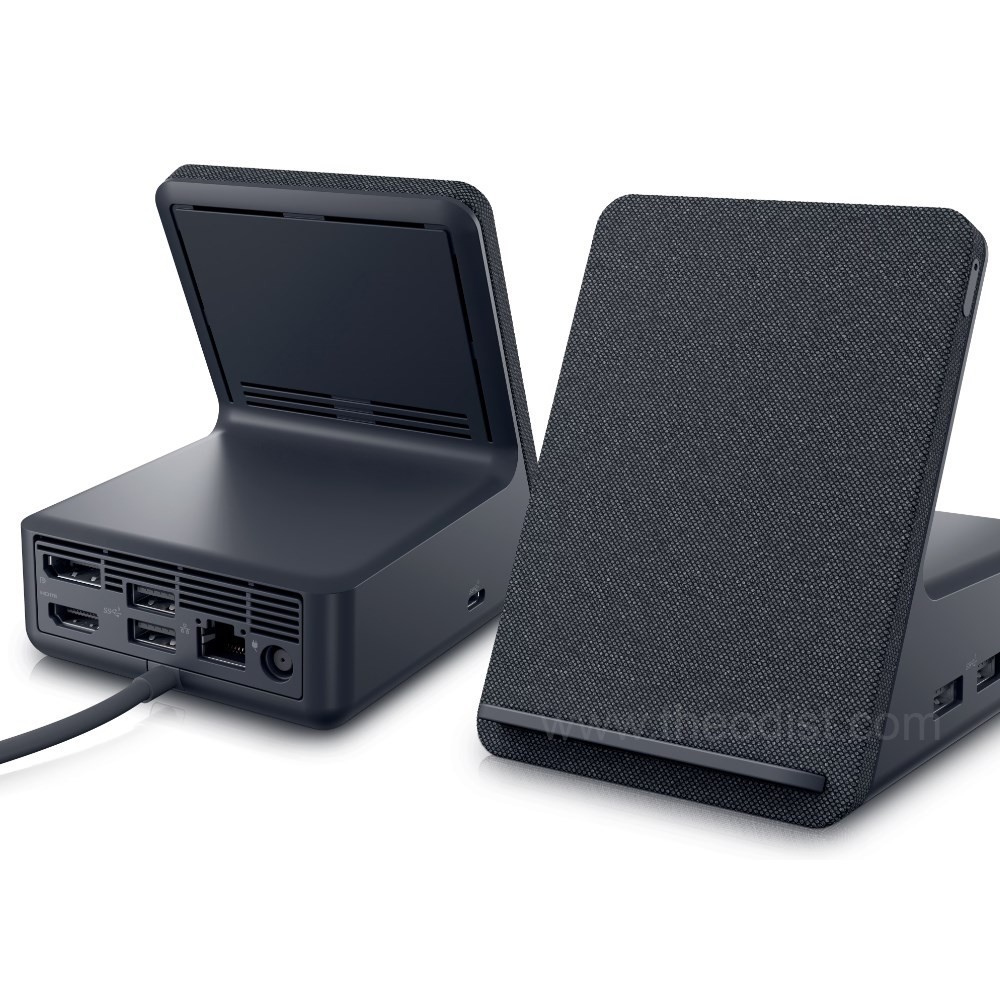
Support for Dell Dual Charge Dock HD22Q | Overview | Dell Australia
Support for Dell Dual Charge Dock HD22Q | Overview | Dell Australia
Support for Dell Dual Charge Dock HD22Q | Overview | Dell Australia
Support for Dell Dual Charge Dock HD22Q | Overview | Dell Australia
Last updated at 08/19/2026 22:21:13
Dell HD22Q Dual 4k Docking Station with Wireless QI Charging Stand, USB-C, 4 x USB A, HDMI and DisplayPort
Free delivery
Affiliate Disclosure: We may receive a small commission for purchases made through this link at no extra cost to you. This helps support our site. Thank you!
Dell HD22Q Dual Charge Docking Station with 90W Qi Wireless Charging Stand (210-BFDS)
Dell HD22Q Dual Charge Docking Station with 90W Qi Wireless Charging Stand (210-BFDS)
30-day returns
Dell HD22Q Dual Charge Docking Station with 90W Qi Wireless Charging Stand (210-BFDS)
30-day returns
Dell Dual Charge Dock - HD22Q - 210-BFDS
Delivery $12.99
Dell HD22Q Dual Charge Docking Station
Affiliate Disclosure: We may receive a small commission for purchases made through this link at no extra cost to you. This helps support our site. Thank you!
Dell Hd22q Usb-c Dock - Dual 4k, 90w Pd, Hdmi 2.1, 4xusb, Rj45 Lan
Delivery $12
Affiliate Disclosure: We may receive a small commission for purchases made through this link at no extra cost to you. This helps support our site. Thank you!
originally posted on dell.com
Running 34" WQHD and response times are good. Runs smoothly when connected to both wide and normal monitors (both at same time as well). Easy setup, excellent iphone charger and nice options to connect other multiple devices. Only 1 usb-c port available and wish there could be at least 2 usb-c with thunderbolt connectivity. Tested with MacOs and Windows. Those who plan to take it for Macbook M1 or latest, this is a nice option. There is ethernet port that can be helpful if the speed matters. I setup mine on desk but it may not be suitable for people who choose to keep it under or hidden. BTW, it looks gorgeous on desk!
originally posted on dell.com
The dock is ideal for my needs. First thing you must be sure of before purchase is that your laptop/device has a thunderbolt controller. If it doesn't you'll only get display and display-audio passed through with no USB connectivity.Assuming you do have a TB controller then this really is ideal. Charges my phone on the desk while allowing fast external display, ethernet, webcam, logitech unifying device passthough with one USB-C connection. It's miles better than the previous DisplayLink USB-C dock I had.
originally posted on dell.com
I purchased the Dell HD22Q for my Dell XPS 13 Plus laptop, and it works great! I love the wireless charging function and the fact that it charges my laptop perfectly.The only downside is it has one display port and one HDMI port. Display ports are getting outdated and I have to use an HDMI--Display cable for my second monitor. Otherwise, I have no other problems with the device.I strongly recommend.
| Processor Count | 16 |
| Wattage | 90 watts |
| Batteries Included | No |
| Batteries Required | No |
| Number of Ports | 6 |
Dell HD22Q Dual 4k Docking Station with Wireless QI Charging Stand, USB-C, 4 x USB A, HDMI and DisplayPort
Free delivery
Affiliate Disclosure: We may receive a small commission for purchases made through this link at no extra cost to you. This helps support our site. Thank you!
Dell HD22Q Dual Charge Docking Station with 90W Qi Wireless Charging Stand (210-BFDS)
Dell HD22Q Dual Charge Docking Station with 90W Qi Wireless Charging Stand (210-BFDS)
30-day returns
Dell HD22Q Dual Charge Docking Station with 90W Qi Wireless Charging Stand (210-BFDS)
30-day returns
Dell Dual Charge Dock - HD22Q - 210-BFDS
Delivery $12.99
Running 34" WQHD and response times are good. Runs smoothly when connected to both wide and normal monitors (both at same time as well). Easy setup, excellent iphone charger and nice options to connect other multiple devices. Only 1 usb-c port available and wish there could be at least 2 usb-c with thunderbolt connectivity. Tested with MacOs and Windows. Those who plan to take it for Macbook M1 or latest, this is a nice option. There is ethernet port that can be helpful if the speed matters. I setup mine on desk but it may not be suitable for people who choose to keep it under or hidden. BTW, it looks gorgeous on desk!
The dock is ideal for my needs. First thing you must be sure of before purchase is that your laptop/device has a thunderbolt controller. If it doesn't you'll only get display and display-audio passed through with no USB connectivity.Assuming you do have a TB controller then this really is ideal. Charges my phone on the desk while allowing fast external display, ethernet, webcam, logitech unifying device passthough with one USB-C connection. It's miles better than the previous DisplayLink USB-C dock I had.
I purchased the Dell HD22Q for my Dell XPS 13 Plus laptop, and it works great! I love the wireless charging function and the fact that it charges my laptop perfectly.The only downside is it has one display port and one HDMI port. Display ports are getting outdated and I have to use an HDMI--Display cable for my second monitor. Otherwise, I have no other problems with the device.I strongly recommend.
I like the concept of the dual use dock and it has enough ports for the peripherals I have. One thing that concerns me is the clicking noise I hear when a phone is not on the charging stand. I've never heard something like it with other Qi/wireless chargers. Hoping it's not an electrical flaw. I unplug the power brick whenever not in use which defeats the purpose of convenience of using USB-C dock.
Since I got a new laptop I had been looking for a replacement to the old style dock I had with my last laptop. I needed one that could handle dual monitors, a scanner, a camera along with a couple USB Bluetooth peripherals. This seems to be the perfect solution with no glitches or power issues. It also supports laptop charging so one less cord to worry about and can also charge your cell phone. So far so good with this little gem!
I love this docking station. I started having issues with my hdmi connection within a few days, so I submitted for support. Support responded immediately and this is my replacement which is working great so far. I understand these products are complex and many issues may arise after setup that are difficult to prevent. I am happy with the product and very satisfied with support. A no-cost replacement and return was processed with minimal hassle.
After trying some cheap Hubs and getting frustrated with their performance, I decided to get this double charger docking station from Dell. All my headaches and frustrations disappeared! Very easy to connect and install the driver for it and all ports work perfectly fine and with a lot of power. I connected several devices simultaneously including my laptop and iPhone, and all worked as expected. Highly recommend the Dell docking station.
The addition for a pseudo phone stand/wireless charger is nice but a total of 10w makes it feel like an after thought when "even" 15w charging is considered "not fast"I also dont get insisting on "not" doing a dual-sided USB-C cable that connects to both the computer and the docking, this made cable replacement hard should the cable broke, and yes thats a real possibility, I have seen my fair share of broken WD15s.Lastly, it's a Dell branded dock, the least you can do is support the Dell-proprietary 130w charging standard, my precision 5470 and XPS 17 cant charge at full speed. Makes purchasing a Dell docking along with Dell computer a complete moot point.
This dock does not reliably connect. Sometimes I have to restart my laptop and/or plug/unplug several times before it recognizes the 2 external monitors, although it will recognize the keyboard and mouse. Very strange. Also, it won't put out enough power for my Precision and if I plug in the regular power supply, I'll get an error that reads "Two docks cannot be connected at once." And finally, I wish I had read other reviews more carefully, because I agree that it makes NO sense to have a Display Port and only 1 HDMI (who uses display port anymore?!?). It should have 2 HDMI ports. Very disappointed.
This is a little powerhouse and perhaps the best overall docking hub I have encountered. I use it for my home office. Its power delivery is wonderful and all of the available ports provide a convenience unmatched by competitor products. Connection to my laptop and displays is flawless. No unplugging and re-plugging in I've had to do with other docks. I did some searching around when looking for a home dock and so very happy I chose this one. The fast phone charging option is remarkable! If you are looking for a docking hub - get this one. You'll thank me later.
| Processor Count | 16 |
| Wattage | 90 watts |
| Batteries Included | No |
| Batteries Required | No |
| Number of Ports | 6 |

