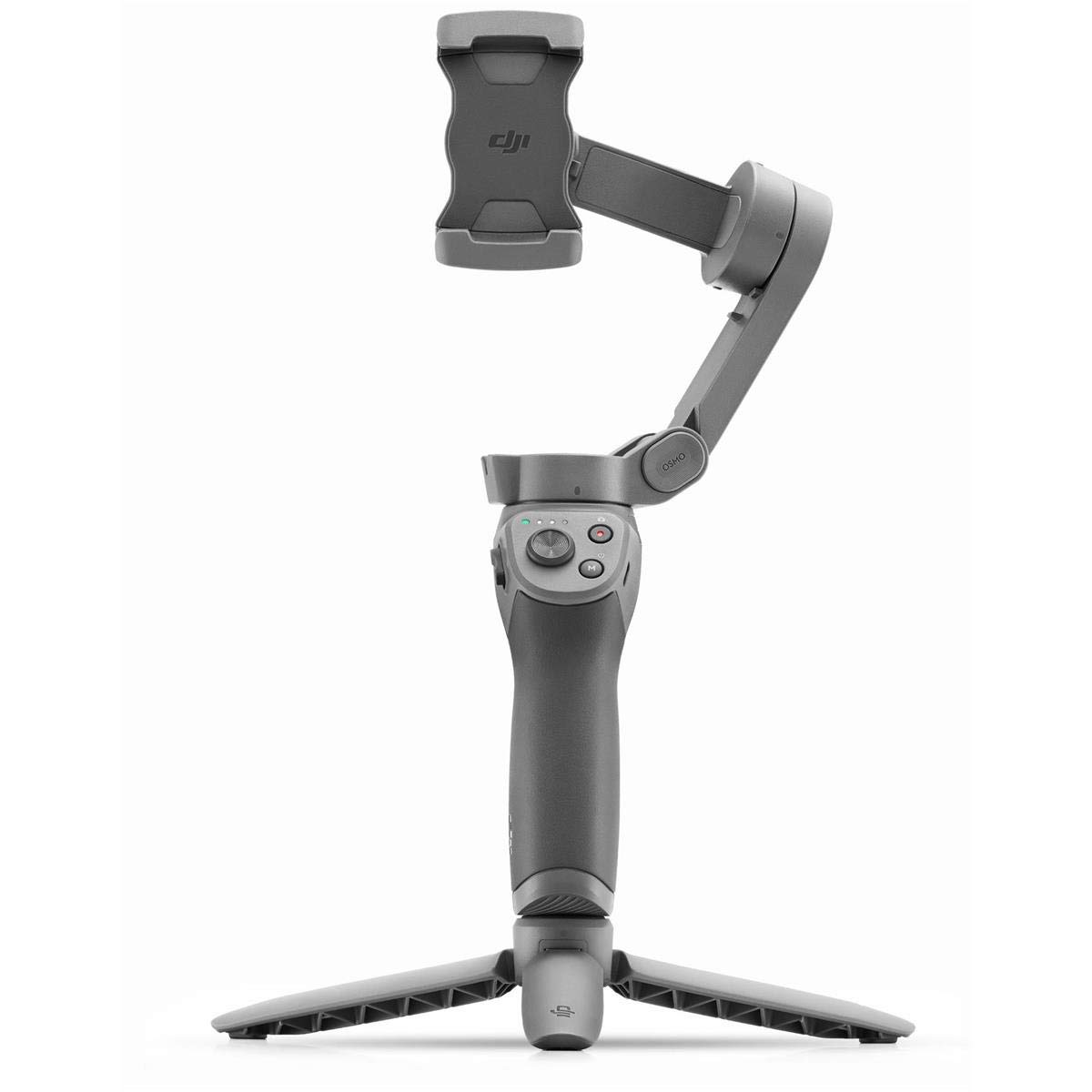
Eliminate Shake With a 3-axis gimbal that effectively reduces shaky footage, Osmo Mobile 3 delivers a super-smooth, stabilized image. A lightweight, ultra-responsive design reacts to your movements in real time, letting you focus more on the moment at hand. Your Story, Your Moment From the extraordinary to the everyday, share your unique moment easily and creatively with Story mode. One-Tap Templates Story mode provides multiple templates that transform your footage in seconds by automatically adding movement, music, and other effects for a polished result. Edit & Share Quickly After customizing your video with a variety of music templates, transition effects, and filters, share your work easily on social media and video platforms. Hyperlapse Hype The powerful combination of electronic image stabilization (EIS) and gimbal stabilization is perfect for shooting Hyperlapse videos. Enable ActiveTrack 3.0 for a truly unique Hyperlapse creation that tracks your subject while recording. Creative Shooting Modes Panorama Capture entire scenes with automatic 33 and 180 panoramas. Timelapse Condense time and movement for stunning results. Slow Motion Record every detail of movements you would otherwise miss. Single-Handed Control Convenient buttons and intuitive functions make Osmo Mobile 3 easy to use with just one hand, providing more versatility and freedom of movement.
Eliminate Shake With a 3-axis gimbal that effectively reduces shaky footage, Osmo Mobile 3 delivers a super-smooth, stabilized image. A lightweight, ultra-responsive design reacts to your movements in real time, letting you focus more on the moment at hand. Your Story, Your Moment From the extraordinary to the everyday, share your unique moment easily and creatively with Story mode. One-Tap Templates Story mode provides multiple templates that transform your footage in seconds by automatically adding movement, music, and other effects for a polished result. Edit & Share Quickly After customizing your video with a variety of music templates, transition effects, and filters, share your work easily on social media and video platforms. Hyperlapse Hype The powerful combination of electronic image stabilization (EIS) and gimbal stabilization is perfect for shooting Hyperlapse videos. Enable ActiveTrack 3.0 for a truly unique Hyperlapse creation that tracks your subject while recording. Creative Shooting Modes Panorama Capture entire scenes with automatic 33 and 180 panoramas. Timelapse Condense time and movement for stunning results. Slow Motion Record every detail of movements you would otherwise miss. Single-Handed Control Convenient buttons and intuitive functions make Osmo Mobile 3 easy to use with just one hand, providing more versatility and freedom of movement.
Eliminate Shake With a 3-axis gimbal that effectively reduces shaky footage, Osmo Mobile 3 delivers a super-smooth, stabilized image. A lightweight, ultra-responsive design reacts to your movements in real time, letting you focus more on the moment at hand. Your Story, Your Moment From the extraordinary to the everyday, share your unique moment easily and creatively with Story mode. One-Tap Templates Story mode provides multiple templates that transform your footage in seconds by automatically adding movement, music, and other effects for a polished result. Edit & Share Quickly After customizing your video with a variety of music templates, transition effects, and filters, share your work easily on social media and video platforms. Hyperlapse Hype The powerful combination of electronic image stabilization (EIS) and gimbal stabilization is perfect for shooting Hyperlapse videos. Enable ActiveTrack 3.0 for a truly unique Hyperlapse creation that tracks your subject while recording. Creative Shooting Modes Panorama Capture entire scenes with automatic 33 and 180 panoramas. Timelapse Condense time and movement for stunning results. Slow Motion Record every detail of movements you would otherwise miss. Single-Handed Control Convenient buttons and intuitive functions make Osmo Mobile 3 easy to use with just one hand, providing more versatility and freedom of movement.
Eliminate Shake With a 3-axis gimbal that effectively reduces shaky footage, Osmo Mobile 3 delivers a super-smooth, stabilized image. A lightweight, ultra-responsive design reacts to your movements in real time, letting you focus more on the moment at hand. Your Story, Your Moment From the extraordinary to the everyday, share your unique moment easily and creatively with Story mode. One-Tap Templates Story mode provides multiple templates that transform your footage in seconds by automatically adding movement, music, and other effects for a polished result. Edit & Share Quickly After customizing your video with a variety of music templates, transition effects, and filters, share your work easily on social media and video platforms. Hyperlapse Hype The powerful combination of electronic image stabilization (EIS) and gimbal stabilization is perfect for shooting Hyperlapse videos. Enable ActiveTrack 3.0 for a truly unique Hyperlapse creation that tracks your subject while recording. Creative Shooting Modes Panorama Capture entire scenes with automatic 33 and 180 panoramas. Timelapse Condense time and movement for stunning results. Slow Motion Record every detail of movements you would otherwise miss. Single-Handed Control Convenient buttons and intuitive functions make Osmo Mobile 3 easy to use with just one hand, providing more versatility and freedom of movement.
Last updated at 08/27/2026 19:38:39
Dji Osmo Mobile 3 Grey Gimbal - Camera
Delivery $20.70
Dji Osmo Mobile 3 Gimbal Om3 Green Gimbal - Camera
Delivery $20
Dji Osmo Mobile 3 Gimbal Om3 For Smartphone Stabilizer
Delivery $8.32
Affiliate Disclosure: We may receive a small commission for purchases made through this link at no extra cost to you. This helps support our site. Thank you!
originally posted on ivd-store.com
First off, guys let me tell you one negative feedback about the seller: the MRP for this item is 7990 and the seller keeps selling this for over 8200 which is illegal. I have notified the authorities at DJI Drone Cameras for this however I still see the same seller selling this for price more than the MRP. Coming to the product itself, dji has been fairly renowned brand when it comes to videography. Their drones and action cams are some of the best in the market. The Osmo mobile 3 (though now replaced by the highly anticipated osmo mobile 5) consistently performs well. I have a fairly hefty phone (212g) and the gimbal always takes around 4-5 secs when turned on to self stabilize. Would have been great if there was a memory function where it remembers the equilibrium ... MoreFirst off, guys let me tell you one negative feedback about the seller: the MRP for this item is 7990 and the seller keeps selling this for over 8200 which is illegal. I have notified the authorities at DJI Drone Cameras for this however I still see the same seller selling this for price more than the MRP. Coming to the product itself, dji has been fairly renowned brand when it comes to videography. Their drones and action cams are some of the best in the market. The Osmo mobile 3 (though now replaced by the highly anticipated osmo mobile 5) consistently performs well. I have a fairly hefty phone (212g) and the gimbal always takes around 4-5 secs when turned on to self stabilize. Would have been great if there was a memory function where it remembers the equilibrium of the last used device. Haven't used the gimbal for over an hour continuously so can't comment on the battery life. However, its foldable and portable. Don't go for the combo pack as third party tripods are available at a cheaper price that what dji is selling. Overall, I am happy with the gimbal, though thoroughly disappointed with the seller and DJI Drone Cameras for doing such unscrupulous business with the inflated pricetag.
originally posted on ivd-store.com
I'll get that bad stuff about this outta the way first. The gimbal is largely incompatible with late model Android phones. I own a Samsung Galaxy Note 10+ I can't use apps like FiLMiC Pro with it, because DJI are... well, they're DJI. Though I "can" use DJI's own app on my phone with this gimbal. But, the app doesn't allow full access to my phone's cameras manual controls. The gimbal's stability is really good... BUT! There's a big BUT here. Filming close-ups macros either may be asking too much of the gimbal's stability or its software isn't quite there yet. Either way, doing close-up videos is where the gimbal gets a little janky the shots aren't as stable as what they could be. IE I can tell when the gimbal begins to correct for orientation changes in the ... MoreI'll get that bad stuff about this outta the way first. The gimbal is largely incompatible with late model Android phones. I own a Samsung Galaxy Note 10+ I can't use apps like FiLMiC Pro with it, because DJI are... well, they're DJI. Though I "can" use DJI's own app on my phone with this gimbal. But, the app doesn't allow full access to my phone's cameras manual controls. The gimbal's stability is really good... BUT! There's a big BUT here. Filming close-ups macros either may be asking too much of the gimbal's stability or its software isn't quite there yet. Either way, doing close-up videos is where the gimbal gets a little janky the shots aren't as stable as what they could be. IE I can tell when the gimbal begins to correct for orientation changes in the footage. But, mid to long-range shots, that instability is unnoticeable in the footage that's probably what DJI have set this gimbal up for. If I at the very least had access to the gimbal's PID gain settings, I'd tighten them up a little more. But, that's me (I do software engineering).Now, the good stuff...Standalone, the gimbal works really well it makes a world of difference in my videos in terms of stability. It allows me to get professional level cinematic footage, that even my phone's own built-in stability will never be able to do. I like the fact that the gimbal has its own hard shell case. THIS is a necessary accessory for me, as I live in an area where six months' worth of dust falls on everything within the space of 24 hours... that's no mark of exaggeration either. So, the case protects the gimbal from that dust very well. That's pretty much it.
originally posted on ivd-store.com
I was looking to buy a smartphone gimbal to shoot YouTube videos for quite a while. I was thinking of buying DJI Osmo Mobile 2 or Zhiyun Smooth Q or Smooth 4. But during DJI Drone Cameras diwali sale I got DJI Osmo Mobile 3 Grey Handheld Smartphone Gimbal for about Rs. 6800 which is the cheapest you could get. The built of the gimbal is very good and compact. It comes with a carry bag instead of a carrying case that you get along with most other gimbals. The gimbal is foldable and takes up very little space when folded which is a big advantage. The DJI Osmo Mobile 3 has a zoom button side, a button on bach, record button, mode button, and a joystick. There is a USB type C port for charging the gimbal and a type A cable for charging the phone while using the gimbal. ... MoreI was looking to buy a smartphone gimbal to shoot YouTube videos for quite a while. I was thinking of buying DJI Osmo Mobile 2 or Zhiyun Smooth Q or Smooth 4. But during DJI Drone Cameras diwali sale I got DJI Osmo Mobile 3 Grey Handheld Smartphone Gimbal for about Rs. 6800 which is the cheapest you could get. The built of the gimbal is very good and compact. It comes with a carry bag instead of a carrying case that you get along with most other gimbals. The gimbal is foldable and takes up very little space when folded which is a big advantage. The DJI Osmo Mobile 3 has a zoom button side, a button on bach, record button, mode button, and a joystick. There is a USB type C port for charging the gimbal and a type A cable for charging the phone while using the gimbal. The setup process took a while for me to get used to it. I had to see a few YouTube videos to see how to stabilize the gimbal with the phone attached. Finally, I got a position on my phone which is perfect for stabilization. I had to install DJI Mimo app to make it working and after the initial connection with Bluetooth, the app updated with the firmware of the gimbal which is great. Starting the connection and stabilization of the phone with the gimbal is a tedious process and it still takes me 5-10 minuted to get the proper connection between the app and the gimbal. I do not know if it is an issue with the gimbal or I am doing something wrong. Once started, the stabilization works very well but I would have preferred choosing the speed of the gimbal for rotation. For time being I am very happy with DJI Osmo Mobile 3 and I will update this review as I order more items in the future.
| Model year | 2019 |
| Compatible Devices | Cellphone |
| Mounting Hardware | Camera Kit |
| Has image stabilisation | Yes |
| Voltage | 7.2 Volts |
Dji Osmo Mobile 3 Grey Gimbal - Camera
Delivery $20.70
Dji Osmo Mobile 3 Gimbal Om3 Green Gimbal - Camera
Delivery $20
Dji Osmo Mobile 3 Gimbal Om3 For Smartphone Stabilizer
Delivery $8.32
Affiliate Disclosure: We may receive a small commission for purchases made through this link at no extra cost to you. This helps support our site. Thank you!
First off, guys let me tell you one negative feedback about the seller: the MRP for this item is 7990 and the seller keeps selling this for over 8200 which is illegal. I have notified the authorities at DJI Drone Cameras for this however I still see the same seller selling this for price more than the MRP. Coming to the product itself, dji has been fairly renowned brand when it comes to videography. Their drones and action cams are some of the best in the market. The Osmo mobile 3 (though now replaced by the highly anticipated osmo mobile 5) consistently performs well. I have a fairly hefty phone (212g) and the gimbal always takes around 4-5 secs when turned on to self stabilize. Would have been great if there was a memory function where it remembers the equilibrium ... MoreFirst off, guys let me tell you one negative feedback about the seller: the MRP for this item is 7990 and the seller keeps selling this for over 8200 which is illegal. I have notified the authorities at DJI Drone Cameras for this however I still see the same seller selling this for price more than the MRP. Coming to the product itself, dji has been fairly renowned brand when it comes to videography. Their drones and action cams are some of the best in the market. The Osmo mobile 3 (though now replaced by the highly anticipated osmo mobile 5) consistently performs well. I have a fairly hefty phone (212g) and the gimbal always takes around 4-5 secs when turned on to self stabilize. Would have been great if there was a memory function where it remembers the equilibrium of the last used device. Haven't used the gimbal for over an hour continuously so can't comment on the battery life. However, its foldable and portable. Don't go for the combo pack as third party tripods are available at a cheaper price that what dji is selling. Overall, I am happy with the gimbal, though thoroughly disappointed with the seller and DJI Drone Cameras for doing such unscrupulous business with the inflated pricetag.
I'll get that bad stuff about this outta the way first. The gimbal is largely incompatible with late model Android phones. I own a Samsung Galaxy Note 10+ I can't use apps like FiLMiC Pro with it, because DJI are... well, they're DJI. Though I "can" use DJI's own app on my phone with this gimbal. But, the app doesn't allow full access to my phone's cameras manual controls. The gimbal's stability is really good... BUT! There's a big BUT here. Filming close-ups macros either may be asking too much of the gimbal's stability or its software isn't quite there yet. Either way, doing close-up videos is where the gimbal gets a little janky the shots aren't as stable as what they could be. IE I can tell when the gimbal begins to correct for orientation changes in the ... MoreI'll get that bad stuff about this outta the way first. The gimbal is largely incompatible with late model Android phones. I own a Samsung Galaxy Note 10+ I can't use apps like FiLMiC Pro with it, because DJI are... well, they're DJI. Though I "can" use DJI's own app on my phone with this gimbal. But, the app doesn't allow full access to my phone's cameras manual controls. The gimbal's stability is really good... BUT! There's a big BUT here. Filming close-ups macros either may be asking too much of the gimbal's stability or its software isn't quite there yet. Either way, doing close-up videos is where the gimbal gets a little janky the shots aren't as stable as what they could be. IE I can tell when the gimbal begins to correct for orientation changes in the footage. But, mid to long-range shots, that instability is unnoticeable in the footage that's probably what DJI have set this gimbal up for. If I at the very least had access to the gimbal's PID gain settings, I'd tighten them up a little more. But, that's me (I do software engineering).Now, the good stuff...Standalone, the gimbal works really well it makes a world of difference in my videos in terms of stability. It allows me to get professional level cinematic footage, that even my phone's own built-in stability will never be able to do. I like the fact that the gimbal has its own hard shell case. THIS is a necessary accessory for me, as I live in an area where six months' worth of dust falls on everything within the space of 24 hours... that's no mark of exaggeration either. So, the case protects the gimbal from that dust very well. That's pretty much it.
I was looking to buy a smartphone gimbal to shoot YouTube videos for quite a while. I was thinking of buying DJI Osmo Mobile 2 or Zhiyun Smooth Q or Smooth 4. But during DJI Drone Cameras diwali sale I got DJI Osmo Mobile 3 Grey Handheld Smartphone Gimbal for about Rs. 6800 which is the cheapest you could get. The built of the gimbal is very good and compact. It comes with a carry bag instead of a carrying case that you get along with most other gimbals. The gimbal is foldable and takes up very little space when folded which is a big advantage. The DJI Osmo Mobile 3 has a zoom button side, a button on bach, record button, mode button, and a joystick. There is a USB type C port for charging the gimbal and a type A cable for charging the phone while using the gimbal. ... MoreI was looking to buy a smartphone gimbal to shoot YouTube videos for quite a while. I was thinking of buying DJI Osmo Mobile 2 or Zhiyun Smooth Q or Smooth 4. But during DJI Drone Cameras diwali sale I got DJI Osmo Mobile 3 Grey Handheld Smartphone Gimbal for about Rs. 6800 which is the cheapest you could get. The built of the gimbal is very good and compact. It comes with a carry bag instead of a carrying case that you get along with most other gimbals. The gimbal is foldable and takes up very little space when folded which is a big advantage. The DJI Osmo Mobile 3 has a zoom button side, a button on bach, record button, mode button, and a joystick. There is a USB type C port for charging the gimbal and a type A cable for charging the phone while using the gimbal. The setup process took a while for me to get used to it. I had to see a few YouTube videos to see how to stabilize the gimbal with the phone attached. Finally, I got a position on my phone which is perfect for stabilization. I had to install DJI Mimo app to make it working and after the initial connection with Bluetooth, the app updated with the firmware of the gimbal which is great. Starting the connection and stabilization of the phone with the gimbal is a tedious process and it still takes me 5-10 minuted to get the proper connection between the app and the gimbal. I do not know if it is an issue with the gimbal or I am doing something wrong. Once started, the stabilization works very well but I would have preferred choosing the speed of the gimbal for rotation. For time being I am very happy with DJI Osmo Mobile 3 and I will update this review as I order more items in the future.
This is a very good, stable gimbal that's easy to set up and use with great features and battery life. The only problem is phone compatibility so please check first on the comprehensive list on the DJI website. The same goes for the later models too. I bought it in 2020 for my Samsung S10 Lite but it wasn't compatible. I checked the list and it listed S10 so I assumed it would be fine but as the phone S10 Lite has inbuilt optical stabilisation that the standard S10 doesn't the phone and gimbal fight each other and the gimbal makes continuous slow circles. Please make sure your actual model is listed as variants aren't always compatible. Sadly I had to return this, although I have recently changed my phone and now have the latest model of this gimbal. This is an ... MoreThis is a very good, stable gimbal that's easy to set up and use with great features and battery life. The only problem is phone compatibility so please check first on the comprehensive list on the DJI website. The same goes for the later models too. I bought it in 2020 for my Samsung S10 Lite but it wasn't compatible. I checked the list and it listed S10 so I assumed it would be fine but as the phone S10 Lite has inbuilt optical stabilisation that the standard S10 doesn't the phone and gimbal fight each other and the gimbal makes continuous slow circles. Please make sure your actual model is listed as variants aren't always compatible. Sadly I had to return this, although I have recently changed my phone and now have the latest model of this gimbal. This is an excellent gimbal at a great price, sadly people criticise it because they don't check compatibility which is their fault and not that of DJI or the gimbal.
For everyone asking about their larger phones. I would not recommend this for anything larger the maybe a galaxy s8 phone. Especially if you use a bulker case, that being said, dji just launched the dji om4 which offers multiple magnetic solutions for larger phones. Definitely glad i held off and waited to pick that one up so I can use my case at the same timeI enjoyed using the gimbal on the occassions that i had a chance to use it. I should have done more research on the gimbal itself before purchasing it as my Note 10+ was too large to use with the case i had on it. I did switch to a otterbox commuter series case that seemed to sort of, ish, fit, but i wouldnt recommend it. Considering the phone didnt fit exactly with the case, it did fit nicely in the phone ... MoreFor everyone asking about their larger phones. I would not recommend this for anything larger the maybe a galaxy s8 phone. Especially if you use a bulker case, that being said, dji just launched the dji om4 which offers multiple magnetic solutions for larger phones. Definitely glad i held off and waited to pick that one up so I can use my case at the same timeI enjoyed using the gimbal on the occassions that i had a chance to use it. I should have done more research on the gimbal itself before purchasing it as my Note 10+ was too large to use with the case i had on it. I did switch to a otterbox commuter series case that seemed to sort of, ish, fit, but i wouldnt recommend it. Considering the phone didnt fit exactly with the case, it did fit nicely in the phone holder of the gimbal, very secure, i wasn't horribly worried about it falling out when using it in a controlled environment, but i was planning this more for family trips and conventions/ drunk vacations/ the gf likes to make tiktok videos and i wouldn't trust my phone in a more action packed setting with out a case on it in the rare situation something happens (learned this the hard way many times)The gimbal was able to balance my phone out very easily once i was more accustomed to the device and the software. At first the gimbal did show that it was connected but in app it showed disconnected in one screen and connected in another, this lead to some initial frustration on my end as nothing was working and i thought my phone was simply incompatible. After an unpairing and and uninstall/reinstall i was able to get everything up and running and i have to say i was impressed with what it was able to do and its ease of use. I'm excited to see what Osmo has instore for the next iteration that will, undoubtedly, handle the larger phone sizes now out there with greater ease.
So by now you know I film truck and tractor pulling for a living and I and number one in America at it on YouTube and number 2 in overall across all social media platforms. This device boosted up my closeup game, interactive with participants, and interviewing the general public. It is unbelievably smooth. The footage is incredible and saves directly to your device. The subject tracking is amazing!The only downside to this device is the sideways turning. You have to turn the handle. Using the toggle switch is extremely slow. You will miss shots. Up, down, tracking is all good. But the side scrolling is brutal. DJI makes killer products and the App support on this makes it feel every bit as professional right out of the box as their other products.
I will need to come back and update this later when I'm six months in and have more experience with this device, but considering the amount of varying info here and on the web in general about the use of an external mic with an Android phone, I figured I'd weigh in. At present, I can only report on using this device and the Mini app with a Pixel 4a(I have a couple other Pixels around here and will report back if I can get the proper adapters to test them).But I can confirm that an external mic plugged into my Pixel 4a is absolutely used as the sound source in the DJI Mimo app. There are no specific settings in the app, it is just picked up by default when the mic is plugged into the 4a, which for the record sports a standard 3.5mm 'mini' audio jack. It is absolutely ... MoreI will need to come back and update this later when I'm six months in and have more experience with this device, but considering the amount of varying info here and on the web in general about the use of an external mic with an Android phone, I figured I'd weigh in. At present, I can only report on using this device and the Mini app with a Pixel 4a(I have a couple other Pixels around here and will report back if I can get the proper adapters to test them).But I can confirm that an external mic plugged into my Pixel 4a is absolutely used as the sound source in the DJI Mimo app. There are no specific settings in the app, it is just picked up by default when the mic is plugged into the 4a, which for the record sports a standard 3.5mm 'mini' audio jack. It is absolutely necessary that the jack that plugs in be TRRS on the phone side - so TRS to TRRS is fine. I will note that the balance on the Mobile 3 is rather delicate and it doesn't tolerate much variation before 'flopping' into a self protective position, so whether you add a cold shoe mount to the Mobile 3's base or a clamp around the handle, you are going to want as light a cable connecting mic to phone as possible that accomodate the Mobile 3's full range, for where the input on the phone happens to be for both landscape and portrait modes, if you plan to use both. This is likely going to be somewhere around 14-16", although this might differ for your setup. You can expect this to be a 'fussy' situation, no matter what phone you are using, but it is possible. Also, I'd like to clarify because I've seen it misrepresented elsewhere - the Mimo app for Android, at least as of Dec 2020, supports 4k resolution at a max frame rate of 30fps, and 1080 and 720p resolutions at a max frame rate of 60fps. Again, this all I have tested and can only confirm for use with the Pixel 4a. Considering that it's not even listed as one of the officially supported phone models, I think that's pretty good. And by and large, the app functions well for all advertised features. I have had crashes in story mode when stitching *specifically* with the 'fashion' template and no others, which is weird but has been consistent. In any case I am not particularly interested in story mode. As for a more substantive review, time will tell. Clearly I am pushing the limits of what the Mobile 3 was designed for - the top end mechanically and the bare minimum when it comes to memory and processing power, but it is absolutely doing everything I hoped it would at the moment, and it is my sincere wish that you should all be so lucky.
This device is absolutely amazing! The stabilization that it provides is stunning for a 3-axis gimbal. It has and continues to work flawlessly. The only word of caution is with their application. They provide a compatibility list on their website and THEY ARE SERIOUS ABOUT THAT LIST. If you're exact phone brand and model isn't on the list, it's highly likely their DJI Mimo app will NOT work on your phone. What this means is that you WON'T be able to use their cool app video features, like automatic subject tracking. It also means you won't be able to use some of the buttons on the gimbal that are designed to work specifically with their app only. What you CAN do is still use the gimbal with any other video recording and editing app you like. Other apps just won't ... MoreThis device is absolutely amazing! The stabilization that it provides is stunning for a 3-axis gimbal. It has and continues to work flawlessly. The only word of caution is with their application. They provide a compatibility list on their website and THEY ARE SERIOUS ABOUT THAT LIST. If you're exact phone brand and model isn't on the list, it's highly likely their DJI Mimo app will NOT work on your phone. What this means is that you WON'T be able to use their cool app video features, like automatic subject tracking. It also means you won't be able to use some of the buttons on the gimbal that are designed to work specifically with their app only. What you CAN do is still use the gimbal with any other video recording and editing app you like. Other apps just won't have a Bluetooth connection to some of the gimbal buttons. You will still be able to use the power button (which is also used to switch horizontal and vertical orientation) as well as the "joystick" button to tilt the phone up, down, left, and right. UPDATE 5/8/2021This device was working perfectly with my Google Pixel 3A XL, including the DJI MIMO app. Then I tried to do a firmware update that DJI pushed. The update failed and the device became completely useless. I was very angry. I contacted DJI support and much to my amazement, they pointed me to a place on their site to fill in a repair request. The rep was cautious about promising me anything about the cost. After I sent them the proof of purchase (it was WAY out of warranty) and explained in the online ticket what happened, I was amazed to find that DJI provided free shipping to their facility in California, free shipping back to my home, and they gave me a completely refurbished device COMPLETELY WITHOUT CHARGE even though I was WAY out of warranty. This is the type of company that I would always want to buy products from! Nice going DJI. UPDATE 1/1/2020The DJI Mimo app is so frustrating and is definitely not up to par relative to the DJI OSMO Mobile 3 hardware. I just discovered that the app does NOT support external microphones on my Moto G6 phone. Maybe not on any phone. I'm not sure. I did a wind test with the built-in phone mic and then an external mic I have using a "dead cat" furry wind screen. When I did this test with Open Camera, an open source app, there was a dramatic difference in the wind noise with and without the external mic plugged in, indicating the mic jack works fine for Open Camera. When I performed the same test with the DJI Mimo app, there was no difference in the wind noise, clearly indicating that even though I had en external mic plugged in, the app still used the internal mic. Very disappointing. Furthermore, there are no mic audio settings in the app to even switch the type of mic being used for recording videos. UPDATE 12/14/2019I was pleasantly surprised to discover recently that the DJI Mimo Android app now works with my Motorola Moto 6 phone. I presume they updated the app and/or the firmware for the device. So this is a nice step forward, however, I'm still leaving the 4-star rating because even though I can use the app, it has limited functionality on Android compared with IOS. For example, I can't shoot 1920 x 1080 video at 60 fps even though my phone hardware supports it and I can shoot video with this using other apps like the Open Source app Open Camera. Shooting at 60 fps is extremely important for shooting fast moving subjects or if you pan left and right a lot when shooting.
Brilliant contraption. I had heard and read reviews online and took it all with a pinch of salt because there’s no way such a small device could turn your mobile phone into a cinematic video recorder. However, I can happily say that the reviews are all real. This works a treat! Smooth, steady video throughout. I use it almost exclusively for recording sport such as hikes and trail running. The result is stunning. Bear in mind that the videographer is running and bouncing around while recording as well and the video is still smooth.The Mimo app is a must to download as it broadens the capabilities of the osmo mobile to allow a 9x9 panorama mode which is useful for scenic shots and for a fun clone function which enables the subject to be placed in three separate ... MoreBrilliant contraption. I had heard and read reviews online and took it all with a pinch of salt because there’s no way such a small device could turn your mobile phone into a cinematic video recorder. However, I can happily say that the reviews are all real. This works a treat! Smooth, steady video throughout. I use it almost exclusively for recording sport such as hikes and trail running. The result is stunning. Bear in mind that the videographer is running and bouncing around while recording as well and the video is still smooth.The Mimo app is a must to download as it broadens the capabilities of the osmo mobile to allow a 9x9 panorama mode which is useful for scenic shots and for a fun clone function which enables the subject to be placed in three separate locations in the one picture. But by far the most useful part of the app combined with the device is the story mode which saves so much time and effort to edit short videos. This mode shows you how to place the lens and how to move it to create a storyboard that combines with default music to create 10s videos that look like professional b roll.For the creatives out there or just the one looking to create memories that you will want to come back to over and over again.
The DJI Osmo Mobile 3 Smartphone Gimbal is an intuitive and reliable device with long-lasting battery life. However, the DJI Mimo app doesn't display all the shooting functions available on the phone, even for those officially listed on DJI's website. Once set up in Mimo, the stabilizer responds well in both the native camera and the Mimo app, and the buttons function properly. I tested it on a Redmi Note 9 Pro, and while there was some noticeable shake when shooting at 1080p 60fps, the footage was still significantly smoother than handheld shots.The gimbal performed even better on a Samsung S20, with no issues, although Mimo only allows shooting in 4K, 1080p, and 720p at 30fps. Unfortunately, the buttons didn't respond as well in the native app on Samsung. On the ... MoreThe DJI Osmo Mobile 3 Smartphone Gimbal is an intuitive and reliable device with long-lasting battery life. However, the DJI Mimo app doesn't display all the shooting functions available on the phone, even for those officially listed on DJI's website. Once set up in Mimo, the stabilizer responds well in both the native camera and the Mimo app, and the buttons function properly. I tested it on a Redmi Note 9 Pro, and while there was some noticeable shake when shooting at 1080p 60fps, the footage was still significantly smoother than handheld shots.The gimbal performed even better on a Samsung S20, with no issues, although Mimo only allows shooting in 4K, 1080p, and 720p at 30fps. Unfortunately, the buttons didn't respond as well in the native app on Samsung. On the positive side, the gimbal doesn't tilt the horizon and stabilizes well during running. Object tracking works excellently, although it may lose track during fast movements. It occasionally glitches in sports mode and twists, but overall, the DJI Osmo Mobile 3 Smartphone Gimbal is a solid investment for enhancing mobile videography.
| Model year | 2019 |
| Compatible Devices | Cellphone |
| Mounting Hardware | Camera Kit |
| Has image stabilisation | Yes |
| Voltage | 7.2 Volts |

