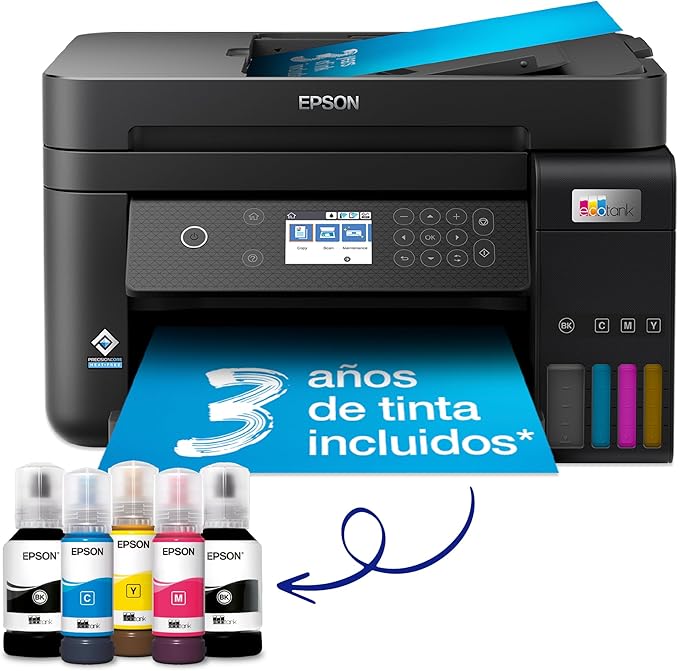
Epson C11CJ61401 EcoTank Printer Seamlessly Splices Low Print Costs with Top Performance Say goodbye to cartridges with the Epson C11CJ61401 EcoTank Printer! This economical printer saves you up to 90% on printing costs with Epson’s cartridge-free EcoTank ink bottle system. Supplied with high-yield ink bottles and integrated ink tanks, this printer is easy to fill with no mess. The key-lock bottles ensure that only the correct colour can be inserted. With one set of ink bottles, you can get up to 7,500 pages in black and 6,000 in colour, equivalent to up to 72 cartridges worth of ink! Epson C11CJ61401 Features for Home Office Versatility Make the most of a variety of tasks with 6.1 cm color LCD screen, automatic double-sided printing and 30-page document feeder, 250-page front paper tray, and print speeds of up to 15.5 pages per minute. You can also integrate the Epson C11CJ61401 printer with an existing home or office setup easily and print from mobiles, tablets and laptops. Keep on Saving with Epson's Smart Panel App To get the most out of your C11CJ61401 EcoTank Printer, take advantage of Epson's Smart Panel App. This app allows you to control your printer from your smart device and helps you set up, monitor and troubleshoot your printer from your phone or tablet. Heat-Free Technology for Maximized Durability The Epson C11CJ61401 also features cutting-edge PrecisionCoreHeat-Free Technology that offers reduced energy consumption and fewer replacement parts. The printhead also comes pre-installed for hassle-free setup. To top it off, the printer comes with an extra black ink bottle for up to 3 years' worth of ink included in the box.
Epson C11CJ61401 EcoTank Printer Seamlessly Splices Low Print Costs with Top Performance Say goodbye to cartridges with the Epson C11CJ61401 EcoTank Printer! This economical printer saves you up to 90% on printing costs with Epson’s cartridge-free EcoTank ink bottle system. Supplied with high-yield ink bottles and integrated ink tanks, this printer is easy to fill with no mess. The key-lock bottles ensure that only the correct colour can be inserted. With one set of ink bottles, you can get up to 7,500 pages in black and 6,000 in colour, equivalent to up to 72 cartridges worth of ink! Epson C11CJ61401 Features for Home Office Versatility Make the most of a variety of tasks with 6.1 cm color LCD screen, automatic double-sided printing and 30-page document feeder, 250-page front paper tray, and print speeds of up to 15.5 pages per minute. You can also integrate the Epson C11CJ61401 printer with an existing home or office setup easily and print from mobiles, tablets and laptops. Keep on Saving with Epson's Smart Panel App To get the most out of your C11CJ61401 EcoTank Printer, take advantage of Epson's Smart Panel App. This app allows you to control your printer from your smart device and helps you set up, monitor and troubleshoot your printer from your phone or tablet. Heat-Free Technology for Maximized Durability The Epson C11CJ61401 also features cutting-edge PrecisionCoreHeat-Free Technology that offers reduced energy consumption and fewer replacement parts. The printhead also comes pre-installed for hassle-free setup. To top it off, the printer comes with an extra black ink bottle for up to 3 years' worth of ink included in the box.
Epson C11CJ61401 EcoTank Printer Seamlessly Splices Low Print Costs with Top Performance Say goodbye to cartridges with the Epson C11CJ61401 EcoTank Printer! This economical printer saves you up to 90% on printing costs with Epson’s cartridge-free EcoTank ink bottle system. Supplied with high-yield ink bottles and integrated ink tanks, this printer is easy to fill with no mess. The key-lock bottles ensure that only the correct colour can be inserted. With one set of ink bottles, you can get up to 7,500 pages in black and 6,000 in colour, equivalent to up to 72 cartridges worth of ink! Epson C11CJ61401 Features for Home Office Versatility Make the most of a variety of tasks with 6.1 cm color LCD screen, automatic double-sided printing and 30-page document feeder, 250-page front paper tray, and print speeds of up to 15.5 pages per minute. You can also integrate the Epson C11CJ61401 printer with an existing home or office setup easily and print from mobiles, tablets and laptops. Keep on Saving with Epson's Smart Panel App To get the most out of your C11CJ61401 EcoTank Printer, take advantage of Epson's Smart Panel App. This app allows you to control your printer from your smart device and helps you set up, monitor and troubleshoot your printer from your phone or tablet. Heat-Free Technology for Maximized Durability The Epson C11CJ61401 also features cutting-edge PrecisionCoreHeat-Free Technology that offers reduced energy consumption and fewer replacement parts. The printhead also comes pre-installed for hassle-free setup. To top it off, the printer comes with an extra black ink bottle for up to 3 years' worth of ink included in the box.
Epson C11CJ61401 EcoTank Printer Seamlessly Splices Low Print Costs with Top Performance Say goodbye to cartridges with the Epson C11CJ61401 EcoTank Printer! This economical printer saves you up to 90% on printing costs with Epson’s cartridge-free EcoTank ink bottle system. Supplied with high-yield ink bottles and integrated ink tanks, this printer is easy to fill with no mess. The key-lock bottles ensure that only the correct colour can be inserted. With one set of ink bottles, you can get up to 7,500 pages in black and 6,000 in colour, equivalent to up to 72 cartridges worth of ink! Epson C11CJ61401 Features for Home Office Versatility Make the most of a variety of tasks with 6.1 cm color LCD screen, automatic double-sided printing and 30-page document feeder, 250-page front paper tray, and print speeds of up to 15.5 pages per minute. You can also integrate the Epson C11CJ61401 printer with an existing home or office setup easily and print from mobiles, tablets and laptops. Keep on Saving with Epson's Smart Panel App To get the most out of your C11CJ61401 EcoTank Printer, take advantage of Epson's Smart Panel App. This app allows you to control your printer from your smart device and helps you set up, monitor and troubleshoot your printer from your phone or tablet. Heat-Free Technology for Maximized Durability The Epson C11CJ61401 also features cutting-edge PrecisionCoreHeat-Free Technology that offers reduced energy consumption and fewer replacement parts. The printhead also comes pre-installed for hassle-free setup. To top it off, the printer comes with an extra black ink bottle for up to 3 years' worth of ink included in the box.
Last updated at 03/18/2026 21:55:33
Epson EcoTank ET-3850 A4 Multifunction Wi-Fi Ink Tank Printer with a Included Stock of Inks up to 3 Years
Affiliate Disclosure: We may receive a small commission for purchases made through this link at no extra cost to you. This helps support our site. Thank you!
originally posted on bhphotovideo.com
To the point when someone asks me to recommend an inkjet printer for them, THIS is the one.And now for the details.A similar model to this one I'm reviewing here had a FAX feature, If you don't FAX much, or at all, you don't need it. Besides, there are many free faxing methods available on the net. And the paper on the FAX model feed from the rear of the printer, meaning that the printer needs not only more desk space but more height due to the paper feed hopper.So far, two good things about this printer: less desktop space needed and the paper feed from the front in a closed flat paper feeder.The third feature that impressed me was the size of the ink bottles that were supplied. In my past experiences, new printers are generally supplied with "just enough" ... MoreTo the point when someone asks me to recommend an inkjet printer for them, THIS is the one.And now for the details.A similar model to this one I'm reviewing here had a FAX feature, If you don't FAX much, or at all, you don't need it. Besides, there are many free faxing methods available on the net. And the paper on the FAX model feed from the rear of the printer, meaning that the printer needs not only more desk space but more height due to the paper feed hopper.So far, two good things about this printer: less desktop space needed and the paper feed from the front in a closed flat paper feeder.The third feature that impressed me was the size of the ink bottles that were supplied. In my past experiences, new printers are generally supplied with "just enough" in or toner to get you by for a short while. The extra capacity ink bottles and tank should last us months,The fourth great feature I liked was how easy the setup was; extremely intuitive for anyone who is replacing a printer or even for a new time user with little experience. Following the steps and answering the questions got the printer up and running quickly.One suggestion whenever I replace ANY printer, is to remove the drivers for the "old" printer. The reason for this is so all your programs will automatically pick up the "new" printer without you having to select the new one.
originally posted on bestbuy.com
PROS: -Obviously more money up front, but the sheer amount of printing that you can do, quickly surpasses the cost of cartridges. Pretty much the second time you replace all the cartridges on a standard printer you would have spent far more. Even the cost of the refill bottles is low enough that there no temptation to purchase cheap alternatives.-Print quality is great, and even though this isn’t billed as a photo printer, it still does a pretty good job. Definitely great for casual photo printing.-Built in tray that holds A LOT of paper.-Print speed is fast for its price point.-First home printer I’ve had with a auto-document feeder, which makes scanning multiple documents very quick and easy.CONS: Initially set this up to connect to my home network ... MorePROS: -Obviously more money up front, but the sheer amount of printing that you can do, quickly surpasses the cost of cartridges. Pretty much the second time you replace all the cartridges on a standard printer you would have spent far more. Even the cost of the refill bottles is low enough that there no temptation to purchase cheap alternatives.-Print quality is great, and even though this isn’t billed as a photo printer, it still does a pretty good job. Definitely great for casual photo printing.-Built in tray that holds A LOT of paper.-Print speed is fast for its price point.-First home printer I’ve had with a auto-document feeder, which makes scanning multiple documents very quick and easy.CONS: Initially set this up to connect to my home network wirelessly, but when the printer goes into low power mode, it disconnects from the network. Had to go wake the printer up manually, which gets old quickly. Especially if you’re printing from the other side of the house. This printer was in the exact same spot as my previous printer and I had no issues with that one. Fortunately I was able to connect a Ethernet cable to this printer and that pretty much solved everything (plus a direct connection spools print jobs so much quicker). Not convenient for those that need flexibility in where they need to place this.Overall very happy with printer. For those wondering the ET-3820, ET-3850, ET-4850 all share the exact same core components. The ET-3850 adds an auto-document feeder for the scanner (definitely worth it). Then the ET-4850 adds a modem for fax and a touch screen for operating the printer. My complaint on the ET-4850 is the touch screen is too small, they should of made it bigger.
originally posted on bestbuy.com
As a user who frequently needs to print documents and photos, I recently purchased the Epson EcoTank ET-3850 All-in-One Supertank Inkjet Printer. Here's my review of this printer.Firstly, the standout feature of the EcoTank ET-3850 is its supertank ink system. Unlike traditional inkjet printers that use ink cartridges, the ET-3850 utilizes built-in ink tanks capable of holding a large volume of ink. This means that I no longer have to frequently replace ink cartridges, reducing printing costs and unnecessary hassles. This is an environmentally friendly and cost-effective choice, particularly suitable for users who print frequently.Secondly, the print quality of the ET-3850 is satisfying. Whether it's documents, photos, or charts, the printed results are very ... MoreAs a user who frequently needs to print documents and photos, I recently purchased the Epson EcoTank ET-3850 All-in-One Supertank Inkjet Printer. Here's my review of this printer.Firstly, the standout feature of the EcoTank ET-3850 is its supertank ink system. Unlike traditional inkjet printers that use ink cartridges, the ET-3850 utilizes built-in ink tanks capable of holding a large volume of ink. This means that I no longer have to frequently replace ink cartridges, reducing printing costs and unnecessary hassles. This is an environmentally friendly and cost-effective choice, particularly suitable for users who print frequently.Secondly, the print quality of the ET-3850 is satisfying. Whether it's documents, photos, or charts, the printed results are very clear and detailed. Color accuracy is also quite precise, making printed photos more vivid and lifelike. This is an important advantage for users who need to print high-quality documents and images.Another commendable feature is the versatility of the ET-3850. In addition to printing, it also includes scanning and copying functions, making it an ideal choice for both office and home use. The automatic duplex printing feature is also practical, helping save paper and time. All these functions are integrated into one device, allowing users to complete multiple tasks in one place.Furthermore, setting up and connecting the ET-3850 is very straightforward. It supports Wi-Fi connectivity, making wireless printing effortless. Through Epson's mobile app, I can directly print documents and photos from my smartphone or tablet without needing to connect to a computer. This convenience makes printing more flexible and convenient.However, it's worth noting that the ET-3850 comes with a relatively higher price tag. Despite its advantages of the supertank ink system and versatility, potential buyers should consider balancing its performance and budget.In conclusion, the Epson EcoTank ET-3850 All-in-One Supertank Inkjet Printer is a powerful and worthwhile product. Its supertank ink system, excellent print quality, and versatility make it an ideal choice for users who print frequently. Despite the higher price, considering its performance and convenience, I believe it's a valuable investment.
| Features | |
| All-In-One-multitasking | Y |
| Printing colours | Pigment black, Cyan, Yellow, Magenta |
| Duplex printing mode | Auto |
| Duplex functions | Print, Scan |
Epson EcoTank ET-3850 A4 Multifunction Wi-Fi Ink Tank Printer with a Included Stock of Inks up to 3 Years
Affiliate Disclosure: We may receive a small commission for purchases made through this link at no extra cost to you. This helps support our site. Thank you!
To the point when someone asks me to recommend an inkjet printer for them, THIS is the one.And now for the details.A similar model to this one I'm reviewing here had a FAX feature, If you don't FAX much, or at all, you don't need it. Besides, there are many free faxing methods available on the net. And the paper on the FAX model feed from the rear of the printer, meaning that the printer needs not only more desk space but more height due to the paper feed hopper.So far, two good things about this printer: less desktop space needed and the paper feed from the front in a closed flat paper feeder.The third feature that impressed me was the size of the ink bottles that were supplied. In my past experiences, new printers are generally supplied with "just enough" ... MoreTo the point when someone asks me to recommend an inkjet printer for them, THIS is the one.And now for the details.A similar model to this one I'm reviewing here had a FAX feature, If you don't FAX much, or at all, you don't need it. Besides, there are many free faxing methods available on the net. And the paper on the FAX model feed from the rear of the printer, meaning that the printer needs not only more desk space but more height due to the paper feed hopper.So far, two good things about this printer: less desktop space needed and the paper feed from the front in a closed flat paper feeder.The third feature that impressed me was the size of the ink bottles that were supplied. In my past experiences, new printers are generally supplied with "just enough" in or toner to get you by for a short while. The extra capacity ink bottles and tank should last us months,The fourth great feature I liked was how easy the setup was; extremely intuitive for anyone who is replacing a printer or even for a new time user with little experience. Following the steps and answering the questions got the printer up and running quickly.One suggestion whenever I replace ANY printer, is to remove the drivers for the "old" printer. The reason for this is so all your programs will automatically pick up the "new" printer without you having to select the new one.
PROS: -Obviously more money up front, but the sheer amount of printing that you can do, quickly surpasses the cost of cartridges. Pretty much the second time you replace all the cartridges on a standard printer you would have spent far more. Even the cost of the refill bottles is low enough that there no temptation to purchase cheap alternatives.-Print quality is great, and even though this isn’t billed as a photo printer, it still does a pretty good job. Definitely great for casual photo printing.-Built in tray that holds A LOT of paper.-Print speed is fast for its price point.-First home printer I’ve had with a auto-document feeder, which makes scanning multiple documents very quick and easy.CONS: Initially set this up to connect to my home network ... MorePROS: -Obviously more money up front, but the sheer amount of printing that you can do, quickly surpasses the cost of cartridges. Pretty much the second time you replace all the cartridges on a standard printer you would have spent far more. Even the cost of the refill bottles is low enough that there no temptation to purchase cheap alternatives.-Print quality is great, and even though this isn’t billed as a photo printer, it still does a pretty good job. Definitely great for casual photo printing.-Built in tray that holds A LOT of paper.-Print speed is fast for its price point.-First home printer I’ve had with a auto-document feeder, which makes scanning multiple documents very quick and easy.CONS: Initially set this up to connect to my home network wirelessly, but when the printer goes into low power mode, it disconnects from the network. Had to go wake the printer up manually, which gets old quickly. Especially if you’re printing from the other side of the house. This printer was in the exact same spot as my previous printer and I had no issues with that one. Fortunately I was able to connect a Ethernet cable to this printer and that pretty much solved everything (plus a direct connection spools print jobs so much quicker). Not convenient for those that need flexibility in where they need to place this.Overall very happy with printer. For those wondering the ET-3820, ET-3850, ET-4850 all share the exact same core components. The ET-3850 adds an auto-document feeder for the scanner (definitely worth it). Then the ET-4850 adds a modem for fax and a touch screen for operating the printer. My complaint on the ET-4850 is the touch screen is too small, they should of made it bigger.
As a user who frequently needs to print documents and photos, I recently purchased the Epson EcoTank ET-3850 All-in-One Supertank Inkjet Printer. Here's my review of this printer.Firstly, the standout feature of the EcoTank ET-3850 is its supertank ink system. Unlike traditional inkjet printers that use ink cartridges, the ET-3850 utilizes built-in ink tanks capable of holding a large volume of ink. This means that I no longer have to frequently replace ink cartridges, reducing printing costs and unnecessary hassles. This is an environmentally friendly and cost-effective choice, particularly suitable for users who print frequently.Secondly, the print quality of the ET-3850 is satisfying. Whether it's documents, photos, or charts, the printed results are very ... MoreAs a user who frequently needs to print documents and photos, I recently purchased the Epson EcoTank ET-3850 All-in-One Supertank Inkjet Printer. Here's my review of this printer.Firstly, the standout feature of the EcoTank ET-3850 is its supertank ink system. Unlike traditional inkjet printers that use ink cartridges, the ET-3850 utilizes built-in ink tanks capable of holding a large volume of ink. This means that I no longer have to frequently replace ink cartridges, reducing printing costs and unnecessary hassles. This is an environmentally friendly and cost-effective choice, particularly suitable for users who print frequently.Secondly, the print quality of the ET-3850 is satisfying. Whether it's documents, photos, or charts, the printed results are very clear and detailed. Color accuracy is also quite precise, making printed photos more vivid and lifelike. This is an important advantage for users who need to print high-quality documents and images.Another commendable feature is the versatility of the ET-3850. In addition to printing, it also includes scanning and copying functions, making it an ideal choice for both office and home use. The automatic duplex printing feature is also practical, helping save paper and time. All these functions are integrated into one device, allowing users to complete multiple tasks in one place.Furthermore, setting up and connecting the ET-3850 is very straightforward. It supports Wi-Fi connectivity, making wireless printing effortless. Through Epson's mobile app, I can directly print documents and photos from my smartphone or tablet without needing to connect to a computer. This convenience makes printing more flexible and convenient.However, it's worth noting that the ET-3850 comes with a relatively higher price tag. Despite its advantages of the supertank ink system and versatility, potential buyers should consider balancing its performance and budget.In conclusion, the Epson EcoTank ET-3850 All-in-One Supertank Inkjet Printer is a powerful and worthwhile product. Its supertank ink system, excellent print quality, and versatility make it an ideal choice for users who print frequently. Despite the higher price, considering its performance and convenience, I believe it's a valuable investment.
We purchased the Epson ET-3850 in February 2023. We previously had an HP printer, but it would often print with lines on the paper, so we needed something with better quality printing. We us our printer for personal needs, but often use color printing and scanning capabilities.Like other reviews, we found the set up to be cumbersome. My husband is an IT professional, and yet it still took him a couple hours to get it all set up. Once set up, we had lots and lots of wi-fi connectivity issues. For some reason the printer would lose wi-fi connection, and the only way to get it restarted was to restart the computer, printer and run the diagnostic - sometimes multiple times. Due to the continual wifi connection issues, we have reverted to using a direct connect cable. ... MoreWe purchased the Epson ET-3850 in February 2023. We previously had an HP printer, but it would often print with lines on the paper, so we needed something with better quality printing. We us our printer for personal needs, but often use color printing and scanning capabilities.Like other reviews, we found the set up to be cumbersome. My husband is an IT professional, and yet it still took him a couple hours to get it all set up. Once set up, we had lots and lots of wi-fi connectivity issues. For some reason the printer would lose wi-fi connection, and the only way to get it restarted was to restart the computer, printer and run the diagnostic - sometimes multiple times. Due to the continual wifi connection issues, we have reverted to using a direct connect cable. Note that the cable is an "older version" with one square end and one USB end - luckily we had an old one of these laying around. My husband works in a different room, so having to use the wired connection for printing each time is inefficient. And the fact the control panel isn't touchscreen is a nuisance, but not that big of a deal.We do really like the compact size of the printer, and the ecotank for ink works very nicely. I have printed quite a bit in two months, and have only used 1/4 of the ink. The print quality is very good, and the speed is pretty good on heavy color powerpoints.Generally, I would say print quality is better than the old HP, but the wifi issue is much worse. And our old old Brother was the best of all three, but it was very large and took a lot of room on our desk. But I think I'll go back to Brother next time.
Setup is simple, and the Eco Tanks are a relief from annoying cartridges. The printout quality is crisper, clearer, brighter than the Canon I had for 10 years. I love that Best Buy has trade-in--super convenient and helps with my 1 in, 1 out rule. I like that it's smaller than my other all-in-one, and does not have the useless fax feature. But its construction is flimsy plastic--the paper drawer, the auto feed tray, and the cover all feel fragile. That is likely the case with all today's home printers.Three functions I don't like: 1) the off power down is more involved than it needs to be (why can't it just be 1 button?); 2) scanning is not intuitive; and 3) the auto feed does not scan TO double sided, it can double side only printing--not fully functioning, ... MoreSetup is simple, and the Eco Tanks are a relief from annoying cartridges. The printout quality is crisper, clearer, brighter than the Canon I had for 10 years. I love that Best Buy has trade-in--super convenient and helps with my 1 in, 1 out rule. I like that it's smaller than my other all-in-one, and does not have the useless fax feature. But its construction is flimsy plastic--the paper drawer, the auto feed tray, and the cover all feel fragile. That is likely the case with all today's home printers.Three functions I don't like: 1) the off power down is more involved than it needs to be (why can't it just be 1 button?); 2) scanning is not intuitive; and 3) the auto feed does not scan TO double sided, it can double side only printing--not fully functioning, IMO.Last, it's helpful that my family can print to this from their PCs, wirelessly, after downloading the apps. Yet, why does Epson need 3 different apps? Maybe I'm used to the Canon having one menu to print and scan from. With Epson, I need to open the scan app if I want to scan, or open the print app if I want to print. And it's confusing and unnecessary that there are 2 different scan apps that seem to do the same thing. I also notice it's louder & slower than my dinosaur Canon was. And it's overpriced.However, it works, does what I need, has good printouts (I print photos & recipes so this is important), and is lightweight.
This printer was purchased to replace my older Epson Ecotank that failed after about four years and 1250 pages printed. Printer experts say you can't expect more than two years out of a printer and we got 4 years with minimal trouble. You must run nozzle checks frequently on these printers to make sure the print head doesn't dry up on one of the colors.Setup is easy with the Epson software. Remote print works as it should and print drivers work perfectly with no hangups once they are set up. There is good clean functional software offered for my wife's Apple, my Windows machines, Androids, and iPhone.This printer in particular seems to print very fast. Be careful not to get any ink on the printer when filling the tanks because it's white and it stains easy. I ... MoreThis printer was purchased to replace my older Epson Ecotank that failed after about four years and 1250 pages printed. Printer experts say you can't expect more than two years out of a printer and we got 4 years with minimal trouble. You must run nozzle checks frequently on these printers to make sure the print head doesn't dry up on one of the colors.Setup is easy with the Epson software. Remote print works as it should and print drivers work perfectly with no hangups once they are set up. There is good clean functional software offered for my wife's Apple, my Windows machines, Androids, and iPhone.This printer in particular seems to print very fast. Be careful not to get any ink on the printer when filling the tanks because it's white and it stains easy. I checked out the Canon and HP options for tank printers and they honestly seemed more flimsy and had more protruding small plastic components that seem like they would snap off if you touched them wrong. The internal paper tray on this model is a big selling point for me. I love it.Color of photo prints is a little bit subdued but that is not what this printer is designed for. Print your heart out! The ink is cheap and paper is cheap!
The Epson ET-3850 purchase involved a lot of research on various options. When our Canon Pixma MX 922 printer began to fail, we tried to fix it. But those efforts were unsuccessful. The repair work would have cost more than the printer was actually worth. What a shame! So, we had to make a change decision.After all the research, the Epson EcoTank system was the best of the options for us to proceed as we needed a reliable printer for all our home printing needs. The total cost of the inks as well as the initial cost of the printer made total sense when thinking of the long term operating costs. Having said that, we still hated to give up our Canon printer as the Canon printing quality was outstanding, second to none. And we knew all of the Canon's idiosyncrasies! ... MoreThe Epson ET-3850 purchase involved a lot of research on various options. When our Canon Pixma MX 922 printer began to fail, we tried to fix it. But those efforts were unsuccessful. The repair work would have cost more than the printer was actually worth. What a shame! So, we had to make a change decision.After all the research, the Epson EcoTank system was the best of the options for us to proceed as we needed a reliable printer for all our home printing needs. The total cost of the inks as well as the initial cost of the printer made total sense when thinking of the long term operating costs. Having said that, we still hated to give up our Canon printer as the Canon printing quality was outstanding, second to none. And we knew all of the Canon's idiosyncrasies! It was also a heavy and solidly built printer.While the Epson printing system is clearly a better long run investment, the actual build quality is not up to the build quality of the Canon MX 922. The Epson has a very light and "plasticy" feel compared to the Canon. But the Epson printing quality, while not quite up to the level of the Canon, is more than acceptable. So, we hope the long-term investment of the Epson ET-3850 will prove out over time.
I had an older model, smaller Epson Eco Tank up until about 6 months ago (ET-2720, I think). It was way more economical to use for heavy printing with the ink tanks, but there was a mechanical issue in the original printer I got and the same thing happened to the replacement, the paper feed punked out and couldn't be repaired to the best of my knowledge.To be fair, Epson customer service was great the first time and sent me a replacement printer. When the replacement printer did the same thing roughly seven months later, Epson customer service noped their way out of sending me another replacement (even though it was due to an obvious issue in manufacturing). At that point, I decided I wasn't going to buy another Epson ever again. $200-300 may not be a lot to most ... MoreI had an older model, smaller Epson Eco Tank up until about 6 months ago (ET-2720, I think). It was way more economical to use for heavy printing with the ink tanks, but there was a mechanical issue in the original printer I got and the same thing happened to the replacement, the paper feed punked out and couldn't be repaired to the best of my knowledge.To be fair, Epson customer service was great the first time and sent me a replacement printer. When the replacement printer did the same thing roughly seven months later, Epson customer service noped their way out of sending me another replacement (even though it was due to an obvious issue in manufacturing). At that point, I decided I wasn't going to buy another Epson ever again. $200-300 may not be a lot to most folks to drop on a printer, but that's a utility bill payment for me. It's a pity, too. I pretty much exclusively used Epson printers for the better part of 25 years, as they were always reliable and I felt that they had the best print resolution you could get on a machine for use in your home. I don't know if the paper feeder in this machine would perform better and for longer (my old printer had a back-end feed where the paper stood up at the back of the machine and this one looks like it has a tray feeder)... I would suggest that if you're considering getting this printer, maybe check out reviews at all the stores where you can buy it and see if anyone else has similar complaints.
Absolutely infuriating. I bought a new computer and a few days later, this printer (my old one had "built-in obsolescence"). This printer would not recognize my pre-packaged Windows 11, only 10. The gentleman at Epson was hugely helpful, going into my computer and together we installed the proper drive. Several months later my router twigged, as did my this drive. When I called Epson, the first person simply hung up on me -- and I was very polite and patient-- and the second person simply couldn't figure out what to do. Finally, the only way someone could correct the problem was to create a direct interface between printer and computer. This means that whenever I want to print something -- which is often -- I need to set up the print page, then disconnect from the ... MoreAbsolutely infuriating. I bought a new computer and a few days later, this printer (my old one had "built-in obsolescence"). This printer would not recognize my pre-packaged Windows 11, only 10. The gentleman at Epson was hugely helpful, going into my computer and together we installed the proper drive. Several months later my router twigged, as did my this drive. When I called Epson, the first person simply hung up on me -- and I was very polite and patient-- and the second person simply couldn't figure out what to do. Finally, the only way someone could correct the problem was to create a direct interface between printer and computer. This means that whenever I want to print something -- which is often -- I need to set up the print page, then disconnect from the internet, then sign on to this direct link, then after printing, re-connect to the internet. I simply cannot believe that after this much time they haven't installed an update for a Windows 11 drive. The whole thing has been enormously frusterating and a waste of time. In addition, their current technical service reps are a big fail and it looks like I will be doing this work-around for the life of my computer/printer.
Have only had this printer for a few weeks after research for what seems like months. Nothing seemed to be what I wanted that had decent reviews so decided to give this a try. It came with set-up dvd but I did online. Was fairly painless. Similar to others, I couldn't see printer for Airprint, but after turning ON the Notifications option on the Epson display, was then able to see, connect & print from ipad/iPhone with Airprint. In addition, have used printing with my laptop. Am very pleased with quality of prints on copy paper. Will prob upgrade to a better paper. After filling the ink tanks, didn't have much of anything left in bottle so think there may have been 'some' exaggeration on the quantity of ink in bottles, but we'll see how it lasts. The only reason so ... MoreHave only had this printer for a few weeks after research for what seems like months. Nothing seemed to be what I wanted that had decent reviews so decided to give this a try. It came with set-up dvd but I did online. Was fairly painless. Similar to others, I couldn't see printer for Airprint, but after turning ON the Notifications option on the Epson display, was then able to see, connect & print from ipad/iPhone with Airprint. In addition, have used printing with my laptop. Am very pleased with quality of prints on copy paper. Will prob upgrade to a better paper. After filling the ink tanks, didn't have much of anything left in bottle so think there may have been 'some' exaggeration on the quantity of ink in bottles, but we'll see how it lasts. The only reason so far for 4 stars is Just the newness of the machine. It's not terribly quiet but who cares. Have not tried the scanning features as most of my work is print. Overall, think this printer will do what I need it too with lower cost than laser and less headache than inkjet. So far it has not dropped off my wireless network (knock on wood) like my other printers frequently do. It also works fine with Windows 11.
| Features | |
| All-In-One-multitasking | Y |
| Printing colours | Pigment black, Cyan, Yellow, Magenta |
| Duplex printing mode | Auto |
| Duplex functions | Print, Scan |

