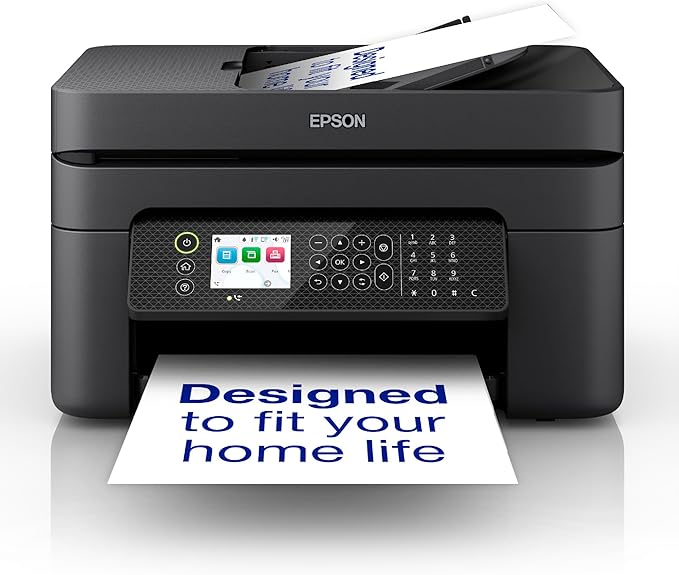
Business printing should be simple. That's why the WorkForce WF-2950 has been developed - a fast, efficient and easy-to-use solution that makes it easy to get the documents you need, when you need them. From spreadsheets and presentations to flyers and graphics to occasional prints for home or family, this all-in-one printer easily delivers crisp, professional-quality prints using Epson's leading-edge imaging technology. With a large 2.4" color display, plus a built-in scanner, copier, fax and Auto Document Feeder, the WF-2950 is the perfect choice for easy, everyday home office printing.
Business printing should be simple. That's why the WorkForce WF-2950 has been developed - a fast, efficient and easy-to-use solution that makes it easy to get the documents you need, when you need them. From spreadsheets and presentations to flyers and graphics to occasional prints for home or family, this all-in-one printer easily delivers crisp, professional-quality prints using Epson's leading-edge imaging technology. With a large 2.4" color display, plus a built-in scanner, copier, fax and Auto Document Feeder, the WF-2950 is the perfect choice for easy, everyday home office printing.
Business printing should be simple. That's why the WorkForce WF-2950 has been developed - a fast, efficient and easy-to-use solution that makes it easy to get the documents you need, when you need them. From spreadsheets and presentations to flyers and graphics to occasional prints for home or family, this all-in-one printer easily delivers crisp, professional-quality prints using Epson's leading-edge imaging technology. With a large 2.4" color display, plus a built-in scanner, copier, fax and Auto Document Feeder, the WF-2950 is the perfect choice for easy, everyday home office printing.
Business printing should be simple. That's why the WorkForce WF-2950 has been developed - a fast, efficient and easy-to-use solution that makes it easy to get the documents you need, when you need them. From spreadsheets and presentations to flyers and graphics to occasional prints for home or family, this all-in-one printer easily delivers crisp, professional-quality prints using Epson's leading-edge imaging technology. With a large 2.4" color display, plus a built-in scanner, copier, fax and Auto Document Feeder, the WF-2950 is the perfect choice for easy, everyday home office printing.
Last updated at 07/14/2026 19:31:15
Epson WF2950 Inkjet MFP
Delivery $15
Epson WF2950 4 Colour Multifunction Inkjet Printer A4 Black
Free delivery between Wed – Fri
Epson WF2950 Inkjet Multifunction Printer - EPWF2950
Delivery $10
Epson WF2950 Inkjet MFP - brisbanetonersupplies.com.au
Epson Workforce WF-2950 Multi-Function Printer
Delivery $29.95
C11CK62501 EPSON WORKFORCE WF-2950, INKJET, COLOUR, A4, MFP, 10.3PPM, WIFI, BT, FAX, DUPLEX PRINT, 1Y C11CK62501
Delivery $22
Epson WF2950 Inkjet MFP
Delivery between Fri – Tue $12.95
Epson WF2950 Inkjet MFP
Free delivery between 21–29 July
Epson Wf2950 Inkjet MFP | Carlo Computers Australia
Delivery between 24–28 July $13
Epson Wf2950 Inkjet Mfp
Free delivery
Affiliate Disclosure: We may receive a small commission for purchases made through this link at no extra cost to you. This helps support our site. Thank you!
originally posted on bestbuy.com
The Epson WF-2930 is a compact four-function or all-in-one printer designed for home use and ideal for work from home, school work or simple general home or personal use. It is a fairly small measuring roughly 14.5” (width) x 11.5” (length) x 8.5” (height). It is sure to fit in almost any corner you would want to place it. Being wi-fi enabled, this printer is no longer limited to being near your primary computer and almost every device can print through wi-fi as long as the corresponding app is installed. Initial setup is a breeze for this printer as once you’ve removed all packaging materials and powered it up, the built-in lcd will present you with a QR code so that you can download the Epson Smart Panel app to your phone. (Of course you can also download and ... MoreThe Epson WF-2930 is a compact four-function or all-in-one printer designed for home use and ideal for work from home, school work or simple general home or personal use. It is a fairly small measuring roughly 14.5” (width) x 11.5” (length) x 8.5” (height). It is sure to fit in almost any corner you would want to place it. Being wi-fi enabled, this printer is no longer limited to being near your primary computer and almost every device can print through wi-fi as long as the corresponding app is installed. Initial setup is a breeze for this printer as once you’ve removed all packaging materials and powered it up, the built-in lcd will present you with a QR code so that you can download the Epson Smart Panel app to your phone. (Of course you can also download and setup the printer via computer too.) Once downloaded all you have to do is follow the instructions given by the app and you’re good to go in about ten minutes. Using the printer is fairly intuitive, first you have to download the Epson suite from the website to obtain full functionality of the printer. This includes the printer and scanner drivers, fax software, a photo print app and even a limited function OCR. Take note that the complete download is almost 500 MB. But of course, you can also specific modules you need. Unfortunately, Epson’s Windows Store app does not support this printer yet nor does it function properly on Windows 11. There is also the Epson iPrint app for your phone should you need to print from your phone. Unfortunately, I have noticed that the iPhone does not natively support this printer. As such you need to download this app if in case you want mobile printing, Being a consumer oriented device, it is not surprising that print and capabilities are are on the slow slide. Printing though I can’t find anything in the documentation is as per my estimate at around 8-10 pages per minute. Scanning speeds are moderate which is typical for AIOs in this price range. In spite of that, performance is acceptable. I was no longer able to test the fax capabilities of this AIO for the simple reason that faxing is fairly minimal in today’s non-corporate environment. Nonetheless, this feature is still welcome for small business and home-based businesses. I like the fact that Epson’s design is extendable meaning you release the paper trays only when you need them and tuck them away when not in use. This way the design is sleek from my perspective. There is pretty much nothing to dislike about this printer as it simply works and is easy to setup an operate. I would recommend this printer for anybody who wants a functional and budget friendly AIO out there.
originally posted on epson.com
This is a review for the Epson Workforce WF-2960 Wireless Printer that I received free of charge to do a beta test and review. I'm coming from a slightly older Epson WF-2830 and there's a fair amount of similarity between these models but also some welcome improvements. What was quite nice over the previous model is this one has a bluetooth module in it to allow initial setup via a downloadable app on your phone. On the previous model, typing in very long alphanumeric with special characters to setup wifi although an infrequent task was super painful. When coming out of sleep to print, it does seem quite a bit snappier than my previous model for it to actually start printing a job. Be sure to setup Epson Connect so you can easily email documents to your printer's ... MoreThis is a review for the Epson Workforce WF-2960 Wireless Printer that I received free of charge to do a beta test and review. I'm coming from a slightly older Epson WF-2830 and there's a fair amount of similarity between these models but also some welcome improvements. What was quite nice over the previous model is this one has a bluetooth module in it to allow initial setup via a downloadable app on your phone. On the previous model, typing in very long alphanumeric with special characters to setup wifi although an infrequent task was super painful. When coming out of sleep to print, it does seem quite a bit snappier than my previous model for it to actually start printing a job. Be sure to setup Epson Connect so you can easily email documents to your printer's email address. As a bonus, although a little gimmicky is some Google Assistant / Alexa connections where you can ask your voice assistant to print some templates. For example, a calendar of a particular month, sudoku puzzles, graph paper, etc. Not sure how useful / common that is, but I like when my different tech products play nice together. I've really only printed and scanned documents on this device - I have not tested any photo printing and I haven't had a landline in 20 years so the fax capability is not really of interest to me either. While it's too soon to say because I haven't had it long enough to need to replace the ink, I hope these cartridges last longer than my previous model as they went extremely quick when I was a very light user of the device to begin with.
originally posted on epson.com
“This is a review for the Epson WorkForce WF-2950 Wireless Printer that I received free of charge to do a beta test and review.” I was immediately impressed once I removed it from the box and saw its small footprint. For a 4-in-1, this took a very small amount of space. From initial setup to printing out a test page, took about 20 minutes. I initially thought the LCD was a touchscreen, but was dismayed to find that it was not. Although this is not a big problem since the LCD screen is on the small size, navigating the control panel layout and watching the LCD at the same time took longer than I expected. In fact throughout the entire process I kept pressing on the LCD out of sheer habit since most electronic devices with an LCD panel are touch nowadays. One would ... More“This is a review for the Epson WorkForce WF-2950 Wireless Printer that I received free of charge to do a beta test and review.” I was immediately impressed once I removed it from the box and saw its small footprint. For a 4-in-1, this took a very small amount of space. From initial setup to printing out a test page, took about 20 minutes. I initially thought the LCD was a touchscreen, but was dismayed to find that it was not. Although this is not a big problem since the LCD screen is on the small size, navigating the control panel layout and watching the LCD at the same time took longer than I expected. In fact throughout the entire process I kept pressing on the LCD out of sheer habit since most electronic devices with an LCD panel are touch nowadays. One would have expected it on this printer. However, just be sure I didn't get a defective unit, I checked the Epson website and discovered that this is the newest model, following the more advanced model WF-2960 which seems to be touchscreen only and has an Ethernet port where the WF-2950 doesn't. I assume Epson came out with this model which is priced lower in an effort to offer a lower priced model, which made sense although the raw cost for those parts are "very" minimal. I printed out several documents to check the print quality. The initial pages were less than satisfactory for a 2022 inkjet printer, although during the initial setup it gives you that option, but that appeared before I was ready to print so I skipped it. Hopefully, once I have a chance to make those adjustments, the quality will improve. That is not to say the quality was really bad, it just looks like it may be slightly out of calibration as the text is not as crisp as on previously owned inkjet printers from various brands going back 10+ years. Color printing was acceptable for a non-photo printer (although I only printed on ordinary printer paper). Copies were acceptable as well. Print speed: It printed a 6 page text only document @ a solid 2 minutes using default print settings. Although this sounds slow, it's perfectly fine for an entry level printer that will only get occasional use as a home office printer. Impressions: What impressed me the most was how it works seamlessly with the Epson software which improved my initial impression of the printer. One of the best apps is the Epson Photo+ Tool where you can use it to take screen shot and send it directly to the printer. The Photo + application is also decent for making flyers, greeting cards, printing wallet sized images, etc. But what I found odd was that I initially installed Epson Connect which has Epson Scan 2 for scanning documents, but then once you install the Photo+ suite, it also installs a scanning application Epson ScanSmart. Seems a bit redundant, and ScanSmart is the better of the two. Scan 2 will never get used. Connecting and print to the printer from a Mobile Device also worked seamlessly. I was able to print; scan; capture and print; as well as make copies using my mobile phone. Previous apps I've used with other printers, didn't work as well. The second time I went to use the printer, it had disconnected from my wireless network. I tried reconnecting to it, but that did not work. I checked the printer settings and it was still connected, but for some reason the Epson Connect app could not find it. I used the troubleshooting tools, followed each step, to no avail. Then was presented with additional solutions that also did not work. I shutdown the printer and unplugged. After about 15 seconds, I plugged it back in and haven't had that issue occur again. I need to spend more time with it, using the number of different features of the Photo+ and Epson Smart Panel apps to see how well it performs, but overall I think this is a good entry level 4-in-1 that will get the job done as long as you are not a heavy printer. The print speed while good for a couple of pages, is not ideal for larger volume printing and while we're on the subject, the ink cartridges' are not that expensive, although I would opt only to buy the High Yield Black as it prints more than double the amount of pages the standard black cartridge prints which is only 150 pages while the high yield prints up to 380 pages. Unfortunately, this printer does not have High Yield for colors as the standard color cartridges only print up to 150 pages as well. The one feature that I am disappointed about is "scan to email". I have not seen it mentioned in any documentation, app, nor did I find it in the menu. This is a no brainer and should be on every all-in-1 by default especially if this to focused on home office users. Overall this is a decent entry level printer that won't break the bank, but won't break any printing speed records either. YMMV
| Maximum resolution Maximum printing resolution | 5760 x 1440 DPI |
| Print speed (colour, normal quality, A4/US Letter) | 5 ppm |
| Copy speed (black, normal quality, A4) | 8.4 cpm |
| Copy speed (colour, normal quality, A4) | 4.3 cpm |
| Output colour depth | 24 bit |
Epson WF2950 Inkjet MFP
Delivery $15
Epson WF2950 4 Colour Multifunction Inkjet Printer A4 Black
Free delivery between Wed – Fri
Epson WF2950 Inkjet Multifunction Printer - EPWF2950
Delivery $10
Epson WF2950 Inkjet MFP - brisbanetonersupplies.com.au
Epson Workforce WF-2950 Multi-Function Printer
Delivery $29.95
The Epson WF-2930 is a compact four-function or all-in-one printer designed for home use and ideal for work from home, school work or simple general home or personal use. It is a fairly small measuring roughly 14.5” (width) x 11.5” (length) x 8.5” (height). It is sure to fit in almost any corner you would want to place it. Being wi-fi enabled, this printer is no longer limited to being near your primary computer and almost every device can print through wi-fi as long as the corresponding app is installed. Initial setup is a breeze for this printer as once you’ve removed all packaging materials and powered it up, the built-in lcd will present you with a QR code so that you can download the Epson Smart Panel app to your phone. (Of course you can also download and ... MoreThe Epson WF-2930 is a compact four-function or all-in-one printer designed for home use and ideal for work from home, school work or simple general home or personal use. It is a fairly small measuring roughly 14.5” (width) x 11.5” (length) x 8.5” (height). It is sure to fit in almost any corner you would want to place it. Being wi-fi enabled, this printer is no longer limited to being near your primary computer and almost every device can print through wi-fi as long as the corresponding app is installed. Initial setup is a breeze for this printer as once you’ve removed all packaging materials and powered it up, the built-in lcd will present you with a QR code so that you can download the Epson Smart Panel app to your phone. (Of course you can also download and setup the printer via computer too.) Once downloaded all you have to do is follow the instructions given by the app and you’re good to go in about ten minutes. Using the printer is fairly intuitive, first you have to download the Epson suite from the website to obtain full functionality of the printer. This includes the printer and scanner drivers, fax software, a photo print app and even a limited function OCR. Take note that the complete download is almost 500 MB. But of course, you can also specific modules you need. Unfortunately, Epson’s Windows Store app does not support this printer yet nor does it function properly on Windows 11. There is also the Epson iPrint app for your phone should you need to print from your phone. Unfortunately, I have noticed that the iPhone does not natively support this printer. As such you need to download this app if in case you want mobile printing, Being a consumer oriented device, it is not surprising that print and capabilities are are on the slow slide. Printing though I can’t find anything in the documentation is as per my estimate at around 8-10 pages per minute. Scanning speeds are moderate which is typical for AIOs in this price range. In spite of that, performance is acceptable. I was no longer able to test the fax capabilities of this AIO for the simple reason that faxing is fairly minimal in today’s non-corporate environment. Nonetheless, this feature is still welcome for small business and home-based businesses. I like the fact that Epson’s design is extendable meaning you release the paper trays only when you need them and tuck them away when not in use. This way the design is sleek from my perspective. There is pretty much nothing to dislike about this printer as it simply works and is easy to setup an operate. I would recommend this printer for anybody who wants a functional and budget friendly AIO out there.
This is a review for the Epson Workforce WF-2960 Wireless Printer that I received free of charge to do a beta test and review. I'm coming from a slightly older Epson WF-2830 and there's a fair amount of similarity between these models but also some welcome improvements. What was quite nice over the previous model is this one has a bluetooth module in it to allow initial setup via a downloadable app on your phone. On the previous model, typing in very long alphanumeric with special characters to setup wifi although an infrequent task was super painful. When coming out of sleep to print, it does seem quite a bit snappier than my previous model for it to actually start printing a job. Be sure to setup Epson Connect so you can easily email documents to your printer's ... MoreThis is a review for the Epson Workforce WF-2960 Wireless Printer that I received free of charge to do a beta test and review. I'm coming from a slightly older Epson WF-2830 and there's a fair amount of similarity between these models but also some welcome improvements. What was quite nice over the previous model is this one has a bluetooth module in it to allow initial setup via a downloadable app on your phone. On the previous model, typing in very long alphanumeric with special characters to setup wifi although an infrequent task was super painful. When coming out of sleep to print, it does seem quite a bit snappier than my previous model for it to actually start printing a job. Be sure to setup Epson Connect so you can easily email documents to your printer's email address. As a bonus, although a little gimmicky is some Google Assistant / Alexa connections where you can ask your voice assistant to print some templates. For example, a calendar of a particular month, sudoku puzzles, graph paper, etc. Not sure how useful / common that is, but I like when my different tech products play nice together. I've really only printed and scanned documents on this device - I have not tested any photo printing and I haven't had a landline in 20 years so the fax capability is not really of interest to me either. While it's too soon to say because I haven't had it long enough to need to replace the ink, I hope these cartridges last longer than my previous model as they went extremely quick when I was a very light user of the device to begin with.
“This is a review for the Epson WorkForce WF-2950 Wireless Printer that I received free of charge to do a beta test and review.” I was immediately impressed once I removed it from the box and saw its small footprint. For a 4-in-1, this took a very small amount of space. From initial setup to printing out a test page, took about 20 minutes. I initially thought the LCD was a touchscreen, but was dismayed to find that it was not. Although this is not a big problem since the LCD screen is on the small size, navigating the control panel layout and watching the LCD at the same time took longer than I expected. In fact throughout the entire process I kept pressing on the LCD out of sheer habit since most electronic devices with an LCD panel are touch nowadays. One would ... More“This is a review for the Epson WorkForce WF-2950 Wireless Printer that I received free of charge to do a beta test and review.” I was immediately impressed once I removed it from the box and saw its small footprint. For a 4-in-1, this took a very small amount of space. From initial setup to printing out a test page, took about 20 minutes. I initially thought the LCD was a touchscreen, but was dismayed to find that it was not. Although this is not a big problem since the LCD screen is on the small size, navigating the control panel layout and watching the LCD at the same time took longer than I expected. In fact throughout the entire process I kept pressing on the LCD out of sheer habit since most electronic devices with an LCD panel are touch nowadays. One would have expected it on this printer. However, just be sure I didn't get a defective unit, I checked the Epson website and discovered that this is the newest model, following the more advanced model WF-2960 which seems to be touchscreen only and has an Ethernet port where the WF-2950 doesn't. I assume Epson came out with this model which is priced lower in an effort to offer a lower priced model, which made sense although the raw cost for those parts are "very" minimal. I printed out several documents to check the print quality. The initial pages were less than satisfactory for a 2022 inkjet printer, although during the initial setup it gives you that option, but that appeared before I was ready to print so I skipped it. Hopefully, once I have a chance to make those adjustments, the quality will improve. That is not to say the quality was really bad, it just looks like it may be slightly out of calibration as the text is not as crisp as on previously owned inkjet printers from various brands going back 10+ years. Color printing was acceptable for a non-photo printer (although I only printed on ordinary printer paper). Copies were acceptable as well. Print speed: It printed a 6 page text only document @ a solid 2 minutes using default print settings. Although this sounds slow, it's perfectly fine for an entry level printer that will only get occasional use as a home office printer. Impressions: What impressed me the most was how it works seamlessly with the Epson software which improved my initial impression of the printer. One of the best apps is the Epson Photo+ Tool where you can use it to take screen shot and send it directly to the printer. The Photo + application is also decent for making flyers, greeting cards, printing wallet sized images, etc. But what I found odd was that I initially installed Epson Connect which has Epson Scan 2 for scanning documents, but then once you install the Photo+ suite, it also installs a scanning application Epson ScanSmart. Seems a bit redundant, and ScanSmart is the better of the two. Scan 2 will never get used. Connecting and print to the printer from a Mobile Device also worked seamlessly. I was able to print; scan; capture and print; as well as make copies using my mobile phone. Previous apps I've used with other printers, didn't work as well. The second time I went to use the printer, it had disconnected from my wireless network. I tried reconnecting to it, but that did not work. I checked the printer settings and it was still connected, but for some reason the Epson Connect app could not find it. I used the troubleshooting tools, followed each step, to no avail. Then was presented with additional solutions that also did not work. I shutdown the printer and unplugged. After about 15 seconds, I plugged it back in and haven't had that issue occur again. I need to spend more time with it, using the number of different features of the Photo+ and Epson Smart Panel apps to see how well it performs, but overall I think this is a good entry level 4-in-1 that will get the job done as long as you are not a heavy printer. The print speed while good for a couple of pages, is not ideal for larger volume printing and while we're on the subject, the ink cartridges' are not that expensive, although I would opt only to buy the High Yield Black as it prints more than double the amount of pages the standard black cartridge prints which is only 150 pages while the high yield prints up to 380 pages. Unfortunately, this printer does not have High Yield for colors as the standard color cartridges only print up to 150 pages as well. The one feature that I am disappointed about is "scan to email". I have not seen it mentioned in any documentation, app, nor did I find it in the menu. This is a no brainer and should be on every all-in-1 by default especially if this to focused on home office users. Overall this is a decent entry level printer that won't break the bank, but won't break any printing speed records either. YMMV
Unboxing the Epson Workforce WF-2930 printer, you’ll find the printer itself, a full complement of Epson ink cartridges, a power cable, and documentation. There is no phone/fax or USB cable included. The printer has a very small footprint at only 12” x 15”. Setting up the printer itself is an easy process. With the printer unpacked and the Epson Smart Panel app installed to your mobile device, simply follow the chat-like prompts. The app will clearly and concisely walk you through installing the ink cartridges, setting up your network configuration, and aligning the print head. At this point, you can start printing with little additional work. Android 12 & 13 devices in my home on the same wifi automatically found and suggested the printer without any downloads or ... MoreUnboxing the Epson Workforce WF-2930 printer, you’ll find the printer itself, a full complement of Epson ink cartridges, a power cable, and documentation. There is no phone/fax or USB cable included. The printer has a very small footprint at only 12” x 15”. Setting up the printer itself is an easy process. With the printer unpacked and the Epson Smart Panel app installed to your mobile device, simply follow the chat-like prompts. The app will clearly and concisely walk you through installing the ink cartridges, setting up your network configuration, and aligning the print head. At this point, you can start printing with little additional work. Android 12 & 13 devices in my home on the same wifi automatically found and suggested the printer without any downloads or setup. And Windows 10 computers added the printer easily by downloading and installing software from Epson’s website. Print quality for both documents and photos has been very impressive with sharp edges, solid colors, and dark blacks. Output is fast both from mobile and desktop and operation is quiet. And 2-sided printing worked quickly and reliably. Scanning operations were quick and easy when initiated by either the computer or scanner. Results were impressive with quick operation, sharp images and good color representation. The document feeder, which only works with 1-sided pages, performed reliably with straight images and no jams. Couple of final thoughts: I do not have a landline and was therefore unable to test faxing. Also, this model printer bucks the current trend towards ink tank style printers with large ink capacity. While this is neither pro nor con, it does mean needing to buy ink cartridges more often. That said, cartridges are already available and are only $7 a for a standard capacity cartridge, which is super reasonable. Overall, the Epson Workforce WF-2930 is an excellent little printer.
This is a review for the Epson Workforce WF-2960 Wireless Printer that I received free of charge to do a beta test and review. The printer is well packaged and secured with protective tape all around the unit. Removal was very easy - make sure to open up all the various areas as instructed to get all the tape out. Included with the printer is the power cable and starter ink pack. Instructions guide you on how to setup the printer via an app on your phone or without the phone by following instructions on the printer itself. I used the app to set mine up - it was easy and straight-forward. I did have an issue where the app said the printer was updating itself and it didn't seem to do anything until I selected the option to continue on the printer itself. After doing ... MoreThis is a review for the Epson Workforce WF-2960 Wireless Printer that I received free of charge to do a beta test and review. The printer is well packaged and secured with protective tape all around the unit. Removal was very easy - make sure to open up all the various areas as instructed to get all the tape out. Included with the printer is the power cable and starter ink pack. Instructions guide you on how to setup the printer via an app on your phone or without the phone by following instructions on the printer itself. I used the app to set mine up - it was easy and straight-forward. I did have an issue where the app said the printer was updating itself and it didn't seem to do anything until I selected the option to continue on the printer itself. After doing some alignment tests/setup, I then did some test prints. Actual printer use is great for home/home office/student use. The prints are fast for my use (mine is connected via wi-fi) and print quality is good. I didn't try any photo prints but assuming using the right paper will give you good results, you would probably get better results with a photo printer though. The printer itself isn't that large but it does take some space compared to some more entry level printers. It's about the same size as my ET-3760 so it can fit on a desk but will take a lot of space, since I have it connected via wifi I can just put it near my workstation on a separate counter/table. The printer is a matte black color, looks fine but if you're picky maybe you would want the printer in white/off white so it matches your surroundings. This printer does have fax capability but I did not test it. I don't have a landline, and I have only needed to fax documents on extremely rare occasions. Overall, I feel this is a good value printer especially if your print load is low/medium. If you constantly do a lot of prints you might want to look into ecotank printers.
This is my first EPSON printer that I have ever owned out of the other brands I have used throughout the past few decades, upon receiving the printer, it was easy right after opening the box, there is the starter ink cartridges, and then the power cable, manual and the printer it self. Upon inspecting this All in one workforce printer, it was made to be light to move around if needed in a office or home setting, but one underwhelming thing I noticed about it was the LCD screen it very very small, its a tad difficult to see from just 10 foot distance, you have to get close within a few feet just to see if its showing any type of messages that may need your attention. Overall, I have been using it for a few days now and I am pleased with how the initial set up process ... MoreThis is my first EPSON printer that I have ever owned out of the other brands I have used throughout the past few decades, upon receiving the printer, it was easy right after opening the box, there is the starter ink cartridges, and then the power cable, manual and the printer it self. Upon inspecting this All in one workforce printer, it was made to be light to move around if needed in a office or home setting, but one underwhelming thing I noticed about it was the LCD screen it very very small, its a tad difficult to see from just 10 foot distance, you have to get close within a few feet just to see if its showing any type of messages that may need your attention. Overall, I have been using it for a few days now and I am pleased with how the initial set up process went, upon plugging the printer in for the first time, I was instructed to download the Epson Smart Panel app on my phone to make the set up way easier, after downloading the app, I was able to find the printer with no problem, connect to my WIFI and I even did a direct wireless connection from my laptop pc directly to the printer with no problems. After getting the ink cartridges installed, it took a few minutes to get adjusted to the new cartridges then on the LCD screen, it instructed that it needed to do a print head alignment to make sure anything I print comes out perfect like it should. Setup was complete and I was ready to go. I started with printing some documents that I needed printed, it printed them pretty quickly, the documents looked great, I then proceeded with trying out the scanner part, when opening the scanner, I noticed the scanner light inside flikers every few seconds, not sure if thats normal or if thats a flaw but overall, it didnt affect the scanning function of the printer, I went ahead and scanned one of the documents I had just printed and within about 10 to 15 seconds, the document had scanned and showed up nicely on my PC. Now on to the fax part, I need faxing as I need to fax some documents every once in a great while and faxing went as expected with no problems at all. Pros: Prints fast Good quality documents Setup was a breeze. Scanning/faxing was flawless. Cons: LCD screen too small for the eyes, must get close to it. Overall, I am very pleased with this Epson AIO Workforce WF-2930 Printer and I wouldn't hesitate to purchase another one of these down the road. Hopefully if they come out with a newer model, they will make the LCD screen bigger.
Bought this printer at the last minute when I needed to print something from my phone within the next hour. I don’t have a computer at home right now, so I needed a printer that I could set up completely from my mobile phone, and one that would be easy and fast to set up since I was in a time crunch! I picked this one due to the lower price range, the full set of features (print, scan, copy, and fax), the fact that it didn’t require a subscription ink service, and (most importantly!) the fact that it was available immediately in-store and had the ability to be set up wirelessly from my phone. When I got this printer home, I found that the unboxing was simple. It comes with a power cord, ink cartridges, and an instruction manual, and the first page of the ... MoreBought this printer at the last minute when I needed to print something from my phone within the next hour. I don’t have a computer at home right now, so I needed a printer that I could set up completely from my mobile phone, and one that would be easy and fast to set up since I was in a time crunch! I picked this one due to the lower price range, the full set of features (print, scan, copy, and fax), the fact that it didn’t require a subscription ink service, and (most importantly!) the fact that it was available immediately in-store and had the ability to be set up wirelessly from my phone. When I got this printer home, I found that the unboxing was simple. It comes with a power cord, ink cartridges, and an instruction manual, and the first page of the instructions goes over setup in super easy detail. It has you remove all of the protective tape from the printer, which takes about a minute. Next, it tells you to download the Epson app if you plan to set up the printer completely from a phone or tablet, or it gives you instructions for how to connect to a computer for installation if you’d prefer that option. After downloading the app, it instructs you to plug in the printer and turn it on, then launch the app. The app searches for the printer to install, which mine automatically detected within a few seconds. Next, the app guides you through installation step by step, including installation of the ink cartridges (which is super easy to do), and connecting the printer to Wi-Fi. Finally, it has you finish by testing the print cartridges for proper alignment, and adjusting them using the test sheets that it prints for you. In summary, from the time I pulled the printer out of the box to the time that I finished installation was about 20 minutes, and at that point I was able to print a document from my phone very easily. The print quality is quite good, and it prints much more quickly and quietly than I had anticipated. I chose to set up the fax feature later. I was able to do the entire setup super easily without a computer, followed by printing a color document directly from my phone, with no errors or problems of any kind. For my needs, this printer is perfect… fairly inexpensive, all of the features I would need from a home printer, good quality fast printing, fast setup, and all of it can be done without a computer (completely from a phone or tablet). I’m very happy with this purchase and would absolutely buy this printer again!
This is a review for the Epson WorkForce WF-2950 Wireless Printer that I received free of charge to do a beta test and review. This printer has been a great little addition to my office. It's footprint is remarkably small. It came just in time to replace another (different brand) printer that finally bit the dust, and had similar, though upgraded features to my old one. Despite being similar in function, this printer takes up just a little more than half the space of my old printer. It fits easily into a tiny little spot that's convenient for me and works great. Setup went super easy for me, and I haven't struggled with any part of the software at this point. The ink installs pretty much the same way as any Inkjet printer, just unwrap and click them into place. The ... MoreThis is a review for the Epson WorkForce WF-2950 Wireless Printer that I received free of charge to do a beta test and review. This printer has been a great little addition to my office. It's footprint is remarkably small. It came just in time to replace another (different brand) printer that finally bit the dust, and had similar, though upgraded features to my old one. Despite being similar in function, this printer takes up just a little more than half the space of my old printer. It fits easily into a tiny little spot that's convenient for me and works great. Setup went super easy for me, and I haven't struggled with any part of the software at this point. The ink installs pretty much the same way as any Inkjet printer, just unwrap and click them into place. The printer setup itself is done partially by pressing printer buttons, but also partially by using your phone, which was really nice, because I wasn't trying to type wifi passwords in with arrow keys on the printer. Mor than anything, this printer has been used to support a local Cub Scout pack. We've printed SO MANY enrollment and health forms on regular paper, and they always come out clear and crisp. I've also printed advancement cards on the pre-perforated cardstock that the scoutshop sells, and those have gone through like a dream. No jamming with the pre-perforated parts, which hasn't been the case with other printers. I've also done some full color printing for flyers and table-signs. Full color printing on standard printer paper comes out just as well as it would at a print shop, and full-color on photo paper looks amazing. Made for excellent selling signs for our popcorn events. Copies have come out great, even when copying hand-written forms filled out in pencil. Overall, I expect good print quality from a printer these days, but the ease of using it with my phone, the quality of the wifi connection, and the tiny footprint really make this one stand out. Id' absolutely recommend this printer to anyone looking for an easy and dependable light to moderate-use printer.
Now that I, like a lot of people, am working remotely from home, I needed a printer for home office use. I had previously been printing out occasional documents and photos for my kids' school work at nearby office supply stores and the local library. While economical, it was not a convenient arrangement. I also considered getting a laser printer, but I also wanted color capabilities and a scanner. A laser printer with those features would have been well out of my budget. This printer has fit my needs quite well. Setup was easy, to the point that I didn't need to look at the documentation. Installing the ink and paper was very intuitive. Connecting the printer to my WiFi network was also a breeze, thanks to the on-screen setup wizard. The only tedious part was ... MoreNow that I, like a lot of people, am working remotely from home, I needed a printer for home office use. I had previously been printing out occasional documents and photos for my kids' school work at nearby office supply stores and the local library. While economical, it was not a convenient arrangement. I also considered getting a laser printer, but I also wanted color capabilities and a scanner. A laser printer with those features would have been well out of my budget. This printer has fit my needs quite well. Setup was easy, to the point that I didn't need to look at the documentation. Installing the ink and paper was very intuitive. Connecting the printer to my WiFi network was also a breeze, thanks to the on-screen setup wizard. The only tedious part was entering in my WiFi password, but unless I get a new router or change my WiFi password, I'm hopeful that it's a one-time deal. Since initial setup, I haven't had any disconnects. I previously owned a printer that would disappear from my wireless network, and even though it did a good job of printing when it was on the network, I boxed it up because of the constant headaches and maintenance it required. The print quality of both black and white prints were good. They aren't professional quality, but it hits the mark for my needs. Similarly, the speed of printing was acceptable -- I'm not printing manuscripts nor making hundreds of copies -- so no complaints there. I have tried the Android app for printing, which is intuitive and convenient. I have not tried the voice printing capabilities; I'm not really sure that I have any use cases for it, but I could see my mother-in-law using a feature like that, since she still likes to print out recipes. I haven't used the printer enough to need ink refills. It looks like only genuine Epson ink cartridges are supported by the printer, which is a bit of a bummer because it means that I'm at the whim of the cost and availability of cartridges from Epson. However, I'm hopeful that I won't need them often; after a month of owning the printer, my ink levels are still in the 90% range. In all, I'd recommend this printer. If your printing needs are like mine -- non-professional usage and for things like home office and school work -- it hits the mark as expected.
This is a review for the Epson Workforce WF-2960 Wireless Printer that I received free of charge to do a beta test and review So now that the formalities are out of the way let’s get into it. First impressions this is hardly changed from the WF-2860 which I have reviewed before. The summation of that is essentially the same here with the 2960. The printing quality is superb, as it should be in this day and age. The setup was flawless with no problems to speak of and the printing out of the box was nearly spot on. The cons are similar to the predecessors as well, small paper capacity, fair print speed, and presumably high ink cost. I currently still use my ET-8700, so I was going to go a different route in this test. I gave it to my 13-year-old son for schoolwork. We ... MoreThis is a review for the Epson Workforce WF-2960 Wireless Printer that I received free of charge to do a beta test and review So now that the formalities are out of the way let’s get into it. First impressions this is hardly changed from the WF-2860 which I have reviewed before. The summation of that is essentially the same here with the 2960. The printing quality is superb, as it should be in this day and age. The setup was flawless with no problems to speak of and the printing out of the box was nearly spot on. The cons are similar to the predecessors as well, small paper capacity, fair print speed, and presumably high ink cost. I currently still use my ET-8700, so I was going to go a different route in this test. I gave it to my 13-year-old son for schoolwork. We setup the printer together and put it near his school workstation. First problem here arose, it is rather bulky and didn't fit on the desk well with his monitors, computer, and school iPad. Needless to say, we worked around this little hiccup. Connectivity from the printer to the Wi-Fi went flawlessly, no problems whatsoever, and sure enough all his devices were able to connect to it immediately. For reference, Windows 10 Surface Pro, 7th Gen Apple iPad locked down for School, and his personal Windows 10 gaming desktop. For a week he used the machine printing off assignments, charts, and even some photos. The black and white documents were reasonably quick, without delay, as were the graphs and charts for some assignments. However, when he printed off photos, or anything with a high range of dynamic color, the speed was cut down considerably. Nothing to be to upset over at the low-mid tier level this printer is marketed. One problem which I would call an easy fix for Epson would be to increase the paper tray capacity. He has a general workload of assignments for an 8th grader, and he uses about a tray (150 sheets listed, really about 140 without it causing problems) in about a week or just over. A standard 250 sheet tray would be appreciated. Overall, he said he was impressed, and incredibly happy to have his own printer rather than running into my office every time he needed something
| Maximum resolution Maximum printing resolution | 5760 x 1440 DPI |
| Print speed (colour, normal quality, A4/US Letter) | 5 ppm |
| Copy speed (black, normal quality, A4) | 8.4 cpm |
| Copy speed (colour, normal quality, A4) | 4.3 cpm |
| Output colour depth | 24 bit |

