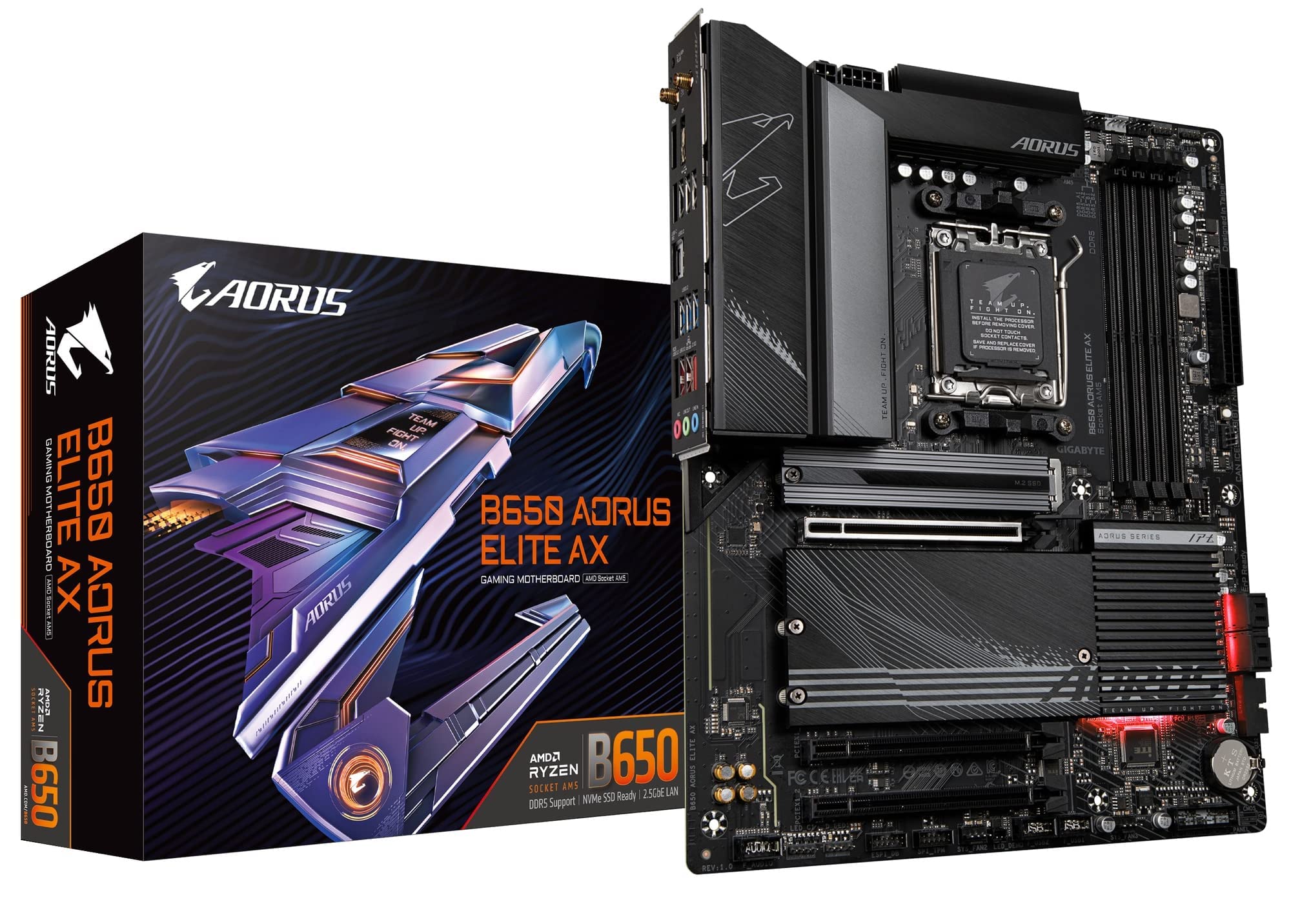
The Gigabyte B650 Aorus Elite AX motherboard is aimed at users who want to create a powerful high-performance system for professional use, gaming, and multimedia. This motherboard uses the AM5 socket and supports AMD Ryzen 7000 series processors. The motherboard has three M.2 ports for SSD, supports memory speeds up to DDR5 6666, and features multiple communication ports including USB 3.2 Gen 2, USB Type-C, Wi-Fi 6, and Ethernet. It also features advanced technologies for increased data transfer speeds and Smart Fan 6 for ultra-quiet operation. Overall, the Gigabyte B650 Aorus Elite AX motherboard is aimed at users looking for an advanced motherboard with high performance and multiple functions for professional use and gaming.
The Gigabyte B650 Aorus Elite AX motherboard is aimed at users who want to create a powerful high-performance system for professional use, gaming, and multimedia. This motherboard uses the AM5 socket and supports AMD Ryzen 7000 series processors. The motherboard has three M.2 ports for SSD, supports memory speeds up to DDR5 6666, and features multiple communication ports including USB 3.2 Gen 2, USB Type-C, Wi-Fi 6, and Ethernet. It also features advanced technologies for increased data transfer speeds and Smart Fan 6 for ultra-quiet operation. Overall, the Gigabyte B650 Aorus Elite AX motherboard is aimed at users looking for an advanced motherboard with high performance and multiple functions for professional use and gaming.
The Gigabyte B650 Aorus Elite AX motherboard is aimed at users who want to create a powerful high-performance system for professional use, gaming, and multimedia. This motherboard uses the AM5 socket and supports AMD Ryzen 7000 series processors. The motherboard has three M.2 ports for SSD, supports memory speeds up to DDR5 6666, and features multiple communication ports including USB 3.2 Gen 2, USB Type-C, Wi-Fi 6, and Ethernet. It also features advanced technologies for increased data transfer speeds and Smart Fan 6 for ultra-quiet operation. Overall, the Gigabyte B650 Aorus Elite AX motherboard is aimed at users looking for an advanced motherboard with high performance and multiple functions for professional use and gaming.
The Gigabyte B650 Aorus Elite AX motherboard is aimed at users who want to create a powerful high-performance system for professional use, gaming, and multimedia. This motherboard uses the AM5 socket and supports AMD Ryzen 7000 series processors. The motherboard has three M.2 ports for SSD, supports memory speeds up to DDR5 6666, and features multiple communication ports including USB 3.2 Gen 2, USB Type-C, Wi-Fi 6, and Ethernet. It also features advanced technologies for increased data transfer speeds and Smart Fan 6 for ultra-quiet operation. Overall, the Gigabyte B650 Aorus Elite AX motherboard is aimed at users looking for an advanced motherboard with high performance and multiple functions for professional use and gaming.
Last updated at 08/23/2026 15:56:43
(factory Refurbished) Gigabyte B650 Aorus Elite Ax Ddr5 Pcie 5.0 Am5
Delivery $53.29
Affiliate Disclosure: We may receive a small commission for purchases made through this link at no extra cost to you. This helps support our site. Thank you!
Gigabyte B650 Aorus Elite Ax Amd Am5 Ddr5 Desktop Motherboard
Delivery $385.85
Affiliate Disclosure: We may receive a small commission for purchases made through this link at no extra cost to you. This helps support our site. Thank you!
Gigabyte B650 Aorus Elite Ax Am5 Lga 1718 Amd B650 Atx Motherboard
Delivery $55.82
Affiliate Disclosure: We may receive a small commission for purchases made through this link at no extra cost to you. This helps support our site. Thank you!
Gigabyte B650 Aorus Elite Ax Am5 Lga 1718 Amd B650 Atx Motherboard
Delivery $60.53
Affiliate Disclosure: We may receive a small commission for purchases made through this link at no extra cost to you. This helps support our site. Thank you!
GIGABYTE - B650 AORUS ELITE AX Socket AM5 AMD B650 ATX DDR5 Wi-Fi 6E Motherboard - Black - B650 AORUS ELITE AX
Delivery $152.18
GIGABYTE B650 AORUS ELITE AX AM5 LGA 1718 AMD B650 ATX Motherboard DDR5, M.2, PCIe 5.0, USB 3.2 Gen2X2 Type-C, WiFi 6E, 2.5GbE LAN, Q-Flash Plus, EZ-L
Delivery $98
Gigabyte B650 Aorus Elite Ax Amd Am5 Atx Motherboard, Support Ryzen 9000/8000/7000 Series, Ddr5, 14+2+1 Power Phase, Pc Ie 5.0 M.2, Usb C 3.2 Gen 2, W
Delivery between 30 Aug – 2 Sept $29
Gigabyte B650 AORUS Elite AX (AM5/ LGA 1718/ AMD B650/ ATX/ / DDR5/ M.2/ PCIe 5.0/ USB 3.2 Gen2X2 Type-C/WiFi 6E/ 2.5GbE LAN/Q-Flash
Delivery between 28 Aug – 1 Sept $35.88
originally posted on pbtech.co.nz
Board feels premium and has a substantial heft to it. Gigabyte control centre made it easy to install all drivers for the chipset, apu ect. The VRM thermal solution is great having a large surface area to dissipate the heat even with the absence of direct cooling around the socket. The only negatives in my opinion would be the lacking variety of pcie slots, the absence of a post code readout (Given the price point this board is at), and the odd placement of the type c header on the board making cable management a little bit harder. All and all I would highly recommend this board especially if you can get it while it is on sale.
originally posted on microcenter.com
I've had this board for more than 3 weeks now and have had no issues with it so far. The Wifi 6E, the boatload of USB ports, we take those! The heatsinks are pretty overkill, even chunkier than my z690 board. Paired with a 7950x, it has no problem pushing 200W of power, but I advice putting on the 105W Eco mode if you want the best power to performance efficiency out of the chip. The free FlareX CL30 6000mhz ram that was bundled with the cpu ran at its EXPO settings with no issues, but you might have to boot into windows first before setting the RAM at its rated speeds.The only PCIE 5.0 on this board is the first NVME slot that's closest to the CPU. Yes it's no b650E but I think it'll take sometime before GPUs can make full use of the 5.0 technology.One downside ... MoreI've had this board for more than 3 weeks now and have had no issues with it so far. The Wifi 6E, the boatload of USB ports, we take those! The heatsinks are pretty overkill, even chunkier than my z690 board. Paired with a 7950x, it has no problem pushing 200W of power, but I advice putting on the 105W Eco mode if you want the best power to performance efficiency out of the chip. The free FlareX CL30 6000mhz ram that was bundled with the cpu ran at its EXPO settings with no issues, but you might have to boot into windows first before setting the RAM at its rated speeds.The only PCIE 5.0 on this board is the first NVME slot that's closest to the CPU. Yes it's no b650E but I think it'll take sometime before GPUs can make full use of the 5.0 technology.One downside to this board is its weak audio chip, but if you have a USB audio interface or a different way to plug in your audio device and want a plethora of USB slots, I highly recommend this board!
originally posted on bestbuy.com
This is my 3rd gigabyte mobo, I believe they make the best mobos for the money. I've never had a single issue with any of mine and I've always been an early adopter for their new boards. Feature wise this guy has everything, new 1718 lga socket, ddr5, pcie gen 5 m.2 slot, wifi/bluetooth, good sound codec, a great power phases. The fan headers and RGB headers are all thoughtfully laid out around the board. AMD expo ran stable and right away 6000mhz cl36 on the ram. The only complaint I can say and it's with every board is the cpu power plugs need to face the rear of the pcb. With the modern vrm heatsinks being massive and aio coolers becoming the norm there is little to no room to run 2 8 pin cables up there.
| Chipset | AMD B650 |
| CPU Socket | AM5 |
| Display | 1 x DisplayPort 1 x HDMI |
| Audio | 3 x 1/8" / 3.5 mm |
| Ethernet / Controller | 1 x Realtek 2.5Gigabit |
(factory Refurbished) Gigabyte B650 Aorus Elite Ax Ddr5 Pcie 5.0 Am5
Delivery $53.29
Affiliate Disclosure: We may receive a small commission for purchases made through this link at no extra cost to you. This helps support our site. Thank you!
Gigabyte B650 Aorus Elite Ax Amd Am5 Ddr5 Desktop Motherboard
Delivery $385.85
Affiliate Disclosure: We may receive a small commission for purchases made through this link at no extra cost to you. This helps support our site. Thank you!
Gigabyte B650 Aorus Elite Ax Am5 Lga 1718 Amd B650 Atx Motherboard
Delivery $55.82
Affiliate Disclosure: We may receive a small commission for purchases made through this link at no extra cost to you. This helps support our site. Thank you!
Gigabyte B650 Aorus Elite Ax Am5 Lga 1718 Amd B650 Atx Motherboard
Delivery $60.53
Affiliate Disclosure: We may receive a small commission for purchases made through this link at no extra cost to you. This helps support our site. Thank you!
GIGABYTE - B650 AORUS ELITE AX Socket AM5 AMD B650 ATX DDR5 Wi-Fi 6E Motherboard - Black - B650 AORUS ELITE AX
Delivery $152.18
Board feels premium and has a substantial heft to it. Gigabyte control centre made it easy to install all drivers for the chipset, apu ect. The VRM thermal solution is great having a large surface area to dissipate the heat even with the absence of direct cooling around the socket. The only negatives in my opinion would be the lacking variety of pcie slots, the absence of a post code readout (Given the price point this board is at), and the odd placement of the type c header on the board making cable management a little bit harder. All and all I would highly recommend this board especially if you can get it while it is on sale.
I've had this board for more than 3 weeks now and have had no issues with it so far. The Wifi 6E, the boatload of USB ports, we take those! The heatsinks are pretty overkill, even chunkier than my z690 board. Paired with a 7950x, it has no problem pushing 200W of power, but I advice putting on the 105W Eco mode if you want the best power to performance efficiency out of the chip. The free FlareX CL30 6000mhz ram that was bundled with the cpu ran at its EXPO settings with no issues, but you might have to boot into windows first before setting the RAM at its rated speeds.The only PCIE 5.0 on this board is the first NVME slot that's closest to the CPU. Yes it's no b650E but I think it'll take sometime before GPUs can make full use of the 5.0 technology.One downside ... MoreI've had this board for more than 3 weeks now and have had no issues with it so far. The Wifi 6E, the boatload of USB ports, we take those! The heatsinks are pretty overkill, even chunkier than my z690 board. Paired with a 7950x, it has no problem pushing 200W of power, but I advice putting on the 105W Eco mode if you want the best power to performance efficiency out of the chip. The free FlareX CL30 6000mhz ram that was bundled with the cpu ran at its EXPO settings with no issues, but you might have to boot into windows first before setting the RAM at its rated speeds.The only PCIE 5.0 on this board is the first NVME slot that's closest to the CPU. Yes it's no b650E but I think it'll take sometime before GPUs can make full use of the 5.0 technology.One downside to this board is its weak audio chip, but if you have a USB audio interface or a different way to plug in your audio device and want a plethora of USB slots, I highly recommend this board!
This is my 3rd gigabyte mobo, I believe they make the best mobos for the money. I've never had a single issue with any of mine and I've always been an early adopter for their new boards. Feature wise this guy has everything, new 1718 lga socket, ddr5, pcie gen 5 m.2 slot, wifi/bluetooth, good sound codec, a great power phases. The fan headers and RGB headers are all thoughtfully laid out around the board. AMD expo ran stable and right away 6000mhz cl36 on the ram. The only complaint I can say and it's with every board is the cpu power plugs need to face the rear of the pcb. With the modern vrm heatsinks being massive and aio coolers becoming the norm there is little to no room to run 2 8 pin cables up there.
Great product. In this price range it is the best AM5 motherboard right now. Good build quality, good connectivity, a lot of options; nice DDR5 and M2 gen 5 support plus 2 extra M2 gen 4 for plenty of fast storage. The GPU pcie slot is only gen 4, but right now it is not important since no video card use pcie gen 5
After researching on youtube - this motherboard is better than some other brands and the auto over clock is really nice. Initially I had some post issues but found out later that I had a small cat hair in the Memory bus lane - just have to be careful when installing the cpu als as the mother board has the PINs now - I'm running the 7950X and have fantastic FPS. I have an RTX 3090 FTW3 so is really nice. Keep in make sure the memory you buy is compatible with the motherboard, in my research I found if you use Intel based or non test memory it may not boot up at all.
Good specs, good feature set. I am coming from AM4 which has been solid and was worried about getting in too early on AM5, but it was painless to get up and running and I haven't had any issues. Biggest "issue" was having to download the Wi-Fi drivers during the Win11 install. Other than that it was a matter of updating the BIOS, picking the right profile for my ram and then going into the curve optimizer and PBO2 menus and setting things up. Not sure if I have a good CPU or if a little tweaking goes a long way, but I am not seeing high temps under load and the 7900x is able to boost over it's "max" boost clock easily. The only big "advantage" I can see with the 670 series is if you need PCI express 5 for some reason. I'm running a RTX4090 and it probably won't even ... MoreGood specs, good feature set. I am coming from AM4 which has been solid and was worried about getting in too early on AM5, but it was painless to get up and running and I haven't had any issues. Biggest "issue" was having to download the Wi-Fi drivers during the Win11 install. Other than that it was a matter of updating the BIOS, picking the right profile for my ram and then going into the curve optimizer and PBO2 menus and setting things up. Not sure if I have a good CPU or if a little tweaking goes a long way, but I am not seeing high temps under load and the 7900x is able to boost over it's "max" boost clock easily. The only big "advantage" I can see with the 670 series is if you need PCI express 5 for some reason. I'm running a RTX4090 and it probably won't even max out ver. 3. USB ports are plentiful....I do sim racing and I had some issues with USB with my x570/5900x system that this replaced. Wi-Fi is a bit faster as well. I picked this up as a bundle with the 7900x and it came with 32GB of DDR5 6000 ram. Super happy with the purchase.
I was upgrading to AM5 and I mainly game and stream from a single pc. This MB has everything that you would need and it performs exactly as it should. 3 M.2 slots, check. Built in wifi 6, check. Bios is simple and easy to navigate, as well Gigabyte makes it really easy to update your bios with their Qflash bios update feature. I didn't want to spend an arm and a leg on a motherboard where most of the features are overkill and a waste of money. This board gets you everything you need for a high end build and then some. Specs for my pc: CPU - Ryzen 7 7700X MB - Gigabyte b650 aorus pro ax RAM - G.SKILL 32G (2 x 16G) DDR5 6000 C30 GPU - Powercolor Red Devil 6900XT PSU - Seasonic 1000W
THE GOOD: Plenty of connectors and USB on the i/o. Very easy to build with too. looks decent enough, No RGBTHE NOT SO GOOD: Absolutely no instructions at all. not even a link to the site with all the firmware. Bluetooth wont work until you figure out how to get all the firmware. Part of the firm ware includes Norton (the worse virus of them all). No RGB.
After spening the better part of five days trouble shooting a NON POST I give up. Gigabyte managed to be first mother board in over 20 years that I couldn't get to work. Board would hang on DRAM error (Red LED on mother Board) and wouldn't post. RAM was Corsair Vengeance 5600 DDR5. Cant update bios because it wont POST. Cant use Quick Flash Post because it wont work..Dunno Why. Posted on Gigabyte website with an obnoxious amount of information needed. They wanted to the P/N and model of ever...single... component including RAM, MB, CPU. No response from Gigabyte for four days. Bought a new set of DDR 5 RAM this time 5200 DDR and it still wont post. Now I'm out another $150, 5 days and another $100 for an ASUS motherboard since BB didn't have a replacement. In ... MoreAfter spening the better part of five days trouble shooting a NON POST I give up. Gigabyte managed to be first mother board in over 20 years that I couldn't get to work. Board would hang on DRAM error (Red LED on mother Board) and wouldn't post. RAM was Corsair Vengeance 5600 DDR5. Cant update bios because it wont POST. Cant use Quick Flash Post because it wont work..Dunno Why. Posted on Gigabyte website with an obnoxious amount of information needed. They wanted to the P/N and model of ever...single... component including RAM, MB, CPU. No response from Gigabyte for four days. Bought a new set of DDR 5 RAM this time 5200 DDR and it still wont post. Now I'm out another $150, 5 days and another $100 for an ASUS motherboard since BB didn't have a replacement. In addition there is no MB manual. $250 and they cant include a $0.25 paper manual so I don't have to scroll through my phone when doing an install. Just a FYI for anyone else there is a 4 Pin and an 8 PIN power input for the CPU. You only need the 8PIN or the 4 PIN. Obviously the 8 Pin is preferred. But the manual doesn't tell you this. Another two hours wasted doing Gigabytes work.
Knocking a star off for the BIOS flashing documentation. It’s non-existent from Gigabyte and I had to watch a video on YouTube to figure it out.Also, flash the BIOS before doing anything. I had an issue where the board would hang on the VGA LED. If this happens to you, make sure the monitor you have the PC plugged into is actively on then reboot. This issue went away after updating the bios to the latest revision. Not a gripe directly against the board, just something to be aware about.Next, theirs is no easy to set ECO Mode. You have to go into Precision Boost Overdrive and manually set PPT, TDC, and EDC. Not a deal breaker, but would be handy to have for experimenting/easy mode changes.Final star knocked off is for the Gigabyte Control Center. It’s very ... MoreKnocking a star off for the BIOS flashing documentation. It’s non-existent from Gigabyte and I had to watch a video on YouTube to figure it out.Also, flash the BIOS before doing anything. I had an issue where the board would hang on the VGA LED. If this happens to you, make sure the monitor you have the PC plugged into is actively on then reboot. This issue went away after updating the bios to the latest revision. Not a gripe directly against the board, just something to be aware about.Next, theirs is no easy to set ECO Mode. You have to go into Precision Boost Overdrive and manually set PPT, TDC, and EDC. Not a deal breaker, but would be handy to have for experimenting/easy mode changes.Final star knocked off is for the Gigabyte Control Center. It’s very basic and THERE’S NO SETTING TO CHANGE TEMPERATURE UNITS! Come on Gigabyte, this is a basic setting!I have mixed feelings overall. These software issues are easy to fix on Gigabyte’s end and tarnish the excellent hardware of the motherboard.
| Chipset | AMD B650 |
| CPU Socket | AM5 |
| Display | 1 x DisplayPort 1 x HDMI |
| Audio | 3 x 1/8" / 3.5 mm |
| Ethernet / Controller | 1 x Realtek 2.5Gigabit |

