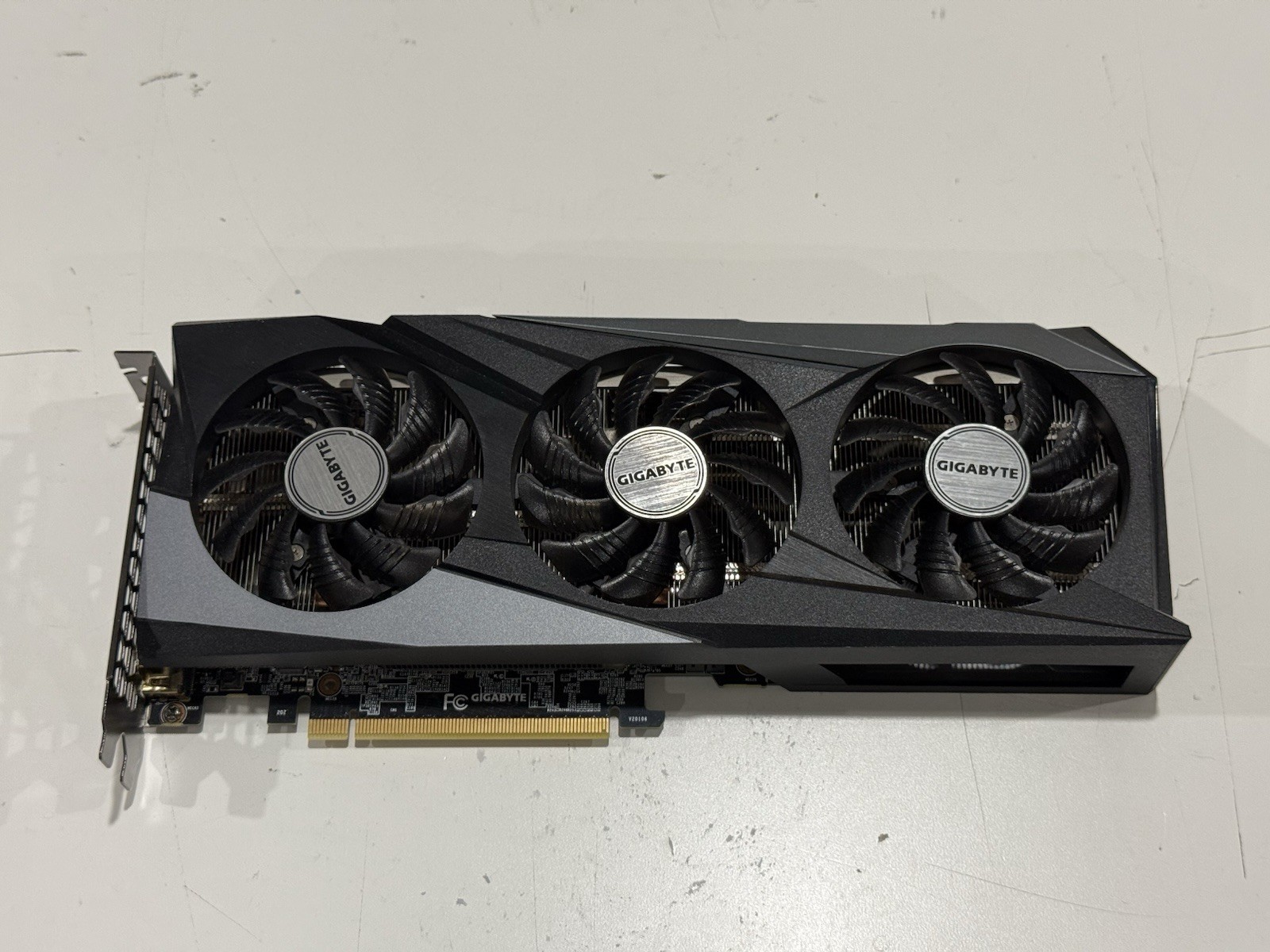
The WINDFORCE 3X cooling system features 3X80mm unique blade fans, alternate spinning, 5 composite copper heat pipes direct touch GPU, 3D active fan and Screen cooling, which together provide high efficiency heat dissipation.
The WINDFORCE 3X cooling system features 3X80mm unique blade fans, alternate spinning, 5 composite copper heat pipes direct touch GPU, 3D active fan and Screen cooling, which together provide high efficiency heat dissipation.
The WINDFORCE 3X cooling system features 3X80mm unique blade fans, alternate spinning, 5 composite copper heat pipes direct touch GPU, 3D active fan and Screen cooling, which together provide high efficiency heat dissipation.
The WINDFORCE 3X cooling system features 3X80mm unique blade fans, alternate spinning, 5 composite copper heat pipes direct touch GPU, 3D active fan and Screen cooling, which together provide high efficiency heat dissipation.
Last updated at 08/15/2026 06:20:29
GIGABYTE GeForce RTX 3060 Ti GAMING OC 8GB GDDR6 Graphics Card
Affiliate Disclosure: We may receive a small commission for purchases made through this link at no extra cost to you. This helps support our site. Thank you!
GIGABYTE Gaming GeForce RTX 3060 Ti 8GB GDDR6X PCI Express 4.0 x16 ATX Video Card GV-N306TXGAMING OC-8GD
Delivery between 19–23 Aug $35.88
Ge Force Rtx 3060 Ti Gaming Oc 8 G (Rev2.0) Graphics Card, 3 X Windforce Fans, Lhr, 8 Gb 256 Bit Gddr6, Gv N306 Tgaming Oc 8 Gd Rev2.0 Video Card
Delivery between 21–24 Aug $29
Ge Force Rtx 3060 Ti Gaming Oc 8 G (Rev2.0) Graphics Card, 3 X Windforce Fans, Lhr, 8 Gb 256 Bit Gddr6, Gv N306 Tgaming Oc 8 Gd Rev2.0 Video Card
Free delivery between 25–28 Aug
originally posted on pbtech.co.nz
Hurry and grab yours before Nvidia try to push at buying the 'new' 8gb version. Same price, worse performance.This thing on the other hand, for the price, awesome card! Temps havent yet exceeded 75 degrees so plenty of OC overhead or a very long life, take your pick. Can play even unoptimised new games like Darktide on medium settings with raytracing using DLSS! Cyberpunk 2077 runs on raytraced high with a stable 70 fps paired with my i5-12400f.No complaints. Look good, runs good, not crazily priced.
originally posted on pbtech.co.nz
As a Blender user I got this because the 3060 has 12 gigs of VRAM, which may not be much of a sales point for gamers but it isdefinitely an advantage when rendering larger scenes in Blender. If your scene larger than 8 gig; on a card with only 8 gigs of VRAM, Blenderhas to reload the scene into VRAM to keep going with the render and so in some cases even a much faster card like say a 3070 with8 gig can actually end up with slower render times if your Blender scene is over 8gig, basically negating the supposed advantage of a faster card.As I'm not yet an expert at fully optimizing my scene for memory size, I'm really happy I went with this card. Render times are SO much faster than my old GTX980and I think are somewhere on par with an RTX2070super I had for a ... MoreAs a Blender user I got this because the 3060 has 12 gigs of VRAM, which may not be much of a sales point for gamers but it isdefinitely an advantage when rendering larger scenes in Blender. If your scene larger than 8 gig; on a card with only 8 gigs of VRAM, Blenderhas to reload the scene into VRAM to keep going with the render and so in some cases even a much faster card like say a 3070 with8 gig can actually end up with slower render times if your Blender scene is over 8gig, basically negating the supposed advantage of a faster card.As I'm not yet an expert at fully optimizing my scene for memory size, I'm really happy I went with this card. Render times are SO much faster than my old GTX980and I think are somewhere on par with an RTX2070super I had for a while.For my use, the balance of 12 gig VRAM, render speeds in cycles with optix, and the price of this card is excellent!I would definitely recommend this card if you can't or don't want to spend more on a higher spec card.
originally posted on scorptec.com.au
As it says in the title I’m reviewing the product and not the merchant, Scorptec was great, 5/5As for the card, it works exactly as intended however like most gigabyte cards the fan reving is extremely annoying and even when the fans work as intended they aren’t exactly in sync or at the correct speeds for the temperature, this isn’t an issue with my build as I read forums and posts about gigabyte cards and this is a universal issue. Overall the cards great for the price, since the 1660 super went up in price the 3060 OC is currently the best price to performance card on the market. Also I bought the card when it wasn’t even at its lowest price point so as soon as it goes below $500 AUD, it is a GREAT deal.
| General | |
| Device Type | Graphics card |
| Bus Type | PCI Express 4.0 x16 |
| Graphics Engine | NVIDIA GeForce RTX 3060 Ti |
| Core Clock | 1740 MHz |
GIGABYTE GeForce RTX 3060 Ti GAMING OC 8GB GDDR6 Graphics Card
Affiliate Disclosure: We may receive a small commission for purchases made through this link at no extra cost to you. This helps support our site. Thank you!
GIGABYTE Gaming GeForce RTX 3060 Ti 8GB GDDR6X PCI Express 4.0 x16 ATX Video Card GV-N306TXGAMING OC-8GD
Delivery between 19–23 Aug $35.88
Ge Force Rtx 3060 Ti Gaming Oc 8 G (Rev2.0) Graphics Card, 3 X Windforce Fans, Lhr, 8 Gb 256 Bit Gddr6, Gv N306 Tgaming Oc 8 Gd Rev2.0 Video Card
Delivery between 21–24 Aug $29
Ge Force Rtx 3060 Ti Gaming Oc 8 G (Rev2.0) Graphics Card, 3 X Windforce Fans, Lhr, 8 Gb 256 Bit Gddr6, Gv N306 Tgaming Oc 8 Gd Rev2.0 Video Card
Free delivery between 25–28 Aug
Hurry and grab yours before Nvidia try to push at buying the 'new' 8gb version. Same price, worse performance.This thing on the other hand, for the price, awesome card! Temps havent yet exceeded 75 degrees so plenty of OC overhead or a very long life, take your pick. Can play even unoptimised new games like Darktide on medium settings with raytracing using DLSS! Cyberpunk 2077 runs on raytraced high with a stable 70 fps paired with my i5-12400f.No complaints. Look good, runs good, not crazily priced.
As a Blender user I got this because the 3060 has 12 gigs of VRAM, which may not be much of a sales point for gamers but it isdefinitely an advantage when rendering larger scenes in Blender. If your scene larger than 8 gig; on a card with only 8 gigs of VRAM, Blenderhas to reload the scene into VRAM to keep going with the render and so in some cases even a much faster card like say a 3070 with8 gig can actually end up with slower render times if your Blender scene is over 8gig, basically negating the supposed advantage of a faster card.As I'm not yet an expert at fully optimizing my scene for memory size, I'm really happy I went with this card. Render times are SO much faster than my old GTX980and I think are somewhere on par with an RTX2070super I had for a ... MoreAs a Blender user I got this because the 3060 has 12 gigs of VRAM, which may not be much of a sales point for gamers but it isdefinitely an advantage when rendering larger scenes in Blender. If your scene larger than 8 gig; on a card with only 8 gigs of VRAM, Blenderhas to reload the scene into VRAM to keep going with the render and so in some cases even a much faster card like say a 3070 with8 gig can actually end up with slower render times if your Blender scene is over 8gig, basically negating the supposed advantage of a faster card.As I'm not yet an expert at fully optimizing my scene for memory size, I'm really happy I went with this card. Render times are SO much faster than my old GTX980and I think are somewhere on par with an RTX2070super I had for a while.For my use, the balance of 12 gig VRAM, render speeds in cycles with optix, and the price of this card is excellent!I would definitely recommend this card if you can't or don't want to spend more on a higher spec card.
As it says in the title I’m reviewing the product and not the merchant, Scorptec was great, 5/5As for the card, it works exactly as intended however like most gigabyte cards the fan reving is extremely annoying and even when the fans work as intended they aren’t exactly in sync or at the correct speeds for the temperature, this isn’t an issue with my build as I read forums and posts about gigabyte cards and this is a universal issue. Overall the cards great for the price, since the 1660 super went up in price the 3060 OC is currently the best price to performance card on the market. Also I bought the card when it wasn’t even at its lowest price point so as soon as it goes below $500 AUD, it is a GREAT deal.
Very efficient for its price level. Purchased to replace the old GTX 1050ti. You have to watch out for overheating of the card - the fans are very small and the card in some games can heat up to 80 degrees and then becomes really loud. When working for a long time, the housing must be able to breathe. For advanced users, I recommend the so-called underclocking (the card is factory overclocked).The performance in games is very good - all tested games in the Ultra settings in 1920x1080 resolution easily reach over 100 fps. In my opinion, there is no better card in this price range.
When the RTX 3060 12GB went down in price, I snagged one, this model in particular. I'm a sucker for RGBs and sought the opportunity to match it with the rest of my setup's red lighting. As far as gaming, it does well in 1080p, but I haven't tested in higher resolutions (because I don't have those monitors yet). I do suspect it will do well in 1440p medium for less demanding titles. Interestingly, I saw that in MSI Afterburner this card can reach a 124% power limit, which is higher than other cards I've used. At stock, this card easily stays under 50c at idle. Make sure this fits in your case before you buy it. Great product.
I am very happy with my purchase. My particular card overclock extremely well. I am able to get very close to the performance of the 3070 I sold like a dirty scalper for almost twice what I paid, and suffered a year with a 1060 3gb 😂. I am able to get a stable OC scoring 12403 (my 3070 stock got 12650 stock and didnt really overclock well at all) in time spy using simple config in MSI Afterburner: 104% power, +175mhz offset and an incredible +950 memory offset! This allows me to crank all of the games I play at 1440p with the help of DLSS on quality settings in 1440p and get 90-120 fps (Forza 5 Shadow of the Tomb Raider) and even cyber punk 2077 with cranked details and ray tracing at playable frame rates (consistently above 60) paired with a 12600kf. I cant ... MoreI am very happy with my purchase. My particular card overclock extremely well. I am able to get very close to the performance of the 3070 I sold like a dirty scalper for almost twice what I paid, and suffered a year with a 1060 3gb 😂. I am able to get a stable OC scoring 12403 (my 3070 stock got 12650 stock and didnt really overclock well at all) in time spy using simple config in MSI Afterburner: 104% power, +175mhz offset and an incredible +950 memory offset! This allows me to crank all of the games I play at 1440p with the help of DLSS on quality settings in 1440p and get 90-120 fps (Forza 5 Shadow of the Tomb Raider) and even cyber punk 2077 with cranked details and ray tracing at playable frame rates (consistently above 60) paired with a 12600kf. I cant guarantee other cards will do as well as it is always playing the silicon lottery, but most reviews and posts Ive seen confirm that these gigabyte cards especially are capable of incredible memory overclocks, and pretty decent core overclocks, their most limiting factor being power as my card tops out at 215 watts with just one 8 pin which close to the absolute max and means Im constantly drawing 65-75w from PCI slot on mobo, and 150 from the cable! Wish I could see this card with one more 6 pin but that only comes on the PRO and in this market theyd probably just go ahead and charge you for a 3070 cause it will def get VERY close to, or even 3070 stock performance with just a little more power. I am needing to re-think airflow however, as the card stays under 85 degrees but with overclock applied it sounds like a whiny jet engine doing so currently! I think I have too much exhaust and not enough input in my H510 Flow, so hoping that can be fixed. Would be pretty silly to consider custom water cooling a 60series card that I already spent too much on but them fans!!!!. Id much prefer 2 120mm fans over 3 70s. Smaller fans have that distinct whine when they soon fast that sounds right out of 2004 gaming PCs RGB is fun, but wish the RTX logo lit up, and or something on the backplate besides just the big Gigabyte logo. Id say for most people as of this moment in time, the 6600 is probably a better buy, can find them pretty regularly for sub 350, but if you like ray tracing and are ok with DLSS to help you along this card is not a bad choice. Just have to be willing to pay the NVIDIA tax. Of course if you can keep waiting do it! If you have a 1080, 2060super or above, or 5700XT or above just keep holding out a little longer! You missed your window to sell those for $700 so hold out till intel finally enters the market! Probably wont even buy an intel GPU for at least a few years, but hopefully it helps drop all GPU prices!
3060ti Delivers a good punch for the price. With cool temps and 8GB of VRAM expect this game to deliver a great 1080p gaming experience.I got Lucky and bought this card in Oct for $399. However I returned it in Jan for a full refund due to a fantastic holiday shopper return window BestBuy had and upgraded to a 4070ti when those released.The 3060ti ran cool and great 1080 frames on most gaming titles. In 1440p I noticed it didn’t perform as well and that’s why I upgraded to the 4070ti.I ran the 3060ti in a Lian Li Mesh 2 tower with a 750 Gold psu and it preformed great, I highly suggest this gpu!
My past experience was on board graphics card.My new pc with 13600k on board graphics was a significant improvement over my past PC 2500k processor.Then I installed the RTX3060 TI. Yet another step up in graphics quality. It was not as significant as the processor change.I was not willing to spend more. I tracked output parameters with the app and found they were great. The limited gaming, I do, I am happy. They look like new games.I am not a heavy online gamer, so I can't speak to how well this will perform.
I've had several Gigabyte Cards in the past 15 years. I have picked Gigabyte each time after considerable research and have not been disappointed. Their quality control is excellent, and none of the cards I've had encountered any issues despite years of gaming on them. Furthermore, Gigabyte doesn't do crazy overclocks like EVGA or similar companies. Those modifications squeeze out negligible performance at the cost of long term wear and tear and instability, which I have experienced. However, if you are someone who changes cards every year or two, then the extra wear and tear will likely not manifest before the switch.My favorite part about Gigabyte cards is their windforce design. The alternating spin on the triple fan design keeps the card cool. This is ... MoreI've had several Gigabyte Cards in the past 15 years. I have picked Gigabyte each time after considerable research and have not been disappointed. Their quality control is excellent, and none of the cards I've had encountered any issues despite years of gaming on them. Furthermore, Gigabyte doesn't do crazy overclocks like EVGA or similar companies. Those modifications squeeze out negligible performance at the cost of long term wear and tear and instability, which I have experienced. However, if you are someone who changes cards every year or two, then the extra wear and tear will likely not manifest before the switch.My favorite part about Gigabyte cards is their windforce design. The alternating spin on the triple fan design keeps the card cool. This is particularly important as each new generation pushes the thermal limits, and having adequate cooling is key to stability and longevity.Other thoughts: this card uses a standard 8 pin video card connector, whereas my previous card used both an 8 pin and a 6 pin. This is nice as it frees up some cables in my modular power supply, plus I didn't need to use the new adapter Nvidia introduced with the 3000 series.One note: I installed this on my MSI X570 motherboard, which has an "armored" GPU slot. This slot has a locking mechanism that prevents the previous card from being removed. I didn't realize this at first and was puzzled. If you've the same motherboard, just press down on the locking mechanism at the back of card slot to disengage it.Installation was easy. I had a previous Nvidia card. I simply downloaded the latest nvidia driver, installed it (with the previous card). Then I swapped out the two, and booted up no issues. The drivers recognized the new card and have been utilizing it well ever since.I almost went Radeon 6800. The reason I didn't was partially due to every card being difficult to find, but also AMD does not have a good competitor to Nvidia's DLSS. Furthermore, AMD drivers can be quite unstable, whereas Nvidia doesn't seem to have this problem.There are plenty of benchmarks on the internet. Seeing this card had almost identical (possibly superior) performance to a 2080 Super really set my mind. If you game at 4K, then you would want a 3080. I'm running a lot of VR with the Occulus, and this is plenty.
No noticeable difference but I only play an older game. I don't play much either. It actually does paging more frequently than the 2060, which is weird. The 2060 has less ram...*shrug* IDK what to say. The same play, same game, faster screen, same settings, the 3060 has more "paging", for me, than the 2060. I can't explain why. Moving from one map area to the next will cause a split second "halt" and then load. win10 pro for workstations x590 amd 9 3900x 1TB pcie 4 ssd (mid range speed, not the slowest, not the fastest) & 64gb ram; this is a wfh machine that happens to have games on it, it's not a gaming machine-regardless, the stats are more than strong enough to run games. and the driver says it's up to date. If I had to setup another pc for someone and I had a ... MoreNo noticeable difference but I only play an older game. I don't play much either. It actually does paging more frequently than the 2060, which is weird. The 2060 has less ram...*shrug* IDK what to say. The same play, same game, faster screen, same settings, the 3060 has more "paging", for me, than the 2060. I can't explain why. Moving from one map area to the next will cause a split second "halt" and then load. win10 pro for workstations x590 amd 9 3900x 1TB pcie 4 ssd (mid range speed, not the slowest, not the fastest) & 64gb ram; this is a wfh machine that happens to have games on it, it's not a gaming machine-regardless, the stats are more than strong enough to run games. and the driver says it's up to date. If I had to setup another pc for someone and I had a choice between 2060 and 3060, at msrp's, I might just go with a 2060.
| General | |
| Device Type | Graphics card |
| Bus Type | PCI Express 4.0 x16 |
| Graphics Engine | NVIDIA GeForce RTX 3060 Ti |
| Core Clock | 1740 MHz |

