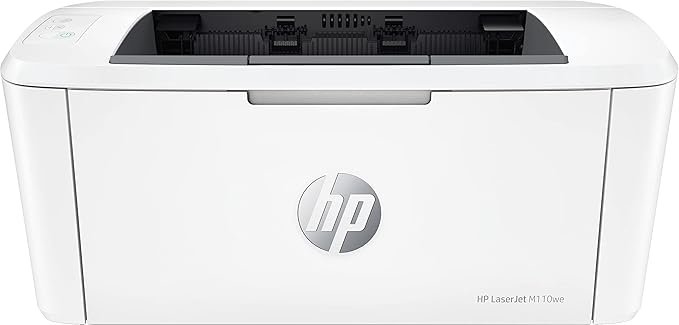
Discover the compact and efficient HP LaserJet M110we WiFi Printer, offering 20 ppm A4 printing and the reliable HP Smart app. Experience seamless connectivity with HP+ system, keeping you ready to print on-the-go.
Discover the compact and efficient HP LaserJet M110we WiFi Printer, offering 20 ppm A4 printing and the reliable HP Smart app. Experience seamless connectivity with HP+ system, keeping you ready to print on-the-go.
Discover the compact and efficient HP LaserJet M110we WiFi Printer, offering 20 ppm A4 printing and the reliable HP Smart app. Experience seamless connectivity with HP+ system, keeping you ready to print on-the-go.
Discover the compact and efficient HP LaserJet M110we WiFi Printer, offering 20 ppm A4 printing and the reliable HP Smart app. Experience seamless connectivity with HP+ system, keeping you ready to print on-the-go.
Last updated at 06/22/2026 14:54:13
HP LaserJet M110we Wireless Black & White Laser Printer, 21 ppm, HP+ Eligible, Energy Star Certified, Compact Design, USB & Wi-Fi Connectivity, 7MD66E
Delivery $29.90
Affiliate Disclosure: We may receive a small commission for purchases made through this link at no extra cost to you. This helps support our site. Thank you!
HP LaserJet M110we Mono Laser Printer
Hp Laserjet M110we Wireless Monochrome Laser Printer Used Excellent
Delivery $47.00
Affiliate Disclosure: We may receive a small commission for purchases made through this link at no extra cost to you. This helps support our site. Thank you!
Hp Laserjet M110we A4 Mono Laser Printer+wi-fi 20ppm 7md66e 141a
Delivery $19.95
Affiliate Disclosure: We may receive a small commission for purchases made through this link at no extra cost to you. This helps support our site. Thank you!
Hp Laserjet M110we A4 Mono Laser Printer+wi-fi 20ppm 7md66e World
Delivery $29.95
Affiliate Disclosure: We may receive a small commission for purchases made through this link at no extra cost to you. This helps support our site. Thank you!
HP LaserJet M110we Monochrome Laser Printer
Affiliate Disclosure: We may receive a small commission for purchases made through this link at no extra cost to you. This helps support our site. Thank you!
HP LaserJet M110WE, A4 Mono Laser Printer
30-day returns
originally posted on officeworks.com.au
I have just helped a friend get their M110we printer working. It is over complicated. If you want a printer that you switch on, plug in a cable and press print then this printer is NOT for you. The setup is crazy enough (needs a smartphone, an HP account and a 2.4Ghz wifi network), but this printer will not print if it is not connected to the internet. This printer will not work if you put 3rd party cartridges in it. The printer is small, but it's not a portable printer. If you want to take it to different places that have different WiFi networks then you need to go through the whole setup process again (after resetting the printer) in each place - every time. There are other printers for sale at Office Works that have the WiFi printing capability (so you can print ... MoreI have just helped a friend get their M110we printer working. It is over complicated. If you want a printer that you switch on, plug in a cable and press print then this printer is NOT for you. The setup is crazy enough (needs a smartphone, an HP account and a 2.4Ghz wifi network), but this printer will not print if it is not connected to the internet. This printer will not work if you put 3rd party cartridges in it. The printer is small, but it's not a portable printer. If you want to take it to different places that have different WiFi networks then you need to go through the whole setup process again (after resetting the printer) in each place - every time. There are other printers for sale at Office Works that have the WiFi printing capability (so you can print from your smart phone) without the need for such a complex setup and printing process. Just because it is small, this is not a simple, basic, portable printer.
originally posted on bestbuy.com
While the printer has a USB port, you can NOT use it with its USB port until you hook it up to Wi-Fi. The HP Smart app tells you that you can use it on USB after connecting it to Wi-Fi, so I did. After doing so, I encounter a screen telling me that my printer needs an update, but that it was unable to do so. I ended up going to the link listed for the manual method, which brings you to a website with a "Submit" button. Hitting the "submit" button brings you to the same page with nothing listed! I did some research and was able to successfully update the printer manually, indicated by the printer restarting and the firmware updater giving a smiley face telling me it was done. Going back to the HP Smart app, it tells me that there is still some sort of "update" that ... MoreWhile the printer has a USB port, you can NOT use it with its USB port until you hook it up to Wi-Fi. The HP Smart app tells you that you can use it on USB after connecting it to Wi-Fi, so I did. After doing so, I encounter a screen telling me that my printer needs an update, but that it was unable to do so. I ended up going to the link listed for the manual method, which brings you to a website with a "Submit" button. Hitting the "submit" button brings you to the same page with nothing listed! I did some research and was able to successfully update the printer manually, indicated by the printer restarting and the firmware updater giving a smiley face telling me it was done. Going back to the HP Smart app, it tells me that there is still some sort of "update" that it can not complete, so the printer will simply not let me print anything AT ALL anymore, even using the USB cable. It almost feels like you are being trolled as a customer. Do NOT buy this printer -- it's practically e-waste even if you do get it set up correctly! Go buy a Brother instead that sets up easily and has toner that actually lasts. I haven't replaced my Brother printer's toner in almost 2 years now!
originally posted on bestbuy.com
I purchased this printer two weeks ago to replace an old, but very reliable, HP P1109w. Overall, I am satisfied with the printing itself, but I am equally disappointed in the wi-fi networking features, or lack thereof, of the printer. There are also unanswered questions re: the sleep settings. Thus, the mid-range rating of the printer. I'll start by mentioning something that I missed in reading the tech specs prior to purchase. This printer's wireless adapter only operates in the 2.5GHz range. I would have much preferred a printer that could operate in the 5GHz range in order to work in a less congested band. Setting up the printer for wi-fi connectivity should be a breeze, and, generally, it is. However, the end result for me did NOT leave a functioning printer! I ... MoreI purchased this printer two weeks ago to replace an old, but very reliable, HP P1109w. Overall, I am satisfied with the printing itself, but I am equally disappointed in the wi-fi networking features, or lack thereof, of the printer. There are also unanswered questions re: the sleep settings. Thus, the mid-range rating of the printer. I'll start by mentioning something that I missed in reading the tech specs prior to purchase. This printer's wireless adapter only operates in the 2.5GHz range. I would have much preferred a printer that could operate in the 5GHz range in order to work in a less congested band. Setting up the printer for wi-fi connectivity should be a breeze, and, generally, it is. However, the end result for me did NOT leave a functioning printer! I have a hidden wi-fi network and, naturally, used its DHCP server to provide the wireless network settings to the printer. However, after the printer was set up it would ONLY print a SINGLE job, including a test page. Any subsequent print job would fail with the following error: "Printing error Stopped - 'Filter' failed" and then the print queue would go into Offline status. After researching said error message and trying a variety of suggested resolutions, nothing would change this behavior. I should mention that this behavior was consistent both in Windows 10 and macOS 13.0.1 (Ventura). I did find a source that suggested, as a last resort, manual IP configuration. I resorted to this and it works. However, this should NOT be necessary! I also despise being forced to have the printer constantly connected to the Internet just to get the HP+ "features", virtually of which I could care less about, including the toner cartridge service. This constant connection creates a larger and unnecessary attack surface.
| Number of print cartridges | 1 |
| Operating temperature (T-T) | 15 - 32.5 °C |
| Bluetooth | Y |
| Wi-Fi | Y |
| Total input capacity | 150 sheets |
HP LaserJet M110we Wireless Black & White Laser Printer, 21 ppm, HP+ Eligible, Energy Star Certified, Compact Design, USB & Wi-Fi Connectivity, 7MD66E
Delivery $29.90
Affiliate Disclosure: We may receive a small commission for purchases made through this link at no extra cost to you. This helps support our site. Thank you!
HP LaserJet M110we Mono Laser Printer
Hp Laserjet M110we Wireless Monochrome Laser Printer Used Excellent
Delivery $47.00
Affiliate Disclosure: We may receive a small commission for purchases made through this link at no extra cost to you. This helps support our site. Thank you!
Hp Laserjet M110we A4 Mono Laser Printer+wi-fi 20ppm 7md66e 141a
Delivery $19.95
Affiliate Disclosure: We may receive a small commission for purchases made through this link at no extra cost to you. This helps support our site. Thank you!
Hp Laserjet M110we A4 Mono Laser Printer+wi-fi 20ppm 7md66e World
Delivery $29.95
Affiliate Disclosure: We may receive a small commission for purchases made through this link at no extra cost to you. This helps support our site. Thank you!
I have just helped a friend get their M110we printer working. It is over complicated. If you want a printer that you switch on, plug in a cable and press print then this printer is NOT for you. The setup is crazy enough (needs a smartphone, an HP account and a 2.4Ghz wifi network), but this printer will not print if it is not connected to the internet. This printer will not work if you put 3rd party cartridges in it. The printer is small, but it's not a portable printer. If you want to take it to different places that have different WiFi networks then you need to go through the whole setup process again (after resetting the printer) in each place - every time. There are other printers for sale at Office Works that have the WiFi printing capability (so you can print ... MoreI have just helped a friend get their M110we printer working. It is over complicated. If you want a printer that you switch on, plug in a cable and press print then this printer is NOT for you. The setup is crazy enough (needs a smartphone, an HP account and a 2.4Ghz wifi network), but this printer will not print if it is not connected to the internet. This printer will not work if you put 3rd party cartridges in it. The printer is small, but it's not a portable printer. If you want to take it to different places that have different WiFi networks then you need to go through the whole setup process again (after resetting the printer) in each place - every time. There are other printers for sale at Office Works that have the WiFi printing capability (so you can print from your smart phone) without the need for such a complex setup and printing process. Just because it is small, this is not a simple, basic, portable printer.
While the printer has a USB port, you can NOT use it with its USB port until you hook it up to Wi-Fi. The HP Smart app tells you that you can use it on USB after connecting it to Wi-Fi, so I did. After doing so, I encounter a screen telling me that my printer needs an update, but that it was unable to do so. I ended up going to the link listed for the manual method, which brings you to a website with a "Submit" button. Hitting the "submit" button brings you to the same page with nothing listed! I did some research and was able to successfully update the printer manually, indicated by the printer restarting and the firmware updater giving a smiley face telling me it was done. Going back to the HP Smart app, it tells me that there is still some sort of "update" that ... MoreWhile the printer has a USB port, you can NOT use it with its USB port until you hook it up to Wi-Fi. The HP Smart app tells you that you can use it on USB after connecting it to Wi-Fi, so I did. After doing so, I encounter a screen telling me that my printer needs an update, but that it was unable to do so. I ended up going to the link listed for the manual method, which brings you to a website with a "Submit" button. Hitting the "submit" button brings you to the same page with nothing listed! I did some research and was able to successfully update the printer manually, indicated by the printer restarting and the firmware updater giving a smiley face telling me it was done. Going back to the HP Smart app, it tells me that there is still some sort of "update" that it can not complete, so the printer will simply not let me print anything AT ALL anymore, even using the USB cable. It almost feels like you are being trolled as a customer. Do NOT buy this printer -- it's practically e-waste even if you do get it set up correctly! Go buy a Brother instead that sets up easily and has toner that actually lasts. I haven't replaced my Brother printer's toner in almost 2 years now!
I purchased this printer two weeks ago to replace an old, but very reliable, HP P1109w. Overall, I am satisfied with the printing itself, but I am equally disappointed in the wi-fi networking features, or lack thereof, of the printer. There are also unanswered questions re: the sleep settings. Thus, the mid-range rating of the printer. I'll start by mentioning something that I missed in reading the tech specs prior to purchase. This printer's wireless adapter only operates in the 2.5GHz range. I would have much preferred a printer that could operate in the 5GHz range in order to work in a less congested band. Setting up the printer for wi-fi connectivity should be a breeze, and, generally, it is. However, the end result for me did NOT leave a functioning printer! I ... MoreI purchased this printer two weeks ago to replace an old, but very reliable, HP P1109w. Overall, I am satisfied with the printing itself, but I am equally disappointed in the wi-fi networking features, or lack thereof, of the printer. There are also unanswered questions re: the sleep settings. Thus, the mid-range rating of the printer. I'll start by mentioning something that I missed in reading the tech specs prior to purchase. This printer's wireless adapter only operates in the 2.5GHz range. I would have much preferred a printer that could operate in the 5GHz range in order to work in a less congested band. Setting up the printer for wi-fi connectivity should be a breeze, and, generally, it is. However, the end result for me did NOT leave a functioning printer! I have a hidden wi-fi network and, naturally, used its DHCP server to provide the wireless network settings to the printer. However, after the printer was set up it would ONLY print a SINGLE job, including a test page. Any subsequent print job would fail with the following error: "Printing error Stopped - 'Filter' failed" and then the print queue would go into Offline status. After researching said error message and trying a variety of suggested resolutions, nothing would change this behavior. I should mention that this behavior was consistent both in Windows 10 and macOS 13.0.1 (Ventura). I did find a source that suggested, as a last resort, manual IP configuration. I resorted to this and it works. However, this should NOT be necessary! I also despise being forced to have the printer constantly connected to the Internet just to get the HP+ "features", virtually of which I could care less about, including the toner cartridge service. This constant connection creates a larger and unnecessary attack surface.
The printer itself is an absolutely delightful compact one-side printing no-frills black & white laser printer. When you click "print," it starts spitting out pages within a few seconds. Compared to my inkjets which spend about 5 full minutes preparing to print, this alone brings tears of joy. What is not great is that HP is so very aggressive about trying to lock you in to using THEIR tonor (or ink) because, let's be frank, that's where the REAL money is in printers. You have to opt out of their ridiculous program that forces you to buy their ink and, in doing so, lose out on warranty and support. The good news here is you CAN still use aftermarket tonor (which, guess what - works almost exactly as well for 50-75% less cost) and truthfully you really don't need to ... MoreThe printer itself is an absolutely delightful compact one-side printing no-frills black & white laser printer. When you click "print," it starts spitting out pages within a few seconds. Compared to my inkjets which spend about 5 full minutes preparing to print, this alone brings tears of joy. What is not great is that HP is so very aggressive about trying to lock you in to using THEIR tonor (or ink) because, let's be frank, that's where the REAL money is in printers. You have to opt out of their ridiculous program that forces you to buy their ink and, in doing so, lose out on warranty and support. The good news here is you CAN still use aftermarket tonor (which, guess what - works almost exactly as well for 50-75% less cost) and truthfully you really don't need to worry about warranty and support because the hardware is great and very straightforward to use if you are marginally computer literate. For my purposes, this is a fantastic value and I will not be spending more for HP tonor despite their insistence, but I expect many years of use out of this great little laser printer.
I work in IT support and we had a client buy a few of these HP Smart printers. They're terrible. You need an app from the Microsoft App store to install it, which means you MUST have Windows 10/11, and you must create a Microsoft account and have it signed into the store. Once the app is installed, you MUST create a HP account and add the printer to it. This is pot luck whether or not the printer is detected or not. The printer cannot be configured using the web interface, it MUST be tied to HP to work. HP control the printer, if you put perfectly fine compatible toner in it, HP will block it and stop you from printing. You can't download drivers for the printer, they don't exist, you can try to use the generic drivers, but this breaks some functionality of the ... MoreI work in IT support and we had a client buy a few of these HP Smart printers. They're terrible. You need an app from the Microsoft App store to install it, which means you MUST have Windows 10/11, and you must create a Microsoft account and have it signed into the store. Once the app is installed, you MUST create a HP account and add the printer to it. This is pot luck whether or not the printer is detected or not. The printer cannot be configured using the web interface, it MUST be tied to HP to work. HP control the printer, if you put perfectly fine compatible toner in it, HP will block it and stop you from printing. You can't download drivers for the printer, they don't exist, you can try to use the generic drivers, but this breaks some functionality of the printer. ALL of the "SMART" printers out client bought, they have ALL stopped working several times across the year. They're a nightmare for IT support as you cannot do anything remotely and must talk the user through complicated steps to get it working. I hate them with a passion.
The HP laser jet printer printer offers office style printing speed in a compact and sleek design. Rather or not your printing multiple documents at a time or just the occasional term paper this printer is sure to get the job done in a matter of seconds no matter what the task is at hand. Out of the box you can expect to get the main unit, power cable and imaging unit. For those who have not owned a ink jet printer this set up uses one single imaging unit in place of toner cartridges. Keep in mind this unit is a black and white printer and does not print in color. Connection is made via your home or local wifi and from there documents can be printed from your phone, tablet, or pc all via the same wifi connection. Set up is done through the free app and only takes a ... MoreThe HP laser jet printer printer offers office style printing speed in a compact and sleek design. Rather or not your printing multiple documents at a time or just the occasional term paper this printer is sure to get the job done in a matter of seconds no matter what the task is at hand. Out of the box you can expect to get the main unit, power cable and imaging unit. For those who have not owned a ink jet printer this set up uses one single imaging unit in place of toner cartridges. Keep in mind this unit is a black and white printer and does not print in color. Connection is made via your home or local wifi and from there documents can be printed from your phone, tablet, or pc all via the same wifi connection. Set up is done through the free app and only takes a matter of minutes to complete. What stood out to me most and honestly has me the most impressed with this unit is how small it is. It is literally half the size of my HP office pro printer which uses ink toners. And even though it doesn't printer in color i still prefer to use this printer due to the fact that most days im printing black and white documents anyways and prefer the speed this printer puts out. HP also claims up to 8,000 prints before the imaging unit should need replacing. This printer like most HP printers offers HP + which allows for easier transition for warranty claims, firmware updates, health check reports and allows for you to sign up for automatic imaging unit replacement and disposals. The paper tray is bottom fed and does not have a separate tray to conceal your fresh sheets. Print quality is very crisp and clean with absolutely no dry times. There are no run offs or breaks as you would see in a typical toner set up and does not require alignment or a ink jet blow out for monthly maintenance. At the end of the day this a very basic ink jet printer but that is not a bad thing. You buy a laser jet printer in order to print multiple pages within seconds instead of minutes and without having to worry about the hassle of blowing through ink cartridges like crazy. As a person who is in management and has a wife in real estate i can say that we are both constantly using the printer and going through ink every month. This printer has definitely cut down time waiting on papers and im sure is going to save me cost on buying ink every month. The fact that this printer is now as affordable as a standard printer has me wonder why anyone would want anything else unless your looking for color.
The HP - Laser Jet M110we Wireless Black and White Laser Printer with 6 months of Instant Ink included with HP+ in white is really a technical wonder. The footprint of this printer is 13.6 x 7.5 x 6.3 in, but extends from back to front when you flip the paper feed tray down to insert your letter sized paper.(Please see the attached picture of the printer profile on counter top). I am a self-employed CPA and have used laserjet printers since they have been in use sometime in the 1990s. It is quite amazing that my first HP laserjet was over a $1,000 and ginormous in size in comparison. So, think of this as a mini laserjet printer-it literally is the mini-me version of today's-sized normal laserjet. Even the ink cartridge, the HP141A Black LaserJet Toner Cartridge ... MoreThe HP - Laser Jet M110we Wireless Black and White Laser Printer with 6 months of Instant Ink included with HP+ in white is really a technical wonder. The footprint of this printer is 13.6 x 7.5 x 6.3 in, but extends from back to front when you flip the paper feed tray down to insert your letter sized paper.(Please see the attached picture of the printer profile on counter top). I am a self-employed CPA and have used laserjet printers since they have been in use sometime in the 1990s. It is quite amazing that my first HP laserjet was over a $1,000 and ginormous in size in comparison. So, think of this as a mini laserjet printer-it literally is the mini-me version of today's-sized normal laserjet. Even the ink cartridge, the HP141A Black LaserJet Toner Cartridge (~950 pages) is a mini version of the regular-sized cartridge. For the price point of $129+, the specs on this wireless laser printer are quite amazing-only prints in black at a rate up to 21 ppm, (no scan or copy), gets the 1st page out very quickly, with a LED display with 1 input paper tray that can hold up to 150 sheets and print up to 100 sheets in the output bin that accommodates regular and custom sized paper, envelopes, etc. This printer works with both Windows and Mac operating systems. No installation CD comes in the box and I thought that I could use my HP smartphone app to install it like I did with a recently acquired HP+ inkjet printer. However, that did not work out and I wound up calling the 800 number. I was initially routed through 2 departments until getting to the 3rd one which was a charm. With the tech's assistance, I wound up using the HP 123 program on my computer to do the installation. Remember, that this printer's WiFi must be installed on a network of 2.4 GHz and then once that is done you can put your network back to the 5 GHz one. I had to call my rural internet telephone coop for another WiFi set up where they set up this secondary 2.4 GHz speed. With the HP+ stuff it will automatically reset itself to the faster speed, however, I have an older HP laser printer and have still not been able to reset it. So, to a non-IT type of person, this could be a real concern. Also, while the HP techs were nice and respectful, you do have to call during their hours, M-F 8-8 EST, and S-S 9-8 EST. By the way, the technician gave me a code that extended the free ink program from 6 months to 9 months. HP has finally realized that they need to extend their 1 year warranty and I have learned that the HP+ machines have a 2 year warranty plus you can talk to a tech for free beyond that 2 year warranty period if it for something of a non-repair issue like resetting the WiFi to the machine which is good to know. I will also say that the cost of the cartridge probably warrants subscribing to their auto ink HP program. I read in the specs that this machine is intended to work only with either a new or reused HP chip and it further says that it does try to block cartridges that do not use HP chips, using firmware updates to maintain this feature. This is very portable to take on work assignments and use in your home office, your kitchen, etc. which to me makes it a very good thing.
HP has clearly decided to create this printer as a Trojan horse for a subscription service. What that's done is led them to develop sub-par software, an always-connected requirement, and a strong-arm subscription approach that renders the printer unusable without it. This is not disclosed when you purchase the unit. In terms of performance, HP's software is really bad. I've never found an IT troubleshooting problem I can't solve, but this one came close, as the wireless connectivity of the unit is finicky and it goes offline frequently, with the only recourse being physically resetting the unit. When I did get it to work, print jobs were substantially sub-par, with paper that was fed into the machine straight, coming out askew (text slanted on page). This is not ... MoreHP has clearly decided to create this printer as a Trojan horse for a subscription service. What that's done is led them to develop sub-par software, an always-connected requirement, and a strong-arm subscription approach that renders the printer unusable without it. This is not disclosed when you purchase the unit. In terms of performance, HP's software is really bad. I've never found an IT troubleshooting problem I can't solve, but this one came close, as the wireless connectivity of the unit is finicky and it goes offline frequently, with the only recourse being physically resetting the unit. When I did get it to work, print jobs were substantially sub-par, with paper that was fed into the machine straight, coming out askew (text slanted on page). This is not user error; it is a problem with the feed mechanism in the printer. In short, not only is this going back on the second day, but it's caused me to place a moratorium for my company on all HP equipment.
I was excited about this printer because of how small it is, but after two weeks I'm extremely disappointed by it and would return it if I was still in the Best Buy return period. Setting up the printer requires connecting it to wifi through the HP mobile app. No problem. It was my understanding however–from an official answer on the HP website itself (screenshot attached)–that opting in to the HP+ program, and consenting to always leave the printer connected to the internet/never use 3rd party cartridges, was optional. This appeared to be true in the first few days I had the printer: I went through the setup steps in the mobile app successfully, then when it prompted me to sign up for HP+ (without a Decline option), I was able to print so I just closed the app and ... MoreI was excited about this printer because of how small it is, but after two weeks I'm extremely disappointed by it and would return it if I was still in the Best Buy return period. Setting up the printer requires connecting it to wifi through the HP mobile app. No problem. It was my understanding however–from an official answer on the HP website itself (screenshot attached)–that opting in to the HP+ program, and consenting to always leave the printer connected to the internet/never use 3rd party cartridges, was optional. This appeared to be true in the first few days I had the printer: I went through the setup steps in the mobile app successfully, then when it prompted me to sign up for HP+ (without a Decline option), I was able to print so I just closed the app and moved on. The printer worked fine for the first 20 pages I printed, then stopped printing with an error stating I needed to complete the setup process. Well it turns out that in reality, completing the setup process is not actually possible without opting in to HP+, and without that opt-in the printer is now a $130 brick on my desk. I have no interest in promising HP I'll always leave this printer connected to the internet and always use their cartridges. My last HP printer lasted me nearly 20 years. Will the web service that this thing connects to for permission to operate even exist at that point? Probably not. Particularly frustratingly, I successfully printed some things right after setting it up, but didn't hit that 20 page threshold where it completely locked up until it was outside of the return window. On top of all of this, the print quality is pretty bad. I wasn't expecting perfection here, I recognized that with this model I was trading DPI for a smaller form factor. That said, I expect a laser printer to produce crisp text. This printer does not produce crisp text. Regardless of the source document, it produces strangely jagged/dithered text that looks significantly worse than a cheap inkjet. So here I am with a printer that produced 20 fuzzy pages before demanding my indefinite loyalty to HP before ever printing again, and I'm left wondering: why would I ever buy another HP product?
Unfortunately, this is second HP printer I have bought in the last year that has not lived up to expectations. My first one (an inkjet photo printer) stopped working unexpectedly within 4 months of buying, and after following user guides and YouTube videos for a week, I officially called it a lost cause and ended up trashing it. As a hobby, I print and bind books for myself and others. When I print, I print anywhere between 100-300 pages at a time. I bought this printer because of it's portability, size, price, and I also didn't need any additional features (i.e. - fax, scanner, etc). The machine occasionally overheats. I did not find this anywhere in user reviews for this machine (and I researched for DAYS before deciding to purchase this one). I end up having to ... MoreUnfortunately, this is second HP printer I have bought in the last year that has not lived up to expectations. My first one (an inkjet photo printer) stopped working unexpectedly within 4 months of buying, and after following user guides and YouTube videos for a week, I officially called it a lost cause and ended up trashing it. As a hobby, I print and bind books for myself and others. When I print, I print anywhere between 100-300 pages at a time. I bought this printer because of it's portability, size, price, and I also didn't need any additional features (i.e. - fax, scanner, etc). The machine occasionally overheats. I did not find this anywhere in user reviews for this machine (and I researched for DAYS before deciding to purchase this one). I end up having to wait anywhere between 10-15 minutes for the subunit to cool down before continuing. If I have 20-30 signatures, each containing 10-20 double sided pages, I end up having to wait every 5 of 6 signatures. In addition, because it does not have auto two-sided printing, I have to manually move my signatures and alternate between printing even and odd pages. While this in and of itself is not difficult, this causes the pages to misalign. Therefore I end up with a two-sided page where the margins are different on front and back. I have done all I can to try and fix this, but nothing seems to work. The last straw (and what has made this a 2 star review) is the print quality for text. I am incredibly unhappy with the way my last document just printed. The text is NOT clear and came out choppy. I have two examples, one printed with the laser jet and one with my inkjet photo printer - I think it's most evident in the photos w/o flash. I am printing from a document I created in InDesign, converted to PDF - so it's not an issue with the document. I ended up stopping one signature in and switched to my inkjet for the rest (which is now a canon photo printer that I LOVE), which resulted in using all my blank ink because I had to get this printed one way or another... All in all, if you are printing little to none and don't need all bells and whistles (and also don't mind subpar print quality), this is an OK machine. The black is truly black compared to an inkjet printer which is nice. Setup was straight-forward. Otherwise, PASS and spend the extra $100 for a better quality printer. I am upset I did not get a plan for this because I want to return this machine to purchase a more expensive and overall better printer.
| Number of print cartridges | 1 |
| Operating temperature (T-T) | 15 - 32.5 °C |
| Bluetooth | Y |
| Wi-Fi | Y |
| Total input capacity | 150 sheets |

