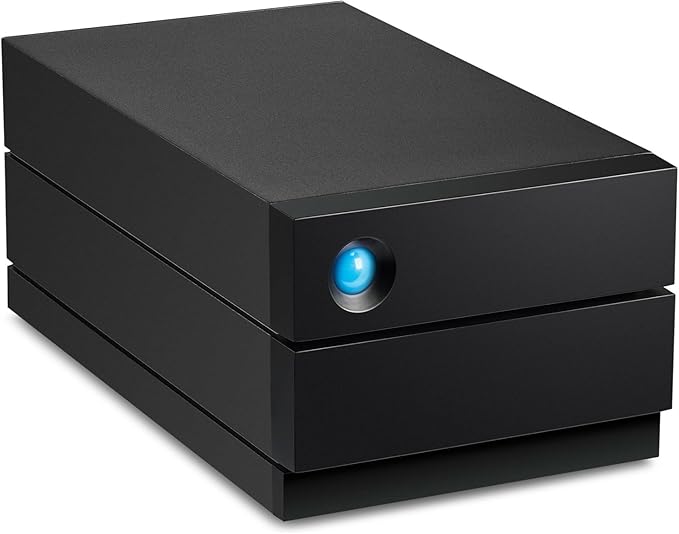
Ideal for creative professionals who need reliable photo backup and seamless video editing, 2big RAID delivers up to 48TB of trusted desktop storage. Easy-to-configure hardware RAID 0/1 enables versatile speed, capacity, and data redundancy, while LaCie RAID Manager sends alerts about drive and system health. IronWolf Pro drives support fast, smooth workflows with 7200-RPM performance and long-term reliability. Hot swappable drives are easy to replace when needed, even while 2big RAID is running. And if a natural disaster or accident strikes, rest easy with 5-year Rescue Data Recovery Services.
Ideal for creative professionals who need reliable photo backup and seamless video editing, 2big RAID delivers up to 48TB of trusted desktop storage. Easy-to-configure hardware RAID 0/1 enables versatile speed, capacity, and data redundancy, while LaCie RAID Manager sends alerts about drive and system health. IronWolf Pro drives support fast, smooth workflows with 7200-RPM performance and long-term reliability. Hot swappable drives are easy to replace when needed, even while 2big RAID is running. And if a natural disaster or accident strikes, rest easy with 5-year Rescue Data Recovery Services.
Ideal for creative professionals who need reliable photo backup and seamless video editing, 2big RAID delivers up to 48TB of trusted desktop storage. Easy-to-configure hardware RAID 0/1 enables versatile speed, capacity, and data redundancy, while LaCie RAID Manager sends alerts about drive and system health. IronWolf Pro drives support fast, smooth workflows with 7200-RPM performance and long-term reliability. Hot swappable drives are easy to replace when needed, even while 2big RAID is running. And if a natural disaster or accident strikes, rest easy with 5-year Rescue Data Recovery Services.
Ideal for creative professionals who need reliable photo backup and seamless video editing, 2big RAID delivers up to 48TB of trusted desktop storage. Easy-to-configure hardware RAID 0/1 enables versatile speed, capacity, and data redundancy, while LaCie RAID Manager sends alerts about drive and system health. IronWolf Pro drives support fast, smooth workflows with 7200-RPM performance and long-term reliability. Hot swappable drives are easy to replace when needed, even while 2big RAID is running. And if a natural disaster or accident strikes, rest easy with 5-year Rescue Data Recovery Services.
Last updated at 06/13/2026 18:53:32
LaCie 2big RAID 28TB (2 x 14TB) 7200RPM USB-C Hardware RAID Desktop Storage
Free delivery between Tue – Fri
LaCie 28TB 2Big Raid USB C Professional Desktop Storage STHJ28000800 - External Hard Drives
Delivery $35.79
LACIE 2BIG RAID 28TB (2X14TB 7200RPM IRONWOLF PRO) USB-C DATA RECOVERY SERVICE
Delivery $12.99
LaCie 2big RAID 28TB USB-C 5YR
Free delivery
LaCie 2big RAID USB-C External HDD - 28TB
Delivery between 16–25 June $15.90
LaCie 2big RAID USB-C 28TB Professional Desktop Storage
30-day returns
Lacie 2BIG Raid 28TB (2X14TB 7200Rpm Ironwolf Pro) USB-C 5Yr Data Recovery Service
Delivery between 17–23 June $11.95
LaCie 2big 28TB RAID USB Type-C External Drive
7-day returns
LaCie 28TB 2big RAID USB Type-C External Desktop Storage Solution
Delivery between 17–25 June $12.95
LaCie 28TB 2big RAID USB-C Desktop Hard Drive
Free delivery between 16–25 June
originally posted on cdw.com
I'm computer literate but not an expert, and I was able to configure this for Raid1 (14 TB total storage) and get the discs initialized and formatted. I had to download the updates from the LaCie website (which is not that easy to navigate, but if you take your time, you can find the necessary info), install the Toolkit and Raid Manager software, and follow the online instructions, and then I had to do some basic internet searches and follow some tutorials to initialize before I was able to format. I used the included software to configure for Raid 1. The whole setup took maybe 90 minutes and I had to be patient and keep looking and reading until I found what I needed. I had a friend who was an IT expert 'on call' in case I needed help, but I figured it out myself. ... MoreI'm computer literate but not an expert, and I was able to configure this for Raid1 (14 TB total storage) and get the discs initialized and formatted. I had to download the updates from the LaCie website (which is not that easy to navigate, but if you take your time, you can find the necessary info), install the Toolkit and Raid Manager software, and follow the online instructions, and then I had to do some basic internet searches and follow some tutorials to initialize before I was able to format. I used the included software to configure for Raid 1. The whole setup took maybe 90 minutes and I had to be patient and keep looking and reading until I found what I needed. I had a friend who was an IT expert 'on call' in case I needed help, but I figured it out myself. If you are a complete novice, this might not be the product for you. If you have even average computer skills and some experience installing/removing software, and know how to navigate the Start menu, Control Panel, dropdowns, going into properties, and can read some basic online tutorials to answer your questions, etc, it shouldn't be a problem. It also took me a couple minutes to put together the electric plug, which was not immediately obvious, but don't force the pieces together.I'm using this with Windows 7 and a USB 3 connection, and have had no problems. I like the fact that it has an on/off switch, though it seems to be smart enough to go to sleep when I turn off my PC. I've had it for a month now, and there have been a couple of instances in which it had trouble waking up, and I had to pull the plug and re-start, but it worked just fine after that. You can hear the discs humming from a few feet away when data is being transferred, so it's not totally silent, but the noise is not a problem.The big blue eye seems to have gotten a scrap of plastic trapped inside it during assembly, which looks a little annoying, but does not affect functionality. I'm just using this for data storage and am not editing Blu-Ray, so I don't have much to say about data transfer speed. I wanted a single device with a lot of storage space and redundancy in case of a disc failure, and in that respect this device is just fine.
originally posted on officeconnect.net.nz
Thanks for a very easy order process, fast delivery and good customer service
originally posted on bhphotovideo.com
The drive randomly ejects from my Macbook Pro without any warning and gives the error message that says “Disk Not Ejected Properly”There is no rhyme or reason to when the drive will mount. Sometimes it works and other times it doesn't show up in the finder at all. It will be visible in Disk Utility but doesn't allow you to do any function like repair disk etc.When the drive works is quite slow and very noisy!
| General | |
| Device Type | Hard drive array |
| Localisation | Worldwide |
| Chassis | |
| Installed Devices / Modules Qty | 2 |
LaCie 2big RAID 28TB (2 x 14TB) 7200RPM USB-C Hardware RAID Desktop Storage
Free delivery between Tue – Fri
LaCie 28TB 2Big Raid USB C Professional Desktop Storage STHJ28000800 - External Hard Drives
Delivery $35.79
LACIE 2BIG RAID 28TB (2X14TB 7200RPM IRONWOLF PRO) USB-C DATA RECOVERY SERVICE
Delivery $12.99
LaCie 2big RAID 28TB USB-C 5YR
Free delivery
LaCie 2big RAID USB-C External HDD - 28TB
Delivery between 16–25 June $15.90
I'm computer literate but not an expert, and I was able to configure this for Raid1 (14 TB total storage) and get the discs initialized and formatted. I had to download the updates from the LaCie website (which is not that easy to navigate, but if you take your time, you can find the necessary info), install the Toolkit and Raid Manager software, and follow the online instructions, and then I had to do some basic internet searches and follow some tutorials to initialize before I was able to format. I used the included software to configure for Raid 1. The whole setup took maybe 90 minutes and I had to be patient and keep looking and reading until I found what I needed. I had a friend who was an IT expert 'on call' in case I needed help, but I figured it out myself. ... MoreI'm computer literate but not an expert, and I was able to configure this for Raid1 (14 TB total storage) and get the discs initialized and formatted. I had to download the updates from the LaCie website (which is not that easy to navigate, but if you take your time, you can find the necessary info), install the Toolkit and Raid Manager software, and follow the online instructions, and then I had to do some basic internet searches and follow some tutorials to initialize before I was able to format. I used the included software to configure for Raid 1. The whole setup took maybe 90 minutes and I had to be patient and keep looking and reading until I found what I needed. I had a friend who was an IT expert 'on call' in case I needed help, but I figured it out myself. If you are a complete novice, this might not be the product for you. If you have even average computer skills and some experience installing/removing software, and know how to navigate the Start menu, Control Panel, dropdowns, going into properties, and can read some basic online tutorials to answer your questions, etc, it shouldn't be a problem. It also took me a couple minutes to put together the electric plug, which was not immediately obvious, but don't force the pieces together.I'm using this with Windows 7 and a USB 3 connection, and have had no problems. I like the fact that it has an on/off switch, though it seems to be smart enough to go to sleep when I turn off my PC. I've had it for a month now, and there have been a couple of instances in which it had trouble waking up, and I had to pull the plug and re-start, but it worked just fine after that. You can hear the discs humming from a few feet away when data is being transferred, so it's not totally silent, but the noise is not a problem.The big blue eye seems to have gotten a scrap of plastic trapped inside it during assembly, which looks a little annoying, but does not affect functionality. I'm just using this for data storage and am not editing Blu-Ray, so I don't have much to say about data transfer speed. I wanted a single device with a lot of storage space and redundancy in case of a disc failure, and in that respect this device is just fine.
Thanks for a very easy order process, fast delivery and good customer service
The drive randomly ejects from my Macbook Pro without any warning and gives the error message that says “Disk Not Ejected Properly”There is no rhyme or reason to when the drive will mount. Sometimes it works and other times it doesn't show up in the finder at all. It will be visible in Disk Utility but doesn't allow you to do any function like repair disk etc.When the drive works is quite slow and very noisy!
excellent product, I own 3 now and all of them work perfectly
| General | |
| Device Type | Hard drive array |
| Localisation | Worldwide |
| Chassis | |
| Installed Devices / Modules Qty | 2 |

