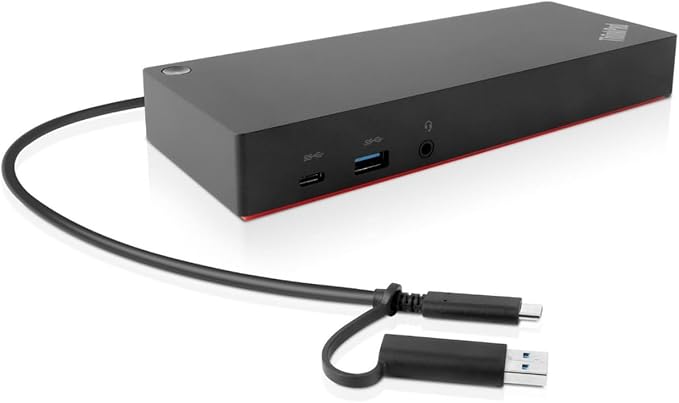
Universal docking solutions of enterprise class. The ThinkPad Hybrid USB-C Dock with USB A expands the capabilities of nearly all laptops, whether old or new. It is the ideal solution for large companies with mixed PC or shared desk environments. Especially in large enterprises, the dock makes the IT department's job easier by supporting management functions such as PXE boot and MAC address pass-through. It offers three high-speed USB 3.1 (Gen. 2) ports and connectivity options for up to two 4K/UHD displays. Additionally, with the Rapid Charge feature, it supports fast charging for ThinkPad notebooks. The included USB-C to USB-A adapter also allows it to function as a port replicator for non-Lenovo laptops or those without a USB Type C port. Schuko/European Standard Plug Type C (without adapter).
Universal docking solutions of enterprise class. The ThinkPad Hybrid USB-C Dock with USB A expands the capabilities of nearly all laptops, whether old or new. It is the ideal solution for large companies with mixed PC or shared desk environments. Especially in large enterprises, the dock makes the IT department's job easier by supporting management functions such as PXE boot and MAC address pass-through. It offers three high-speed USB 3.1 (Gen. 2) ports and connectivity options for up to two 4K/UHD displays. Additionally, with the Rapid Charge feature, it supports fast charging for ThinkPad notebooks. The included USB-C to USB-A adapter also allows it to function as a port replicator for non-Lenovo laptops or those without a USB Type C port. Schuko/European Standard Plug Type C (without adapter).
Universal docking solutions of enterprise class. The ThinkPad Hybrid USB-C Dock with USB A expands the capabilities of nearly all laptops, whether old or new. It is the ideal solution for large companies with mixed PC or shared desk environments. Especially in large enterprises, the dock makes the IT department's job easier by supporting management functions such as PXE boot and MAC address pass-through. It offers three high-speed USB 3.1 (Gen. 2) ports and connectivity options for up to two 4K/UHD displays. Additionally, with the Rapid Charge feature, it supports fast charging for ThinkPad notebooks. The included USB-C to USB-A adapter also allows it to function as a port replicator for non-Lenovo laptops or those without a USB Type C port. Schuko/European Standard Plug Type C (without adapter).
Universal docking solutions of enterprise class. The ThinkPad Hybrid USB-C Dock with USB A expands the capabilities of nearly all laptops, whether old or new. It is the ideal solution for large companies with mixed PC or shared desk environments. Especially in large enterprises, the dock makes the IT department's job easier by supporting management functions such as PXE boot and MAC address pass-through. It offers three high-speed USB 3.1 (Gen. 2) ports and connectivity options for up to two 4K/UHD displays. Additionally, with the Rapid Charge feature, it supports fast charging for ThinkPad notebooks. The included USB-C to USB-A adapter also allows it to function as a port replicator for non-Lenovo laptops or those without a USB Type C port. Schuko/European Standard Plug Type C (without adapter).
Last updated at 06/27/2026 05:45:22
Lenovo ThinkPad Hybrid USB-C with USB-A Dock - Docking Station - 2 x HDMI, 2 x DisplayPort - GigE - 40AF0135EU
Affiliate Disclosure: We may receive a small commission for purchases made through this link at no extra cost to you. This helps support our site. Thank you!
Excellent
30-day returns
Lenovo Thinkpad Hybrid Usb-C With Usb-A Dock Dud9011d1 Black USB Hub
Delivery $12.50
Lenovo Thinkpad Hybrid Usb-c With Usb-a Dock 40af & 40ac With Original
Delivery $14.55
Affiliate Disclosure: We may receive a small commission for purchases made through this link at no extra cost to you. This helps support our site. Thank you!
Lenovo 40af0135eu Thinkpad Hybrid Usb
Free delivery
Affiliate Disclosure: We may receive a small commission for purchases made through this link at no extra cost to you. This helps support our site. Thank you!
ThinkPad Hybrid USB-C with USB-A Dock- Australia/NZ/Fiji/PNG
30-day returns
Lenovo ThinkPad Hybrid USB-C with USB-A Dock US (40AF0135US)
Free delivery between 7–10 July
originally posted on ebay.com
The Lenovo 40AF0135UK USB-C docking station is built to a high standard, small yet comes with more inputs than most. The dock is compatible with any USB 3 laptop which support the display link driver with the help of the bundled USB-C to USB-A adapter (Laptop will not charge via the adaptor). As with all USB docking stations the more powerful the laptop the better performance you will get as the majority of the graphics work is done here, but with this dock being 135w it will juice even most high performance gaming laptops and MacBooks Pros. Pros: - Laptop Charging via USB-C - Device Charging via 1x USB-C and 1x USB-A - 2x HDMI Out and 2x DP Out - 4x USB 3.0 ports (3x USB-A 1x USB-C) - USB-C to A adapter built into the host cable - Works with webcams (even high ... MoreThe Lenovo 40AF0135UK USB-C docking station is built to a high standard, small yet comes with more inputs than most. The dock is compatible with any USB 3 laptop which support the display link driver with the help of the bundled USB-C to USB-A adapter (Laptop will not charge via the adaptor). As with all USB docking stations the more powerful the laptop the better performance you will get as the majority of the graphics work is done here, but with this dock being 135w it will juice even most high performance gaming laptops and MacBooks Pros. Pros: - Laptop Charging via USB-C - Device Charging via 1x USB-C and 1x USB-A - 2x HDMI Out and 2x DP Out - 4x USB 3.0 ports (3x USB-A 1x USB-C) - USB-C to A adapter built into the host cable - Works with webcams (even high end), microphones, USB-Extenders, KVMs, wireless keyboards and mice etc. - Very reliable, will accept multiple changes of host in quick concession without crashing. Cons - Bundled USB-C to USB-C cable can cause problems with multiple devices or daisy chaining, to work around this simply purchase a good quality 100w rated USB-C to USB-C cable (3rd Party) - Mac compatibility will take a little trial and error depending on the device, OS version and Driver, however we have managed to get all our various Macs using the dock, eventually. Far superior to the Hengedock solutions. This little dock, whilst expensive has revolutionised the way we dock our devices, highly recommended.
originally posted on lenovo.com
Good product. Some issues with charging my laptop. My laptop (P15 second generation), comes with a 135W charger. This docking station also comes with 135W power supply but it does not charge my computer, so I have plug in the additional charger to charge my laptop. Now I have to plug in two power supplies, one to power up the docking station and the other to power up the laptop. For the display, I sometimes feel a blur, especially when a dialogue window is opened. We can accomplish the same tasks with a generic and much cheaper docking station, which works without a power supply.
originally posted on lenovo.com
This dock uses DisplayLink to be able to send video over any USB, making it compatible with almost any computer. However, DisplayLink causes a lot of stuttering and dropped frames in video. It’s even noticeable when moving the mouse. It is not a pleasant experience. I returned and bought the ThinkPad Ultra docking station that doesn’t use DisplayLink, which works great.
| Ports & interfaces | |
| Combo headphone/mic port | Y |
| DisplayPorts quantity | 2 |
| HDMI ports quantity | 2 |
| Ethernet LAN (RJ-45) ports | 1 |
Lenovo ThinkPad Hybrid USB-C with USB-A Dock - Docking Station - 2 x HDMI, 2 x DisplayPort - GigE - 40AF0135EU
Affiliate Disclosure: We may receive a small commission for purchases made through this link at no extra cost to you. This helps support our site. Thank you!
Excellent
30-day returns
Lenovo Thinkpad Hybrid Usb-C With Usb-A Dock Dud9011d1 Black USB Hub
Delivery $12.50
Lenovo Thinkpad Hybrid Usb-c With Usb-a Dock 40af & 40ac With Original
Delivery $14.55
Affiliate Disclosure: We may receive a small commission for purchases made through this link at no extra cost to you. This helps support our site. Thank you!
Lenovo 40af0135eu Thinkpad Hybrid Usb
Free delivery
Affiliate Disclosure: We may receive a small commission for purchases made through this link at no extra cost to you. This helps support our site. Thank you!
The Lenovo 40AF0135UK USB-C docking station is built to a high standard, small yet comes with more inputs than most. The dock is compatible with any USB 3 laptop which support the display link driver with the help of the bundled USB-C to USB-A adapter (Laptop will not charge via the adaptor). As with all USB docking stations the more powerful the laptop the better performance you will get as the majority of the graphics work is done here, but with this dock being 135w it will juice even most high performance gaming laptops and MacBooks Pros. Pros: - Laptop Charging via USB-C - Device Charging via 1x USB-C and 1x USB-A - 2x HDMI Out and 2x DP Out - 4x USB 3.0 ports (3x USB-A 1x USB-C) - USB-C to A adapter built into the host cable - Works with webcams (even high ... MoreThe Lenovo 40AF0135UK USB-C docking station is built to a high standard, small yet comes with more inputs than most. The dock is compatible with any USB 3 laptop which support the display link driver with the help of the bundled USB-C to USB-A adapter (Laptop will not charge via the adaptor). As with all USB docking stations the more powerful the laptop the better performance you will get as the majority of the graphics work is done here, but with this dock being 135w it will juice even most high performance gaming laptops and MacBooks Pros. Pros: - Laptop Charging via USB-C - Device Charging via 1x USB-C and 1x USB-A - 2x HDMI Out and 2x DP Out - 4x USB 3.0 ports (3x USB-A 1x USB-C) - USB-C to A adapter built into the host cable - Works with webcams (even high end), microphones, USB-Extenders, KVMs, wireless keyboards and mice etc. - Very reliable, will accept multiple changes of host in quick concession without crashing. Cons - Bundled USB-C to USB-C cable can cause problems with multiple devices or daisy chaining, to work around this simply purchase a good quality 100w rated USB-C to USB-C cable (3rd Party) - Mac compatibility will take a little trial and error depending on the device, OS version and Driver, however we have managed to get all our various Macs using the dock, eventually. Far superior to the Hengedock solutions. This little dock, whilst expensive has revolutionised the way we dock our devices, highly recommended.
Good product. Some issues with charging my laptop. My laptop (P15 second generation), comes with a 135W charger. This docking station also comes with 135W power supply but it does not charge my computer, so I have plug in the additional charger to charge my laptop. Now I have to plug in two power supplies, one to power up the docking station and the other to power up the laptop. For the display, I sometimes feel a blur, especially when a dialogue window is opened. We can accomplish the same tasks with a generic and much cheaper docking station, which works without a power supply.
This dock uses DisplayLink to be able to send video over any USB, making it compatible with almost any computer. However, DisplayLink causes a lot of stuttering and dropped frames in video. It’s even noticeable when moving the mouse. It is not a pleasant experience. I returned and bought the ThinkPad Ultra docking station that doesn’t use DisplayLink, which works great.
We have several Lenovo USB-C and Thunderbolt docks deployed among our staff and they are always great performers and reliable. This Hybrid dock may lack Thunderbolt support, but so do many of our AMD-powered laptops - exactly why we were seeking a USB option.I appreciate the dual-monitor options of a combination of DisplayPort and HDMI outputs, having always found DisplayPort connections to be problematic. Even higher resolution displays are solid with this dock and some quality HDMI 2.0/2.1 cables. Quickly solved a resolution issue we had connecting a different dock to a 1440p ultrawide monitor with this.I also like that the cable to connect to the computer offers an attached USB-A connector for use with systems that do not feature a USB-C connection. Very ... MoreWe have several Lenovo USB-C and Thunderbolt docks deployed among our staff and they are always great performers and reliable. This Hybrid dock may lack Thunderbolt support, but so do many of our AMD-powered laptops - exactly why we were seeking a USB option.I appreciate the dual-monitor options of a combination of DisplayPort and HDMI outputs, having always found DisplayPort connections to be problematic. Even higher resolution displays are solid with this dock and some quality HDMI 2.0/2.1 cables. Quickly solved a resolution issue we had connecting a different dock to a 1440p ultrawide monitor with this.I also like that the cable to connect to the computer offers an attached USB-A connector for use with systems that do not feature a USB-C connection. Very versatile, even with slightly older systems.
I bought this docking station to work with a P1 G6-21FV ThinkPad laptop. The Lenovo docking station compatibility chart indicates the dock can provide enough AC power that external power doesn't have to be independently connected to the laptop. However, once plugged in, a computer message shows on the screen indicating external power needs to be connected. Now I have to purchase another AC adaptor (I need a separate mobile adaptor for travel).
This thing is awful. I bought this to replace a 40AS hoping that this would solve my issue but it has caused new issues. First, my computer (Lenovo P15s) struggles to wake up from sleep with the exact same settings on my previous dock. The HDMI cable that I was using with my previous dock no longer works with this one and had to be replaced. And this dock for some reason will not do HDR with my monitor anymore even though it is fully capable of it. The only brightside is I do not seem to be having the USB connection issues I was having with the 40AS. Fixed 1 problem to cause at least 3 more. I am reasonably tech savvy and even took this to my IT department to see if I was doing anything wrong and they confirmed I had hooked everything up correct and had every last ... MoreThis thing is awful. I bought this to replace a 40AS hoping that this would solve my issue but it has caused new issues. First, my computer (Lenovo P15s) struggles to wake up from sleep with the exact same settings on my previous dock. The HDMI cable that I was using with my previous dock no longer works with this one and had to be replaced. And this dock for some reason will not do HDR with my monitor anymore even though it is fully capable of it. The only brightside is I do not seem to be having the USB connection issues I was having with the 40AS. Fixed 1 problem to cause at least 3 more. I am reasonably tech savvy and even took this to my IT department to see if I was doing anything wrong and they confirmed I had hooked everything up correct and had every last thing up to date.
This Lenovo docking station has made my life so much easier. It’s incredibly convenient to have all my devices connected in one place. It has an array of ports, including HDMI and Ethernet, allowing me to hook up my monitor, printer, and internet cable all at once. It’s as simple as plugging my laptop in, and I’m ready to go. Performance has been smooth, and I’ve had no issues with connection drops or lag. Highly recommended for anyone working from home or needing a streamlined setup.
I bought this to use with my new Thinkpad, which replaced my 25th Anniversary edition Thinkpad. It definitely does what I need (connect via HDMI to dual external monitors, Ethernet, and additional USB ports). However, in replacing my old setup, I sacrificed the dock, which doubled as an angled laptop stand/riser, in addition to housing all the ports, and connected through a special port on the bottom of the old Thinkpad. Perhaps a future iteration of this item could "hybridize" the two ideas by making the case angled, but keeping the USB-C connection to the laptop.
The unit works as expected. It is nice that the USB ports are powered when the laptop is not present. This works great for charging phone. The only small issue is periodically when the laptop have been to sleep and powered up, the monitor does not get a signal. I have to unplug the display cable and replug. No sure if this is the USB hub issue or my display. Other than that, it have been great.
If you are looking into buying this make sure you know how many watts of power your laptop actually uses, this dock has a 135w power supply but will only charge your laptop at 90w. The other 45 watts are used by other devices on the dock but not for the laptop.The Compatibility Matrix for this docking station only refers to the driver compatibility not the ability to provide enough watts of power to your laptop through the type-C thunderbolt 4 cable. I had my work buy this for me so I would not have to fill up all the plugs on my laptop every time I came to the office. It does work nice as a hub, I only need one USB C cable for everything but it barely keeps up charging my Thinkpad P16s Gen 1. I primarily use the laptop for CAD design and with all my usual apps ... MoreIf you are looking into buying this make sure you know how many watts of power your laptop actually uses, this dock has a 135w power supply but will only charge your laptop at 90w. The other 45 watts are used by other devices on the dock but not for the laptop.The Compatibility Matrix for this docking station only refers to the driver compatibility not the ability to provide enough watts of power to your laptop through the type-C thunderbolt 4 cable. I had my work buy this for me so I would not have to fill up all the plugs on my laptop every time I came to the office. It does work nice as a hub, I only need one USB C cable for everything but it barely keeps up charging my Thinkpad P16s Gen 1. I primarily use the laptop for CAD design and with all my usual apps open I must be using exactly the 90 watts this dock can output through the thunderbolt 4 cable. If I arrive at work with 95% battery, I will leave work with 95% battery. The charger the laptop came with will output 100 watts and has no problem charging and running all day, but this hub is barely keeping up with my system. Unfortunately there is not currently a larger power supply version of this docking station so the only way I can get better charging is to use both the charger my laptop came with and the docking station at the same time. Then the docking station is only used as an overpriced USB hub.
| Ports & interfaces | |
| Combo headphone/mic port | Y |
| DisplayPorts quantity | 2 |
| HDMI ports quantity | 2 |
| Ethernet LAN (RJ-45) ports | 1 |

