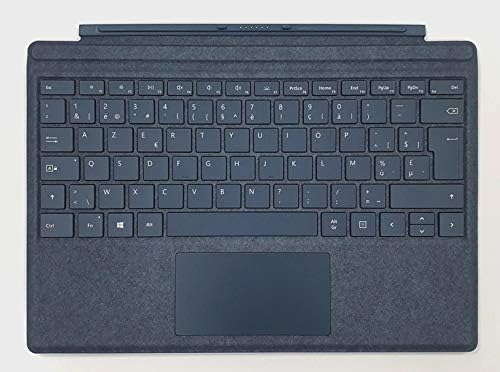
Type comfortably and navigate the Web with ease using your Microsoft Surface Pro. Well-spaced, backlit keys and a large trackpad make it simple to input data or type up notes, even in dim lighting. The Surface Pro Type Cover adjusts to virtually any angle and clicks easily into place, transforming your Surface Pro from tablet to laptop.
Type comfortably and navigate the Web with ease using your Microsoft Surface Pro. Well-spaced, backlit keys and a large trackpad make it simple to input data or type up notes, even in dim lighting. The Surface Pro Type Cover adjusts to virtually any angle and clicks easily into place, transforming your Surface Pro from tablet to laptop.
Type comfortably and navigate the Web with ease using your Microsoft Surface Pro. Well-spaced, backlit keys and a large trackpad make it simple to input data or type up notes, even in dim lighting. The Surface Pro Type Cover adjusts to virtually any angle and clicks easily into place, transforming your Surface Pro from tablet to laptop.
Type comfortably and navigate the Web with ease using your Microsoft Surface Pro. Well-spaced, backlit keys and a large trackpad make it simple to input data or type up notes, even in dim lighting. The Surface Pro Type Cover adjusts to virtually any angle and clicks easily into place, transforming your Surface Pro from tablet to laptop.
Last updated at 08/26/2026 19:25:30
AA+ Original Keyboard Tablet For Microsoft Surface Pro4 Pro5 Pro6 Pro7 Pro7+ Black US Version
Free delivery
[EP2-00406] Microsoft Surface Pro Keyboard SC English AU/HK/IN/MY/NZ/SG Commercial Black
7-day returns
Surface CO-PILOT Keyboard TYPECOVER Pro 13 inch 8 9 X 10 11 12 No Pen And
Delivery $16.95
EP2-00406 Surface Co-Pilot Keyboard Typecover Pro 13" 8,9,X,10,11,12 No Pen And No Pen Slot - Blac EP2-00406
Delivery between 31 Aug – 3 Sept $15
EP2-00406 Surface Pro Keyboard For Business - Black EP2-00406
Delivery between 31 Aug – 3 Sept $15
SURFACE PRO 10, KEYBOARD, NO PEN AND NO PEN SLOT - BLACK - EP2-00406
Delivery between 31 Aug – 3 Sept $15
Microsoft Surface Pro Keyboard Black (EP2-00406) Cover port docking, Island-style layout, Windows keys, Glass touchpad, Attachable cover, Compatible
Delivery between 29 Aug – 9 Sept $12
Microsoft Surface Pro Co‐Pilot Keyboard EP2-00406
Delivery $22
Microsoft Keyboard/Cover Case Microsoft Surface Pro 8, Surface Pro 9, Surface Pro X, Surface Pro 10, Surface Pro 11 Tablet - Black
Free delivery
Microsoft Keyboard/Cover Case Microsoft Surface Pro 8, Surface Pro 9, Surface Pro X, Surface Pro 10, Surface Pro 11 Tablet - Black - Stain Resistant
Delivery $7.95
originally posted on influenster.com
Good keyboard, however, it isn’t my favorite. It gets very dirty fast and it’s hard to clean because of the material it’s made of. It does its job, but I got a Bridge keyboard for my surface pro and I prefer it more than this one. It’s easier to clean and it holds my keyboard up, so I don’t have to use the stand on the tablet and hope that the keyboard stays attached to it if it falls. If you want something thin and not bulky, but don’t mind if it gets dirty, I would recommend getting this product.
originally posted on ebay.com
I highly recommend this keyboard type cover, operates flawlessly, looks like it's meant to be and you don't have to connect it via micro USB for it to operate. I purchased an inferior keyboard that had seven different coloured lights, looked fantastic, had Bluetooth 5 and a really good price. Unfortunately every time I restarted tablet 80% of the time I had to manually reconnect Bluetooth, real pain and it took up a valuable USB port to power the lights and Bluetooth, yes it has a battery but only lasted a few days at best. Microsoft keyboard type cover is the only way to go, don't waste your money on inferior keyboards, you'll end up buying a Microsoft one in the end. Powered through magnetic connectors in hinge area, no need for any charging leads, mechanical ... MoreI highly recommend this keyboard type cover, operates flawlessly, looks like it's meant to be and you don't have to connect it via micro USB for it to operate. I purchased an inferior keyboard that had seven different coloured lights, looked fantastic, had Bluetooth 5 and a really good price. Unfortunately every time I restarted tablet 80% of the time I had to manually reconnect Bluetooth, real pain and it took up a valuable USB port to power the lights and Bluetooth, yes it has a battery but only lasted a few days at best. Microsoft keyboard type cover is the only way to go, don't waste your money on inferior keyboards, you'll end up buying a Microsoft one in the end. Powered through magnetic connectors in hinge area, no need for any charging leads, mechanical keys, different lighting options, fingerprint scanner, which works all the the time-excellent. I have a Surface Pro 7+ and this keyboard works perfectly.
originally posted on webuy.com
Bought this a month ago and it beats using a stylus. The most significant aspect of the purchase was the helpful and polite service I received from various members of staff at the Bracknell branch. I had to return the tablet that this cover was for and they could not have been more patient and helpful to an octogenarian! GREAT service.
| General | |
| Device Type | Keyboard |
| Hot Keys Function | Brightness, Windows shortcuts, media controls, microphone mute, Copilot |
| Localization and Layout | QWERTY English |
| Keyboard Technology | Mechanical |
AA+ Original Keyboard Tablet For Microsoft Surface Pro4 Pro5 Pro6 Pro7 Pro7+ Black US Version
Free delivery
[EP2-00406] Microsoft Surface Pro Keyboard SC English AU/HK/IN/MY/NZ/SG Commercial Black
7-day returns
Surface CO-PILOT Keyboard TYPECOVER Pro 13 inch 8 9 X 10 11 12 No Pen And
Delivery $16.95
EP2-00406 Surface Co-Pilot Keyboard Typecover Pro 13" 8,9,X,10,11,12 No Pen And No Pen Slot - Blac EP2-00406
Delivery between 31 Aug – 3 Sept $15
EP2-00406 Surface Pro Keyboard For Business - Black EP2-00406
Delivery between 31 Aug – 3 Sept $15
Good keyboard, however, it isn’t my favorite. It gets very dirty fast and it’s hard to clean because of the material it’s made of. It does its job, but I got a Bridge keyboard for my surface pro and I prefer it more than this one. It’s easier to clean and it holds my keyboard up, so I don’t have to use the stand on the tablet and hope that the keyboard stays attached to it if it falls. If you want something thin and not bulky, but don’t mind if it gets dirty, I would recommend getting this product.
I highly recommend this keyboard type cover, operates flawlessly, looks like it's meant to be and you don't have to connect it via micro USB for it to operate. I purchased an inferior keyboard that had seven different coloured lights, looked fantastic, had Bluetooth 5 and a really good price. Unfortunately every time I restarted tablet 80% of the time I had to manually reconnect Bluetooth, real pain and it took up a valuable USB port to power the lights and Bluetooth, yes it has a battery but only lasted a few days at best. Microsoft keyboard type cover is the only way to go, don't waste your money on inferior keyboards, you'll end up buying a Microsoft one in the end. Powered through magnetic connectors in hinge area, no need for any charging leads, mechanical ... MoreI highly recommend this keyboard type cover, operates flawlessly, looks like it's meant to be and you don't have to connect it via micro USB for it to operate. I purchased an inferior keyboard that had seven different coloured lights, looked fantastic, had Bluetooth 5 and a really good price. Unfortunately every time I restarted tablet 80% of the time I had to manually reconnect Bluetooth, real pain and it took up a valuable USB port to power the lights and Bluetooth, yes it has a battery but only lasted a few days at best. Microsoft keyboard type cover is the only way to go, don't waste your money on inferior keyboards, you'll end up buying a Microsoft one in the end. Powered through magnetic connectors in hinge area, no need for any charging leads, mechanical keys, different lighting options, fingerprint scanner, which works all the the time-excellent. I have a Surface Pro 7+ and this keyboard works perfectly.
Bought this a month ago and it beats using a stylus. The most significant aspect of the purchase was the helpful and polite service I received from various members of staff at the Bracknell branch. I had to return the tablet that this cover was for and they could not have been more patient and helpful to an octogenarian! GREAT service.
If you are one of the few with a Surface Pro X SQ1 or SQ2, than you will need a keyboard. Though this is MS keyboard and attaches well , it is average compare to the other pro keyboards and it falls behind in build quality to the SP7 keyboard. First some of the keys do not sit straight and this causes issues when typing, the bounce on this keyboard is bad, as I type this I have to back space a lot due to key bounce error from no key presses. The material is good, and price is ok (probably cost them 40 dollars to build and they charge 100+ for it) The backlight is much lighter than my Surface Pro 4 keyboard and worse than the wife SP7. The touch pad is large though not placed well (to either side) so you have to move your whole hand if you want to type scroll combo. ... MoreIf you are one of the few with a Surface Pro X SQ1 or SQ2, than you will need a keyboard. Though this is MS keyboard and attaches well , it is average compare to the other pro keyboards and it falls behind in build quality to the SP7 keyboard. First some of the keys do not sit straight and this causes issues when typing, the bounce on this keyboard is bad, as I type this I have to back space a lot due to key bounce error from no key presses. The material is good, and price is ok (probably cost them 40 dollars to build and they charge 100+ for it) The backlight is much lighter than my Surface Pro 4 keyboard and worse than the wife SP7. The touch pad is large though not placed well (to either side) so you have to move your whole hand if you want to type scroll combo. There is NO PEN attachment like the signature keyboard, so all and all it's average and gets the job done and if their was another option less than 200 dollars I would go for it (signature keyboard is over priced hard to justify) and the brydge keyboard pushes the screen hard like it does on the Surface Pro 3-7 models. If you need a keyboard as you will this is really your only option. See the attached pictures for the keyboard, the 2nd pic shows the slanted keys and shows how some are slightly hire than other ones(this was NEW IN BOX from MS) so rather disappointed.
Keyboard works well, attaches by magnets that snap it into place. But this type of keyboard is plagued with the duplicate key flaw. You're typing away on the Surface Pro and it gives you a whole string of fffffs or something like that, and it doesn't stop until you hit enter. It's an inherent flaw in the keyboard design. You can work with it--somewhat awkwardly--by going into Windows settings. Go to Ease of Access, then down to Keyboard, and scroll down a bit on the page that pops up. Go to Filter Keys and turn the slider than allows you to ignore brief and repeated keystrokes. This allows you to turn on Bounce Keys which programs in a wait before accepting additional keystrokes when you press the same key more than once. You can also change the setting that allows ... MoreKeyboard works well, attaches by magnets that snap it into place. But this type of keyboard is plagued with the duplicate key flaw. You're typing away on the Surface Pro and it gives you a whole string of fffffs or something like that, and it doesn't stop until you hit enter. It's an inherent flaw in the keyboard design. You can work with it--somewhat awkwardly--by going into Windows settings. Go to Ease of Access, then down to Keyboard, and scroll down a bit on the page that pops up. Go to Filter Keys and turn the slider than allows you to ignore brief and repeated keystrokes. This allows you to turn on Bounce Keys which programs in a wait before accepting additional keystrokes when you press the same key more than once. You can also change the setting that allows you add in a longer wait between repeated keystrokes. You can also turn on Repeat Keys to delay repeated keystrokes when you hold down a key. I find a combination of all of them is the only thing that works, and even then, it's not perfect, but doable. It slows down my typing rate, but it's either that, or have fast reflexes on the Enter key before you have a whole paragraph of just one letter.
The keys are very plastic which feels cheap and a lot worse then my original cover where the keys had a rubbery feel. Also, the backlight keys only lights up the middle of the keys, so you can't really read the keys when it gets dark, so perhaps the lettering on the keys might have been touched up with white paint, as the keys look fine in the light. overall, it works, just not a great experience compared to the original,
I just picked up the Surface Pro keyboard today, and I think it's a fantastic addition to the Surface Pro. I had the other keyboard with the stylus holder/charger, but its "Alcantara" material was too much like cloth and attracted stains. This one feels more like a rubber/plastic mix and is easier to keep clean. It doesn't have the pen holder/charger, but I don't need or use the pen anyway, and this one is $50 cheaper. Overall, it feels great and the keys are responsive. it does also have backlit keys which is a nice feature to have at this price point. .
I purchased this Surface Pro 11 keyboard as an open box item in order to save money. It arrived in excellent condition and obviously had not been used, so it was just like new. It works great with my new Surface Pro tablet. I own 2 other older Surface models, and I love how quiet and fast the keyboard is to operate and also its slim profile!
| General | |
| Device Type | Keyboard |
| Hot Keys Function | Brightness, Windows shortcuts, media controls, microphone mute, Copilot |
| Localization and Layout | QWERTY English |
| Keyboard Technology | Mechanical |

