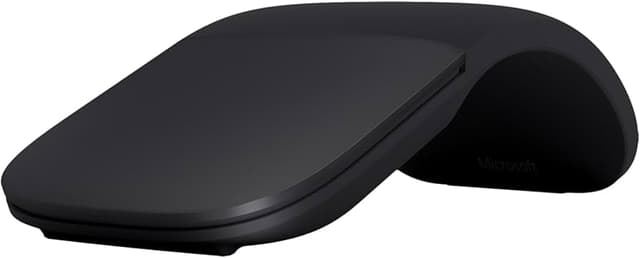
Ultra-slim and lightweight. Snaps flat and slips easily into a pocket or bag., Optimized design for the most natural interaction. Innovative full scroll plane lets you scroll both vertically and horizontally. Enjoy precise tracking, with optimized left and right click.
Ultra-slim and lightweight. Snaps flat and slips easily into a pocket or bag., Optimized design for the most natural interaction. Innovative full scroll plane lets you scroll both vertically and horizontally. Enjoy precise tracking, with optimized left and right click.
Ultra-slim and lightweight. Snaps flat and slips easily into a pocket or bag., Optimized design for the most natural interaction. Innovative full scroll plane lets you scroll both vertically and horizontally. Enjoy precise tracking, with optimized left and right click.
Ultra-slim and lightweight. Snaps flat and slips easily into a pocket or bag., Optimized design for the most natural interaction. Innovative full scroll plane lets you scroll both vertically and horizontally. Enjoy precise tracking, with optimized left and right click.
Last updated at 06/07/2026 13:46:11
New FHD-00020 15T-MS-FHD-00020 COM Microsoft -FHD-00020- Surface ARC Bluetooth Mouse - Black.
Affiliate Disclosure: We may receive a small commission for purchases made through this link at no extra cost to you. This helps support our site. Thank you!
Microsoft Surface ARC Bluetooth Mouse [FHD-00020] Black - Clearance *Last Unit*
Delivery between 9–16 June $16.32
Microsoft ARC MOUSE BLUETOOTH BLACK
Delivery between Mon – Thu $15
Microsoft Surface Arc Wireless Mouse - Curved Design for Surface Pro 11/10/8/9/x Laptops - Black
Delivery between Tue – Thu $12
Microsoft Surface For Business Arc Bluetooth Mouse - 1791 - Black
Delivery $20
Microsoft Surface Arc Wireless Mouse
7-day returns
Microsoft Surface Wireless Arc Mouse For Business - Black
7-day returns
Microsoft Surface Arc Wireless Mouse curved design Surface Pro 11/10/8/9/X Laptop 7/6/5/4- Black
Delivery $13
Microsoft Surface Arc Bluetooth Mouse - Black [CZV-00101]
Delivery $10
Microsoft Surface Arc Mouse - Bluetooth - USB - BlueTrack - 2 Button(s) - Black - Wireless - 1000 dpi - Scroll Plane - Symmetrical
Free delivery
originally posted on bestbuy.com
The Microsoft Arc Wireless BlueTrack Ambidextrous Mouse is a sleek and versatile device. Its ergonomic design makes it comfortable to use for both left and right-handed users. The BlueTrack technology allows for accurate tracking on any surface. The wireless connection is reliable and easy to set up. Additionally, the mouse is compact and easy to carry around. Overall, the Microsoft Arc Wireless BlueTrack Ambidextrous Mouse is a great choice for anyone in need of a high-quality and adaptable mouse.
originally posted on bestbuy.com
The arch of this mouse is deceptive. it's not meant for your hand.My favorite thing about this mouse is its scroll functionality. It's super easy to scroll vertically and horizontally, navigating websites and documents.The clicks are manageable if you click on the corners. Otherwise, they're too heavy.Initially, I thought it was too uncomfortable for sustained use. It's wider at the palm than the chunky Logitech MX Master Mouse series. However once I opened up an Excel file and began to tinker, I found myself using a paw/pencil grip-- My palm didn't rest on the arch at all.Grip: I held the mouse between my thumb and third finger, and kept it steady with my middle finger on the right click. My pinky finger actually rested underneath the mouse, and the third ... MoreThe arch of this mouse is deceptive. it's not meant for your hand.My favorite thing about this mouse is its scroll functionality. It's super easy to scroll vertically and horizontally, navigating websites and documents.The clicks are manageable if you click on the corners. Otherwise, they're too heavy.Initially, I thought it was too uncomfortable for sustained use. It's wider at the palm than the chunky Logitech MX Master Mouse series. However once I opened up an Excel file and began to tinker, I found myself using a paw/pencil grip-- My palm didn't rest on the arch at all.Grip: I held the mouse between my thumb and third finger, and kept it steady with my middle finger on the right click. My pinky finger actually rested underneath the mouse, and the third finger was comfortable along its under-slant.It's like ignoring the mouse and pointing with your index finger.I tried this mouse in both Excel and Sketchup (quick 3D modeling environment). It's great, but misses the middle click. Not too big of a deal in Sketchup since there's an easily accessible tool that does the same thing.This mouse is meant to supplement a keyboard. You should only be touching the mouse when you have something to accomplish, and to that end the mouse works well. However, the lack of extra sides buttons means that this shouldn't be your casual or everyday mouse if you're not already a wiz at the keyboard.It's like Batman. Effective in a pinch, but who really wants to hang out with Batman?
originally posted on bestbuy.com
It's a different take on a mouse, that's for sure. It works fine but wish it had at least one customizable button because I really miss having a "back" button when using this. The touchpad-like controls are ok and the side-to-side to feature takes some practice. I can't use it as long as a full-size mouse as it puts my hand in a position that is not very comfortable. I can tell that long term use will cause wrist issues. So, ok for travel but will never permanently replace a full-size mouse. If it would not have been on sale, I would not have purchased it, and still wouldn't.
New FHD-00020 15T-MS-FHD-00020 COM Microsoft -FHD-00020- Surface ARC Bluetooth Mouse - Black.
Affiliate Disclosure: We may receive a small commission for purchases made through this link at no extra cost to you. This helps support our site. Thank you!
Microsoft Surface ARC Bluetooth Mouse [FHD-00020] Black - Clearance *Last Unit*
Delivery between 9–16 June $16.32
Microsoft ARC MOUSE BLUETOOTH BLACK
Delivery between Mon – Thu $15
Microsoft Surface Arc Wireless Mouse - Curved Design for Surface Pro 11/10/8/9/x Laptops - Black
Delivery between Tue – Thu $12
Microsoft Surface For Business Arc Bluetooth Mouse - 1791 - Black
Delivery $20
The Microsoft Arc Wireless BlueTrack Ambidextrous Mouse is a sleek and versatile device. Its ergonomic design makes it comfortable to use for both left and right-handed users. The BlueTrack technology allows for accurate tracking on any surface. The wireless connection is reliable and easy to set up. Additionally, the mouse is compact and easy to carry around. Overall, the Microsoft Arc Wireless BlueTrack Ambidextrous Mouse is a great choice for anyone in need of a high-quality and adaptable mouse.
The arch of this mouse is deceptive. it's not meant for your hand.My favorite thing about this mouse is its scroll functionality. It's super easy to scroll vertically and horizontally, navigating websites and documents.The clicks are manageable if you click on the corners. Otherwise, they're too heavy.Initially, I thought it was too uncomfortable for sustained use. It's wider at the palm than the chunky Logitech MX Master Mouse series. However once I opened up an Excel file and began to tinker, I found myself using a paw/pencil grip-- My palm didn't rest on the arch at all.Grip: I held the mouse between my thumb and third finger, and kept it steady with my middle finger on the right click. My pinky finger actually rested underneath the mouse, and the third ... MoreThe arch of this mouse is deceptive. it's not meant for your hand.My favorite thing about this mouse is its scroll functionality. It's super easy to scroll vertically and horizontally, navigating websites and documents.The clicks are manageable if you click on the corners. Otherwise, they're too heavy.Initially, I thought it was too uncomfortable for sustained use. It's wider at the palm than the chunky Logitech MX Master Mouse series. However once I opened up an Excel file and began to tinker, I found myself using a paw/pencil grip-- My palm didn't rest on the arch at all.Grip: I held the mouse between my thumb and third finger, and kept it steady with my middle finger on the right click. My pinky finger actually rested underneath the mouse, and the third finger was comfortable along its under-slant.It's like ignoring the mouse and pointing with your index finger.I tried this mouse in both Excel and Sketchup (quick 3D modeling environment). It's great, but misses the middle click. Not too big of a deal in Sketchup since there's an easily accessible tool that does the same thing.This mouse is meant to supplement a keyboard. You should only be touching the mouse when you have something to accomplish, and to that end the mouse works well. However, the lack of extra sides buttons means that this shouldn't be your casual or everyday mouse if you're not already a wiz at the keyboard.It's like Batman. Effective in a pinch, but who really wants to hang out with Batman?
It's a different take on a mouse, that's for sure. It works fine but wish it had at least one customizable button because I really miss having a "back" button when using this. The touchpad-like controls are ok and the side-to-side to feature takes some practice. I can't use it as long as a full-size mouse as it puts my hand in a position that is not very comfortable. I can tell that long term use will cause wrist issues. So, ok for travel but will never permanently replace a full-size mouse. If it would not have been on sale, I would not have purchased it, and still wouldn't.
I rest my fingers on the top of a mouse. Maybe I just got a bad one, but my experience with this mouse was that if my index finger was lightly resting on the left edge of the mouse a click on the right edge with another finger was still considered a left click. If I raised my index finger off the surface far enough, the same click would be correctly considered a right click. This and some inconsistent middle clicks led me to return it. You might have a better experience. The build quality is good, and it does flatten to make it easy to pack for travel.
This mouse is easy to use and the materials are nice. It wouldnt work for gaming in any scenario. Its pretty good for work. Note that you need a bluetooth on your pc or laptop (if its not pre-installed you can get a bluetooth dongle for cheap anywhere). I like the touch sensor for scrolling, and you can program the third button (pushing the wheel on a regular mouse) by clicking with three fingers which ended up being the selling point for me. Its really easy to get used to, but occasionally i wont click far enough to the left and it will register as a right click, thats been my only issue after a few weeks of use.
This mouse has a nice design and seems well built. It's was simple and quick to connect. Works well, accurate and responsive. I like the look and how it flattens out and takes up less room in my bag. The only thing i dont like is the feel in my hand. I can't get used to the empty space underneath. It leaves no place for some fingers and I have to adjust my grip. Then i go to work and use a normal mouse. When i got back to this one i had to adjust again. Had to return it. It may work well for others though.
Microsoft foldable ARC mice are amongst their best. Very portable, accurate mousing, configurable (including haptic clicking) using using the "Mouse and Keyboard Center" software for Windows on Microsoft website (which is not automatically installed for Windows 7-11). Some of the arc mice have a slightly rubbery matt finish on the clickable part. This can degrade when older and get tacky, only problem with the arc series mice. Can be removed with acetone nail polish remover although mouse won't look as good.
Overall, great value for the money when I purchased this during the Deal of the Day promotion. See pros and cons below:Pros:- Great bluetooth connectivity- Easy portability- Preserves battery life when you shut down mouse by flattening when not in useCons:- Can take some getting used to if you have used mouse with multiple click buttons in the past- Scroll response feels different and slower vs. previous mouse with a scroll wheel
I love the fact that it is original equipment, but I used the Arc mouse with my Surface and found it to be (for me) and ergonomic nightmare. I love the fact that when you fold the mouse outwards, it turns on and connects seamlessly, however; it simply did not work with my hand. The arc seemed far too high- and the Surface's keyboard has such a great trackpad that it seemed like a moot point anyway. Had I known that the device is quite old, I would not have purchased it in the first place. Innovative power on and off and cool design- but I need comfort in a mouse and this did not do it for me, sadly. If I were to try another one, I would probably skip their newer model and just get a tried and true Logitech.
Very simple set up. Very slim for travel when off and nicer fuller size than my other mini travel mouse. Also, this does not use a rechargeable battery, which for me was a plus so that when I go to use it instead of being dead for half an hour, waiting for it to charge up, I can simply change the batteries and instantly be back to work and fully productive. I have not had to change the battery yet, but being a travel mouse, the battery probably won’t be dead because of use, but just because of sitting long periods of time between when I need it.

