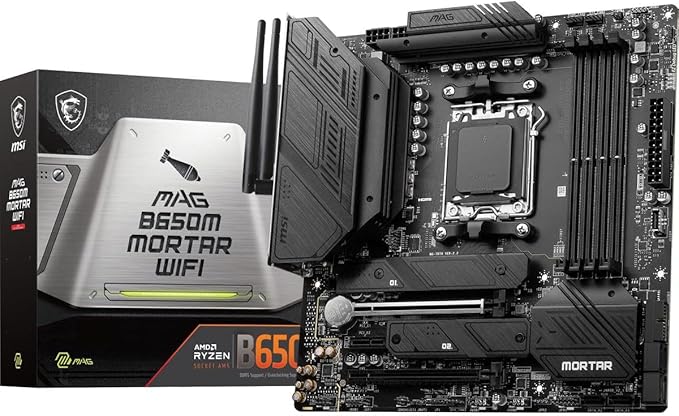
The all-new MSI MAG series lets you fight alongside gamers in pursuit of honour. With added military-inspired elements in these gaming products, they were reborn as the symbol of sturdiness and durability. The PCB design has been optimized for higher bandwidth and faster transfer speeds, which is also beneficial for reliable circuit transmission. Unleash and sustain maximum performance with an aggressive VRM design built with a digital CPU power system. Combining 8 + 8-pin power connectors and exclusive Core Boost technology, MAG series motherboard is ready to sustain heavy gaming loadings.
The all-new MSI MAG series lets you fight alongside gamers in pursuit of honour. With added military-inspired elements in these gaming products, they were reborn as the symbol of sturdiness and durability. The PCB design has been optimized for higher bandwidth and faster transfer speeds, which is also beneficial for reliable circuit transmission. Unleash and sustain maximum performance with an aggressive VRM design built with a digital CPU power system. Combining 8 + 8-pin power connectors and exclusive Core Boost technology, MAG series motherboard is ready to sustain heavy gaming loadings.
The all-new MSI MAG series lets you fight alongside gamers in pursuit of honour. With added military-inspired elements in these gaming products, they were reborn as the symbol of sturdiness and durability. The PCB design has been optimized for higher bandwidth and faster transfer speeds, which is also beneficial for reliable circuit transmission. Unleash and sustain maximum performance with an aggressive VRM design built with a digital CPU power system. Combining 8 + 8-pin power connectors and exclusive Core Boost technology, MAG series motherboard is ready to sustain heavy gaming loadings.
The all-new MSI MAG series lets you fight alongside gamers in pursuit of honour. With added military-inspired elements in these gaming products, they were reborn as the symbol of sturdiness and durability. The PCB design has been optimized for higher bandwidth and faster transfer speeds, which is also beneficial for reliable circuit transmission. Unleash and sustain maximum performance with an aggressive VRM design built with a digital CPU power system. Combining 8 + 8-pin power connectors and exclusive Core Boost technology, MAG series motherboard is ready to sustain heavy gaming loadings.
Last updated at 08/22/2026 16:10:01
Msi Pro H610M-S Wifi Ddr4 Motherboard - MSI
Delivery between 31 Aug – 4 Sept $9.90
MSI MAG B650M MORTAR WIFI DDR5 AM5 Micro-ATX Motherboard (Avail: In Stock )
Free delivery between 26 Aug – 2 Sept
MSI MAG B650M Mortar WiFi AM5 mATX Motherboard MAG B650M MORTAR WIFI - AMD AM5
Delivery $17.83
MSI AM5 Micro-ATX B650M MORTAR WIFI DDR5 Motherboard | Best Online Computer Store
Delivery between 28 Aug – 4 Sept $12.12
MSI MAG B650M Mortar WiFi AM5 mATX Motherboard MAG B650M MORTAR WIFI - AMD AM5
Delivery $15
MSI MAG B650M MORTAR WIFI DDR5 AMD AM5 WiFi 6E mATX Motherboard
Free delivery between 26 Aug – 1 Sept
MSI MAG B650M Mortar WiFi AM5 Micro-ATX Motherboard
Delivery $10.95
MSI MAG B650M Mortar WiFi AM5 Micro-ATX Motherboard
Free delivery between Tue – Fri
MSI MAG B650M Mortar WiFi AM5 Micro-ATX Motherboard
Delivery $10.95
MSI MAG B650M Mortar WiFi AM5 mATX Motherboard (MAG B650M MORTAR WIFI)
14-day returns
originally posted on microcenter.com
Has all the connectors and features I need , but continuously throwing bios errors anytime I oc the ram to 6000. On every boot it holds a dram light. Hopefully a bios update will fix this. Overall decent
originally posted on bhphotovideo.com
I've been using this MB for around a month now, and for day-to-day operation, it has been rock solid. It handles my Ryzen 9 7950x with no troubles. This BIOS is reasonably feature-rich for the product segment, though it would be nice to have the hybrid-OC support that some other Zen 4 MBs have.The MB also performs RAM training on every boot for any DDR5 kit that is faster than DDR5 4800. You can try to skip this with the memory retention BIOS setting, but doing so is unstable. MSI needs to work with AMD (and maybe the memory vendors?) to solve this. I'm not taking a point off the rating for it, because this seems to be an industry-wide problem that affects (nearly?) every single AM5 board, and it is something that could potentially be solved with a BIOS ... MoreI've been using this MB for around a month now, and for day-to-day operation, it has been rock solid. It handles my Ryzen 9 7950x with no troubles. This BIOS is reasonably feature-rich for the product segment, though it would be nice to have the hybrid-OC support that some other Zen 4 MBs have.The MB also performs RAM training on every boot for any DDR5 kit that is faster than DDR5 4800. You can try to skip this with the memory retention BIOS setting, but doing so is unstable. MSI needs to work with AMD (and maybe the memory vendors?) to solve this. I'm not taking a point off the rating for it, because this seems to be an industry-wide problem that affects (nearly?) every single AM5 board, and it is something that could potentially be solved with a BIOS update.Speaking of BIOS updates... MSI has released updates for this MB, but it isn't a priority for them. I get that not every MB can be their BIOS team's number 1 priority, and this MB isn't the most expensive in the product line, so it won't be anywhere near the top of that list. That means that when there are issues with the MB, it's going to take longer for them to be fixed. That's true for every MB that isn't at the top end of the price bracket though, so I'm not docking the score for this one for it.The reason I docked a point off the rating is that the board is just missing a couple of features that really ought to be present, and would cost a few cents, maybe a dollar at most to add. There needs to be a proper debug code display on the board; the colored LEDs can only convey the most basic of information. It's especially problematic in light of the RAM-training-on-every-boot issue, where you boot up and the RAM debug LED lights up and stays on for a minute or two, and you can't tell during that time if it's just training or if there is a real problem with the RAM. There also needs to be a Clear CMOS button on the rear I/O panel. The Clear CMOS jumper is on the bottom edge of the board, covered up by the 3-slot GPU heatsinks that are common these days; I broke the GPU retention clip on my MB from taking the GPU out and putting it back in every time I needed to clear CMOS. It should be noted that MSI includes a header on the board for attaching a control module that includes both a debug display and a clear CMOS button, but MSI doesn't sell the controller, so it's a useless header.All-in-all, I like the board. It just needs some polishing on the BIOS to fix the RAM training issue, and a new revision with proper debug display and a clear CMOS button would be really appreciated.
| Chipset | AMD B650 |
| CPU Socket | AM5 |
| Display | 1 x DisplayPort 1 x HDMI |
| Ethernet / Controller | 1 x 2.5Gigabit |
| Wi-Fi Antenna | 2 x Connector |
Msi Pro H610M-S Wifi Ddr4 Motherboard - MSI
Delivery between 31 Aug – 4 Sept $9.90
MSI MAG B650M MORTAR WIFI DDR5 AM5 Micro-ATX Motherboard (Avail: In Stock )
Free delivery between 26 Aug – 2 Sept
MSI MAG B650M Mortar WiFi AM5 mATX Motherboard MAG B650M MORTAR WIFI - AMD AM5
Delivery $17.83
MSI AM5 Micro-ATX B650M MORTAR WIFI DDR5 Motherboard | Best Online Computer Store
Delivery between 28 Aug – 4 Sept $12.12
MSI MAG B650M Mortar WiFi AM5 mATX Motherboard MAG B650M MORTAR WIFI - AMD AM5
Delivery $15
Has all the connectors and features I need , but continuously throwing bios errors anytime I oc the ram to 6000. On every boot it holds a dram light. Hopefully a bios update will fix this. Overall decent
I've been using this MB for around a month now, and for day-to-day operation, it has been rock solid. It handles my Ryzen 9 7950x with no troubles. This BIOS is reasonably feature-rich for the product segment, though it would be nice to have the hybrid-OC support that some other Zen 4 MBs have.The MB also performs RAM training on every boot for any DDR5 kit that is faster than DDR5 4800. You can try to skip this with the memory retention BIOS setting, but doing so is unstable. MSI needs to work with AMD (and maybe the memory vendors?) to solve this. I'm not taking a point off the rating for it, because this seems to be an industry-wide problem that affects (nearly?) every single AM5 board, and it is something that could potentially be solved with a BIOS ... MoreI've been using this MB for around a month now, and for day-to-day operation, it has been rock solid. It handles my Ryzen 9 7950x with no troubles. This BIOS is reasonably feature-rich for the product segment, though it would be nice to have the hybrid-OC support that some other Zen 4 MBs have.The MB also performs RAM training on every boot for any DDR5 kit that is faster than DDR5 4800. You can try to skip this with the memory retention BIOS setting, but doing so is unstable. MSI needs to work with AMD (and maybe the memory vendors?) to solve this. I'm not taking a point off the rating for it, because this seems to be an industry-wide problem that affects (nearly?) every single AM5 board, and it is something that could potentially be solved with a BIOS update.Speaking of BIOS updates... MSI has released updates for this MB, but it isn't a priority for them. I get that not every MB can be their BIOS team's number 1 priority, and this MB isn't the most expensive in the product line, so it won't be anywhere near the top of that list. That means that when there are issues with the MB, it's going to take longer for them to be fixed. That's true for every MB that isn't at the top end of the price bracket though, so I'm not docking the score for this one for it.The reason I docked a point off the rating is that the board is just missing a couple of features that really ought to be present, and would cost a few cents, maybe a dollar at most to add. There needs to be a proper debug code display on the board; the colored LEDs can only convey the most basic of information. It's especially problematic in light of the RAM-training-on-every-boot issue, where you boot up and the RAM debug LED lights up and stays on for a minute or two, and you can't tell during that time if it's just training or if there is a real problem with the RAM. There also needs to be a Clear CMOS button on the rear I/O panel. The Clear CMOS jumper is on the bottom edge of the board, covered up by the 3-slot GPU heatsinks that are common these days; I broke the GPU retention clip on my MB from taking the GPU out and putting it back in every time I needed to clear CMOS. It should be noted that MSI includes a header on the board for attaching a control module that includes both a debug display and a clear CMOS button, but MSI doesn't sell the controller, so it's a useless header.All-in-all, I like the board. It just needs some polishing on the BIOS to fix the RAM training issue, and a new revision with proper debug display and a clear CMOS button would be really appreciated.
| Chipset | AMD B650 |
| CPU Socket | AM5 |
| Display | 1 x DisplayPort 1 x HDMI |
| Ethernet / Controller | 1 x 2.5Gigabit |
| Wi-Fi Antenna | 2 x Connector |

