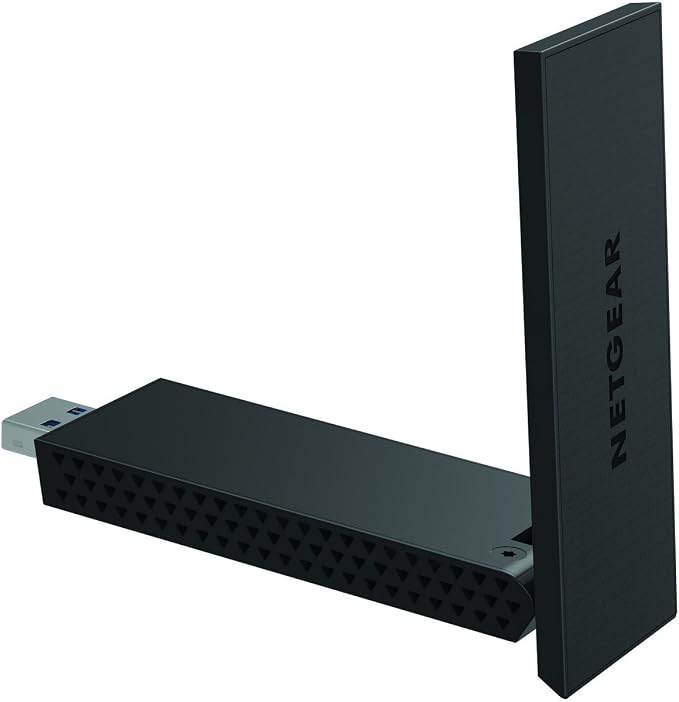
Your PC at the Speed of AC. Now Faster with USB 3.0 When it comes to connecting online, speed is everything. Now with this AC1200 USB 3.0 adapter, you can make even your older Windows -based laptops and desktops connect at the speed of 802.11ac, the world's fastest WiFi technology. Increase range with high gain antennas, and with USB 3.0, you can connect even faster than USB 2.0. Just plug this adapter into a USB 3.0 port and enjoy faster browsing, streaming and gaming. Compatible with USB 2.0 and the latest 11ac WiFi devices and backward compatible with 802.11 a/b/g/n devices.
Your PC at the Speed of AC. Now Faster with USB 3.0 When it comes to connecting online, speed is everything. Now with this AC1200 USB 3.0 adapter, you can make even your older Windows -based laptops and desktops connect at the speed of 802.11ac, the world's fastest WiFi technology. Increase range with high gain antennas, and with USB 3.0, you can connect even faster than USB 2.0. Just plug this adapter into a USB 3.0 port and enjoy faster browsing, streaming and gaming. Compatible with USB 2.0 and the latest 11ac WiFi devices and backward compatible with 802.11 a/b/g/n devices.
Your PC at the Speed of AC. Now Faster with USB 3.0 When it comes to connecting online, speed is everything. Now with this AC1200 USB 3.0 adapter, you can make even your older Windows -based laptops and desktops connect at the speed of 802.11ac, the world's fastest WiFi technology. Increase range with high gain antennas, and with USB 3.0, you can connect even faster than USB 2.0. Just plug this adapter into a USB 3.0 port and enjoy faster browsing, streaming and gaming. Compatible with USB 2.0 and the latest 11ac WiFi devices and backward compatible with 802.11 a/b/g/n devices.
Your PC at the Speed of AC. Now Faster with USB 3.0 When it comes to connecting online, speed is everything. Now with this AC1200 USB 3.0 adapter, you can make even your older Windows -based laptops and desktops connect at the speed of 802.11ac, the world's fastest WiFi technology. Increase range with high gain antennas, and with USB 3.0, you can connect even faster than USB 2.0. Just plug this adapter into a USB 3.0 port and enjoy faster browsing, streaming and gaming. Compatible with USB 2.0 and the latest 11ac WiFi devices and backward compatible with 802.11 a/b/g/n devices.
Last updated at 08/18/2026 13:59:21
NETGEAR A6210 WiFi Adapter AC1200 USB 3.0 Wi-Fi Network Adapter 802.11AC Dual-Band With High-Gain
Free delivery
NETGEAR A6210 WiFi Adapter AC1200 USB 3.0 Wi-Fi Network Adapter 802.11AC Dual-Band With High-Gain
Free delivery
Netgear A6210 High Gain WiFi USB Adapter-AC1200 802.11ac Dual Band
30-day returns
NetGear A6210 WiFi USB 3.0 Adapter
Victron GX WiFi module long range (Netgear AC1200) : BPP900200400
Free delivery between Thu – Mon
Victron GX WiFi Module Long Range
Delivery $14
Victron GX WiFi Module Long Range
Delivery $14
Victron GX WiFi module long range | Shop Victron Netgear AC1200
Delivery $63.48
Victron GX WiFi Module Long Range (Netgear AC1200) - BPP900200400
Free delivery between 19–26 Aug
Victron GX WiFi module long range (Netgear AC1200)
Delivery between 20–31 Aug $45.56
originally posted on cclonline.com
Read the Amazon 'one star' reviews and believe them for a change. This adapter has a serious driver problem (Media Tek/Ralink based). Throughput fluctuates from the ballpark 150Mbps you'd expect to see down to 1Mbps, at which point you will wonder why pages are loading so slowly, check your router status and then realize that it's this adapter. All in all a disappointing product from Netgear ... it looks pretty but doesn't work very well. Sorry, something like this should just work straight out of the box. I don't have time for faffing (well, I do, obviously!). Oh, and even in standalone-installation mode Netgear still drops a program in Startup which 'phones home', ostensibly to check for driver updates. I tried to extract the drivers-only using 7-Zip but it didn't ... MoreRead the Amazon 'one star' reviews and believe them for a change. This adapter has a serious driver problem (Media Tek/Ralink based). Throughput fluctuates from the ballpark 150Mbps you'd expect to see down to 1Mbps, at which point you will wonder why pages are loading so slowly, check your router status and then realize that it's this adapter. All in all a disappointing product from Netgear ... it looks pretty but doesn't work very well. Sorry, something like this should just work straight out of the box. I don't have time for faffing (well, I do, obviously!). Oh, and even in standalone-installation mode Netgear still drops a program in Startup which 'phones home', ostensibly to check for driver updates. I tried to extract the drivers-only using 7-Zip but it didn't work out. Post-install, I copied the Drivers folder (7 files) to a removable drive and then reinstalled Windows from a recent Acronis image. Those 7 files seem to be all you need. 3 stars because, as always, maybe I'm the problem; I'm testing at a distance of less than 5 metres from the TP-Link VR400 router so there's always a possibility that the signal is too strong (is that a thing?).[And the antenna is not detachable, except in the sense that there are 2 small screws securing it that will need a jeweller's screwdriver ... and who knows what happens after you've unscrewed them.]
originally posted on netgear.com
To put in my words, It's been a trying few months for me. Stretching my every dollar to make, sure my little boy, his mom and myself are afloat. This product came into sight as I seen the price. It was already discounted when I purchased it. Retail, if my memory serves, was 71.00$. it was discounted at 47.00$ when I spotted it. It wasn't until I checked out, that the CSR told me 18.30$ was my grand total. I was eccentric! I saved 77$ in thinking I was going to spend 100$ minimum. But the experience from unboxing, to setup, to registration for warranty, and account creation, simply a breeze. I'd say I spent no more than 7 minutes doing all of this and the product was setup. I don't have any problems to report with it so far. It hasn't kicked me off, disconnected in ... MoreTo put in my words, It's been a trying few months for me. Stretching my every dollar to make, sure my little boy, his mom and myself are afloat. This product came into sight as I seen the price. It was already discounted when I purchased it. Retail, if my memory serves, was 71.00$. it was discounted at 47.00$ when I spotted it. It wasn't until I checked out, that the CSR told me 18.30$ was my grand total. I was eccentric! I saved 77$ in thinking I was going to spend 100$ minimum. But the experience from unboxing, to setup, to registration for warranty, and account creation, simply a breeze. I'd say I spent no more than 7 minutes doing all of this and the product was setup. I don't have any problems to report with it so far. It hasn't kicked me off, disconnected in any way. It's lightning quick, so my much reaction is excellent for this item! I'd actually highly recommend it to anyone who is in need of something like this! Thank you Netgear! Money saver, Stress reducer, and I get to keep some of my remaining hairline too! All pluses in my opinion. As I have a liking to keeping my hair! Baldness wouldn't look good on me.
originally posted on galaxus.ch
Now that we are in the age of 802.11ac and 802.11ax, I had been looking to completely get rid of network cables, even for my desktop machines and Linux server. Because of bad experiences with Wi-Fi sticks using Realtek chipsets, I was looking for something not made by Realtek that is more stable and has drivers for both Windows and Linux. The Netgear A6210 is what I found.This stick uses a Mediatek MT7612U chipset. It of course comes with a Windows driver, but also works out of the box on recent Linux versions (Kernel 4.19 and higher) - no extra drivers required. I use it both under Windows and Linux and the drivers have been stable so far; installing the Windows driver takes a bit of work and it comes with a connection utility that looks like it came from 2007, ... MoreNow that we are in the age of 802.11ac and 802.11ax, I had been looking to completely get rid of network cables, even for my desktop machines and Linux server. Because of bad experiences with Wi-Fi sticks using Realtek chipsets, I was looking for something not made by Realtek that is more stable and has drivers for both Windows and Linux. The Netgear A6210 is what I found.This stick uses a Mediatek MT7612U chipset. It of course comes with a Windows driver, but also works out of the box on recent Linux versions (Kernel 4.19 and higher) - no extra drivers required. I use it both under Windows and Linux and the drivers have been stable so far; installing the Windows driver takes a bit of work and it comes with a connection utility that looks like it came from 2007, but does its job very well.Connection stability and speed are overall much better than with the Realtek-based sticks I have been using in the past few years. The Netgear A6210 has two features that help a lot for this: its top is an antenna that you can unfold for better signal quality, and it comes with a dock. With a USB extension code roughly 80 cm long, the dock allows you to place the stick next to or on top of your PC where it usually gets a much better signal than if it were just hanging behind the machine.I am very satisfied with the purchase. The stick fulfills the goal entirely: with its help and a well-placed Wi-Fi router and repeater, I did end up getting rid of all network cables and can now place my server and desktop machines wherever I want.
| Ports & interfaces | |
| USB version | 2.0/3.2 Gen 1 (3.1 Gen 1) |
| Interface | WLAN |
| Host interface | USB |
| Internal | N |
NETGEAR A6210 WiFi Adapter AC1200 USB 3.0 Wi-Fi Network Adapter 802.11AC Dual-Band With High-Gain
Free delivery
NETGEAR A6210 WiFi Adapter AC1200 USB 3.0 Wi-Fi Network Adapter 802.11AC Dual-Band With High-Gain
Free delivery
Netgear A6210 High Gain WiFi USB Adapter-AC1200 802.11ac Dual Band
30-day returns
NetGear A6210 WiFi USB 3.0 Adapter
Victron GX WiFi module long range (Netgear AC1200) : BPP900200400
Free delivery between Thu – Mon
Read the Amazon 'one star' reviews and believe them for a change. This adapter has a serious driver problem (Media Tek/Ralink based). Throughput fluctuates from the ballpark 150Mbps you'd expect to see down to 1Mbps, at which point you will wonder why pages are loading so slowly, check your router status and then realize that it's this adapter. All in all a disappointing product from Netgear ... it looks pretty but doesn't work very well. Sorry, something like this should just work straight out of the box. I don't have time for faffing (well, I do, obviously!). Oh, and even in standalone-installation mode Netgear still drops a program in Startup which 'phones home', ostensibly to check for driver updates. I tried to extract the drivers-only using 7-Zip but it didn't ... MoreRead the Amazon 'one star' reviews and believe them for a change. This adapter has a serious driver problem (Media Tek/Ralink based). Throughput fluctuates from the ballpark 150Mbps you'd expect to see down to 1Mbps, at which point you will wonder why pages are loading so slowly, check your router status and then realize that it's this adapter. All in all a disappointing product from Netgear ... it looks pretty but doesn't work very well. Sorry, something like this should just work straight out of the box. I don't have time for faffing (well, I do, obviously!). Oh, and even in standalone-installation mode Netgear still drops a program in Startup which 'phones home', ostensibly to check for driver updates. I tried to extract the drivers-only using 7-Zip but it didn't work out. Post-install, I copied the Drivers folder (7 files) to a removable drive and then reinstalled Windows from a recent Acronis image. Those 7 files seem to be all you need. 3 stars because, as always, maybe I'm the problem; I'm testing at a distance of less than 5 metres from the TP-Link VR400 router so there's always a possibility that the signal is too strong (is that a thing?).[And the antenna is not detachable, except in the sense that there are 2 small screws securing it that will need a jeweller's screwdriver ... and who knows what happens after you've unscrewed them.]
To put in my words, It's been a trying few months for me. Stretching my every dollar to make, sure my little boy, his mom and myself are afloat. This product came into sight as I seen the price. It was already discounted when I purchased it. Retail, if my memory serves, was 71.00$. it was discounted at 47.00$ when I spotted it. It wasn't until I checked out, that the CSR told me 18.30$ was my grand total. I was eccentric! I saved 77$ in thinking I was going to spend 100$ minimum. But the experience from unboxing, to setup, to registration for warranty, and account creation, simply a breeze. I'd say I spent no more than 7 minutes doing all of this and the product was setup. I don't have any problems to report with it so far. It hasn't kicked me off, disconnected in ... MoreTo put in my words, It's been a trying few months for me. Stretching my every dollar to make, sure my little boy, his mom and myself are afloat. This product came into sight as I seen the price. It was already discounted when I purchased it. Retail, if my memory serves, was 71.00$. it was discounted at 47.00$ when I spotted it. It wasn't until I checked out, that the CSR told me 18.30$ was my grand total. I was eccentric! I saved 77$ in thinking I was going to spend 100$ minimum. But the experience from unboxing, to setup, to registration for warranty, and account creation, simply a breeze. I'd say I spent no more than 7 minutes doing all of this and the product was setup. I don't have any problems to report with it so far. It hasn't kicked me off, disconnected in any way. It's lightning quick, so my much reaction is excellent for this item! I'd actually highly recommend it to anyone who is in need of something like this! Thank you Netgear! Money saver, Stress reducer, and I get to keep some of my remaining hairline too! All pluses in my opinion. As I have a liking to keeping my hair! Baldness wouldn't look good on me.
Now that we are in the age of 802.11ac and 802.11ax, I had been looking to completely get rid of network cables, even for my desktop machines and Linux server. Because of bad experiences with Wi-Fi sticks using Realtek chipsets, I was looking for something not made by Realtek that is more stable and has drivers for both Windows and Linux. The Netgear A6210 is what I found.This stick uses a Mediatek MT7612U chipset. It of course comes with a Windows driver, but also works out of the box on recent Linux versions (Kernel 4.19 and higher) - no extra drivers required. I use it both under Windows and Linux and the drivers have been stable so far; installing the Windows driver takes a bit of work and it comes with a connection utility that looks like it came from 2007, ... MoreNow that we are in the age of 802.11ac and 802.11ax, I had been looking to completely get rid of network cables, even for my desktop machines and Linux server. Because of bad experiences with Wi-Fi sticks using Realtek chipsets, I was looking for something not made by Realtek that is more stable and has drivers for both Windows and Linux. The Netgear A6210 is what I found.This stick uses a Mediatek MT7612U chipset. It of course comes with a Windows driver, but also works out of the box on recent Linux versions (Kernel 4.19 and higher) - no extra drivers required. I use it both under Windows and Linux and the drivers have been stable so far; installing the Windows driver takes a bit of work and it comes with a connection utility that looks like it came from 2007, but does its job very well.Connection stability and speed are overall much better than with the Realtek-based sticks I have been using in the past few years. The Netgear A6210 has two features that help a lot for this: its top is an antenna that you can unfold for better signal quality, and it comes with a dock. With a USB extension code roughly 80 cm long, the dock allows you to place the stick next to or on top of your PC where it usually gets a much better signal than if it were just hanging behind the machine.I am very satisfied with the purchase. The stick fulfills the goal entirely: with its help and a well-placed Wi-Fi router and repeater, I did end up getting rid of all network cables and can now place my server and desktop machines wherever I want.
This thing is a complete and total waste of money. It was really my only choice for a wifi adapter for the pc I just built for gaming. I had to do some crazy gymnastics to get the drivers onto my pc because it doesn’t have a cd drive. The program is terrible and somehow takes a long time to load up (keep that in mind). Every time I turned on my pc it would not connect at first and I would have to connect and reconnect over and over again to get it to finally have a stable connection. It would boot me off of my wifi every time after I connected until eventually it would decide to stay. However it didn’t just do this when I turned on my pc. It would randomly cut me off from internet connection, and I would have to do more reconnecting. Now this is why I have been ... MoreThis thing is a complete and total waste of money. It was really my only choice for a wifi adapter for the pc I just built for gaming. I had to do some crazy gymnastics to get the drivers onto my pc because it doesn’t have a cd drive. The program is terrible and somehow takes a long time to load up (keep that in mind). Every time I turned on my pc it would not connect at first and I would have to connect and reconnect over and over again to get it to finally have a stable connection. It would boot me off of my wifi every time after I connected until eventually it would decide to stay. However it didn’t just do this when I turned on my pc. It would randomly cut me off from internet connection, and I would have to do more reconnecting. Now this is why I have been talking in past tense. I use my pc mainly for gaming. I spent over a thousand on it and I thought I would be getting something quality for $50 in terms of wifi (I was at Best Buy). Since I built my pc for gaming, I play games on it. But having an internet connection is vital to the playing of most of my games. When you are in the middle of an match and you lose contact with you’re friends as well as being kicked out of the game it isn’t fun. There was no way of predicting when I would lose connection. Then one day I had enough. I was in the middle of a game of Enlisted and I lost connection. I had been away from home for a while so I was eager to play some games. I murdered the wifi adapter. I tore it in half, stomped on it, snuffed it’s miserable existence. I have no regrets for what I did to the net gear wifi adapter. Now I have to spend more money and I’m not happy about it.
I’ve had this adapter for a couple years now and it’s “suited” my old router, download speed clocking in on average 1.5 mb/s which is extremely slow and annoying to deal with. Fast forward and I get a new router/internet, the download speed kicks down to 200 KB/S and I’m consistently getting booted out of games, all the while it disconnects randomly and at bad times especially when I’m doing homework. It was so bad I thought it might have been my router’s fault. I end up getting the tplink ac600 and that completely demolished the netgear a6210, so it had nothing to do with my internet but the adapter itself. Don’t bother with this if you have fairly new wifi, this adapter can’t and won’t support it.
This product gives a WIFI signal from behind 2 concrete walls with only 30ish drop in Mbps difference from hard wire. It runs on multiple channels so I get around 240 Mbps from a 270 hard wire speed. Great for outbuldings/outdoors too! Have bought this same model several times over the years. Great product!
I tried to just plug and play. Once I realized it wouldn’t work, I decided to do the opposite of what us men do, I read the instructions. I downloaded the update, now it downloads and uploads exactly how it should. Very good range. Probably why it was on the clearance rack for half off at Walmart. Win win for me and a little bit of reading skills and patience.
The Netgear AC1200 works great however they should change the installation from a CD to a flash drive or some other up to date file transfer system. Most computers these days do not have a CD player and unless you have internet or a CD player you cannot install the drivers necessary to use this product.. which kind of defeats the purpose of it. If you have internet to install it, why would you even need it? A CD is just out of date and is old technology when it comes to computers. Other than that it is a great product!
Don't purchase under any condition. It will eventually stop working correctly. The most common issue is that even if you install and reinstall the driver, the a6210 will just consistently disconnect over and over again -- even if you connect it manually to something. Unplugging and re plugging it in only works for so long, and the software they give to manage the driver will suck up so much memory for no reason. This is basically a scam every time it doesn't work. Don't listen to the lucky ones. They're just lucky. This thing consistently fails. Do not do it!
| Ports & interfaces | |
| USB version | 2.0/3.2 Gen 1 (3.1 Gen 1) |
| Interface | WLAN |
| Host interface | USB |
| Internal | N |

