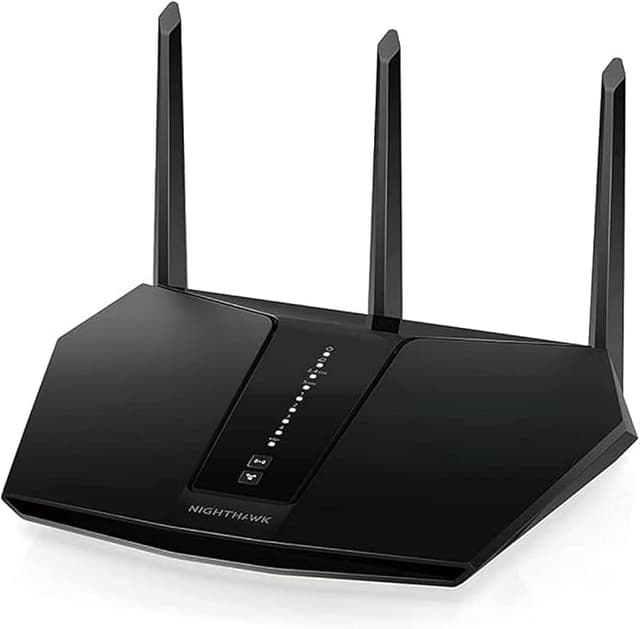
Discover unparalleled internet performance with the NETGEAR Nighthawk RAX30, an AX2400 WiFi 6 Router designed to keep your smart home running smoothly. Optimised for next-generation devices, this router ensures lightning-fast speeds and reliable connectivity across all your gadgets. With advanced WiFi 6 technology, enjoy seamless streaming, gaming, and browsing experiences without lag or dropouts. The RAX30 is a must-have upgrade for anyone seeking top-tier networking in their home or small office setup. Upgrade today and experience the future of internet connection.
Discover unparalleled internet performance with the NETGEAR Nighthawk RAX30, an AX2400 WiFi 6 Router designed to keep your smart home running smoothly. Optimised for next-generation devices, this router ensures lightning-fast speeds and reliable connectivity across all your gadgets. With advanced WiFi 6 technology, enjoy seamless streaming, gaming, and browsing experiences without lag or dropouts. The RAX30 is a must-have upgrade for anyone seeking top-tier networking in their home or small office setup. Upgrade today and experience the future of internet connection.
Discover unparalleled internet performance with the NETGEAR Nighthawk RAX30, an AX2400 WiFi 6 Router designed to keep your smart home running smoothly. Optimised for next-generation devices, this router ensures lightning-fast speeds and reliable connectivity across all your gadgets. With advanced WiFi 6 technology, enjoy seamless streaming, gaming, and browsing experiences without lag or dropouts. The RAX30 is a must-have upgrade for anyone seeking top-tier networking in their home or small office setup. Upgrade today and experience the future of internet connection.
Discover unparalleled internet performance with the NETGEAR Nighthawk RAX30, an AX2400 WiFi 6 Router designed to keep your smart home running smoothly. Optimised for next-generation devices, this router ensures lightning-fast speeds and reliable connectivity across all your gadgets. With advanced WiFi 6 technology, enjoy seamless streaming, gaming, and browsing experiences without lag or dropouts. The RAX30 is a must-have upgrade for anyone seeking top-tier networking in their home or small office setup. Upgrade today and experience the future of internet connection.
Last updated at 06/14/2026 22:10:45
Netgear Nighthawk RAX29 802.11ax Wireless LAN Access Point Cable DSL Router
Affiliate Disclosure: We may receive a small commission for purchases made through this link at no extra cost to you. This helps support our site. Thank you!
Brand Netgear Nighthawk Rax30100aus 2400 Mbps 4 Port Wireless Router
Delivery $12.95
Affiliate Disclosure: We may receive a small commission for purchases made through this link at no extra cost to you. This helps support our site. Thank you!
NETGEAR Nighthawk WiFi 6 Router RAX29 - Security Features, Dual-Band Gigabit Router,
Delivery between 19–23 June $13.99
NETGEAR Nighthawk WiFi 6 Router RAX30 - Security Features, 5-Stream Dual-Band Gigabit
Delivery between 19–23 June $14.05
NETGEAR Nighthawk WiFi 6 Router RAX29 - Security Features, Dual-Band Gigabit Router,
Delivery between 19–23 June $14.08
NETGEAR Nighthawk WiFi 6 Router RAX29 - Security Features, Dual-Band Gigabit Router,
Delivery between 19–24 June $13.44
NETGEAR Nighthawk WiFi 6 Router RAX29 - Security Features, Dual-Band Gigabit Router,
Delivery between 20–24 June $8.47
NETGEAR Nighthawk WiFi 6 Router RAX29 - Security Features, Dual-Band Gigabit Router,
Delivery between 19–23 June $16.24
NETGEAR Nighthawk WiFi 6 Router RAX29 - Security Features, Dual-Band Gigabit Router,
Delivery between 19–23 June $15.41
Nighthawk AX2400 Dual-Band WiFi 6 Router (up to 2.4Gbps) with NETGEAR Armor, 3.0 USB Port (RAX29)
Delivery between 21–24 June $29
originally posted on walmart.com
I bought this product for Black Friday and this particular router was a great price and came with a one year subscription to Netgear Armor Security. I set it up bought 2 yrs of pro support and used the promo code that came in the box for the Armor Security and once it was all finished I threw all packaging away In January. Then o find out the Netgear Armor Security was being charged to my credit card after 30 days. The tech with Netgear put it in as a 40 trial instead of the free one year. When I called they said they needed proof of purchase which I provided them with the Walmart.com order receipt I was sent via email. They then said the on year armor subscription is not specified on the receipt and I needed something from Walmart proving that is in fact the model ... MoreI bought this product for Black Friday and this particular router was a great price and came with a one year subscription to Netgear Armor Security. I set it up bought 2 yrs of pro support and used the promo code that came in the box for the Armor Security and once it was all finished I threw all packaging away In January. Then o find out the Netgear Armor Security was being charged to my credit card after 30 days. The tech with Netgear put it in as a 40 trial instead of the free one year. When I called they said they needed proof of purchase which I provided them with the Walmart.com order receipt I was sent via email. They then said the on year armor subscription is not specified on the receipt and I needed something from Walmart proving that is in fact the model that came with the one year armor subscription. I have called Walmart.com customer service 3 times and all 3 times was told that it was escalated to 2 different departments; to the promotions department to have them make sure that was what was offered with this device during Black Friday sale AND to someone. To approve a refund of the $42.24 which is what the one year armor subscription costs if they can’t provide the information regarding their promotional sale for that holiday. I have not received a single call or email with any kind of resolution. I would have paid for the better router at the time if I was just going to have to pay for the armor security as well! I would have been fine with that if I knew both Walmart and Netgear would not honor the product bundle they were selling for Black Friday! Very disappointed in Walmart and the lack of quality In customer support/resolution when they offer a product. BUYER BEWARE!!! I guess we all should be saving the packages and ALL that is included in the box for at least 6 months to make sure you get what you pay for!!!!
originally posted on netgear.com
I purchased a Netgear Nighthawk AX2400 to upgrade a five year old router of another brand. Our household was experiencing lags and disconnect issues. The Netgear Nighthawk was very easy to set up and all our devices easily connected by entering the password. The Netgear App is user friendly too. When setting up the Netgear router, a prompt informs you that if you keep the same WI FI network name and password your wireless devices will automatically reconnect to the internet; however, this wasn’t the case for me. I had to reconnect each device even though a kept the the network name and password the same. The router I replaced was another brand, so maybe that made a difference. Since installing the Netgear NightHawk router, we haven’t experienced any connection ... MoreI purchased a Netgear Nighthawk AX2400 to upgrade a five year old router of another brand. Our household was experiencing lags and disconnect issues. The Netgear Nighthawk was very easy to set up and all our devices easily connected by entering the password. The Netgear App is user friendly too. When setting up the Netgear router, a prompt informs you that if you keep the same WI FI network name and password your wireless devices will automatically reconnect to the internet; however, this wasn’t the case for me. I had to reconnect each device even though a kept the the network name and password the same. The router I replaced was another brand, so maybe that made a difference. Since installing the Netgear NightHawk router, we haven’t experienced any connection issues or lags. I would recommend this product.
originally posted on netgear.com
I'm not an IT professional and am not an expert with modems, routers, etc. Started researching how to improve our home setup as our house only gets 10mb download. Used the Internet Provider's router as a modem only and attached the Netgear RAX29 as the router. Needed a way to throttle kid's gaming from taking 90% making wifi unusable for others. The QoS option allows for device prioritization. This router also distributes the signal optimally allowing for my wife to actually stream. Very impressed with how this router best utilizes our small amount of bandwidth. That was a plus as I was only searching for a way to prioritize devices. Only option I haven't found on it is a way to also cap the bandwidth a device can use. Ultimately, though, this router has nearly ... MoreI'm not an IT professional and am not an expert with modems, routers, etc. Started researching how to improve our home setup as our house only gets 10mb download. Used the Internet Provider's router as a modem only and attached the Netgear RAX29 as the router. Needed a way to throttle kid's gaming from taking 90% making wifi unusable for others. The QoS option allows for device prioritization. This router also distributes the signal optimally allowing for my wife to actually stream. Very impressed with how this router best utilizes our small amount of bandwidth. That was a plus as I was only searching for a way to prioritize devices. Only option I haven't found on it is a way to also cap the bandwidth a device can use. Ultimately, though, this router has nearly alleviated all of our issues and has elevated our internet experience in other areas. Our home experience as been greatly improved. Now if it could somehow run fiber and increase our bandwidth by at least 10 times that would be great (kidding!).
| Dual Band | Dual-Band 5GHz + 2.4GHz |
| Gigabit Ethernet | 5 x Gigabit Ports |
| Data Transfer Speed | Up to 1800 Mbps |
| Manufacturer's Warranty | 2 Year |
| Wi-Fi | Wi-Fi 6 (802.11ax) |
Netgear Nighthawk RAX29 802.11ax Wireless LAN Access Point Cable DSL Router
Affiliate Disclosure: We may receive a small commission for purchases made through this link at no extra cost to you. This helps support our site. Thank you!
Brand Netgear Nighthawk Rax30100aus 2400 Mbps 4 Port Wireless Router
Delivery $12.95
Affiliate Disclosure: We may receive a small commission for purchases made through this link at no extra cost to you. This helps support our site. Thank you!
NETGEAR Nighthawk WiFi 6 Router RAX29 - Security Features, Dual-Band Gigabit Router,
Delivery between 19–23 June $13.99
NETGEAR Nighthawk WiFi 6 Router RAX30 - Security Features, 5-Stream Dual-Band Gigabit
Delivery between 19–23 June $14.05
NETGEAR Nighthawk WiFi 6 Router RAX29 - Security Features, Dual-Band Gigabit Router,
Delivery between 19–23 June $14.08
I bought this product for Black Friday and this particular router was a great price and came with a one year subscription to Netgear Armor Security. I set it up bought 2 yrs of pro support and used the promo code that came in the box for the Armor Security and once it was all finished I threw all packaging away In January. Then o find out the Netgear Armor Security was being charged to my credit card after 30 days. The tech with Netgear put it in as a 40 trial instead of the free one year. When I called they said they needed proof of purchase which I provided them with the Walmart.com order receipt I was sent via email. They then said the on year armor subscription is not specified on the receipt and I needed something from Walmart proving that is in fact the model ... MoreI bought this product for Black Friday and this particular router was a great price and came with a one year subscription to Netgear Armor Security. I set it up bought 2 yrs of pro support and used the promo code that came in the box for the Armor Security and once it was all finished I threw all packaging away In January. Then o find out the Netgear Armor Security was being charged to my credit card after 30 days. The tech with Netgear put it in as a 40 trial instead of the free one year. When I called they said they needed proof of purchase which I provided them with the Walmart.com order receipt I was sent via email. They then said the on year armor subscription is not specified on the receipt and I needed something from Walmart proving that is in fact the model that came with the one year armor subscription. I have called Walmart.com customer service 3 times and all 3 times was told that it was escalated to 2 different departments; to the promotions department to have them make sure that was what was offered with this device during Black Friday sale AND to someone. To approve a refund of the $42.24 which is what the one year armor subscription costs if they can’t provide the information regarding their promotional sale for that holiday. I have not received a single call or email with any kind of resolution. I would have paid for the better router at the time if I was just going to have to pay for the armor security as well! I would have been fine with that if I knew both Walmart and Netgear would not honor the product bundle they were selling for Black Friday! Very disappointed in Walmart and the lack of quality In customer support/resolution when they offer a product. BUYER BEWARE!!! I guess we all should be saving the packages and ALL that is included in the box for at least 6 months to make sure you get what you pay for!!!!
I purchased a Netgear Nighthawk AX2400 to upgrade a five year old router of another brand. Our household was experiencing lags and disconnect issues. The Netgear Nighthawk was very easy to set up and all our devices easily connected by entering the password. The Netgear App is user friendly too. When setting up the Netgear router, a prompt informs you that if you keep the same WI FI network name and password your wireless devices will automatically reconnect to the internet; however, this wasn’t the case for me. I had to reconnect each device even though a kept the the network name and password the same. The router I replaced was another brand, so maybe that made a difference. Since installing the Netgear NightHawk router, we haven’t experienced any connection ... MoreI purchased a Netgear Nighthawk AX2400 to upgrade a five year old router of another brand. Our household was experiencing lags and disconnect issues. The Netgear Nighthawk was very easy to set up and all our devices easily connected by entering the password. The Netgear App is user friendly too. When setting up the Netgear router, a prompt informs you that if you keep the same WI FI network name and password your wireless devices will automatically reconnect to the internet; however, this wasn’t the case for me. I had to reconnect each device even though a kept the the network name and password the same. The router I replaced was another brand, so maybe that made a difference. Since installing the Netgear NightHawk router, we haven’t experienced any connection issues or lags. I would recommend this product.
I'm not an IT professional and am not an expert with modems, routers, etc. Started researching how to improve our home setup as our house only gets 10mb download. Used the Internet Provider's router as a modem only and attached the Netgear RAX29 as the router. Needed a way to throttle kid's gaming from taking 90% making wifi unusable for others. The QoS option allows for device prioritization. This router also distributes the signal optimally allowing for my wife to actually stream. Very impressed with how this router best utilizes our small amount of bandwidth. That was a plus as I was only searching for a way to prioritize devices. Only option I haven't found on it is a way to also cap the bandwidth a device can use. Ultimately, though, this router has nearly ... MoreI'm not an IT professional and am not an expert with modems, routers, etc. Started researching how to improve our home setup as our house only gets 10mb download. Used the Internet Provider's router as a modem only and attached the Netgear RAX29 as the router. Needed a way to throttle kid's gaming from taking 90% making wifi unusable for others. The QoS option allows for device prioritization. This router also distributes the signal optimally allowing for my wife to actually stream. Very impressed with how this router best utilizes our small amount of bandwidth. That was a plus as I was only searching for a way to prioritize devices. Only option I haven't found on it is a way to also cap the bandwidth a device can use. Ultimately, though, this router has nearly alleviated all of our issues and has elevated our internet experience in other areas. Our home experience as been greatly improved. Now if it could somehow run fiber and increase our bandwidth by at least 10 times that would be great (kidding!).
No parental control without paying an additional monthly fee. Seriously. I can't even filter sites on my own network for free? Especially irksome given the price of the unit... Every time you open the app it's constantly bugging you about signing up for this subscription too. Super annoying... In addition. There are some devices seemingly connecting to my network at random that I have no control over. My password is plenty secure. It was the same password as my previous (cheaper) router and I never had this issue before. I can forcibly remove them, which is great. Except for devices that are currently online... There's a Motorola tablet on there that is constantly online. I don't own a Motorola tablet, and I can't remove it from the network. This was an impulse buy ... MoreNo parental control without paying an additional monthly fee. Seriously. I can't even filter sites on my own network for free? Especially irksome given the price of the unit... Every time you open the app it's constantly bugging you about signing up for this subscription too. Super annoying... In addition. There are some devices seemingly connecting to my network at random that I have no control over. My password is plenty secure. It was the same password as my previous (cheaper) router and I never had this issue before. I can forcibly remove them, which is great. Except for devices that are currently online... There's a Motorola tablet on there that is constantly online. I don't own a Motorola tablet, and I can't remove it from the network. This was an impulse buy for wifi 6 alone. I can't say I entirely regret the purchase. It's still a solid router hardware wise. But oh god the software. I realize I'm the only review on the site. So if you want more opinions on the software side of things, look up the nighthawk app if you want to read more about what people have to say about the software. (This is also required to set up the router... Really?)
I got this router on sale at Walmart because my former router kept dropping connections and for some reason the 5G band would become “overwhelmed” and fail altogether. Setup for the NEW NETGEAR Nighthawk AX 2400 would have been easy IF the WI FI on my ancient iPhone 7 had been functioning. As it was, using the app for setup became problematic and I ended up manually setting it up via browser. The process also convinced me to upgrade to a newer phone on which the NETGEAR app works swimmingly and I occasionally get notifications from it when the trial security subscription lets me know that it has investigated a new connection and has deemed it not to be a security threat. The most thrilling thing about the AX2400 is the strong wireless signal that in now available ... MoreI got this router on sale at Walmart because my former router kept dropping connections and for some reason the 5G band would become “overwhelmed” and fail altogether. Setup for the NEW NETGEAR Nighthawk AX 2400 would have been easy IF the WI FI on my ancient iPhone 7 had been functioning. As it was, using the app for setup became problematic and I ended up manually setting it up via browser. The process also convinced me to upgrade to a newer phone on which the NETGEAR app works swimmingly and I occasionally get notifications from it when the trial security subscription lets me know that it has investigated a new connection and has deemed it not to be a security threat. The most thrilling thing about the AX2400 is the strong wireless signal that in now available everywhere in our modest 3-bedroom home (including the garage). Both the 2.4G and 5G are max-bars everywhere, and I’ve yet to have a tv, phone, computer, security sensor, switch, speaker, or camera have a dropped connection. I’ve been using the AX2400 for a week, my previous router would have required a reset 3-4 times in a week, and many devices would have lost signal and required reconnecting within that week. So far I am very pleased with the solidarity, affordability, and robust coverage of the Nighthawk AX2400.
The RAX30 router got hacked the same day that I set it up. I had to contact tech support to get it to work. The router would not connect to the internet. The router website is not available to configure the router for things like setup as a hidden network or turn off broadcasting the router’s address. The Netgear Nighthawk app is required to set up the router, which broadcasts the router’s information. If you have Internet hackers as neighbors like I do, this is not the router for you! As soon as the router connected, I could not connect to the 2.4 ghz connection (I knew something was wrong). I setup the router with the 5.0 ghz and then I saw that someone had made a Wi-Fi connection with the same name as my network, but added an additional 5.0 to the network name. I ... MoreThe RAX30 router got hacked the same day that I set it up. I had to contact tech support to get it to work. The router would not connect to the internet. The router website is not available to configure the router for things like setup as a hidden network or turn off broadcasting the router’s address. The Netgear Nighthawk app is required to set up the router, which broadcasts the router’s information. If you have Internet hackers as neighbors like I do, this is not the router for you! As soon as the router connected, I could not connect to the 2.4 ghz connection (I knew something was wrong). I setup the router with the 5.0 ghz and then I saw that someone had made a Wi-Fi connection with the same name as my network, but added an additional 5.0 to the network name. I unplugged the router and over half of the available Wi-If networks disappeared. Do not think that the software that come with this router is going to help protect your devices! It cannot even protect the router from being so easily hacked!
New router seem to be working well. Due to weather I haven't tried to see what the range is compared to my old router. What I really was annoyed about is setting up my router. My old netgear router I just hooked it up and the program loaded and I had everything set up in 5 min. I would guess that 90% of the people that by this product are like me in that they set up the router and they never go back into the program. Now you want me to download a program to my phone that doesn't have much room on it, that does all sorts of things that I will never use just to set up a router. The set up didn't work right. I kept getting a message that the program could not find thee router. The only option the program offered was to try again and of course it still could not find ... MoreNew router seem to be working well. Due to weather I haven't tried to see what the range is compared to my old router. What I really was annoyed about is setting up my router. My old netgear router I just hooked it up and the program loaded and I had everything set up in 5 min. I would guess that 90% of the people that by this product are like me in that they set up the router and they never go back into the program. Now you want me to download a program to my phone that doesn't have much room on it, that does all sorts of things that I will never use just to set up a router. The set up didn't work right. I kept getting a message that the program could not find thee router. The only option the program offered was to try again and of course it still could not find the router. I called customer support and after a lengthy phone call got the router set up. My suggestion would be to have a simple program to set up the router for the 90% that that's all they need. Offer the nighthawk app for the few that want to do all the other stuff.
My old Netgear R7000P I had for years and was dying out I wasn't getting hardly any speeds and getting booted offline quite a bit. I didn't get it at first because I have fiber optics. I tested on my old router, 41.8 mbps download and 4.3 mbps upload on my provider's speed test. After buying this new one at Best Buy, now my speed test results are, 97.5 mbps download and 92.3 mbps upload. These results are from my Omen 25L Desktop Gaming Computer that is hard wired though a Netgear AX6000 WiFi extender. I still can't believe the results! Even my cell phone is much faster since it is connected through the new router at my house. Setup was very easy unlike the old router have difficulties all the time and not working well with the nighthawk app. I highly recommend this ... MoreMy old Netgear R7000P I had for years and was dying out I wasn't getting hardly any speeds and getting booted offline quite a bit. I didn't get it at first because I have fiber optics. I tested on my old router, 41.8 mbps download and 4.3 mbps upload on my provider's speed test. After buying this new one at Best Buy, now my speed test results are, 97.5 mbps download and 92.3 mbps upload. These results are from my Omen 25L Desktop Gaming Computer that is hard wired though a Netgear AX6000 WiFi extender. I still can't believe the results! Even my cell phone is much faster since it is connected through the new router at my house. Setup was very easy unlike the old router have difficulties all the time and not working well with the nighthawk app. I highly recommend this router!
I replaced my two year “old” Netgear router with this unit because it was having issues with sporadic connection. The new router worked great for about two months and then it started failing. It will go from 230 mbps down to 15 mbps for a few seconds (just enough to give me flashbacks of dial-up) and then it will perform great for another few minutes. The app said my firmware was up to date but the website said an update was available. I went the long way around to download and install the new firmware. I rebooted the router and I’m still having issues with with the router’s performance. On another note, the tech support is frustrating. I understand it’s cheaper to send calls overseas but it can be very difficult to understand the directions that the technician is ... MoreI replaced my two year “old” Netgear router with this unit because it was having issues with sporadic connection. The new router worked great for about two months and then it started failing. It will go from 230 mbps down to 15 mbps for a few seconds (just enough to give me flashbacks of dial-up) and then it will perform great for another few minutes. The app said my firmware was up to date but the website said an update was available. I went the long way around to download and install the new firmware. I rebooted the router and I’m still having issues with with the router’s performance. On another note, the tech support is frustrating. I understand it’s cheaper to send calls overseas but it can be very difficult to understand the directions that the technician is giving. I spent nearly an hour on the phone try to figure out why my router is acting up. They were trying to tell me we had too many devices connected (nothing has changed since the first day I installed the new router). Why would it wait two months before it started to give me issues? First two screenshots were taken seconds apart from each other. The last two screenshots were taken about ten minutes apart from each other and about an hour after the first two were taken. As I’m writing this review, it seems like my router has taken a turn for the worse. It has been over 30 minutes with speeds less than 10mbps. I just realized why these routers have so many positive reviews…the people that have issues with their router cannot connect to the internet to leave a honest/poor review. If you have read through this review this far and are still debating purchasing this router, go ahead and roll the dice but you can say I didn’t warn you!! You never know, maybe you’ll be “lucky” and get one that will last you a year and a half like my first Netgear router. Good luck!!
I work in IT and this router works well for it's purposes. I get great speeds and a strong connection. It would be 5 stars if not for the following: setup is wonky if you don't use the app. I set it up via gateway, changed SSID, and wanted to connect the app afterwards, but kept scanning for the default SSID. I had to reset, connect app first, then change SSID. I don't anticipate this being an issue for most people though. In the same vein, I've got a DAS that has four 8TB disks. The router doesn't seem to handle being connected to such a large storage array (setup as jbod, might not be an issue with hardware RAID). While it is slow to boot with the DAS connected it works, although the interface that displays which drives or volumes is wonky as it does not show all ... MoreI work in IT and this router works well for it's purposes. I get great speeds and a strong connection. It would be 5 stars if not for the following: setup is wonky if you don't use the app. I set it up via gateway, changed SSID, and wanted to connect the app afterwards, but kept scanning for the default SSID. I had to reset, connect app first, then change SSID. I don't anticipate this being an issue for most people though. In the same vein, I've got a DAS that has four 8TB disks. The router doesn't seem to handle being connected to such a large storage array (setup as jbod, might not be an issue with hardware RAID). While it is slow to boot with the DAS connected it works, although the interface that displays which drives or volumes is wonky as it does not show all shared volumes. This review is waay in the weeds for most, but from my experience this router is awesome, and the fact that it can handle what I've thrown at it at all is surprising. If you need a good router, this is the one!
| Dual Band | Dual-Band 5GHz + 2.4GHz |
| Gigabit Ethernet | 5 x Gigabit Ports |
| Data Transfer Speed | Up to 1800 Mbps |
| Manufacturer's Warranty | 2 Year |
| Wi-Fi | Wi-Fi 6 (802.11ax) |

