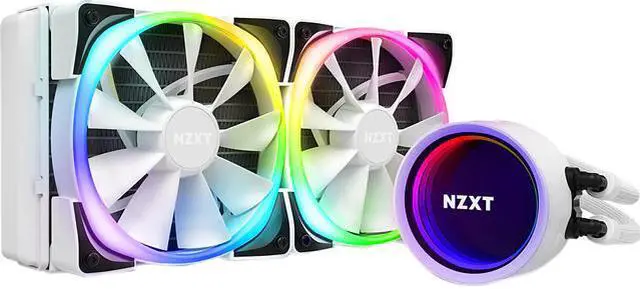
High Performance Cooling & Stunning RGB The refreshed Kraken X Series is a must-have for any build, providing better cooling, stunning visual effects, and intuitive installation. With a re-designed cap and larger infinity mirror ring LED, the new Kraken X delivers an amazing experience in RGB liquid cooling. Bigger & Brighter A 10% bigger LED ring allows for more vivid RGB. A rotatable top accommodates re-orienting the logo no matter the direction the cooler is installed. Better Control CAM provides sophisticated controls with an intuitive, user-friendly interface. Now with better sync for lighting across all NZXT RGB devices, full CAM integration allows you to manage your Kraken s performance with precision, making adjustments with the click of a button. RGB Ready RGB channel easily integrates with any RGB accessory, including AER RGB 2 fans. Incredible Performance The Aer P radiator fans are designed for liquid-cooling perfection. It features a chamfered intake and fluid dynamic bearing that provides silent operations, durability, and powerful cooling performance. Simple Installation Fine nylon mesh sleeves strengthen the rubber tubing, providing durability and protection against mishandling. Adjust the orientation of the pump head* to fit the needs of your motherboard without affecting the direction of the logo. *The pump orientation can be changed in 30 increments to reduce interference with other components.
High Performance Cooling & Stunning RGB The refreshed Kraken X Series is a must-have for any build, providing better cooling, stunning visual effects, and intuitive installation. With a re-designed cap and larger infinity mirror ring LED, the new Kraken X delivers an amazing experience in RGB liquid cooling. Bigger & Brighter A 10% bigger LED ring allows for more vivid RGB. A rotatable top accommodates re-orienting the logo no matter the direction the cooler is installed. Better Control CAM provides sophisticated controls with an intuitive, user-friendly interface. Now with better sync for lighting across all NZXT RGB devices, full CAM integration allows you to manage your Kraken s performance with precision, making adjustments with the click of a button. RGB Ready RGB channel easily integrates with any RGB accessory, including AER RGB 2 fans. Incredible Performance The Aer P radiator fans are designed for liquid-cooling perfection. It features a chamfered intake and fluid dynamic bearing that provides silent operations, durability, and powerful cooling performance. Simple Installation Fine nylon mesh sleeves strengthen the rubber tubing, providing durability and protection against mishandling. Adjust the orientation of the pump head* to fit the needs of your motherboard without affecting the direction of the logo. *The pump orientation can be changed in 30 increments to reduce interference with other components.
High Performance Cooling & Stunning RGB The refreshed Kraken X Series is a must-have for any build, providing better cooling, stunning visual effects, and intuitive installation. With a re-designed cap and larger infinity mirror ring LED, the new Kraken X delivers an amazing experience in RGB liquid cooling. Bigger & Brighter A 10% bigger LED ring allows for more vivid RGB. A rotatable top accommodates re-orienting the logo no matter the direction the cooler is installed. Better Control CAM provides sophisticated controls with an intuitive, user-friendly interface. Now with better sync for lighting across all NZXT RGB devices, full CAM integration allows you to manage your Kraken s performance with precision, making adjustments with the click of a button. RGB Ready RGB channel easily integrates with any RGB accessory, including AER RGB 2 fans. Incredible Performance The Aer P radiator fans are designed for liquid-cooling perfection. It features a chamfered intake and fluid dynamic bearing that provides silent operations, durability, and powerful cooling performance. Simple Installation Fine nylon mesh sleeves strengthen the rubber tubing, providing durability and protection against mishandling. Adjust the orientation of the pump head* to fit the needs of your motherboard without affecting the direction of the logo. *The pump orientation can be changed in 30 increments to reduce interference with other components.
High Performance Cooling & Stunning RGB The refreshed Kraken X Series is a must-have for any build, providing better cooling, stunning visual effects, and intuitive installation. With a re-designed cap and larger infinity mirror ring LED, the new Kraken X delivers an amazing experience in RGB liquid cooling. Bigger & Brighter A 10% bigger LED ring allows for more vivid RGB. A rotatable top accommodates re-orienting the logo no matter the direction the cooler is installed. Better Control CAM provides sophisticated controls with an intuitive, user-friendly interface. Now with better sync for lighting across all NZXT RGB devices, full CAM integration allows you to manage your Kraken s performance with precision, making adjustments with the click of a button. RGB Ready RGB channel easily integrates with any RGB accessory, including AER RGB 2 fans. Incredible Performance The Aer P radiator fans are designed for liquid-cooling perfection. It features a chamfered intake and fluid dynamic bearing that provides silent operations, durability, and powerful cooling performance. Simple Installation Fine nylon mesh sleeves strengthen the rubber tubing, providing durability and protection against mishandling. Adjust the orientation of the pump head* to fit the needs of your motherboard without affecting the direction of the logo. *The pump orientation can be changed in 30 increments to reduce interference with other components.
Last updated at 05/10/2026 03:48:07
NZXT Kraken X53 240mm - RL-KRX53-01 - AIO RGB CPU Liquid Cooler - Rotating Infinity Mirror Design - Improved Pump-Powered By CAM V4-RGB Connector-Aer
Affiliate Disclosure: We may receive a small commission for purchases made through this link at no extra cost to you. This helps support our site. Thank you!
NZXT Kraken X53 240mm AIO Liquid CPU Cooler
30-day returns
NZXT Kraken X53 240mm AIO Liquid CPU Cooler
30-day returns
NZXT Kraken X53 240mm AIO Liquid CPU Cooler
60-day returns
originally posted on bestbuy.com
I've got this installed over a Ryzen 5 3600 that the motherboard routinely turbo boosts it to 4.2mhz. And if you're at all aware, Ryzens do tend to run hot, which is why I went with an AiO over the stock cooler. This AiO keeps the chip at idle between 30 and 40C. Under Prime95 it reached a maximum temp of 86C. And under normal loads it will bounce between 50 and 70C. Overall, I find that the AiO works pretty well in keeping my chip cool.Instillation was pretty easy. I didn't have any trouble attaching it to the chip, and I always appreciate pre-applied thermal paste. The rubber inserts in the fans help keep noise down, and the very tight tolerances on the radiator help keep that from wobbling either. The connections were easy to understand, although there are a ... MoreI've got this installed over a Ryzen 5 3600 that the motherboard routinely turbo boosts it to 4.2mhz. And if you're at all aware, Ryzens do tend to run hot, which is why I went with an AiO over the stock cooler. This AiO keeps the chip at idle between 30 and 40C. Under Prime95 it reached a maximum temp of 86C. And under normal loads it will bounce between 50 and 70C. Overall, I find that the AiO works pretty well in keeping my chip cool.Instillation was pretty easy. I didn't have any trouble attaching it to the chip, and I always appreciate pre-applied thermal paste. The rubber inserts in the fans help keep noise down, and the very tight tolerances on the radiator help keep that from wobbling either. The connections were easy to understand, although there are a lot of them. You'll need a USB2 header, sata power, a 3pin fan header, as well as some strange RGB connector. Everything went in fine, but the RGB connector. It's a male end, so you need an additional cable to connect it to the motherboard. Sadly, the connector that came with my MSI MPG B550 Carbon Wifi board didn't work with the Kraken's RGB pins. Personally, I don't like a lot of lights in my case, so this isn't any great loss but I would have liked to see it light up in color- by default it's only glowing white. The white LEDs that are working, aren't obnoxiously bright, and the infinity mirror is an interesting aesthetic- if only my case had a window for me to care.The pump seems quiet enough. I've never noticed pump whine in any of the AiOs I've used. But the fans! The fans are loud. Right out of the box my fan curves were throwing these fans up to the highest RPM they could reach, 2000, which made it sound like a small tornado was running around in my case. After some tweaking, they are less noticeable, but they are still the noisiest thing in the case. Even at idle they are still noticeable. The rest of my fans are Noctuas, which are just about dead silent even at their highest setting, so I may change out the AiO's fans for those in the future. The AiO loses a star for this. Compared to my old AiOs, this has been the loudest.Overall, I like this AiO. The fans are loud, but a proper fan curve can sort that out to a more tolerable level. The aesthetic choice of an infinity mirror is really sleek looking, although the numerous cables to hook it up could be daunting to someone new. If you've got a Ryzen chip that runs hot, this will probably bring it to bear.
originally posted on scan.co.uk
My Corsair h100i RGB Platinum decided it didn't want to talk to the iCue software any more so the fans on the rad set themselves to 100% vacuum cleaner mode. No amount of fiddling or installing different versions of the software would allow it to be detected and as if that wasn't annoying enough I had a usb connecting/disconnecting 'boinking' noise coming through my speakers every 20-30 seconds, which strangely enough didn't happen when the iCue software was no longer installed, proving it's a software issue and not a usb hardware one as the 'boinking' sounds might suggest.Annoyed and frustrated with Corsair's ineptly programmed software I ordered the Kraken x53 AIO on the Sunday afternoon at a sub £100 special price with free delivery...bargain.It arrived today ... MoreMy Corsair h100i RGB Platinum decided it didn't want to talk to the iCue software any more so the fans on the rad set themselves to 100% vacuum cleaner mode. No amount of fiddling or installing different versions of the software would allow it to be detected and as if that wasn't annoying enough I had a usb connecting/disconnecting 'boinking' noise coming through my speakers every 20-30 seconds, which strangely enough didn't happen when the iCue software was no longer installed, proving it's a software issue and not a usb hardware one as the 'boinking' sounds might suggest.Annoyed and frustrated with Corsair's ineptly programmed software I ordered the Kraken x53 AIO on the Sunday afternoon at a sub £100 special price with free delivery...bargain.It arrived today (Monday) at 12.30pm and I had it fitted and up and running by 2pm.Now my Ryzen 9 5950x is idling at 3.6Ghz at a satisfying 33c with barely a sound coming from the base unit. The old Corsair h100i could'nt do better than 39c on a cold day, though admittedly I did apply Arctic Silver 3 thermal paste to the CPU this time so the temp improvements could be partly down to that.All in all, thus far I am extremely happy with the Kraken x53 AIO and if anyone was wondering if it's 'man' enough to cool a processor like the 5950x, yes, yes it is.
originally posted on microcenter.com
It's pretty hard to differentiate on a 240mm AIO given the number of different options, but the X53 does a fairly decent job. The fans are much better than some other brands (but not as quiet as Noctuas), which is a big plus, but the pump is a bit noisy compared to other offerings, even at 60-80%. My biggest complaint is the need for a separate USB connection, which makes for some very limited options for the pump block orientation (you might get the radiator hoses situated well, but then the USB header shows up to ruin the party). Some kind of 90-degree connector would have earned this 5 stars, since it would give it much more clearance next to the first DIMM slot.
| General | |
| Product Type | Processor liquid cooling system |
| Product Material | Plastic, aluminium, nylon, rubber, copper |
| Package Content | Mounting hardware, variable speed pump, 2 NZXT Aer P120 fans |
| Shipping Dimensions (WxDxH) / Weight | 56.3 cm x 45.9 cm x 32.5 cm / 1.81 kg |
NZXT Kraken X53 240mm - RL-KRX53-01 - AIO RGB CPU Liquid Cooler - Rotating Infinity Mirror Design - Improved Pump-Powered By CAM V4-RGB Connector-Aer
Affiliate Disclosure: We may receive a small commission for purchases made through this link at no extra cost to you. This helps support our site. Thank you!
NZXT Kraken X53 240mm AIO Liquid CPU Cooler
30-day returns
NZXT Kraken X53 240mm AIO Liquid CPU Cooler
30-day returns
NZXT Kraken X53 240mm AIO Liquid CPU Cooler
60-day returns
I've got this installed over a Ryzen 5 3600 that the motherboard routinely turbo boosts it to 4.2mhz. And if you're at all aware, Ryzens do tend to run hot, which is why I went with an AiO over the stock cooler. This AiO keeps the chip at idle between 30 and 40C. Under Prime95 it reached a maximum temp of 86C. And under normal loads it will bounce between 50 and 70C. Overall, I find that the AiO works pretty well in keeping my chip cool.Instillation was pretty easy. I didn't have any trouble attaching it to the chip, and I always appreciate pre-applied thermal paste. The rubber inserts in the fans help keep noise down, and the very tight tolerances on the radiator help keep that from wobbling either. The connections were easy to understand, although there are a ... MoreI've got this installed over a Ryzen 5 3600 that the motherboard routinely turbo boosts it to 4.2mhz. And if you're at all aware, Ryzens do tend to run hot, which is why I went with an AiO over the stock cooler. This AiO keeps the chip at idle between 30 and 40C. Under Prime95 it reached a maximum temp of 86C. And under normal loads it will bounce between 50 and 70C. Overall, I find that the AiO works pretty well in keeping my chip cool.Instillation was pretty easy. I didn't have any trouble attaching it to the chip, and I always appreciate pre-applied thermal paste. The rubber inserts in the fans help keep noise down, and the very tight tolerances on the radiator help keep that from wobbling either. The connections were easy to understand, although there are a lot of them. You'll need a USB2 header, sata power, a 3pin fan header, as well as some strange RGB connector. Everything went in fine, but the RGB connector. It's a male end, so you need an additional cable to connect it to the motherboard. Sadly, the connector that came with my MSI MPG B550 Carbon Wifi board didn't work with the Kraken's RGB pins. Personally, I don't like a lot of lights in my case, so this isn't any great loss but I would have liked to see it light up in color- by default it's only glowing white. The white LEDs that are working, aren't obnoxiously bright, and the infinity mirror is an interesting aesthetic- if only my case had a window for me to care.The pump seems quiet enough. I've never noticed pump whine in any of the AiOs I've used. But the fans! The fans are loud. Right out of the box my fan curves were throwing these fans up to the highest RPM they could reach, 2000, which made it sound like a small tornado was running around in my case. After some tweaking, they are less noticeable, but they are still the noisiest thing in the case. Even at idle they are still noticeable. The rest of my fans are Noctuas, which are just about dead silent even at their highest setting, so I may change out the AiO's fans for those in the future. The AiO loses a star for this. Compared to my old AiOs, this has been the loudest.Overall, I like this AiO. The fans are loud, but a proper fan curve can sort that out to a more tolerable level. The aesthetic choice of an infinity mirror is really sleek looking, although the numerous cables to hook it up could be daunting to someone new. If you've got a Ryzen chip that runs hot, this will probably bring it to bear.
My Corsair h100i RGB Platinum decided it didn't want to talk to the iCue software any more so the fans on the rad set themselves to 100% vacuum cleaner mode. No amount of fiddling or installing different versions of the software would allow it to be detected and as if that wasn't annoying enough I had a usb connecting/disconnecting 'boinking' noise coming through my speakers every 20-30 seconds, which strangely enough didn't happen when the iCue software was no longer installed, proving it's a software issue and not a usb hardware one as the 'boinking' sounds might suggest.Annoyed and frustrated with Corsair's ineptly programmed software I ordered the Kraken x53 AIO on the Sunday afternoon at a sub £100 special price with free delivery...bargain.It arrived today ... MoreMy Corsair h100i RGB Platinum decided it didn't want to talk to the iCue software any more so the fans on the rad set themselves to 100% vacuum cleaner mode. No amount of fiddling or installing different versions of the software would allow it to be detected and as if that wasn't annoying enough I had a usb connecting/disconnecting 'boinking' noise coming through my speakers every 20-30 seconds, which strangely enough didn't happen when the iCue software was no longer installed, proving it's a software issue and not a usb hardware one as the 'boinking' sounds might suggest.Annoyed and frustrated with Corsair's ineptly programmed software I ordered the Kraken x53 AIO on the Sunday afternoon at a sub £100 special price with free delivery...bargain.It arrived today (Monday) at 12.30pm and I had it fitted and up and running by 2pm.Now my Ryzen 9 5950x is idling at 3.6Ghz at a satisfying 33c with barely a sound coming from the base unit. The old Corsair h100i could'nt do better than 39c on a cold day, though admittedly I did apply Arctic Silver 3 thermal paste to the CPU this time so the temp improvements could be partly down to that.All in all, thus far I am extremely happy with the Kraken x53 AIO and if anyone was wondering if it's 'man' enough to cool a processor like the 5950x, yes, yes it is.
It's pretty hard to differentiate on a 240mm AIO given the number of different options, but the X53 does a fairly decent job. The fans are much better than some other brands (but not as quiet as Noctuas), which is a big plus, but the pump is a bit noisy compared to other offerings, even at 60-80%. My biggest complaint is the need for a separate USB connection, which makes for some very limited options for the pump block orientation (you might get the radiator hoses situated well, but then the USB header shows up to ruin the party). Some kind of 90-degree connector would have earned this 5 stars, since it would give it much more clearance next to the first DIMM slot.
It keeps temps very low, even under heavy load. My previous cooler master 120mm aio struggled to stay under 80°C with heavy tasking. The highest I've seen with this one is mid 60s, and generally runs 40-50°. I was considering a 360mm, but this 240 performs great, so I'm very happy with it.The infinity mirror on the pump looks great as well, and I have the RGB set to change color based on CPU heat, so it's functional as well.The only negative aspect is the pump has a small whine to it. It's not loud, and comes with the territory with an aio, but don't expect complete silence from it.
I bought this to replace a CoolerMaster AIO that had been gurgling since the day it came with my PC and now was dying. It has been leaps and bounds better in quality, with a modest temperature drop for the same size radiator.I like that it has a fluid temp sensor, and it seems to be dissipating its heat well, but still allows my Ryzen 9-5900x to reach 73-75°C under specific conditions with Flight Simulator, but never exceeds 60°C on Cinebench multicore (in a 70°F room).The fans sound "whooshy" meaning you hear the airflow but the fans themselves make little noise compared to the whine of the CoolerMaster it replaced.I like being able to set the center of the LEDs to represent CPU temp, but most of the ring effects are, to say the least, annoying. For me, it's ... MoreI bought this to replace a CoolerMaster AIO that had been gurgling since the day it came with my PC and now was dying. It has been leaps and bounds better in quality, with a modest temperature drop for the same size radiator.I like that it has a fluid temp sensor, and it seems to be dissipating its heat well, but still allows my Ryzen 9-5900x to reach 73-75°C under specific conditions with Flight Simulator, but never exceeds 60°C on Cinebench multicore (in a 70°F room).The fans sound "whooshy" meaning you hear the airflow but the fans themselves make little noise compared to the whine of the CoolerMaster it replaced.I like being able to set the center of the LEDs to represent CPU temp, but most of the ring effects are, to say the least, annoying. For me, it's not worth going the step up to the LCD display model, which is the only difference between this and the Z63 as far as I can tell.Nice cooler, easy install. What more could I ask for given the price?
It gets the job done when it comes to cooling, but the screeching noise is too loud when the CPU is utilized. I don't push my pc to the max, nor overclock. Even when the PC is idle, the AIO still makes a slight screeching noise. I contacted the support team from NZXT and went with their advice on how to solve the problem, by giving it a little shake and re-installing the AIO. The problem seemed to be gone at first, but it reappeared after a couple of days. I'm thoroughly disappointed in the cooler, and wouldn't recommend it until they address the problem.
a couple important tips:when mounting AIO coolers vertically, the radiator pipes should be on the bottom. if they're on the top, you're more likely to get some gurgling noises from the pump as any trapped air bubbles may get sucked into the pipes and create a gurgling noise. If you're mounting the radiator to the top of the case, the position of the pipes doesn't matter... just whatever works best for your layout.also, make sure you plug the 4 pin connector from the pump to the "AIO" or "PUMP" fan connector on your mobo. these connectors will run at 100% power allowing your software (NZXT Cam, in this case) to control the pump speed. if your mobo doesn't have those fan connectors, you can use any other fan connector such as "CHA" or "CPU", but if you do this ... Morea couple important tips:when mounting AIO coolers vertically, the radiator pipes should be on the bottom. if they're on the top, you're more likely to get some gurgling noises from the pump as any trapped air bubbles may get sucked into the pipes and create a gurgling noise. If you're mounting the radiator to the top of the case, the position of the pipes doesn't matter... just whatever works best for your layout.also, make sure you plug the 4 pin connector from the pump to the "AIO" or "PUMP" fan connector on your mobo. these connectors will run at 100% power allowing your software (NZXT Cam, in this case) to control the pump speed. if your mobo doesn't have those fan connectors, you can use any other fan connector such as "CHA" or "CPU", but if you do this make sure you set that connectors power in bios to full power or disable any speed control for that specific connector. again, this will allow the pump to receive full power from the mobo and NZXT Cam will control the pump speed.
I recently built a new PC for one of my son's with a 5600x and RGB Corsair case. The case is great but the air flow is somewhat limited due to an almost sold glass front. The 5600x comes with a cooler but... well let's say we tried to use it, even upgrading thermal paste.Sadly sitting above a hot GPU the temps would idle in the high 50s and get close to thermal throttling while gaming. The system got so hot a few days ago it shut down so I immediately ordered the Kraken.Many of our other PC have Corsair AIOs but they seem to have gotten really proud of them in the past few years. This was just a little over $100. While it won't pair with iCue like the rest of the system, if you use Corsair,... it was about $150 less.Upon install the idle temps dropped to the ... MoreI recently built a new PC for one of my son's with a 5600x and RGB Corsair case. The case is great but the air flow is somewhat limited due to an almost sold glass front. The 5600x comes with a cooler but... well let's say we tried to use it, even upgrading thermal paste.Sadly sitting above a hot GPU the temps would idle in the high 50s and get close to thermal throttling while gaming. The system got so hot a few days ago it shut down so I immediately ordered the Kraken.Many of our other PC have Corsair AIOs but they seem to have gotten really proud of them in the past few years. This was just a little over $100. While it won't pair with iCue like the rest of the system, if you use Corsair,... it was about $150 less.Upon install the idle temps dropped to the mid 30s and while gaming, which has been constant the past 3 hours, it hasn't gotten above the mid 70s. Excellent cooling.While I have heard good things about NZXT I haven't used their products before even though I tend to build a number of PCs. My next upgrade for one of my other sons will include this and probably one of their cases as well. Color me impressed and sad I haven't picked something up sooner.This is a great AIO, it still has RGB in a nice not too flashy way, and the price can't be beat, it's almost as cheap as a really good air cooler!
This is an amazing AIO! I have a 5600x, and it's been getting pretty hot. When playing Dead Space remake, I was peaking at 95C. The amd chips are meant to run to that, but it could throttle. I got the X53 and replaced the stock wraith cooler, and the next time I played Dead Space I peaked at 62C! Could get even cooler than that if you have them running full blast, but obviously don't want that noise constantly. They're not crazy loud, but you'll definitely notice. You can always replace the NZXT fans with a Noctua or Be Quiet if you want a quieter system. Overall I definitley recommend this cooler!
This didn't work out of the box. After 2 days of troubleshooting and reinstalling about 6 times one of the plastic pieces eventually just fell off and liquid came pouring out everywhere. No such luck on the return so I guess I'm just out the money and time trying to install garbage.This just would not move any liquid, the pump software said it was working (showing rpm) but the CPU temps were 70+ sitting idle, try to run a game and it would hit 85 and I had to hold the power button to shut it down....legit feared that my CPU would burn its self out with this cooler on it.After 2 days of troubleshooting and it finally broke, I Installed a new cooler of a different brand and it worked perfectly the first install.
| General | |
| Product Type | Processor liquid cooling system |
| Product Material | Plastic, aluminium, nylon, rubber, copper |
| Package Content | Mounting hardware, variable speed pump, 2 NZXT Aer P120 fans |
| Shipping Dimensions (WxDxH) / Weight | 56.3 cm x 45.9 cm x 32.5 cm / 1.81 kg |

