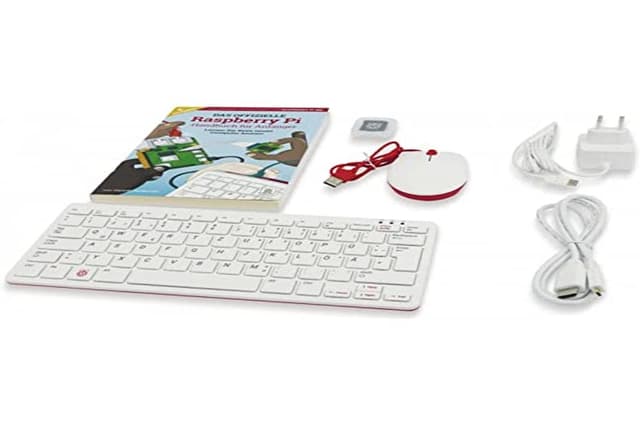
Raspberry Pi 400 with German keyboard layout (DE) The Raspberry Pi 400 is a keyboard with integrated Raspberry Pi 4 B with 4 GB memory, similar to the Commodore 64 (C64) from the 80s, but a little bit more powerful. But not just a normal Raspberry Pi 4 B was integrated into the Raspberry Pi keyboard, but a completely new board layout was developed especially for this purpose. In addition, the speed has been increased from 1.5 GHz to 1.8 GHz, due to the good cooling performance of the cooling plate inside the keyboard. Only the CSI and DSI connectors have been omitted in the new Pi 4 layout. Currently, the Pi 400 is available as a stand-alone version or as a complete set - the so-called kit. The Pi 400 stand-alone version is interesting for all those who already have a mouse, a power supply and a micro-SD memory card. However, in this case the software has to be downloaded and installed first and also the accompanying booklet is not included. The Pi 400 kit in turn contains everything you need to get started. Simply connect the included power supply and mouse as well as a monitor or TV via HDMI, then switch on and, thanks to the pre-installed software, get started immediately - surfing the Internet, programming or starting a new project.
Raspberry Pi 400 with German keyboard layout (DE) The Raspberry Pi 400 is a keyboard with integrated Raspberry Pi 4 B with 4 GB memory, similar to the Commodore 64 (C64) from the 80s, but a little bit more powerful. But not just a normal Raspberry Pi 4 B was integrated into the Raspberry Pi keyboard, but a completely new board layout was developed especially for this purpose. In addition, the speed has been increased from 1.5 GHz to 1.8 GHz, due to the good cooling performance of the cooling plate inside the keyboard. Only the CSI and DSI connectors have been omitted in the new Pi 4 layout. Currently, the Pi 400 is available as a stand-alone version or as a complete set - the so-called kit. The Pi 400 stand-alone version is interesting for all those who already have a mouse, a power supply and a micro-SD memory card. However, in this case the software has to be downloaded and installed first and also the accompanying booklet is not included. The Pi 400 kit in turn contains everything you need to get started. Simply connect the included power supply and mouse as well as a monitor or TV via HDMI, then switch on and, thanks to the pre-installed software, get started immediately - surfing the Internet, programming or starting a new project.
Raspberry Pi 400 with German keyboard layout (DE) The Raspberry Pi 400 is a keyboard with integrated Raspberry Pi 4 B with 4 GB memory, similar to the Commodore 64 (C64) from the 80s, but a little bit more powerful. But not just a normal Raspberry Pi 4 B was integrated into the Raspberry Pi keyboard, but a completely new board layout was developed especially for this purpose. In addition, the speed has been increased from 1.5 GHz to 1.8 GHz, due to the good cooling performance of the cooling plate inside the keyboard. Only the CSI and DSI connectors have been omitted in the new Pi 4 layout. Currently, the Pi 400 is available as a stand-alone version or as a complete set - the so-called kit. The Pi 400 stand-alone version is interesting for all those who already have a mouse, a power supply and a micro-SD memory card. However, in this case the software has to be downloaded and installed first and also the accompanying booklet is not included. The Pi 400 kit in turn contains everything you need to get started. Simply connect the included power supply and mouse as well as a monitor or TV via HDMI, then switch on and, thanks to the pre-installed software, get started immediately - surfing the Internet, programming or starting a new project.
Raspberry Pi 400 with German keyboard layout (DE) The Raspberry Pi 400 is a keyboard with integrated Raspberry Pi 4 B with 4 GB memory, similar to the Commodore 64 (C64) from the 80s, but a little bit more powerful. But not just a normal Raspberry Pi 4 B was integrated into the Raspberry Pi keyboard, but a completely new board layout was developed especially for this purpose. In addition, the speed has been increased from 1.5 GHz to 1.8 GHz, due to the good cooling performance of the cooling plate inside the keyboard. Only the CSI and DSI connectors have been omitted in the new Pi 4 layout. Currently, the Pi 400 is available as a stand-alone version or as a complete set - the so-called kit. The Pi 400 stand-alone version is interesting for all those who already have a mouse, a power supply and a micro-SD memory card. However, in this case the software has to be downloaded and installed first and also the accompanying booklet is not included. The Pi 400 kit in turn contains everything you need to get started. Simply connect the included power supply and mouse as well as a monitor or TV via HDMI, then switch on and, thanks to the pre-installed software, get started immediately - surfing the Internet, programming or starting a new project.
Last updated at 03/21/2026 07:10:44
Raspberry Pi SC0374
Delivery between Mon – Fri $70.99
Raspberry Pi 400, Germany
Delivery $14.22
Raspberry Pi SC0374 Embedded Box Computers
Free delivery between 27 Mar – 2 Apr
SC0374 - Sbc 1.8GHZ 4 Core 4GB Ram De
Raspberry PC Pi 400 CPU1.8GHz 4GB German Layout
Affiliate Disclosure: We may receive a small commission for purchases made through this link at no extra cost to you. This helps support our site. Thank you!
originally posted on vilros.com
I purchased this computer for a Commodore 64 and Amiga emulation project and have been very pleased with the hardware. The form-factor of the Pi/400 is compact, light, and comfortable. The unit runs quiet due to no mechanical parts, and also does not get hot due to the enlarged Raspberri Pi/4 PCB and heat spreader. Installing software is straightforward, but be prepared to compile sources for software that doesn't release binaries for the Raspberry Pi OS (Debian 10); this is very common in the Linux community.I purchased the Pi/400 as part of a VILROS kit and am very happy with the effort put into the kit and its documentation. I received a 32GB SanDisk SD card, 5V 3A power supply, micro HDMI->HDMI cable, BlueTooth/2.4Ghz mouse, and carrying case; more than what I ... MoreI purchased this computer for a Commodore 64 and Amiga emulation project and have been very pleased with the hardware. The form-factor of the Pi/400 is compact, light, and comfortable. The unit runs quiet due to no mechanical parts, and also does not get hot due to the enlarged Raspberri Pi/4 PCB and heat spreader. Installing software is straightforward, but be prepared to compile sources for software that doesn't release binaries for the Raspberry Pi OS (Debian 10); this is very common in the Linux community.I purchased the Pi/400 as part of a VILROS kit and am very happy with the effort put into the kit and its documentation. I received a 32GB SanDisk SD card, 5V 3A power supply, micro HDMI->HDMI cable, BlueTooth/2.4Ghz mouse, and carrying case; more than what I needed, but ideal for the price.Please note that during the installation of Raspberry Pi OS, the process will ask you to update to the latest packages/OS on the system. Doing so broke BlueTooth connectivity and thus I couldn't use my mouse without occupying one of the three USB ports. After a bit of research, I discovered that the updated Bluez package introduced a regression that disabled BlueTooth. Fixing this was as easy as reverting the package to the previous version with the following command:sudo apt install bluez=5.50-1.2~deb10u1+rpt2Again, this is not an issue with the hardware or any service provided by VILROS, but rather with the ever-changing software landscape of the Linux community.
originally posted on vilros.com
I bought this for work to aid in some of the tedious parts of working with inventory on a small screen. Simply add a wireless mouse and an Anker battery pack and this thing is pretty neat.Some wishes would be a built in SSD for better storage and boot times. Another would be a built in fan and for a slightly more powerful system so a couple tabs wouldn’t be a problem. But this gets the work done so far. Price is better than what is out there right now.
originally posted on vilros.com
I like the styling and compactness of the system. I can use the Raspberry Pi with out extra cables. I plugged in the monitor, power cable and mouse, loaded the operating system and it worked. I like it. I am going to have to put an identifying mark on the Pi 400 so it is simpler for me to be able to tell the difference between the Raspberry Pi 400 and the stand alone keyboard that I bought from Vilros a couple of years ago. Not a big issue. Just something to deal with.
| Processor Brand | Broadcom |
| Processor Type | ARM Cortex A72 |
| Frequency | 1.8 GHz |
| Installed RAM | 4 GB |
| Operating Supply Voltage | 5 V |
Raspberry Pi SC0374
Delivery between Mon – Fri $70.99
Raspberry Pi 400, Germany
Delivery $14.22
Raspberry Pi SC0374 Embedded Box Computers
Free delivery between 27 Mar – 2 Apr
SC0374 - Sbc 1.8GHZ 4 Core 4GB Ram De
Raspberry PC Pi 400 CPU1.8GHz 4GB German Layout
Affiliate Disclosure: We may receive a small commission for purchases made through this link at no extra cost to you. This helps support our site. Thank you!
I purchased this computer for a Commodore 64 and Amiga emulation project and have been very pleased with the hardware. The form-factor of the Pi/400 is compact, light, and comfortable. The unit runs quiet due to no mechanical parts, and also does not get hot due to the enlarged Raspberri Pi/4 PCB and heat spreader. Installing software is straightforward, but be prepared to compile sources for software that doesn't release binaries for the Raspberry Pi OS (Debian 10); this is very common in the Linux community.I purchased the Pi/400 as part of a VILROS kit and am very happy with the effort put into the kit and its documentation. I received a 32GB SanDisk SD card, 5V 3A power supply, micro HDMI->HDMI cable, BlueTooth/2.4Ghz mouse, and carrying case; more than what I ... MoreI purchased this computer for a Commodore 64 and Amiga emulation project and have been very pleased with the hardware. The form-factor of the Pi/400 is compact, light, and comfortable. The unit runs quiet due to no mechanical parts, and also does not get hot due to the enlarged Raspberri Pi/4 PCB and heat spreader. Installing software is straightforward, but be prepared to compile sources for software that doesn't release binaries for the Raspberry Pi OS (Debian 10); this is very common in the Linux community.I purchased the Pi/400 as part of a VILROS kit and am very happy with the effort put into the kit and its documentation. I received a 32GB SanDisk SD card, 5V 3A power supply, micro HDMI->HDMI cable, BlueTooth/2.4Ghz mouse, and carrying case; more than what I needed, but ideal for the price.Please note that during the installation of Raspberry Pi OS, the process will ask you to update to the latest packages/OS on the system. Doing so broke BlueTooth connectivity and thus I couldn't use my mouse without occupying one of the three USB ports. After a bit of research, I discovered that the updated Bluez package introduced a regression that disabled BlueTooth. Fixing this was as easy as reverting the package to the previous version with the following command:sudo apt install bluez=5.50-1.2~deb10u1+rpt2Again, this is not an issue with the hardware or any service provided by VILROS, but rather with the ever-changing software landscape of the Linux community.
I bought this for work to aid in some of the tedious parts of working with inventory on a small screen. Simply add a wireless mouse and an Anker battery pack and this thing is pretty neat.Some wishes would be a built in SSD for better storage and boot times. Another would be a built in fan and for a slightly more powerful system so a couple tabs wouldn’t be a problem. But this gets the work done so far. Price is better than what is out there right now.
I like the styling and compactness of the system. I can use the Raspberry Pi with out extra cables. I plugged in the monitor, power cable and mouse, loaded the operating system and it worked. I like it. I am going to have to put an identifying mark on the Pi 400 so it is simpler for me to be able to tell the difference between the Raspberry Pi 400 and the stand alone keyboard that I bought from Vilros a couple of years ago. Not a big issue. Just something to deal with.
First time Raspberry Pi guy here and I'd always shied away because I didn't care to purchase boards, cases and to be frank I don't own spare keyboards any longer. Unit showed up quickly and while one of the commenters questioned the keyboard quality I wasn't expecting a world beater keyboard / computer for $82. Keyboard was fine but compared to an Apple Keyboards it's a little mushy with less feedback, generally I SSH into the system anyway so for me the keyboard is just a temporary issue. To date I've installed Ubuntu Desktop, Ubuntu Server and Kali Linux for testing on the device with zero problems. Nice form factor and if I have a need I'll purchase another one with no hesitation.
The order process and Delivery were great as usual - 5 Stars as is the Pi 400 itself.This is something landed from Raspberry PI from no where.. ofcourse similar to commodore c64 or zx Spectrum similar etc from the past. I was part of those early systems and now to see a similar package with more power impresses.Pi 400 just works out of box with a SD card put in. Heat not at all felt even under stress, performance similar to Pi4 unit i had earlier with a heat sink and fan now that all thos extra stuff gone out of the desk.My son love it - easy to connect, disconnect including a surprise on off switch on key board. looks fantastic to work with. My kids love it and now made it as a main PC for themselves to do school activities!just lookin g at to convert it to ... MoreThe order process and Delivery were great as usual - 5 Stars as is the Pi 400 itself.This is something landed from Raspberry PI from no where.. ofcourse similar to commodore c64 or zx Spectrum similar etc from the past. I was part of those early systems and now to see a similar package with more power impresses.Pi 400 just works out of box with a SD card put in. Heat not at all felt even under stress, performance similar to Pi4 unit i had earlier with a heat sink and fan now that all thos extra stuff gone out of the desk.My son love it - easy to connect, disconnect including a surprise on off switch on key board. looks fantastic to work with. My kids love it and now made it as a main PC for themselves to do school activities!just lookin g at to convert it to boot from external Samsung EVO SSD, to increase storage and other stuff, otherwise unit itself is great, clocks at 2.1 Ghz after overclocking with no noticeable heat, and inspires new gen.
I was well impressed with this unit, as it really does mean I can have a multi OS, neat and powerful PC on my desktop. I downloaded the Ubuntu Gorilla and the Raspbian. I swap them over and do different things with them. I have an order in for the I/O connector to breadboard and may well do some PI development stuff.However, the fact that it is such a neat and powerful, easily reboot-able, to 'whatever you want' , makes this a first class device for learners and professionals alike. To have a super, low cost desktop for browsing and experimental computing development base. My only minor criticism is the lack of an audio jack for simple external amplified speakers.I intend to use it for audio recording, Neflixing (fantastic streaming) , browsing and would highly ... MoreI was well impressed with this unit, as it really does mean I can have a multi OS, neat and powerful PC on my desktop. I downloaded the Ubuntu Gorilla and the Raspbian. I swap them over and do different things with them. I have an order in for the I/O connector to breadboard and may well do some PI development stuff.However, the fact that it is such a neat and powerful, easily reboot-able, to 'whatever you want' , makes this a first class device for learners and professionals alike. To have a super, low cost desktop for browsing and experimental computing development base. My only minor criticism is the lack of an audio jack for simple external amplified speakers.I intend to use it for audio recording, Neflixing (fantastic streaming) , browsing and would highly recommend it as a Christmas gift for a young relative to learn computing without limits.
At less than £100 the Raspberry Pi400 provides a meaningful solution for the notorious 'three body problem' that confronts computer buyers - to balance the conflicting requirements of functionality, performance and price. The Pi400 is quite astonishing and it is fantastic value.The basic keyboard unit at £67 has no mouse, SD card or micro-HDMI to HDMI for a monitor but for just a bit extra at £93 you can get all that in one bundle plus a handy user guide (with the Raspberry Pi OS pre-installed to the SD card). On reflection that might have been a better deal because I had no spare SD card or HDMI lead but these are cheap enough to buy separately. The pre-installed software included with the Raspberry Pi OS is more than enough to provide anyone with an accessible ... MoreAt less than £100 the Raspberry Pi400 provides a meaningful solution for the notorious 'three body problem' that confronts computer buyers - to balance the conflicting requirements of functionality, performance and price. The Pi400 is quite astonishing and it is fantastic value.The basic keyboard unit at £67 has no mouse, SD card or micro-HDMI to HDMI for a monitor but for just a bit extra at £93 you can get all that in one bundle plus a handy user guide (with the Raspberry Pi OS pre-installed to the SD card). On reflection that might have been a better deal because I had no spare SD card or HDMI lead but these are cheap enough to buy separately. The pre-installed software included with the Raspberry Pi OS is more than enough to provide anyone with an accessible computer environment and because it is free and/or open source it is readily maintained.The Pi400 surely hits the mark for the everyday user. It is a compact PC and with the included software it provides more than sufficient performance for writing, emailing, web browsing or common data management tasks. This small but punchy device will meet all your needs. But also for me, a lifetime Windows user who is always interested to explore further 'under the hood', this is a great way to dive into the Linux OS with minimal hassle. Novice or advanced programmers too will be satisfied by the inclusion of Python and Scratch while tinkerers will enjoy the GPIO interface allowing the Pi400 to interact with the physical world using many widely available, and cheap, connectables.Thus, for a relatively small outlay you can have a high end PC sitting modestly on your desk and, if you don’t already have one, a reasonable monitor can be bought for as little as £80 (or, if your TV has an HDMI port, use that instead unless you have to argue with your housemates for TV time!). The Pi400 could readily support most home working needs, or it could be a tool of choice for students following a computer science curriculum, and a small start-up business might comfortably fulfil its basic IT requirements (along with a reputable cloud storage provider) without consuming significant capital resources.What's not to like?
I've been working with computers for over 50 years ... the Pi 400 is very, very nearly the PC replacement I've been seeking for the last 20 years. Small, low power consumption, huge computing power. If only this came with a 3.5mm jack for sound output and a slot for an internal M.2 solid state "hard disk" it would be _almost_ perfect.The keyboard, yeah, well, it has that "dead flesh" feel typical of cheap membrane devices. Functional but nowhere near as nice to type on as my 1980s vintage genuine IBM PS/2 mechanical switch "clackey" keyboard (which, I believe, cost more in 1985 money than the Pi 400 does today! Mine cost nothing, I "liberated" it from a skip about 30 years ago)I bought mine as the kit version ... everything needed to get you going apart from the ... MoreI've been working with computers for over 50 years ... the Pi 400 is very, very nearly the PC replacement I've been seeking for the last 20 years. Small, low power consumption, huge computing power. If only this came with a 3.5mm jack for sound output and a slot for an internal M.2 solid state "hard disk" it would be _almost_ perfect.The keyboard, yeah, well, it has that "dead flesh" feel typical of cheap membrane devices. Functional but nowhere near as nice to type on as my 1980s vintage genuine IBM PS/2 mechanical switch "clackey" keyboard (which, I believe, cost more in 1985 money than the Pi 400 does today! Mine cost nothing, I "liberated" it from a skip about 30 years ago)I bought mine as the kit version ... everything needed to get you going apart from the monitor, it's really great value for money - again, one irritating failing, easily solved if you happen to have a standard USB mouse lying around somewhere - the cable on the "official" mouse is far too short & if you use it for any length of time you ARE going to get postural problems, especially if, like me, you prefer to use the mouse in your right hand. (But still preferable to wireless / Bluetooth mice which never work well in my experience!)I've had a couple of Pis for some time now - a Pi 2 and a Pi 3B - and have to say that the 4 is a huge improvement, what makes it for me is the big step up in computing power and much faster USB 3 ports - still these have been doing sterling service as "headless" Pi Hole servers, running continuously for well over a year without any issues.Love the Pi 4, the 400 solves most of the cable mess & makes it look like a "proper" computer for the first time. Wish I could give 4.5 stars - 0.5 withheld for the creepy keyboard & lack of an M.2 socket - and that is very high praise from me. I'm actually starting to wonder if I need my Intel-powered tower PC any more.The service I got from Pi Hut was excellent, unexpectedly fast delivery by Royal Mail with full tracking. Well done.
This thing is amazing. The form and functionality are almost perfect for daily personal use. If you are looking for a daily light computing device the Pi can pull its weight. Built into a keyboard gives you plenty of options for building your own custom computer/cyberdeck as well.The keyboard has a plastic case that feels robust, the design is pretty cool. I like the styling of the heat vents on the base. The connectivity is good, even by full size desktop standards. 3 USB ports, a USB-C power port, the 40-pin GPIO and 2x Micro HDMI outputs. It also has wireless connectivity for bluetooth devices.As always a versatile and well thought out device with a million uses!
Absolutely brilliant and shockingly good value for money. The best Pi ever except for the fault on mine. It runs way cooler than my Pi 3B, even though that has heatsinks and is in a ventilated case with fan. Having an 'off' button on the keyboard is a real boon too (although I still prefer to have an inline power switch). NB The twin HDMI connections on the 400 are micro HDMI - so order a lead or adaptor with your 400!The keys on my 400 seemed a bit unresponsive on first use and, although they seemed to come good after a good tap the D and K keys didn't. They can be made to work by applying excessive pressure - 2kg to get a K!Another word of warning - the GPIO pins are exposed on the rear panel, just waiting to be shorted out with a wayward USB plug. The 400 ... MoreAbsolutely brilliant and shockingly good value for money. The best Pi ever except for the fault on mine. It runs way cooler than my Pi 3B, even though that has heatsinks and is in a ventilated case with fan. Having an 'off' button on the keyboard is a real boon too (although I still prefer to have an inline power switch). NB The twin HDMI connections on the 400 are micro HDMI - so order a lead or adaptor with your 400!The keys on my 400 seemed a bit unresponsive on first use and, although they seemed to come good after a good tap the D and K keys didn't. They can be made to work by applying excessive pressure - 2kg to get a K!Another word of warning - the GPIO pins are exposed on the rear panel, just waiting to be shorted out with a wayward USB plug. The 400 really ought to ship some sort of cover. Probably not a good idea to use tape if you think you might want to use the GPIO as you could end up with adhesive gunge on the pins. I gather you can use the plug from an IDE cable or you can 3D print a cover. (I printed design 4648490 from Thingiverse.)
| Processor Brand | Broadcom |
| Processor Type | ARM Cortex A72 |
| Frequency | 1.8 GHz |
| Installed RAM | 4 GB |
| Operating Supply Voltage | 5 V |

