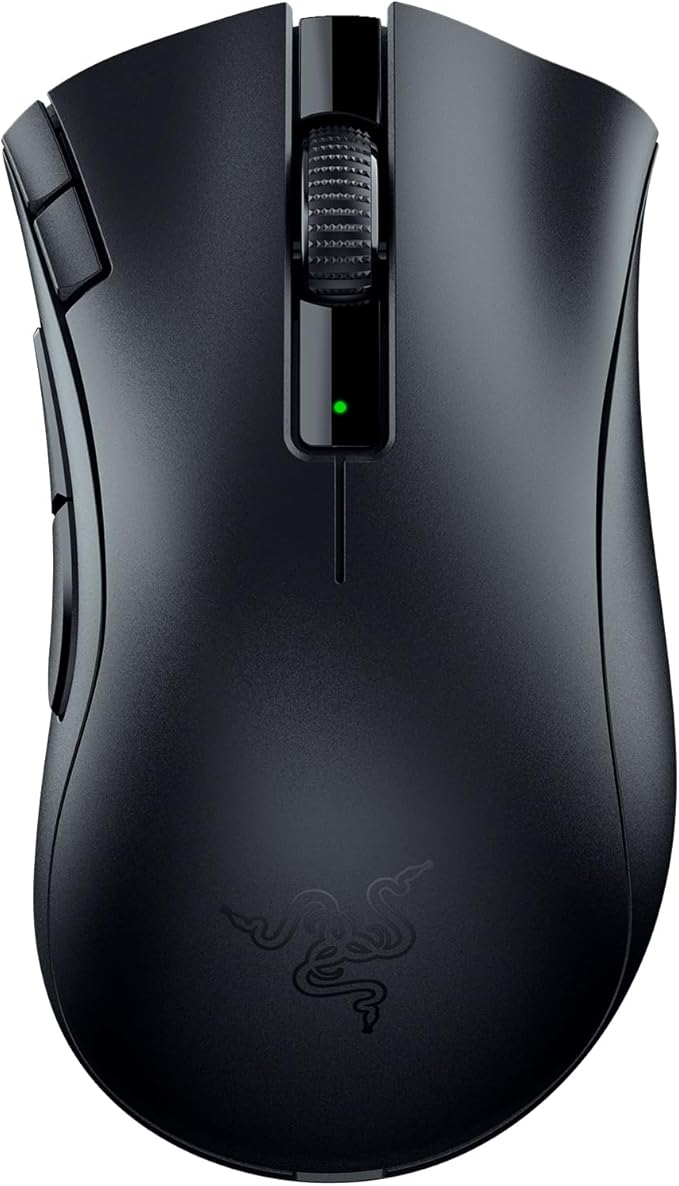
Over 15 million DeathAdders sold. Over a decade’s worth of awards to its name. Iconic ergonomics now comes with limitless control, thanks to dual wireless connectivity via ultra-fast Razer HyperSpeed Wireless or Bluetooth, and 7 programmable buttons including 2 new quick-access edge buttons. Features Trusted by over 15 million fans worldwide, the DeathAdder’s iconic shape has provided wins for countless pros more than any other mouse Featuring the same high-speed Razer HyperSpeed Wireless technology used in our top-tier gaming mice Able to run on a single AA or AAA battery, the mouse’s hybrid battery slot gives you to option of longer battery life or lighter weight Have all the control you need at your fingertips with 2 unique quick-access edge buttons and 2 side buttons.
Over 15 million DeathAdders sold. Over a decade’s worth of awards to its name. Iconic ergonomics now comes with limitless control, thanks to dual wireless connectivity via ultra-fast Razer HyperSpeed Wireless or Bluetooth, and 7 programmable buttons including 2 new quick-access edge buttons. Features Trusted by over 15 million fans worldwide, the DeathAdder’s iconic shape has provided wins for countless pros more than any other mouse Featuring the same high-speed Razer HyperSpeed Wireless technology used in our top-tier gaming mice Able to run on a single AA or AAA battery, the mouse’s hybrid battery slot gives you to option of longer battery life or lighter weight Have all the control you need at your fingertips with 2 unique quick-access edge buttons and 2 side buttons.
Over 15 million DeathAdders sold. Over a decade’s worth of awards to its name. Iconic ergonomics now comes with limitless control, thanks to dual wireless connectivity via ultra-fast Razer HyperSpeed Wireless or Bluetooth, and 7 programmable buttons including 2 new quick-access edge buttons. Features Trusted by over 15 million fans worldwide, the DeathAdder’s iconic shape has provided wins for countless pros more than any other mouse Featuring the same high-speed Razer HyperSpeed Wireless technology used in our top-tier gaming mice Able to run on a single AA or AAA battery, the mouse’s hybrid battery slot gives you to option of longer battery life or lighter weight Have all the control you need at your fingertips with 2 unique quick-access edge buttons and 2 side buttons.
Over 15 million DeathAdders sold. Over a decade’s worth of awards to its name. Iconic ergonomics now comes with limitless control, thanks to dual wireless connectivity via ultra-fast Razer HyperSpeed Wireless or Bluetooth, and 7 programmable buttons including 2 new quick-access edge buttons. Features Trusted by over 15 million fans worldwide, the DeathAdder’s iconic shape has provided wins for countless pros more than any other mouse Featuring the same high-speed Razer HyperSpeed Wireless technology used in our top-tier gaming mice Able to run on a single AA or AAA battery, the mouse’s hybrid battery slot gives you to option of longer battery life or lighter weight Have all the control you need at your fingertips with 2 unique quick-access edge buttons and 2 side buttons.
Last updated at 08/01/2026 21:10:52
Razer DeathAdder V2 X Hyperspeed: Award-Winning Ergonomic Design - Ultra-Fast Hyperspeed Wireless - 235hr Battery Life - 7 Programmable Buttons - Gen
Affiliate Disclosure: We may receive a small commission for purchases made through this link at no extra cost to you. This helps support our site. Thank you!
Razer RZ01-04130100 DeathAdder V2 X HyperSpeed Wireless Ergonomic Gaming Mouse
Delivery between 5–10 Aug $14.50
Razer DeathAdder V2 X HyperSpeed Wireless Gaming Mouse: Award-Winning Ergonomic Design, Ultra-Fast HyperSpeed, 7 Programmable Buttons, Gen 2 Mechanica
Free delivery between 11–14 Aug
originally posted on bestbuy.com
Pro's:-Nails the Deathadder shape.-Lightweight wireless option depending on what battery you use.-No crazy RGB unicorn puke.-PTFE feet.Cons-Per typical Razer, no onboard profiles so you'll need the Synapse bloatware running if you want to remap the dpi buttons on the top corner of the LMB.-Speaking of those two DPI buttons, they are kind of off to the side and are a bit sunken in. I can't easily tell which one I'm hitting and neither are very intuative. It's like a poorly attempted G502 gimmick.All in all, I would say if you really like the shape then just spend the extra few bucks and get the DA Wireless.
originally posted on microcenter.com
I got this mouse to upgrade from a budget, wired msi mouse. My initial impression after using the mouse for a day wasn't good. The mouse lacks texture on the sides to keep it gripped in my hand without needing to feel like I had to hold it firmly. Plus, the sides arent angled outwards so it is very easy for the mouse to slip out of your hand if not holding firmly. My previous mouse had the outward curvature and the texture which made it so easy to use the mouse not only for gaming but productivity. I was going to return the product when I decided to give myself time to adjust as the clicks, response, and the fact that it was wireless was outstanding.After a month using it, I couldn't be happier with my purchase. It fits my hand perfect. I dont even think about the ... MoreI got this mouse to upgrade from a budget, wired msi mouse. My initial impression after using the mouse for a day wasn't good. The mouse lacks texture on the sides to keep it gripped in my hand without needing to feel like I had to hold it firmly. Plus, the sides arent angled outwards so it is very easy for the mouse to slip out of your hand if not holding firmly. My previous mouse had the outward curvature and the texture which made it so easy to use the mouse not only for gaming but productivity. I was going to return the product when I decided to give myself time to adjust as the clicks, response, and the fact that it was wireless was outstanding.After a month using it, I couldn't be happier with my purchase. It fits my hand perfect. I dont even think about the grip anymore. If anything, I think the shape of the mouse making me having to hold it firmly made my aim improve as I felt more in control and precise/accurate. If youre looking for flexible mouse for productivity like school use, maybe skip this. If you're using it for mainly gaming purposes or dont mind having a less relaxed grip, then this mouse is perfect.
originally posted on bestbuy.com
As with most Razer products, this one has defects with almost every unit i encountered. The first one the receiver didn’t work, so i ezchanged it. The second one the scroll wheel was very stiff and loud when scrolling up, but not down. The third gripe I have is a design complaint: that Razer did not put side grips on the mouse. This may be a budget wireless mouse, but at 60 dollars it is more than their wired v2 with side grips and other Razer “x” models like the Basilisk x hyperspeed has side grips. Why would razer cheap out and not include simple plastic or rubber side grips? Bad decision. All in all, with sales going around right now, I’d just go for the razer deathadder v2 pro if you want to stick with razer. Besides all that, i like the new placement of the dpi ... MoreAs with most Razer products, this one has defects with almost every unit i encountered. The first one the receiver didn’t work, so i ezchanged it. The second one the scroll wheel was very stiff and loud when scrolling up, but not down. The third gripe I have is a design complaint: that Razer did not put side grips on the mouse. This may be a budget wireless mouse, but at 60 dollars it is more than their wired v2 with side grips and other Razer “x” models like the Basilisk x hyperspeed has side grips. Why would razer cheap out and not include simple plastic or rubber side grips? Bad decision. All in all, with sales going around right now, I’d just go for the razer deathadder v2 pro if you want to stick with razer. Besides all that, i like the new placement of the dpi buttons and the clicky mechanical switches in lieu of the razer opticals.
| Interface | Bluetooth |
| Mouse Grip Style | Claw |
| Hand Orientation | Right Hand |
| Buttons | 7 |
| Scrolling Capability | 1 x Wheel |
Razer DeathAdder V2 X Hyperspeed: Award-Winning Ergonomic Design - Ultra-Fast Hyperspeed Wireless - 235hr Battery Life - 7 Programmable Buttons - Gen
Affiliate Disclosure: We may receive a small commission for purchases made through this link at no extra cost to you. This helps support our site. Thank you!
Razer RZ01-04130100 DeathAdder V2 X HyperSpeed Wireless Ergonomic Gaming Mouse
Delivery between 5–10 Aug $14.50
Razer DeathAdder V2 X HyperSpeed Wireless Gaming Mouse: Award-Winning Ergonomic Design, Ultra-Fast HyperSpeed, 7 Programmable Buttons, Gen 2 Mechanica
Free delivery between 11–14 Aug
Pro's:-Nails the Deathadder shape.-Lightweight wireless option depending on what battery you use.-No crazy RGB unicorn puke.-PTFE feet.Cons-Per typical Razer, no onboard profiles so you'll need the Synapse bloatware running if you want to remap the dpi buttons on the top corner of the LMB.-Speaking of those two DPI buttons, they are kind of off to the side and are a bit sunken in. I can't easily tell which one I'm hitting and neither are very intuative. It's like a poorly attempted G502 gimmick.All in all, I would say if you really like the shape then just spend the extra few bucks and get the DA Wireless.
I got this mouse to upgrade from a budget, wired msi mouse. My initial impression after using the mouse for a day wasn't good. The mouse lacks texture on the sides to keep it gripped in my hand without needing to feel like I had to hold it firmly. Plus, the sides arent angled outwards so it is very easy for the mouse to slip out of your hand if not holding firmly. My previous mouse had the outward curvature and the texture which made it so easy to use the mouse not only for gaming but productivity. I was going to return the product when I decided to give myself time to adjust as the clicks, response, and the fact that it was wireless was outstanding.After a month using it, I couldn't be happier with my purchase. It fits my hand perfect. I dont even think about the ... MoreI got this mouse to upgrade from a budget, wired msi mouse. My initial impression after using the mouse for a day wasn't good. The mouse lacks texture on the sides to keep it gripped in my hand without needing to feel like I had to hold it firmly. Plus, the sides arent angled outwards so it is very easy for the mouse to slip out of your hand if not holding firmly. My previous mouse had the outward curvature and the texture which made it so easy to use the mouse not only for gaming but productivity. I was going to return the product when I decided to give myself time to adjust as the clicks, response, and the fact that it was wireless was outstanding.After a month using it, I couldn't be happier with my purchase. It fits my hand perfect. I dont even think about the grip anymore. If anything, I think the shape of the mouse making me having to hold it firmly made my aim improve as I felt more in control and precise/accurate. If youre looking for flexible mouse for productivity like school use, maybe skip this. If you're using it for mainly gaming purposes or dont mind having a less relaxed grip, then this mouse is perfect.
As with most Razer products, this one has defects with almost every unit i encountered. The first one the receiver didn’t work, so i ezchanged it. The second one the scroll wheel was very stiff and loud when scrolling up, but not down. The third gripe I have is a design complaint: that Razer did not put side grips on the mouse. This may be a budget wireless mouse, but at 60 dollars it is more than their wired v2 with side grips and other Razer “x” models like the Basilisk x hyperspeed has side grips. Why would razer cheap out and not include simple plastic or rubber side grips? Bad decision. All in all, with sales going around right now, I’d just go for the razer deathadder v2 pro if you want to stick with razer. Besides all that, i like the new placement of the dpi ... MoreAs with most Razer products, this one has defects with almost every unit i encountered. The first one the receiver didn’t work, so i ezchanged it. The second one the scroll wheel was very stiff and loud when scrolling up, but not down. The third gripe I have is a design complaint: that Razer did not put side grips on the mouse. This may be a budget wireless mouse, but at 60 dollars it is more than their wired v2 with side grips and other Razer “x” models like the Basilisk x hyperspeed has side grips. Why would razer cheap out and not include simple plastic or rubber side grips? Bad decision. All in all, with sales going around right now, I’d just go for the razer deathadder v2 pro if you want to stick with razer. Besides all that, i like the new placement of the dpi buttons and the clicky mechanical switches in lieu of the razer opticals.
Since I switch my mouse from computers the save-to-mouse for profiles was a big selling point.But you can't save the LED profiles so unless you install Razer Synapse on all your devices, you can't deactivate the LED's rainbow lighting. This means: as long as razer's software is running on your computer, you can have the lights however you want (including off). When you reboot, or plug the mouse in another device, or turn off the razer software, the LEDs go back to bright rainbow colors.The configuration software is one of the most atrocious pieces of software I've ever seen (several gigabytes of software!)Parts of the outer silicon shell are already slightly lose after barely a few days of use.I will stay away from Razer products in the future, and recommend ... MoreSince I switch my mouse from computers the save-to-mouse for profiles was a big selling point.But you can't save the LED profiles so unless you install Razer Synapse on all your devices, you can't deactivate the LED's rainbow lighting. This means: as long as razer's software is running on your computer, you can have the lights however you want (including off). When you reboot, or plug the mouse in another device, or turn off the razer software, the LEDs go back to bright rainbow colors.The configuration software is one of the most atrocious pieces of software I've ever seen (several gigabytes of software!)Parts of the outer silicon shell are already slightly lose after barely a few days of use.I will stay away from Razer products in the future, and recommend you do so as well.
The item is good itself, came in good packaging and everything you would expectPros: it glides very well, it’s good for people with bigger sized hands, fits my hand well.Cons: the way my ring finger and pinky finger sit at the side of the mouse is u comfortable since it doesn’t have the inward design to it, but that’s my fault for not doing my research on the mouse.Overall a good mouse if you have bigger sized hands and need a affordable mouse for gaming!
Lightweight, nice powder-coated feel, good ergonomics. Disappointed about no onboard profile management. That feature would make sense since this mouse can switch between the 2.4GHz wireless or Bluetooth; an ideal option for switching between computers. The Razer software to configure the mouse is Windows only. I’m also not happy that it immediately tries to install the software when plugging in for the first time. It’s more disruptive than convenient. The Logitech G603 might have been the better buy at this price.
I can't wait to use this mouse every day! I really love the fun and uniqueness that the Razer Chromja RGB adds. It is a gaming mouse so there are a lot of features that make it perfect for a wired gaming mouse and I love:Speedflex Cable - It is very drag free with a nice long length.5 memory profiles - It makes it super convenient to switch up your lights and other settings like the DPI.8 programmable buttons - they include the bottom profile button as one of the 8 but with their software you really can program them to be anything.Ergonomics - The grip for your thumb and pinky finger is a super nice feature for ergonomics. The mouse itself feels good in the hand when using for gaming, when using for other computer work I need to use my wrist-rest ... MoreI can't wait to use this mouse every day! I really love the fun and uniqueness that the Razer Chromja RGB adds. It is a gaming mouse so there are a lot of features that make it perfect for a wired gaming mouse and I love:Speedflex Cable - It is very drag free with a nice long length.5 memory profiles - It makes it super convenient to switch up your lights and other settings like the DPI.8 programmable buttons - they include the bottom profile button as one of the 8 but with their software you really can program them to be anything.Ergonomics - The grip for your thumb and pinky finger is a super nice feature for ergonomics. The mouse itself feels good in the hand when using for gaming, when using for other computer work I need to use my wrist-rest cushion.Optical sensor - Of course, it is super precise. There is no issue there, it's labeled as the best specs in the market for a reason.It initially looks like a simple mouse but it has everything you need to have a great gaming experience, especially since this version is lighter than the original.
The V2 X Hyperspeed is a great ergo gaming mouse, meant for people with larger hands or who want to use palm grip (a comfortable way to hold a mouse by resting your palm and fingers on the shell of the mouse).The V2 X Hyperspeed is extremely similar to the Deathadder V2 Pro, Razer's more expensive wireless ergo offering. The key differences here (and the reasons one would want to buy this one) are the use of AA or AAA batteries, rather than a rechargeable onboard battery, a slightly heavier weight (around 100 grams with AA battery installed), and the cheaper price. Other differences include a lack of RGB lights anywhere on this mouse, the 2 DPI buttons being moved next to the left click, and a slightly different feeling in the main clicks due to mechanical ... MoreThe V2 X Hyperspeed is a great ergo gaming mouse, meant for people with larger hands or who want to use palm grip (a comfortable way to hold a mouse by resting your palm and fingers on the shell of the mouse).The V2 X Hyperspeed is extremely similar to the Deathadder V2 Pro, Razer's more expensive wireless ergo offering. The key differences here (and the reasons one would want to buy this one) are the use of AA or AAA batteries, rather than a rechargeable onboard battery, a slightly heavier weight (around 100 grams with AA battery installed), and the cheaper price. Other differences include a lack of RGB lights anywhere on this mouse, the 2 DPI buttons being moved next to the left click, and a slightly different feeling in the main clicks due to mechanical switches. For the average person, most of these changes won't be a problem. This is, for all intents and purposes, a slightly heavier version of Razer's premium Deathadder at a lower cost.The overall feel of the mouse is very premium, with a grippy texture that resists fingerprints and grime pretty well. The AA battery means you won't have to worry about regularly charging the mouse, making it a good choice for use at the office for people who are already fans of the Deathadder shape. Bluetooth functionality means you can use this mouse with multiple devices or use this with a laptop without taking up a USB-A port. The standard USB-A dongle is also included for a lower latency connection. The sensor on this mouse is a high performance gaming sensor that will perform excellently for gaming as well as productivity use.For me personally, I picked this mouse up for use at work since i needed a large ergonomically shaped mouse to help alleviate pain in my wrist. For people with large hands looking for a comfortable mouse with good performance, this is perfect.
so the previes mouse i had didnt have extra buttons and was kinda a peace of crap but this won is amzing, i got it so i could hot key on minecraft(which took me a while to figure out, if you wanna costomize this mouse get Razer synapse it makes it so easy, and its free) how it feels in my hand is nice. the only thing i dont like about it is the price $105 nzd, its a lot but in my opinion its well worth it, oh and just today i programed the scroll wheel for left click and right click, thats 22 cps with ease amd 80 cps when im trying. sadly i think ill get banned from any java server i use that kinda cps on, but i might be able to use that on bedrock servers without getting banned.sorry about my spelling
It's louder and sounds way more hollow than the original Deathadder. I'll try to mod it to an acceptable level but what a big disappointment.The Scroll Wheel is nothing better, the new wheel is like a grinder. (TTC White Mouse Scroll Wheel Encoder)Modded the case and switches with foam and the click travel distance with plastic. Added plastic to the m1 left 3x45µm (0.135mm) and m2 right 4x45µm (0.18mm), to make them have less pre and post travel. Yet the after post travel vibration on the right click is still noticeable and an annoying feel.
| Interface | Bluetooth |
| Mouse Grip Style | Claw |
| Hand Orientation | Right Hand |
| Buttons | 7 |
| Scrolling Capability | 1 x Wheel |

