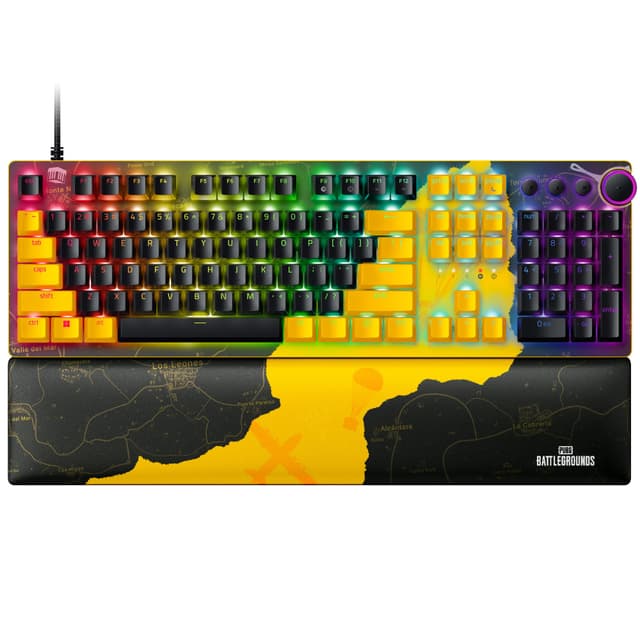
Optical Gaming Keyboard - Razer Huntsman V2
Optical Gaming Keyboard - Razer Huntsman V2
Optical Gaming Keyboard - Razer Huntsman V2
Optical Gaming Keyboard - Razer Huntsman V2
Last updated at 03/21/2026 18:50:56
Razer Huntsman V2 Optical Gaming Mechanical Keyboard, Linear Red Switch, RGB Customize Backlighting, Doubleshot PBT, Wired Connectivity, Braided Fiber
Delivery between 25 Mar – 1 Apr $56.68
Razer Huntsman V2 Linear Optical Switch Gaming Keyboard, English, Us
Free delivery
Affiliate Disclosure: We may receive a small commission for purchases made through this link at no extra cost to you. This helps support our site. Thank you!
Razer Huntsman V2 (Analog Switch) - Optical Gaming Keyboard with Near-Zero Input Latency (Analog Optical-Mechanical Switches, Doubleshot PBT Keycaps,
Affiliate Disclosure: We may receive a small commission for purchases made through this link at no extra cost to you. This helps support our site. Thank you!
originally posted on microcenter.com
Overall, the keyboard is very well built, decent RGB effects, and the perimeter of the wrist pad also lights up.One big issue with this keyboard is if you run an Xbox controller, your controller will not work as the keyboard is recognized as both a keyboard and a Xbox Controller in the device manager (for some of the analog controls). In order to get your Xbox Controller to work, you need to poke around in your device manager and disable the Xbox Controller that was installed as part of the keyboard installation. Do a quick google search for Razer Huntsman Xbox Controller and you'll see what I mean. No perm fix in place yet as of 3/2022.One smaller issue I have is it's a 2-cable connection to your pc. It uses one USB-A port and one USB-C port. It does come with ... MoreOverall, the keyboard is very well built, decent RGB effects, and the perimeter of the wrist pad also lights up.One big issue with this keyboard is if you run an Xbox controller, your controller will not work as the keyboard is recognized as both a keyboard and a Xbox Controller in the device manager (for some of the analog controls). In order to get your Xbox Controller to work, you need to poke around in your device manager and disable the Xbox Controller that was installed as part of the keyboard installation. Do a quick google search for Razer Huntsman Xbox Controller and you'll see what I mean. No perm fix in place yet as of 3/2022.One smaller issue I have is it's a 2-cable connection to your pc. It uses one USB-A port and one USB-C port. It does come with a USB-C-to-USB-a adapter.Aside from that, very nice keyboard. One of the quieter mechanical keyboards I've used.
originally posted on ebay.com
I'm enjoying the keyboard greatly and find it very responsive for gaming, though it is also very sensitive and leads to alot more accidental keystrokes. You cannot be heavy handed with the keyboard. Just touching a key can activate it. It's also strange not having a 10 key, but that just made me pick up a left handed extra keypad from Razer. (now I have a lot more extra buttons than I know what to do with.) I also chose to replace the keycaps with the Razer Phantom ones. It was not neccisary, but does look much cooler. The conversion went extremely smooth. The product greatly increased my interest in Razer products. Yes, there are better ones, but not for the price you pay for this one.
originally posted on razerzone.com
This keyboard is so awesome! First off, I love the light effects and the colors are so mesmerizing! If you download the Razer Synapse program, you can fully customize the lighting effects to whatever your heart desires. I love the twinkle effect the best with aqua and fushia. Soooo pretty!The clicks on this keyboard are so satisfying. The spacing is great, as well. The keyboard is great quality and very sturdy so it doesn't slide or tilt. The wrist pad has the perfect amount of cushioning and makes my typing experience much more comfortable. Overall, this is probably the best keyboard I have ever used and I would definitely recommend it to others.
| General | |
| Device Type | Keyboard |
| Backlit | RGB Chroma |
| Interface | USB |
| Input Device |
Razer Huntsman V2 Optical Gaming Mechanical Keyboard, Linear Red Switch, RGB Customize Backlighting, Doubleshot PBT, Wired Connectivity, Braided Fiber
Delivery between 25 Mar – 1 Apr $56.68
Razer Huntsman V2 Linear Optical Switch Gaming Keyboard, English, Us
Free delivery
Affiliate Disclosure: We may receive a small commission for purchases made through this link at no extra cost to you. This helps support our site. Thank you!
Razer Huntsman V2 (Analog Switch) - Optical Gaming Keyboard with Near-Zero Input Latency (Analog Optical-Mechanical Switches, Doubleshot PBT Keycaps,
Affiliate Disclosure: We may receive a small commission for purchases made through this link at no extra cost to you. This helps support our site. Thank you!
Overall, the keyboard is very well built, decent RGB effects, and the perimeter of the wrist pad also lights up.One big issue with this keyboard is if you run an Xbox controller, your controller will not work as the keyboard is recognized as both a keyboard and a Xbox Controller in the device manager (for some of the analog controls). In order to get your Xbox Controller to work, you need to poke around in your device manager and disable the Xbox Controller that was installed as part of the keyboard installation. Do a quick google search for Razer Huntsman Xbox Controller and you'll see what I mean. No perm fix in place yet as of 3/2022.One smaller issue I have is it's a 2-cable connection to your pc. It uses one USB-A port and one USB-C port. It does come with ... MoreOverall, the keyboard is very well built, decent RGB effects, and the perimeter of the wrist pad also lights up.One big issue with this keyboard is if you run an Xbox controller, your controller will not work as the keyboard is recognized as both a keyboard and a Xbox Controller in the device manager (for some of the analog controls). In order to get your Xbox Controller to work, you need to poke around in your device manager and disable the Xbox Controller that was installed as part of the keyboard installation. Do a quick google search for Razer Huntsman Xbox Controller and you'll see what I mean. No perm fix in place yet as of 3/2022.One smaller issue I have is it's a 2-cable connection to your pc. It uses one USB-A port and one USB-C port. It does come with a USB-C-to-USB-a adapter.Aside from that, very nice keyboard. One of the quieter mechanical keyboards I've used.
I'm enjoying the keyboard greatly and find it very responsive for gaming, though it is also very sensitive and leads to alot more accidental keystrokes. You cannot be heavy handed with the keyboard. Just touching a key can activate it. It's also strange not having a 10 key, but that just made me pick up a left handed extra keypad from Razer. (now I have a lot more extra buttons than I know what to do with.) I also chose to replace the keycaps with the Razer Phantom ones. It was not neccisary, but does look much cooler. The conversion went extremely smooth. The product greatly increased my interest in Razer products. Yes, there are better ones, but not for the price you pay for this one.
This keyboard is so awesome! First off, I love the light effects and the colors are so mesmerizing! If you download the Razer Synapse program, you can fully customize the lighting effects to whatever your heart desires. I love the twinkle effect the best with aqua and fushia. Soooo pretty!The clicks on this keyboard are so satisfying. The spacing is great, as well. The keyboard is great quality and very sturdy so it doesn't slide or tilt. The wrist pad has the perfect amount of cushioning and makes my typing experience much more comfortable. Overall, this is probably the best keyboard I have ever used and I would definitely recommend it to others.
This is such a great keyboard! I can't say enough good things about it. It comes with a rest pad for your wrists, which is nice and especially helpful when you are spending a long time playing a game. I love that the keyboard has such awesome back lighting. It looks super cool and is really functional when playing in a dark room. The keys feel amazing to push and are super responsive, so I don't have to worry about any kind of lag when playing. There's so much versatility and functionality making it perfect for playing any game. I love it!
This Razer Huntsman Mini is exactly what a lot of us having been asking for. For some time now, Ive watched the community provide immense feedback in terms of the type of keyboard wed like to see as well as the features. I was a big fan of the original Razer Huntsman Elite and we finally have one of the best keyboards on the market, imho, in sixty percent form factor. It is astounding how much space Ive freed up on my desk by switching to this huntsman mini. I didnt realize how much space a traditional ten key keyboard takes up over this. Im surprised its taken a major retail store manufacturer this long to come out with this form factor.I keep trying to find flaws with this keyboard but Im a bit hard pressed. Its higher quality than I would have expected from ... MoreThis Razer Huntsman Mini is exactly what a lot of us having been asking for. For some time now, Ive watched the community provide immense feedback in terms of the type of keyboard wed like to see as well as the features. I was a big fan of the original Razer Huntsman Elite and we finally have one of the best keyboards on the market, imho, in sixty percent form factor. It is astounding how much space Ive freed up on my desk by switching to this huntsman mini. I didnt realize how much space a traditional ten key keyboard takes up over this. Im surprised its taken a major retail store manufacturer this long to come out with this form factor.I keep trying to find flaws with this keyboard but Im a bit hard pressed. Its higher quality than I would have expected from Razer. Its built like a tank. The bottom of the keyboard is constructed with a really high quality plastic with an aluminum top plate. There is no flex on the keyboard which is what lends to it feeling indestructible. We finally have stock double shot PBT keycaps. An ingenious feature of this board is the side printed secondary functions see pics. I found this incredibly convenient. While youre certainly not going to get get arrow or media keys with a 60 keyboard, these side printed keys provide with you the functionality of media keys, arrow keys, brightness control, and some page updown keys by just holding down the function button. A nice touch that I really loved that Razer included here was that when you hold down the fn key, only the keys with secondary functions light up see picsIn terms of the typing experience, I personally love Razers purple clicky optical switches. I have for some time now. Key type will of course come down to preference but if you prefer tactile keys and you are a fan of the previous offerings of razers purple optical switches, then you will love these even more. For some reason, these purples feel even more stable than on the Razer Elite that Ive tried. I dont know if its because of the double shot keys or if its because of the type of lubricant that Razer used on each one of these keys but they feel rock solid. The keys are also a lot less noisy than the traditional optical clicky purples that Ive tried in the past. I could only presume that its from the type or application of lubricant that Razer used on this keyboard. Typing on this is a dream that you have to really just try for yourself. On that note, please bear in mind that if you are coming from a traditional tenkey or TKL keyboard, it will likely take a couple or a few days to adjust to this smaller size. The keys are ever so slightly closer together because of the form factor but definitely not to the point that your hands feel cramped for reference I have medium to large hands.The RGB lighting on this keyboard is bar none which Ive already come to expect from Razer and their synapse software.They have great presets but you can also individually customize each key using Chroma Studio listed under Advanced Effects. Do bear in mind though, that there is not a lot of light bleed from underneath the keycaps if thats the look youre going for.In terms of cons its tough to find any. However, there are two things that I can nit pick. The first is Ive recently started to see some online keyboard companies with 60 keyboards start to include two USBC connectors one on the right of the keyboard and one on the left. This is a pretty neat feature as it allows you to connect the USBC cable closest to the side on your desk where your PC is located. While the included braided USBC cable is super high quality, the USBC slot is located on the upper left of the keyboard only. The second minor gripe I have is that if you decide to purchase Razers very own doubleshot PBT keycaps that are sold separately in different colors, they do not include the side printed secondary functions So bear in mind that if you do switch out the keys, you will lose those side printed shortcuts. Other than that, this is a flawless execution. Ive typed up this entire review on this keyboard and these keys make me not want to stop If youve havent had the opportunity to use a Razer product in the past, this is one that I would highly urge that you give a chance
I love the size of the huntsman mini since I always have to travel and this fits well inside of my backpack. The switches are indeed clicky but the only thing about them is that they do have a slight noise of a spring that is a little bit annoying but I got used to it after couple of weeks using it. The usbc cable that came with the keyboard is nice and braided and pretty long. Its lightweight and I can easily type of it really well without my hands getting fatigued or tired by gaming on it. It did take some getting used to when I had to push the function key first then push f5 or something like that. The keyboards keycaps are actually pretty good. They dont really show fingerprints or signs of usage. It has an oil free layer on top which makes the keycaps look like ... MoreI love the size of the huntsman mini since I always have to travel and this fits well inside of my backpack. The switches are indeed clicky but the only thing about them is that they do have a slight noise of a spring that is a little bit annoying but I got used to it after couple of weeks using it. The usbc cable that came with the keyboard is nice and braided and pretty long. Its lightweight and I can easily type of it really well without my hands getting fatigued or tired by gaming on it. It did take some getting used to when I had to push the function key first then push f5 or something like that. The keyboards keycaps are actually pretty good. They dont really show fingerprints or signs of usage. It has an oil free layer on top which makes the keycaps look like thats the specific one being used most of the time. Overall, quality is top notch, value is eh in my opinion for the regular price but I got a gift card so I only had to pay 60 dollars which is not bad for a razer brand especially. Lastly the ease of use is pretty simple. If you want to customize the lighting of the keyboard, just download the synapse 3 application on windows and you can set functions or do anything in your head that makes you work comfortably on the keyboard you can imagine
The Mini Minimalist KeyboardThis keyboard is perfect for those who want a clean gaming setup without all the space needed by a full size keyboard. Using a 60 keyboard you will have more room to work with your mouse and a more spacious workspace. I find the Huntsman Mini to be well built but a lot more plastic than metal. As a result, this keyboard often slides around which can be a bit of an annoyance. IMO, for this price, it should have included a wristrest but nonetheless you get an amazing keyboard overall.I must say, this is NOT my favorite for just working on typical computer tasks like word processing, spreadsheets, and surfing the internet. The key combos just for the arrows are EXTREMELY inconvenient. I dont even want to mention this is TERRIBLE if you try ... MoreThe Mini Minimalist KeyboardThis keyboard is perfect for those who want a clean gaming setup without all the space needed by a full size keyboard. Using a 60 keyboard you will have more room to work with your mouse and a more spacious workspace. I find the Huntsman Mini to be well built but a lot more plastic than metal. As a result, this keyboard often slides around which can be a bit of an annoyance. IMO, for this price, it should have included a wristrest but nonetheless you get an amazing keyboard overall.I must say, this is NOT my favorite for just working on typical computer tasks like word processing, spreadsheets, and surfing the internet. The key combos just for the arrows are EXTREMELY inconvenient. I dont even want to mention this is TERRIBLE if you try to use it for content creation since you need arrow keys to skip frames and perform other functions. Basically, it comes down to if you mainly game then this is for you. If you want to use this as your everyday driver, there is a learning curve and finger gymnastics that will come into play. I do love the fact the doubleshot PBT key caps come with secondary functions printed on the keys, but unfortunately they do not illuminate with the top of the keys leaving you to memorize the board. I do like when you press the fn key, only those keys with a secondary function light up to take some of the guesswork out of it. It this does take some getting used to if you happen to use the arrow keys to do highlighting text. Some will need two hands for the fn keys and others will be finger gymnasts.The responsiveness is DEFINITELY noticeable as well as how little pressure is actually needed to engage the switches. I find playing on this board to be effortless and just feels great overall. The texture on the keys is nice and the RGB lighting is top notch. USBC is great making this futureproof, and the Synapse 3 software makes it a gamers dream. In short, this is a great keyboard for those who are actually gaming instead of multitasking on a PC. I recommend this to ONLY those whose main purpose of using a PC is to game a full size keyboard will serve everyone else better.
Its a 60 keyboard. As long as youre good to learn some of the shortcuts youll be fine. The trade off is that its very space saving and minimalistic. Very nice keyboard to type on and play games. Im currently enjoying this at the office and will be trying it out at home with fps some games, but I dont foresee any issues.This keyboard is very light weight, due to the obvious size of the product. Also the materials keep it on the light side, aluminum top plate but everything else is plastic. Feels sturdy though and havent had an accidental slide, so I feel like it will stay planted just fine.The sound profile is alright, a little loud for some, but I enjoy the feed back noises. Its hard to describe the feel of the razer purple opto switches, they are not as clicky or ... MoreIts a 60 keyboard. As long as youre good to learn some of the shortcuts youll be fine. The trade off is that its very space saving and minimalistic. Very nice keyboard to type on and play games. Im currently enjoying this at the office and will be trying it out at home with fps some games, but I dont foresee any issues.This keyboard is very light weight, due to the obvious size of the product. Also the materials keep it on the light side, aluminum top plate but everything else is plastic. Feels sturdy though and havent had an accidental slide, so I feel like it will stay planted just fine.The sound profile is alright, a little loud for some, but I enjoy the feed back noises. Its hard to describe the feel of the razer purple opto switches, they are not as clicky or as loud as a traditional cherry mx blue switch. They also dont require as much force to activate, they literally trigger right on the bump, which I like. So far Im getting used to this keyboard fairly quickly and enjoying it.I purchased the black color option and not the mercury white. The black color option seems to keep the RGB lighting at a minimal, meaning it doesnt look too bright or flashly, enough to get the job done and see the legends in low lighting. I believe the white color option would really help make the RGB reflect and shine much more, so keep that in mind if the RGB is an important factor in your decision. One con is that I wish the shorcuts that are printed on the front of some of the keys were shine thru, they are not, so in low lighting it can be difficult at first until you get used to the boards layout thats if you need to use some of a full size keyboards functions. You can use the software, or you can adjust the lighting with shorcuts without having to use the software, which is nice.If youre a minimalist or a gamer who prefers to have more desk real estate open for your mouse movements you will really enjoy this keyboard. Im using the purple switches, Im normally a linear guy so Im sure the reds are even more enjoyable and cant wait to try those out sometime soonThe switches have a very light feel to them. I like to bottom out the keys when I type, it has a foreign yet satisfying feeling to them. The switches have some odd sound feedback to them at times. Im thinking its due to the switch design, specifically the stabilizers on each switch.The price point is not bad IMO. Yeah 119 USD to start for a keyboard can seem like a bit much, but if youre a keyboard person it really does fall in line with the typical pricing trend sure I do wish overall the market wasnt so expensive though. Compared to a ducky or even an anne pro its a little more money around 10 or 20 but the trade off is that this keyboard can be bought at a big box retail store, aka meaning minimal to no wait time. Just go pick one up instead of waiting for shipping or stock to replenish from a favorite website. Also if you have any issues right away you can go right back to the store instead of having to ship it backOverall I recommend this keyboard, works good, I like how it types, and its not super flashy. You can customize it with different keycaps if you like, just know that as of right now razer and other third parties do not make any keycaps with the front printed shortcuts as replacements.
The Razer Huntsman V2 keyboard is superb. I play videogames. This keyboard helps me type really fast and accurately. This keyboard has very smooth keypresses and I love the clicky sound that's not so bad it bothers others in the room. Everything about this keyboard feels just right. I type around 80-90 WPM with this keyboard I can do around 100 WPM. The included wrist wrest feels nice! I love the programmable RGB lighting. It was really a cool suprise to see that when you play certain games like DOOM and Factorio the layout for the lighting changes to fit the games atmosphere. I can't say enough about how much I love this keyboard. It has a real premium feel to it and you cannot go wrong getting one of these! In all my years and many keyboards I've gone through this ... MoreThe Razer Huntsman V2 keyboard is superb. I play videogames. This keyboard helps me type really fast and accurately. This keyboard has very smooth keypresses and I love the clicky sound that's not so bad it bothers others in the room. Everything about this keyboard feels just right. I type around 80-90 WPM with this keyboard I can do around 100 WPM. The included wrist wrest feels nice! I love the programmable RGB lighting. It was really a cool suprise to see that when you play certain games like DOOM and Factorio the layout for the lighting changes to fit the games atmosphere. I can't say enough about how much I love this keyboard. It has a real premium feel to it and you cannot go wrong getting one of these! In all my years and many keyboards I've gone through this is my favorite that I've owned. I promise you will not be disappointed. You can't go wrong when its a razer product.
I am not a heavy gamer. I play one or two games a couple of times a week for a few hours. I have used this keyboard every day for about one month. Since I do a lot of non-gaming-related typing every day. It is the best keyboard that I have ever used. The first thing I noticed is how high the quality is. The keys seem very durable. It seems durable. Every time I press a key, it has a mechanical sound. The sound it makes is somewhat loud, but I don't mind. It came with a magnetic wrist rest for added comfort. The wrist rest is soft enough that it feels comfortable under my wrist but firm enough that it supports my wrist. My favorite part about this keyboard is how I can customize the colors on the keys that I want to be lit up. I can choose a different color for each ... MoreI am not a heavy gamer. I play one or two games a couple of times a week for a few hours. I have used this keyboard every day for about one month. Since I do a lot of non-gaming-related typing every day. It is the best keyboard that I have ever used. The first thing I noticed is how high the quality is. The keys seem very durable. It seems durable. Every time I press a key, it has a mechanical sound. The sound it makes is somewhat loud, but I don't mind. It came with a magnetic wrist rest for added comfort. The wrist rest is soft enough that it feels comfortable under my wrist but firm enough that it supports my wrist. My favorite part about this keyboard is how I can customize the colors on the keys that I want to be lit up. I can choose a different color for each key if I wanted to. It allows you to save up to five keyboard looks for different games.
| General | |
| Device Type | Keyboard |
| Backlit | RGB Chroma |
| Interface | USB |
| Input Device |

