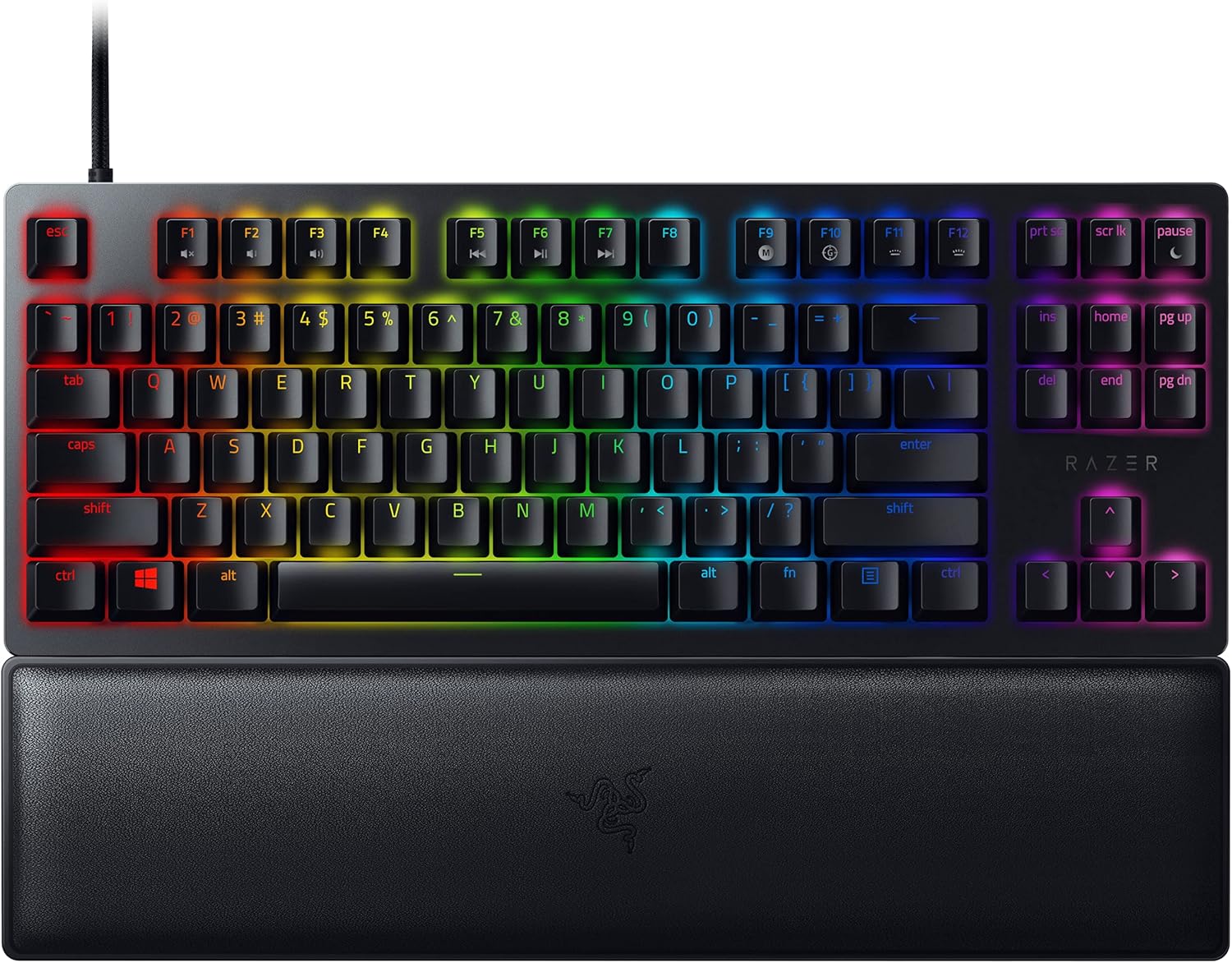
No Frills. All Performance. If all-out advantage is more your speed, arm yourself with responsiveness that’s second to none. Meet the Razer Huntsman V2— an optical gaming keyboard with near-zero input latency and fully geared out with other high-end features to make it the complete package. Razer Optical Switches They’re faster, lighter, and more durable than traditional mechanical switches, with up to true 8000Hz polling rate for lower input latency. Clicky Optical Switches. Crisp Tactile Feedback Enjoy quick, snappy keystrokes that sound satisfying and feel lighter than traditional mechanical switches— with up to true 8000Hz polling rate for lower input latency. Doubleshot PBT Keycaps Harder and more durable than ABS plastic, these tough keycaps won’t wear down to a shiny finish and have labels which will never fade thanks to their doubleshot molding process. Sound Dampening Foam Added for improved acoustics, the Razer Huntsman V2 has a layer of special foam inside its casing which absorbs any pinging noises that might occur when you bottom out your keys. Ergonomic Wrist Rest Featuring sturdy wrist support perfectly aligns to the keyboard to relieve pressure on your wrists, so you feel less fatigued when gaming over long periods. Multi-Function Digital Dial and 4 Media Keys Configure them to pause, play, skip and tweak everything from brightness to volume—the ultimate convenience as you enjoy your entertainment. Hybrid On-board Memory and Cloud Storage Be match-ready regardless of the situation when you can save and activate up to 5 on-board memory profiles, while building a library of macros and settings to call upon with cloud storage.
No Frills. All Performance. If all-out advantage is more your speed, arm yourself with responsiveness that’s second to none. Meet the Razer Huntsman V2— an optical gaming keyboard with near-zero input latency and fully geared out with other high-end features to make it the complete package. Razer Optical Switches They’re faster, lighter, and more durable than traditional mechanical switches, with up to true 8000Hz polling rate for lower input latency. Clicky Optical Switches. Crisp Tactile Feedback Enjoy quick, snappy keystrokes that sound satisfying and feel lighter than traditional mechanical switches— with up to true 8000Hz polling rate for lower input latency. Doubleshot PBT Keycaps Harder and more durable than ABS plastic, these tough keycaps won’t wear down to a shiny finish and have labels which will never fade thanks to their doubleshot molding process. Sound Dampening Foam Added for improved acoustics, the Razer Huntsman V2 has a layer of special foam inside its casing which absorbs any pinging noises that might occur when you bottom out your keys. Ergonomic Wrist Rest Featuring sturdy wrist support perfectly aligns to the keyboard to relieve pressure on your wrists, so you feel less fatigued when gaming over long periods. Multi-Function Digital Dial and 4 Media Keys Configure them to pause, play, skip and tweak everything from brightness to volume—the ultimate convenience as you enjoy your entertainment. Hybrid On-board Memory and Cloud Storage Be match-ready regardless of the situation when you can save and activate up to 5 on-board memory profiles, while building a library of macros and settings to call upon with cloud storage.
No Frills. All Performance. If all-out advantage is more your speed, arm yourself with responsiveness that’s second to none. Meet the Razer Huntsman V2— an optical gaming keyboard with near-zero input latency and fully geared out with other high-end features to make it the complete package. Razer Optical Switches They’re faster, lighter, and more durable than traditional mechanical switches, with up to true 8000Hz polling rate for lower input latency. Clicky Optical Switches. Crisp Tactile Feedback Enjoy quick, snappy keystrokes that sound satisfying and feel lighter than traditional mechanical switches— with up to true 8000Hz polling rate for lower input latency. Doubleshot PBT Keycaps Harder and more durable than ABS plastic, these tough keycaps won’t wear down to a shiny finish and have labels which will never fade thanks to their doubleshot molding process. Sound Dampening Foam Added for improved acoustics, the Razer Huntsman V2 has a layer of special foam inside its casing which absorbs any pinging noises that might occur when you bottom out your keys. Ergonomic Wrist Rest Featuring sturdy wrist support perfectly aligns to the keyboard to relieve pressure on your wrists, so you feel less fatigued when gaming over long periods. Multi-Function Digital Dial and 4 Media Keys Configure them to pause, play, skip and tweak everything from brightness to volume—the ultimate convenience as you enjoy your entertainment. Hybrid On-board Memory and Cloud Storage Be match-ready regardless of the situation when you can save and activate up to 5 on-board memory profiles, while building a library of macros and settings to call upon with cloud storage.
No Frills. All Performance. If all-out advantage is more your speed, arm yourself with responsiveness that’s second to none. Meet the Razer Huntsman V2— an optical gaming keyboard with near-zero input latency and fully geared out with other high-end features to make it the complete package. Razer Optical Switches They’re faster, lighter, and more durable than traditional mechanical switches, with up to true 8000Hz polling rate for lower input latency. Clicky Optical Switches. Crisp Tactile Feedback Enjoy quick, snappy keystrokes that sound satisfying and feel lighter than traditional mechanical switches— with up to true 8000Hz polling rate for lower input latency. Doubleshot PBT Keycaps Harder and more durable than ABS plastic, these tough keycaps won’t wear down to a shiny finish and have labels which will never fade thanks to their doubleshot molding process. Sound Dampening Foam Added for improved acoustics, the Razer Huntsman V2 has a layer of special foam inside its casing which absorbs any pinging noises that might occur when you bottom out your keys. Ergonomic Wrist Rest Featuring sturdy wrist support perfectly aligns to the keyboard to relieve pressure on your wrists, so you feel less fatigued when gaming over long periods. Multi-Function Digital Dial and 4 Media Keys Configure them to pause, play, skip and tweak everything from brightness to volume—the ultimate convenience as you enjoy your entertainment. Hybrid On-board Memory and Cloud Storage Be match-ready regardless of the situation when you can save and activate up to 5 on-board memory profiles, while building a library of macros and settings to call upon with cloud storage.
Last updated at 06/07/2026 16:54:28
Razer Huntsman V2 Tenkeyless (Purple Switch) - Optical Gaming Keyboard (Clicky Optical Switches, Doubleshot PBT Keycaps, Ergonomic Wrist Rest) US
Affiliate Disclosure: We may receive a small commission for purchases made through this link at no extra cost to you. This helps support our site. Thank you!
Razer Huntsman V2 Tenkeyless RGB Wired Clicky Optical Switch Gaming Keyboard Purple RZ03 03940300 - Keyboards
Delivery $16.30
Razer Huntsman V2 Tkl Clicky Optical Switch Gaming Keyboard Us Layout
Delivery $3.60
Affiliate Disclosure: We may receive a small commission for purchases made through this link at no extra cost to you. This helps support our site. Thank you!
originally posted on bestbuy.com
The Razer Huntsman Mini Analog is a mighty little 60% keyboard. 60% keyboards eschew all but the most necessary keys, hiding the more advanced functions behind Fn modifiers. These means 2 things: these are the smallest full sized key keyboards by far, and these require chords of keys to accomplish many normal functions that you might be used to. Is this keyboard for you? Are Razer’s analog switches any good? Read on!Essentially Razer’s analogue keys feel like a mechanical “red” style switch. This suits their analog nature quite well. What exactly is an analog key switch? Well, it’s a switch that responds not with a simple on or off, but a range of activation. For instance, the Huntsman lets you set two distinct actions for various depths of a press, or even to ... MoreThe Razer Huntsman Mini Analog is a mighty little 60% keyboard. 60% keyboards eschew all but the most necessary keys, hiding the more advanced functions behind Fn modifiers. These means 2 things: these are the smallest full sized key keyboards by far, and these require chords of keys to accomplish many normal functions that you might be used to. Is this keyboard for you? Are Razer’s analog switches any good? Read on!Essentially Razer’s analogue keys feel like a mechanical “red” style switch. This suits their analog nature quite well. What exactly is an analog key switch? Well, it’s a switch that responds not with a simple on or off, but a range of activation. For instance, the Huntsman lets you set two distinct actions for various depths of a press, or even to bind the WASD quad to the left joystick on a controller (which works surprisingly well). This is a huge differentiator for Razer, as optical analog keys are still a pretty unique feature.So in practice what does this 60% bring to the market vs others? Well, having owned a few 60% keyboards, I can tell you, I can’t get used to the Fn key’s location. I find 60% keyboards practically unusable because of it, as I use a lot of keys and combos in daily use. The allure of a 60% keyboard is the amount of desk space you can save, which is naturally ergonomic. Sure a TKL brings a lot of those benefits with very little compromise, there’s nothing smaller than a 60% keyboard. The ability to remap the Fn to another key is paramount to me for usability. The good news is you can remap the Fn key to caps lock, which is the perfect use of caps lock. You get a nice wide key, and it’s off hand of many of the functions (as most are associated on the right hand).Speaking of, I love that the arrow keys are aligned with IJKL. Some other 60% I’ve had move them one key to the right and I find that awkward to align. Being able to hold caps lock and use the arrow keys from home row is so natural and quite easy for me. I’m a software engineer, so being able to use arrow keys + Alt to navigate by words is huge, and this keyboard aligns very well with that. PGUP/PGDN and Home/End are were things get a bit dicey (moving all the way to ] for Home), but the core keys are very accessible and I’m sure I’ll adjust quickly. It is surprising how fast you adjust to having most of your functions on home row - which is the beauty of a 60%.Now, the keys, like stated before, are similar to mechanical Red in feel. The keycaps are PBT, which provides an excellent feel and durability. These won’t shine or look greasy in a month or two. Backlighting is superb - with per key control and layers. Honestly, I feel like it looks great in Razer Green, but obviously RGB per key is here.Software to configure these features is surprisingly good. Razer Synapse was once kind of a joke, but it’s come a long way, and its ability to configure hardware is on par with other manufacturers. It no longer supports MacOS, so keep that in mind if you’re a Mac user. I have a KVM setup, and I can easily configure the keyboard in Windows, and have a majority of settings carry over. I like knowing that key assignments are hardware and not software based (for instance the Caps Lock assignment I talked about carried over perfectly) is comforting and shows the level of maturity Razer brings to the table these days.So back to the real differentiator on this keyboard: Analog switches. Are they worth the premium? I think that’s a relative question. While you can emulate (very easily) the left hand joystick to the WASD cluster, keep in mind, this requires a soft touch. Overall the analog control is an interesting idea. I used it to play Dark Souls 3 and Elden Ring, and I was surprised at how easy it was to modulate the keys. That said, it was an adjustment. In games like Flight Simulator, it does bring a degree of control you won’t get from a standard keyboard. This does beg the question, why not just buy a controller, because the keys aren’t quite as intuitive.Finally, is it worth the extra cost over the Hunstman Mini non-analog? I think that’s up to you. The analog switches bring a very unique feel and unique capability. Having that option of both dual function and analog joystick is a nice to have. Overall the key feel and capabilities are unique. The execution of the keyboard is top notch, and I’m a huge fan of what Razer has done with this keyboard. Highly recommended.
originally posted on bestbuy.com
I’m relatively new to gaming PCs, but I’ve had many keyboards over the years. My newest PC goes in the gaming category and was my first introduction to gaming keyboards with RGB lighting. The lighting was overly bright and the keys had very loud clicks. I don’t know if that’s what gamers want, but it certainly didn’t interest me. That’s where the Razer Huntsman V2 comes in. I’ve only had this keyboard for a few days, but I can already say that I agree with the design choices.The keys have a layer of foam that absorbs the clicking sounds in a satisfying way. I very much prefer this to the loud clicks from my other gaming keyboard. I’m also in favor of the RGB lighting on this keyboard. It’s not over-the-top, just the right amount to read the keys and get the RGB ... MoreI’m relatively new to gaming PCs, but I’ve had many keyboards over the years. My newest PC goes in the gaming category and was my first introduction to gaming keyboards with RGB lighting. The lighting was overly bright and the keys had very loud clicks. I don’t know if that’s what gamers want, but it certainly didn’t interest me. That’s where the Razer Huntsman V2 comes in. I’ve only had this keyboard for a few days, but I can already say that I agree with the design choices.The keys have a layer of foam that absorbs the clicking sounds in a satisfying way. I very much prefer this to the loud clicks from my other gaming keyboard. I’m also in favor of the RGB lighting on this keyboard. It’s not over-the-top, just the right amount to read the keys and get the RGB lighting effects that gamers crave. This also happens to be very customizable, thanks to the Razer Synapse software. Let’s just say that the only real limitation is your imagination, but you can either use various presets to get there quickly, or go deep into the editing of each key. If you match it with a Razer mouse, you can edit both in the same program.The keys have a nice feel to them, and I enjoy typing on them. Thanks to optical switches, the latency is incredibly low, making every keystroke feel instantaneous. My left hand felt perfectly fine after a long gaming session with this keyboard, so I’m looking forward to using it from this point forward, as it improves my overall gaming experience and comfort. If comfort is your thing, a wrist rest is included that will allow you to rest your hand and wrist even more.The Huntsman V2 is definitely a pricier than a typical gaming keyboard, but with that being said, it’s in the same price range as the most recommended gaming keyboards, so you get what you pay for. It’s a step above, so I believe it’s worth it.Overall, this is a premium keyboard for someone who’s looking for a quieter and more comfortable experience, and quite honestly, you don’t even have to be a gamer to appreciate the features. A great keyboard for everyone!
originally posted on bestbuy.com
When it comes to keyboards there's a lot of personal preference to them. Key height, key travel, and key feedback are all things that can vary greatly between them but is more subjective in regards to what's better. Having said that, I'll do my best to keep this review more about the objective features and functionality.The latter, arguably also most importantly, is where we'll start. In this regard, it meets all expectations of a higher end keyboard. The keys are responsive and fast and there's almost a clarity when typing with it. Best I can describe it is that each keystroke is just smooth and it has no issues keeping up when typing fast. And even though there's a bit of key travel, there's no need to pound them into the ground. In fact, because of the type of ... MoreWhen it comes to keyboards there's a lot of personal preference to them. Key height, key travel, and key feedback are all things that can vary greatly between them but is more subjective in regards to what's better. Having said that, I'll do my best to keep this review more about the objective features and functionality.The latter, arguably also most importantly, is where we'll start. In this regard, it meets all expectations of a higher end keyboard. The keys are responsive and fast and there's almost a clarity when typing with it. Best I can describe it is that each keystroke is just smooth and it has no issues keeping up when typing fast. And even though there's a bit of key travel, there's no need to pound them into the ground. In fact, because of the type of switches these keyboards use, the keys can almost act like the triggers on a game console controller.That takes us to one of the coolest features of this keyboard. It doesn't take much travel at all for the analog optical switch to register a keystroke. And because of that and the way the optical sensors work, using the Razer software, you can actually set each key to have 2 different commands, 1 for a light touch with little travel and the other when pressing it further down. This may not be a big deal for everyday use, and can take some getting used to, but for gaming this is an amazing feature. For example, one key can control different rates of fire in a shooter, or whether you move fast or slow in the game.Speaking of the Razer software, called Synapse, that is another invaluable feature with this keyboard. Best of all though the software works across many of the Razer devices. This is actually my 5th Razer device, I have 2 other keyboards and 2 mice (disclaimer, I like Razer devices so much that I bought a second duplicate keyboard/mouse set to use at my work office), and I can control the settings on all of them with Razer Synapse.Another great feature is that this keyboard has on-board memory. Straight out of the box it already has several lighting effects preloaded on it, so you can change it up or turn it off without ever having to download Synapse. But if you do download it, you can also take advantage of the on-board memory and store different keyboard profiles. This can come in handy, like if you use it for gaming at home and then also take it to the office to use for work!And traveling it does well. Just the fact it's a small keyboard makes that easier, and might even be a reason why you'd consider buying a 60% sized keyboard. It is a wired keyboard, but they made the cable detachable, and that makes traveling with it so much easier. And honestly, the packaging is simple enough that if you don't have a dedicated case, you can use it for that purpose instead of throwing it out and it barely takes up any more space than the keyboard itself, and again, makes it really easy to travel with. Finally, the build quality is excellent and solid and just feels like it can easily handle any abuse from moving around.The few things to note with this keyboard, because it's small, you're not going to get a lot of the features of a larger keyboard. That's obviously a given, but if you absolutely depend on having a 10-key, then this wouldn't be for you. If you like a 'clicky' style keyboard, then this isn't really for you either.Overall, if it fits your keyboard style preferences, I honestly can't think of any negatives with this keyboard. I've been a fan of Razer products for some time now and they continue to not only meet, but exceed my expectations and I can't recommend this keyboard highly enough.
| Keyboard keys operating life | 100 million characters |
| Rollover | N-key rollover |
| Polling rate | 8000 Hz |
| Backlight type | RGB LED |
| Backlight colour | Multicolour |
Razer Huntsman V2 Tenkeyless (Purple Switch) - Optical Gaming Keyboard (Clicky Optical Switches, Doubleshot PBT Keycaps, Ergonomic Wrist Rest) US
Affiliate Disclosure: We may receive a small commission for purchases made through this link at no extra cost to you. This helps support our site. Thank you!
Razer Huntsman V2 Tenkeyless RGB Wired Clicky Optical Switch Gaming Keyboard Purple RZ03 03940300 - Keyboards
Delivery $16.30
Razer Huntsman V2 Tkl Clicky Optical Switch Gaming Keyboard Us Layout
Delivery $3.60
Affiliate Disclosure: We may receive a small commission for purchases made through this link at no extra cost to you. This helps support our site. Thank you!
The Razer Huntsman Mini Analog is a mighty little 60% keyboard. 60% keyboards eschew all but the most necessary keys, hiding the more advanced functions behind Fn modifiers. These means 2 things: these are the smallest full sized key keyboards by far, and these require chords of keys to accomplish many normal functions that you might be used to. Is this keyboard for you? Are Razer’s analog switches any good? Read on!Essentially Razer’s analogue keys feel like a mechanical “red” style switch. This suits their analog nature quite well. What exactly is an analog key switch? Well, it’s a switch that responds not with a simple on or off, but a range of activation. For instance, the Huntsman lets you set two distinct actions for various depths of a press, or even to ... MoreThe Razer Huntsman Mini Analog is a mighty little 60% keyboard. 60% keyboards eschew all but the most necessary keys, hiding the more advanced functions behind Fn modifiers. These means 2 things: these are the smallest full sized key keyboards by far, and these require chords of keys to accomplish many normal functions that you might be used to. Is this keyboard for you? Are Razer’s analog switches any good? Read on!Essentially Razer’s analogue keys feel like a mechanical “red” style switch. This suits their analog nature quite well. What exactly is an analog key switch? Well, it’s a switch that responds not with a simple on or off, but a range of activation. For instance, the Huntsman lets you set two distinct actions for various depths of a press, or even to bind the WASD quad to the left joystick on a controller (which works surprisingly well). This is a huge differentiator for Razer, as optical analog keys are still a pretty unique feature.So in practice what does this 60% bring to the market vs others? Well, having owned a few 60% keyboards, I can tell you, I can’t get used to the Fn key’s location. I find 60% keyboards practically unusable because of it, as I use a lot of keys and combos in daily use. The allure of a 60% keyboard is the amount of desk space you can save, which is naturally ergonomic. Sure a TKL brings a lot of those benefits with very little compromise, there’s nothing smaller than a 60% keyboard. The ability to remap the Fn to another key is paramount to me for usability. The good news is you can remap the Fn key to caps lock, which is the perfect use of caps lock. You get a nice wide key, and it’s off hand of many of the functions (as most are associated on the right hand).Speaking of, I love that the arrow keys are aligned with IJKL. Some other 60% I’ve had move them one key to the right and I find that awkward to align. Being able to hold caps lock and use the arrow keys from home row is so natural and quite easy for me. I’m a software engineer, so being able to use arrow keys + Alt to navigate by words is huge, and this keyboard aligns very well with that. PGUP/PGDN and Home/End are were things get a bit dicey (moving all the way to ] for Home), but the core keys are very accessible and I’m sure I’ll adjust quickly. It is surprising how fast you adjust to having most of your functions on home row - which is the beauty of a 60%.Now, the keys, like stated before, are similar to mechanical Red in feel. The keycaps are PBT, which provides an excellent feel and durability. These won’t shine or look greasy in a month or two. Backlighting is superb - with per key control and layers. Honestly, I feel like it looks great in Razer Green, but obviously RGB per key is here.Software to configure these features is surprisingly good. Razer Synapse was once kind of a joke, but it’s come a long way, and its ability to configure hardware is on par with other manufacturers. It no longer supports MacOS, so keep that in mind if you’re a Mac user. I have a KVM setup, and I can easily configure the keyboard in Windows, and have a majority of settings carry over. I like knowing that key assignments are hardware and not software based (for instance the Caps Lock assignment I talked about carried over perfectly) is comforting and shows the level of maturity Razer brings to the table these days.So back to the real differentiator on this keyboard: Analog switches. Are they worth the premium? I think that’s a relative question. While you can emulate (very easily) the left hand joystick to the WASD cluster, keep in mind, this requires a soft touch. Overall the analog control is an interesting idea. I used it to play Dark Souls 3 and Elden Ring, and I was surprised at how easy it was to modulate the keys. That said, it was an adjustment. In games like Flight Simulator, it does bring a degree of control you won’t get from a standard keyboard. This does beg the question, why not just buy a controller, because the keys aren’t quite as intuitive.Finally, is it worth the extra cost over the Hunstman Mini non-analog? I think that’s up to you. The analog switches bring a very unique feel and unique capability. Having that option of both dual function and analog joystick is a nice to have. Overall the key feel and capabilities are unique. The execution of the keyboard is top notch, and I’m a huge fan of what Razer has done with this keyboard. Highly recommended.
I’m relatively new to gaming PCs, but I’ve had many keyboards over the years. My newest PC goes in the gaming category and was my first introduction to gaming keyboards with RGB lighting. The lighting was overly bright and the keys had very loud clicks. I don’t know if that’s what gamers want, but it certainly didn’t interest me. That’s where the Razer Huntsman V2 comes in. I’ve only had this keyboard for a few days, but I can already say that I agree with the design choices.The keys have a layer of foam that absorbs the clicking sounds in a satisfying way. I very much prefer this to the loud clicks from my other gaming keyboard. I’m also in favor of the RGB lighting on this keyboard. It’s not over-the-top, just the right amount to read the keys and get the RGB ... MoreI’m relatively new to gaming PCs, but I’ve had many keyboards over the years. My newest PC goes in the gaming category and was my first introduction to gaming keyboards with RGB lighting. The lighting was overly bright and the keys had very loud clicks. I don’t know if that’s what gamers want, but it certainly didn’t interest me. That’s where the Razer Huntsman V2 comes in. I’ve only had this keyboard for a few days, but I can already say that I agree with the design choices.The keys have a layer of foam that absorbs the clicking sounds in a satisfying way. I very much prefer this to the loud clicks from my other gaming keyboard. I’m also in favor of the RGB lighting on this keyboard. It’s not over-the-top, just the right amount to read the keys and get the RGB lighting effects that gamers crave. This also happens to be very customizable, thanks to the Razer Synapse software. Let’s just say that the only real limitation is your imagination, but you can either use various presets to get there quickly, or go deep into the editing of each key. If you match it with a Razer mouse, you can edit both in the same program.The keys have a nice feel to them, and I enjoy typing on them. Thanks to optical switches, the latency is incredibly low, making every keystroke feel instantaneous. My left hand felt perfectly fine after a long gaming session with this keyboard, so I’m looking forward to using it from this point forward, as it improves my overall gaming experience and comfort. If comfort is your thing, a wrist rest is included that will allow you to rest your hand and wrist even more.The Huntsman V2 is definitely a pricier than a typical gaming keyboard, but with that being said, it’s in the same price range as the most recommended gaming keyboards, so you get what you pay for. It’s a step above, so I believe it’s worth it.Overall, this is a premium keyboard for someone who’s looking for a quieter and more comfortable experience, and quite honestly, you don’t even have to be a gamer to appreciate the features. A great keyboard for everyone!
When it comes to keyboards there's a lot of personal preference to them. Key height, key travel, and key feedback are all things that can vary greatly between them but is more subjective in regards to what's better. Having said that, I'll do my best to keep this review more about the objective features and functionality.The latter, arguably also most importantly, is where we'll start. In this regard, it meets all expectations of a higher end keyboard. The keys are responsive and fast and there's almost a clarity when typing with it. Best I can describe it is that each keystroke is just smooth and it has no issues keeping up when typing fast. And even though there's a bit of key travel, there's no need to pound them into the ground. In fact, because of the type of ... MoreWhen it comes to keyboards there's a lot of personal preference to them. Key height, key travel, and key feedback are all things that can vary greatly between them but is more subjective in regards to what's better. Having said that, I'll do my best to keep this review more about the objective features and functionality.The latter, arguably also most importantly, is where we'll start. In this regard, it meets all expectations of a higher end keyboard. The keys are responsive and fast and there's almost a clarity when typing with it. Best I can describe it is that each keystroke is just smooth and it has no issues keeping up when typing fast. And even though there's a bit of key travel, there's no need to pound them into the ground. In fact, because of the type of switches these keyboards use, the keys can almost act like the triggers on a game console controller.That takes us to one of the coolest features of this keyboard. It doesn't take much travel at all for the analog optical switch to register a keystroke. And because of that and the way the optical sensors work, using the Razer software, you can actually set each key to have 2 different commands, 1 for a light touch with little travel and the other when pressing it further down. This may not be a big deal for everyday use, and can take some getting used to, but for gaming this is an amazing feature. For example, one key can control different rates of fire in a shooter, or whether you move fast or slow in the game.Speaking of the Razer software, called Synapse, that is another invaluable feature with this keyboard. Best of all though the software works across many of the Razer devices. This is actually my 5th Razer device, I have 2 other keyboards and 2 mice (disclaimer, I like Razer devices so much that I bought a second duplicate keyboard/mouse set to use at my work office), and I can control the settings on all of them with Razer Synapse.Another great feature is that this keyboard has on-board memory. Straight out of the box it already has several lighting effects preloaded on it, so you can change it up or turn it off without ever having to download Synapse. But if you do download it, you can also take advantage of the on-board memory and store different keyboard profiles. This can come in handy, like if you use it for gaming at home and then also take it to the office to use for work!And traveling it does well. Just the fact it's a small keyboard makes that easier, and might even be a reason why you'd consider buying a 60% sized keyboard. It is a wired keyboard, but they made the cable detachable, and that makes traveling with it so much easier. And honestly, the packaging is simple enough that if you don't have a dedicated case, you can use it for that purpose instead of throwing it out and it barely takes up any more space than the keyboard itself, and again, makes it really easy to travel with. Finally, the build quality is excellent and solid and just feels like it can easily handle any abuse from moving around.The few things to note with this keyboard, because it's small, you're not going to get a lot of the features of a larger keyboard. That's obviously a given, but if you absolutely depend on having a 10-key, then this wouldn't be for you. If you like a 'clicky' style keyboard, then this isn't really for you either.Overall, if it fits your keyboard style preferences, I honestly can't think of any negatives with this keyboard. I've been a fan of Razer products for some time now and they continue to not only meet, but exceed my expectations and I can't recommend this keyboard highly enough.
I've been wanting to dive in to using a smaller keyboard for some time now, but I've always been attached to full size keyboards and those with media keys.Ditching the 10 Key is easy enough. Ditching the FN keys and the media keys of course is a bit harder, moreso the function key's.That out of the way, so far, with some re-learning and getting used to the smaller footprint and finger placement since I'm so used to a 100% keyboards, it's been a great keyboard.My previous has also been a Razer, specifically the Huntsman Elite, so there wasn't a whole lot in the way of needing any new S/W or anything.Being able to confiigure the keys to function as controller input is a potential game changer. I don't know if it will catch on, but it could. It naturally won't ... MoreI've been wanting to dive in to using a smaller keyboard for some time now, but I've always been attached to full size keyboards and those with media keys.Ditching the 10 Key is easy enough. Ditching the FN keys and the media keys of course is a bit harder, moreso the function key's.That out of the way, so far, with some re-learning and getting used to the smaller footprint and finger placement since I'm so used to a 100% keyboards, it's been a great keyboard.My previous has also been a Razer, specifically the Huntsman Elite, so there wasn't a whole lot in the way of needing any new S/W or anything.Being able to confiigure the keys to function as controller input is a potential game changer. I don't know if it will catch on, but it could. It naturally won't replace your controller, but for some games where you would prefer a controller, but at the same prefer using the keyboard, this helps to bridge that gap.Testing it out in some games like Horizon Zero Dawn, GTA and others similar where depending on how much pressure you apply to the key it controls how fast or slow your character moves. This actually really helps in GTA cause of the driving. There's nothing really that offers as great a control as the joysticks on a controller, but again, this really helps to simulate that experience.The configuration through the Synapse software is easy, but also very in depth cause you can adjust each and every single key on the keyboard. It isn't something that's just jump in and setup, it does require some time and effort. There's differing levels of actuation that can be setup as well.The noise of the keyboard is a lot softer than my Elite. This keyboard rarely gets picked up in my discord calls or streaming, but this is preference and I much prefer loud and clicky keyboards be it for everyday typing or gaming.If you're looking for a good quality keyboard thats got a smaller footprint that a 100% model and gives you some adjustability with actuation and better usability for some games that require a more precise amount of control but don't want to rely on a controller, this may very fit the bill for you.
OverallAs the title says, I’ve never once owned a Razer product. Not because I think there’s anything wrong with them but because I’m too deeply invested into other ecosystems to justify adding another piece of software to manage their RGB or other embedded functionality. In the box, you got your keyboard, product manual, stickers, and a nice braided USB Type-A to USB Type-C of about 5ft. To be honest, I feel like it is at least 1ft short, but I can make it work. In any case, this keyboard is very nice, both for gaming and as a daily driver. It leaves you with only the essential keys while getting rid of the rest of the useless real estate that occupies a lot of your desk. There may be a very small subset of games that I can think of that utilize the directional ... MoreOverallAs the title says, I’ve never once owned a Razer product. Not because I think there’s anything wrong with them but because I’m too deeply invested into other ecosystems to justify adding another piece of software to manage their RGB or other embedded functionality. In the box, you got your keyboard, product manual, stickers, and a nice braided USB Type-A to USB Type-C of about 5ft. To be honest, I feel like it is at least 1ft short, but I can make it work. In any case, this keyboard is very nice, both for gaming and as a daily driver. It leaves you with only the essential keys while getting rid of the rest of the useless real estate that occupies a lot of your desk. There may be a very small subset of games that I can think of that utilize the directional keys or keypad. A larger portion would have you map those keys if you really wanted them. But lets face it, not many use the keypad to game. Thinking about that setup makes me wonder how much space would I need to maneuver the mouse while also having access to the keypad and directional keys. I may be a bit off base but to memory, the only types that utilize these keys fall into MMO, and RTS types. The dual kickstand thing is a nice add-on as most mainstream keyboards seem to only have a single leg. So this setup gives you a little more flexibility. More than anything else on the keyboard, I love that triggering the function key brings up lights across all your keys that have a secondary key function. I can’t recall seeing this in any keyboard I’ve owned before. To unlock full functionality of all of the keyboards features you need the synapse software. But as I unpacked it to setup with my computer I wasn’t spammed with the needed software. There’s a small message on the back of the box but that's really small that you’ll likely glance over it and not really notice it. There’s a second message about it on the second page of the manual, but the diagrams and other messages on there are much more predominant that I never really noticed it. I already had it in my head that I’ll end up downloading something from the Razer website to use it to its full potential. Much to my surprise, as soon as I plugged it into my USB port I got a Razer software prompt asking if I would like to download synapse. This was something new as I normally have to hunt for software when I plug in a peripheral. Drivers will install automatically, but companion software isn’t a thing. This is so simple yet very impressive to see this.Synapse unlocks a myriad of features from assigning macro keys, customizing the RGB experience past the default presets, and adjusting sensitivity, for lack of a better word, how much you need to press on a key to actuate a keystroke. The keyboards build quality is impressive. The brushed aluminum base has a solid and premium feel.If I had to complain about anything it’d have to be the clicking on this particular keyboard. I do love mechanical keyboards so I’m not against clicking keys, but I can’t say I’m 100% a fan of the 80s sounding OEM keyboard sound this one produces. I won’t name manufacturers but this type of sound usually came from the old dinosaur, practically indestructible, cream colored keyboards from the late 80s early 90s.Regardless how I look at it, Razer has made an amazing product if you’re looking for a 60% form factor. This is a 5 star product loaded with lots of features.
I’ve tested/used/reviewed a number of gaming keyboards in my life, so when presented with a chance to review the new Razr Huntsman Mini Analog keyboard - to pair nicely with my DEATHADDER v2, I was all in.TL;DR for my frequent readers and details below.Pros:60%Detachable USB-C cableUSB-C port is recessed under the keyboardSound / TactilityRazr Software for key manipulation / LEDsMulti-level height adjustment tabsCons:Less pitched at the backSlippery when using the height adjustment tabsMeh:No side-key light for function button reading in low-lightRazr Software - Time/Patience to learnBefore getting this keyboard, I have been using another vendor’s 60%er. It’s nice that I can unify on a single piece of management software and free up some RAM. ... MoreI’ve tested/used/reviewed a number of gaming keyboards in my life, so when presented with a chance to review the new Razr Huntsman Mini Analog keyboard - to pair nicely with my DEATHADDER v2, I was all in.TL;DR for my frequent readers and details below.Pros:60%Detachable USB-C cableUSB-C port is recessed under the keyboardSound / TactilityRazr Software for key manipulation / LEDsMulti-level height adjustment tabsCons:Less pitched at the backSlippery when using the height adjustment tabsMeh:No side-key light for function button reading in low-lightRazr Software - Time/Patience to learnBefore getting this keyboard, I have been using another vendor’s 60%er. It’s nice that I can unify on a single piece of management software and free up some RAM. Typing & gaming have a more muted click when compared to Red Linear switches, however the snappiness and clean pops of the keys are nice to the senses.I like the fact that the USB-C -> USB-A cable is detachable. Additionally, a nice woven cable is supplied with a rubber cable wrap, which shows me that longevity is a factor. Having a recessed USB-C port under the keyboard is great as doing this exposes only the cable out the rear, not the connector so there is less of a chance to cause accidental damage when moving it around the desk. Back to the cable - the keyboard side has a groove to hold the connector in place as well - very cool for rigidity and stability!Before I started playing, I swapped out the old keyboard for this one and noticed that it wasn’t pitched as high at the back, so I checked out the tab height options. I found the smaller of the tabs to be good for me, however it made the keyboard slide a bit too easy. A fix to this would be to add some grippier front rubber feet to compensate for the rear no longer having the grippers.A clean, yet slightly muted click that’s heard and felt, even compared to Red Linear switches is nice. I thought I liked the Linear the best, but this feel and sound is pretty great.Now when it comes to customization, Razr is pretty on-top of things. The Razr Central Software serves as a menu for other Apps for customization; for me, it’s mainly: Synapse. Want to change how responsive your WASD keys are? Head on over to Synapse. Feel like adding some cool typing LED reactions to your keyboard & Mouse? Synapse again, but this time - Chroma Studio is where you want to go to ensure your Mouse gets the same effects as your keyboard - or a totally totally different cool color/feature. Cortex is also an option, should you want something to keep a library of your games, or if you want to know how your FPS was during the game, after (or in-) game. It’s pretty slick, but take your time learning it.One thing that’s annoyed me about 60% keyboards that have FN / function key requirements from other keys, is the lack of a side key light. Right now, to see what Right Arrow is, I can’t because it’s not daylight or super bright at my desk. If the keys alternate functions were lit up, that’d be fantastic - but I haven’t seen it yet.Overall - I dig this keyboard and it is now going to be my daily gamer - so the answer to: Do you recommend this is - yes!
This Razer Huntsman Mini is exactly what a lot of us having been asking for. For some time now, Ive watched the community provide immense feedback in terms of the type of keyboard wed like to see as well as the features. I was a big fan of the original Razer Huntsman Elite and we finally have one of the best keyboards on the market, imho, in sixty percent form factor. It is astounding how much space Ive freed up on my desk by switching to this huntsman mini. I didnt realize how much space a traditional ten key keyboard takes up over this. Im surprised its taken a major retail store manufacturer this long to come out with this form factor.I keep trying to find flaws with this keyboard but Im a bit hard pressed. Its higher quality than I would have expected from ... MoreThis Razer Huntsman Mini is exactly what a lot of us having been asking for. For some time now, Ive watched the community provide immense feedback in terms of the type of keyboard wed like to see as well as the features. I was a big fan of the original Razer Huntsman Elite and we finally have one of the best keyboards on the market, imho, in sixty percent form factor. It is astounding how much space Ive freed up on my desk by switching to this huntsman mini. I didnt realize how much space a traditional ten key keyboard takes up over this. Im surprised its taken a major retail store manufacturer this long to come out with this form factor.I keep trying to find flaws with this keyboard but Im a bit hard pressed. Its higher quality than I would have expected from Razer. Its built like a tank. The bottom of the keyboard is constructed with a really high quality plastic with an aluminum top plate. There is no flex on the keyboard which is what lends to it feeling indestructible. We finally have stock double shot PBT keycaps. An ingenious feature of this board is the side printed secondary functions see pics. I found this incredibly convenient. While youre certainly not going to get get arrow or media keys with a 60 keyboard, these side printed keys provide with you the functionality of media keys, arrow keys, brightness control, and some page updown keys by just holding down the function button. A nice touch that I really loved that Razer included here was that when you hold down the fn key, only the keys with secondary functions light up see picsIn terms of the typing experience, I personally love Razers purple clicky optical switches. I have for some time now. Key type will of course come down to preference but if you prefer tactile keys and you are a fan of the previous offerings of razers purple optical switches, then you will love these even more. For some reason, these purples feel even more stable than on the Razer Elite that Ive tried. I dont know if its because of the double shot keys or if its because of the type of lubricant that Razer used on each one of these keys but they feel rock solid. The keys are also a lot less noisy than the traditional optical clicky purples that Ive tried in the past. I could only presume that its from the type or application of lubricant that Razer used on this keyboard. Typing on this is a dream that you have to really just try for yourself. On that note, please bear in mind that if you are coming from a traditional tenkey or TKL keyboard, it will likely take a couple or a few days to adjust to this smaller size. The keys are ever so slightly closer together because of the form factor but definitely not to the point that your hands feel cramped for reference I have medium to large hands.The RGB lighting on this keyboard is bar none which Ive already come to expect from Razer and their synapse software.They have great presets but you can also individually customize each key using Chroma Studio listed under Advanced Effects. Do bear in mind though, that there is not a lot of light bleed from underneath the keycaps if thats the look youre going for.In terms of cons its tough to find any. However, there are two things that I can nit pick. The first is Ive recently started to see some online keyboard companies with 60 keyboards start to include two USBC connectors one on the right of the keyboard and one on the left. This is a pretty neat feature as it allows you to connect the USBC cable closest to the side on your desk where your PC is located. While the included braided USBC cable is super high quality, the USBC slot is located on the upper left of the keyboard only. The second minor gripe I have is that if you decide to purchase Razers very own doubleshot PBT keycaps that are sold separately in different colors, they do not include the side printed secondary functions So bear in mind that if you do switch out the keys, you will lose those side printed shortcuts. Other than that, this is a flawless execution. Ive typed up this entire review on this keyboard and these keys make me not want to stop If youve havent had the opportunity to use a Razer product in the past, this is one that I would highly urge that you give a chance
I am really impressed with Razer and their ability to churn out keyboards like this that feel as good to type on as they look. This 60% Huntsman keyboard provides an excellent option for hardcore gamers or typists who prefer a smaller keyboard, are space limited, or like to take their keyboard on the go. 60% is an interesting experience if you have never used one before. 60% are the embodiments of practicality when it comes to keyboard usability, and they leave you so much room on your desk.This keyboard departs from the previous Huntsman Mini model given that it comes with Razer’s new analog optical switches which allow for scalable levels of input. This allegedly provides more accurate button presses and more precise movement of the key through the keystroke. I ... MoreI am really impressed with Razer and their ability to churn out keyboards like this that feel as good to type on as they look. This 60% Huntsman keyboard provides an excellent option for hardcore gamers or typists who prefer a smaller keyboard, are space limited, or like to take their keyboard on the go. 60% is an interesting experience if you have never used one before. 60% are the embodiments of practicality when it comes to keyboard usability, and they leave you so much room on your desk.This keyboard departs from the previous Huntsman Mini model given that it comes with Razer’s new analog optical switches which allow for scalable levels of input. This allegedly provides more accurate button presses and more precise movement of the key through the keystroke. I have owned and test nearly a dozen keyboards now, and I am just going to say in perfect honesty that I have difficulty telling the difference between the keystrokes on this other red switch linear keyboards I have had in the past. I would say that if anything, I am noticing finer, more precise movements when I play my favorite competitive shooter, Hunt Showdown. I am able to “wiggle” the character side to side while peeking windows with greater ease and finer side to side movements than on my current daily driver Roccat Pyro keyboard. That does add a competitive advantage and I can honestly directly say the keystrokes on the Huntsman Mini analog are directly responsible for that.Other aspects of this Razer keyboard go along familiar Razer product experiences. The packaging is excellent and feels premium and you get a detachable, braided USB-C cable. The keyboard itself shows attention to detail with a nice matte finish, and the RGB is fully controlled with Razer Synapse software which has markedly improved over the years since my first Razer Keyboard in 2018. The only comment I will make is that the RGB on this keyboard is quite dim on full brightness compared to my Razer Goliathus Chroma mousepad that sits right next to it in my current gaming setup.Altogether, I think this keyboard is going to appeal to the hardcore, minimalist PC gamers who want the build and precision of a Razer keyboard without giving up on the precision or control of the actual keystrokes. I would give this keyboard 5 stars for that genre of user, but I would say for anyone that isn’t in need of a 60% keyboard with as fine of switches as these, you will find better, more featured options at this price point. Thanks for reading and good luck with your purchase!
The Razer Huntsman 60% gaming Keyboard is a great choice for any gamer. The smaller size allows for more mouse pad space while playing first person shooters. This is one of the main benefits of using a smaller keyboard. You get just the keys you need for gaming which allows for a wider area of movement for games like Fortnite, Warzone, Valorant etc. A main issue I had while playing these games, was that with my lower sensitivity settings, I required more mouse pad space for aiming and other movements.The keyboard itself is great, high quality and I have enjoyed using it so far. It is really a no-frills keyboard. There is no media bar or other controls. It does what it needs to do, and it does a good job.Using the Synapse software, you can customize various ... MoreThe Razer Huntsman 60% gaming Keyboard is a great choice for any gamer. The smaller size allows for more mouse pad space while playing first person shooters. This is one of the main benefits of using a smaller keyboard. You get just the keys you need for gaming which allows for a wider area of movement for games like Fortnite, Warzone, Valorant etc. A main issue I had while playing these games, was that with my lower sensitivity settings, I required more mouse pad space for aiming and other movements.The keyboard itself is great, high quality and I have enjoyed using it so far. It is really a no-frills keyboard. There is no media bar or other controls. It does what it needs to do, and it does a good job.Using the Synapse software, you can customize various settings and RGB colors. This software has always worked very well for me, and it is east to use.Overall, I really enjoy this keyboard. It’s simple, well made and does what it needs to do. If you’re looking for a smaller keyboard to maximize your space, you should certainly consider the Razer Huntsman!
The problem with this keyboard is that the design doesn't accomplish the whole concept of a "lighted" keyboard should be. When you say lighted, most people are looking for a keyboard where the letters, numbers and symbols are back-lite so they themselves are illuminated so you can see them in a place with very little or no light, even in the dark. With this product, just the area around the keys is lit, not the keys themselves and that really is pretty useless. With this keyboard, you STILL need an external light source to see the face of the keys; the light that the keyboard emits is totally cosmetic. You certainly can't use this keyboard in the dark unless you are a professional who can type totally blind, and if that were the case, then you wouldn't need any ... MoreThe problem with this keyboard is that the design doesn't accomplish the whole concept of a "lighted" keyboard should be. When you say lighted, most people are looking for a keyboard where the letters, numbers and symbols are back-lite so they themselves are illuminated so you can see them in a place with very little or no light, even in the dark. With this product, just the area around the keys is lit, not the keys themselves and that really is pretty useless. With this keyboard, you STILL need an external light source to see the face of the keys; the light that the keyboard emits is totally cosmetic. You certainly can't use this keyboard in the dark unless you are a professional who can type totally blind, and if that were the case, then you wouldn't need any light at all. For those who assume a "lighted" keyboard means the keyboard letters, numbers and symbols are lit from behind...you'd be wrong. The light is only from around the keys and in fact, that makes the letters, numbers and symbols on the face of the keys HARDER to see since the area around them is brighter than the face which only make the face of the keys seem DARK! What's needed is a total redesign; the keys need to be lit from behind so the letters, numbers and symbols LIGHT UP! THAT what most peopleexpect from something called a "lighted Keyboard!" The two stars are because, yes, it does work as an ordinary keyboard.
| Keyboard keys operating life | 100 million characters |
| Rollover | N-key rollover |
| Polling rate | 8000 Hz |
| Backlight type | RGB LED |
| Backlight colour | Multicolour |

