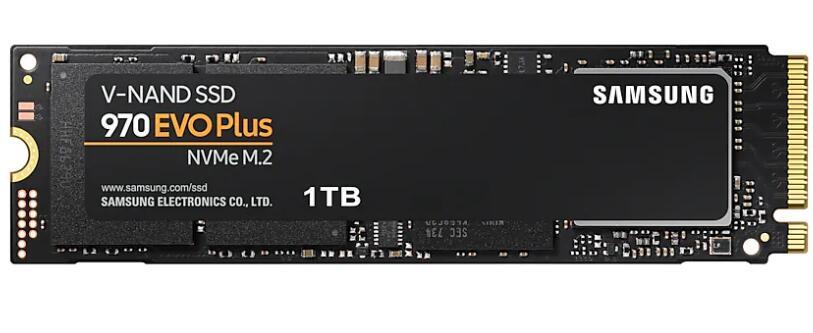
The ultimate in performance, upgraded. Faster than the 970 EVO, the 970 EVO Plus is powered by the latest V-NAND technology and firmware optimization. It maximizes the potential of NVMe bandwidth for unbeatable computing. Comes in capacities of up to 1TB, with reliability of up to 600 TBW. The 970 EVO Plus reaches sequential read/write speeds up to 3,500/3,300 MB/s, up to 53% faster than the 970 EVO. Powered by the latest V-NAND technology—which brings greater NAND performance and higher power efficiency—along with optimized firmware, a proven Phoenix controller, and Intelligent TurboWrite boost speed.
The ultimate in performance, upgraded. Faster than the 970 EVO, the 970 EVO Plus is powered by the latest V-NAND technology and firmware optimization. It maximizes the potential of NVMe bandwidth for unbeatable computing. Comes in capacities of up to 1TB, with reliability of up to 600 TBW. The 970 EVO Plus reaches sequential read/write speeds up to 3,500/3,300 MB/s, up to 53% faster than the 970 EVO. Powered by the latest V-NAND technology—which brings greater NAND performance and higher power efficiency—along with optimized firmware, a proven Phoenix controller, and Intelligent TurboWrite boost speed.
The ultimate in performance, upgraded. Faster than the 970 EVO, the 970 EVO Plus is powered by the latest V-NAND technology and firmware optimization. It maximizes the potential of NVMe bandwidth for unbeatable computing. Comes in capacities of up to 1TB, with reliability of up to 600 TBW. The 970 EVO Plus reaches sequential read/write speeds up to 3,500/3,300 MB/s, up to 53% faster than the 970 EVO. Powered by the latest V-NAND technology—which brings greater NAND performance and higher power efficiency—along with optimized firmware, a proven Phoenix controller, and Intelligent TurboWrite boost speed.
The ultimate in performance, upgraded. Faster than the 970 EVO, the 970 EVO Plus is powered by the latest V-NAND technology and firmware optimization. It maximizes the potential of NVMe bandwidth for unbeatable computing. Comes in capacities of up to 1TB, with reliability of up to 600 TBW. The 970 EVO Plus reaches sequential read/write speeds up to 3,500/3,300 MB/s, up to 53% faster than the 970 EVO. Powered by the latest V-NAND technology—which brings greater NAND performance and higher power efficiency—along with optimized firmware, a proven Phoenix controller, and Intelligent TurboWrite boost speed.
Last updated at 08/31/2026 00:31:28
Samsung MZ-V7S2T0BW
Affiliate Disclosure: We may receive a small commission for purchases made through this link at no extra cost to you. This helps support our site. Thank you!
970 Evo Plus 250GB 500GB 1tb 2tb Nvme Protocol SSD M. 2 for Desktop Notebook Solid State Drive
Free delivery
Mz-V7s2t0b 970evo Plus Nvme Pcie 3.0 M. 2 2tb SSD
Free delivery
51F9G Samsung 970 EVO Plus Series 250GB NVMe PCIE SSD Hard Drive M.2 2280 Card Replacement For Dell Latitude 5310 13"
Delivery $40.50
Samsung 970 Evo Plus 250GB MZ-V7S250 M.2 SSD
Free delivery
SAMSUNG 970 EVO Plus SSD MLC NVMe M.2 2280 PCIe 3.0x4 Internal Solid State Drive 250GB 500GB 2TB For
Free delivery
SAMSUNG SSD 970 EVO Plus MLC NVMe M.2 2280 500GB 1TB 2TB Internal Solid State Drive PCIe 3.0x4 250GB
Delivery $1.33
Samsung 970 EVO Plus SSD 1TB 2TB 500GB 250GB MLC NVMe Hard Drive HDD Hard Disk M.2 2280 Internal
Delivery $1.33
RY FOR Samsung Evo pro 970 plus 500GB M.2 NVMe SSD
Delivery $9.94
Samsung Ssd 250gb 970 Evo Plus M.2 Nvme Internal Hard Drive For Laptop
Free delivery
Affiliate Disclosure: We may receive a small commission for purchases made through this link at no extra cost to you. This helps support our site. Thank you!
originally posted on pbtech.co.nz
If you need the extra speed for bulky I/O like editing large videos, or swapping data that can't fit into memory, the 970 EVO works well. Otherwise I think SATA is sufficiently fast for most things and is in some ways more convenient. However for typical smaller work loads, such as booting, or starting typical applications, you might not notice the difference. For example, my desktop boots about 1 second faster using the 970 EVO MVMe than my SATA Samsung 850 EVO SSD - so it turns out the small reads and writes made during booting are not the principle bottleneck. For normal applications I can't tell the difference when running from the 970 EVO MVMe versus the 850 EVO SSD.I've found MVMe is great for swap because swap may require masses of big writes. if I drive my ... MoreIf you need the extra speed for bulky I/O like editing large videos, or swapping data that can't fit into memory, the 970 EVO works well. Otherwise I think SATA is sufficiently fast for most things and is in some ways more convenient. However for typical smaller work loads, such as booting, or starting typical applications, you might not notice the difference. For example, my desktop boots about 1 second faster using the 970 EVO MVMe than my SATA Samsung 850 EVO SSD - so it turns out the small reads and writes made during booting are not the principle bottleneck. For normal applications I can't tell the difference when running from the 970 EVO MVMe versus the 850 EVO SSD.I've found MVMe is great for swap because swap may require masses of big writes. if I drive my desktop heavily into MVMe swap, it's still responsive enough for me to take action to bring memory use back under control.NVMe also requires dealing with small screws, plus considering heatsinks if the MVMe is badly placed for airflow. As I understand it, adding a heatsink would void Samsung's warranty. Apparently the sticker on the drive is already some kind of heat conductor, plus the NVMe will automatically throttle back on speed if it gets too hot. SATA SSD's are relatively free of cooling issues and pretty easy to install.I was considering using this as compact storage for a raspberry Pi 4, but MVMe requires more power than SATA, so I'd have to add a powered USB-hub. So if you're picky about energy efficiency, SATA SSD may be the way to go.I'll take the win of faster swap, but in many ways I see MVMe as a failed experiment on my part. SATA was already good enough, maybe I should have put the money toward more RAM or a faster CPU.
originally posted on bestbuy.com
I recently upgraded my laptop's storage from a 256 GB solid-state drive (SSD) to the Samsung 970 EVO Plus 1TB Internal SSD PCIe Gen 3 x4 NVMe, and I must say, I am absolutely thrilled with the results! This SSD is an absolute powerhouse and has significantly improved the speed and performance of my computer.First off, the installation process was incredibly smooth, thanks in large part to the Geek Squad support that I received. The Geek Squad agent I spoke with was incredibly knowledgeable and walked me through every step of the process. They even helped me transfer all of my files and data from my old SSD to the new one, which saved me a ton of time and hassle.Once the installation was complete, I was blown away by how fast my computer was running. Everything ... MoreI recently upgraded my laptop's storage from a 256 GB solid-state drive (SSD) to the Samsung 970 EVO Plus 1TB Internal SSD PCIe Gen 3 x4 NVMe, and I must say, I am absolutely thrilled with the results! This SSD is an absolute powerhouse and has significantly improved the speed and performance of my computer.First off, the installation process was incredibly smooth, thanks in large part to the Geek Squad support that I received. The Geek Squad agent I spoke with was incredibly knowledgeable and walked me through every step of the process. They even helped me transfer all of my files and data from my old SSD to the new one, which saved me a ton of time and hassle.Once the installation was complete, I was blown away by how fast my computer was running. Everything from booting up to opening and closing programs was lightning quick, and I no longer have to deal with the frustrating lag and slow load times that I experienced with my old SSD.In addition to the speed and performance improvements, I also love the fact that this SSD has 1TB of storage space. This means that I can store all of my important files, photos, and videos without having to worry about running out of space. Plus, the NVMe technology means that my data transfer speeds are faster than ever before, which is especially important when working with large files or transferring data to external drives.Overall, I am absolutely thrilled with my upgrade to the Samsung 970 EVO Plus 1TB Internal SSD PCIe Gen 3 x4 NVMe, and I would highly recommend it to anyone looking to boost their computer's performance. And if you're considering making the upgrade, I would definitely recommend seeking out Geek Squad support - they made the process incredibly easy and stress-free!
originally posted on bestbuy.com
I recently upgraded to the Samsung 970 EVO Plus 2TB Internal SSD (PCIe Gen 3.0 x4 NVMe), and I am thrilled with its exceptional performance and reliability. This SSD has truly earned its 5-star rating and has become an indispensable part of my computing setup.The speed and responsiveness of the Samsung 970 EVO Plus are mind-blowing. With its PCIe Gen 3.0 x4 NVMe interface, this SSD delivers blazing fast read and write speeds, significantly reducing loading times and boosting overall system performance. Whether it's launching applications, transferring large files, or booting up my system, this SSD handles every task with lightning speed and efficiency.The 2TB storage capacity is a game-changer for me. It provides ample space to store my extensive collection of ... MoreI recently upgraded to the Samsung 970 EVO Plus 2TB Internal SSD (PCIe Gen 3.0 x4 NVMe), and I am thrilled with its exceptional performance and reliability. This SSD has truly earned its 5-star rating and has become an indispensable part of my computing setup.The speed and responsiveness of the Samsung 970 EVO Plus are mind-blowing. With its PCIe Gen 3.0 x4 NVMe interface, this SSD delivers blazing fast read and write speeds, significantly reducing loading times and boosting overall system performance. Whether it's launching applications, transferring large files, or booting up my system, this SSD handles every task with lightning speed and efficiency.The 2TB storage capacity is a game-changer for me. It provides ample space to store my extensive collection of files, documents, and multimedia content. I no longer have to worry about running out of storage or juggling multiple drives. The generous capacity of the Samsung 970 EVO Plus allows me to keep all my data in one place, streamlining my workflow and improving productivity.The build quality of this SSD is top-notch. Samsung has crafted a durable and reliable drive that instills confidence. The drive feels solid and well-engineered, and the advanced heat dissipation technology ensures optimal performance even during extended usage. I appreciate the attention to detail and the focus on creating a dependable product.Installation was a breeze thanks to the included software and clear instructions. Within minutes, I had the Samsung 970 EVO Plus up and running in my system. The drive seamlessly integrated with my existing hardware, and I encountered no compatibility issues whatsoever.Samsung's reputation for quality is well-deserved, and the 970 EVO Plus SSD exemplifies their commitment to excellence. The drive is backed by a solid warranty, providing further assurance of its reliability and longevity. I can confidently rely on this SSD to handle my data storage needs for years to come.In conclusion, the Samsung 970 EVO Plus 2TB Internal SSD is a remarkable product that delivers unparalleled speed, ample storage capacity, and rock-solid reliability. It has transformed my computing experience, allowing me to work and play without any performance bottlenecks. If you're seeking a high-performance SSD that combines speed and reliability, look no further than the Samsung 970 EVO Plus.
| Device Type | Internal Solid State Drive (SSD) |
| Used For | Consumer |
| Form Factor | M.2 2280 |
| Capacity | 1TB |
| Memory Components | V-NAND 3-bit MLC |
Samsung MZ-V7S2T0BW
Affiliate Disclosure: We may receive a small commission for purchases made through this link at no extra cost to you. This helps support our site. Thank you!
970 Evo Plus 250GB 500GB 1tb 2tb Nvme Protocol SSD M. 2 for Desktop Notebook Solid State Drive
Free delivery
Mz-V7s2t0b 970evo Plus Nvme Pcie 3.0 M. 2 2tb SSD
Free delivery
51F9G Samsung 970 EVO Plus Series 250GB NVMe PCIE SSD Hard Drive M.2 2280 Card Replacement For Dell Latitude 5310 13"
Delivery $40.50
Samsung 970 Evo Plus 250GB MZ-V7S250 M.2 SSD
Free delivery
If you need the extra speed for bulky I/O like editing large videos, or swapping data that can't fit into memory, the 970 EVO works well. Otherwise I think SATA is sufficiently fast for most things and is in some ways more convenient. However for typical smaller work loads, such as booting, or starting typical applications, you might not notice the difference. For example, my desktop boots about 1 second faster using the 970 EVO MVMe than my SATA Samsung 850 EVO SSD - so it turns out the small reads and writes made during booting are not the principle bottleneck. For normal applications I can't tell the difference when running from the 970 EVO MVMe versus the 850 EVO SSD.I've found MVMe is great for swap because swap may require masses of big writes. if I drive my ... MoreIf you need the extra speed for bulky I/O like editing large videos, or swapping data that can't fit into memory, the 970 EVO works well. Otherwise I think SATA is sufficiently fast for most things and is in some ways more convenient. However for typical smaller work loads, such as booting, or starting typical applications, you might not notice the difference. For example, my desktop boots about 1 second faster using the 970 EVO MVMe than my SATA Samsung 850 EVO SSD - so it turns out the small reads and writes made during booting are not the principle bottleneck. For normal applications I can't tell the difference when running from the 970 EVO MVMe versus the 850 EVO SSD.I've found MVMe is great for swap because swap may require masses of big writes. if I drive my desktop heavily into MVMe swap, it's still responsive enough for me to take action to bring memory use back under control.NVMe also requires dealing with small screws, plus considering heatsinks if the MVMe is badly placed for airflow. As I understand it, adding a heatsink would void Samsung's warranty. Apparently the sticker on the drive is already some kind of heat conductor, plus the NVMe will automatically throttle back on speed if it gets too hot. SATA SSD's are relatively free of cooling issues and pretty easy to install.I was considering using this as compact storage for a raspberry Pi 4, but MVMe requires more power than SATA, so I'd have to add a powered USB-hub. So if you're picky about energy efficiency, SATA SSD may be the way to go.I'll take the win of faster swap, but in many ways I see MVMe as a failed experiment on my part. SATA was already good enough, maybe I should have put the money toward more RAM or a faster CPU.
I recently upgraded my laptop's storage from a 256 GB solid-state drive (SSD) to the Samsung 970 EVO Plus 1TB Internal SSD PCIe Gen 3 x4 NVMe, and I must say, I am absolutely thrilled with the results! This SSD is an absolute powerhouse and has significantly improved the speed and performance of my computer.First off, the installation process was incredibly smooth, thanks in large part to the Geek Squad support that I received. The Geek Squad agent I spoke with was incredibly knowledgeable and walked me through every step of the process. They even helped me transfer all of my files and data from my old SSD to the new one, which saved me a ton of time and hassle.Once the installation was complete, I was blown away by how fast my computer was running. Everything ... MoreI recently upgraded my laptop's storage from a 256 GB solid-state drive (SSD) to the Samsung 970 EVO Plus 1TB Internal SSD PCIe Gen 3 x4 NVMe, and I must say, I am absolutely thrilled with the results! This SSD is an absolute powerhouse and has significantly improved the speed and performance of my computer.First off, the installation process was incredibly smooth, thanks in large part to the Geek Squad support that I received. The Geek Squad agent I spoke with was incredibly knowledgeable and walked me through every step of the process. They even helped me transfer all of my files and data from my old SSD to the new one, which saved me a ton of time and hassle.Once the installation was complete, I was blown away by how fast my computer was running. Everything from booting up to opening and closing programs was lightning quick, and I no longer have to deal with the frustrating lag and slow load times that I experienced with my old SSD.In addition to the speed and performance improvements, I also love the fact that this SSD has 1TB of storage space. This means that I can store all of my important files, photos, and videos without having to worry about running out of space. Plus, the NVMe technology means that my data transfer speeds are faster than ever before, which is especially important when working with large files or transferring data to external drives.Overall, I am absolutely thrilled with my upgrade to the Samsung 970 EVO Plus 1TB Internal SSD PCIe Gen 3 x4 NVMe, and I would highly recommend it to anyone looking to boost their computer's performance. And if you're considering making the upgrade, I would definitely recommend seeking out Geek Squad support - they made the process incredibly easy and stress-free!
I recently upgraded to the Samsung 970 EVO Plus 2TB Internal SSD (PCIe Gen 3.0 x4 NVMe), and I am thrilled with its exceptional performance and reliability. This SSD has truly earned its 5-star rating and has become an indispensable part of my computing setup.The speed and responsiveness of the Samsung 970 EVO Plus are mind-blowing. With its PCIe Gen 3.0 x4 NVMe interface, this SSD delivers blazing fast read and write speeds, significantly reducing loading times and boosting overall system performance. Whether it's launching applications, transferring large files, or booting up my system, this SSD handles every task with lightning speed and efficiency.The 2TB storage capacity is a game-changer for me. It provides ample space to store my extensive collection of ... MoreI recently upgraded to the Samsung 970 EVO Plus 2TB Internal SSD (PCIe Gen 3.0 x4 NVMe), and I am thrilled with its exceptional performance and reliability. This SSD has truly earned its 5-star rating and has become an indispensable part of my computing setup.The speed and responsiveness of the Samsung 970 EVO Plus are mind-blowing. With its PCIe Gen 3.0 x4 NVMe interface, this SSD delivers blazing fast read and write speeds, significantly reducing loading times and boosting overall system performance. Whether it's launching applications, transferring large files, or booting up my system, this SSD handles every task with lightning speed and efficiency.The 2TB storage capacity is a game-changer for me. It provides ample space to store my extensive collection of files, documents, and multimedia content. I no longer have to worry about running out of storage or juggling multiple drives. The generous capacity of the Samsung 970 EVO Plus allows me to keep all my data in one place, streamlining my workflow and improving productivity.The build quality of this SSD is top-notch. Samsung has crafted a durable and reliable drive that instills confidence. The drive feels solid and well-engineered, and the advanced heat dissipation technology ensures optimal performance even during extended usage. I appreciate the attention to detail and the focus on creating a dependable product.Installation was a breeze thanks to the included software and clear instructions. Within minutes, I had the Samsung 970 EVO Plus up and running in my system. The drive seamlessly integrated with my existing hardware, and I encountered no compatibility issues whatsoever.Samsung's reputation for quality is well-deserved, and the 970 EVO Plus SSD exemplifies their commitment to excellence. The drive is backed by a solid warranty, providing further assurance of its reliability and longevity. I can confidently rely on this SSD to handle my data storage needs for years to come.In conclusion, the Samsung 970 EVO Plus 2TB Internal SSD is a remarkable product that delivers unparalleled speed, ample storage capacity, and rock-solid reliability. It has transformed my computing experience, allowing me to work and play without any performance bottlenecks. If you're seeking a high-performance SSD that combines speed and reliability, look no further than the Samsung 970 EVO Plus.
Pros:1. Exceptional Speed (5/5): The Samsung 970 EVO Plus is a speed demon. Its PCIe Gen 3 x4 NVMe interface ensures lightning-fast data transfer rates, reducing loading times and improving overall system responsiveness.2. Large Capacity (5/5): With 1TB of storage space, this SSD offers ample room for your operating system, applications, games, and data. It's an excellent choice for users who require both speed and storage capacity.3. Reliable Performance (5/5): Samsung is renowned for its reliable SSDs, and the 970 EVO Plus is no exception. It consistently delivers high-speed performance without compromising on stability.4. NAND Flash Technology (5/5): The drive uses Samsung's V-NAND 3-bit MLC (TLC) NAND flash memory, which strikes a balance between ... MorePros:1. Exceptional Speed (5/5): The Samsung 970 EVO Plus is a speed demon. Its PCIe Gen 3 x4 NVMe interface ensures lightning-fast data transfer rates, reducing loading times and improving overall system responsiveness.2. Large Capacity (5/5): With 1TB of storage space, this SSD offers ample room for your operating system, applications, games, and data. It's an excellent choice for users who require both speed and storage capacity.3. Reliable Performance (5/5): Samsung is renowned for its reliable SSDs, and the 970 EVO Plus is no exception. It consistently delivers high-speed performance without compromising on stability.4. NAND Flash Technology (5/5): The drive uses Samsung's V-NAND 3-bit MLC (TLC) NAND flash memory, which strikes a balance between performance and durability.5. Easy Installation (5/5): Installing the 970 EVO Plus is straightforward, whether you're upgrading your existing system or building a new one. The drive comes with clear instructions and is compatible with various motherboards.Cons:1. Price (4/5): High-speed NVMe SSDs, especially with larger capacities like this one, can be relatively expensive. It's an investment that may not be suitable for budget-conscious users.2. No Heatsink (4/5): While the SSD performs exceptionally well, it does not come with a built-in heatsink. This may not be an issue for many users, but those concerned about thermal management may need to purchase a separate heatsink.Conclusion:In conclusion, the Samsung 970 EVO Plus 1TB Internal SSD is a standout choice for users who demand top-tier speed, ample storage capacity, and rock-solid reliability from their storage solution.The SSD's exceptional speed, large capacity, and reliability make it well-suited for a wide range of applications, from gaming and content creation to everyday computing tasks. While the price may be a consideration for some, the performance gains and storage space offered by the 970 EVO Plus make it a worthwhile investment.Whether you're upgrading an existing system or building a new one, the Samsung 970 EVO Plus 1TB SSD is a stellar choice that will significantly enhance your computing experience. If you prioritize speed and storage capacity in your storage solution, this SSD is hard to beat.
Thanks to Black Friday, I jumped on the opportunity of picking two of these. Design wise, the black PCB has that nice and simple design that is clear for the ones wanting something more "simple" and "professional" looking. While some persons criticize the Elpis revision over the older Phoenix version of this unit, the newer control does have some real-world benefits compared to what Phoenix could do. It's important to note that the cache on the Elpis is much, much higher than what Phoenix could handle, generally x3 the amount. The flaw/drawback is mostly that once that's filled up, the Elpis control operates slower than the Phoenix. This could be an issue for some when it comes to larger files, but for anyone else who's more of a regular user this is fine. The TBW ... MoreThanks to Black Friday, I jumped on the opportunity of picking two of these. Design wise, the black PCB has that nice and simple design that is clear for the ones wanting something more "simple" and "professional" looking. While some persons criticize the Elpis revision over the older Phoenix version of this unit, the newer control does have some real-world benefits compared to what Phoenix could do. It's important to note that the cache on the Elpis is much, much higher than what Phoenix could handle, generally x3 the amount. The flaw/drawback is mostly that once that's filled up, the Elpis control operates slower than the Phoenix. This could be an issue for some when it comes to larger files, but for anyone else who's more of a regular user this is fine. The TBW on these isn't all too special, but it should be fine for the general person picking up a TLC SSD. Of course though, with Black Friday it's hard to not recommend a 2TB NVME for just 189.99$, quite a steal for a good PCIe 3 unit with a decent 1200TBW. The only real problem that may come for some users is related to the higher temperatures that the Elpis causes when it's under load. This generally seems to be an extra 10 degrees Celsius over how Phoenix operated, which could result in issues for some persons who maybe a little restricted or tight when it comes to the open space available for an SSD. I do recommend getting a heatsink (Even if it's just a small copper plate with some thermal pads) to maintain that temperature under some form of control if it gets a little too hot for the drive's safety. On a brighter note, Elpis does allow for what seems to be rather low temperatures while the drive is idling.
I bought this to replace a failing NVMe Windows 10 system drive. (I used Acronis software and a USB enclosure to clone the original drive). As a replacement drive, it seems to be working fine, but I have a few gripes about the documentation.First, Samsung's website mentions downloading drivers and software, but the included documentation really doesn't talk about that. It just tells you to refer to your PC's instructions for installation.Attempting to install the Samsung driver unceremoniously failed, and you cannot install the Samsung utility software without their driver. After digging around support websites, it appears that it probably failed because I have RAID enabled in my BIOS. Although I'm not currently using RAID on this PC, I have used it on other ... MoreI bought this to replace a failing NVMe Windows 10 system drive. (I used Acronis software and a USB enclosure to clone the original drive). As a replacement drive, it seems to be working fine, but I have a few gripes about the documentation.First, Samsung's website mentions downloading drivers and software, but the included documentation really doesn't talk about that. It just tells you to refer to your PC's instructions for installation.Attempting to install the Samsung driver unceremoniously failed, and you cannot install the Samsung utility software without their driver. After digging around support websites, it appears that it probably failed because I have RAID enabled in my BIOS. Although I'm not currently using RAID on this PC, I have used it on other machines and like to have it as an option. This strikes me as kind of a silly limitation. And frankly, the drive seems to be working just fine with Microsoft's driver, so I'm not really clear what big advantage there would be to using Samsung's driver and utility.Finally, the package does not say it is compatible with Windows 11, which I will be upgrading to someday. Again from digging around support websites, it appears that the Samsung driver will run under Windows 11, but will not support some of the game performance features of Windows 11. In my opinion, this is one more reason to stick with the Microsoft driver.And as a side note: the serial number on the side of the box was missing a letter at the end, so I couldn't register the product with Samsung without pulling the drive out of the PC I'd just installed it in to get the last character of the S/N. Another needless oversight in my opinion.
A month ago, I took the plunge and upgraded my system with the Samsung 970 EVO Plus 2TB SSD, and boy, has it been transformative. Here's my take on this powerful piece of tech:Instant Performance Boost: Since the moment I installed this SSD, my boot-up times have drastically reduced and applications load almost instantaneously. The NVMe interface combined with the PCIe Gen 3 x4 support makes every operation, from transferring huge files to launching intensive applications, feel like a breeze.Reliability You Can Feel: Having read about Samsung's V-NAND technology prior to purchase, I had high expectations. A month in and I can attest to its durability. Despite subjecting it to heavy tasks daily, the 970 EVO Plus has performed seamlessly without any ... MoreA month ago, I took the plunge and upgraded my system with the Samsung 970 EVO Plus 2TB SSD, and boy, has it been transformative. Here's my take on this powerful piece of tech:Instant Performance Boost: Since the moment I installed this SSD, my boot-up times have drastically reduced and applications load almost instantaneously. The NVMe interface combined with the PCIe Gen 3 x4 support makes every operation, from transferring huge files to launching intensive applications, feel like a breeze.Reliability You Can Feel: Having read about Samsung's V-NAND technology prior to purchase, I had high expectations. A month in and I can attest to its durability. Despite subjecting it to heavy tasks daily, the 970 EVO Plus has performed seamlessly without any hitches.Smooth Installation: Setting it up was straightforward. My system recognized the SSD immediately and transferring my OS and files was hassle-free.In the short span of a month, the Samsung 970 EVO Plus has elevated my computing experience, and I'm confident in saying it's one of the best investments I've made for my setup. If you're on the fence about it, take it from someone who's been using it daily: it's worth every penny.
The Samsung 970 EVO Plus 2TB Internal SSD PCIe Gen 3 x4 NVMe is an absolute powerhouse that has taken my PC's performance to new heights. As an avid gamer and content creator, this SSD has proven to be a game-changer, and I can confidently say it's one of the best investments I've made for my computer. Here's why I believe this SSD deserves a glowing review:Blazing-fast speed: The speed of this SSD is simply mind-blowing. With PCIe Gen 3 x4 NVMe interface, it delivers lightning-fast read and write speeds, significantly reducing loading times for games, applications, and large files. My computer now boots up in seconds, and software opens instantaneously.Massive storage capacity: The 2TB storage capacity is ample for all my gaming, media, and creative projects. I ... MoreThe Samsung 970 EVO Plus 2TB Internal SSD PCIe Gen 3 x4 NVMe is an absolute powerhouse that has taken my PC's performance to new heights. As an avid gamer and content creator, this SSD has proven to be a game-changer, and I can confidently say it's one of the best investments I've made for my computer. Here's why I believe this SSD deserves a glowing review:Blazing-fast speed: The speed of this SSD is simply mind-blowing. With PCIe Gen 3 x4 NVMe interface, it delivers lightning-fast read and write speeds, significantly reducing loading times for games, applications, and large files. My computer now boots up in seconds, and software opens instantaneously.Massive storage capacity: The 2TB storage capacity is ample for all my gaming, media, and creative projects. I no longer have to worry about running out of storage space, and it has eliminated the need for external drives for my most-used files.Superior reliability: Samsung's reputation for reliability is well-earned, and the 970 EVO Plus SSD is no exception. It has passed rigorous tests and is built to withstand heavy workloads and consistent performance over time. I feel confident knowing my data is safe and secure on this SSD.Excellent heat management: The SSD's built-in Dynamic Thermal Guard technology ensures that it stays cool even during intense tasks. This feature not only helps maintain peak performance but also increases the SSD's lifespan.Easy installation and setup: The installation process was a breeze. The SSD's M.2 form factor and Samsung's intuitive software made setting it up a quick and seamless experience. Within minutes, my system was up and running with the new SSD.Samsung Magician software: The included Samsung Magician software is a fantastic addition. It allows me to monitor the SSD's performance, update firmware, and optimize settings for peak efficiency. It's a valuable tool for maintaining the SSD's longevity and performance.Enhanced gaming experience: As a gamer, I've noticed a significant improvement in gaming performance after switching to this SSD. Games load faster, and I experience reduced stuttering and lag, especially in open-world games with vast landscapes.Energy-efficient: The SSD's energy-efficient design helps in saving power and reduces the strain on my computer's battery, making it an excellent choice for laptops as well.In conclusion, the Samsung 970 EVO Plus 2TB Internal SSD PCIe Gen 3 x4 NVMe is an outstanding storage solution that lives up to its reputation. Its exceptional speed, reliability, and generous storage capacity have transformed my computing experience, and I couldn't be happier with my purchase. If you're looking to elevate your PC's performance and storage capabilities, this SSD is an absolute must-have. It's worth every penny, and I highly recommend it to anyone seeking a top-of-the-line SSD for their system.
I decided to pay the premium price for this Samsung SSD, despite the fact that I'd seen numerous discussions about how it can run very hot. My full size tower case has good airflow and I figured most people were having heat problems in laptops. I was wrong. HWInfo shows "Drive Temperature 2" for this SSD exceeding 90 deg C for the default CrystalDiskMark benchmark test, and I see clear evidence of significant performance throttling in the results with read and write speeds that start above 3000 MB/s dropping below 1000 MB/s for later tests. Clearly this is a very stressful test scenario that's not likely to be encountered in the real world, but I'm also seeing temps approach 80 deg C for sustained copy operations at around 500 MB/s.It's important to note that the ... MoreI decided to pay the premium price for this Samsung SSD, despite the fact that I'd seen numerous discussions about how it can run very hot. My full size tower case has good airflow and I figured most people were having heat problems in laptops. I was wrong. HWInfo shows "Drive Temperature 2" for this SSD exceeding 90 deg C for the default CrystalDiskMark benchmark test, and I see clear evidence of significant performance throttling in the results with read and write speeds that start above 3000 MB/s dropping below 1000 MB/s for later tests. Clearly this is a very stressful test scenario that's not likely to be encountered in the real world, but I'm also seeing temps approach 80 deg C for sustained copy operations at around 500 MB/s.It's important to note that the Samsung Magician app conveniently only reports "Drive Temperature 1" which is always significantly cooler (below 70 deg C) but is clearly not representative of the throttling state.So this drive is definitely a mixed bag. It seems to perform quite well if you can keep it cool, but Samsung should really not be selling it without a heat sink. I have little faith in the longevity of this drive without one, and I will not be entrusting it with valuable data until I have one installed. That's an extra cost I didn't factor in to the price of the drive.
This drive will work to its max potential on the gen3 bus as expected. So far mine has gone faster than advertised at 3.6gbps which I don’t even know if I can believe however it works great! If you are going to shadow copy your drive make sure you check your bootmgr in windows. Whatever volume # is listen for your c:\ drive use that number. If it’s the same then no need to change. I have a gigabyte motherboard and the “windows boot manager” shows up as blank because of this and will not allow me to boot to this drive because of my windows installation having the wrong volume number in bootmgr. Took a while to research this. OEM’s may not suffer from this however if you have a custom build, this will correct the issue.Point is, this drive works at its advertised ... MoreThis drive will work to its max potential on the gen3 bus as expected. So far mine has gone faster than advertised at 3.6gbps which I don’t even know if I can believe however it works great! If you are going to shadow copy your drive make sure you check your bootmgr in windows. Whatever volume # is listen for your c:\ drive use that number. If it’s the same then no need to change. I have a gigabyte motherboard and the “windows boot manager” shows up as blank because of this and will not allow me to boot to this drive because of my windows installation having the wrong volume number in bootmgr. Took a while to research this. OEM’s may not suffer from this however if you have a custom build, this will correct the issue.Point is, this drive works at its advertised speeds and then some. It also does not suffer from the same firmware issues as the 980 pro drive. The 2tb chip most likely will have the same controller as the 980 pro drive instead of it’s original phenix controller. Regardless, both versions work beautifully! I use this one in my plex server, steam server, and gaming rig. So far so good and all 3 work as advertised in terms of speed. The WD sn750 did not like my hardware which is why the upgrade. The 970 evo works like it was meant to be there.In terms of self cooling. This is the only drive that I have found that has a copper cooling bad under the memory chips. Kudos Samsung!
| Device Type | Internal Solid State Drive (SSD) |
| Used For | Consumer |
| Form Factor | M.2 2280 |
| Capacity | 1TB |
| Memory Components | V-NAND 3-bit MLC |

