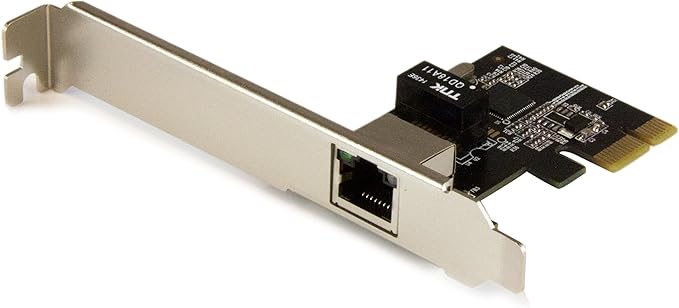
One-Port Gigabit Ethernet NIC with Intel I210 Chipset- PCIeBoost the performance and capabilities of your server or desktop computer by adding a Gigabit Ethernet port through a PCI Express slot. This GbE (Gigabit Ethernet) network card makes it easy to create a high-performance, cost-effective networking solution. The performance and reliability you demand in network connectivity This PCI Express Gigabit Ethernet card utilizes the Intel I210-AT chipset, delivering the power, performance and enhanced capabilities you need for dependable network connections to your server or computer. Compliant with IEEE 802.3/u/ab standards, the GbE network card provides an effective upgrade or replacement network port, with a maximum throughput of up to 1000Mbps in each direction (2000 Mbps total) - up to ten times faster than 10/100 Ethernet. The I210 chipset provides many advanced features to support load-balancing the flow of network traffic, to enhance throughput and provide greater data reliability. It also supports Audio-Video Bridging (AVB) to enable tightly controlled media stream synchronization, buffering and resource reservation. A versatile and cost-effective solution Compatible with a broad range of operating systems, this versatile PCIe Gigabit NIC is ideal for many business applications requiring servers or workstation upgrades. It’s a cost-effective way to upgrade your server or computer from a 10/100 Ethernet port to a Gigabit Ethernet port, or add an Ethernet port to take advantage of advanced features such as VLAN tagging, Jumbo Frames, Wake-On-LAN and Auto MDIX. Easy installation With a dual-profile design, the PCI Express network card installs easily into a wide range of computer/server chassis, regardless of form factor. The card comes equipped with a full-sized bracket, and includes a low-profile/half-height installation bracket that you can use as needed.
One-Port Gigabit Ethernet NIC with Intel I210 Chipset- PCIeBoost the performance and capabilities of your server or desktop computer by adding a Gigabit Ethernet port through a PCI Express slot. This GbE (Gigabit Ethernet) network card makes it easy to create a high-performance, cost-effective networking solution. The performance and reliability you demand in network connectivity This PCI Express Gigabit Ethernet card utilizes the Intel I210-AT chipset, delivering the power, performance and enhanced capabilities you need for dependable network connections to your server or computer. Compliant with IEEE 802.3/u/ab standards, the GbE network card provides an effective upgrade or replacement network port, with a maximum throughput of up to 1000Mbps in each direction (2000 Mbps total) - up to ten times faster than 10/100 Ethernet. The I210 chipset provides many advanced features to support load-balancing the flow of network traffic, to enhance throughput and provide greater data reliability. It also supports Audio-Video Bridging (AVB) to enable tightly controlled media stream synchronization, buffering and resource reservation. A versatile and cost-effective solution Compatible with a broad range of operating systems, this versatile PCIe Gigabit NIC is ideal for many business applications requiring servers or workstation upgrades. It’s a cost-effective way to upgrade your server or computer from a 10/100 Ethernet port to a Gigabit Ethernet port, or add an Ethernet port to take advantage of advanced features such as VLAN tagging, Jumbo Frames, Wake-On-LAN and Auto MDIX. Easy installation With a dual-profile design, the PCI Express network card installs easily into a wide range of computer/server chassis, regardless of form factor. The card comes equipped with a full-sized bracket, and includes a low-profile/half-height installation bracket that you can use as needed.
One-Port Gigabit Ethernet NIC with Intel I210 Chipset- PCIeBoost the performance and capabilities of your server or desktop computer by adding a Gigabit Ethernet port through a PCI Express slot. This GbE (Gigabit Ethernet) network card makes it easy to create a high-performance, cost-effective networking solution. The performance and reliability you demand in network connectivity This PCI Express Gigabit Ethernet card utilizes the Intel I210-AT chipset, delivering the power, performance and enhanced capabilities you need for dependable network connections to your server or computer. Compliant with IEEE 802.3/u/ab standards, the GbE network card provides an effective upgrade or replacement network port, with a maximum throughput of up to 1000Mbps in each direction (2000 Mbps total) - up to ten times faster than 10/100 Ethernet. The I210 chipset provides many advanced features to support load-balancing the flow of network traffic, to enhance throughput and provide greater data reliability. It also supports Audio-Video Bridging (AVB) to enable tightly controlled media stream synchronization, buffering and resource reservation. A versatile and cost-effective solution Compatible with a broad range of operating systems, this versatile PCIe Gigabit NIC is ideal for many business applications requiring servers or workstation upgrades. It’s a cost-effective way to upgrade your server or computer from a 10/100 Ethernet port to a Gigabit Ethernet port, or add an Ethernet port to take advantage of advanced features such as VLAN tagging, Jumbo Frames, Wake-On-LAN and Auto MDIX. Easy installation With a dual-profile design, the PCI Express network card installs easily into a wide range of computer/server chassis, regardless of form factor. The card comes equipped with a full-sized bracket, and includes a low-profile/half-height installation bracket that you can use as needed.
One-Port Gigabit Ethernet NIC with Intel I210 Chipset- PCIeBoost the performance and capabilities of your server or desktop computer by adding a Gigabit Ethernet port through a PCI Express slot. This GbE (Gigabit Ethernet) network card makes it easy to create a high-performance, cost-effective networking solution. The performance and reliability you demand in network connectivity This PCI Express Gigabit Ethernet card utilizes the Intel I210-AT chipset, delivering the power, performance and enhanced capabilities you need for dependable network connections to your server or computer. Compliant with IEEE 802.3/u/ab standards, the GbE network card provides an effective upgrade or replacement network port, with a maximum throughput of up to 1000Mbps in each direction (2000 Mbps total) - up to ten times faster than 10/100 Ethernet. The I210 chipset provides many advanced features to support load-balancing the flow of network traffic, to enhance throughput and provide greater data reliability. It also supports Audio-Video Bridging (AVB) to enable tightly controlled media stream synchronization, buffering and resource reservation. A versatile and cost-effective solution Compatible with a broad range of operating systems, this versatile PCIe Gigabit NIC is ideal for many business applications requiring servers or workstation upgrades. It’s a cost-effective way to upgrade your server or computer from a 10/100 Ethernet port to a Gigabit Ethernet port, or add an Ethernet port to take advantage of advanced features such as VLAN tagging, Jumbo Frames, Wake-On-LAN and Auto MDIX. Easy installation With a dual-profile design, the PCI Express network card installs easily into a wide range of computer/server chassis, regardless of form factor. The card comes equipped with a full-sized bracket, and includes a low-profile/half-height installation bracket that you can use as needed.
Last updated at 06/26/2026 23:47:52
StarTech.com 1 Port Gigabit Ethernet Network Card PCI Express Single Port PCIe Network Adapter Card
Affiliate Disclosure: We may receive a small commission for purchases made through this link at no extra cost to you. This helps support our site. Thank you!
StarTech One-Port Gigabit Ethernet NIC with Intel I210 Chipset- PCIe
Delivery between Tue – Fri $10
StarTech.com Intel I210 NIC - Gigabit Ethernet - Buy Online Australia
Delivery $25
StarTech 1-Port Gigabit Ethernet Network Card PCI Express Intel I210 Network Adapter
Free delivery between 30 June – 7 July
Startech ST1000spexi Internal Network Card, Intel I210-AT Chipset, 1000 Mbps Ethernet, PCI Express Slot
Delivery between Tue – Thu $12
StarTech.com ST1000SPEXI 1-Port Gigabit Ethernet Network Card - PCI Express, Intel I210 NIC
Delivery between 1–6 July $9
StarTech 1-Port Gigabit Ethernet Network Card - PCI Express, Intel I210 NIC ST1000SPEXI
Delivery $12.99
1-Port Gigabit Ethernet Network Card - PCI Express, Intel I210 NIC
1-Port Gigabit Ethernet Network Card - PCI Express, Intel I210 NIC
1-Port Gigabit Ethernet Network Card - PCI Express, Intel I210 NIC
originally posted on novatech.co.uk
Easy to install., works well
originally posted on pbtech.co.nz
The NIC did everything we needed it to do. The info from their website explaining how to download driver and install it was easy to follow and worked well.
originally posted on homeessentialsdirect.com
I have a lot of experience working with computer hardware so installation was simple. Find a compatible PCIe slot on your motherboard and plug in the device. The best advice I can give to people buying this network interface card (NIC) is to read the manual and take precautionary steps to prevent and electrostatic damage to the NIC (i.e. install the device in a proper environment and use an anti-static wrist strap). Also, it is important to understand how using this device in a PCIe slot on your motherboard will affect other PCIe-based components (see your motherboard documentation for that information, it will tell you what occurs when each PCIe slot is populated). After plugging in the device I installed the latest drivers from StarTech's website and then plugged ... MoreI have a lot of experience working with computer hardware so installation was simple. Find a compatible PCIe slot on your motherboard and plug in the device. The best advice I can give to people buying this network interface card (NIC) is to read the manual and take precautionary steps to prevent and electrostatic damage to the NIC (i.e. install the device in a proper environment and use an anti-static wrist strap). Also, it is important to understand how using this device in a PCIe slot on your motherboard will affect other PCIe-based components (see your motherboard documentation for that information, it will tell you what occurs when each PCIe slot is populated). After plugging in the device I installed the latest drivers from StarTech's website and then plugged in cat 6a cable to each port. The NIC worked immediately. I have been using the NIC for a week with no issues and my speed has been very consistent. I mainly bought this NIC for link aggregation which I will be implementing in the next few days (I'm waiting on the new router). Anyways, if you are someone looking to spend a moderate amount for 802.3ad (IEEE Link Aggregation) and you also want redundant and reliable Ethernet connections then buy this NIC. I'm very happy with it.
| General | |
| Device Type | Network adapter |
| Form Factor | Plug-in card - low profile |
| Interface (Bus) Type | PCI Express x1 |
| Networking |
StarTech.com 1 Port Gigabit Ethernet Network Card PCI Express Single Port PCIe Network Adapter Card
Affiliate Disclosure: We may receive a small commission for purchases made through this link at no extra cost to you. This helps support our site. Thank you!
StarTech One-Port Gigabit Ethernet NIC with Intel I210 Chipset- PCIe
Delivery between Tue – Fri $10
StarTech.com Intel I210 NIC - Gigabit Ethernet - Buy Online Australia
Delivery $25
StarTech 1-Port Gigabit Ethernet Network Card PCI Express Intel I210 Network Adapter
Free delivery between 30 June – 7 July
Startech ST1000spexi Internal Network Card, Intel I210-AT Chipset, 1000 Mbps Ethernet, PCI Express Slot
Delivery between Tue – Thu $12
Easy to install., works well
The NIC did everything we needed it to do. The info from their website explaining how to download driver and install it was easy to follow and worked well.
I have a lot of experience working with computer hardware so installation was simple. Find a compatible PCIe slot on your motherboard and plug in the device. The best advice I can give to people buying this network interface card (NIC) is to read the manual and take precautionary steps to prevent and electrostatic damage to the NIC (i.e. install the device in a proper environment and use an anti-static wrist strap). Also, it is important to understand how using this device in a PCIe slot on your motherboard will affect other PCIe-based components (see your motherboard documentation for that information, it will tell you what occurs when each PCIe slot is populated). After plugging in the device I installed the latest drivers from StarTech's website and then plugged ... MoreI have a lot of experience working with computer hardware so installation was simple. Find a compatible PCIe slot on your motherboard and plug in the device. The best advice I can give to people buying this network interface card (NIC) is to read the manual and take precautionary steps to prevent and electrostatic damage to the NIC (i.e. install the device in a proper environment and use an anti-static wrist strap). Also, it is important to understand how using this device in a PCIe slot on your motherboard will affect other PCIe-based components (see your motherboard documentation for that information, it will tell you what occurs when each PCIe slot is populated). After plugging in the device I installed the latest drivers from StarTech's website and then plugged in cat 6a cable to each port. The NIC worked immediately. I have been using the NIC for a week with no issues and my speed has been very consistent. I mainly bought this NIC for link aggregation which I will be implementing in the next few days (I'm waiting on the new router). Anyways, if you are someone looking to spend a moderate amount for 802.3ad (IEEE Link Aggregation) and you also want redundant and reliable Ethernet connections then buy this NIC. I'm very happy with it.
I use these in lieu of the Intel i350 cards. One of the things I particularly like is that the RJ45 holes aren't as close together as on the Intel NICs, which is easier on my fingers when removing cables on which the RJ45 anti-snag stuff has gotten itself stuck under the RJ45's plastic tab. I routinely push a lot of traffic at high rates through these with a Spirent box and have not noticed any driver, performance, or temperature problems.
If you're looking for an Intel NIC, I would stick with Intel, Supermicro, or some other reputable brand. Something is really odd about this one causing the above issues mentioned in Cons. Every boot would show "(A7) Me FW Downgrade - Request MeSpiLock Failed" and then something about HECI disabled. I even manually updated my IMEI firmware to the latest version for my platform but still was receiving this issue, nomatter what PCIe slot I installed it into. Perhaps the firmware on this card is too old or has some corners cut somewhere in the manufacturing and design. From what I understand, Intel products usually communicate with each other and something was incompatible with this card combined with my z97 chipset and haswell cpu but it might not just be limited to ... MoreIf you're looking for an Intel NIC, I would stick with Intel, Supermicro, or some other reputable brand. Something is really odd about this one causing the above issues mentioned in Cons. Every boot would show "(A7) Me FW Downgrade - Request MeSpiLock Failed" and then something about HECI disabled. I even manually updated my IMEI firmware to the latest version for my platform but still was receiving this issue, nomatter what PCIe slot I installed it into. Perhaps the firmware on this card is too old or has some corners cut somewhere in the manufacturing and design. From what I understand, Intel products usually communicate with each other and something was incompatible with this card combined with my z97 chipset and haswell cpu but it might not just be limited to these hardware configurations, could very well be a broken motherboard BIOS implementation too but until I know for sure, I can't recommend buying this unless you want to take a chance. I'll probably be buying an Intel brand of this i210 NIC and painting it black to match my system.
It does not fit the motherboard.
| General | |
| Device Type | Network adapter |
| Form Factor | Plug-in card - low profile |
| Interface (Bus) Type | PCI Express x1 |
| Networking |

