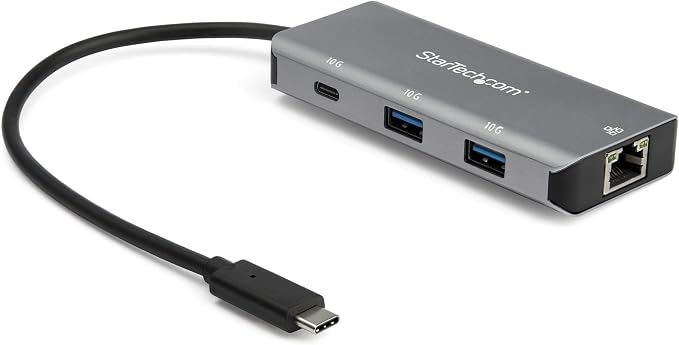
This bus-powered USB-C hub with 3 ports connects to the USB Type-C or Thunderbolt 3 port of your device, adding a LAN port, a USB-C port, and two USB-A ports, allowing you to quickly connect additional USB devices. For faster and more consistent network connections, the built-in Gigabit Ethernet port of the USB 3.1 Gen 2 hub provides wired network access that is fully compliant with IEEE 802.3/u/ab standards. The GbE port also supports Wake-on-LAN (WOL), enabling you to remotely wake your computer over your network. This compact and lightweight USB Type-C hub is a convenient and mobile addition to your laptop accessories. The USB-C cable is integrated, and the hub is bus-powered, meaning it draws power directly from the computer's USB-C port without the need for an external power supply. This results in fewer cables during your travels. The hub can draw up to 15 watts from the connected host and power multiple bus-powered devices simultaneously, with the total available power depending on the connected host. The extended attached cable of 25 cm provides more flexibility for distant devices, as well as plug-and-play installation. With ports for USB-C and USB-A peripherals, this hub is backward compatible and supports both older and newer USB devices. You can connect flash drives, video capture devices, and external hard drives with high data transfer rates of up to 10 Gbit/s. This USB Type-C hub provides you with the necessary connectivity options at work, thereby enhancing your productivity.
This bus-powered USB-C hub with 3 ports connects to the USB Type-C or Thunderbolt 3 port of your device, adding a LAN port, a USB-C port, and two USB-A ports, allowing you to quickly connect additional USB devices. For faster and more consistent network connections, the built-in Gigabit Ethernet port of the USB 3.1 Gen 2 hub provides wired network access that is fully compliant with IEEE 802.3/u/ab standards. The GbE port also supports Wake-on-LAN (WOL), enabling you to remotely wake your computer over your network. This compact and lightweight USB Type-C hub is a convenient and mobile addition to your laptop accessories. The USB-C cable is integrated, and the hub is bus-powered, meaning it draws power directly from the computer's USB-C port without the need for an external power supply. This results in fewer cables during your travels. The hub can draw up to 15 watts from the connected host and power multiple bus-powered devices simultaneously, with the total available power depending on the connected host. The extended attached cable of 25 cm provides more flexibility for distant devices, as well as plug-and-play installation. With ports for USB-C and USB-A peripherals, this hub is backward compatible and supports both older and newer USB devices. You can connect flash drives, video capture devices, and external hard drives with high data transfer rates of up to 10 Gbit/s. This USB Type-C hub provides you with the necessary connectivity options at work, thereby enhancing your productivity.
There are no live offers for StarTech 3 Port USB-C Hub With LAN Port - 10Gbps 2x USB-A & 1x USB-C right now. The all-time low we recorded was $79.42 on 27 Apr 2026. Set a price alert to hear when it's back in stock.
Prices last updated 4 Sept 2026.
StarTech 3 Port USB-C Hub With LAN Port - 10Gbps 2x USB-A & 1x USB-C
This bus-powered USB-C hub with 3 ports connects to the USB Type-C or Thunderbolt 3 port of your device, adding a LAN port, a USB-C port, and two USB-A ports, allowing you to quickly connect additional USB devices. For faster and more consistent network connections, the built-in Gigabit Ethernet port of the USB 3.1 Gen 2 hub provides wired network access that is fully compliant with IEEE 802.3/u/ab standards. The GbE port also supports Wake-on-LAN (WOL), enabling you to remotely wake your computer over your network. This compact and lightweight USB Type-C hub is a convenient and mobile addition to your laptop accessories. The USB-C cable is integrated, and the hub is bus-powered, meaning it draws power directly from the computer's USB-C port without the need for an external power supply. This results in fewer cables during your travels. The hub can draw up to 15 watts from the connected host and power multiple bus-powered devices simultaneously, with the total available power depending on the connected host. The extended attached cable of 25 cm provides more flexibility for distant devices, as well as plug-and-play installation. With ports for USB-C and USB-A peripherals, this hub is backward compatible and supports both older and newer USB devices. You can connect flash drives, video capture devices, and external hard drives with high data transfer rates of up to 10 Gbit/s. This USB Type-C hub provides you with the necessary connectivity options at work, thereby enhancing your productivity.
This bus-powered USB-C hub with 3 ports connects to the USB Type-C or Thunderbolt 3 port of your device, adding a LAN port, a USB-C port, and two USB-A ports, allowing you to quickly connect additional USB devices. For faster and more consistent network connections, the built-in Gigabit Ethernet port of the USB 3.1 Gen 2 hub provides wired network access that is fully compliant with IEEE 802.3/u/ab standards. The GbE port also supports Wake-on-LAN (WOL), enabling you to remotely wake your computer over your network. This compact and lightweight USB Type-C hub is a convenient and mobile addition to your laptop accessories. The USB-C cable is integrated, and the hub is bus-powered, meaning it draws power directly from the computer's USB-C port without the need for an external power supply. This results in fewer cables during your travels. The hub can draw up to 15 watts from the connected host and power multiple bus-powered devices simultaneously, with the total available power depending on the connected host. The extended attached cable of 25 cm provides more flexibility for distant devices, as well as plug-and-play installation. With ports for USB-C and USB-A peripherals, this hub is backward compatible and supports both older and newer USB devices. You can connect flash drives, video capture devices, and external hard drives with high data transfer rates of up to 10 Gbit/s. This USB Type-C hub provides you with the necessary connectivity options at work, thereby enhancing your productivity.
Last updated at 09/04/2026 02:37:33
StarTech USB 3.1 Gen 2 USB-C to 2xA + 1xC Hub with Gigabit ETH 3 Port Multiport Hub | 1x USB-C port, Jumbo Frames, VLAN Tagging, 15W shared power,
Affiliate Disclosure: We may receive a small commission for purchases made through this link at no extra cost to you. This helps support our site. Thank you!
3 Port USB C Hub with Gigabit Ethernet RJ45 GbE Port - 2x USB-A, 1x USB-C - SuperSpeed 10Gbps USB 3.2 Gen 2 Type C Hub Adapter - USB Bus Powered -
StarTech 3-Port USB-C Hub with GbE LAN Port
Free delivery between 7–14 Sept
StarTech 3-Port USB-C Hub with LAN Port, 10Gbps, 2x USB-A & 1x USB-C - HB31C2A1CGB
Delivery $12.99
Startech 3-Port USB-C Hub 10Gbps (2)USB-A And (1)USB-C
Delivery between 8–11 Sept $10
Startech 3-Port USB 3.2 Gen 2 Type-C Hub with Gigabit Ethernet Port, Black, Grey
Delivery between Mon – Wed $10
HB31C2A1CGB Startech.Com 3 Port USB-C Hub, USB-C(1), USB(2), RJ45, USB Bus Pwr, 2YR HB31C2A1CGB
Delivery between 9–11 Sept $15
Startech 3 Port USB C Hub with Gigabit Ethernet RJ45 GbE Port 2x USB-A 1x USB-C SuperSpeed 10Gbps USB 3.1 / 3.2 Gen 2 Type C Hub Adapter USB Bus
Delivery $16.50
StarTech 3 Port USB C Hub with Gigabit Ethernet RJ45 GbE Port
Delivery $9.90
StarTech 3-Port USB-C Hub with GbE LAN Port
originally posted on homeessentialsdirect.com
Decent quality, does the job as advertised, it gets a bit hot sometimes but nothing to worry about. Decent speeds, The cable could be better, it's a bit short. Verdict: overpriced but there is nothing else in the market if this is what you need.
originally posted on homeessentialsdirect.com
I did hear that cheaper units like this could possibly be an issue for the mac thunder bolt posts but only had a few drops.
originally posted on homeessentialsdirect.com
It is actually too lightweight for me and the power cord is way too short. When I connected my two SSD drives to it, they toppled it so I had to improvise ways to keep the drives and the hub from hanging by the cables. As far as speed, I'm not a "Techie" but they're plenty fast for me. I did attempt to use a 3.1 extension cable but that slowed my drives down to a crawl or caused one of them to not connect. I had to return that cable.
| General | |
| Device Type | Hub - 3 ports |
| Enclosure Type | Desktop |
| Subtype | USB |
| Ports | 1 x USB-C + 2 x USB 3.1 + 1 x 10/100/1000 |

StarTech USB 3.1 Gen 2 USB-C to 2xA + 1xC Hub with Gigabit ETH 3 Port Multiport Hub | 1x USB-C port, Jumbo Frames, VLAN Tagging, 15W shared power,
Affiliate Disclosure: We may receive a small commission for purchases made through this link at no extra cost to you. This helps support our site. Thank you!
3 Port USB C Hub with Gigabit Ethernet RJ45 GbE Port - 2x USB-A, 1x USB-C - SuperSpeed 10Gbps USB 3.2 Gen 2 Type C Hub Adapter - USB Bus Powered -
StarTech 3-Port USB-C Hub with GbE LAN Port
Free delivery between 7–14 Sept
StarTech 3-Port USB-C Hub with LAN Port, 10Gbps, 2x USB-A & 1x USB-C - HB31C2A1CGB
Delivery $12.99
Startech 3-Port USB-C Hub 10Gbps (2)USB-A And (1)USB-C
Delivery between 8–11 Sept $10
Decent quality, does the job as advertised, it gets a bit hot sometimes but nothing to worry about. Decent speeds, The cable could be better, it's a bit short. Verdict: overpriced but there is nothing else in the market if this is what you need.
I did hear that cheaper units like this could possibly be an issue for the mac thunder bolt posts but only had a few drops.
It is actually too lightweight for me and the power cord is way too short. When I connected my two SSD drives to it, they toppled it so I had to improvise ways to keep the drives and the hub from hanging by the cables. As far as speed, I'm not a "Techie" but they're plenty fast for me. I did attempt to use a 3.1 extension cable but that slowed my drives down to a crawl or caused one of them to not connect. I had to return that cable.
Item: StarTech.com 4 Port USB C Hub w/ 3x USB A & 1x USB C - SuperSpeed 10Gbps I have used this hub for a month with Gen2 10gbps USB3 to NVMe enclosures, Gen1 flash drives and with other simple mouse/keyboard devices, all with zero issues. This is not an externally powered hub, so don't expect to drive 4 high-powered device. 4 flash drives is fine. 4 NVMe SSDs, maybe not. Note the supplied upstream power. All output ports are Gen2/10gbps capable, even though the pastic in the port is blue, but labeling shows "10G" (nice). If you want Gen2/10gbps throughput, then the upstream connection must be a true Gen2/10gbps port (don't assume otherwise, look for "10"). I have also used the ST ext-powered hub as the upstream source and all worked well (but keep cable length ... MoreItem: StarTech.com 4 Port USB C Hub w/ 3x USB A & 1x USB C - SuperSpeed 10Gbps I have used this hub for a month with Gen2 10gbps USB3 to NVMe enclosures, Gen1 flash drives and with other simple mouse/keyboard devices, all with zero issues. This is not an externally powered hub, so don't expect to drive 4 high-powered device. 4 flash drives is fine. 4 NVMe SSDs, maybe not. Note the supplied upstream power. All output ports are Gen2/10gbps capable, even though the pastic in the port is blue, but labeling shows "10G" (nice). If you want Gen2/10gbps throughput, then the upstream connection must be a true Gen2/10gbps port (don't assume otherwise, look for "10"). I have also used the ST ext-powered hub as the upstream source and all worked well (but keep cable length shorter when chaining like this). 3ft (1M) from PC to the powered hub and 3ft out ofnthis hub, did work - 6ft (2M) on either of those will probably not work (most 6ft Gen2 simply and sadly don't operate reliably at Gen2/10gbps speeds). Many Gen2 cables > 3ft have issues. Some Gen2 cables
Running 4 10TB USB hard drives from Western Digital and Seagate. Had to buy a USB-C to USB 3.1 Micro cable to utilize the 4th port (USB-C) on this hub. But through this hub I can write to at least 3 of the drives SIMULTANEOUSLY at their full potential write speed, with no slowdowns whatsoever. Not sure what the read limitations might be, but since I use these drives to backup 6K raw video that comes in on ultra-fast USB SSDs (attached to a separate 10Gbps USB port from the one the hub is plugged into) I'm quite happy.
StarTech model HB31C3A1CB. 3 x USB-A ports, 1 x USB-C ports. All ports are marked "10G" for 10Gbps USB 3.1 (gen 2.) Plugged in to my MacBook running OS X 10.14.6. No drivers needed, no warning messages. Direct plug-and-play. Plugged in one of my 500GB Samsung SSD drives (which itself uses a StarTech USB-C / 2.5" SATA data-power adapter cable.) In my initial testing of file transfer & access speeds, the StarTech 4-port USB 3.1 Gen 2 adapter allows full read/write speed. I am waiting on a few additional drives & USB-A adapter cables to arrive. After they do I will update this review with notes on the stability & speed of transfers between multiple drives attached to the StarTech 4-port USB adapter. It would be nice to have a small amber or green (not blue) indicator ... MoreStarTech model HB31C3A1CB. 3 x USB-A ports, 1 x USB-C ports. All ports are marked "10G" for 10Gbps USB 3.1 (gen 2.) Plugged in to my MacBook running OS X 10.14.6. No drivers needed, no warning messages. Direct plug-and-play. Plugged in one of my 500GB Samsung SSD drives (which itself uses a StarTech USB-C / 2.5" SATA data-power adapter cable.) In my initial testing of file transfer & access speeds, the StarTech 4-port USB 3.1 Gen 2 adapter allows full read/write speed. I am waiting on a few additional drives & USB-A adapter cables to arrive. After they do I will update this review with notes on the stability & speed of transfers between multiple drives attached to the StarTech 4-port USB adapter. It would be nice to have a small amber or green (not blue) indicator light somewhere on the device to give a visible indication that it is powered on.
There doesn't seem to be much thought put behind the design of this product, and that doesn't serve customers well. First, the connecting cord is way too short. On many PCs, the USB-C port is at the rear of the box. The length of this cord barely clears enough distance to allow it to rest on the top of the case. I guess the product designers never actually used their product in real life. Secondly, the USB-C cord should have been removable and a second USB-C-to-USB-A cord should have been included. Many PCs only have a single USB-C port, but multiple USB-A Gen 3.2 ports. This product removes the USB-C port out of play, yet doesn't provide on in the actual hub. You'd think someone would use what they sell??
| General | |
| Device Type | Hub - 3 ports |
| Enclosure Type | Desktop |
| Subtype | USB |
| Ports | 1 x USB-C + 2 x USB 3.1 + 1 x 10/100/1000 |


