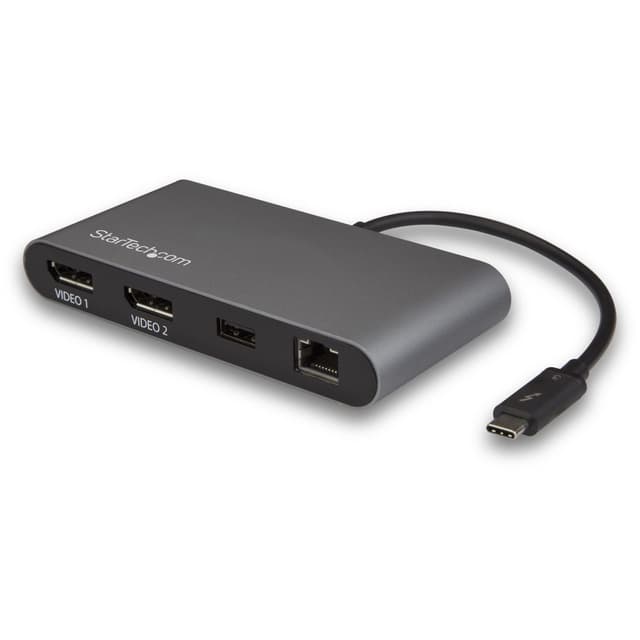
With the bus-powered Thunderbolt 3 docking station, you can connect to dual-4K DisplayPort displays, Gigabit Ethernet and a USB 3.0 (Type-A) port. Compatible with MacOS and Windows, it's the ideal accessory for your Thunderbolt 3 laptop. The connected USB C cable has an extended length of 20 cm. This dual-display port docking station with 40 Gbps throughput is ideal for 4K video editing or other Ultra-HD tasks. It supports 4K resolution at 60Hz on two DisplayPort screens via a single Thunderbolt 3 connector.
With the bus-powered Thunderbolt 3 docking station, you can connect to dual-4K DisplayPort displays, Gigabit Ethernet and a USB 3.0 (Type-A) port. Compatible with MacOS and Windows, it's the ideal accessory for your Thunderbolt 3 laptop. The connected USB C cable has an extended length of 20 cm. This dual-display port docking station with 40 Gbps throughput is ideal for 4K video editing or other Ultra-HD tasks. It supports 4K resolution at 60Hz on two DisplayPort screens via a single Thunderbolt 3 connector.
With the bus-powered Thunderbolt 3 docking station, you can connect to dual-4K DisplayPort displays, Gigabit Ethernet and a USB 3.0 (Type-A) port. Compatible with MacOS and Windows, it's the ideal accessory for your Thunderbolt 3 laptop. The connected USB C cable has an extended length of 20 cm. This dual-display port docking station with 40 Gbps throughput is ideal for 4K video editing or other Ultra-HD tasks. It supports 4K resolution at 60Hz on two DisplayPort screens via a single Thunderbolt 3 connector.
With the bus-powered Thunderbolt 3 docking station, you can connect to dual-4K DisplayPort displays, Gigabit Ethernet and a USB 3.0 (Type-A) port. Compatible with MacOS and Windows, it's the ideal accessory for your Thunderbolt 3 laptop. The connected USB C cable has an extended length of 20 cm. This dual-display port docking station with 40 Gbps throughput is ideal for 4K video editing or other Ultra-HD tasks. It supports 4K resolution at 60Hz on two DisplayPort screens via a single Thunderbolt 3 connector.
Last updated at 08/03/2026 13:58:01
StarTech.com Dual 4K Monitor Mini Thunderbolt 3 Dock with DisplayPort - Mac & Windows Docking Station - Discontinued, Limited Stock, & Replaced by
Affiliate Disclosure: We may receive a small commission for purchases made through this link at no extra cost to you. This helps support our site. Thank you!
StarTech Driverless Thunderbolt 3 Dual 4K 60Hz DisplayPort Mini Dock, GbE
Delivery between 9–12 Aug $29
Startech Thunderbolt 3 Dual Displayport Docking Station 4k 60hz
Delivery $33.05
Affiliate Disclosure: We may receive a small commission for purchases made through this link at no extra cost to you. This helps support our site. Thank you!
Startech Dual 4k Monitor Mini Thunderbolt 3 Dock With Displayport
Free delivery
Affiliate Disclosure: We may receive a small commission for purchases made through this link at no extra cost to you. This helps support our site. Thank you!
Dual 4K Monitor Mini Thunderbolt 3 Dock with DisplayPort - Mac & Windows Docking Station - Discontinued, Limited Stock, & Replaced by TB3DKM2DPL (
Dual 4K Monitor Mini Thunderbolt 3 Dock with DisplayPort - Mac & Windows Docking Station - Discontinued, Limited Stock, & Replaced by TB3DKM2DPL (
StarTech TB3DKM2DP Dock Mini - Thunderbolt 3 Dual 4K 60Hz
Delivery between Wed – Mon $14.50
originally posted on startech.com
I have been in the AV/IT Integration space for over 30 years.I found this unit easy to setup and use on my Microsoft and Apple devices. This unit is bus-powered, so there is no external power required, which is a great feature. The attached USB-C cable has an extended length of approximately 8 inches, which allows for flexibility in physical set up. The unit installs quickly and is compatible with a variety of operating systems, which I tested.What is Included:1 - Thunderbolt 3 Dock1 - Instruction ManualNote: “I received this product in exchange for an unbiased review.”
originally posted on startech.com
Keep in mind, that this is TB-3. This is *NOT* TB-2 or USB-C.OK, the negative first: The built-in cable is WAY too short and not removable.Now to the good stuff!This thing is FAST. It just worked on my Macbook. Even driving dual-4k, transferring data via USB, and network, nothing seemed to slow down at all.It took some dings in my field bag, and got some dust and fuzz in there, but it never stopped working. Keep some of that "non-slide" shelf-liner with you and this little lightweight dock won't slide around either (being that light is a plus in my book!)I received this product in exchange for an unbiased review.
originally posted on homeessentialsdirect.com
I have a Lenovo Yoga with 2 Thunderbolt 3 ports, and this is very helpful for typing, as my laptop does not have a full keyboard. It worked great out of the box. The only 2 issues I have. If my laptop goes to sleep and I wake it up, one the monitors scrambles and I have to plug and unplug the HDMI cable to get it to reset to normal. I also had an ethernet cable get stuck in the jack on this, and was seriously worried about breaking the cable or the dock getting it removed. In fairness, these issues could be related to my computer graphics card or the ethernet cable. This is ideal for me. I do wish there was a USB-C port on the dock as I have some USB-C peripherals that would be nice to plug into the dock.
| General | |
| Product Type | Docking station |
| Width | 6 cm |
| Depth | 12 cm |
| Height | 1.88 cm |
StarTech.com Dual 4K Monitor Mini Thunderbolt 3 Dock with DisplayPort - Mac & Windows Docking Station - Discontinued, Limited Stock, & Replaced by
Affiliate Disclosure: We may receive a small commission for purchases made through this link at no extra cost to you. This helps support our site. Thank you!
StarTech Driverless Thunderbolt 3 Dual 4K 60Hz DisplayPort Mini Dock, GbE
Delivery between 9–12 Aug $29
Startech Thunderbolt 3 Dual Displayport Docking Station 4k 60hz
Delivery $33.05
Affiliate Disclosure: We may receive a small commission for purchases made through this link at no extra cost to you. This helps support our site. Thank you!
Startech Dual 4k Monitor Mini Thunderbolt 3 Dock With Displayport
Free delivery
Affiliate Disclosure: We may receive a small commission for purchases made through this link at no extra cost to you. This helps support our site. Thank you!
Dual 4K Monitor Mini Thunderbolt 3 Dock with DisplayPort - Mac & Windows Docking Station - Discontinued, Limited Stock, & Replaced by TB3DKM2DPL (
I have been in the AV/IT Integration space for over 30 years.I found this unit easy to setup and use on my Microsoft and Apple devices. This unit is bus-powered, so there is no external power required, which is a great feature. The attached USB-C cable has an extended length of approximately 8 inches, which allows for flexibility in physical set up. The unit installs quickly and is compatible with a variety of operating systems, which I tested.What is Included:1 - Thunderbolt 3 Dock1 - Instruction ManualNote: “I received this product in exchange for an unbiased review.”
Keep in mind, that this is TB-3. This is *NOT* TB-2 or USB-C.OK, the negative first: The built-in cable is WAY too short and not removable.Now to the good stuff!This thing is FAST. It just worked on my Macbook. Even driving dual-4k, transferring data via USB, and network, nothing seemed to slow down at all.It took some dings in my field bag, and got some dust and fuzz in there, but it never stopped working. Keep some of that "non-slide" shelf-liner with you and this little lightweight dock won't slide around either (being that light is a plus in my book!)I received this product in exchange for an unbiased review.
I have a Lenovo Yoga with 2 Thunderbolt 3 ports, and this is very helpful for typing, as my laptop does not have a full keyboard. It worked great out of the box. The only 2 issues I have. If my laptop goes to sleep and I wake it up, one the monitors scrambles and I have to plug and unplug the HDMI cable to get it to reset to normal. I also had an ethernet cable get stuck in the jack on this, and was seriously worried about breaking the cable or the dock getting it removed. In fairness, these issues could be related to my computer graphics card or the ethernet cable. This is ideal for me. I do wish there was a USB-C port on the dock as I have some USB-C peripherals that would be nice to plug into the dock.
Loving this hub as it allows me to extend my desktop across three monitors, use the USB 3.0 port, and use wired ethernet, all at the same time on my Lenovo Yoga 920. Better yet, it's small enough to carry with the laptop. Its not super light, but not too heavy either, about right for what it does. It does get warm (I'll never have cold coffee again), but not unexpectedly so given how much high performance electronics are stuffed into the small space. I did have to download and install the Win10 drivers before anything other than the wired ethernet would work. It would have been nice if that hadn't been necessary like the instructions said it wouldn't, but that doesn't affect my rating since they were easy to find and install from the Startech website. Sadly, I only ... MoreLoving this hub as it allows me to extend my desktop across three monitors, use the USB 3.0 port, and use wired ethernet, all at the same time on my Lenovo Yoga 920. Better yet, it's small enough to carry with the laptop. Its not super light, but not too heavy either, about right for what it does. It does get warm (I'll never have cold coffee again), but not unexpectedly so given how much high performance electronics are stuffed into the small space. I did have to download and install the Win10 drivers before anything other than the wired ethernet would work. It would have been nice if that hadn't been necessary like the instructions said it wouldn't, but that doesn't affect my rating since they were easy to find and install from the Startech website. Sadly, I only have HD monitors, so can't verify that it works with two 4k ones all the way to 60 Hz -- someone else will have to review that aspect.
The hub drains the battery much faster when this hub is connected. Based on the time remaining estimates provided by the Activity Monitor the battery is max 8 hours with in plugged in versus 18+ hours without it plugged in. The only thing plugged in to the hub is an Apple keyboard.
This product generally works as expected and I've rarely had any issues except for one that unfortunately crops up daily. I have my MacBook Pro connected to two external monitors but have to disconnect many times a day when I take the laptop to meetings. Upon returning to my desk and reconnecting the dock, the screens may switch (left screen is now the right screen). It happens at least 50% of the time and I have go to my display settings to re-arrange them. I can't isolate what causes it and I think it's just a race situation. Whichever display the dock recognizes first is just assigned a random placement. Frustrating productivity killer.
I bought this product for use with a Mac.It has poor mac support - the displays turn on /off intermittently and now the dock will not pass through any video from them at all. 1/5.
I bought this dock to use with my 2018 MacBook Pro 15", specifically for the dual DisplayPorts to connect my two 24" ViewSonic monitors. The Monitors work perfectly with my Windows 10 notebook using the DisplayPort to DVI cables. But, I can't get the MacBook to detect either one of the monitors through either DisplayPort on the dock. The USB port, and ethernet port, on the dock work flawlessly. It's definitely fast. I just wish the DisplayPorts worked.
I had nothing but good things to say about this Thunderbolt Dock until i update my MacBook Pro to MacOS Ventura. Since the Ventura update it will not support dual monitors no matter the resolution I try. I can get 1 monitor to work off it, but if I plug in 2 monitors, both stop working. The purpose I purchased this Docking Port for was so I could connect dual displays to my MacBook Pro as well as hardwired networking. I gave this product 2 stars because of the issues i've been having since I upgraded to MacOS Ventura. Prior to me upgrading to Ventura, I would have given it 5 stars.
Been using it for 6 months without issue, with a 2018 15" MacBook Pro.Not likely related to this product, but I found that I had to connect my third monitor on the other side of the MacBook, while using a USB-C to HDMI adapter. Might be a limitation of the MacBook that I haven't found documented anywhere else, for the number of displays it can output per side of the laptop.
| General | |
| Product Type | Docking station |
| Width | 6 cm |
| Depth | 12 cm |
| Height | 1.88 cm |

