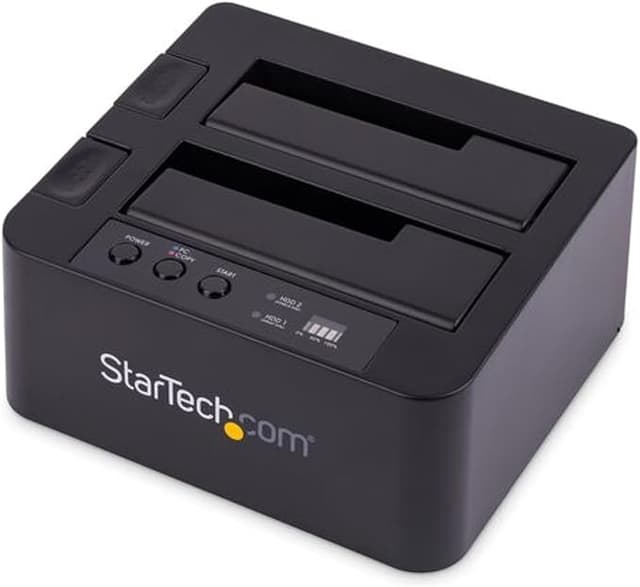
The Universal Docking Station for Hard Drives USB 3.0 with UASP enables you to instantly access your 2.5 or 3.5 IDE and SATA hard drives through two top loading drive slots, saving you the hassle of mounting the drives into a computer or external enclosure or tray. Enhanced with UASP (USB Attached SCSI Protocol), this hard drive docking station lets you get the most out of the fastest drive technologies such as SATA 6b/s, solid state drives and hybrid drives with performance up to 70 percent faster than conventional USB 3.0 when paired with a UASP-enabled host controller. The slot-loading design holds the SATA and IDE drives upright inside the docks, neatly keeping them off the desk, for convenience and a clutter-free setup. For SATA drives, the hard drive can be inserted and connected directly through the designated dock slot, while the IDE drive slot is conveniently positioned near the rear panel 40-pin data and LP4 power connections, making it easy to connect to the dock using the included IDE data and power cables.A single USB 3.0 connection to your host computer, enables access to both the IDE and SATA hard drives simultaneously - a convenient solution for migrating data from an IDE drive to a SATA drive or vice versa. The dock can also be used to greatly increase the storage and backup capabilities of your computer system with support for high capacity drives (tested with up to 6TB 3.5 and 2TB 2.5 drives).
The Universal Docking Station for Hard Drives USB 3.0 with UASP enables you to instantly access your 2.5 or 3.5 IDE and SATA hard drives through two top loading drive slots, saving you the hassle of mounting the drives into a computer or external enclosure or tray. Enhanced with UASP (USB Attached SCSI Protocol), this hard drive docking station lets you get the most out of the fastest drive technologies such as SATA 6b/s, solid state drives and hybrid drives with performance up to 70 percent faster than conventional USB 3.0 when paired with a UASP-enabled host controller. The slot-loading design holds the SATA and IDE drives upright inside the docks, neatly keeping them off the desk, for convenience and a clutter-free setup. For SATA drives, the hard drive can be inserted and connected directly through the designated dock slot, while the IDE drive slot is conveniently positioned near the rear panel 40-pin data and LP4 power connections, making it easy to connect to the dock using the included IDE data and power cables.A single USB 3.0 connection to your host computer, enables access to both the IDE and SATA hard drives simultaneously - a convenient solution for migrating data from an IDE drive to a SATA drive or vice versa. The dock can also be used to greatly increase the storage and backup capabilities of your computer system with support for high capacity drives (tested with up to 6TB 3.5 and 2TB 2.5 drives).
The Universal Docking Station for Hard Drives USB 3.0 with UASP enables you to instantly access your 2.5 or 3.5 IDE and SATA hard drives through two top loading drive slots, saving you the hassle of mounting the drives into a computer or external enclosure or tray. Enhanced with UASP (USB Attached SCSI Protocol), this hard drive docking station lets you get the most out of the fastest drive technologies such as SATA 6b/s, solid state drives and hybrid drives with performance up to 70 percent faster than conventional USB 3.0 when paired with a UASP-enabled host controller. The slot-loading design holds the SATA and IDE drives upright inside the docks, neatly keeping them off the desk, for convenience and a clutter-free setup. For SATA drives, the hard drive can be inserted and connected directly through the designated dock slot, while the IDE drive slot is conveniently positioned near the rear panel 40-pin data and LP4 power connections, making it easy to connect to the dock using the included IDE data and power cables.A single USB 3.0 connection to your host computer, enables access to both the IDE and SATA hard drives simultaneously - a convenient solution for migrating data from an IDE drive to a SATA drive or vice versa. The dock can also be used to greatly increase the storage and backup capabilities of your computer system with support for high capacity drives (tested with up to 6TB 3.5 and 2TB 2.5 drives).
The Universal Docking Station for Hard Drives USB 3.0 with UASP enables you to instantly access your 2.5 or 3.5 IDE and SATA hard drives through two top loading drive slots, saving you the hassle of mounting the drives into a computer or external enclosure or tray. Enhanced with UASP (USB Attached SCSI Protocol), this hard drive docking station lets you get the most out of the fastest drive technologies such as SATA 6b/s, solid state drives and hybrid drives with performance up to 70 percent faster than conventional USB 3.0 when paired with a UASP-enabled host controller. The slot-loading design holds the SATA and IDE drives upright inside the docks, neatly keeping them off the desk, for convenience and a clutter-free setup. For SATA drives, the hard drive can be inserted and connected directly through the designated dock slot, while the IDE drive slot is conveniently positioned near the rear panel 40-pin data and LP4 power connections, making it easy to connect to the dock using the included IDE data and power cables.A single USB 3.0 connection to your host computer, enables access to both the IDE and SATA hard drives simultaneously - a convenient solution for migrating data from an IDE drive to a SATA drive or vice versa. The dock can also be used to greatly increase the storage and backup capabilities of your computer system with support for high capacity drives (tested with up to 6TB 3.5 and 2TB 2.5 drives).
Last updated at 03/21/2026 15:00:39
Star Tech USB 3.0 Universal Docking Station Stand for 2.5/3.5" HDD Hard Drives
Delivery $10
Star Tech USB 3.0 Universal Docking Station Stand for 2.5/3.5" HDD Hard Drives
Free delivery
Star Tech USB 3.0 Universal Docking Station Stand for 2.5/3.5" HDD Hard Drives
Free delivery between Wed – Sat
StarTech.com Universal Hard Drive Docking Station 2.5 and 3.5 Inches HDD and SSD with UASP and SATA III (UNIDOCKU33)
Affiliate Disclosure: We may receive a small commission for purchases made through this link at no extra cost to you. This helps support our site. Thank you!
StarTech USB 3.0 universal HDD Dock, 2.5/3.5in SATA & IDE, UASP - UNIDOCKU33
Delivery $12.99
Startech Unidocku33 Storage Drive Docking Station USB 3.2 Gen 1 Type-B Black, Supports 2.5/3.5in IDE and SATA Hard Drives, UASP Technology for Fast
Delivery between Tue – Thu $13.50
Startech USB 3.0 universal Hard Drive Dock - 2.5/3.5in SATA & IDE - UASP
Delivery between 25–30 Mar $9.95
StarTech UNIDOCKU33, Universal hard drive docking station - SATA and IDE dock - 2.5in & 3.5in HDD and SSD docking station with UASP & SATA III - SATA
Delivery between 24 Mar – 3 Apr $14.99
Startech Usb 3.0 Dual Hard Drive Docking Station#65030856928
Delivery $39.32
[UNIDOCKU33] StarTech STARTECH.COM UNIVERSAL Dock FOR 2.5/35IN SATA & IDE HDD - USB 3.0 WITH UASP 2YR
7-day returns
originally posted on homeessentialsdirect.com
Bottom line is this dock does what it says it will do, allow you to transfer data between SATA dn IDE drives. What is not so clear from the write ups though is that it does not allow you do transfer between two SATA drives. This is a one to one transfer capability only, one SATA and one IDE drive. Other than that, plugged it in, set the drives in place and off we went. simply and easily. Remember if you are looking for that SATA to SATA handling then this is not the dock for you.
originally posted on bhphotovideo.com
Works great. No issues so far. HDD's easily fit, however they can be moved back and forth since it's not perfectly snug. But that is not a problem because if you're moving these around while in use, then you need to read Hard Drives for Dummies. No speed problems and it works on multiple platforms easily. I use this for backing up data and an external drives for my Xbox 360.
originally posted on homeessentialsdirect.com
I had every hard drive that I have ever had in a box with the intention that someday I would add them to a new computer to copy all of my artwork and written music. Never happened until I brazenly type in USB harddrive Dock. Lo and behold this unit appeared first. Kind of funny because even though I worked in the IT industry I never knew they existed and when I described what I wanted to do to another techie they would scrunch up their nose and say that such a beast does not exist. This worked perfectly without any computer complaints or error messages.
| General | |
| Device Type | Storage controller - external |
| Hard Drive Form Factor Compatibility | 2.5", 3.5" |
| Host Bus | USB 3.0 |
| Product Material | Plastic |
Star Tech USB 3.0 Universal Docking Station Stand for 2.5/3.5" HDD Hard Drives
Delivery $10
Star Tech USB 3.0 Universal Docking Station Stand for 2.5/3.5" HDD Hard Drives
Free delivery
Star Tech USB 3.0 Universal Docking Station Stand for 2.5/3.5" HDD Hard Drives
Free delivery between Wed – Sat
StarTech.com Universal Hard Drive Docking Station 2.5 and 3.5 Inches HDD and SSD with UASP and SATA III (UNIDOCKU33)
Affiliate Disclosure: We may receive a small commission for purchases made through this link at no extra cost to you. This helps support our site. Thank you!
StarTech USB 3.0 universal HDD Dock, 2.5/3.5in SATA & IDE, UASP - UNIDOCKU33
Delivery $12.99
Bottom line is this dock does what it says it will do, allow you to transfer data between SATA dn IDE drives. What is not so clear from the write ups though is that it does not allow you do transfer between two SATA drives. This is a one to one transfer capability only, one SATA and one IDE drive. Other than that, plugged it in, set the drives in place and off we went. simply and easily. Remember if you are looking for that SATA to SATA handling then this is not the dock for you.
Works great. No issues so far. HDD's easily fit, however they can be moved back and forth since it's not perfectly snug. But that is not a problem because if you're moving these around while in use, then you need to read Hard Drives for Dummies. No speed problems and it works on multiple platforms easily. I use this for backing up data and an external drives for my Xbox 360.
I had every hard drive that I have ever had in a box with the intention that someday I would add them to a new computer to copy all of my artwork and written music. Never happened until I brazenly type in USB harddrive Dock. Lo and behold this unit appeared first. Kind of funny because even though I worked in the IT industry I never knew they existed and when I described what I wanted to do to another techie they would scrunch up their nose and say that such a beast does not exist. This worked perfectly without any computer complaints or error messages.
I purchased the StarTech docking station so I could wipe some old hard drives. I had both a SATA and ATI drives and was able to mount both types easily. The procedure worked great. I have 1 more old SATA drive and I'm considering using the docking station as a backup device. Easy setup and easy use. I don't use it all the time, but I'm glad I have it.
The description is not clear. I thought the second slot can be both SATA/IDE. Turns out it only accept IDE. For a product that charge $100+ I expect it's a bit too much
Pros: Does the required job wellCons: Advert makes it look like you just drop all hard drives straight in, but back slot requires cables to be connected to drive and back off dock
Well firstly, as stated above, this isn't actually a two-drive dock! Or at least if you're thinking it's a dock that can accept two SATA drives in addition to an IDE drive, since it looks like that, you will be sorely mistaken. Rather, it's a dock that slots one drive and cradles a second while you use an ide cable to access it--two VERY different things. The second "slot" just has a foam pad at the bottom. Talk about misleading! Beyond this, the functional parts that DO exist are in a sorry state. It's incapable of passing serial numbers and general SMART info to the host computer; of all the drives tested with the device, the results were the same: crystaldiskinfo couldn't read anything, and seatools (all drives tested were seagates) could only see the serial ... MoreWell firstly, as stated above, this isn't actually a two-drive dock! Or at least if you're thinking it's a dock that can accept two SATA drives in addition to an IDE drive, since it looks like that, you will be sorely mistaken. Rather, it's a dock that slots one drive and cradles a second while you use an ide cable to access it--two VERY different things. The second "slot" just has a foam pad at the bottom. Talk about misleading! Beyond this, the functional parts that DO exist are in a sorry state. It's incapable of passing serial numbers and general SMART info to the host computer; of all the drives tested with the device, the results were the same: crystaldiskinfo couldn't read anything, and seatools (all drives tested were seagates) could only see the serial numbers as a string of 0s. What's more, the device conked out once during drive initialization, and in general was very reluctant to actually surface the connected devices to windows. Buy something else.
Startech all the way. I picked one of these up several months back on sale to upgrade my older Startech USB 2.0 cloning station (mostly used as a docking station). I had originally tried some other brand (had the opaque plastic door/cover that closes over the HDD) and it just didn't work at all. I used this Startech unit recently to clone a 2TB storage HDD to a 3TB HDD (converted to GPT of course). The 2TB was 1/4 full; it only took 1.5 hours to move everything to the larger drive, which was MUCH faster than my previous setup. Startech is true plug-and-play unlike some of the other brands. I've never had an issue with Startech equipment, and have never had a failure. I still use the old cloner connected to my router for my NAS. Although pricey compared to the other ... MoreStartech all the way. I picked one of these up several months back on sale to upgrade my older Startech USB 2.0 cloning station (mostly used as a docking station). I had originally tried some other brand (had the opaque plastic door/cover that closes over the HDD) and it just didn't work at all. I used this Startech unit recently to clone a 2TB storage HDD to a 3TB HDD (converted to GPT of course). The 2TB was 1/4 full; it only took 1.5 hours to move everything to the larger drive, which was MUCH faster than my previous setup. Startech is true plug-and-play unlike some of the other brands. I've never had an issue with Startech equipment, and have never had a failure. I still use the old cloner connected to my router for my NAS. Although pricey compared to the other setups, it was still worth it. You can't go wrong.
The second slot on the top has nothing in it. Even though it APPEARS on the photos to be usable. It is not. You can hook up 1 sata drive... And one IDE Drive. Thats it. 1 Of each. Im not sure why it HAD to have the second slot lol. Im guessing they just re-used the case from the other model to save money. For the record though... Its that one slot from being a great product. Hoping I can find one I can still use for cloning Sata drives, but includes an IDE interface as well. This works for the one project I needed it for... Otherwise I dont know what Im going to do with it hahahahaha.
Well, I have been thinking about this type of device for a while, but didn't know one existed. You see, I was an early adopter with home PC's, so needless to say I have a lot of old hard drives around the house. At one point I had my old stuff on a backup drive, but foolishly I striped the drives, so when one crashed I lost that data. Fast forward to this device. Took a few tries to get the drive jumpers arranged so it worked, but once it did, it worked well. Would recommend for anyone (like me) with old hard drives lying around who want access to the data without the hassle of installing into the PC.
| General | |
| Device Type | Storage controller - external |
| Hard Drive Form Factor Compatibility | 2.5", 3.5" |
| Host Bus | USB 3.0 |
| Product Material | Plastic |

