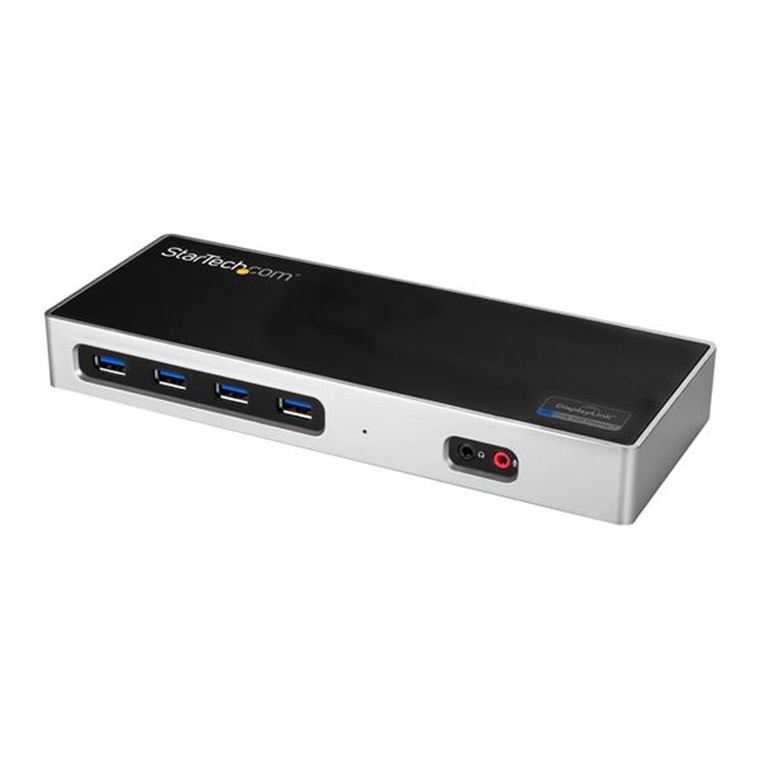
The Startech DK30A2DH Black USB Hub Dockstation provides seamless connectivity for your devices, transforming your workspace into a powerful hub. With its sleek black design, this dock supports dual-display setups and allows you to connect multiple peripherals easily. Featuring USB 3.0 ports for high-speed data transfer, HDMI outputs for stunning visuals, and an Ethernet port for reliable internet access, it's designed for the modern professional. Upgrade your productivity today with the Startech DK30A2DH dock.
The Startech DK30A2DH Black USB Hub Dockstation provides seamless connectivity for your devices, transforming your workspace into a powerful hub. With its sleek black design, this dock supports dual-display setups and allows you to connect multiple peripherals easily. Featuring USB 3.0 ports for high-speed data transfer, HDMI outputs for stunning visuals, and an Ethernet port for reliable internet access, it's designed for the modern professional. Upgrade your productivity today with the Startech DK30A2DH dock.
The Startech DK30A2DH Black USB Hub Dockstation provides seamless connectivity for your devices, transforming your workspace into a powerful hub. With its sleek black design, this dock supports dual-display setups and allows you to connect multiple peripherals easily. Featuring USB 3.0 ports for high-speed data transfer, HDMI outputs for stunning visuals, and an Ethernet port for reliable internet access, it's designed for the modern professional. Upgrade your productivity today with the Startech DK30A2DH dock.
The Startech DK30A2DH Black USB Hub Dockstation provides seamless connectivity for your devices, transforming your workspace into a powerful hub. With its sleek black design, this dock supports dual-display setups and allows you to connect multiple peripherals easily. Featuring USB 3.0 ports for high-speed data transfer, HDMI outputs for stunning visuals, and an Ethernet port for reliable internet access, it's designed for the modern professional. Upgrade your productivity today with the Startech DK30A2DH dock.
Last updated at 03/21/2026 11:58:35
StarTech DK30A2DH Dual Monitor 4K USB-C Docking Station
Free delivery
StarTech Dual 4K Dock - Mac and Windows (DK30A2DH)
Free delivery
USB-C & USB-A Dock - Dual Monitor 4K 60Hz Dock DisplayPort + HDMI - Hybrid USB 3.0 Docking Station for USB-C/USB-A Laptops - 6x USB Type-A, GbE - USB
Free delivery between 31 Mar – 3 Apr
StarTech.com USB-C & USB-A Dock - Dual Monitor 4K 60Hz Dock DisplayPort + HDMI - Hybrid USB 3.0 Docking Station For USB-C/USB-A Laptops - 6x USB
Delivery $28.38
StarTech.com DK30A2DH USB-C & USB3.0 Dual 4K Mobile Dock 2x DP - 2x HDMI - 1x
Free delivery
StarTech.com DK30A2DH USB-C & USB3.0 Dual 4K Mobile Dock 2x DP - 2x HDMI - 1x USB-C - 6x USB3.2 - Support Apple / Chrome / Microsoft Windows - 3Y Warr
Delivery between 26–31 Mar $9
StarTech.com USB-C & USB-A Dock - Dual Monitor 4K 60Hz Dock DisplayPort + HDMI - Hybrid USB 3.0 Docking Station for USB-C/USB-A Laptops - 6X USB Type-
Affiliate Disclosure: We may receive a small commission for purchases made through this link at no extra cost to you. This helps support our site. Thank you!
StarTech.com USB-C & USB
Startech Usb-c & Usb-a Dock - Dual Monitor Hdm/dp 4k 60hz Dock
Delivery $16.65
Affiliate Disclosure: We may receive a small commission for purchases made through this link at no extra cost to you. This helps support our site. Thank you!
StarTech Dual 4K Dock, Mac and Windows, USB-A & USB-C, DP & HDMI - DK30A2DH
Delivery $12.99
originally posted on pbtech.co.nz
Yes, it works for a DUAL SCREEN dock for the Apple M1 unit due to the DisplayLink technology inside. Any dock without this DL technology is unlikely to work with an M1. I got that information directly from the StarTech customer services team.But no, it doesn't deliver power as an 'all in one solution'. So really good, but not great for the lack of power delivery.Overall happy with this purchase.
originally posted on startech.com
I bought this docking station last week and connected it today. Its working perfectly with 2 additional screens and the available usb ports are enough.The only disappointing part is the power adapter supplied with it. As it is a universal version you have to apply the EU, JP, UK or ANZ part yourself. The EU adapter doesn´t connect perfectly and because of this the power is failing several times in a power-strip. It would be beter to deliver a regular EU power adapter as I now have to fix it with additional tape/tie-rip to keep it on its place. Because of this it would not recommend the docking to others.
originally posted on startech.com
This is a great docking station for people who want simple and easy connection. This dock is well built and has just enough weight to it to sit firmly on the desk with cables as to not move around too much. I have tried similar docks from other manufactures and this one tends to stay in one place better. I like the simplicity of a simple connection of usb-c or usb 3.0.I had no issues with hookup to my windows based laptop and found everything worked as planned. The monitor resolution and image was great when used and I could see no artifacting at all. I appreciate the ethernet port as so many laptops are dropping this feature but in the office having a solid hard wired connection is always a nice addition.Overall the quality is excellent.I received this product ... MoreThis is a great docking station for people who want simple and easy connection. This dock is well built and has just enough weight to it to sit firmly on the desk with cables as to not move around too much. I have tried similar docks from other manufactures and this one tends to stay in one place better. I like the simplicity of a simple connection of usb-c or usb 3.0.I had no issues with hookup to my windows based laptop and found everything worked as planned. The monitor resolution and image was great when used and I could see no artifacting at all. I appreciate the ethernet port as so many laptops are dropping this feature but in the office having a solid hard wired connection is always a nice addition.Overall the quality is excellent.I received this product in exchange for an unbiased review
| General | |
| Product Type | Docking station |
| Width | 8.34 cm |
| Depth | 22.39 cm |
| Height | 2.71 cm |
StarTech DK30A2DH Dual Monitor 4K USB-C Docking Station
Free delivery
StarTech Dual 4K Dock - Mac and Windows (DK30A2DH)
Free delivery
USB-C & USB-A Dock - Dual Monitor 4K 60Hz Dock DisplayPort + HDMI - Hybrid USB 3.0 Docking Station for USB-C/USB-A Laptops - 6x USB Type-A, GbE - USB
Free delivery between 31 Mar – 3 Apr
StarTech.com USB-C & USB-A Dock - Dual Monitor 4K 60Hz Dock DisplayPort + HDMI - Hybrid USB 3.0 Docking Station For USB-C/USB-A Laptops - 6x USB
Delivery $28.38
StarTech.com DK30A2DH USB-C & USB3.0 Dual 4K Mobile Dock 2x DP - 2x HDMI - 1x
Free delivery
Yes, it works for a DUAL SCREEN dock for the Apple M1 unit due to the DisplayLink technology inside. Any dock without this DL technology is unlikely to work with an M1. I got that information directly from the StarTech customer services team.But no, it doesn't deliver power as an 'all in one solution'. So really good, but not great for the lack of power delivery.Overall happy with this purchase.
I bought this docking station last week and connected it today. Its working perfectly with 2 additional screens and the available usb ports are enough.The only disappointing part is the power adapter supplied with it. As it is a universal version you have to apply the EU, JP, UK or ANZ part yourself. The EU adapter doesn´t connect perfectly and because of this the power is failing several times in a power-strip. It would be beter to deliver a regular EU power adapter as I now have to fix it with additional tape/tie-rip to keep it on its place. Because of this it would not recommend the docking to others.
This is a great docking station for people who want simple and easy connection. This dock is well built and has just enough weight to it to sit firmly on the desk with cables as to not move around too much. I have tried similar docks from other manufactures and this one tends to stay in one place better. I like the simplicity of a simple connection of usb-c or usb 3.0.I had no issues with hookup to my windows based laptop and found everything worked as planned. The monitor resolution and image was great when used and I could see no artifacting at all. I appreciate the ethernet port as so many laptops are dropping this feature but in the office having a solid hard wired connection is always a nice addition.Overall the quality is excellent.I received this product ... MoreThis is a great docking station for people who want simple and easy connection. This dock is well built and has just enough weight to it to sit firmly on the desk with cables as to not move around too much. I have tried similar docks from other manufactures and this one tends to stay in one place better. I like the simplicity of a simple connection of usb-c or usb 3.0.I had no issues with hookup to my windows based laptop and found everything worked as planned. The monitor resolution and image was great when used and I could see no artifacting at all. I appreciate the ethernet port as so many laptops are dropping this feature but in the office having a solid hard wired connection is always a nice addition.Overall the quality is excellent.I received this product in exchange for an unbiased review
Small, lots of ports, sturdy, and worked without me doing anything on both my Dell (Windows), and Macbook. If it worked with Linux, had an extra USB-C port, and delivered power over USB-C, it would be the perfect dock for me!C'mon guys... I need to add an extra USB-C adapter to get power to the Macbook using this dock? Add a second, power-delivering port, and call it a day!Other than power, my only complaint is that the USB-C port that it does have, for connecting a laptop, is on the back. Since I have to switch cables to connect my laptops, and I "mount" my docks towards the back of the desk with other devices in a stack, having to reach behind and swap cables is annoying. If I had this dock on a shared desk, I'd hear about it from the users!Anyway, on to the ... MoreSmall, lots of ports, sturdy, and worked without me doing anything on both my Dell (Windows), and Macbook. If it worked with Linux, had an extra USB-C port, and delivered power over USB-C, it would be the perfect dock for me!C'mon guys... I need to add an extra USB-C adapter to get power to the Macbook using this dock? Add a second, power-delivering port, and call it a day!Other than power, my only complaint is that the USB-C port that it does have, for connecting a laptop, is on the back. Since I have to switch cables to connect my laptops, and I "mount" my docks towards the back of the desk with other devices in a stack, having to reach behind and swap cables is annoying. If I had this dock on a shared desk, I'd hear about it from the users!Anyway, on to the positive.... Small, sturdy, LOTS of ports (compared to my other USB3 and TB3 docks!), and fast throughput. Connected three different laptops in total, and no driver pause or installs for me (maybe I already have the DisplayLink drivers from before?). Video is flawless at full resolution, I've played games, done some Blender and Photoshop stuff....So now this dock is part of the mounted stack on my desk! If it delivered power, I'd probably take my TB3 dock out since this works just fine with my Macbook now, and HAS MORE PORTS!!! :)
First off, this is an excellent product that supported all the non-display accessories I use. The shortcoming is with the DisplayLink driver. Turns out that the driver for Mac does not support clamshell mode. I could work around that. The show stopper for me is that HDCP will not play thru the dock with the current driver, no iTunes purchase video will play thru to the monitors.
After some running around, I assumed all dual monitors would be able to extend from an M1 to two screens. Actually without the DisplayLink technology in this model, no other dock will offer dual but only offer a single extended display. After advice from the StarTech team online, I went ahead with this purchase. I am happy to say it works on my M1 Apple Macbook Air 2020 model. The only downside is this unit does not power the laptop like other models do. So it's only 4 stars due to the fact power is the missing component in this setup.
This is a really versatile docking station. Depending on what monitors you have, you invariably have to look at adapters for something or other, or you are tied to only using one device. This dock lets you connect different host machines (USB 3.0 or USB-C) to a wide variety of monitors. I was impressed with the 4 USB 3.0 ports in the front, I thought all these ports would make it look crowded, but it’s very slick and everything works. I can go between my 2 laptops and connect to everything I need. This would be a great option for Hoteling stations, where people don’t all have the same hardware. Setup is very easy and every Win10 machine I’ve connected finds all the drivers quickly and efficiently.I received this product in exchange for an unbiased review
The product itself works for 2 monitors with 2019 Mac Book Pro, no issues there. What I do not like is the fact that the product description is a bit mis-leading or maybe the description is not fully descriptive. You would think that if you have to plug in the hub that the hub would provide power to the laptop or at the least provide power to the usb ports. It does not provide power to anything. These two things are leading me to return the unit and look for another solution. Paying almost 200 dollars for a bunch of useless USB ports and a power pack that runs the little blue led on the front of the unit????
I have tested this dock using several laptops both with the USB-A and USB-C connections. Each time it took a while to install but performed great afterwards.The dock comes in a box about half the size of a breakfast cereal box lengthwise. The dock is made out of plastic but looks very premium and could be mistaken for metal before touching it. The dock has 6 USB ports, 2 HDMI, 2 DVI, 1 Network and Mic/Speaker ports for audio. To use the dock you need to plug it in using the supplied AC adaptor and have the power switch turned on. The port to connect to a computer is a USB-C port and it comes with both a USB-C to USB-A cable and a USB-C to USB-C cable.When I fist connected this dock to a new computer using USB-C nothing seemed to happen. I waited a bit for ... MoreI have tested this dock using several laptops both with the USB-A and USB-C connections. Each time it took a while to install but performed great afterwards.The dock comes in a box about half the size of a breakfast cereal box lengthwise. The dock is made out of plastic but looks very premium and could be mistaken for metal before touching it. The dock has 6 USB ports, 2 HDMI, 2 DVI, 1 Network and Mic/Speaker ports for audio. To use the dock you need to plug it in using the supplied AC adaptor and have the power switch turned on. The port to connect to a computer is a USB-C port and it comes with both a USB-C to USB-A cable and a USB-C to USB-C cable.When I fist connected this dock to a new computer using USB-C nothing seemed to happen. I waited a bit for installations to occur but none went. After trying a few things, I found that I needed to have my laptop already connected to the internet, then on next connection it downloaded all necessary drivers and was working within minutes. On a different older computer using USB-A cable, I got a message "USB device not recognized". After waiting a couple minutes for the computer to download and install all drivers, it was working without any issues. The displays are very fast through the dock and during my testing I never noticed any lag or choppiness from the displays. Connecting the dock after everything was setup was quick and simple, although I still get the USB error when it's connected but everything seems to work without any issues. This dock is not a Thunderbolt dock so it will not charge your laptop and will install a new USB video card for display output. The computer will need to be connected to power for charging with a separate cable.Little rocky installation but once it got going it works really great. It has lots of ports and performs quickly. I received this product in exchange for an unbiased review.
I've had this docking station for a while now and I can't seem to get through a full day (even a few hours) of work without it disconnecting the video. About a third of the time when I plug it into my computer (2018 MBP) it doesn't recognize the USB keyboard. I have to either disconnect and reconnect, or turn the docking station off and on again. I've tried updating firmware and DisplayLink drivers on my Mac but nothing has helped. My (much less expensive) docking station in my home office does not have these issues, so I know it's not my computer. It's frustrating that I can't get this to just work the way it's advertised...
| General | |
| Product Type | Docking station |
| Width | 8.34 cm |
| Depth | 22.39 cm |
| Height | 2.71 cm |

