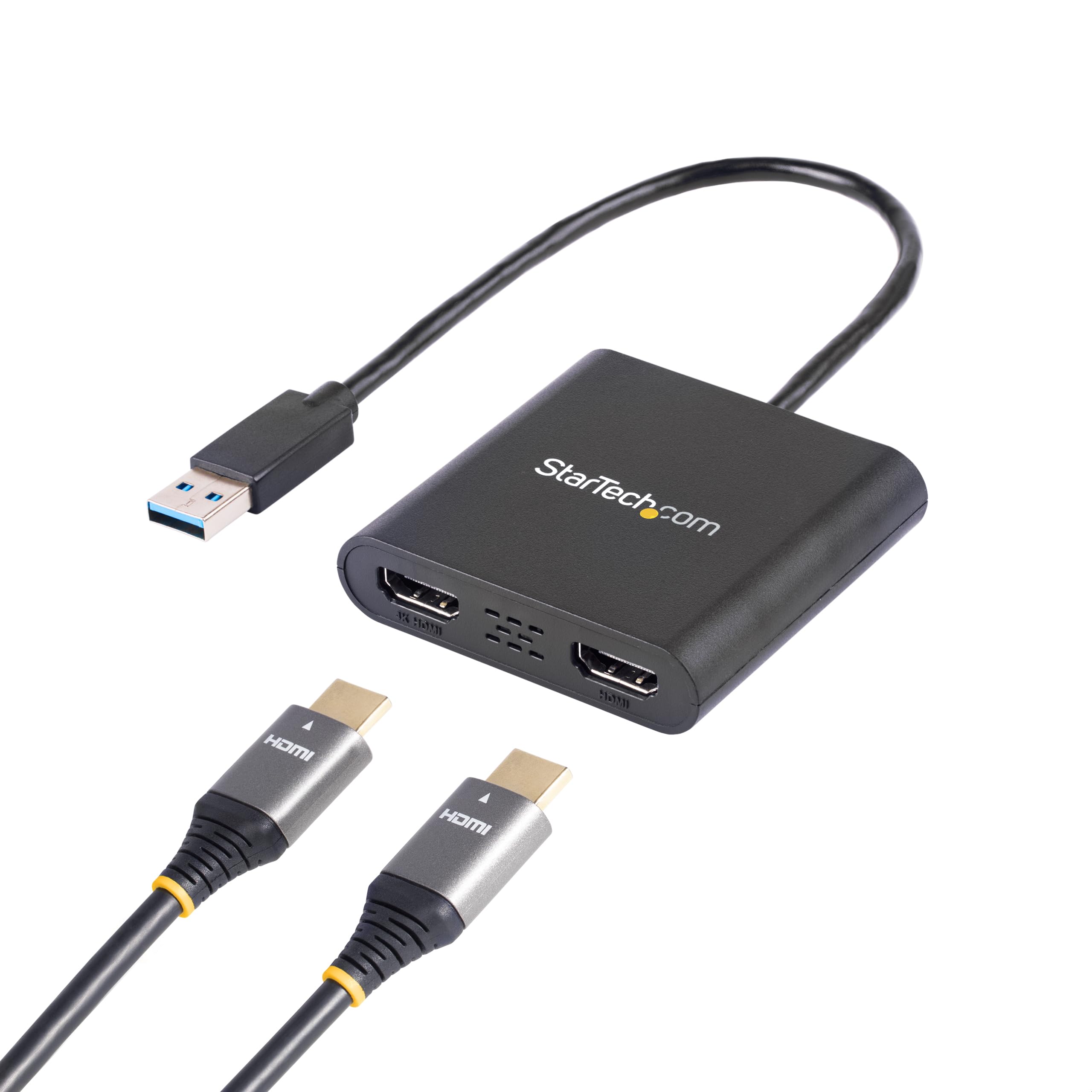
Experience high-quality video and audio with the Startech USB 3.0 to HDMI Adapter. This USB32HD2 model allows you to connect your laptop or desktop computer to an HDMI display for stunning visuals. With its sleek black design, this adapter is not only functional but also stylish. Easily extend your desktop or mirror your screen for presentations, gaming, or watching movies. Compatible with a range of operating systems, this plug-and-play adapter offers a hassle-free setup for an enhanced viewing experience.
Experience high-quality video and audio with the Startech USB 3.0 to HDMI Adapter. This USB32HD2 model allows you to connect your laptop or desktop computer to an HDMI display for stunning visuals. With its sleek black design, this adapter is not only functional but also stylish. Easily extend your desktop or mirror your screen for presentations, gaming, or watching movies. Compatible with a range of operating systems, this plug-and-play adapter offers a hassle-free setup for an enhanced viewing experience.
Experience high-quality video and audio with the Startech USB 3.0 to HDMI Adapter. This USB32HD2 model allows you to connect your laptop or desktop computer to an HDMI display for stunning visuals. With its sleek black design, this adapter is not only functional but also stylish. Easily extend your desktop or mirror your screen for presentations, gaming, or watching movies. Compatible with a range of operating systems, this plug-and-play adapter offers a hassle-free setup for an enhanced viewing experience.
Experience high-quality video and audio with the Startech USB 3.0 to HDMI Adapter. This USB32HD2 model allows you to connect your laptop or desktop computer to an HDMI display for stunning visuals. With its sleek black design, this adapter is not only functional but also stylish. Easily extend your desktop or mirror your screen for presentations, gaming, or watching movies. Compatible with a range of operating systems, this plug-and-play adapter offers a hassle-free setup for an enhanced viewing experience.
Last updated at 07/30/2026 20:38:45
StarTech.com USB 3.0 to Dual HDMI Adapter - 1x 4K 30Hz & 1x 1080p - External Video & Graphics Card - USB Type-A to HDMI Dual Monitor Display Adapter -
Affiliate Disclosure: We may receive a small commission for purchases made through this link at no extra cost to you. This helps support our site. Thank you!
StarTech USB32HD2 USB to Dual HDMI Adapter - 4K
Delivery between 3–7 Aug $14.50
Startech USB 3.0 to Dual HDMI Adapter - 1x 4K 30hz & 1x 1080p - External Video & Graphics Card - USB Type-a to HDMI Dual Monitor Display Adapter for
Delivery between Mon – Wed $10
StarTech USB 3.0 to Dual HDMI Adapter USB32HD2 HDMI USB Adapter
Free delivery between 3–10 Aug
StarTech USB32HD2 USB 3.0 to Dual HDMI Adapter - 1x 4K 30Hz & 1x 1080p - External Video & Graphics Card - USB Type-A to HDMI Dual Monitor Display
Free delivery between Sat – Tue
StarTech.com USB32HD2 USB to HDMI Adapter - USB to Dual HDMI Adapter - USB3.0 to [USB32HD2]
Delivery $10
Star Tech USB 3.0 To Dual HDMI Adapter 4K x 2K/30Hz BLK For PC/Monitor/Laptop
Free delivery between Sat – Tue
StarTech USB32HD2 USB 3.0 to Dual HDMI Adapter - 1x 4K 30Hz & 1x 1080p - External Video & Graphics Card - USB Type-A to HDMI Dual Monitor Display
Delivery between 2–10 Aug $10
StarTech USB 3.0 to Dual HDMI Adapter
Delivery $10
Startech USB 3.0 to Dual HDMI Adapter - 4K 30Hz
Delivery between Mon – Thu $11.64
originally posted on pbtech.co.nz
This converter will do the job without any additional power.After the software is installed in the backend, it may take a few minutes to load the screen for the very first time. After that, it will immediately connect to the screens.If you have issues connecting the screen, just restart your workstation.Synced with Surface Pro 4 as well, but text results weren't good, but work well with a laptop.
originally posted on pbtech.co.nz
i didn't think i would need it for this lockdown but after all these weeks working on a small laptop with 1 good sized monitor wasn't doing the job. i am thankful i was able to get this so quickly so i could hook up both monitors... but now i'm thinking about getting a proper monitor instead of using the tv lol. we shall see if i cave in. it does what i need it to do - i have the laptop and 2 bigger monitors now linked (only using the laptop coz of the webcam). easy to use, just plug the hdmi cords in and boom! it's working perfect. i didn't want to use the work hub coz that means travelling to the office to get it. why do that when i can continue to use this gadget so the value is def. there - worth the money paid.
originally posted on startech.com
I have used this USB to HDMI adaptor with several computers and it always connects and works well.The adaptor comes in a box about the size of three DVD cases. The adaptor's size is slightly smaller than the palm of my hand. The cable coming out is about a foot long and very flexible. It comes with instructions but I don't think they are needed as you just have to plug it in to start using it.When I connect this device to a new computer it takes about 30 seconds to detect, install and start working. Future connections only take seconds before it is working.The response time is very quick for the display and I can't notice any lagging. Only one port works with 4K, but I can use both ports with 1080p displays. I like the fact that I can connect this to any ... MoreI have used this USB to HDMI adaptor with several computers and it always connects and works well.The adaptor comes in a box about the size of three DVD cases. The adaptor's size is slightly smaller than the palm of my hand. The cable coming out is about a foot long and very flexible. It comes with instructions but I don't think they are needed as you just have to plug it in to start using it.When I connect this device to a new computer it takes about 30 seconds to detect, install and start working. Future connections only take seconds before it is working.The response time is very quick for the display and I can't notice any lagging. Only one port works with 4K, but I can use both ports with 1080p displays. I like the fact that I can connect this to any computer and I don't have to worry about what type of video out port the computer has.This adaptor works consistently well and quickly. I received this product in exchange for an unbiased review.
| General | |
| Cable Type | Adapter cable 4K30Hz (3840 x 2160) support |
| Interface Supported | HDMI / USB |
| Compliant Standards | USB 3.0 |
| Length | 25 cm |
StarTech.com USB 3.0 to Dual HDMI Adapter - 1x 4K 30Hz & 1x 1080p - External Video & Graphics Card - USB Type-A to HDMI Dual Monitor Display Adapter -
Affiliate Disclosure: We may receive a small commission for purchases made through this link at no extra cost to you. This helps support our site. Thank you!
StarTech USB32HD2 USB to Dual HDMI Adapter - 4K
Delivery between 3–7 Aug $14.50
Startech USB 3.0 to Dual HDMI Adapter - 1x 4K 30hz & 1x 1080p - External Video & Graphics Card - USB Type-a to HDMI Dual Monitor Display Adapter for
Delivery between Mon – Wed $10
StarTech USB 3.0 to Dual HDMI Adapter USB32HD2 HDMI USB Adapter
Free delivery between 3–10 Aug
StarTech USB32HD2 USB 3.0 to Dual HDMI Adapter - 1x 4K 30Hz & 1x 1080p - External Video & Graphics Card - USB Type-A to HDMI Dual Monitor Display
Free delivery between Sat – Tue
This converter will do the job without any additional power.After the software is installed in the backend, it may take a few minutes to load the screen for the very first time. After that, it will immediately connect to the screens.If you have issues connecting the screen, just restart your workstation.Synced with Surface Pro 4 as well, but text results weren't good, but work well with a laptop.
i didn't think i would need it for this lockdown but after all these weeks working on a small laptop with 1 good sized monitor wasn't doing the job. i am thankful i was able to get this so quickly so i could hook up both monitors... but now i'm thinking about getting a proper monitor instead of using the tv lol. we shall see if i cave in. it does what i need it to do - i have the laptop and 2 bigger monitors now linked (only using the laptop coz of the webcam). easy to use, just plug the hdmi cords in and boom! it's working perfect. i didn't want to use the work hub coz that means travelling to the office to get it. why do that when i can continue to use this gadget so the value is def. there - worth the money paid.
I have used this USB to HDMI adaptor with several computers and it always connects and works well.The adaptor comes in a box about the size of three DVD cases. The adaptor's size is slightly smaller than the palm of my hand. The cable coming out is about a foot long and very flexible. It comes with instructions but I don't think they are needed as you just have to plug it in to start using it.When I connect this device to a new computer it takes about 30 seconds to detect, install and start working. Future connections only take seconds before it is working.The response time is very quick for the display and I can't notice any lagging. Only one port works with 4K, but I can use both ports with 1080p displays. I like the fact that I can connect this to any ... MoreI have used this USB to HDMI adaptor with several computers and it always connects and works well.The adaptor comes in a box about the size of three DVD cases. The adaptor's size is slightly smaller than the palm of my hand. The cable coming out is about a foot long and very flexible. It comes with instructions but I don't think they are needed as you just have to plug it in to start using it.When I connect this device to a new computer it takes about 30 seconds to detect, install and start working. Future connections only take seconds before it is working.The response time is very quick for the display and I can't notice any lagging. Only one port works with 4K, but I can use both ports with 1080p displays. I like the fact that I can connect this to any computer and I don't have to worry about what type of video out port the computer has.This adaptor works consistently well and quickly. I received this product in exchange for an unbiased review.
I needed something that would allow me to connect an additional monitor to my Lenovo Ideapad 530S. It has an existing HDMI port but I needed two external monitors. This little device did the trick! It installed flawlessly and the additional monitor was recognized with no issues what so ever. Great product, fair price. Would purchase again in a heartbeat. Kudos to Startech support that assisted me with the product selection. The tech was very knowledgeable and pointed me in the right direction. Use Case: This is for my wife's computer and she just needed additional real estate for desktop applications (word processing, browsing, zoom meetings, etc.) She's not a gamer or streamer so I can't attest to the performance if put under heavy load.
Seems like one of the two ports on the original item was defective. It would pixelate the picture. Reseated cables and it went away for 24 hours, but then it was back. Switching the monitors in the ports moved it to the other screen, so it is not the cable or the monitor. Switched USB ports on the computer, still there. Used a different computer, still there. So definitely defective device. This seems to be a recurring theme with StarTech products.
I like this a lot when it works. As others have noted in their reviews, it suffers from three problems that happen intermittently. 1. Second monitor does not wake up from sleep. Only option is to unplug device from USB (or use bat file that one review provided) 2. Audio gets switched to HDMI. Really seems to confuse up my Skype sessions. 3. Second monitor will just freeze. Image remains on the screen but will not refresh. Again only option is to unplug device from USB. It is really simple to use and works great, when it works. If they can work out the issues I am getting then it would be a 5 star product.
My laptop only has 1 HDMI port, which meant that I could only add a single additional monitor. I needed a USB adapter to add a second external monitor. This little device did the trick. Now I have 3 monitors (including the built-in monitor) and after some adjusting in Windows 10, I have 3 monitors that I can scroll across continuously left to right and have multiple windows open. This is huge when I am working in Excel, PowerPoint and Chrome at the same time. I can even stream videos and music from YouTube and work on the other screens. Very good product. Simple to use by downloading some software and following the instructions. Takes just 5 minutes or so.
My laptop has HDMI output and could not find a splitter to extend to two monitors. I called StarTech support and this gentleman (Harish) guided me to the right product after some technical questions. AND, now not even using the HDMI just one of the USB ports! Very clear communications with these guys.
I have been in the AV/IT Integration space for over 30 years.I found this unit easy to setup and use. This unit lets you add two independent HDMI displays to your computer using a single USB 3.0 port. Both displays I connected had exceptional picture quality, without tearing or pixalization during fast motion video. This unit provides smoother scrolling, higher resolutions and better overall performance than other USB adapters I have tested.What is Included:1 - USB Video Adapter1- Quick Start GuideNote: “I received this product in exchange for an unbiased review.”
| General | |
| Cable Type | Adapter cable 4K30Hz (3840 x 2160) support |
| Interface Supported | HDMI / USB |
| Compliant Standards | USB 3.0 |
| Length | 25 cm |

