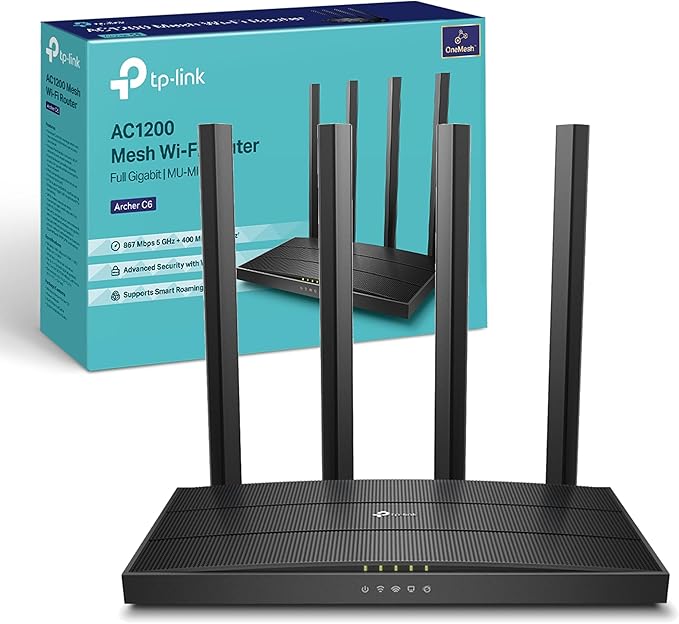
The Archer C6 creates a reliable and blazing-fast network powered by 802.11ac Wi-Fi technology. The 2.4GHz band delivers speeds up to 300Mbps, ready for everyday tasks like emailing and web browsing, while the 5GHz band delivers speeds up to 867Mbps, ideal for HD video streaming and lag-free online gaming. Create a Mesh network by connecting one or more OneMesh? ó range extenders to your Archer C6 for seamless whole-home coverage. One Gigabit WAN port and four Gigabit LAN ports deliver speeds up to 10x faster than standard Ethernet connections. Let every member of your family simultaneously enjoy high-speed network on their phones, tablets and laptops.
The Archer C6 creates a reliable and blazing-fast network powered by 802.11ac Wi-Fi technology. The 2.4GHz band delivers speeds up to 300Mbps, ready for everyday tasks like emailing and web browsing, while the 5GHz band delivers speeds up to 867Mbps, ideal for HD video streaming and lag-free online gaming. Create a Mesh network by connecting one or more OneMesh? ó range extenders to your Archer C6 for seamless whole-home coverage. One Gigabit WAN port and four Gigabit LAN ports deliver speeds up to 10x faster than standard Ethernet connections. Let every member of your family simultaneously enjoy high-speed network on their phones, tablets and laptops.
The Archer C6 creates a reliable and blazing-fast network powered by 802.11ac Wi-Fi technology. The 2.4GHz band delivers speeds up to 300Mbps, ready for everyday tasks like emailing and web browsing, while the 5GHz band delivers speeds up to 867Mbps, ideal for HD video streaming and lag-free online gaming. Create a Mesh network by connecting one or more OneMesh? ó range extenders to your Archer C6 for seamless whole-home coverage. One Gigabit WAN port and four Gigabit LAN ports deliver speeds up to 10x faster than standard Ethernet connections. Let every member of your family simultaneously enjoy high-speed network on their phones, tablets and laptops.
The Archer C6 creates a reliable and blazing-fast network powered by 802.11ac Wi-Fi technology. The 2.4GHz band delivers speeds up to 300Mbps, ready for everyday tasks like emailing and web browsing, while the 5GHz band delivers speeds up to 867Mbps, ideal for HD video streaming and lag-free online gaming. Create a Mesh network by connecting one or more OneMesh? ó range extenders to your Archer C6 for seamless whole-home coverage. One Gigabit WAN port and four Gigabit LAN ports deliver speeds up to 10x faster than standard Ethernet connections. Let every member of your family simultaneously enjoy high-speed network on their phones, tablets and laptops.
Last updated at 07/19/2026 10:57:32
Router TP-LINK Archer C6 dual band AC1200 Wi-Fi 1x GWAN 4x GLAN MU-MIMO 4x fiksne antene
Delivery $8.18
Tp-link Archer C6 Router Ver. 2 1200mbps Mu-mimo
Delivery $94.56
Affiliate Disclosure: We may receive a small commission for purchases made through this link at no extra cost to you. This helps support our site. Thank you!
Archer AC1200 Archer C6 Wi-Fi Speed Up to 867 Mbps/5 GHz + 400Mbps/2.4 GHz, 5 Gigabit Ports, 4 External Antennas, MU-MIMO, Dual Band, WiFi Coverage wi
Free delivery between 28–31 July
originally posted on croma.com
The new version 4.0 of C6 router has good range and fantastic speed. I am using the 5 ghz band almost like 33 ft away with 2 brick walls in between and speedtest check is giving 125 mbps of download speed and similar on upload. My rated internet bandwidth is 125 Mbps and the latency is like 45ms. My isp is Alliance in Bidhannagar area. When sitting close to the router I am getting almost 140 mbps download speed during night time speed test. Excellent experience so far
originally posted on microcenter.com
I actually got this router as an exchange for a more popular brand name, won't get into details but the routers cost the same at the time.I really like the TP LINK router because my original purchase I was looking for VPN support which the previous claimed but didn't actually support. I have a completely detailed home network, server, static IP's ect. Being able to VPN to my home network give me all the internal access on the go. This router FULLY supports PPTP and OpenVPN.As well a feature I didn't expect is integration into NOIP which I happen to have already been using for years.About 2 weeks into owning the unit I have had no problems relating to disconnects and connectivity issues that I experienced with the returned router.Other things I'm interested ... MoreI actually got this router as an exchange for a more popular brand name, won't get into details but the routers cost the same at the time.I really like the TP LINK router because my original purchase I was looking for VPN support which the previous claimed but didn't actually support. I have a completely detailed home network, server, static IP's ect. Being able to VPN to my home network give me all the internal access on the go. This router FULLY supports PPTP and OpenVPN.As well a feature I didn't expect is integration into NOIP which I happen to have already been using for years.About 2 weeks into owning the unit I have had no problems relating to disconnects and connectivity issues that I experienced with the returned router.Other things I'm interested in using eventually is their implementation of their OneMesh (whole house expanders.)
originally posted on bestbuy.com
The setup was relatively straightforward, and the router seems to work reasonably well. The user interface web page is a bit "dumbed down" and with fewer options than my old D-Link router (DIR-655). But it has the capabilities that I need, including the ability to put the MAC addresses of my devices into a whitelist so that only my devices are allowed to connect. I did not attempt to measure the actual bandwidth of my connections, but they seem more than adequate for my modest needs, and higher than my old router. It also seems to boot-up a bit faster than my old router.I have only 2 minor gripes, though I was aware of them before I purchased it. (1) the antennas are not removable, so I could not replace them with longer, higher-gain antennas. But the signal ... MoreThe setup was relatively straightforward, and the router seems to work reasonably well. The user interface web page is a bit "dumbed down" and with fewer options than my old D-Link router (DIR-655). But it has the capabilities that I need, including the ability to put the MAC addresses of my devices into a whitelist so that only my devices are allowed to connect. I did not attempt to measure the actual bandwidth of my connections, but they seem more than adequate for my modest needs, and higher than my old router. It also seems to boot-up a bit faster than my old router.I have only 2 minor gripes, though I was aware of them before I purchased it. (1) the antennas are not removable, so I could not replace them with longer, higher-gain antennas. But the signal strength I get at my furthest device is the same or slightly better than what I got with my old router. (2) the status indicator LEDs are on top of the router rather than my preferred location on the side. I place the router on top of a bookshelf to minimize signal obstructions from furniture etc. But when it's up there, I cannot see the status LEDs unless I get up on a ladder or lift the router off the bookshelf and tilt it so I can see the LEDs.
| General | |
| Device Type | Wireless router - 4-port switch (integrated) |
| Enclosure Type | Desktop |
| Connectivity Technology | Wireless, wired |
| Data Link Protocol | Ethernet, Fast Ethernet, Gigabit Ethernet, IEEE 802.11b, IEEE 802.11a, IEEE 802.11g, IEEE 802.11n, IEEE 802.11ac |
Router TP-LINK Archer C6 dual band AC1200 Wi-Fi 1x GWAN 4x GLAN MU-MIMO 4x fiksne antene
Delivery $8.18
Tp-link Archer C6 Router Ver. 2 1200mbps Mu-mimo
Delivery $94.56
Affiliate Disclosure: We may receive a small commission for purchases made through this link at no extra cost to you. This helps support our site. Thank you!
Archer AC1200 Archer C6 Wi-Fi Speed Up to 867 Mbps/5 GHz + 400Mbps/2.4 GHz, 5 Gigabit Ports, 4 External Antennas, MU-MIMO, Dual Band, WiFi Coverage wi
Free delivery between 28–31 July
The new version 4.0 of C6 router has good range and fantastic speed. I am using the 5 ghz band almost like 33 ft away with 2 brick walls in between and speedtest check is giving 125 mbps of download speed and similar on upload. My rated internet bandwidth is 125 Mbps and the latency is like 45ms. My isp is Alliance in Bidhannagar area. When sitting close to the router I am getting almost 140 mbps download speed during night time speed test. Excellent experience so far
I actually got this router as an exchange for a more popular brand name, won't get into details but the routers cost the same at the time.I really like the TP LINK router because my original purchase I was looking for VPN support which the previous claimed but didn't actually support. I have a completely detailed home network, server, static IP's ect. Being able to VPN to my home network give me all the internal access on the go. This router FULLY supports PPTP and OpenVPN.As well a feature I didn't expect is integration into NOIP which I happen to have already been using for years.About 2 weeks into owning the unit I have had no problems relating to disconnects and connectivity issues that I experienced with the returned router.Other things I'm interested ... MoreI actually got this router as an exchange for a more popular brand name, won't get into details but the routers cost the same at the time.I really like the TP LINK router because my original purchase I was looking for VPN support which the previous claimed but didn't actually support. I have a completely detailed home network, server, static IP's ect. Being able to VPN to my home network give me all the internal access on the go. This router FULLY supports PPTP and OpenVPN.As well a feature I didn't expect is integration into NOIP which I happen to have already been using for years.About 2 weeks into owning the unit I have had no problems relating to disconnects and connectivity issues that I experienced with the returned router.Other things I'm interested in using eventually is their implementation of their OneMesh (whole house expanders.)
The setup was relatively straightforward, and the router seems to work reasonably well. The user interface web page is a bit "dumbed down" and with fewer options than my old D-Link router (DIR-655). But it has the capabilities that I need, including the ability to put the MAC addresses of my devices into a whitelist so that only my devices are allowed to connect. I did not attempt to measure the actual bandwidth of my connections, but they seem more than adequate for my modest needs, and higher than my old router. It also seems to boot-up a bit faster than my old router.I have only 2 minor gripes, though I was aware of them before I purchased it. (1) the antennas are not removable, so I could not replace them with longer, higher-gain antennas. But the signal ... MoreThe setup was relatively straightforward, and the router seems to work reasonably well. The user interface web page is a bit "dumbed down" and with fewer options than my old D-Link router (DIR-655). But it has the capabilities that I need, including the ability to put the MAC addresses of my devices into a whitelist so that only my devices are allowed to connect. I did not attempt to measure the actual bandwidth of my connections, but they seem more than adequate for my modest needs, and higher than my old router. It also seems to boot-up a bit faster than my old router.I have only 2 minor gripes, though I was aware of them before I purchased it. (1) the antennas are not removable, so I could not replace them with longer, higher-gain antennas. But the signal strength I get at my furthest device is the same or slightly better than what I got with my old router. (2) the status indicator LEDs are on top of the router rather than my preferred location on the side. I place the router on top of a bookshelf to minimize signal obstructions from furniture etc. But when it's up there, I cannot see the status LEDs unless I get up on a ladder or lift the router off the bookshelf and tilt it so I can see the LEDs.
I liked this router when I first got it and was working fine now after a little over a month or so it is working a bit out of sync or at least I think that what i'm experiencing is from the router itself though i'm not a 100% sure if it's coming from my internet service provider which is, Verizon fios with the very fast fiber optics service they give me? anyways the problem is that the wireless connection it seems like it's always on a come and go even if it is for just seconds? Reason is that when surfing the internet with google chrome browser a lot of time the connection is lost and the pages don't open and a message pop up that says AW oops the conection was lost and the page cannot open? before I had this router this would not happen? I'm still about to call ... MoreI liked this router when I first got it and was working fine now after a little over a month or so it is working a bit out of sync or at least I think that what i'm experiencing is from the router itself though i'm not a 100% sure if it's coming from my internet service provider which is, Verizon fios with the very fast fiber optics service they give me? anyways the problem is that the wireless connection it seems like it's always on a come and go even if it is for just seconds? Reason is that when surfing the internet with google chrome browser a lot of time the connection is lost and the pages don't open and a message pop up that says AW oops the conection was lost and the page cannot open? before I had this router this would not happen? I'm still about to call Verizon to report this and find out if it is coming from them? anywyas I also now since it's passed the 30 days for returning this router I guess that my only option is to call the manufacturer and see how and if they can help me with this issue? this was a budget router that I was really impressed in the beginning but I hate things that after 30 days or so it's passed it starts to not perform as good! anyways i'd give 2 stars but i'm being generous by giving 3 instead, still cause I hope it's coming from my internet provider Verizon but that might be unlikely that it's coming from them!
I used to have two of the older versions of this router. So I’m glad to see that TP Link has been continuously updating their routers and other devices. This is the latest version of the TP Link AC1200 Archer C6. The major upgrades it has received is definitely a welcome addition and a necessity for any modern mid range to high end router. The most recent upgrades this router has received are MU-MIMO and beamforming.The best thing about this line of TP Link routers is the range. This model features MU-MIMO dual band wi-fi and four gigabit Ethernet ports. MU-MIMO, which is short for Multi User-Multiple In Multiple Out, is basically a wireless protocol newer routers use to allow them to send and receiver more wireless signals while maintaining signal strength and ... MoreI used to have two of the older versions of this router. So I’m glad to see that TP Link has been continuously updating their routers and other devices. This is the latest version of the TP Link AC1200 Archer C6. The major upgrades it has received is definitely a welcome addition and a necessity for any modern mid range to high end router. The most recent upgrades this router has received are MU-MIMO and beamforming.The best thing about this line of TP Link routers is the range. This model features MU-MIMO dual band wi-fi and four gigabit Ethernet ports. MU-MIMO, which is short for Multi User-Multiple In Multiple Out, is basically a wireless protocol newer routers use to allow them to send and receiver more wireless signals while maintaining signal strength and speed. These routers have excellent range for what they cost. I've had the opportunity to test over twenty routers in the past few years, ranging from low end to the best of the best. That includes every model in this line of TP Link routers, and they consistently have the best value in regard to their maximum range and overall maximum bandwidth. Both their 5 GHz and 2.4 GHz band have impressive range. Which is a necessity for me as I have an old house. It’s construction tends to inhibit wireless signals. The signal from this router cuts through it better than most, and extends to the edge of my property, which is about another 20 yards on either side of the house. It’s nice having that strong wireless signal outside when I’m mowing the lawn or sitting in my car while I wait for my teenage daughter to finish getting ready.The addition of beamforming to this router has improved the signal strength even further versus the older version. Basically, beamforming allows the router to maintain a stronger connection to your devices compared to a standard router, although, beamforming is most effective when you’re device is either stationary or staying relatively still.Setup with this router is relatively simple and straight forward. This TP Link router doesn't come with an install disc anymore, so you have to use the web based setup. For first time wireless access you'll need the Pin on the bottom of the router, that's your password. To access the web based setup you can just type tplinklogin.net in the address bar of your web browser or you can use the routers IP which is 192.168.0.1It's not a bad idea to check out the web based setup, even if you're not an advanced user. All the various functions and settings are there for you to explore. If you're not experienced in networking, then it's best to leave most of the features at their default setting. But it's a good way to start learning and if you're curious about any of it, you can contact TP Link support for help, check out the manual, read the FAQ section on the TP Link website, or get on the forums online and ask questions. TP Link support is free and easily accessible during normal business hours.If you have a need for guest network, you can enable it in the advanced web based setup. There are settings for parental control, not too advanced, but you can block user specified websites. If you search hard enough you can find lists of inappropriate sites to add to the parental filter list, but be prepared to put in a significant amount of time if you're serious about blocking sites through this routers parental control feature.There is also an app you can get, TP Link Tether, for either Apple or Android. It gives you access to some of the routers basic functions. You can see what devices are connected to your network and block any unwanted access, manage your parental control and manage your primary and guest networks. It definitely has the potential to be useful. It would be nice to see them improve on that app with greater control over your routers advanced features. But you can still easily access the routers web based setup using any web browser.My sole complaint with this router is instead of going from USB 2.0 to USB 3.0, they ditched the USB ports entirely. So you no longer have the option to connect a network printer to your router or setup a media server using your external hard drive. The previous versions USB ports performance were lackluster at best, however, that was something they could have easily fixed.This is a great mid range router with a lot of options. Although, I personally recommend the TP Link AC1750 Archer C8, which doesn't cost much more than this one. It has USB 3.0 ports, it also has slightly improved overall range. For the average user, especially if you don't have a lot of simultaneous connections or a large area to cover, this model will be fine. But for the advanced user, the AC1750 is the superior router both in terms of performance and value.
Very good value for money router. I have been using it for 2 weeks already, and the router is rock solid: no restarts, no connection drops. We are two people working from home with constant video meetings, plus we have close to 10 devices hooked on the router most of the time (work laptops, personal laptops, phones, tablets, chromecast, etc.) and the router seemed not to be bothered at all by it.The network coverage is solid, although it drops quite fast with the distance and walls between the router and the device. Anyhow, for the given price range I must say I cannot ask anything more from the router.Some figures: I have a 100/100 Mbps connection. In the same room wit the router I am measuring around 95/95 Mbps which is acceptable. In my office, which is a ... MoreVery good value for money router. I have been using it for 2 weeks already, and the router is rock solid: no restarts, no connection drops. We are two people working from home with constant video meetings, plus we have close to 10 devices hooked on the router most of the time (work laptops, personal laptops, phones, tablets, chromecast, etc.) and the router seemed not to be bothered at all by it.The network coverage is solid, although it drops quite fast with the distance and walls between the router and the device. Anyhow, for the given price range I must say I cannot ask anything more from the router.Some figures: I have a 100/100 Mbps connection. In the same room wit the router I am measuring around 95/95 Mbps which is acceptable. In my office, which is a complete hallway away (and 3 walls between my computer and the router) I am constantly measuring 80 Mbps (down/up), which is more than acceptable in my book.Overall, does not get much better for 490SEK, thus the 5* rating despite the certain shortcomings pointed above.
Recently I needed wi-fi router replacement and I opted for this one. I'm very satisfied with it. I live in an apartment with 70 m2 and have excellent signal in all rooms. We have at least 5-10 devices connected all the time. And we use 5 ghz band. We use wi-fi for smartphones, tablets and smart TVs. Netflix 4k HDR work perfectly 5m away from router true concrete wall. I don't game on wi-fi.Overall, excellent for my and needs of my family.
This is very poor quality. I'm returning it after trying to use it several times. We have admittedly relatively slow internet. My old TP link router seemed like it could use an update as speeds have increased since I purchased it well over 4 years ago. We average about 10 Mbps DSL internet (an increase from about 3 Mbps 4 years ago) and we do not stream HD, only SD. Plus, I figured well over 4 years could likely be about the end of the life span of a router and I don't want stuck without WiFi. So, I ordered this "updated" version and it boasted that it'd improve WiFi speeds. I was initially excited. It worked fine for two devices at once, but totally blocked out using 3 devices. We could not stream 3 devices (SD) at once on this router. No matter what I tried -- ... MoreThis is very poor quality. I'm returning it after trying to use it several times. We have admittedly relatively slow internet. My old TP link router seemed like it could use an update as speeds have increased since I purchased it well over 4 years ago. We average about 10 Mbps DSL internet (an increase from about 3 Mbps 4 years ago) and we do not stream HD, only SD. Plus, I figured well over 4 years could likely be about the end of the life span of a router and I don't want stuck without WiFi. So, I ordered this "updated" version and it boasted that it'd improve WiFi speeds. I was initially excited. It worked fine for two devices at once, but totally blocked out using 3 devices. We could not stream 3 devices (SD) at once on this router. No matter what I tried -- reset, WiFi extender sync'd, still no dice. I plugged back in my old WiFi router (to see if it was internet speed at issue as we do live rural and sometimes our internet gets slower than our normal kinda slow) and almost immediately everyone could stream (SD) at once. I even tried downloading something on WiFi and opening a bunch of youtube videos on old WiFi router at the same time and it handled it fine. I plugged this router back in and set everyone up onto the WiFi and we again could not stream more than 2 devices at once. Also, it could not handle a wireless download or YouTube videos whilst streaming anything - immediately the streaming would freeze. Plugged in old router, again we could all stream (SD), watch YouTube, browse, download, upload. Like I said, I'm sending this back. I think I'll just buy another of my old router. My old router is a TP-Link N300 and although I sometimes have to reset it and it does need a WiFi extender to cover our whole home -- it works fine for us.
Great access point. This really opened up my range and works as a second gateway and router with great ethernet and wireless speed and connectivity. Many useful options for techies built in. Can be set to simple operational mode as an access point or more advanced in router mode with an even more advanced, advanced menu within. Very advanced for the price. Could easily replace most gateways or be used as a second access point with more control than the cable company router over network traffic and QOS abilities.
I needed to replace my router, and really wanted to stay with Asus because of the great UI, but couldn't justify the price difference. This one was even better than I had hoped! I don't miss my Asus at all. This one was easy to set up and the 4 antenna are easy to adjust. The box itself looks pretty snazzy as well.I am on a 400 mbps plan and with my old router I was only getting about 70 mbps, which was still plenty for streaming, but it would come in and out and sometimes drop to nothing. Since I got this one my speed has skyrocketed and I don't get notices on the Roku anymore about the connection dropping. I do occasionally lose the connection on my work laptop, but I don't think that has anything to do with the router, since it's never happened on any other ... MoreI needed to replace my router, and really wanted to stay with Asus because of the great UI, but couldn't justify the price difference. This one was even better than I had hoped! I don't miss my Asus at all. This one was easy to set up and the 4 antenna are easy to adjust. The box itself looks pretty snazzy as well.I am on a 400 mbps plan and with my old router I was only getting about 70 mbps, which was still plenty for streaming, but it would come in and out and sometimes drop to nothing. Since I got this one my speed has skyrocketed and I don't get notices on the Roku anymore about the connection dropping. I do occasionally lose the connection on my work laptop, but I don't think that has anything to do with the router, since it's never happened on any other device. Even with the router being right next to the modem and TV, around a corner from half my apartment, I still get a strong enough signal all around, which means no more Zoom warnings about my signal either.The interface is very simple to use and the app is pretty good as well, although the cloud account was useless. The app says I don't have passwords, where the web interface says I do (which I do), but other than that bug it's nice. It makes it really easy to add the guest account when people come over.Definitely very happy with this router!!
| General | |
| Device Type | Wireless router - 4-port switch (integrated) |
| Enclosure Type | Desktop |
| Connectivity Technology | Wireless, wired |
| Data Link Protocol | Ethernet, Fast Ethernet, Gigabit Ethernet, IEEE 802.11b, IEEE 802.11a, IEEE 802.11g, IEEE 802.11n, IEEE 802.11ac |

