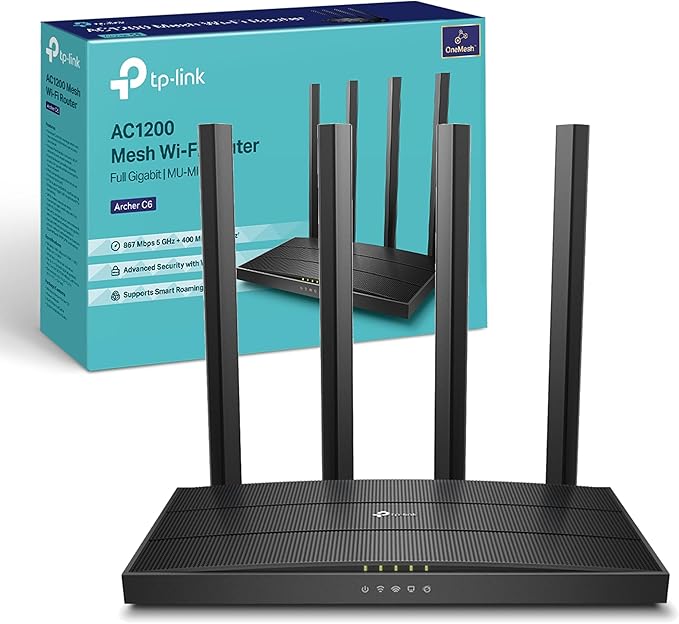
The Archer C6 creates a reliable and blazing-fast network powered by 802.11ac Wi-Fi technology. The 2.4GHz band delivers speeds up to 300Mbps, ready for everyday tasks like emailing and web browsing, while the 5GHz band delivers speeds up to 867Mbps, ideal for HD video streaming and lag-free online gaming. Create a Mesh network by connecting one or more OneMesh? ó range extenders to your Archer C6 for seamless whole-home coverage. One Gigabit WAN port and four Gigabit LAN ports deliver speeds up to 10x faster than standard Ethernet connections. Let every member of your family simultaneously enjoy high-speed network on their phones, tablets and laptops.
The Archer C6 creates a reliable and blazing-fast network powered by 802.11ac Wi-Fi technology. The 2.4GHz band delivers speeds up to 300Mbps, ready for everyday tasks like emailing and web browsing, while the 5GHz band delivers speeds up to 867Mbps, ideal for HD video streaming and lag-free online gaming. Create a Mesh network by connecting one or more OneMesh? ó range extenders to your Archer C6 for seamless whole-home coverage. One Gigabit WAN port and four Gigabit LAN ports deliver speeds up to 10x faster than standard Ethernet connections. Let every member of your family simultaneously enjoy high-speed network on their phones, tablets and laptops.
The Archer C6 creates a reliable and blazing-fast network powered by 802.11ac Wi-Fi technology. The 2.4GHz band delivers speeds up to 300Mbps, ready for everyday tasks like emailing and web browsing, while the 5GHz band delivers speeds up to 867Mbps, ideal for HD video streaming and lag-free online gaming. Create a Mesh network by connecting one or more OneMesh? ó range extenders to your Archer C6 for seamless whole-home coverage. One Gigabit WAN port and four Gigabit LAN ports deliver speeds up to 10x faster than standard Ethernet connections. Let every member of your family simultaneously enjoy high-speed network on their phones, tablets and laptops.
The Archer C6 creates a reliable and blazing-fast network powered by 802.11ac Wi-Fi technology. The 2.4GHz band delivers speeds up to 300Mbps, ready for everyday tasks like emailing and web browsing, while the 5GHz band delivers speeds up to 867Mbps, ideal for HD video streaming and lag-free online gaming. Create a Mesh network by connecting one or more OneMesh? ó range extenders to your Archer C6 for seamless whole-home coverage. One Gigabit WAN port and four Gigabit LAN ports deliver speeds up to 10x faster than standard Ethernet connections. Let every member of your family simultaneously enjoy high-speed network on their phones, tablets and laptops.
Last updated at 08/18/2026 13:59:11
TP-Link Archer C6 AC1200 Wi-Fi Router, Dual Band 1200 Mbps Speed, Advanced Security with WPA3, Smart Roaming, Black | Archer C6
Delivery between 21–28 Aug $35.44
Wholesale home use wireless router High-speed TP-LINK router Wireless wall-penetrating Archer C5 English version AC1200 gigabit TP-LINK Archer C5
Delivery $22.40
Wholesale high-speed home router High-speed wireless wall-penetrating Archer C5 TP-LINK English version ac1200 router Home use gigabit fiber optic
Delivery $22.40
Tp-Link Archer C6 AC1200 Wireless Gigabit Router in Dar Tanzania
Delivery $42.23
TP-Link WiFi Wireless LAN Router 11ac MU-MIMO Beamforming All Gigabit Ports Dual-Band AC1200 867 + 300Mbps Archer C6
Free delivery
[Used, Very Good] TP-Link WiFi Wireless LAN Router 11ac MU-MIMO Beamforming Gigabit Ethernet Ports Dual Band AC1200 867 + 300Mbps Archer C6
Free delivery
[Used] (Unused/Unopened) TP-Link WiFi Wireless LAN Router 11ac MU-MIMO Beamforming Gigabit Ethernet Ports Dual Band AC1200 867 + 300Mbps Archer C6
Free delivery
Amazon Alexa CertifiedWi-Fi Router TP-Link WiFi Wireless LAN Router 11ac WiFi 5 AC1200 867300Mbps IPv6 Support High Security WPA3 Easy Setup OneMesh
Delivery between 23–27 Aug $35.88
Amazon Alexa CertifiedWi-Fi Router TP-Link WiFi Wireless LAN Router 11ac WiFi 5 AC1200 867+300Mbps IPv6 Support High Security WPA3 Easy Setup OneMesh
Delivery between 23–27 Aug $35.88
TP-Link Archer C6 AC1200 Dual Band Wireless Mu-Mimo Gigabit Router
Delivery between 23–27 Aug $35.88
originally posted on walmart.com
Wifi is slow, even at 2 feet away.Hard wired gigabit ethernet to the device. Fast.com shows 800mbit for hard wired. Standing right next to the router on either 2.4HZ or 5GHZ it maxes out at 140mbit. I put the router into access point mode, disabled one of the bands, changed Wifi channels, nothing helped the Wifi perform anywhere near acceptable speed. If your internet speed is 150mbit, then this might be the device for you. Setup was easy and the interface was friendly, but I would deal with a hard setup and an unfriendly UI for a high performance networking device.
originally posted on walmart.com
We are big on streaming in our house, we run Fire TV and streamjust about everything. We have our computers and tabletsand our phones on wireless as well. We have always had TPLink routers and they have always been great but lately it hasbeen running a bit slow due to our internet speed being a bitsluggish at times more often than not. This caused a lot ofthe connections to drop and move slow. This routerchanged all of that. It increased our upload and downloadspeeds by quite a bit and gave us a speed we haven't hadsince we started streaming. All devices are running fasterthanks to this little router. We have a two story and it isconsistent on both floors even in the back yard. The setup was super easy, we have good security and dual ... MoreWe are big on streaming in our house, we run Fire TV and streamjust about everything. We have our computers and tabletsand our phones on wireless as well. We have always had TPLink routers and they have always been great but lately it hasbeen running a bit slow due to our internet speed being a bitsluggish at times more often than not. This caused a lot ofthe connections to drop and move slow. This routerchanged all of that. It increased our upload and downloadspeeds by quite a bit and gave us a speed we haven't hadsince we started streaming. All devices are running fasterthanks to this little router. We have a two story and it isconsistent on both floors even in the back yard. The setup was super easy, we have good security and dual bandtechnology. We haven't had any problems with it so far,it's a great little router.
originally posted on walmart.com
My ISP is providing 100Mbps. I was using a 100Mbps fast ethernet backplane in the house. I was getting a speedtest.net of about 70Mbps. I converted everything over to gigabit ethernet and am now up to about 120Mbps. This router is the first coming into the house, connected directly to the cable modem and then forking off to subnets. I tried the 802.11ac and actually got 110Mbps, but only on devices which support 802.11ac. Most of my devices do not (roku boxes, cell phones, tablets, etc.) On those I got about 25Mbps. Very pleased with performance. Setup through the network interface was very straight forward. Setup through the app was too limited for my purposes.
| General | |
| Device Type | Wireless router - 4-port switch (integrated) |
| Enclosure Type | Desktop |
| Connectivity Technology | Wireless, wired |
| Data Link Protocol | Ethernet, Fast Ethernet, Gigabit Ethernet, IEEE 802.11b, IEEE 802.11a, IEEE 802.11g, IEEE 802.11n, IEEE 802.11ac |
TP-Link Archer C6 AC1200 Wi-Fi Router, Dual Band 1200 Mbps Speed, Advanced Security with WPA3, Smart Roaming, Black | Archer C6
Delivery between 21–28 Aug $35.44
Wholesale home use wireless router High-speed TP-LINK router Wireless wall-penetrating Archer C5 English version AC1200 gigabit TP-LINK Archer C5
Delivery $22.40
Wholesale high-speed home router High-speed wireless wall-penetrating Archer C5 TP-LINK English version ac1200 router Home use gigabit fiber optic
Delivery $22.40
Tp-Link Archer C6 AC1200 Wireless Gigabit Router in Dar Tanzania
Delivery $42.23
TP-Link WiFi Wireless LAN Router 11ac MU-MIMO Beamforming All Gigabit Ports Dual-Band AC1200 867 + 300Mbps Archer C6
Free delivery
Wifi is slow, even at 2 feet away.Hard wired gigabit ethernet to the device. Fast.com shows 800mbit for hard wired. Standing right next to the router on either 2.4HZ or 5GHZ it maxes out at 140mbit. I put the router into access point mode, disabled one of the bands, changed Wifi channels, nothing helped the Wifi perform anywhere near acceptable speed. If your internet speed is 150mbit, then this might be the device for you. Setup was easy and the interface was friendly, but I would deal with a hard setup and an unfriendly UI for a high performance networking device.
We are big on streaming in our house, we run Fire TV and streamjust about everything. We have our computers and tabletsand our phones on wireless as well. We have always had TPLink routers and they have always been great but lately it hasbeen running a bit slow due to our internet speed being a bitsluggish at times more often than not. This caused a lot ofthe connections to drop and move slow. This routerchanged all of that. It increased our upload and downloadspeeds by quite a bit and gave us a speed we haven't hadsince we started streaming. All devices are running fasterthanks to this little router. We have a two story and it isconsistent on both floors even in the back yard. The setup was super easy, we have good security and dual ... MoreWe are big on streaming in our house, we run Fire TV and streamjust about everything. We have our computers and tabletsand our phones on wireless as well. We have always had TPLink routers and they have always been great but lately it hasbeen running a bit slow due to our internet speed being a bitsluggish at times more often than not. This caused a lot ofthe connections to drop and move slow. This routerchanged all of that. It increased our upload and downloadspeeds by quite a bit and gave us a speed we haven't hadsince we started streaming. All devices are running fasterthanks to this little router. We have a two story and it isconsistent on both floors even in the back yard. The setup was super easy, we have good security and dual bandtechnology. We haven't had any problems with it so far,it's a great little router.
My ISP is providing 100Mbps. I was using a 100Mbps fast ethernet backplane in the house. I was getting a speedtest.net of about 70Mbps. I converted everything over to gigabit ethernet and am now up to about 120Mbps. This router is the first coming into the house, connected directly to the cable modem and then forking off to subnets. I tried the 802.11ac and actually got 110Mbps, but only on devices which support 802.11ac. Most of my devices do not (roku boxes, cell phones, tablets, etc.) On those I got about 25Mbps. Very pleased with performance. Setup through the network interface was very straight forward. Setup through the app was too limited for my purposes.
Good looks, good speeds, fairly compact, and phenomenal price.I have a gigabit connection capable of 890 Megabits/s or 111 Megabytes/s.On a wired connection, I'm able to reach the full 890 Megabits/s I am afforded.On a wireless 2.4GHz band I recieve lower speeds around 20 Megabits/s (still entirely usable for streaming and browsing on at least two devices). The range of this band is expectedly very far: 70ft with no interferences.On a 5GHz band I recieve 300 Megabits/s, a phenomenal conversion of speeds compared to other high end routers. The range is also expectedly short, nothing out of the ordinary, 30ft no interferences.
I used to have two of the older versions of this router. So I’m glad to see that TP Link has been continuously updating their routers and other devices. This is the latest version of the TP Link AC1200 Archer C6. The major upgrades it has received is definitely a welcome addition and a necessity for any modern mid range to high end router. The most recent upgrades this router has received are MU-MIMO and beamforming.The best thing about this line of TP Link routers is the range. This model features MU-MIMO dual band wi-fi and four gigabit Ethernet ports. MU-MIMO, which is short for Multi User-Multiple In Multiple Out, is basically a wireless protocol newer routers use to allow them to send and receiver more wireless signals while maintaining signal strength and ... MoreI used to have two of the older versions of this router. So I’m glad to see that TP Link has been continuously updating their routers and other devices. This is the latest version of the TP Link AC1200 Archer C6. The major upgrades it has received is definitely a welcome addition and a necessity for any modern mid range to high end router. The most recent upgrades this router has received are MU-MIMO and beamforming.The best thing about this line of TP Link routers is the range. This model features MU-MIMO dual band wi-fi and four gigabit Ethernet ports. MU-MIMO, which is short for Multi User-Multiple In Multiple Out, is basically a wireless protocol newer routers use to allow them to send and receiver more wireless signals while maintaining signal strength and speed. These routers have excellent range for what they cost. I've had the opportunity to test over twenty routers in the past few years, ranging from low end to the best of the best. That includes every model in this line of TP Link routers, and they consistently have the best value in regard to their maximum range and overall maximum bandwidth. Both their 5 GHz and 2.4 GHz band have impressive range. Which is a necessity for me as I have an old house. It’s construction tends to inhibit wireless signals. The signal from this router cuts through it better than most, and extends to the edge of my property, which is about another 20 yards on either side of the house. It’s nice having that strong wireless signal outside when I’m mowing the lawn or sitting in my car while I wait for my teenage daughter to finish getting ready.The addition of beamforming to this router has improved the signal strength even further versus the older version. Basically, beamforming allows the router to maintain a stronger connection to your devices compared to a standard router, although, beamforming is most effective when you’re device is either stationary or staying relatively still.Setup with this router is relatively simple and straight forward. This TP Link router doesn't come with an install disc anymore, so you have to use the web based setup. For first time wireless access you'll need the Pin on the bottom of the router, that's your password. To access the web based setup you can just type tplinklogin.net in the address bar of your web browser or you can use the routers IP which is 192.168.0.1It's not a bad idea to check out the web based setup, even if you're not an advanced user. All the various functions and settings are there for you to explore. If you're not experienced in networking, then it's best to leave most of the features at their default setting. But it's a good way to start learning and if you're curious about any of it, you can contact TP Link support for help, check out the manual, read the FAQ section on the TP Link website, or get on the forums online and ask questions. TP Link support is free and easily accessible during normal business hours.If you have a need for guest network, you can enable it in the advanced web based setup. There are settings for parental control, not too advanced, but you can block user specified websites. If you search hard enough you can find lists of inappropriate sites to add to the parental filter list, but be prepared to put in a significant amount of time if you're serious about blocking sites through this routers parental control feature.There is also an app you can get, TP Link Tether, for either Apple or Android. It gives you access to some of the routers basic functions. You can see what devices are connected to your network and block any unwanted access, manage your parental control and manage your primary and guest networks. It definitely has the potential to be useful. It would be nice to see them improve on that app with greater control over your routers advanced features. But you can still easily access the routers web based setup using any web browser.My sole complaint with this router is instead of going from USB 2.0 to USB 3.0, they ditched the USB ports entirely. So you no longer have the option to connect a network printer to your router or setup a media server using your external hard drive. The previous versions USB ports performance were lackluster at best, however, that was something they could have easily fixed.This is a great mid range router with a lot of options. Although, I personally recommend the TP Link AC1750 Archer C8, which doesn't cost much more than this one. It has USB 3.0 ports, it also has slightly improved overall range. For the average user, especially if you don't have a lot of simultaneous connections or a large area to cover, this model will be fine. But for the advanced user, the AC1750 is the superior router both in terms of performance and value.
I?ve had this a little over two weeks now and have been really happy with the results thus far. Really extended my signal and it?s strength through out the house where my previous combo modem/router combo lacked. My household runs up to 15 devices at a time and it?s been fine. Easy app setup which was great and so much easier than older model installs. Excellent value for the price. Really happy with purchase.
All-in-all, this is a good router. I wanted to put Gargoyle or similar on it but made the mistake of letting it update. This causes an issue so I ran with stock firmware.There are parental controls which have confusing start and end times. You can also only have 4 groups each with up to 8 devices in the group. I'd like more.You can't turn off the DHCP server without losing your reserved DHCP IPs. So I hacked this and have a DHCP range of 1 IP with reserved ones being outside that range - it works.I might revisit the open source firmware at some point but it works.Also as Salt only gives me a public IPv6 address, my VPN does not work. The Tether App gives me most of what I need, namely control of the network while I am away.
Very slow wifi right out of the box, steadily got worse. I thought it was just bad ethernet. Started dropping signal many times during the day, requiring refreshing web pages up to 10 times to load. Finally quit altogether after 3.5 months... the LAN was still active, but router didn't recognize ethernet. (I attached the ethernet cable to my laptop and it connects fine.)Replaced with a lower-end Linksys, and now my wifi is blazing fast.
This is very poor quality. I'm returning it after trying to use it several times. We have admittedly relatively slow internet. My old TP link router seemed like it could use an update as speeds have increased since I purchased it well over 4 years ago. We average about 10 Mbps DSL internet (an increase from about 3 Mbps 4 years ago) and we do not stream HD, only SD. Plus, I figured well over 4 years could likely be about the end of the life span of a router and I don't want stuck without WiFi. So, I ordered this "updated" version and it boasted that it'd improve WiFi speeds. I was initially excited. It worked fine for two devices at once, but totally blocked out using 3 devices. We could not stream 3 devices (SD) at once on this router. No matter what I tried -- ... MoreThis is very poor quality. I'm returning it after trying to use it several times. We have admittedly relatively slow internet. My old TP link router seemed like it could use an update as speeds have increased since I purchased it well over 4 years ago. We average about 10 Mbps DSL internet (an increase from about 3 Mbps 4 years ago) and we do not stream HD, only SD. Plus, I figured well over 4 years could likely be about the end of the life span of a router and I don't want stuck without WiFi. So, I ordered this "updated" version and it boasted that it'd improve WiFi speeds. I was initially excited. It worked fine for two devices at once, but totally blocked out using 3 devices. We could not stream 3 devices (SD) at once on this router. No matter what I tried -- reset, WiFi extender sync'd, still no dice. I plugged back in my old WiFi router (to see if it was internet speed at issue as we do live rural and sometimes our internet gets slower than our normal kinda slow) and almost immediately everyone could stream (SD) at once. I even tried downloading something on WiFi and opening a bunch of youtube videos on old WiFi router at the same time and it handled it fine. I plugged this router back in and set everyone up onto the WiFi and we again could not stream more than 2 devices at once. Also, it could not handle a wireless download or YouTube videos whilst streaming anything - immediately the streaming would freeze. Plugged in old router, again we could all stream (SD), watch YouTube, browse, download, upload. Like I said, I'm sending this back. I think I'll just buy another of my old router. My old router is a TP-Link N300 and although I sometimes have to reset it and it does need a WiFi extender to cover our whole home -- it works fine for us.
So far, this has been a great improvement over the router we were renting from our provider, and it will pay for itself in four months. It was super easy to set up; it took me maybe 10 minutes, and I even made a mistake. We pay for 150Mbps, but we usually get download speeds close to 200Mbps. We're not even close to pushing the capabilities of the router, so I wouldn't expect anything less, really.
| General | |
| Device Type | Wireless router - 4-port switch (integrated) |
| Enclosure Type | Desktop |
| Connectivity Technology | Wireless, wired |
| Data Link Protocol | Ethernet, Fast Ethernet, Gigabit Ethernet, IEEE 802.11b, IEEE 802.11a, IEEE 802.11g, IEEE 802.11n, IEEE 802.11ac |

