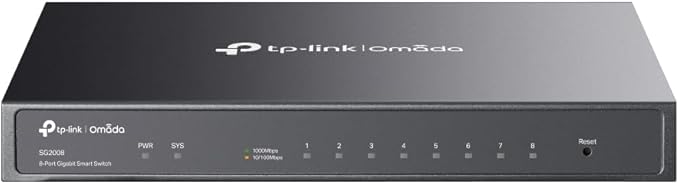
TP-LINK Gigabit Smart Switch TL-SG2008 is equipped with 8 gigabit RJ45 ports. The switch provides high performance, enterprise-level QoS, useful security strategies and rich layer 2 management features. TP-LINK’s 8-Port Gigabit Smart Switch TL-SG2008 is especially designed for the small and medium business networks that require efficient network management. TL-SG2008 comes with a comprehensive set of features, such as Link Aggregation Group, 802.1Q VLAN, Access Control Lists (ACL), Quality of Service(QoS L2 to L4), Storm Control and IGMP Snooping to provide a small or medium-sized business with a network that is geared for growth while ensuring performance and reliability. What’s more, its easy-to-use web management interface means faster setup and configuration with less downtime, providing the ideal solution for your business network.
TP-LINK Gigabit Smart Switch TL-SG2008 is equipped with 8 gigabit RJ45 ports. The switch provides high performance, enterprise-level QoS, useful security strategies and rich layer 2 management features. TP-LINK’s 8-Port Gigabit Smart Switch TL-SG2008 is especially designed for the small and medium business networks that require efficient network management. TL-SG2008 comes with a comprehensive set of features, such as Link Aggregation Group, 802.1Q VLAN, Access Control Lists (ACL), Quality of Service(QoS L2 to L4), Storm Control and IGMP Snooping to provide a small or medium-sized business with a network that is geared for growth while ensuring performance and reliability. What’s more, its easy-to-use web management interface means faster setup and configuration with less downtime, providing the ideal solution for your business network.
TP-LINK Gigabit Smart Switch TL-SG2008 is equipped with 8 gigabit RJ45 ports. The switch provides high performance, enterprise-level QoS, useful security strategies and rich layer 2 management features. TP-LINK’s 8-Port Gigabit Smart Switch TL-SG2008 is especially designed for the small and medium business networks that require efficient network management. TL-SG2008 comes with a comprehensive set of features, such as Link Aggregation Group, 802.1Q VLAN, Access Control Lists (ACL), Quality of Service(QoS L2 to L4), Storm Control and IGMP Snooping to provide a small or medium-sized business with a network that is geared for growth while ensuring performance and reliability. What’s more, its easy-to-use web management interface means faster setup and configuration with less downtime, providing the ideal solution for your business network.
TP-LINK Gigabit Smart Switch TL-SG2008 is equipped with 8 gigabit RJ45 ports. The switch provides high performance, enterprise-level QoS, useful security strategies and rich layer 2 management features. TP-LINK’s 8-Port Gigabit Smart Switch TL-SG2008 is especially designed for the small and medium business networks that require efficient network management. TL-SG2008 comes with a comprehensive set of features, such as Link Aggregation Group, 802.1Q VLAN, Access Control Lists (ACL), Quality of Service(QoS L2 to L4), Storm Control and IGMP Snooping to provide a small or medium-sized business with a network that is geared for growth while ensuring performance and reliability. What’s more, its easy-to-use web management interface means faster setup and configuration with less downtime, providing the ideal solution for your business network.
Last updated at 06/28/2026 16:20:12
Omada 8-Port Gigabit Smart Ethernet Switch, Full Gigabit Ports, Omada SDN, Centralised Management, Secure Network, Advanced L2+, Silent Operation,
Free delivery
Affiliate Disclosure: We may receive a small commission for purchases made through this link at no extra cost to you. This helps support our site. Thank you!
Tp-Link TL-SG2008, 8-Port Gigabit Smart Switch Fanless 802.1Q VLAN, ACL, Port Security and Storm control L2/L3/L4 QoS and IGMP Snooping
Delivery between 30 June – 10 July $14.99
TP Link JetStream 8-Port Gigabit Smart Switch
Delivery $9.95
TP-Link Omada SG2008 Smart Managed 8 Port Gigabit Switch
Delivery $19
TP Link JetStream 8-Port Gigabit Smart Switch
Delivery between 1–6 July $6.99
TP-Link TL-SG2008 JetStream 8-Port Gigabit Smart Switch PORT: 8 Gigabit RJ45
Free delivery
TP-Link Omada 8-port Managed Gigabit Switch, SG2008 Switches / HUBs
Free delivery between 1–8 July
TP-Link SG2008 Omada 8-Port Gigabit Smart Switch
Delivery $15.90
TP-Link TL-SG2008 JetStream 8-Port Gigabit Smart Switch PORT: 8× Gigabit RJ45 Ports: Desktop Steel Case, Static Routing,Omada
Delivery $15
TP-Link Omada SG2008 Managed L2/L2+ Gigabit Ethernet Switch, Black
Delivery between Tue – Thu $12
originally posted on ebay.com
This switch was easy to set up, even used. Resetting it, I was able to set it up for my network. I haven't utilized managing VLANs with it yet, but am not worried that this switch won't do what I want it to do.
originally posted on ebay.com
manage QOS in a noise free small package. Great for small network.
originally posted on newegg.com
Make sure to log into the UI before you deploy and change the switch's IP to something on your LAN if your LAN isn't 192.168.0.0/24. My router is 192.168.1.1 so the switch got set to 192.168.1.3.
| General | |
| Device Type | Switch - 8 ports - Managed |
| Enclosure Type | Desktop |
| Subtype | Gigabit Ethernet |
| Ports | 8 x 10/100/1000 |
Omada 8-Port Gigabit Smart Ethernet Switch, Full Gigabit Ports, Omada SDN, Centralised Management, Secure Network, Advanced L2+, Silent Operation,
Free delivery
Affiliate Disclosure: We may receive a small commission for purchases made through this link at no extra cost to you. This helps support our site. Thank you!
Tp-Link TL-SG2008, 8-Port Gigabit Smart Switch Fanless 802.1Q VLAN, ACL, Port Security and Storm control L2/L3/L4 QoS and IGMP Snooping
Delivery between 30 June – 10 July $14.99
TP Link JetStream 8-Port Gigabit Smart Switch
Delivery $9.95
TP-Link Omada SG2008 Smart Managed 8 Port Gigabit Switch
Delivery $19
TP Link JetStream 8-Port Gigabit Smart Switch
Delivery between 1–6 July $6.99
This switch was easy to set up, even used. Resetting it, I was able to set it up for my network. I haven't utilized managing VLANs with it yet, but am not worried that this switch won't do what I want it to do.
manage QOS in a noise free small package. Great for small network.
Make sure to log into the UI before you deploy and change the switch's IP to something on your LAN if your LAN isn't 192.168.0.0/24. My router is 192.168.1.1 so the switch got set to 192.168.1.3.
If you are going to use RSTP for loop prevention, make sure to use BPDU protect, and enable edge port. The two features work together for workstations. (they are synonamous with BPDU guard, and port fast for those familiar with cisco features)
Pros: Low power, quiet, seamless integration with Omada SDN Controller.
Cons: Does not support CAT 6 network which was the main reason that I made the purchase.
Probably the highest quality build I've seen come out of China - device feels solid, and well engineered. The geo location feature defaults to shenzin china, and the timezone does as well - Don't forget to change them. I was hesitant to buy a TP-Link device as I've always considered them an 'off-brand' - I will no longer hesitate. This device has made an awesome first impression for them, and I'm actively telling friends how much I like it!
If you buy this to trunk or port aggregate ports to go from 1GBs to 2GBs ethernet speeds, given dual 1GBs NICs at both ends, forget it with Windows 8 systems. Port trunking is not supported unless using a server OS like 2012 or a Linux version. Not a fault of the switch, just Windows 8 and a crippled feature set. You will only get 1GBs maximum but with the marginal benefit of fail-over.
This is a very nice switch to use for a network, personal or business. One thing I like about this switch is that all of the connections are on the back. The Netgear equivalent all has the RJ-45 on the front, but the power on the back, which was not good for me. On this device, the power, and RJ-45 are all on the back. On the front are status indicator lights. This lights display power for the device, and link activity for each port. The port lights will also indicate whether the port is operating at speeds of 10/100 or 1G. The web based GUI is nice. I much prefer it over the Netgear interface. This one is more user friendly, and it works. There is also the option to use CLI (command line interface) if you want to telnet into the device, which is great too.
This switch is perfect for a home operation. The web interface is super simple and easy to work with. The only downside is that there is no option to export your config, and should you forgot to save the config before rebooting, it will default back to the last save you've had. This is worth of knocking an egg off.
| General | |
| Device Type | Switch - 8 ports - Managed |
| Enclosure Type | Desktop |
| Subtype | Gigabit Ethernet |
| Ports | 8 x 10/100/1000 |

