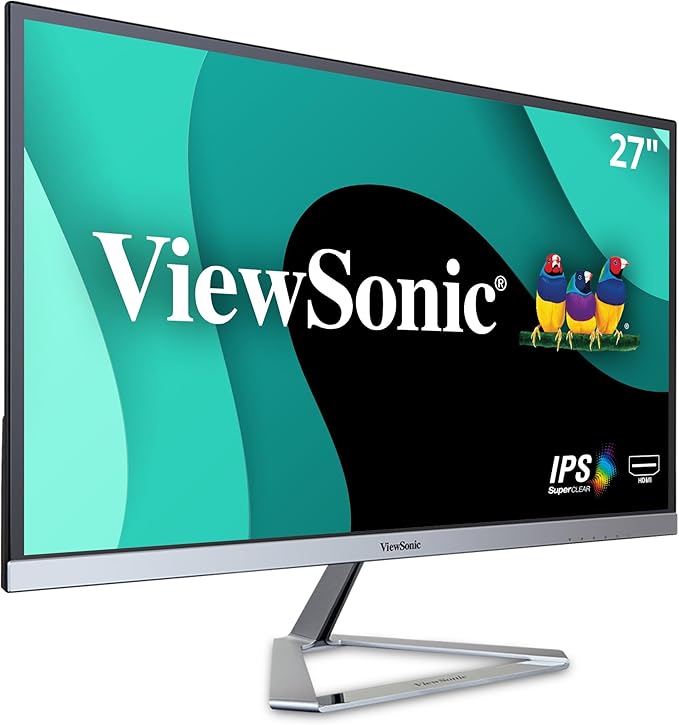
The ViewSonic VX3276-2K-mhd-2 is the perfect blend of style and performance with features that include a sizeable 32” frameless bezel, a minimalist design, and QHD (2560 x 1440) resolution. Design features such as an ultra-slim profile, metallic silver triangle stand, and a sleek edge-to-edge frameless bezel give the monitor a premium feel that fits nicely both at home and in the office. VX3276-2K-mhd-2 leverages SuperClear IPS panel and rich 10-bit color to produce an extensive array of vibrant colors with wide viewing angles. What's more, this monitor is integrated with dual 2-watt stereo speakers, while DisplayPort, Mini DP, and 2 HDMI ports offer flexible connectivity options for both general usage and gaming.
The ViewSonic VX3276-2K-mhd-2 is the perfect blend of style and performance with features that include a sizeable 32” frameless bezel, a minimalist design, and QHD (2560 x 1440) resolution. Design features such as an ultra-slim profile, metallic silver triangle stand, and a sleek edge-to-edge frameless bezel give the monitor a premium feel that fits nicely both at home and in the office. VX3276-2K-mhd-2 leverages SuperClear IPS panel and rich 10-bit color to produce an extensive array of vibrant colors with wide viewing angles. What's more, this monitor is integrated with dual 2-watt stereo speakers, while DisplayPort, Mini DP, and 2 HDMI ports offer flexible connectivity options for both general usage and gaming.
There are no live offers for ViewSonic VX3276-2K-mhd 32inch WQHD IPS Monitor right now. The all-time low we recorded was $46.20 on 1 Sept 2026. Set a price alert to hear when it's back in stock.
Prices last updated 1 Sept 2026.
ViewSonic VX3276-2K-mhd 32inch WQHD IPS Monitor
The ViewSonic VX3276-2K-mhd-2 is the perfect blend of style and performance with features that include a sizeable 32” frameless bezel, a minimalist design, and QHD (2560 x 1440) resolution. Design features such as an ultra-slim profile, metallic silver triangle stand, and a sleek edge-to-edge frameless bezel give the monitor a premium feel that fits nicely both at home and in the office. VX3276-2K-mhd-2 leverages SuperClear IPS panel and rich 10-bit color to produce an extensive array of vibrant colors with wide viewing angles. What's more, this monitor is integrated with dual 2-watt stereo speakers, while DisplayPort, Mini DP, and 2 HDMI ports offer flexible connectivity options for both general usage and gaming.
The ViewSonic VX3276-2K-mhd-2 is the perfect blend of style and performance with features that include a sizeable 32” frameless bezel, a minimalist design, and QHD (2560 x 1440) resolution. Design features such as an ultra-slim profile, metallic silver triangle stand, and a sleek edge-to-edge frameless bezel give the monitor a premium feel that fits nicely both at home and in the office. VX3276-2K-mhd-2 leverages SuperClear IPS panel and rich 10-bit color to produce an extensive array of vibrant colors with wide viewing angles. What's more, this monitor is integrated with dual 2-watt stereo speakers, while DisplayPort, Mini DP, and 2 HDMI ports offer flexible connectivity options for both general usage and gaming.
Last updated at 09/01/2026 10:50:51
ViewSonic VX3276-2K-MHD 32 Inch Widescreen IPS 1440p Monitor with Ultra-Thin Bezels, HDMI DisplayPort and Mini DisplayPort
Affiliate Disclosure: We may receive a small commission for purchases made through this link at no extra cost to you. This helps support our site. Thank you!
ViewSonic VX3276-2K-MHD 32 inch Widescreen IPS LCD Monitor
Affiliate Disclosure: We may receive a small commission for purchases made through this link at no extra cost to you. This helps support our site. Thank you!
ViewSonic VX3276-2K 32" WQHD IPS UltraSlim Monitor
7-day returns
ViewSonic VX3276 32" 2K WQHD IPS Monitor
Delivery between 3–8 Sept $30
ViewSonic 32” 2K QHD (2560 x 1440) Business Professional Ultra Thin Stylish, Elegant,SuperClear IPS, low energy 36w, 3YARW
Delivery between 3–8 Sept $29.05
Viewsonic VX Series VX3276-2K-mhd-2 computer monitor (32") 2560 x 1440 pixels Quad HD LED Silver
Delivery between 4–12 Sept $10
ViewSonic VX3276-2K-MHD-2 32” 2K Entertainment Monitor - (VX3276-2K-MHD-2)
Delivery by 9 Sept $15
ViewSonic VX3276-2K-MHD-2 32" IPS QHD Entertainment Monitor
Free delivery between 4–9 Sept
ViewSonic VX3276-2K-MHD 32 Inch 1440p QHD IPS Widescreen Monitor, 75Hz LCD
Delivery between 7–10 Sept $29
Viewsonic VX Series VX3276-2K-MHD computer monitor 80 cm 31.5" Quad HD LED Flat Matt Black, Silver
Delivery between 5–9 Sept $35.88
originally posted on homeessentialsdirect.com
.... the packaging is stupid. i think it's got two sheets of paper for documentation, not too sure what they're about because one of them has a few sentences in just about any language but Hebrew, don't think they're worth anything to anyone. The box is "eco friendly" 24 inch monitor in a box smaller than my brother"s 21 inch Viewsonic. it does protect the monitor well enough. Just about all of the "documentation" is the printing on the box itself. "This end up" represented by a small arrow, you might miss it ( not a word with it) Your direction for opening the box...3 or 4 simplistic drawings not good enough to really do the job. I wanted to preserve the box for transporting the monitor without tearing it apart, i had to get someone else to figure it out. just ... More.... the packaging is stupid. i think it's got two sheets of paper for documentation, not too sure what they're about because one of them has a few sentences in just about any language but Hebrew, don't think they're worth anything to anyone. The box is "eco friendly" 24 inch monitor in a box smaller than my brother"s 21 inch Viewsonic. it does protect the monitor well enough. Just about all of the "documentation" is the printing on the box itself. "This end up" represented by a small arrow, you might miss it ( not a word with it) Your direction for opening the box...3 or 4 simplistic drawings not good enough to really do the job. I wanted to preserve the box for transporting the monitor without tearing it apart, i had to get someone else to figure it out. just about the only thing i've seen that's worse are those tight plastic things so much stuff you have to cut open to get to your product. My brother's Viewsonic came with a built in carry handle, it's very obvious and easy to fiure out for use. My box? i finally found the handles...cut into the box, they aren't marked in any way-some people will not even see them. The monitor itself is pretty good, my brother didn't have to adjust anything it was fine right of the box.....now all I've got to do is figure out what those 5 buttons next to the power button do, even it is unidentified. The tilt/cable routing, ability to turn on end, and adjustable monitor height are nice but they're left up to you to figure out. I think it's got speakers- someplace. i wanted to use the HDMI port (?) but I'll need someone else to hook into that because I can't do it myself, you have to hook it up by working upside down and backwards (it's on the back of the monitor good for hanging on the wall but awkward and inconvenient for me. It looks good and seems to work all right but needs a bit more documentation to help even somebody who knows what they're doing.
originally posted on viewsonic.com
I've been a fan of ViewSonic monitors for over 10 years now, using them first at home, and then at work. Being IT Support I've setup thousands of monitors ranging from 17 inch 720p to 32 inch 4k concentrating mostly on 24 and 28 inch 1080p setups. I stopped working from home 4 years ago, but COVID sent me home again. I decided to upgrade my home displays from 19/24/19 1080p monitors to a pair of 27 inch 1440p (I was using a pair of 28 inch 1080p's at work). The 1440p upgrade from 1080p is well worth the cost. The contrast and refresh rate on these is great - even for streaming TV broadcasts (I play the news in the mornings while catching up on email). Make sure your system will support the resolution in the number of monitors you want. Using my dock I could only ... MoreI've been a fan of ViewSonic monitors for over 10 years now, using them first at home, and then at work. Being IT Support I've setup thousands of monitors ranging from 17 inch 720p to 32 inch 4k concentrating mostly on 24 and 28 inch 1080p setups. I stopped working from home 4 years ago, but COVID sent me home again. I decided to upgrade my home displays from 19/24/19 1080p monitors to a pair of 27 inch 1440p (I was using a pair of 28 inch 1080p's at work). The 1440p upgrade from 1080p is well worth the cost. The contrast and refresh rate on these is great - even for streaming TV broadcasts (I play the news in the mornings while catching up on email). Make sure your system will support the resolution in the number of monitors you want. Using my dock I could only support one 1440p and two 1080p - so I have to run one from the dock and one from the laptop. I started out running one of the 27's and a 24 inch 1080p at the same time while I was figuring out what was going on with the dock - and I currently have them set up 27/24/27. I thought about keeping them setup like this because I do like having 3 monitors - but these 27's are so much nicer that the 24 inch 1080p has got to go. I think I'll get a 3rd one of these and mount it above...
originally posted on bhphotovideo.com
I much prefer using one large monitor instead of multiple monitors for my workflow. I often need to compare documents, or refer to emails or other documents simultaneously. And the single, large monitor allows you to position those very close together , with no plastic bezel separating them visually. Also, the single-large-monitor approach works great using, and switching among multiple Desktops in Windows. With this large screen monitor, proofreading, cutting/pasting between documents or apps is easy and fast. I strongly recommend getting the 2K resolution for a monitor of this size, even for working with MS Office, PDF documents. I was going to get the lower-resolution version--incorrectly thinking it would be fine to use for anything other than HD video use--but ... MoreI much prefer using one large monitor instead of multiple monitors for my workflow. I often need to compare documents, or refer to emails or other documents simultaneously. And the single, large monitor allows you to position those very close together , with no plastic bezel separating them visually. Also, the single-large-monitor approach works great using, and switching among multiple Desktops in Windows. With this large screen monitor, proofreading, cutting/pasting between documents or apps is easy and fast. I strongly recommend getting the 2K resolution for a monitor of this size, even for working with MS Office, PDF documents. I was going to get the lower-resolution version--incorrectly thinking it would be fine to use for anything other than HD video use--but am very glad I took the advice of the B&H product specialist who recommended the 2K version for document and office app use. For example, when you view zoomed-in documents (or app GUI/user interfaces) on a lower resolution monitor than this one, the font can appear fuzzy, with indistinct edges on the letters and numbers. It's almost like you feel you need reading glasses--except the print is already very enlarged. That is much more tiring to view than on this 2K resolution monitor, on which all zoomed-in documents appear crisp, and easy to read. Every other application I have used on this monitor displays perfectly for my needs. That includes videos, using Cubase (digital audio software), and even basic video and photo editing software. Some items required trial and error to optimize the scaling and display settings in my PC. I found 125% scaling works best in Windows display settings. The inputs on this monitor are adequate for my needs. The built in speakers are just OK, and are no substitute for quality powered speakers. I would not use the built in ones for listening to music or even movies. But they are handy for use cases where you will occasionally listen to spoken word or news. The sound they produce is intelligible and loud enough. I do not consider the speakers to be an important feature for my monitor. If you need high quality audio reproduction, I would recommend you consider external speakers or other solutions. The various viewing modes on this monitor are handy, but I usually stick with one all-purpose custom setting I like and saved, and do not bother to switch modes for different uses. My main criticism of this monitor is the location of the buttons to control the monitor settings. They are on the BACK of the monitor, where you cannot see them, and their operation is unintuitive. Instead, you need to rely on feel, and it requires some practice to get comfortable using the buttons, and to avoid hitting the wrong ones. Still, that is very rarely an issue in my use case, since I do not often adjust them. A larger, 2K monitor like this one significantly improved my workflow and accuracy. When I am working outside my office, on a laptop, I actually find myself saving tasks to do later, for when I get back the big screen. The difference is profound. I would have bought one much sooner had I realized how big of a difference the extra size and resolution make.
| General | |
| Display Type | LED-backlit LCD monitor / TFT active matrix |
| Energy Class | Class G |
| Energy Consumption per Year | 60 kWh |
| Diagonal Size | 32" |

ViewSonic VX3276-2K-MHD 32 Inch Widescreen IPS 1440p Monitor with Ultra-Thin Bezels, HDMI DisplayPort and Mini DisplayPort
Affiliate Disclosure: We may receive a small commission for purchases made through this link at no extra cost to you. This helps support our site. Thank you!
ViewSonic VX3276-2K-MHD 32 inch Widescreen IPS LCD Monitor
Affiliate Disclosure: We may receive a small commission for purchases made through this link at no extra cost to you. This helps support our site. Thank you!
ViewSonic VX3276-2K 32" WQHD IPS UltraSlim Monitor
7-day returns
ViewSonic VX3276 32" 2K WQHD IPS Monitor
Delivery between 3–8 Sept $30
ViewSonic 32” 2K QHD (2560 x 1440) Business Professional Ultra Thin Stylish, Elegant,SuperClear IPS, low energy 36w, 3YARW
Delivery between 3–8 Sept $29.05
.... the packaging is stupid. i think it's got two sheets of paper for documentation, not too sure what they're about because one of them has a few sentences in just about any language but Hebrew, don't think they're worth anything to anyone. The box is "eco friendly" 24 inch monitor in a box smaller than my brother"s 21 inch Viewsonic. it does protect the monitor well enough. Just about all of the "documentation" is the printing on the box itself. "This end up" represented by a small arrow, you might miss it ( not a word with it) Your direction for opening the box...3 or 4 simplistic drawings not good enough to really do the job. I wanted to preserve the box for transporting the monitor without tearing it apart, i had to get someone else to figure it out. just ... More.... the packaging is stupid. i think it's got two sheets of paper for documentation, not too sure what they're about because one of them has a few sentences in just about any language but Hebrew, don't think they're worth anything to anyone. The box is "eco friendly" 24 inch monitor in a box smaller than my brother"s 21 inch Viewsonic. it does protect the monitor well enough. Just about all of the "documentation" is the printing on the box itself. "This end up" represented by a small arrow, you might miss it ( not a word with it) Your direction for opening the box...3 or 4 simplistic drawings not good enough to really do the job. I wanted to preserve the box for transporting the monitor without tearing it apart, i had to get someone else to figure it out. just about the only thing i've seen that's worse are those tight plastic things so much stuff you have to cut open to get to your product. My brother's Viewsonic came with a built in carry handle, it's very obvious and easy to fiure out for use. My box? i finally found the handles...cut into the box, they aren't marked in any way-some people will not even see them. The monitor itself is pretty good, my brother didn't have to adjust anything it was fine right of the box.....now all I've got to do is figure out what those 5 buttons next to the power button do, even it is unidentified. The tilt/cable routing, ability to turn on end, and adjustable monitor height are nice but they're left up to you to figure out. I think it's got speakers- someplace. i wanted to use the HDMI port (?) but I'll need someone else to hook into that because I can't do it myself, you have to hook it up by working upside down and backwards (it's on the back of the monitor good for hanging on the wall but awkward and inconvenient for me. It looks good and seems to work all right but needs a bit more documentation to help even somebody who knows what they're doing.
I've been a fan of ViewSonic monitors for over 10 years now, using them first at home, and then at work. Being IT Support I've setup thousands of monitors ranging from 17 inch 720p to 32 inch 4k concentrating mostly on 24 and 28 inch 1080p setups. I stopped working from home 4 years ago, but COVID sent me home again. I decided to upgrade my home displays from 19/24/19 1080p monitors to a pair of 27 inch 1440p (I was using a pair of 28 inch 1080p's at work). The 1440p upgrade from 1080p is well worth the cost. The contrast and refresh rate on these is great - even for streaming TV broadcasts (I play the news in the mornings while catching up on email). Make sure your system will support the resolution in the number of monitors you want. Using my dock I could only ... MoreI've been a fan of ViewSonic monitors for over 10 years now, using them first at home, and then at work. Being IT Support I've setup thousands of monitors ranging from 17 inch 720p to 32 inch 4k concentrating mostly on 24 and 28 inch 1080p setups. I stopped working from home 4 years ago, but COVID sent me home again. I decided to upgrade my home displays from 19/24/19 1080p monitors to a pair of 27 inch 1440p (I was using a pair of 28 inch 1080p's at work). The 1440p upgrade from 1080p is well worth the cost. The contrast and refresh rate on these is great - even for streaming TV broadcasts (I play the news in the mornings while catching up on email). Make sure your system will support the resolution in the number of monitors you want. Using my dock I could only support one 1440p and two 1080p - so I have to run one from the dock and one from the laptop. I started out running one of the 27's and a 24 inch 1080p at the same time while I was figuring out what was going on with the dock - and I currently have them set up 27/24/27. I thought about keeping them setup like this because I do like having 3 monitors - but these 27's are so much nicer that the 24 inch 1080p has got to go. I think I'll get a 3rd one of these and mount it above...
I much prefer using one large monitor instead of multiple monitors for my workflow. I often need to compare documents, or refer to emails or other documents simultaneously. And the single, large monitor allows you to position those very close together , with no plastic bezel separating them visually. Also, the single-large-monitor approach works great using, and switching among multiple Desktops in Windows. With this large screen monitor, proofreading, cutting/pasting between documents or apps is easy and fast. I strongly recommend getting the 2K resolution for a monitor of this size, even for working with MS Office, PDF documents. I was going to get the lower-resolution version--incorrectly thinking it would be fine to use for anything other than HD video use--but ... MoreI much prefer using one large monitor instead of multiple monitors for my workflow. I often need to compare documents, or refer to emails or other documents simultaneously. And the single, large monitor allows you to position those very close together , with no plastic bezel separating them visually. Also, the single-large-monitor approach works great using, and switching among multiple Desktops in Windows. With this large screen monitor, proofreading, cutting/pasting between documents or apps is easy and fast. I strongly recommend getting the 2K resolution for a monitor of this size, even for working with MS Office, PDF documents. I was going to get the lower-resolution version--incorrectly thinking it would be fine to use for anything other than HD video use--but am very glad I took the advice of the B&H product specialist who recommended the 2K version for document and office app use. For example, when you view zoomed-in documents (or app GUI/user interfaces) on a lower resolution monitor than this one, the font can appear fuzzy, with indistinct edges on the letters and numbers. It's almost like you feel you need reading glasses--except the print is already very enlarged. That is much more tiring to view than on this 2K resolution monitor, on which all zoomed-in documents appear crisp, and easy to read. Every other application I have used on this monitor displays perfectly for my needs. That includes videos, using Cubase (digital audio software), and even basic video and photo editing software. Some items required trial and error to optimize the scaling and display settings in my PC. I found 125% scaling works best in Windows display settings. The inputs on this monitor are adequate for my needs. The built in speakers are just OK, and are no substitute for quality powered speakers. I would not use the built in ones for listening to music or even movies. But they are handy for use cases where you will occasionally listen to spoken word or news. The sound they produce is intelligible and loud enough. I do not consider the speakers to be an important feature for my monitor. If you need high quality audio reproduction, I would recommend you consider external speakers or other solutions. The various viewing modes on this monitor are handy, but I usually stick with one all-purpose custom setting I like and saved, and do not bother to switch modes for different uses. My main criticism of this monitor is the location of the buttons to control the monitor settings. They are on the BACK of the monitor, where you cannot see them, and their operation is unintuitive. Instead, you need to rely on feel, and it requires some practice to get comfortable using the buttons, and to avoid hitting the wrong ones. Still, that is very rarely an issue in my use case, since I do not often adjust them. A larger, 2K monitor like this one significantly improved my workflow and accuracy. When I am working outside my office, on a laptop, I actually find myself saving tasks to do later, for when I get back the big screen. The difference is profound. I would have bought one much sooner had I realized how big of a difference the extra size and resolution make.
I regret not getting this sooner, even for mostly document work. The large single screen is much better than dual displays for documents, since it lets you put zoomed-in documents, spreadsheets, PDFs, and/or emails so they are adjacent (touching), side-by-side for easy workflow. I was not sure I needed a monitor with this high of a resolution on a 32 screen, but I'm really glad I followed the B&H rep's advice and went for a 2K model. Well worth the extra cost over lower resolution monitors. Even for document use--my primary application for this monitor--you need at least 2K resolution. When you zoom in on documents with 2K, the font appears sharp and readable. On lower resolution monitors, zoomed-in text tends to have a fuzzy edge to the font, that makes it harder ... MoreI regret not getting this sooner, even for mostly document work. The large single screen is much better than dual displays for documents, since it lets you put zoomed-in documents, spreadsheets, PDFs, and/or emails so they are adjacent (touching), side-by-side for easy workflow. I was not sure I needed a monitor with this high of a resolution on a 32 screen, but I'm really glad I followed the B&H rep's advice and went for a 2K model. Well worth the extra cost over lower resolution monitors. Even for document use--my primary application for this monitor--you need at least 2K resolution. When you zoom in on documents with 2K, the font appears sharp and readable. On lower resolution monitors, zoomed-in text tends to have a fuzzy edge to the font, that makes it harder on the eyes. This monitor is a bargain for how nice it is. The annoying negative with this unit is the placement of the hardware buttons for controlling monitor settings--on the back, so you cannot see what you are pressing, and need to work by feel. Not bad, once you get used to it. And switching among display modes is great. It optimizes the settings to suit different content, e.g., documents, videos etc. The speakers are only for the most basic sounds, like system noises or alarms. Those speakers do not sound good for video sound or music. Get external speakers for those applications. I have a tiny, tiny desk, and was surprised to find the monitor fits perfection on there. Even though I checked the dimensions and measured against my work area, until it arrived, I was doubtful it would fit. The included stand is very solid, and makes a really solid footing for this monitor.
First off, this is the first ViewSonic I've had since the CRT days. I loved them then so I decided to give this a shot since I never had color issues like I have with my original LG lcd I've been using for the past 9 years. It was a 24 1080p and was looking to upgrade to QHD for my photo editing. Positives: Using this for photo editing is great. Fantastic color accuracy out of the box. The large size and resolution makes detail work a breeze. For gaming, I've had no issues. Has higher latency that your average Gamer Monitor but no where near the latency of a TV in the living room. 8ms is nothing to scoff at. The minor complaints: vga? but no DVI. (I'm using display port anyway) Only a 60hz panel, but for the price it's understandable. They make a higher (120?) ... MoreFirst off, this is the first ViewSonic I've had since the CRT days. I loved them then so I decided to give this a shot since I never had color issues like I have with my original LG lcd I've been using for the past 9 years. It was a 24 1080p and was looking to upgrade to QHD for my photo editing. Positives: Using this for photo editing is great. Fantastic color accuracy out of the box. The large size and resolution makes detail work a breeze. For gaming, I've had no issues. Has higher latency that your average Gamer Monitor but no where near the latency of a TV in the living room. 8ms is nothing to scoff at. The minor complaints: vga? but no DVI. (I'm using display port anyway) Only a 60hz panel, but for the price it's understandable. They make a higher (120?) refresh model if it's a problem. Speaker sound quality is thin, but it is loud. And the big one. Not height adjustable. I'll probably have to just order a VESA stand for the 1 clearance I need to fit my built-in office desk so even then, it has a solution. All in all, I am very satisfied with this monitor and it is the best QHD for the money if high refresh rate and latency isn't the biggest concern.
Have been working at home since March, and wanted to upgrade to a 34 inch ultra wide monitor. Have had this monitor for a month now. What I like about this monitor: It's ultra wide, so I can have two split screens, and see everything clearly. I can easily adjust the monitor to go up and down. I like this feature a lot. It is not a glossy screen. My last monitor has a glossy finish, and since there are windows behind my desk, anytime it's sunny, there is a huge glare. No more glare! The built in speakers are great and very loud and clear. What I don't like about this monitor: It's not curved. Since it is 34 inches, it took my eyes a few days to get adjusted to looking at the ultra wide size. I kind of wish I had gotten a curved monitor. But now I am used to it. The ... MoreHave been working at home since March, and wanted to upgrade to a 34 inch ultra wide monitor. Have had this monitor for a month now. What I like about this monitor: It's ultra wide, so I can have two split screens, and see everything clearly. I can easily adjust the monitor to go up and down. I like this feature a lot. It is not a glossy screen. My last monitor has a glossy finish, and since there are windows behind my desk, anytime it's sunny, there is a huge glare. No more glare! The built in speakers are great and very loud and clear. What I don't like about this monitor: It's not curved. Since it is 34 inches, it took my eyes a few days to get adjusted to looking at the ultra wide size. I kind of wish I had gotten a curved monitor. But now I am used to it. The power cord where it plugs into the monitor is a bit touchy. Sometimes when I move the monitor, or move the laptop or a cable behind the monitor, the screen goes black. I just reach around and touch the plug and the screen comes back on. Just a minor nuisance. Overall it's good monitor and I like it a lot. However, if I could do it over again and buy another monitor, I would probably buy a curved monitor.
I bought this monitor for my HP Z6 workstation, that I use mainly for my 1K to 2K video work used mainly on the Internet and for individual video projects for many organizations that I work with. The large screen is really great when working with highly detailed videos. The adjustable rotating and various tilt angles ergonomic base is a nice feature so a person doesn't have to strain their neck when working long hours on a video project. Although it has multiple connection formats, I use the latest display port connection, which is a nice addition and slightly less cumbersome than the HDMI or the older digital port connections. The images and colors are crisp, bright, and clear without any noticeable imperfections at any angle that lesser quality monitors seem to ... MoreI bought this monitor for my HP Z6 workstation, that I use mainly for my 1K to 2K video work used mainly on the Internet and for individual video projects for many organizations that I work with. The large screen is really great when working with highly detailed videos. The adjustable rotating and various tilt angles ergonomic base is a nice feature so a person doesn't have to strain their neck when working long hours on a video project. Although it has multiple connection formats, I use the latest display port connection, which is a nice addition and slightly less cumbersome than the HDMI or the older digital port connections. The images and colors are crisp, bright, and clear without any noticeable imperfections at any angle that lesser quality monitors seem to exhibit. I prefer ViewSonic products due to their great quality. The built-in blue light filter is a nice feature to reduce eye strain during long editing sessions. Overall, I'm very happy with this large monitor.
I checked the reviews on this monitor before purchasing and they were for the most part ok. However, one thing I noticed right away was the darkness of the screen. For deep dark reds and blues it looks great, but if you're used to getting vibrant whites and yellows FORGET IT. You can see in the two pics I've attached when white is set behind a darker color the white almost projects as a light gray. It's bad, and I mean real bad. I would describe the lighter colors as dingy. I've seen 1080P monitors deliver better colors then this. I'm half tempted to send the monitors back (I bought 2) because it causes fatigue when viewing them throughout the day. I'm wide open for suggestions here because I've messed with all the settings and nothing seems to bring out the lighter ... MoreI checked the reviews on this monitor before purchasing and they were for the most part ok. However, one thing I noticed right away was the darkness of the screen. For deep dark reds and blues it looks great, but if you're used to getting vibrant whites and yellows FORGET IT. You can see in the two pics I've attached when white is set behind a darker color the white almost projects as a light gray. It's bad, and I mean real bad. I would describe the lighter colors as dingy. I've seen 1080P monitors deliver better colors then this. I'm half tempted to send the monitors back (I bought 2) because it causes fatigue when viewing them throughout the day. I'm wide open for suggestions here because I've messed with all the settings and nothing seems to bring out the lighter shades to a crisp and clean color. If your looking for a vibrant picture, look somewhere else, I don't think this monitor can deliver a clean, crisp picture.
This is my first ultrawide, and so far I love it. Using it mostly for viewing text with lots of windows open, so I can't speak to how good it is for gaming or streaming. Picture is sharp. If your PC only has one video port (such as a typical laptop), this monitor is a good alternative to a docking station with two monitors. Looks great with my eyes are about 2 ft. from the screen, but the left and right edges of the screen are near the limits of the LCD viewing angle, so a prospective buyer might want to consider a curved-screen monitor depending on viewing distance and what you're using it for. (I'm looking at lots of small text, but if you're watching movies or playing games, you probably wouldn't notice it, especially if your face is more than 2 ft. away.) You'll ... MoreThis is my first ultrawide, and so far I love it. Using it mostly for viewing text with lots of windows open, so I can't speak to how good it is for gaming or streaming. Picture is sharp. If your PC only has one video port (such as a typical laptop), this monitor is a good alternative to a docking station with two monitors. Looks great with my eyes are about 2 ft. from the screen, but the left and right edges of the screen are near the limits of the LCD viewing angle, so a prospective buyer might want to consider a curved-screen monitor depending on viewing distance and what you're using it for. (I'm looking at lots of small text, but if you're watching movies or playing games, you probably wouldn't notice it, especially if your face is more than 2 ft. away.) You'll want your PC to have a decent graphics card to handle the approx. 410 sq. in. of 2k resolution. Five benjamins is a bit pricey - so it's not quite getting the five stars - but that's my only complaint so far.
I bought this mini projector and was very disappointed. The battery is of very poor quality. In fact, the device discharges faster than it charges. So if you try to play a movie and the battery wasn't fully charged before, it won't work. If the movie is longer than an hour and a half, it won't work either. A week after purchase, the remote stopped working. I bought a new battery, but nothing to do. And without a remote control, the projector can't be used. 200$ in the trash. Also, the projector does not play any video format on a USB stick. The only way to play a movie (and only during the 7 days the remote worked) was to use an HDMI cable.
| General | |
| Display Type | LED-backlit LCD monitor / TFT active matrix |
| Energy Class | Class G |
| Energy Consumption per Year | 60 kWh |
| Diagonal Size | 32" |


