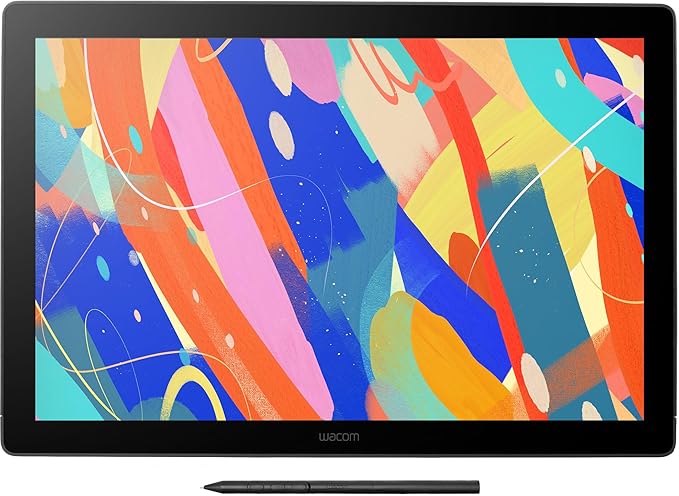
Wacom Cintiq in a nutshell: Increase your productivity with the powerful screen and pen combination. 8,192 levels of pressure sensitivity give you amazing precision. The pen reacts to the tilt of your hand and accurately responds to each movement, immediately. The 1920 x 1080 full HD display is built for creativity, with anti-glare, reduced parallax, foldable legs and more to make your work flow easier. Plus, it’s durable and scratch resistant. Features overview: Wacom Pro Pen 2 offers precision and control – with 8,192 levels of pressure sensitivity, low activation force and tilt recognition. Never need to charge the pen – EMR (Electro Magnetic Resonance) technology draws power from your Wacom Cintiq. Comfortable in your hand – weight-balanced, rubber grip and easy reach of the two side buttons. Get easy access to your favorite software’s shortcuts – with the pen’s programmable side buttons. Avoid distracting reflections as you work – thanks to a layer of anti-glare film. See your cursor appear exactly where you would expect with reduced parallax. Rely on Wacom Cintiq day after day – thanks to durable, scratch resistant materials. Get into the perfect position – a pair of foldable legs let you adjust how you want to work. An optional stand gives you even more flexible and ergonomic positions See every detail of your work – the 1920 x 1080 full HD display gives you all the clarity you need. Customize how you work even further – Wacom Cintiq is compatible with the full range of accessory pens in the Wacom range.
Wacom Cintiq in a nutshell: Increase your productivity with the powerful screen and pen combination. 8,192 levels of pressure sensitivity give you amazing precision. The pen reacts to the tilt of your hand and accurately responds to each movement, immediately. The 1920 x 1080 full HD display is built for creativity, with anti-glare, reduced parallax, foldable legs and more to make your work flow easier. Plus, it’s durable and scratch resistant. Features overview: Wacom Pro Pen 2 offers precision and control – with 8,192 levels of pressure sensitivity, low activation force and tilt recognition. Never need to charge the pen – EMR (Electro Magnetic Resonance) technology draws power from your Wacom Cintiq. Comfortable in your hand – weight-balanced, rubber grip and easy reach of the two side buttons. Get easy access to your favorite software’s shortcuts – with the pen’s programmable side buttons. Avoid distracting reflections as you work – thanks to a layer of anti-glare film. See your cursor appear exactly where you would expect with reduced parallax. Rely on Wacom Cintiq day after day – thanks to durable, scratch resistant materials. Get into the perfect position – a pair of foldable legs let you adjust how you want to work. An optional stand gives you even more flexible and ergonomic positions See every detail of your work – the 1920 x 1080 full HD display gives you all the clarity you need. Customize how you work even further – Wacom Cintiq is compatible with the full range of accessory pens in the Wacom range.
There are no live offers for Wacom Cintiq 16 Graphic Tablet Black 5080 LPI 344.16 x 193.59 mm right now. The all-time low we recorded was $815.00 on 1 May 2026. Set a price alert to hear when it's back in stock.
Prices last updated 31 Aug 2026.
Wacom Cintiq 16 Graphic Tablet Black 5080 LPI 344.16 x 193.59 mm
Wacom Cintiq in a nutshell: Increase your productivity with the powerful screen and pen combination. 8,192 levels of pressure sensitivity give you amazing precision. The pen reacts to the tilt of your hand and accurately responds to each movement, immediately. The 1920 x 1080 full HD display is built for creativity, with anti-glare, reduced parallax, foldable legs and more to make your work flow easier. Plus, it’s durable and scratch resistant. Features overview: Wacom Pro Pen 2 offers precision and control – with 8,192 levels of pressure sensitivity, low activation force and tilt recognition. Never need to charge the pen – EMR (Electro Magnetic Resonance) technology draws power from your Wacom Cintiq. Comfortable in your hand – weight-balanced, rubber grip and easy reach of the two side buttons. Get easy access to your favorite software’s shortcuts – with the pen’s programmable side buttons. Avoid distracting reflections as you work – thanks to a layer of anti-glare film. See your cursor appear exactly where you would expect with reduced parallax. Rely on Wacom Cintiq day after day – thanks to durable, scratch resistant materials. Get into the perfect position – a pair of foldable legs let you adjust how you want to work. An optional stand gives you even more flexible and ergonomic positions See every detail of your work – the 1920 x 1080 full HD display gives you all the clarity you need. Customize how you work even further – Wacom Cintiq is compatible with the full range of accessory pens in the Wacom range.
Wacom Cintiq in a nutshell: Increase your productivity with the powerful screen and pen combination. 8,192 levels of pressure sensitivity give you amazing precision. The pen reacts to the tilt of your hand and accurately responds to each movement, immediately. The 1920 x 1080 full HD display is built for creativity, with anti-glare, reduced parallax, foldable legs and more to make your work flow easier. Plus, it’s durable and scratch resistant. Features overview: Wacom Pro Pen 2 offers precision and control – with 8,192 levels of pressure sensitivity, low activation force and tilt recognition. Never need to charge the pen – EMR (Electro Magnetic Resonance) technology draws power from your Wacom Cintiq. Comfortable in your hand – weight-balanced, rubber grip and easy reach of the two side buttons. Get easy access to your favorite software’s shortcuts – with the pen’s programmable side buttons. Avoid distracting reflections as you work – thanks to a layer of anti-glare film. See your cursor appear exactly where you would expect with reduced parallax. Rely on Wacom Cintiq day after day – thanks to durable, scratch resistant materials. Get into the perfect position – a pair of foldable legs let you adjust how you want to work. An optional stand gives you even more flexible and ergonomic positions See every detail of your work – the 1920 x 1080 full HD display gives you all the clarity you need. Customize how you work even further – Wacom Cintiq is compatible with the full range of accessory pens in the Wacom range.
Last updated at 08/31/2026 00:51:22
Ex-Demo Wacom Cintiq 16
Free delivery between 3–10 Sept
Grafički tablet WACOM Cintiq 16 Pen Display (DTK1660K0B)
Delivery $8.08
Wacom Dtk-1660-k0b Cintiq 16 Graphic Tablet
Free delivery
Affiliate Disclosure: We may receive a small commission for purchases made through this link at no extra cost to you. This helps support our site. Thank you!
Wacom Cintiq 16 graphic tablet Black 5080 lpi 344.16 x 193.59 mm
Free delivery
originally posted on jbhifi.com.au
The tablet is extremely good.It functions by capturing the screen of whatever PC or laptop it is plugged into and casting that screen directly onto the tablet. This means almost zero setup is required and it works out of the box. Its capable of navigating windows with the pen, binding ctrl+z to the pen button and runs flawlessly with everything I could test from SAI to CSP to Medibang to ProCreate.Absolutely fantastic machine, but it DOES require a computer with a spare HDMI port to function, it is NOT capable of outputting display on its own without that.If you can handle that caveat, then this tablet is a must buy, the pen sensitivity is incredible, the responsiveness is fantastic, the colors are gorgeous and the machine is sturdy and comfortable to work with.
originally posted on bestbuy.ca
I bought this back in 2019 and I still love it so much. I loved it even more for the price point back then, but that was 5 years ago and the inflation is crazy now. I used to use it for school and work but these days I only use it if I want to draw or double as a second screen. This is the perfect product for someone that only really needs the bare minimum, which is a screen to draw on, but also something that retains it's quality for a long time (my old school had 20 year old cintiqs that still worked perfectly). This was also the only wacom cintiq at the time of buying that didn't break the bank.Only thing with this specific product is that the connection plug in is a little finnicky if you move it a certain way (maybe a year into using it), but it doesn't ... MoreI bought this back in 2019 and I still love it so much. I loved it even more for the price point back then, but that was 5 years ago and the inflation is crazy now. I used to use it for school and work but these days I only use it if I want to draw or double as a second screen. This is the perfect product for someone that only really needs the bare minimum, which is a screen to draw on, but also something that retains it's quality for a long time (my old school had 20 year old cintiqs that still worked perfectly). This was also the only wacom cintiq at the time of buying that didn't break the bank.Only thing with this specific product is that the connection plug in is a little finnicky if you move it a certain way (maybe a year into using it), but it doesn't matter to me as this isn't a product where you need to move it around a lot, aside from sliding it back and forward on a desk. And for very high quality cintiq that is comparatively affordable, that doesn't matter to me at all.
originally posted on walmart.com
Got it from Walmart fairly quickly and am very happy purchasing, it does what it says! The flow of the pen to tablet is smooth and amazing. I brought this with Clip Studio Paint from Walmart too later and the program works with ease with my tablet on my computer. I got my tablet in the the end of May or the beginning of June 2020 and love it. The only problem I'm having with the tablet is when I'm scrolling the web (like googling pictures on google) the tablet bar jumps. To stop that from happening I scroll up and down by the arrows on my keyboard. The only other thing is I wish for all the money I'm paying I get touch functions but you can't. Now more of the pros to help y'all decide on your purchase. The color range is beautiful and I can draw for hours with no ... MoreGot it from Walmart fairly quickly and am very happy purchasing, it does what it says! The flow of the pen to tablet is smooth and amazing. I brought this with Clip Studio Paint from Walmart too later and the program works with ease with my tablet on my computer. I got my tablet in the the end of May or the beginning of June 2020 and love it. The only problem I'm having with the tablet is when I'm scrolling the web (like googling pictures on google) the tablet bar jumps. To stop that from happening I scroll up and down by the arrows on my keyboard. The only other thing is I wish for all the money I'm paying I get touch functions but you can't. Now more of the pros to help y'all decide on your purchase. The color range is beautiful and I can draw for hours with no eye problems because I can dim the lights and color controls. The size of the drawing area is great and weight is fine. I especially love that unlike other tablets I got from Wacom I don't have to worry about restarting the tablet because it's not working or something being wrong with pen pressure because it ALWAYS WORKS! No matter if I take out the cables or leave them connected to the computer. Everything works on the photoshop I have (CS4). SAI worked great when I had it and now I have Clip Studio Paint Pro and everything works fine with the tablet, including the pose it models. If you do have problems with the tablet Wacom helps a lot. With my older wacom tablets which are 2 Bamboo's, and 1 CTH480 they helped me when I had problems. And my CTH 480 still works and I got it around 2015. Hope this tablet lasts forever because it was a heavy investment. I rate it a 4.5 out of 5 because it works perfectly besides the small problem I'm having and I wish it had touch functions.I'm writing this post on 1/3/2021 if it doesn't show.
Ex-Demo Wacom Cintiq 16
Free delivery between 3–10 Sept
Grafički tablet WACOM Cintiq 16 Pen Display (DTK1660K0B)
Delivery $8.08
Wacom Dtk-1660-k0b Cintiq 16 Graphic Tablet
Free delivery
Affiliate Disclosure: We may receive a small commission for purchases made through this link at no extra cost to you. This helps support our site. Thank you!
Wacom Cintiq 16 graphic tablet Black 5080 lpi 344.16 x 193.59 mm
Free delivery
The tablet is extremely good.It functions by capturing the screen of whatever PC or laptop it is plugged into and casting that screen directly onto the tablet. This means almost zero setup is required and it works out of the box. Its capable of navigating windows with the pen, binding ctrl+z to the pen button and runs flawlessly with everything I could test from SAI to CSP to Medibang to ProCreate.Absolutely fantastic machine, but it DOES require a computer with a spare HDMI port to function, it is NOT capable of outputting display on its own without that.If you can handle that caveat, then this tablet is a must buy, the pen sensitivity is incredible, the responsiveness is fantastic, the colors are gorgeous and the machine is sturdy and comfortable to work with.
I bought this back in 2019 and I still love it so much. I loved it even more for the price point back then, but that was 5 years ago and the inflation is crazy now. I used to use it for school and work but these days I only use it if I want to draw or double as a second screen. This is the perfect product for someone that only really needs the bare minimum, which is a screen to draw on, but also something that retains it's quality for a long time (my old school had 20 year old cintiqs that still worked perfectly). This was also the only wacom cintiq at the time of buying that didn't break the bank.Only thing with this specific product is that the connection plug in is a little finnicky if you move it a certain way (maybe a year into using it), but it doesn't ... MoreI bought this back in 2019 and I still love it so much. I loved it even more for the price point back then, but that was 5 years ago and the inflation is crazy now. I used to use it for school and work but these days I only use it if I want to draw or double as a second screen. This is the perfect product for someone that only really needs the bare minimum, which is a screen to draw on, but also something that retains it's quality for a long time (my old school had 20 year old cintiqs that still worked perfectly). This was also the only wacom cintiq at the time of buying that didn't break the bank.Only thing with this specific product is that the connection plug in is a little finnicky if you move it a certain way (maybe a year into using it), but it doesn't matter to me as this isn't a product where you need to move it around a lot, aside from sliding it back and forward on a desk. And for very high quality cintiq that is comparatively affordable, that doesn't matter to me at all.
Got it from Walmart fairly quickly and am very happy purchasing, it does what it says! The flow of the pen to tablet is smooth and amazing. I brought this with Clip Studio Paint from Walmart too later and the program works with ease with my tablet on my computer. I got my tablet in the the end of May or the beginning of June 2020 and love it. The only problem I'm having with the tablet is when I'm scrolling the web (like googling pictures on google) the tablet bar jumps. To stop that from happening I scroll up and down by the arrows on my keyboard. The only other thing is I wish for all the money I'm paying I get touch functions but you can't. Now more of the pros to help y'all decide on your purchase. The color range is beautiful and I can draw for hours with no ... MoreGot it from Walmart fairly quickly and am very happy purchasing, it does what it says! The flow of the pen to tablet is smooth and amazing. I brought this with Clip Studio Paint from Walmart too later and the program works with ease with my tablet on my computer. I got my tablet in the the end of May or the beginning of June 2020 and love it. The only problem I'm having with the tablet is when I'm scrolling the web (like googling pictures on google) the tablet bar jumps. To stop that from happening I scroll up and down by the arrows on my keyboard. The only other thing is I wish for all the money I'm paying I get touch functions but you can't. Now more of the pros to help y'all decide on your purchase. The color range is beautiful and I can draw for hours with no eye problems because I can dim the lights and color controls. The size of the drawing area is great and weight is fine. I especially love that unlike other tablets I got from Wacom I don't have to worry about restarting the tablet because it's not working or something being wrong with pen pressure because it ALWAYS WORKS! No matter if I take out the cables or leave them connected to the computer. Everything works on the photoshop I have (CS4). SAI worked great when I had it and now I have Clip Studio Paint Pro and everything works fine with the tablet, including the pose it models. If you do have problems with the tablet Wacom helps a lot. With my older wacom tablets which are 2 Bamboo's, and 1 CTH480 they helped me when I had problems. And my CTH 480 still works and I got it around 2015. Hope this tablet lasts forever because it was a heavy investment. I rate it a 4.5 out of 5 because it works perfectly besides the small problem I'm having and I wish it had touch functions.I'm writing this post on 1/3/2021 if it doesn't show.
I've used the old cintiqs from years back, the 22HD, 24UHD, 12WX. I've even used a Huion screen tablet for a couple contracts in studio. I never liked any of them.I always felt a screen tablet was too cumbersome for what it could do. I could never find a way to get comfortable with one so I avoided them most of my career / life doing art.That being said, this is everything I could've asked for from a tablet. It's light, compact, the size is absolutely perfect, the screen is comfortable to draw on, the screen itself looks fantastic. Normally you'd think the bigger the better with something like this, but I don't think so.All I need now is a monitor arm for an extra comfort upgrade. I will be using this tablet for as long as I can.
Best purchase I have ever made. Perfect gift for an artist friend or yourself. It was easy to set up and the instructions were very clear. Setting it up with my dual monitors and downloading programs was easy. The screen and overall device is durable and the pen is great! Overall a 10/10. Im glad i got it for myself as a birthday present.!!I use Clip Studio Ex on my wacom! also a recommend
I love this! Very fun for digital art! Great price and unlike other reviews I I’ve had no problem with the nibs which I was really concerned about. At the rate some reviews said they needed replacement it would have not been worth it but I’m still using my original nib and no problems. I would advise making sure your monitor its color calibrated mine isn’t and the color change is a little distracting nothing major thought. My only true complaint…. Is the pen! They have put 2 buttons right where my fingers wrap around and I’m constantly hitting the buttons it’s annoying. Anyway buy it you’ll love it! Thanks Best buy!
As the title says, the cords ruin this product. There is one central cord the connects to the top of the Wacom display. It is about 4ft long. From the central cord, it has 3 cords that come off it. Where these three cords split off from is about 3ft into a 4ft long cord. Meaning, you only have three 1ft cords to plug into the follow:The first cord plugs into a power supply. The power supply is good because it has a power brick and about 6 feet of cordage. That is the best part of the cords because it gives the user plenty of space to have your powering system (surge proctor) and it doesn't have to be extremely close.The second cord is an hdmi that plugs into your display port on your computer (where your monitor will plug into).The last cord is a usb that ... MoreAs the title says, the cords ruin this product. There is one central cord the connects to the top of the Wacom display. It is about 4ft long. From the central cord, it has 3 cords that come off it. Where these three cords split off from is about 3ft into a 4ft long cord. Meaning, you only have three 1ft cords to plug into the follow:The first cord plugs into a power supply. The power supply is good because it has a power brick and about 6 feet of cordage. That is the best part of the cords because it gives the user plenty of space to have your powering system (surge proctor) and it doesn't have to be extremely close.The second cord is an hdmi that plugs into your display port on your computer (where your monitor will plug into).The last cord is a usb that plugs into your computer (where peripherals would go).That is a lot of wiggle room needed for all of this. A good foot of the central cord is used to plug peripherals and hdmi/display port in. This leaves about 3 feet of cordage...that 3 feet has to work with your computer set up. If you have a laptop, it isn't so bad (unless your display port and USB are on different sides of the laptop...you might run into trouble). However, if you're plugging this into a desktop, it is almost impossible to plug it in, wrap cords around everything, and still have room to prop the screen up in a comfortable location and still be able to use your mouse/keyboard if needed. It is way too cluttered.Beware when purchasing. It does not work very well with my set up. I have a gaming set up on a gaming desk that does not have a lot of room to put this on my desk and use it comfortably along with my mouse and keyboard. IF you have a set up that has enough room, maybe a table on the side or something...it will probably work with you.Highly recommend measuring your set up and make sure you have enough wiggle room for a 3 foot cord that is thick and stiff to maneuver around your desk/monitors/keyboard/mouse/etc.
Great display for someone on an average budget. Good for 3D texturing and sculpting. Response time is great. Pen pressure works great. It doesn't have any buttons on the display itself, but I use keyboard shortcuts so that hasn't affected me.The more you use it the more small scratches will appear on the screen. It probably happens more as the pen nibs wear out and get flat spots. You'll want to have extra nibs for a smooth experience.Overall it's good for the price.I recommend getting the Wacom adjustable Landscape stand if you want to use it in a better position as a second monitor, or if you want to use it hanging off the edge of your desk.
Bought this for my girlfriend for graphic designing! She absolutely loves it! She says the pen is amazing and does exactly what she wants the strokes to look like all based on the pressure she uses! Her favorite programs to use it with are Adobe illustrator, creative cloud and photoshop! Only thing I didn’t know was that it had to be used with a separate computer and once you download the free software it comes with you can’t download it to another computer! I didn’t know that when I purchased it. I wonder now if an iPad would have been better. She loves it though and that is all that matters. We did end up buying a laptop for her to use it with as well. Just don’t love that it all has to have cords to be used not making it an on the go item. Again depends on what ... MoreBought this for my girlfriend for graphic designing! She absolutely loves it! She says the pen is amazing and does exactly what she wants the strokes to look like all based on the pressure she uses! Her favorite programs to use it with are Adobe illustrator, creative cloud and photoshop! Only thing I didn’t know was that it had to be used with a separate computer and once you download the free software it comes with you can’t download it to another computer! I didn’t know that when I purchased it. I wonder now if an iPad would have been better. She loves it though and that is all that matters. We did end up buying a laptop for her to use it with as well. Just don’t love that it all has to have cords to be used not making it an on the go item. Again depends on what you are looking for. The capabilities it offers however with drawing are incredible!
Been using it for 2 years, daily use for professional drawing and animation. Very good so far. Screen displays don't make better art, but it's great for gaining time and efficiency.Pen is light and feels good in my hand, I haven't experimented parallax. When using a screen display you need to be careful about neck pain. The tablet has a built in stand, and while it's better than nothing it doesn't help much and I had to get one separately (which was quite expensive as well)After 2 years I'm starting to experiment small bugs, such as pen randomly loosing pressure, or pen detection stops. Simply holding the pen further away from the screen then putting it back on has always fixed it, but at this price, I'm hoping it will last a very long time so I'm worried about ... MoreBeen using it for 2 years, daily use for professional drawing and animation. Very good so far. Screen displays don't make better art, but it's great for gaining time and efficiency.Pen is light and feels good in my hand, I haven't experimented parallax. When using a screen display you need to be careful about neck pain. The tablet has a built in stand, and while it's better than nothing it doesn't help much and I had to get one separately (which was quite expensive as well)After 2 years I'm starting to experiment small bugs, such as pen randomly loosing pressure, or pen detection stops. Simply holding the pen further away from the screen then putting it back on has always fixed it, but at this price, I'm hoping it will last a very long time so I'm worried about this issue getting worse with time. Still this is nitpicking and it doesn't affect my overall experience as I'm very happy with it.

