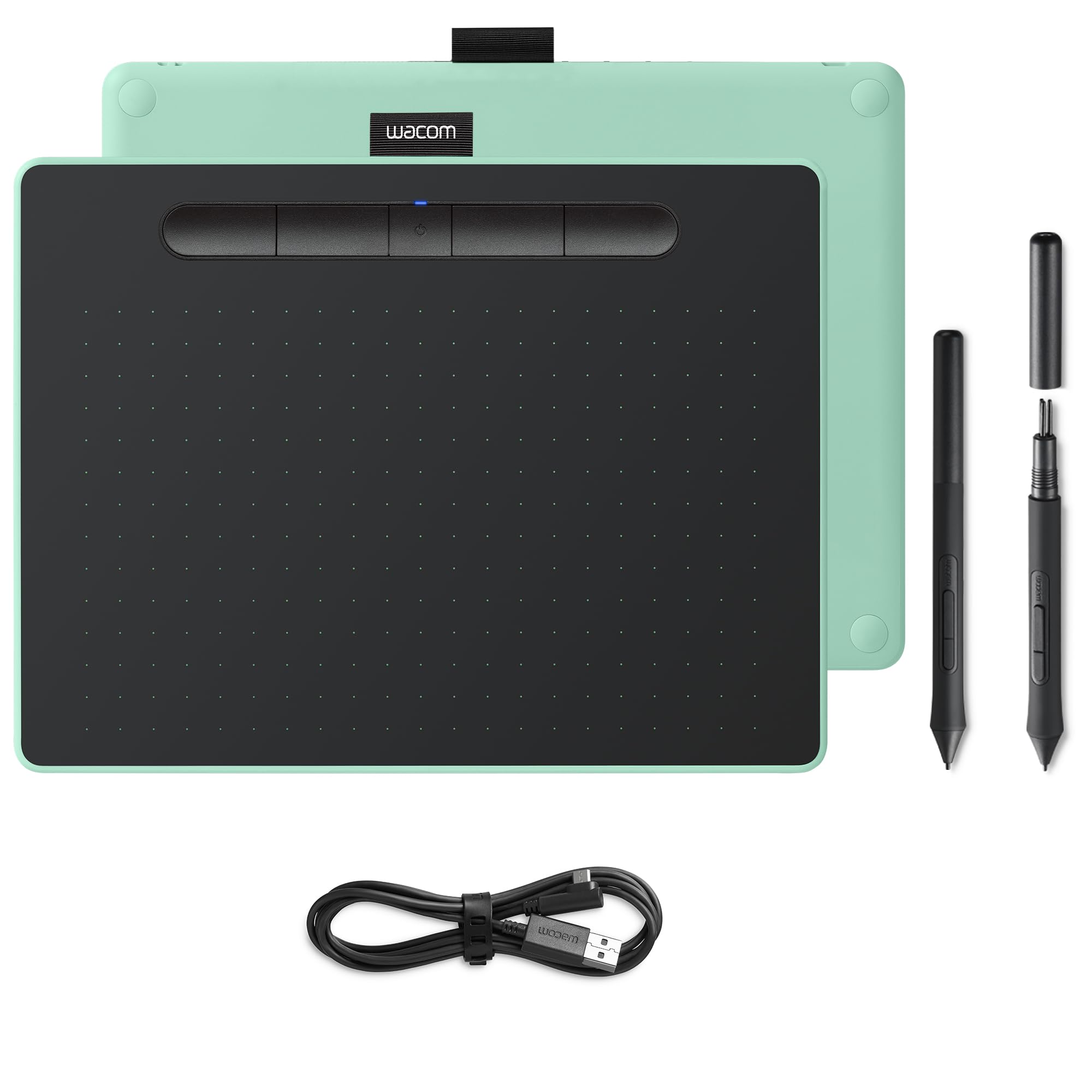
Cable problems are in the past with this wireless Wacom Intuos S Bluetooth. Unlike its predecessor, you can use this Intuos with both a USB cable and wirelessly via Bluetooth. The active area of 21.6 by 13.5 centimeters gives you a bit more space to work on than the S version. You can accurately determine how thick or thin you want the lines to be with the included pen, because 4096 pressure points transfer your movements just like on paper. The pen includes 3 extra tips and a tool to remove the tips. You have full control over your workflow thanks to the 4 programmable ExpressKeys at the top of the tablet.
Cable problems are in the past with this wireless Wacom Intuos S Bluetooth. Unlike its predecessor, you can use this Intuos with both a USB cable and wirelessly via Bluetooth. The active area of 21.6 by 13.5 centimeters gives you a bit more space to work on than the S version. You can accurately determine how thick or thin you want the lines to be with the included pen, because 4096 pressure points transfer your movements just like on paper. The pen includes 3 extra tips and a tool to remove the tips. You have full control over your workflow thanks to the 4 programmable ExpressKeys at the top of the tablet.
Cable problems are in the past with this wireless Wacom Intuos S Bluetooth. Unlike its predecessor, you can use this Intuos with both a USB cable and wirelessly via Bluetooth. The active area of 21.6 by 13.5 centimeters gives you a bit more space to work on than the S version. You can accurately determine how thick or thin you want the lines to be with the included pen, because 4096 pressure points transfer your movements just like on paper. The pen includes 3 extra tips and a tool to remove the tips. You have full control over your workflow thanks to the 4 programmable ExpressKeys at the top of the tablet.
Cable problems are in the past with this wireless Wacom Intuos S Bluetooth. Unlike its predecessor, you can use this Intuos with both a USB cable and wirelessly via Bluetooth. The active area of 21.6 by 13.5 centimeters gives you a bit more space to work on than the S version. You can accurately determine how thick or thin you want the lines to be with the included pen, because 4096 pressure points transfer your movements just like on paper. The pen includes 3 extra tips and a tool to remove the tips. You have full control over your workflow thanks to the 4 programmable ExpressKeys at the top of the tablet.
Last updated at 11/23/2025 11:42:34
originally posted on bestbuy.com
I believe that Wacom is the name for graphic design, and this is a great basic/intro tablet for people who don't need more advanced features. Installation was quick and easy. It was on sale when I purchased and made for an even better deal.
originally posted on bhphotovideo.com
Purchased for photo editing with no prior experience using a tablet. It functions exactly as I expected and then some. More functions than I need and the learning curve was more than I expected but it allows me to try photo editing with a tablet. A smaller tablet would be all I needed but who knows I may be an artist in the future.
originally posted on bhphotovideo.com
There is a learning curve to using the Wacom tablet but it does what it is supposed to do. After reviewing several YouTube tutorials I was able to customize it to my taste and needs. Come to find out, I don't really need the Bluetooth feature because the wire connection is convenient and even faster. I wish I had purchased the non-Bluetooth version and saved a few bucks.
I believe that Wacom is the name for graphic design, and this is a great basic/intro tablet for people who don't need more advanced features. Installation was quick and easy. It was on sale when I purchased and made for an even better deal.
Purchased for photo editing with no prior experience using a tablet. It functions exactly as I expected and then some. More functions than I need and the learning curve was more than I expected but it allows me to try photo editing with a tablet. A smaller tablet would be all I needed but who knows I may be an artist in the future.
There is a learning curve to using the Wacom tablet but it does what it is supposed to do. After reviewing several YouTube tutorials I was able to customize it to my taste and needs. Come to find out, I don't really need the Bluetooth feature because the wire connection is convenient and even faster. I wish I had purchased the non-Bluetooth version and saved a few bucks.
My Intuos 4 finally stopped working after many years, so I decided to replace it with this Intuos BT-M.Setup was easy, and and the tablet works well, as expected.There are a couple of minor differences that I will need to get used to. The first is that my palm frequently rests half on the surface, and half off. There's not really a border around the edges. Just personal preference, but it would be nice to have a little more room on the bottom for the wrist.The other difference is that the stylus is much thinner and lighter than the Intuos 4 stylus. This is not necessarily a bad thing, depending on preferences, but I kind of miss the more substantial feel of the previous stylus. I may try to find a grip that might help the feel/weight. Of note though, I'm quite ... MoreMy Intuos 4 finally stopped working after many years, so I decided to replace it with this Intuos BT-M.Setup was easy, and and the tablet works well, as expected.There are a couple of minor differences that I will need to get used to. The first is that my palm frequently rests half on the surface, and half off. There's not really a border around the edges. Just personal preference, but it would be nice to have a little more room on the bottom for the wrist.The other difference is that the stylus is much thinner and lighter than the Intuos 4 stylus. This is not necessarily a bad thing, depending on preferences, but I kind of miss the more substantial feel of the previous stylus. I may try to find a grip that might help the feel/weight. Of note though, I'm quite sure I'll get used to this one soon enough.But, I still give it 5 stars, because these I'll get accustomed to the differences, and the tablet works great. Stylish, too!
I got this for my daughter who does digital art and she loves it! She wanted a gaming computer so she saved up for one but couldnt afford a touchscreen gaming laptop with the graphics she wanted so she got a non-touchscreen and I bought this so she could draw. She absolutely loves it!
I am very happy with this tablet. I use it mostly photoshop and 3D stuff.There's only 2 things I don't like... 1 is the tips wear out quickly and two when the tablet is used with the usb cable the tablet can't be lined up with my laptop because the cable is in the way. Such an odd place to put the connector if you ask me.
This upgrade for my pen tablet was a long time coming. My Wacom Bamboo finally died. Its a little different bc there was more surface area on the bamboo. Almost the entire surface is usable space on the Intuos. Not a hard transition though and I like the extra space on my desk. One of the other reviews complained about the lack of surface area, that there needed to be space for your hand to rest (which there was on the bamboo... sort of), but the thin, sleek tablet design makes this issue a non- issue for me. I like the thin tablet. The pen is also different. The Bamboo pen had a larger diameter which was easier to grip. Intuos pen is much thinner and is definitely an adjustment for me, especially when retouching for long periods of time. But again, this is new and ... MoreThis upgrade for my pen tablet was a long time coming. My Wacom Bamboo finally died. Its a little different bc there was more surface area on the bamboo. Almost the entire surface is usable space on the Intuos. Not a hard transition though and I like the extra space on my desk. One of the other reviews complained about the lack of surface area, that there needed to be space for your hand to rest (which there was on the bamboo... sort of), but the thin, sleek tablet design makes this issue a non- issue for me. I like the thin tablet. The pen is also different. The Bamboo pen had a larger diameter which was easier to grip. Intuos pen is much thinner and is definitely an adjustment for me, especially when retouching for long periods of time. But again, this is new and I think I'll get used to that quickly. Very easy set up. Nice and responsive to touch and pressure. Also the pistachio green makes me smile : ) Overall very happy and would recommend.
I was so excited about it, but now I just have contempt towards it.I bought the tablet so that I could mask images and zoom at the same time. I imagined using the pen for brushwork/masking/healing and using my fingers to pinch + zoom and move the image around. I can't do that with this tablet.It's a decent tool, but it doesn't serve the purpose for which I bought it. You CAN customize the buttons to zoom in and out, but you still have to use the mouse (or touchscreen) to move your image around.It is very much unlike the touchpads on laptops, which is more what I was expecting, but with a fancy pen. lolThe way this tablet works is it is NOT reactive to touch which allows you to rest your hand on it, I guess, for more precise penwork.Unlike the way you can ... MoreI was so excited about it, but now I just have contempt towards it.I bought the tablet so that I could mask images and zoom at the same time. I imagined using the pen for brushwork/masking/healing and using my fingers to pinch + zoom and move the image around. I can't do that with this tablet.It's a decent tool, but it doesn't serve the purpose for which I bought it. You CAN customize the buttons to zoom in and out, but you still have to use the mouse (or touchscreen) to move your image around.It is very much unlike the touchpads on laptops, which is more what I was expecting, but with a fancy pen. lolThe way this tablet works is it is NOT reactive to touch which allows you to rest your hand on it, I guess, for more precise penwork.Unlike the way you can pick up a mouse so you're not running off the edge of your desk while working on the computer, you cannot move the space in which you are working on the tablet. You end up on the edges of the tablet when you're on the edges of your screen which is uncomfortable for me. (There is a way to narrow-in the active part of the tablet to help with this.)In short, this tablet did not meet my expectations.I did not return it because I was hoping it was something I could adapt to or get used to. NOPE. If it's not your cup of tea, don't expect to get used to it. I was so excited about it, but now I just have contempt towards it.
Bought this as an upgrade from a wacom bamboo. The real estate of the medium is perfect for working on 24" monitor. I didn't think I'd need it, but Bluetooth has been amazing. The freedom to place the tablet wherever without wires in the way and leaving an extra USB slot open has been a godsend. I haven't noticed any lag, it lasts for a solid 8+ hours, and it takes about an hour to charge. The button shorcuts are great. I wish I had a wheel to zoom in and out, but I wasn't willing to pay an extra $150 for an Intuos Pro just for that. Mapping zoom in/out to two of the buttons works just fine.
My Only gripe and this is NOT in the seller's reach or power, but Purolator, even though stamped my item as being dropped at the nearest drop off point where i could pick it up, did not in fact leave it there and I had to go to the other end of the city to recuperate it at their facility. Which was a bit of an adventure but okay - Tablet is 100% ! I absolutely recommend it!! I didn't know it came with 3 painting softwares and I was actually planning to save to get Clip Paint but with the tablet, i get a PRO license which -wow !- thank you !!! Loving the uber heck out of this tablet and program ! ♥ Highly recommend! Comfortable, good pressure variation, good size, and the software of course is a killer.

