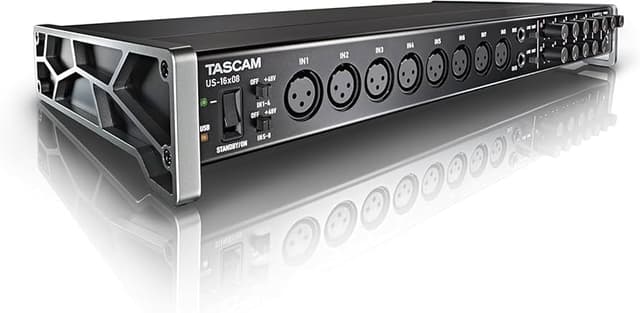
The TASCAM US-16x08 captures 16 mic and line inputs to your computer with clear sound quality and advanced features to manage big sessions. Eight Ultra-HDDA microphone preamps deliver the cleanest and quietest operation in their class while delivering up to 56dB of gain. An additional eight line inputs are provided, two of them switchable to instrument level for direct guitar or bass recording. Eight balanced line outputs are also available, two with a level control on the front panel for monitoring. Built into the US-16x08 is a DSP Mixer for low-latency digital mixing. Each channel has four-band EQ and compression for polished-sounding monitor mixes. In addition to interface mode, the US-16x08 can be used stand alone as a standalone mic preamp. Mac and Windows drivers are provided, as well as USB Class Compliant 2.0 drivers for tablets like Apple's iPad. MIDI input and output are also available on the rear panel. Whether using the ergonomically-designed angled desktop stand or mounting with the included rack ears, the US-16x08 includes analog I/O for almost any music recording application.
The TASCAM US-16x08 captures 16 mic and line inputs to your computer with clear sound quality and advanced features to manage big sessions. Eight Ultra-HDDA microphone preamps deliver the cleanest and quietest operation in their class while delivering up to 56dB of gain. An additional eight line inputs are provided, two of them switchable to instrument level for direct guitar or bass recording. Eight balanced line outputs are also available, two with a level control on the front panel for monitoring. Built into the US-16x08 is a DSP Mixer for low-latency digital mixing. Each channel has four-band EQ and compression for polished-sounding monitor mixes. In addition to interface mode, the US-16x08 can be used stand alone as a standalone mic preamp. Mac and Windows drivers are provided, as well as USB Class Compliant 2.0 drivers for tablets like Apple's iPad. MIDI input and output are also available on the rear panel. Whether using the ergonomically-designed angled desktop stand or mounting with the included rack ears, the US-16x08 includes analog I/O for almost any music recording application.
The TASCAM US-16x08 captures 16 mic and line inputs to your computer with clear sound quality and advanced features to manage big sessions. Eight Ultra-HDDA microphone preamps deliver the cleanest and quietest operation in their class while delivering up to 56dB of gain. An additional eight line inputs are provided, two of them switchable to instrument level for direct guitar or bass recording. Eight balanced line outputs are also available, two with a level control on the front panel for monitoring. Built into the US-16x08 is a DSP Mixer for low-latency digital mixing. Each channel has four-band EQ and compression for polished-sounding monitor mixes. In addition to interface mode, the US-16x08 can be used stand alone as a standalone mic preamp. Mac and Windows drivers are provided, as well as USB Class Compliant 2.0 drivers for tablets like Apple's iPad. MIDI input and output are also available on the rear panel. Whether using the ergonomically-designed angled desktop stand or mounting with the included rack ears, the US-16x08 includes analog I/O for almost any music recording application.
The TASCAM US-16x08 captures 16 mic and line inputs to your computer with clear sound quality and advanced features to manage big sessions. Eight Ultra-HDDA microphone preamps deliver the cleanest and quietest operation in their class while delivering up to 56dB of gain. An additional eight line inputs are provided, two of them switchable to instrument level for direct guitar or bass recording. Eight balanced line outputs are also available, two with a level control on the front panel for monitoring. Built into the US-16x08 is a DSP Mixer for low-latency digital mixing. Each channel has four-band EQ and compression for polished-sounding monitor mixes. In addition to interface mode, the US-16x08 can be used stand alone as a standalone mic preamp. Mac and Windows drivers are provided, as well as USB Class Compliant 2.0 drivers for tablets like Apple's iPad. MIDI input and output are also available on the rear panel. Whether using the ergonomically-designed angled desktop stand or mounting with the included rack ears, the US-16x08 includes analog I/O for almost any music recording application.
Last updated at 05/14/2026 15:25:00
Tascam US-16x08 - USB Audio/MIDI Interface
Delivery $41.53
Tascam US-16x08 USB Interface for Mac Windows & iOS
Free delivery between 19–27 May
TASCAM US-16X08 16x8 Channel USB 2.0 Audio Interface for Mac, Windows and iPad
Free delivery between 19–27 May
Tascam US-16x08 USB Audio/MIDI Interface (Import)
Tascam US-16X08
Free delivery between 18–22 May
TASCAM US-16x08 16-input Audio Interface for Mac, Windows and iPad
Free delivery
Tascam Us-16x08 16x8 Channel Usb 2.0 Audio Interface For Mac, Windows
Free delivery
Affiliate Disclosure: We may receive a small commission for purchases made through this link at no extra cost to you. This helps support our site. Thank you!
Tascam US-16x08 USB Interface for Mac Windows & iOS
Delivery $5
Tascam US-16x08 USB Interface for Mac Windows & iOS
Delivery $5
Tascam US-16x08 USB Interface for Mac Windows & iOS
Delivery $5
originally posted on musiciansfriend.com
For the price you will not find a better USB interface. I finally replaced my Alesis iO-26 firewire interface after 8 years of faithful service. New Macs don't use firewire connections anymore, so when I upgraded to a new Mac mini (highly recommended as well, btw) my old interface became useless to me. I considered the more expensive Roland units, but this Tascam interface made more sense for my budget. I only needed to download one driver and I was ready to plug in and record. I could instantly hear the difference in sound quality when recording vocals through the Tascam with the same condenser mic I had been using on my old interface. This blows the old Alesis out of the water. Vocals are clear and background noise was greatly reduced. I love the two extra ... MoreFor the price you will not find a better USB interface. I finally replaced my Alesis iO-26 firewire interface after 8 years of faithful service. New Macs don't use firewire connections anymore, so when I upgraded to a new Mac mini (highly recommended as well, btw) my old interface became useless to me. I considered the more expensive Roland units, but this Tascam interface made more sense for my budget. I only needed to download one driver and I was ready to plug in and record. I could instantly hear the difference in sound quality when recording vocals through the Tascam with the same condenser mic I had been using on my old interface. This blows the old Alesis out of the water. Vocals are clear and background noise was greatly reduced. I love the two extra instrument inputs, giving you up to ten channels for (8 for XLR mic cables, 2 for guitars so you can plug in directly for scratch tracks) on the front and another 8 line level inputs on the back of the unit. If you are a young musician just getting into home recording, or a seasoned musician that would like to easily and affordably record demos, this is the interface for you. All the inputs you could ever need, and simple, straight forward layout make this easy to master within a few minutes, not hours. And it only takes up one unit of space in my rack case (rack ears are included). Looking forward to using this is track my whole band for many years to come.
originally posted on Sam Ash
Tascam has created yet another fantastic product for anyone recording anything. It features Tascam's own Ultra-HDDA preamp, compatible with any mic, from dynamic to ribbon. It has low noise and even lower distortion. The latency on this interface is almost nonexistent. You can even turn the first two channels into guitar inputs, no need for a preamp at all. With all of the inputs on this bad boy, you could potentially record a full band with only the one interface. It has 48v phantom power for up to 8 condenser mics. It can even be a stand alone preamp if you so choose. The 16x08 comes with a standard USB connection for your computer.
originally posted on musiciansfriend.com
For so much I/O there's really nothing at this price point that beats it. The digital mixer is alright, but not as good as some in the next price category up. I was debating on this or the Behringer 18/20 interface, that a friend used. Not having two separate headphone sends is upsetting but for a solo setup (which is my primary use) this works amazing. Straight out of it box, Tascam is a trusted name for a reason. The preamps sound great, and the unit works exactly as advertised.
| Dimensions | 21.9 × 5.9 × 44.5 cm |
Tascam US-16x08 - USB Audio/MIDI Interface
Delivery $41.53
Tascam US-16x08 USB Interface for Mac Windows & iOS
Free delivery between 19–27 May
TASCAM US-16X08 16x8 Channel USB 2.0 Audio Interface for Mac, Windows and iPad
Free delivery between 19–27 May
Tascam US-16x08 USB Audio/MIDI Interface (Import)
Tascam US-16X08
Free delivery between 18–22 May
For the price you will not find a better USB interface. I finally replaced my Alesis iO-26 firewire interface after 8 years of faithful service. New Macs don't use firewire connections anymore, so when I upgraded to a new Mac mini (highly recommended as well, btw) my old interface became useless to me. I considered the more expensive Roland units, but this Tascam interface made more sense for my budget. I only needed to download one driver and I was ready to plug in and record. I could instantly hear the difference in sound quality when recording vocals through the Tascam with the same condenser mic I had been using on my old interface. This blows the old Alesis out of the water. Vocals are clear and background noise was greatly reduced. I love the two extra ... MoreFor the price you will not find a better USB interface. I finally replaced my Alesis iO-26 firewire interface after 8 years of faithful service. New Macs don't use firewire connections anymore, so when I upgraded to a new Mac mini (highly recommended as well, btw) my old interface became useless to me. I considered the more expensive Roland units, but this Tascam interface made more sense for my budget. I only needed to download one driver and I was ready to plug in and record. I could instantly hear the difference in sound quality when recording vocals through the Tascam with the same condenser mic I had been using on my old interface. This blows the old Alesis out of the water. Vocals are clear and background noise was greatly reduced. I love the two extra instrument inputs, giving you up to ten channels for (8 for XLR mic cables, 2 for guitars so you can plug in directly for scratch tracks) on the front and another 8 line level inputs on the back of the unit. If you are a young musician just getting into home recording, or a seasoned musician that would like to easily and affordably record demos, this is the interface for you. All the inputs you could ever need, and simple, straight forward layout make this easy to master within a few minutes, not hours. And it only takes up one unit of space in my rack case (rack ears are included). Looking forward to using this is track my whole band for many years to come.
Tascam has created yet another fantastic product for anyone recording anything. It features Tascam's own Ultra-HDDA preamp, compatible with any mic, from dynamic to ribbon. It has low noise and even lower distortion. The latency on this interface is almost nonexistent. You can even turn the first two channels into guitar inputs, no need for a preamp at all. With all of the inputs on this bad boy, you could potentially record a full band with only the one interface. It has 48v phantom power for up to 8 condenser mics. It can even be a stand alone preamp if you so choose. The 16x08 comes with a standard USB connection for your computer.
For so much I/O there's really nothing at this price point that beats it. The digital mixer is alright, but not as good as some in the next price category up. I was debating on this or the Behringer 18/20 interface, that a friend used. Not having two separate headphone sends is upsetting but for a solo setup (which is my primary use) this works amazing. Straight out of it box, Tascam is a trusted name for a reason. The preamps sound great, and the unit works exactly as advertised.
Overall:I have owned this Tascam for 9+ years Used for Live and Studio work. Never let me down. I have done several live concert recordings of Traditional Guitar Bands as well as several Live Public Perfomances of a 14 piece Polka Band. Plus vocals. Love using the 16-08. Links to my DAW and just works. Multi Tracking the live Polka Band was the funnest. This thing works perfect in the studio for for any recording configuration I need. Can track multi vocals and instruments at the same time as well as do overdubs and single channel work. It has stood the test of time. Highly recommended. 16 channels. I use it at least once a week in the studio for the group I play music with. It is the main mixer. And if we want to record. Click Record. Really satisfied with it. ... MoreOverall:I have owned this Tascam for 9+ years Used for Live and Studio work. Never let me down. I have done several live concert recordings of Traditional Guitar Bands as well as several Live Public Perfomances of a 14 piece Polka Band. Plus vocals. Love using the 16-08. Links to my DAW and just works. Multi Tracking the live Polka Band was the funnest. This thing works perfect in the studio for for any recording configuration I need. Can track multi vocals and instruments at the same time as well as do overdubs and single channel work. It has stood the test of time. Highly recommended. 16 channels. I use it at least once a week in the studio for the group I play music with. It is the main mixer. And if we want to record. Click Record. Really satisfied with it. Very reasonable price. I also have an OLD Tascam 424 analog cassette 4 track I have used previously that still works great. I have tons of archived performances and studio work on tape. I use the new Tascam to input the old tapes into and digitize them. Viola.Now I can edit and dub new things onto old recordings. This review is about the Tascam 16-08. But I mention the old 424 tape machine, that still works, as a quality endorsement. Tascam products, in my experience, hold up and do a great job.
I really like these. I've owned two for 4 years. I combined them with ASIO4All driver and recorded 20 tracks live and mixed remotely from iPad using remote control software (that was stretching it - moved to using a Behringer X32Rack when I could afford it). In studio they are clean and have a bunch of line in and outs all DAC'd so I can use it for outboard inserts in my DAW (reaper). Like the two 1/4" ins on the front where you can add gain to a line input if you want, or use for instrument level. All my ins and outs on the back are accessible in a patch bay below and that makes life easy and me happy! Combined with realllly nice mics from an amazing vendor in Santa Rosa, Ca, I am tracking and mixing stuff that gives me chills - all over these units. And yes, I ... MoreI really like these. I've owned two for 4 years. I combined them with ASIO4All driver and recorded 20 tracks live and mixed remotely from iPad using remote control software (that was stretching it - moved to using a Behringer X32Rack when I could afford it). In studio they are clean and have a bunch of line in and outs all DAC'd so I can use it for outboard inserts in my DAW (reaper). Like the two 1/4" ins on the front where you can add gain to a line input if you want, or use for instrument level. All my ins and outs on the back are accessible in a patch bay below and that makes life easy and me happy! Combined with realllly nice mics from an amazing vendor in Santa Rosa, Ca, I am tracking and mixing stuff that gives me chills - all over these units. And yes, I have a couple analog preamps for added lead vocal characteristics, but didn't start with those - varied mics and Tascam preamps did the trick.
I am from Argentina, I am a little accustomed to high-end equipment. I had it for 2 years and I had to get rid of it because it is very limited. The preamps dont have high end definition, the noise floor is quite high. The driver is bad, old and without much versatility, with pro tools open it does not let you hear things in the background (windows media, spotify, chrome, etc) and does not let you change the buffer size from PT, you must close the session and do it manually from the driver. The quality of the converters is commensurate with the price, taking into account the many channels (bad, so bad). I recommend it only for home studios that need so many inputs. It's the only good thing about the interface ... its i / o. Think if you really need so many i/o (I ... MoreI am from Argentina, I am a little accustomed to high-end equipment. I had it for 2 years and I had to get rid of it because it is very limited. The preamps dont have high end definition, the noise floor is quite high. The driver is bad, old and without much versatility, with pro tools open it does not let you hear things in the background (windows media, spotify, chrome, etc) and does not let you change the buffer size from PT, you must close the session and do it manually from the driver. The quality of the converters is commensurate with the price, taking into account the many channels (bad, so bad). I recommend it only for home studios that need so many inputs. It's the only good thing about the interface ... its i / o. Think if you really need so many i/o (I only used them a couple of times, my bad) I bought an Audient ID14 for the same price and it is awesome, portable, good quality (not crazy good but very good) and the i/o are enough for today's demands.
Overall:This review is simple. I have a Behringer UMC404HD that I use for Podcasting and to play-back YouTube video backing tracks while recording myself practicing guitar to those tracks, and recording my music. I usually use Audacity or Ardour, but occasionally I use Tracktion all with no issues. This past week everything stopped working. I thought the Behringer died because it quit working. I tried it on 3 of my Windows PC's and it had the same issue on all three PC's. I then went online and did some research on a new interface and decided to try the TASCAM US-16x08. TASCAM is a name I've long heard about in recording, so I assumed I'd be getting a top-of-the-line, even if mid-tiered, device. When the US-16x08 arrived I hooked it and downloaded the drivers, ... MoreOverall:This review is simple. I have a Behringer UMC404HD that I use for Podcasting and to play-back YouTube video backing tracks while recording myself practicing guitar to those tracks, and recording my music. I usually use Audacity or Ardour, but occasionally I use Tracktion all with no issues. This past week everything stopped working. I thought the Behringer died because it quit working. I tried it on 3 of my Windows PC's and it had the same issue on all three PC's. I then went online and did some research on a new interface and decided to try the TASCAM US-16x08. TASCAM is a name I've long heard about in recording, so I assumed I'd be getting a top-of-the-line, even if mid-tiered, device. When the US-16x08 arrived I hooked it and downloaded the drivers, installed them and boom. It didn't work either. It got pretty much the same error, with the same symptoms. To make this short. I did some research on the error I got from the TASCAM and it turns out that several months ago Windows released an update that turns off the Windows input microphone as a new default setting. Once I got that info and corrected that setting and sure enough the TASCAM started working. Sort of. Here's the real review. It seems the TASCAM demands to have total exclusive control over the Windows sound system to record. That means I can't play along with the Youtube stuff I use for practice. It also prevents me from playing back anything that isn't coming through whatever DAW I'm using at the time. In fact, If I'm listening to anything and I load up any DAW, the audio playback continues but goes silent. I can't hear it and I can't record it. It doesn't matter the audio source if it's not coming from the DAW, then I can't use that audio. I can still use the TASCAM to record, but I expected a similar experience like with the Behringer just with more inputs and outputs as options. Turns out there are fewer options than with my Behringer UMC404HD. At this point, I feel like I've blown $300 on something that I can't use the way I need to use it. For me, the TASCAM US-16x08 is not worth the money for my uses.
This unit is fantastic! Setup on my MacBook Pro Logic software was a breeze. I was recording 12 different tracks at once literally two hours after plugging it in.
Decided to step up from a Behringer UMC 404 HD as 4 channels is pretty limited. The Behringer works great, good mic preamps, great sound etc. But 4 channels is just not enough for recording a full band. I use at least that on just the drum tracks. The Tascam 16 X 08 was the ticket. The driver loaded without a hitch. I'd say it was "plug and play" but as you probably know there is some set-up you must always do with these things. Setting your buffer size, sampling rate, adjust for for minimum latency and best sound without any glitches and all that stuff with your DAW. I won't go into detail about all that. A lot of latency, glitches, sound quality is dependent on your ram size, CPU speed, how hard your DAW pushes the CPU etc. I use this with a Mixcraft StudioPro 7 ... MoreDecided to step up from a Behringer UMC 404 HD as 4 channels is pretty limited. The Behringer works great, good mic preamps, great sound etc. But 4 channels is just not enough for recording a full band. I use at least that on just the drum tracks. The Tascam 16 X 08 was the ticket. The driver loaded without a hitch. I'd say it was "plug and play" but as you probably know there is some set-up you must always do with these things. Setting your buffer size, sampling rate, adjust for for minimum latency and best sound without any glitches and all that stuff with your DAW. I won't go into detail about all that. A lot of latency, glitches, sound quality is dependent on your ram size, CPU speed, how hard your DAW pushes the CPU etc. I use this with a Mixcraft StudioPro 7 DAW. I like this DAW for it's recording power and it's creative aspects too. I also love Samplitude for it's over the top creativity factor on another computer. I use this with a Mackie 1604-VLZ mixer. So now I have 4 busses for my drum tracks and have 4 more direct outs for bass, rhythm, whatever tracks. I runs smotthly with no lockups, freezing or other surprizes. This is no toy, it produces professional quality sound and probably with better results that what you'd get from a "professional studio" with limited time factor involved. As you can tell, I'm lovin it. If you'rein a band, have some recording/producing knowledge, this is the deal. Burn your own master CD's, and produce your own skipping the hassle and costs of the middle man. With the sound quality and versatility I now have, I feel this unit goes beyond just making demos. The sky is the limit, go for it.
I have used this unit for about 12 months. It is so hit or miss, I am moving back to my M-Audio for the time being. My old Lexicon Omega performs better than this thing has. Latency, all the time, in every setting. I Moved from a Quad core Phenom up to a Quad Core A8 (DDR2 800 up to DDR3 1866), then tested on a clean Skylake build with nothing else on it and it is NOT the systems. It performed the same in any Windows system I plugged it into. The unit will start jittering after several minutes of it working fine, until you switch the latency setting (doesn't matter which setting), it will then smooth back out for a while, then start jittering again after some time, of course to the point that your buffer is too large and you start getting too much latency and are ... MoreI have used this unit for about 12 months. It is so hit or miss, I am moving back to my M-Audio for the time being. My old Lexicon Omega performs better than this thing has. Latency, all the time, in every setting. I Moved from a Quad core Phenom up to a Quad Core A8 (DDR2 800 up to DDR3 1866), then tested on a clean Skylake build with nothing else on it and it is NOT the systems. It performed the same in any Windows system I plugged it into. The unit will start jittering after several minutes of it working fine, until you switch the latency setting (doesn't matter which setting), it will then smooth back out for a while, then start jittering again after some time, of course to the point that your buffer is too large and you start getting too much latency and are unable to perform parts in time. It is almost incapable of streaming audio quality above 44.1khz with BFD standalone in 64-bit (even with the sample mode bumped down to 16-bit), I plug in my M-audio...works fine. This I attribute to horrible driver support. The Windows 10 supported drivers were a month behind the release of Windows 10 (glad I had a fallback device, though, there was day one support for the 20X20...?...) and were nothing more than horrible ports of the drivers from Windows 7. Seems like Tascam is more dedicated to the 20X20 or the HD units. There have been 2 other updates to the drivers since then, that have not bettered the performance of the unit, and NO firmware updates whatsoever. Matter of fact, the latency issues worsened from 1.02 to 1.04. IT IS THE ONLY WINDOWS SUPPORTED SUB THREE HUNDRED (ON SALE) AUDIO DEVICE WITH AT LEAST 6 OUTPUTS AND MIDI. ALL OTHER DEVICES HAVE ONLY 4 OUTPUTS, NO MIDI(IF YOU NEED IT), OR COST MORE THAN FOUR HUNDRED FIFTY. So, looking elsewhere for my surround recording and mixing. Going to sell this one after replacing it with something better.
| Dimensions | 21.9 × 5.9 × 44.5 cm |

